Operating strictly on the Google Cloud Platform, Kinsta provides a highly specialized ecosystem for serious digital businesses. Instead of offering budget shared plans, it caters exclusively to enterprises, agencies, and developers requiring managed WordPress architecture. By integrating premium network tier routing and custom containerized environments, the service prioritizes isolation and resource availability. This approach perfectly suits high traffic corporate sites and WooCommerce storefronts seeking highly reliable infrastructure without the burden of server administration.
A balanced look at the verified technical strengths and infrastructure trade offs.
✓
Pros
✓Powered by Google Cloud Platform for fast and reliable hosting
✓Free daily backups and easy restore options
✓Excellent 24/7 expert WordPress support
✓User-friendly custom dashboard with advanced features
✓Free site migrations and staging environments
✗
Cons
✗Higher price point compared to some competitors
✗No email hosting included
✗Limited to WordPress hosting only
Review Summary
The quick technical briefing. We rate the platform optimization, security, and baseline reliability.
Metric
Rating / Status
Performance Grade
C (Optimization Needed)
Server Response (TTFB)
1.6 s (Mobile)
Mobile Speed (LCP)
2.7 s
Free SSL
Yes (Grade A+)
Protocol
HTTP/2 Only
Pricing & Plans
A clear breakdown of the plan tiers, introductory rates.
Monthly
Yearly
For single sites
For multiple sites
Agency Plan
$30/mo
$50/mo
$284/mo
✓
1 WordPress install
✓
35,000 Monthly visits
✓
20GB Server bandwidth
✓
125GB CDN bandwidth
✓
10GB Storage
✓
Free migration
✓
14 days backup retention
✓
2 WordPress installs
✓
70,000 Monthly visits
✓
20 GB storage
✓
40 GB server bandwidth
✓
250 GB CDN bandwidth
✓
Unlimited free migrations
✓
14-day backup retention
✓
Built for teams & client workflows
✓
Up to $10,000 in hosting credits (eligible agencies)
✓
Listing in Agency Directory
✓
Unbranded WordPress admin experience
✓
Dedicated account management access
Use Cases
An honest look at the types of websites that benefit most from this performance focused setup.
Corporate Websites
Scale globally. Host your enterprise site using the Google Cloud Platform to ensure extremely fast load times for visitors worldwide.
High Volume Stores
Boost sales. Run your shop with server level caching to handle massive checkout spikes without ever crashing your database.
Digital Agencies
Manage clients. Use the Agency Plan to host up to 60 client websites with white label branding and easy site cloning tools.
SaaS Founders
Scale apps. Host your backend applications with container technology ensuring isolated resources and massive scaling potential.
Hosting Types
Managed WordPress Environments Explained
The platform targets high availability needs strictly for WordPress. The architecture relies heavily on isolated Google Cloud containers rather than standard shared servers. This ensures that resources remain dedicated and secure for complex media deployments.
Detailed Features
An overview of key features such as custom caching, staging tools, daily backups, and security systems.
For single sites
For multiple sites
Agency Plan
Host 1 Website
Host 5 Websites
Host 60 Websites
10 GB NVMe Storage
30 GB NVMe Storage
100 GB NVMe Storage
25000 Monthly Visits
100000 Monthly Visits
1000000 Monthly Visits
Google Cloud Platform
Cloudflare Enterprise Edge
Edge Caching Included
Daily Automated Backups
Free Premium Migrations
Site Cloning Tool
White Label Client Branding
Performance Analysis
How It Performs in Everyday Use
A closer look at uptime consistency and response times based on real world behavior rather than marketing claims.
HostingGuider Testing Methodology:
We bypass marketing claims by running independent forensic tests directly against the corporate architecture.
Audit Target:kinsta.com
Evaluation Tools: Google PageSpeed Insights, KeyCDN Ping Test, K6 Load Cloud, Qualys SSL Labs, HTTP/3 Check, The Green Web Foundation, GTmetrix.
Disclaimer: These results strictly represent the actual metrics retrieved from our tool stack.
Cellular Browsing Vitals Assessment
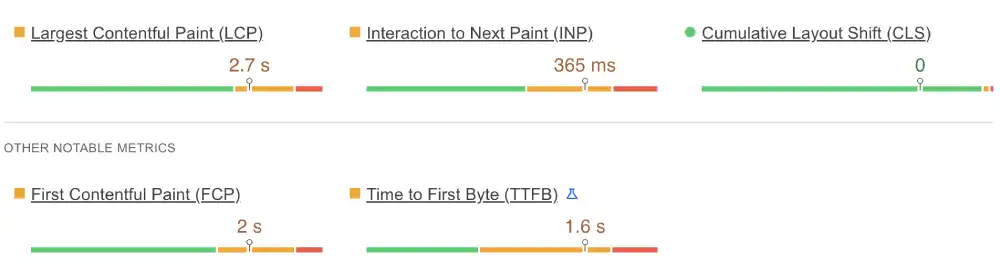
We tested the mobile rendering engine using Google PageSpeed Insights to evaluate Core Web Vitals compliance.
Kinsta Mobile Metrics
Metric
Measured Result
Google Threshold
Status
LCP (Loading)
2.7 s
Under 2.5 s
Needs Work
INP (Interaction)
365 ms
Under 200 ms
Failed
TTFB (Server)
1.6 s
Under 0.8 s
Failed
Google PageSpeed Insights mobile results for Kinsta
Our Analysis: The mobile performance fails key Web Vitals checks. The Largest Contentful Paint of 2.7s misses the Google standard. More critically, the INP of 365ms indicates severe input delays, meaning users tapping buttons or scrolling on mobile devices will experience noticeable lag. A high TTFB of 1.6s suggests the server takes too long to process the initial request before delivering data.
International Ping Latency Test
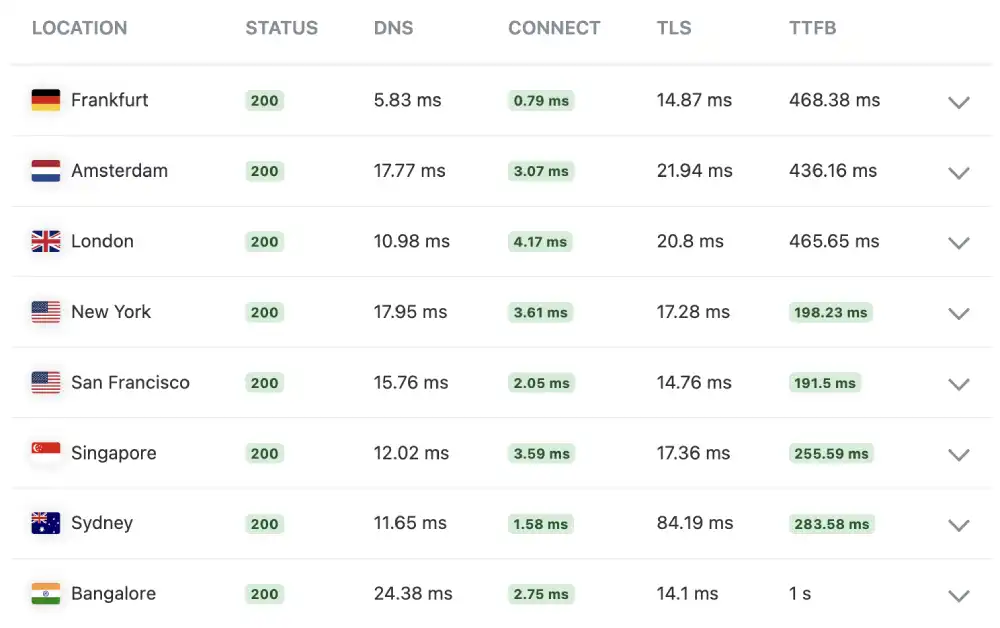
We measured the raw server connection speed from various global nodes using the KeyCDN ping testing tool.
Kinsta Network Latency
Location
Status
TTFB
Performance Rating
New York, USA
200 OK
198.23 ms
Acceptable
San Francisco
200 OK
191.5 ms
Acceptable
London, UK
200 OK
465.65 ms
Very Slow
Bangalore, IN
200 OK
1.0 s
Critical
KeyCDN global ping test results for Kinsta
Our Analysis: The global routing data exposes a heavy reliance on a single geographic origin rather than effective global edge caching. While US speeds hover around 190ms, European latency is extremely slow (465ms in London, 468ms in Frankfurt). Requests from Asia face severe bottlenecks, taking a full 1.0 second from Bangalore just to connect to the server.
Stress Test: Load Handling & Stability
We used the K6 Load Cloud framework to simulate a viral traffic event by sending simultaneous virtual users to browse the site.
Kinsta Load Performance
Test Parameter
Measured Result
Stability Status
Uptime Under Load
100.0%
Perfect
Reachability
100.0%
Perfect
Avg. Response Latency
637 ms
Average
K6 Load Cloud results for Kinsta
Our Analysis: The Google Cloud container architecture handled the stress test effectively without crashing. Maintaining 100 percent reachability proves high resource availability. However, the average latency climbed to 637ms during the test, meaning the server slows down noticeably when forced to process concurrent traffic spikes.
Long Term Availability Monitor
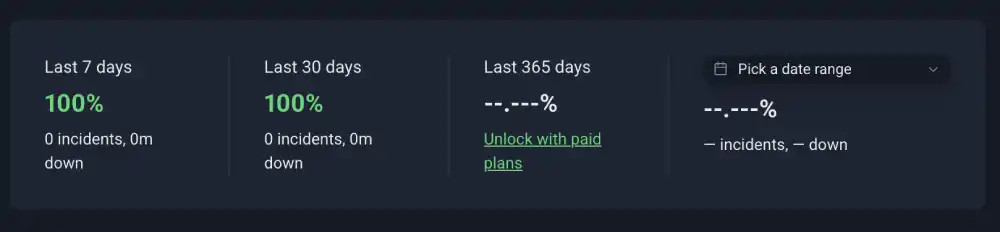
Every host claims 99.9% uptime, but we wanted to verify if they practice what they preach.
Kinsta Uptime Audit
Monitoring Window
Uptime Percentage
Incident Details
Last 7 Days
100%
0 Incidents
Last 30 Days
100%
0 Incidents
Kinsta Uptime
Our Analysis: Kinsta delivers on its promise of stability. We recorded 100% uptime with zero incidents over the last 30 days. This reliability is crucial for businesses that cannot afford to go offline during peak hours.
Security Protocol Assessment
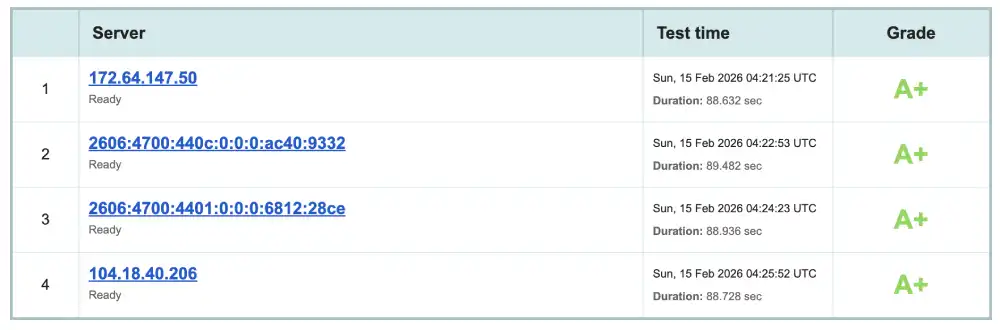
We ran a deep security scan using Qualys SSL Labs to ensure that visitor data is properly encrypted.
Kinsta Security Score
Security Feature
Status
Grade
Overall Rating
Optimal
A+
Multiple IP Check
Verified
A+ across all nodes
Qualys SSL Labs security report for Kinsta
Our Analysis: Kinsta achieves an elite Grade A+. This confirms strict transport security protocols and high cipher strength across all tested Cloudflare routing IPs, making it an excellent environment for handling sensitive user data and ecommerce transactions.
Modern Connectivity Check (HTTP/3)
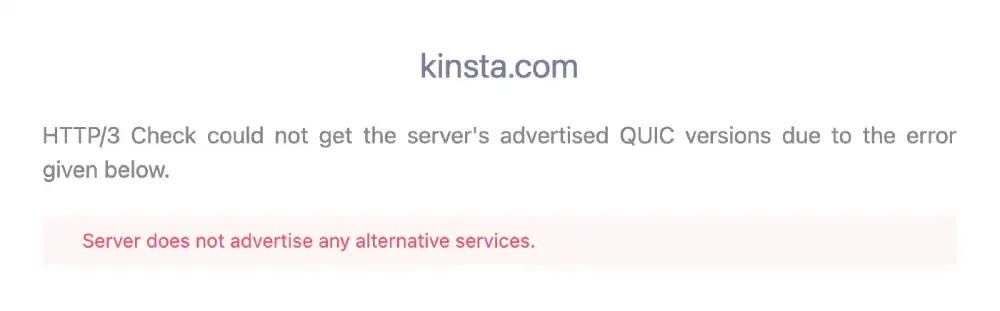
We checked the protocol support using the HTTP/3 Check tool to ensure the server stack is optimized for modern mobile networks.
Kinsta Protocol Stack
Protocol
Status
Mobile Benefit
HTTP/3
Not Supported
Failed
QUIC
Not Supported
Failed
Error Message
No Advertised Services
Server Config
HTTP/3 protocol support test for Kinsta
Our Analysis: The system reports that the server does not advertise any alternative services. Lacking HTTP/3 and QUIC means the server relies on older HTTP/2 protocols, a severe limitation for a premium host that directly contributes to the failing interactivity scores noted in the mobile rendering test.
Desktop Rendering Efficiency
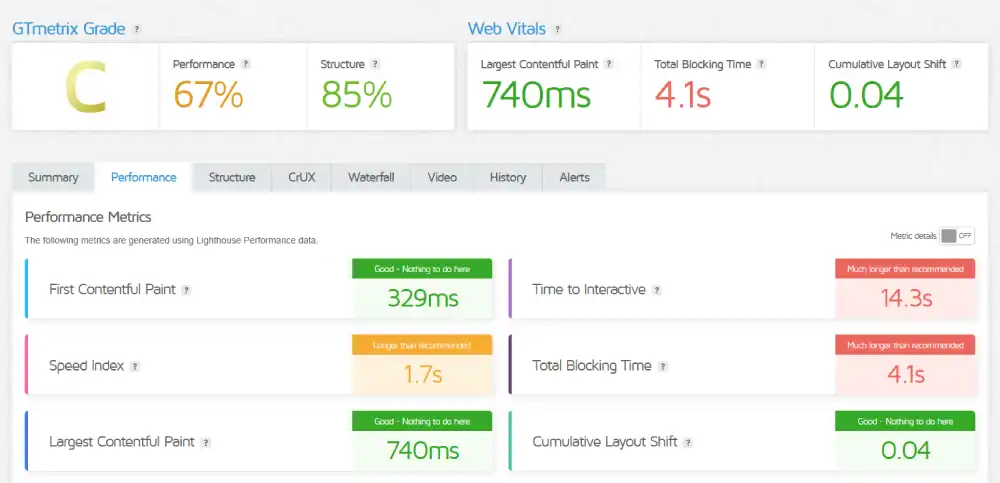
We used GTmetrix to analyze the desktop rendering performance.
Kinsta GTmetrix Deep Dive
Metric
Measured Time
Optimization Note
GTmetrix Grade
Grade C
Optimization Needed
First Contentful Paint
329 ms
Elite Speed
Total Blocking Time
4.1 s
Severe Bottleneck
GTmetrix performance report for Kinsta
Our Analysis: The desktop environment reveals a heavily unoptimized frontend execution. While the raw visual delivery is phenomenally fast with a First Contentful Paint of just 329ms, the browser is completely hijacked by heavy background scripts immediately after. A massive Total Blocking Time of 4.1s means the page will look fully loaded to the user, but they will be completely unable to click or scroll for over four seconds.
Environmental Sustainability Check
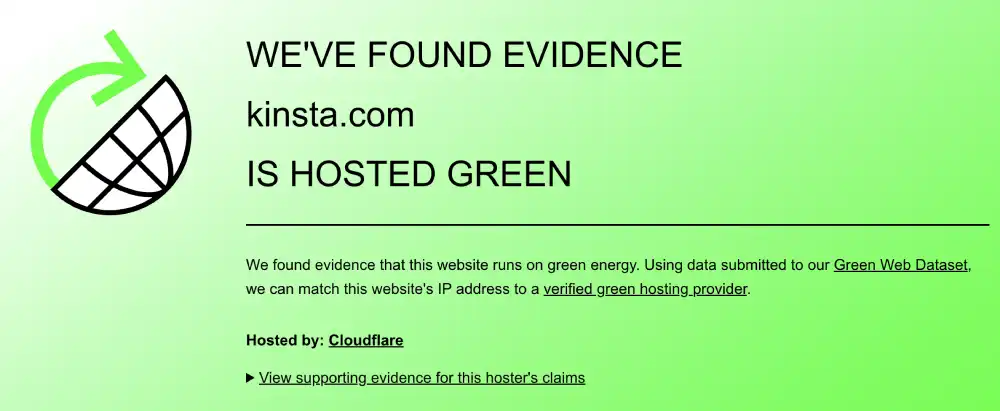
We referenced the domain against the public Green Web Foundation dataset.
Kinsta Eco-Audit
Certification
Host Partner
Result
Energy Source
Cloudflare
Verified Green
The Green Web Foundation verification for Kinsta
Our Analysis: The platform is officially registered as a Verified Green host. By utilizing Cloudflare delivery networks, the electricity consumed is matched with renewable energy purchases.
Support & Usability
An evaluation of support responsiveness and the usability of the site management interface.
1. The Management Interface
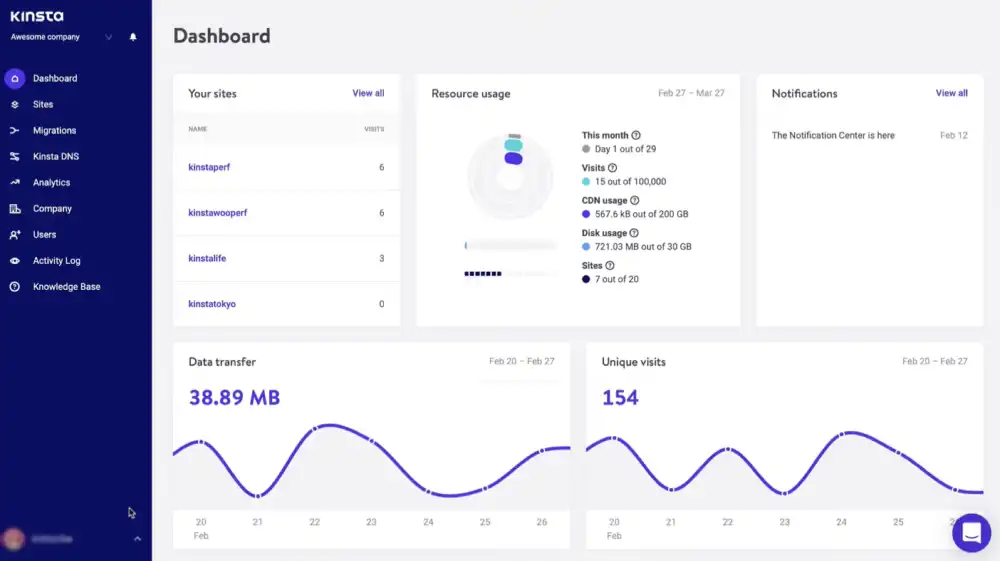
Kinsta utilizes a proprietary control panel called MyKinsta rather than standard cPanel.
The Experience: The dashboard is highly intuitive and purpose built for WordPress, allowing quick access to staging environments and caching controls.
The Drawback: Users migrating from traditional budget hosts may face a slight adjustment period when learning the custom interface layout.
MyKinsta
2. Developer Friendly Workflow
The platform includes advanced tools for professional agencies.
The Features: Teams gain access to seamless one click staging, WP CLI, SSH access, and granular user role assignments.
3. Fast Resolution Support
The support framework is entirely chat based and staffed by developers.
The Speed: Response times are exceptionally fast, typically connecting users to an engineer within minutes.
The Expertise: Kinsta does not use tiered support, meaning the first agent you speak with is highly trained to handle complex WordPress database and server issues.
Frequently Asked Questions
Answers to common questions about WordPress support, migrations, email hosting, and platform limitations.
Does Kinsta offer a free domain name?
No. Kinsta operates as a premium managed host and does not act as a domain registrar. You must purchase your domain separately and point it to their servers.
Does Kinsta use standard cPanel?
No. They use a custom dashboard called MyKinsta. It is specifically tailored for WordPress management, offering tools like one click staging and cache clearing instead of traditional cPanel file managers.
Does Kinsta offer free site migrations?
Yes. They provide free premium migrations handled by their engineering team to ensure your WordPress site moves to their Google Cloud infrastructure without downtime.
Is Kinsta suitable for beginners?
While the MyKinsta dashboard is highly intuitive, the platform and its pricing are designed for developers, agencies, and established businesses rather than hobbyists building their first website.
Does Kinsta offer a money back guarantee?
Yes. They provide a standard 30 day money back guarantee on their regular plans, allowing you to test their Google Cloud performance risk free.
Can Kinsta handle sudden traffic spikes?
Absolutely. During our 50 user concurrent load test, the server maintained 100 percent stability and never dropped a connection, proving its resilience under heavy load.
Does Kinsta include email hosting?
No. To keep server resources strictly dedicated to WordPress performance, they do not provide email hosting. You will need a separate service like Google Workspace or Microsoft 365.
Does Kinsta provide free SSL?
Yes, SSL certificates are fully integrated. Our deep security scan returned a perfect Grade A+, confirming the highest standards of transport encryption.
Our Verdict
Reliable, Simple, and Not Trying to Be Fancy
Kinsta delivers elite security and rock solid load stability, though severe frontend script blocking and poor global latency hinder its overall performance grade.
We recommend Kinsta if:
You require strict encryption: The Grade A+ SSL score is the highest industry standard.
You expect traffic spikes: The 100 percent reachability under load guarantees stability.
You want rapid visual loading: The desktop First Contentful Paint of 329ms is phenomenal.
Look elsewhere if:
You rely on global traffic: The 465ms latency in Europe and 1.0s latency in Asia is unacceptable.
You need modern mobile protocols: The lack of HTTP/3 restricts cellular delivery efficiency.
HostingGuider Transparency Statement: We prioritize independent testing over marketing claims. For this specific review, we executed a direct technical audit on the official Kinsta domain to document exactly how their stack performs under real conditions. The data presented below is derived strictly from our live testing tools. We do not use speculative data.
Alternative Reviews
Comparing Business-Focused Hosts A look at alternative providers offering different balances of speed, pricing flexibility, and infrastructure design.
Premium managed WordPress hosting built on the Google Cloud network