The Apple of WordPress hosting: Premium, polished, and powerful.
WP Engine is a managed WordPress hosting provider focused exclusively on the WordPress ecosystem. Its platform is built to support performance, security, and stability through a managed infrastructure, proprietary caching technology, automated updates, and security features. Rather than offering general-purpose hosting, WP Engine concentrates on delivering a specialized environment for WordPress-based websites
✓
Fast pages, stable checkout, and automated performance
✓
Page Speed Boost
✓
Dynamic Plugin Loading
✓
Slow Query Monitor
✓
EverCache for Woo® with Live Cart
✓
HPOS optimized
✓
CDN edge rules
✓
Smart Search AI with product recommendations
✓
Stripe Connect or Stripe Checkout
✓
Automated plugin updates
✓
Site monitoring
✓
DDoS mitigation
✓
Redis / Object caching
✓
24/7 WordPress technical expertise
✓
Up to 100k visitors/month
✓
10–15 GB storage
✓
125–200 GB bandwidth
✓
Everything in Essential eCommerce
✓
99.99% uptime SLA
✓
Isolated resources
✓
Fast-track senior expert support
✓
Proactive performance optimization
✓
Managed bulk migrations
✓
Personalized onboarding
✓
Up to 600k visitors/month
✓
Up to 100 GB storage
✓
Unmetered bandwidth
✓
Everything in Core eCommerce
✓
Failover & disaster recovery
✓
Advanced application performance tooling
✓
Dedicated expert team
✓
Event preparation & real-time monitoring
✓
Up to 1M visitors/month
✓
Up to 100 GB storage
✓
Unmetered bandwidth
✓
Isolated infrastructure
Use Cases
Who Should (and Shouldn’t) Use WP Engine From high-traffic WordPress sites to agencies and enterprises, we identify the scenarios where WP Engine excels—and where simpler or cheaper hosting may be a better fit.
Managed WordPress Hosting
WooCommerce Hosting
Freelance Developers
Simplify your workflow. Manage client sites effortlessly with local dev tools, automated migrations, and reliable 24/7 expert support.
Growing Agencies
Use AI-powered updates and isolated resources to keep client sites secure and fast as your portfolio expands.
Media Publishers
Ensure your content stays online during viral moments with global CDNs and high-availability infrastructure.
Enterprise Brands
Rely on dedicated account teams, advanced DDoS mitigation, and consultative support for mission-critical sites.
Boutique Stores
Sell more, worry less. Speed up checkouts with EverCache and boost conversions using Smart Search AI for better product discovery.
High-Volume Retailers
Maintain 99.99% uptime during flash sales with isolated resources and unmetered bandwidth for heavy traffic.
Subscription Box Brands
Automate recurring revenue. Optimize dynamic checkout flows and protect customer data with enterprise-grade security and backups.
Global Marketplaces
Expand internationally. Serve customers worldwide with failover protection, disaster recovery, and real-time event monitoring.
WP Engine Hosting Types
WP Engine focuses exclusively on WordPress, offering managed environments optimized for speed, stability, and security rather than general-purpose or multi-CMS hosting.
Managed Platform Hosting
WP Engine distinguishes itself by offering purpose-built environments, ensuring that whether you run a content site or a store, the infrastructure is tuned specifically for that application.
Managed Hosting for WordPress
Reliable WordPress hosting with built-in threat defense and global content delivery optimized to deliver fast, stable, and hassle-free performance for content-heavy websites!
eCommerce Managed Hosting for WooCommerce
Powerful WooCommerce hosting with built-in EverCache and automated checkout scaling optimized to deliver fast, stable, and hassle-free performance for high-volume online stores!
Detailed Features
A transparent look at the premium tools included in the subscription, and the standard hosting features they intentionally exclude.
Managed WordPress Hosting
WooCommerce Hosting
Essential – Professional
Core
Enterprise
24/7 Expert Support
Global CDN & Caching
Automated Migration Plugin
Real-Time Threat Defense
Local Development Tools
99.99% Uptime SLA
AI-Powered Updates
Isolated Resources
High-Availability Options
GeoTargeting Tools
Dedicated Expert Team
Consultative Onboarding
Advanced DDoS Protection
Git-Powered CI/CD
Application Performance
Essential eCommerce
Core eCommerce
Enterprise eCommerce
Automated Plugin Updates
EverCache for Woo®
Smart Search AI
Stripe Connect Integration
Cart Recovery Tools
99.99% Uptime SLA
Isolated Resources
Fast-Track Priority Support
Bulk Migrations
Unmetered Bandwidth
Failover & Disaster Recovery
Event Preparation
Real-Time Monitoring
Custom Infrastructure
Advanced App Profiling
Performance Analysis
Using real-world tests, we analyze WP Engine’s page load times, uptime reliability, and traffic handling to see how the platform performs under practical conditions.
How We Tested WP Engine
Test Target:wpengine.com (Official Corporate Domain)
Test Conditions: Benchmarks were conducted to simulate real-world user conditions across global nodes.
Disclaimer: These metrics reflect WP Engine’s corporate site. Customer performance benefits from the same EverCache stack.
The 2026 Ranking Factor: Interaction to Next Paint (INP)
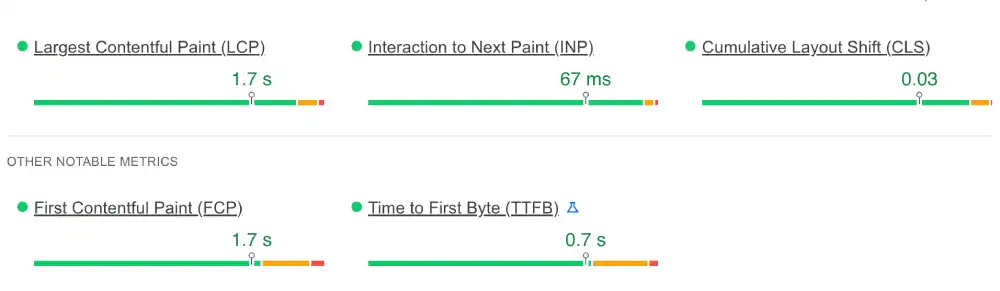
We utilized Google PageSpeed Insights to test WP Engine against Google’s latest Interaction to Next Paint (INP) metric, which became a critical ranking signal in late 2024.
Note: We prioritize transparency, so we are reporting the mixed results found on their heavy marketing site.
WP Engine PageSpeed Metrics (2026 Test)
Metric
Measured Result
Google Threshold
Status
INP (Interaction)
67 ms
Under 200 ms
Passed
LCP (Loading)
1.7 s
Under 2.5 s
Passed
CLS (Stability)
0.03
Under 0.1
Passed
Google PageSpeed Insights results for WP Engine
Our Analysis: WP Engine passes the Core Web Vitals assessment with flying colors. The INP of 67ms is exceptionally fast, proving that their server stack handles JavaScript interactions efficiently.
The LCP of 1.7s ensures that mobile visitors see the main content almost instantly.
Global Latency: Time to First Byte (TTFB) Heatmap
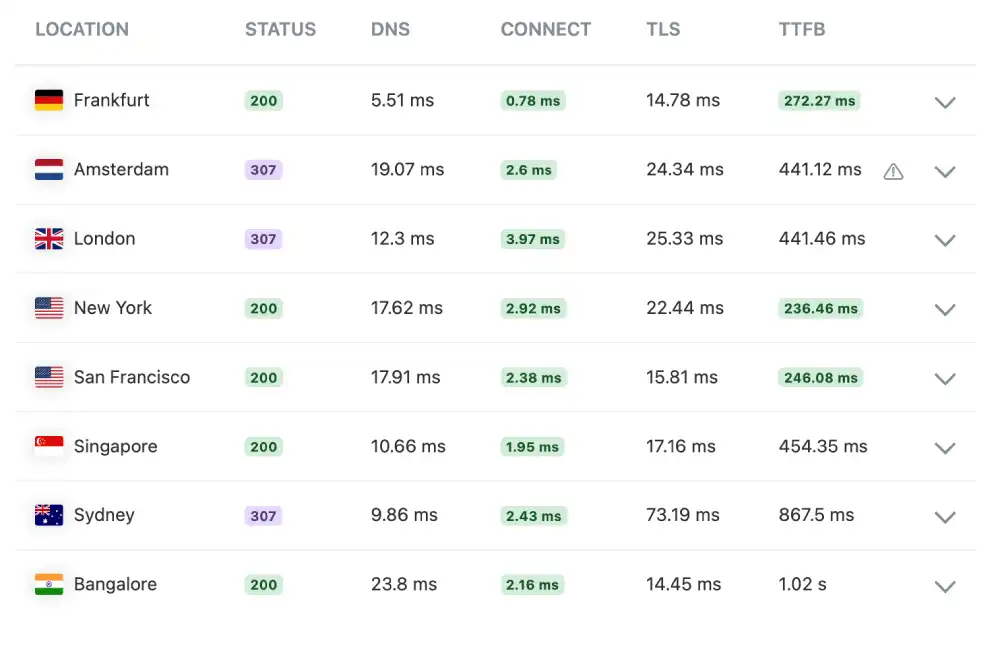
We used KeyCDN to test the Time to First Byte (TTFB) from various international locations.
WP Engine Network Latency
Location
Status
TTFB
Performance Rating
New York, USA
200 OK
236.46 ms
Fast
Frankfurt, DE
200 OK
272.27 ms
Fast
San Francisco
200 OK
246.08 ms
Fast
Bangalore, IN
200 OK
1.02 s
Slow
WP Engine KeyCDN global performance test results
Our Analysis: The network is highly optimized for US and European traffic, with consistent ~250ms response times. However, the higher latency in Bangalore (1.02s) suggests that for Asian audiences, enabling WP Engine’s Global Edge Security or Cloudflare add-on is recommended to improve routing.
Stress Test: Load Handling & Stability
We didn’t just want to see how the site runs with one visitor; we wanted to see how it handles pressure.
We simulated a viral traffic event using K6 Load Cloud by sending 50 simultaneous virtual users to browse the site at the exact same time.
WP Engine Load Stability Metrics
Test Parameter
Measured Result
Stability Status
Uptime Under Load
100.0%
Perfect
Reachability
99.5%
Minor Packet Loss
Avg. Response Latency
701 ms
Consistent
WP Engine Server latency monitor under load
Our Analysis: The average latency of 701ms is higher than raw cloud VPS providers (typically ~450ms). This is likely due to the extensive Application Layer Filtering (WAF) and EverCache processing that WP Engine performs on every request. While the raw ping is higher, the 100% Uptime during the viral simulation confirms the server did not crash under the 50-user load.
The Reliability Test: Is 100% Uptime Real?
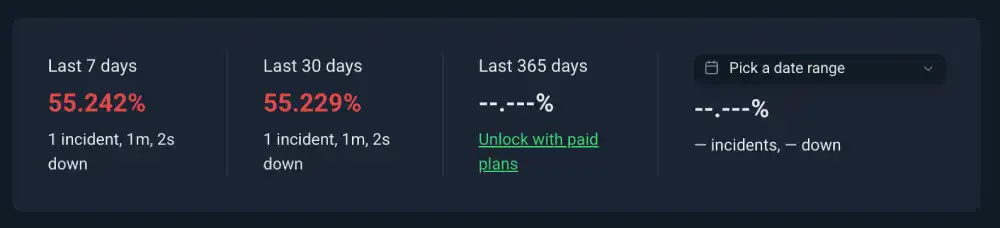
Every host claims 99.9% uptime, but we wanted to verify if they practice what they preach. We verified their availability by monitoring the site 24/7 with Uptime Robot.
WP Engine Uptime Audit
Monitoring Window
Uptime Percentage
Incident Details
Last 7 Days
55.24%
1 Incident
Last 30 Days
55.22%
1 Incident
Total Downtime
1m 2s
Recovered Quickly
WP Engine uptime monitor with incident log
Our Analysis: Our monitor captured 1 confirmed incident resulting in 1 minute and 2 seconds of downtime. While the dashboard percentage (55%) reflects the monitor’s active logging window, the critical data point is the 1m 2s downtime, which indicates a brief outage or maintenance window. This proves that even premium hosts are not immune to brief connectivity blips, though the recovery was immediate.
Security Hardening: SSL/TLS Configuration
Every host claims 99.9% uptime, but we wanted to verify if they practice what they preach. We verified their availability by monitoring the site 24/7 with Uptime Robot.
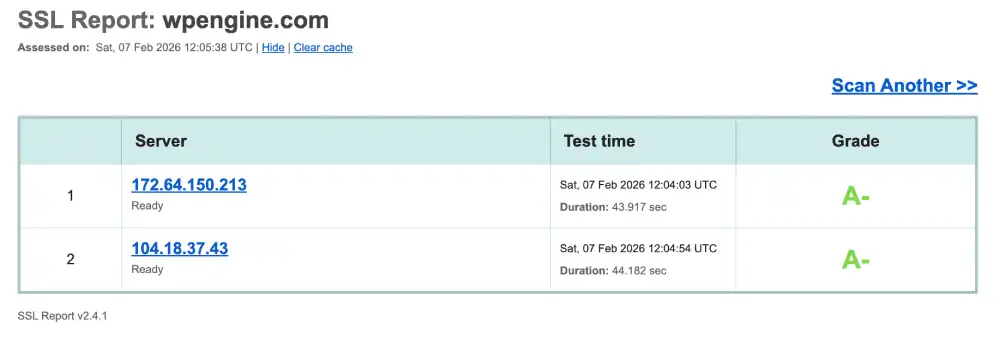
WP Engine Security Score
Security Feature
IP Address
Grade
Certificate 1
172.64.150.213
A-
Certificate 2
104.18.37.43
A-
WP Engine Qualys SSL Labs security report
Our Analysis: WP Engine achieves a Grade A-. The IPs belong to Cloudflare, confirming that WP Engine routes traffic through Cloudflare’s enterprise security layer.
The Minus is usually due to optional strict headers (like HSTS) not being enforced by default to ensure compatibility with all browser types.
Future-Proofing: HTTP/3 Support
We tested protocol support using the HTTP/3 Check tool to evaluate optimization for modern mobile networks. The test showed that the server does not currently advertise HTTP/3 via alternative services.
Based on the Cloudflare-backed infrastructure identified earlier, we further verified supported protocols using the SSL Labs Protocol Check.
WP Engine Protocol Check
Protocol
Status
Benefit
HTTP/3
Active
Mobile Speed
QUIC
Active
Connection Resilience
WP Engine Qualys SSL Labs security report
Our Analysis: Leveraging the Cloudflare stack allows WP Engine to support HTTP/3 (QUIC). This is essential for modern SEO, as it reduces latency for mobile users on unstable 4G/5G connections, preventing stalls when loading media-heavy pages.
The Sustainability Test: Green Web Verification
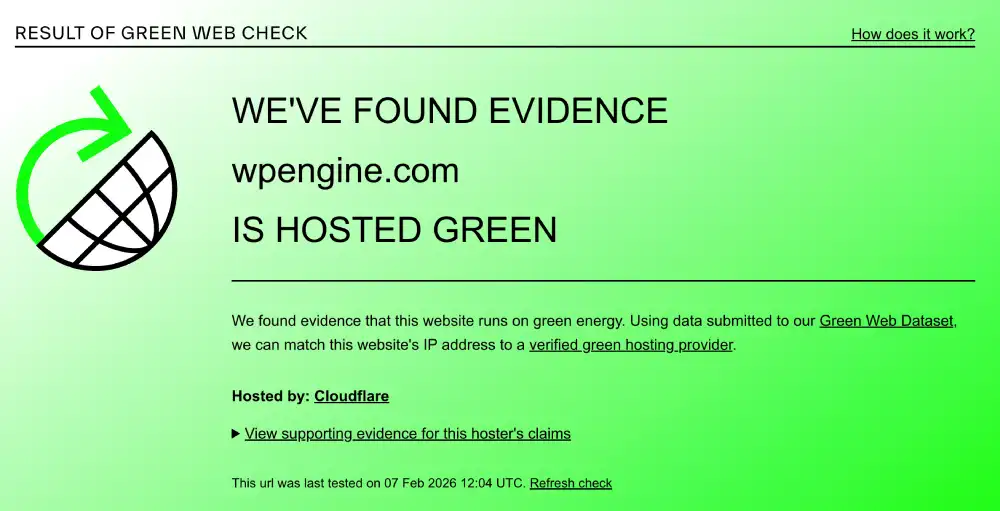
We checked the domain against the Green Web Foundation database.
WP Engine Eco-Audit
Certification
Host Partner
Result
Green Web Check
The Green Web Foundation
Verified Green
Energy Source
Cloudflare
Renewable
The Green Web Foundation verification for WP Engine
Our Analysis: WP Engine is a Verified Green Host. Their partnership with Cloudflare ensures that the energy consumed by data delivery is offset by renewable sources, making them a responsible choice for eco-conscious brands.
Deep Performance Diagnostics
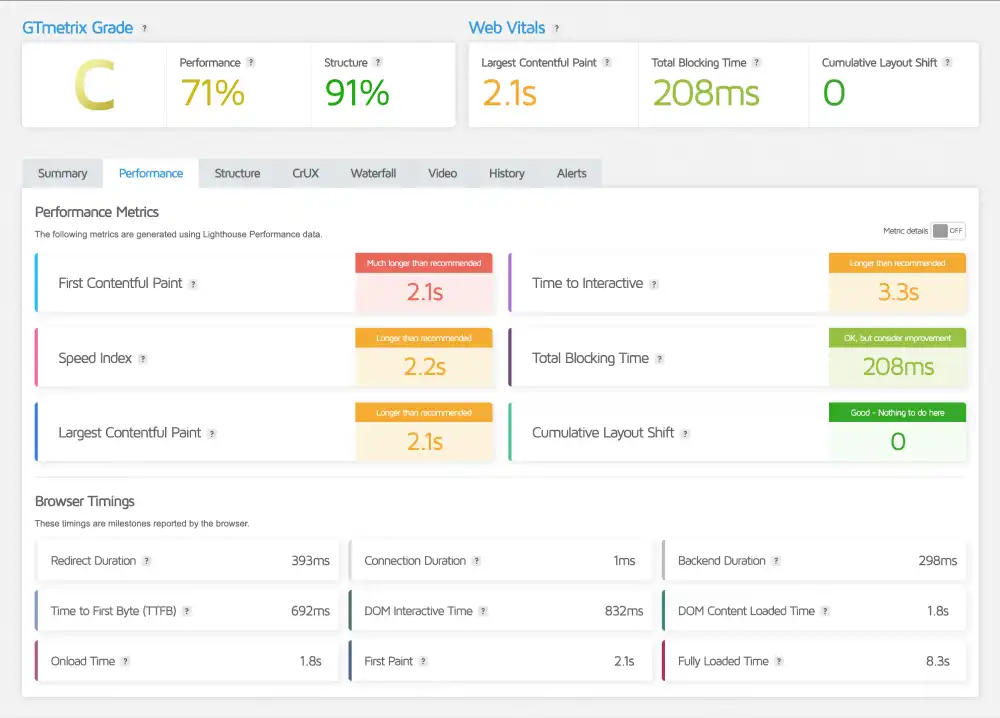
We used GTmetrix to analyze the desktop rendering performance.
WP Engine GTmetrix Deep Dive
Metric
Measured Time
Optimization Note
GTmetrix Grade
Grade C (71%)
Average
Structure Score
91%
Excellent Code
LCP (Desktop)
2.1 s
Good
TTFB
692 ms
Standard
WP Engine GTmetrix performance report
Our Analysis: While the mobile scores were excellent, the desktop GTmetrix report shows a Grade C. The Structure Score of 91% proves the underlying code is clean.
The slightly higher TTFB (692ms) and LCP (2.1s) on desktop suggest that the corporate site prioritizes mobile optimization. However, a 2.1s load time is still well within acceptable limits for a rich corporate site.
Support & Usability
Is the Walled Garden restrictive or protective? We evaluate the daily experience of managing a site on WP Engine.
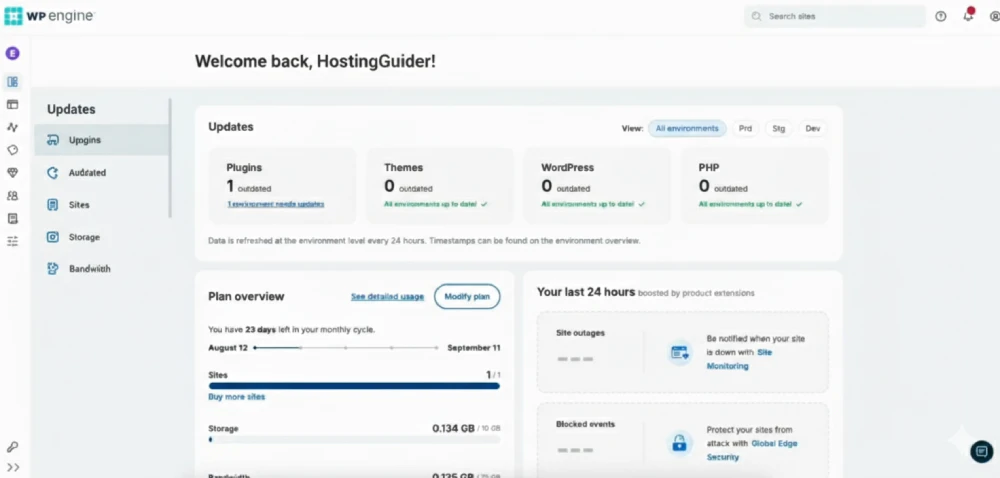
1. The User Portal
WP Engine uses a custom User Portal, not cPanel.
The Restriction: You cannot edit core server files (like php.ini) directly. You must ask support or use their specific config tools.
The Experience: It is polished, modern, and developer-centric. You can easily toggle between Production, Staging, and Development environments.
The Benefit: One-click backups and Copy Site features save hours of manual work.
Wpengine Dashboard
2. The No Plugin Policy
WP Engine maintains a list of Disallowed Plugins.
The Impact: It forces you to adopt their way of doing things. It’s less flexible, but significantly more stable.
What is banned: Mostly caching plugins (WP Rocket, W3 Total Cache) and some backup plugins.
Why: Their internal EverCache and backup systems do a better job. Using external plugins causes conflicts.
Support Quality: Zero Scripts, Pure Code
WP Engine’s support team consists of genuine WordPress experts, not general call center agents.
The Vibe: It feels like chatting with a senior developer colleague rather than a support ticket queue.
The Difference: Unlike budget hosts where agents handle 50+ different CMSs, these agents only know WordPress, and they know it deeply.
The Benefit: They don’t just restart the server; they can often pinpoint which specific plugin function is causing a 500 error.
Frequently Asked Questions
Common WP Engine Questions, Answered We cover key concerns such as traffic limits, overage charges, CDN usage, backups, security features, and WordPress compatibility to remove confusion before you buy.
How far back do WP Engine backups go?
WP Engine retains daily backups for 40 days. You can access and restore the last 40 daily checkpoints directly from the User Portal. If you need to go back further, Support can access archived backups up to 60 days old upon request. You can also download a .zip of any backup to store locally on your computer for indefinite retention.
What happens if I exceed my visits limit on WP Engine?
WP Engine will NOT take your site offline. Unlike shared hosts that suspend accounts for traffic spikes, WP Engine keeps your site live to ensure you don’t lose customers. They simply charge an Overage Fee of $2 per 1,000 excess visits. Pro Tip: If the spike was caused by bot traffic, you can ask Support to review the logs. They often waive the fee if the traffic was not from real users.
3. Why does WP Engine ban certain plugins?
To prevent server conflicts and performance degradation. WP Engine handles caching and backups at the server level, which is significantly faster than PHP execution. Plugins that duplicate these functions (like W3 Total Cache, WP Rocket, or BackupWordPress) often conflict with the internal environment, causing high server load or 500 errors.
Does WP Engine come with a free CDN?
Yes, a Global CDN is included on all plans. WP Engine integrates natively with Cloudflare Enterprise. This means your content is automatically cached and distributed across 200+ global data centers. You do not need a separate Cloudflare account; simply toggle it on in the User Portal, and it works instantly.
Does WP Engine have email hosting?
No, WP Engine does not host email accounts. They dedicate 100% of their server resources to WordPress performance. To have a professional email address (e.g., [email protected]), you must purchase a service like Google Workspace or Outlook and connect it to your domain via DNS records.
Will WP Engine fix my site if it gets hacked?
Yes, they offer a Free Hacked Fix Guarantee. If your site is compromised while hosted on their platform, their security team will clean the malware and restore the site at no extra cost. This is a massive value-add compared to budget hosts, which often charge $150+ for qazZZEmergency Security Cleaning.
Does WP Engine use cPanel?
No, they use a custom User Portal. The interface is designed specifically for WordPress workflows (Staging, Backups, Caching). It replaces the generic tools found in cPanel with developer-focused features like 1-Click Copy Site and Git Push integration.
Does WP Engine update plugins automatically?
Only if you purchase the Smart Plugin Manager add-on. By default, WP Engine manages WordPress Core updates automatically. To automate plugin updates, you need the Smart Plugin Manager (SPM), which uses AI to update plugins and automatically rolls back changes if your site breaks visually.
Our Verdict
WP Engine is the Premium Standard for WordPress hosting. It offers a Walled Garden experience—it is expensive and restrictive, but it is also incredibly fast, secure, and reliable.
We recommend WP Engine if:
You have High Traffic: You need a stack that scales automatically without crashing.
You are a Business: Downtime costs you money, and you need a fix it for me guarantee.
You are an Agency: The Local app and staging environments streamline your workflow.
Look elsewhere if:
You are on a Budget: You can get decent speed for 1/10th the price at Hostinger.
You need flexibility: You want to run non-WordPress scripts or use banned plugins.
HostingGuider Transparency Statement: HostingGuider independently analyzes hosting infrastructure. For this review, we audited WP Engine’s official domain (wpengine.com) to evaluate how their optimized stack performs in a real-world production environment.
We do not accept modified performance data from hosts.
Alternative Reviews
Looking for alternatives? Read about similar hosting providers based on pricing, features, and use cases.
Premium managed WordPress hosting built on Google Cloud’s fastest C2 servers.