
What Is a Dedicated Server? A dedicated server is a physical server exclusively assigned to a single user or organization. It provides full control over CPU, RAM, storage, and bandwidth, with no resource sharing, making it ideal for high-performance, secure, and resource-intensive applications.
If your website is slow, your application crashes under load, or you handle sensitive customer data, shared hosting and VPS hosting can quickly become bottlenecks. A dedicated server removes these limitations by giving you complete control over a physical machine dedicated entirely to your workloads.
You avoid noisy neighbors and performance bottlenecks. This guide covers everything you need to know about dedicated infrastructure.
In this guide, you will learn:
- The difference between dedicated, shared, VPS, and cloud hosting
- Key components of a dedicated server and what they do
- The main benefits and potential drawbacks
- Who actually needs a dedicated server
- How much it costs and what to look for in a provider
- How to calculate your exact server requirements using our interactive architecture builder.
Key Takeaways
- All server resources are exclusively allocated to a single user
- No performance impact from other users or shared environments
- Full root access allows deep system-level customization
- Ideal for high-traffic, data-sensitive, and compute-intensive workloads
- Available in managed and unmanaged configurations
What Is a Dedicated Server?
A dedicated server gives you exclusive access to an entire physical machine, allowing full control over performance, configuration, and security. Unlike shared or VPS hosting, there is no resource competition, ensuring consistent and predictable performance.
In practical terms, all CPU power, memory, and bandwidth are reserved for your workloads, making dedicated servers ideal for high-demand and mission-critical applications.
Imagine renting a single desk in a crowded co-working space. The internet is slow, the room is loud, and you have zero privacy. That is shared web hosting. Now imagine owning a private corporate building. Every resource belongs to you, and nobody else can enter. That is a dedicated server.
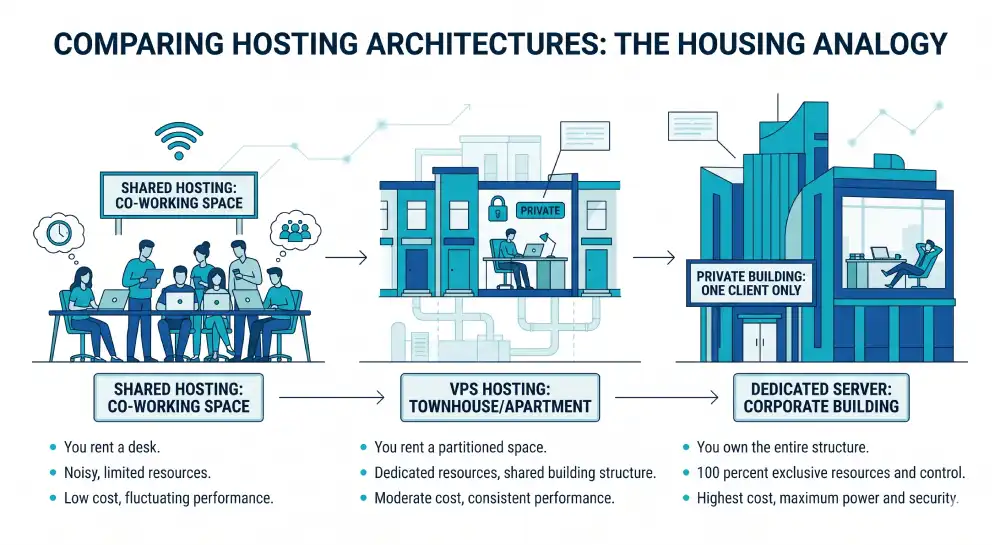
A dedicated server is an enterprise-grade physical machine reserved entirely for one client. Every cycle of CPU power, every gigabyte of RAM, and all network bandwidth is 100 percent yours.
Unlike shared hosting or virtual private servers (VPS), there is no resource division. You never share hardware with other websites, meaning another company experiencing a massive traffic spike cannot slow down your platform.
Advantages and Disadvantages of Dedicated Servers
Pros:
- Maximum performance: All CPU and RAM resources are exclusively yours.
- Full control: Root access allows custom OS and software configurations.
- Strong security: Physical isolation prevents cross-tenant data breaches.
- Predictable pricing: Fixed monthly costs avoid cloud billing surprises.
Cons:
- Higher cost: Physical hardware requires a larger monthly budget.
- Technical expertise: Unmanaged setups require advanced sysadmin skills.
- Hardware limits: Scaling beyond the physical chassis requires migrating to a new machine.
How Does a Dedicated Server Work?
When you rent a dedicated server, your provider assigns you a specific physical machine located in their data center. Here is what typically happens:
- Hardware provisioning: The provider configures your server with your chosen CPU, RAM, storage drives, and network card.
- OS installation: You select an operating system. Common choices include various Linux distributions like Ubuntu, CentOS, AlmaLinux, and Debian, or Windows Server.
- Remote access: You receive login credentials with root or admin access to manage the server remotely via SSH or a control panel.
- Network connectivity: The server connects to a high-speed network with a dedicated bandwidth allocation. Many providers guarantee uptime through a Service Level Agreement (SLA), often at 99.9 percent or higher.
- Ongoing management: Depending on your plan, either you handle maintenance yourself (unmanaged) or the provider takes care of updates, patches, and monitoring (managed). You can install web servers like Nginx or Apache, deploy containers using Docker or Kubernetes, and manage firewalls.
Most providers also give you access to an out-of-band management interface. This is a secondary connection that lets you reboot or troubleshoot the server even if the main operating system is unresponsive.
When a visitor accesses your website, the request travels from their device to the data center. The server processes it and sends the response back in milliseconds. Because there are no other users on the hardware, the server dedicates its full processing power strictly to handling your traffic.
Administrators access the server remotely through SSH for Linux or Remote Desktop Protocol for Windows. From there, you have root access to install any operating system, configure custom software, manage firewalls, and monitor hardware health.
Core Components of a Dedicated Server
Understanding what is inside a dedicated server helps you choose the right configuration for your workload.
Server Hardware Blueprint
Select a schematic component below to view its role in a dedicated infrastructure.
The computational engine of the server. Enterprise configurations utilize dual-socket motherboards running processors like AMD EPYC or Intel Xeon. This provides the massive core count necessary to process thousands of concurrent database queries without bottlenecking.
RAM acts as the short-term memory for active application data. Dedicated servers use ECC memory to automatically detect and correct data corruption. You have exclusive access to the entire memory pool, ensuring memory-intensive tasks never crash due to other tenants.
Connected directly to the motherboard via the PCIe interface, NVMe storage bypasses legacy SATA controllers to deliver the fastest read/write speeds currently available in enterprise hosting. This translates directly into lower Time To First Byte (TTFB) for your users.
High-bandwidth interfaces that allow the server to be customized with additional hardware. Administrators use these lanes to install hardware RAID controllers for data redundancy, or dedicated GPUs for machine learning and artificial intelligence workloads.
The physical uplink to the data center network backbone. Dedicated servers feature 1Gbps to 10Gbps unmetered ports, ensuring that your server can transmit heavy data payloads globally without experiencing bandwidth throttling.
- Processor (CPU): This is the brain of the server. Multi-core processors like AMD EPYC or Intel Xeon handle all computations. More cores allow the server to process multiple tasks simultaneously.
- Memory (RAM): Enterprise setups typically start at 32 GB of RAM. Heavy databases or analytics platforms often require 128 GB or more to process data without lagging.
- Storage (NVMe/SSD): NVMe SSDs are the modern standard, offering the fastest data retrieval and lowest latency. Traditional HDDs are only used today for cheap mass archiving.
- Network Bandwidth: Data centers provide high-speed uplinks ranging from 1 Gbps to 10 Gbps to ensure data travels rapidly between the server and the end user.
- Operating System: Linux distributions like Ubuntu Server or AlmaLinux provide high stability with zero licensing costs. Windows Server is necessary for running specific Microsoft applications.
How to Choose a Dedicated Server
Choosing the right dedicated server depends on your workload, performance requirements, and technical expertise.
1. CPU Selection
Choose high clock speed CPUs for latency-sensitive workloads like SaaS apps or gaming servers. Choose high core-count processors (e.g., AMD EPYC or Intel Xeon) for virtualization, databases, and parallel workloads.
2. RAM Sizing
Start with 32GB for standard web applications. Scale to 64–128GB for heavy databases, caching layers, or analytics systems. For AI or in-memory workloads, 256GB+ may be required.
3. Storage Type
Always prioritize NVMe SSDs for primary storage due to their superior IOPS and latency performance. HDDs should only be used for archival or backup storage.
4. Bandwidth Requirements
Estimate traffic patterns before choosing bandwidth. High-traffic websites, streaming platforms, or file distribution systems should use unmetered or high-throughput connections (10 Gbps where available).
5. Managed vs Unmanaged
Choose managed hosting if you lack an internal system administration team. Choose unmanaged hosting if you have in-house expertise and require full control over system configuration.
Dedicated Server vs Cloud Hosting
When evaluating infrastructure, you must understand the difference between bare-metal hardware and cloud environments.
- Latency: Bare-metal servers offer the lowest possible latency, making them ideal for high-frequency trading or multiplayer gaming.
- Performance: Dedicated servers offer raw, unthrottled compute power. Cloud servers have virtualization overhead, utilizing hypervisors like KVM virtualization, which can slightly reduce performance.
- Pricing predictability: Dedicated servers have fixed monthly fees. Cloud hosting utilizes usage-based billing, which can spike during traffic surges.
- Scaling: Cloud hosting allows instant scaling of CPU and RAM. Dedicated servers require physical hardware upgrades.
Dedicated Server vs. Shared Hosting vs. VPS: What is the Difference?
| Feature | Shared Hosting | VPS Hosting | Dedicated Server |
| Resource sharing | Yes, with many users | Partial (virtualized) | None |
| Performance | Limited | Moderate | High |
| Customization | Minimal | Moderate | Full |
| Security | Basic | Better | Strongest |
| Cost | Low ($3 to $15/mo) | Medium ($20 to $100/mo) | Higher ($80 to $500+/mo) |
| Best for | Small blogs, beginners | Growing SMBs | High-traffic or enterprise sites |
Shared hosting puts your website on the same server as hundreds of others. If one site gets a traffic spike, it affects everyone. A VPS (Virtual Private Server) improves on that by carving out a dedicated slice of resources on a shared physical machine, but you are still sharing the underlying hardware.
A dedicated server eliminates that shared layer entirely. You own all the computing power. That is the core difference.
Not sure what infrastructure your project actually needs? Use our interactive Hosting Matchmaker tool below to find your perfect fit:
Find Your Perfect Hosting Match
VPS
Scaling & balanced.
Dedicated
Max power & privacy.
What Are the Key Benefits of a Dedicated Server?
Maximum Performance
All CPU cycles, memory, and bandwidth go toward your applications. There is no competition for resources, which means consistent performance even under heavy traffic. This matters most for platforms with steady, predictable demand like large databases, real-time APIs, and SaaS applications.
Enhanced Security
Physical isolation is the strongest form of data protection available in hosting. Your data stays on hardware that no other customer touches. You control the firewall rules, access policies, encryption setup, and compliance configurations from the root level. This makes dedicated servers the standard choice for industries governed by HIPAA, PCI-DSS, GDPR, and similar regulations.
Full Root Access and Customization
You have complete freedom to install any operating system, modify kernel settings, and tune the environment to match your exact application requirements. This level of granular control is impossible in shared hosting.
Predictable Costs
Unlike cloud billing, which can spike unpredictably with traffic or data transfer, dedicated server pricing is fixed. You pay a set monthly fee for defined hardware. This makes budget planning straightforward for businesses with stable, long-term workloads. A high-profile example: 37signals (makers of Basecamp) projected $10 million in savings over five years by moving from cloud infrastructure to owned hardware in colocation. (Source: Hivelocity)
Reliability and Uptime
Dedicated servers sit in data centers with redundant power, cooling, and network connections. Quality providers back their infrastructure with 99.9% or higher uptime SLAs. Since you share no resources, a problem with another customer’s account cannot affect your server.
Who Should Use a Dedicated Server?
Not every business needs one. However, certain use cases clearly benefit from a dedicated server setup:
- High-traffic websites: For example, sites handling thousands of simultaneous visitors can easily overwhelm shared hosting. Therefore, dedicated resources ensure stable performance.
- E-commerce platforms: In this case, downtime or slow load speeds directly impact revenue. As a result, a dedicated server helps maintain speed and reliability.
- SaaS companies: These businesses often run resource-heavy applications. So, they need consistent memory and processing power to perform well.
- Healthcare and finance organizations: Moreover, these industries must follow strict data privacy laws. A dedicated environment offers better control and compliance.
- Game developers: Similarly, multiplayer servers require low latency and high connection capacity. Dedicated servers provide the needed stability.
- Agencies and web hosting providers: In addition, managing multiple client websites becomes easier with full server control and predictable performance.
- AI and machine learning workloads: Finally, these tasks demand high-core CPUs and GPU support. Dedicated servers can handle such intensive processing.
Who Does Not Need a Dedicated Server?
On the other hand, not every project requires this level of power.
- Small businesses, personal blogs, and early-stage startups usually have lower traffic and simpler needs.
- In most cases, shared hosting or a basic VPS is more than enough.
- Plus, these options are far more cost-effective while still delivering reliable performance.
When Should You Upgrade to a Dedicated Server?
Several signs point to the right time to make the move:
You probably need a dedicated server if:
- Your site handles consistent high traffic of 50,000+ monthly visitors.
- You store sensitive customer data and need strict access control.
- You run resource-heavy applications like massive databases, video processing, or machine learning inference.
- Your industry requires specific compliance standards like HIPAA or PCI-DSS.
- Downtime directly costs you money.
- You have outgrown your VPS and are hitting resource ceilings regularly.
You probably do not need one yet if:
- You are running a new or low-traffic blog or portfolio.
- Your team does not have server management experience.
- Your budget is limited, and your traffic is manageable on a VPS.
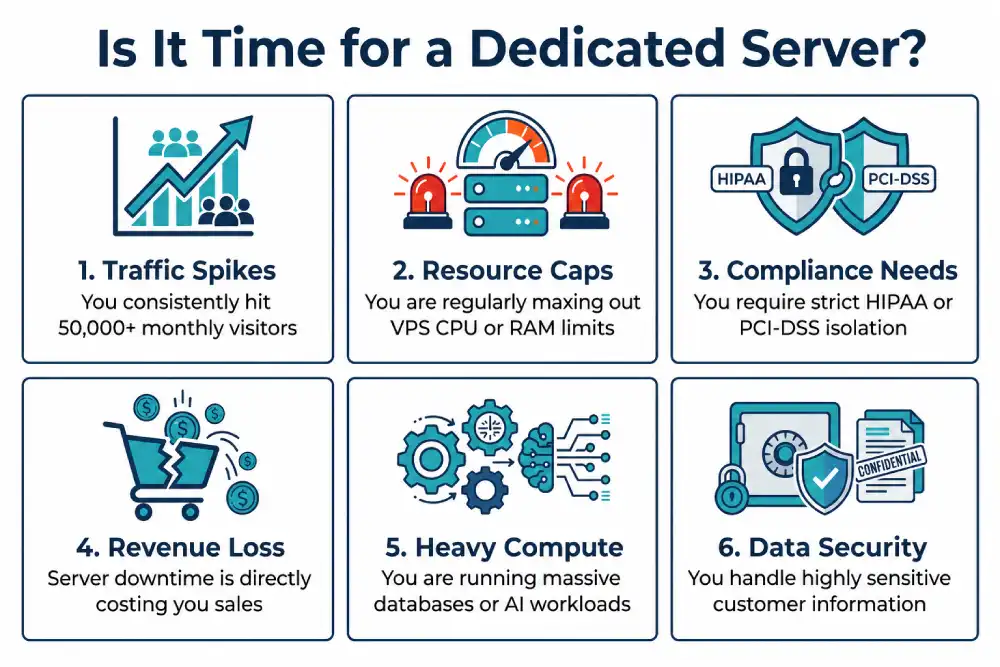
Use our interactive decision engine below to map your exact bottlenecks:
Recommended:
According to a 2026 report from Cherry Servers, the shift back to dedicated infrastructure is most visible in databases with steady traffic, latency-sensitive services, and systems that run continuously, which are workloads where cloud overhead creates friction that fixed hardware eliminates.
Managed vs. Unmanaged Dedicated Servers
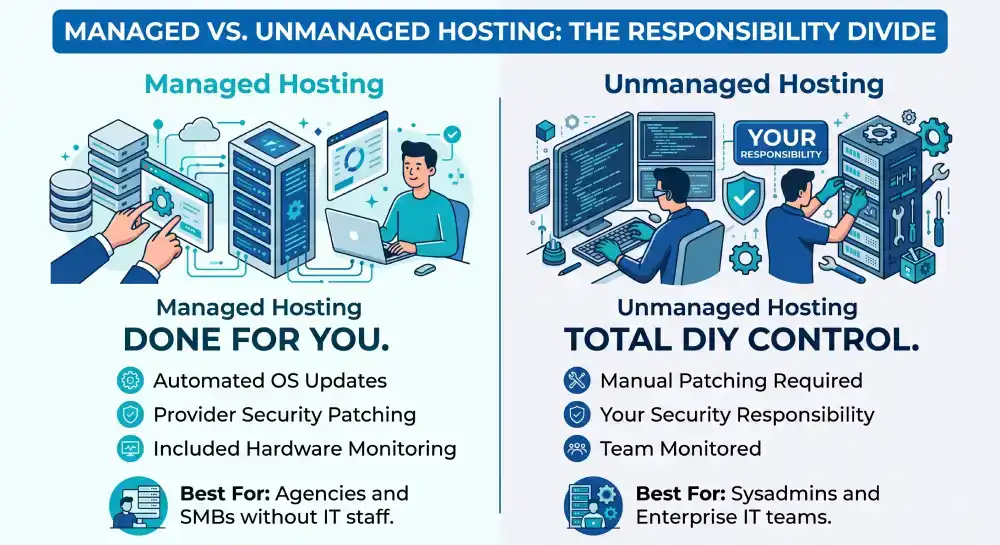
| Feature | Managed Dedicated Server | Unmanaged Dedicated Server |
| Server Setup | Done for you | DIY |
| OS Updates | Automated by provider | Manual patching required |
| Security Patching | Managed by provider | Your responsibility |
| Hardware Monitoring | Included | Monitored by your team |
| Cost | Higher | Lower |
| Best For | Agencies, SMBs without IT staff | IT Pros, Sysadmins, Enterprises |
Unmanaged servers give you full control and lower costs. The provider handles the physical hardware and network connectivity. Everything else – OS installation, security patches, software updates, and monitoring – falls on your team. This suits businesses with experienced system administrators.
Managed servers include ongoing server maintenance from the provider. They handle updates, security monitoring, and sometimes backups. You pay more, but the operational burden stays off your internal team. This is the better fit for businesses that want dedicated performance without a full-time infrastructure team. Most small to mid-sized businesses prefer managed dedicated server solutions to reduce overhead while maintaining the performance benefits.
Common Use Cases for Dedicated Servers
- Web hosting for large platforms: High-traffic news sites, portals, and SaaS products need stable resources that shared environments cannot guarantee.
- E-commerce: Online stores processing many transactions simultaneously need isolation, speed, and PCI-DSS compliance support.
- Gaming servers: Multiplayer games require low latency and the ability to handle hundreds of concurrent connections without lag.
- High-performance computing (HPC): Scientific simulations, 3D rendering, and large-scale data analytics need maximum CPU and memory access.
- Private cloud infrastructure: In hybrid cloud setups, the private side commonly runs on dedicated servers for components like primary databases, internal APIs, and identity services.
- Data backup and archiving: Organizations handling regulated data use dedicated servers to maintain full control over backup configurations and retention policies.
How Much Does a Dedicated Server Cost?
Dedicated server pricing in 2026 spans a wide range based on hardware configuration, location, and included services.
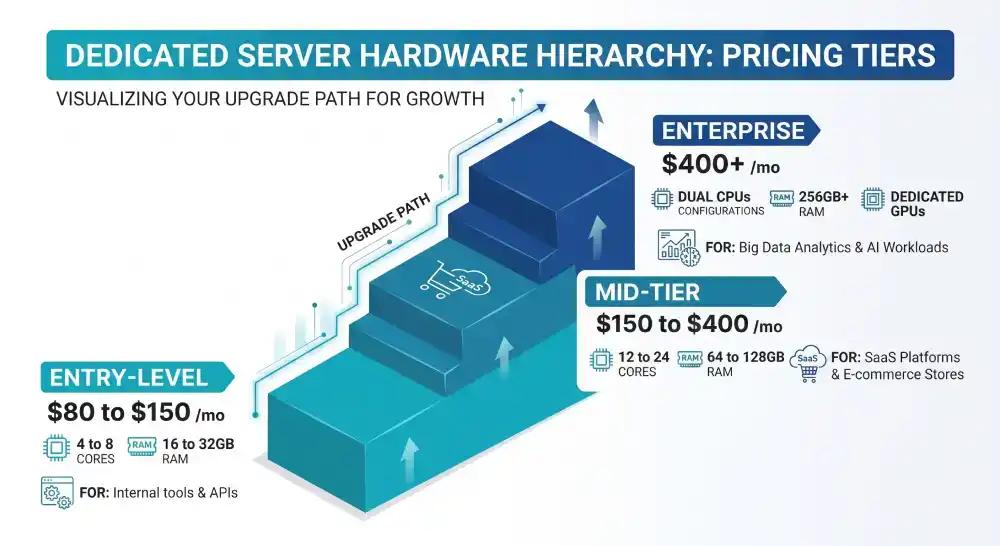
| Tier | Estimated Monthly Cost | Typical Hardware | Best For |
| Entry-Level | $80 to $150 | 4-8 Cores, 16-32GB RAM | Internal tools, growing APIs |
| Mid-Tier | $150 to $400 | 12-24 Cores, 64-128GB RAM | SaaS, E-commerce |
| Enterprise | $400+ | Dual CPUs, 256GB+ RAM, GPUs | AI workloads, Big Data |
Managed plans add a premium on top of hardware costs. Some providers also charge for bandwidth overages, IP addresses, or control panel licenses.
Always check what is included in the base price. Look for SLA uptime guarantees, DDoS protection, RAID storage options, and the quality of technical support.
Operating Systems for Dedicated Servers
You typically choose between Linux and Windows Server. Linux distributions like Ubuntu, Debian, AlmaLinux, and CentOS are popular because they are open source, widely supported, and have strong server performance.
Windows Server makes sense when your stack relies on Microsoft technologies like ASP.NET, Active Directory, or MSSQL. Your OS choice affects software compatibility, licensing costs, and how you will manage the server day-to-day.
Linux is generally the default for web servers, whereas Windows becomes relevant for enterprise environments with existing Microsoft infrastructure.
Dedicated Servers and the Infrastructure Market in 2026
The demand for dedicated server infrastructure is accelerating. The global server market hit a record $444.1 billion in annual revenue during 2025, driven heavily by AI workload investment and cloud infrastructure expansion.
North America holds approximately 42.5 percent of global server market share, with the Asia Pacific region growing fastest at an expected CAGR of over 15 percent through 2033. (Source: Grand View Research)
This growth reflects how central server infrastructure has become, not just for large enterprises but for mid-size businesses that now routinely run data-intensive applications.
Frequently Asked Questions
What is the difference between a dedicated server and a VPS?
A VPS (Virtual Private Server) is a virtualized slice of a physical server that you share with other tenants at the hardware level. A dedicated server gives you the entire physical machine exclusively. This means no resource contention, better raw performance, and stronger security isolation compared to any virtualized setup.
Is a dedicated server the same as bare metal?
Yes, but only in specific cases. A small business with moderate traffic and no strict compliance requirements is usually better served by VPS or cloud hosting due to lower cost and easier management. However, if the business handles sensitive data, processes high transaction volumes, or expects rapid growth, a dedicated server can prevent performance issues and future migration complexity.
Can a small business use a dedicated server?
Yes, but only in specific cases. A small business with moderate traffic and no strict compliance requirements is usually better served by VPS or cloud hosting due to lower cost and easier management. However, if the business handles sensitive data, processes high transaction volumes, or expects rapid growth, a dedicated server can prevent performance issues and future migration complexity.
What operating systems can run on a dedicated server?
Most dedicated server providers support both Linux and Windows. Linux distributions like Ubuntu Server, Debian, AlmaLinux, and Rocky Linux are widely used for web and database workloads. Windows Server suits businesses running .NET applications, Active Directory, or Microsoft-specific software.
How is a dedicated server managed remotely?
A dedicated server is managed remotely using secure access protocols like SSH for Linux or Remote Desktop Protocol (RDP) for Windows.
Most providers also offer out-of-band management tools such as IPMI or iDRAC, allowing you to control the server even if the operating system becomes unresponsive.
What uptime should I expect from a dedicated server?
Reputable providers back their infrastructure with 99.9% network uptime SLAs or higher. Physical hardware failure is rare but possible, which is why choosing a provider with hardware replacement guarantees and redundant data center infrastructure matters. Many providers commit to replacing failed components within a defined timeframe.
Wrapping Up
A dedicated server is the right choice when performance, security, and control genuinely matter for your business. It gives you a physical machine to yourself, full administrative access, and the ability to configure your environment without the limitations that come with shared or virtualized hosting.
It is not for everyone. Small sites and early-stage businesses rarely need that level of infrastructure. But if your website drives serious revenue, your app handles sensitive data, or you have hit the ceiling on your current hosting plan, a dedicated server is a practical and well-proven solution.
Start by mapping your actual resource needs, then compare managed versus unmanaged options to find a setup that matches your team capacity and your budget.


