
Every second, billions of pieces of data travel across the internet. Passwords. Credit card numbers. Private messages. Without protection, any of it can be read by the wrong person.
That protection is what an SSL certificate provides.
If you own a website and you’ve heard you “need SSL” but never understood why, this guide will fix that. By the end, you will know what an SSL certificate is, how it works, what type to choose, how to get one, and what to do when something breaks.
If you are shopping around, our guide on where to buy web hosting with free SSL certificates highlights the best providers that include this out of the box.
Let’s start with the basics.
What Is an SSL Certificate?
An SSL certificate is a small digital file that does two jobs: it proves a website is real, and it encrypts the data sent between the website and its visitors.
When a site has a valid SSL certificate, your browser shows a padlock icon and the URL begins with https:// instead of http://. The “S” stands for secure.
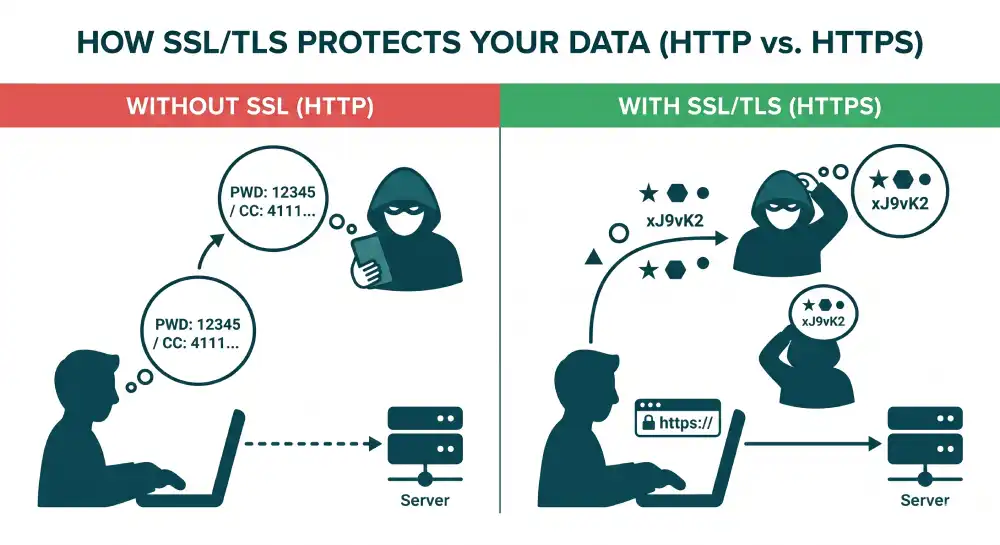
Without SSL, anything you type into a website travels as plain text. Anyone on the same network can read it. With SSL, that same data becomes scrambled code that only the intended server can unscramble.
SSL stands for Secure Sockets Layer. The technology has been replaced by TLS (Transport Layer Security), but the name “SSL” stuck. Today, both terms mean the same thing in everyday use.
How Do SSL Certificates Work?
SSL certificates work through a process called the TLS handshake. It happens in milliseconds every time you load a secure page.
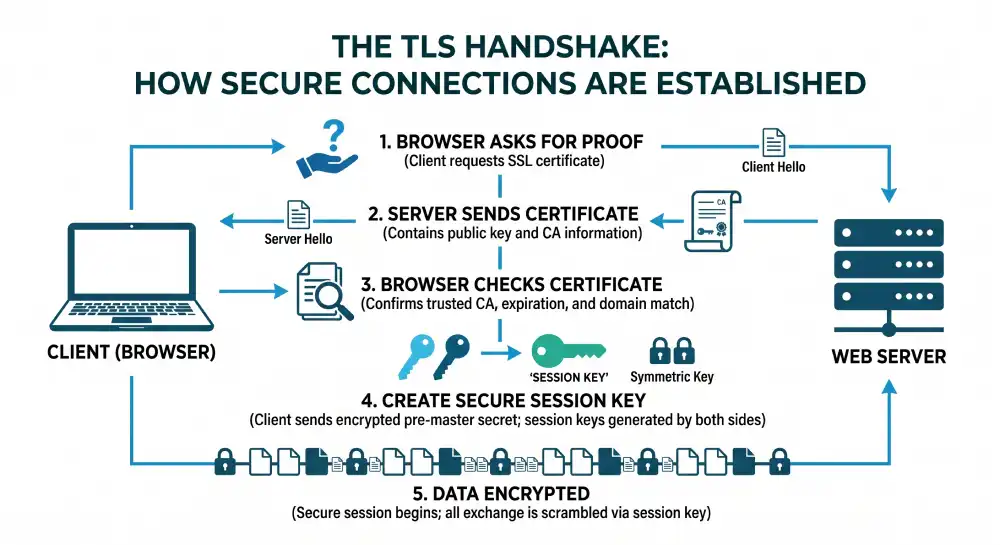
Here is what happens step by step:
- The browser asks the server for proof. When you visit a site, your browser requests its SSL certificate.
- The server sends its certificate. The certificate includes the site’s public key and information about who issued it.
- The browser checks the certificate. It confirms the certificate was issued by a trusted Certificate Authority (CA), has not expired, and matches the domain.
- A secure session begins. The browser and server use the public key to create a shared session key.
- All data is encrypted. From this point on, every byte exchanged is scrambled using that session key.
The result: even if someone intercepts the traffic, they only see meaningless data.
Why Does Your Website Need an SSL Certificate?
An SSL certificate is no longer optional. Here are the main reasons every website needs one in 2026.
1. Browsers Warn Visitors Away From Unsecured Sites
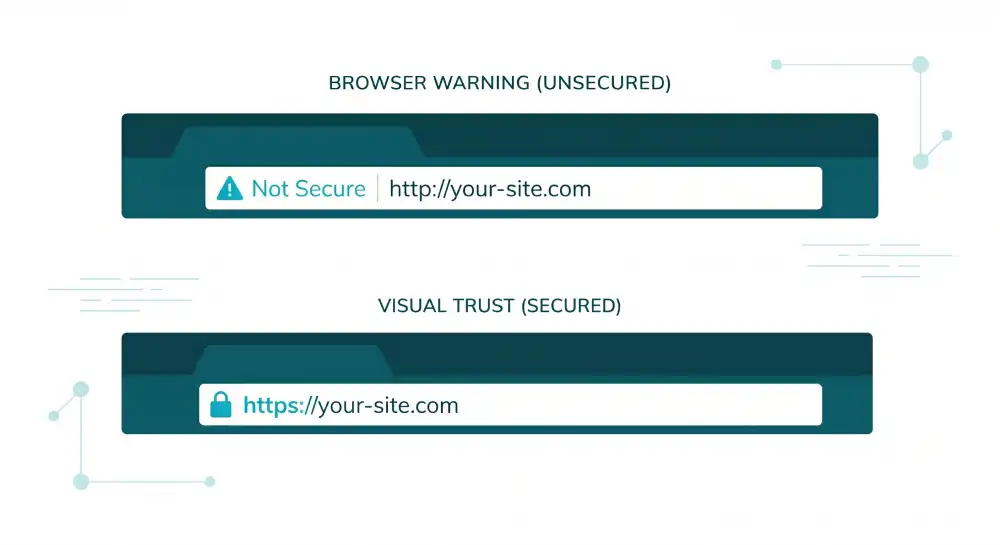
Chrome, Safari, Firefox, and Edge all display a clear “Not Secure” warning on any site without SSL. Visitors leave within seconds. Trust drops. Conversions fall.
Read our breakdown on the true importance of domain name uptime and website performance to see how security warnings directly impact your traffic numbers.
2. Google Rewards Secure Sites
Google has used HTTPS as a ranking factor since 2014. Sites with SSL rank higher than those without. For competitive search terms, this difference matters.
3. Customer Data Stays Private
Without SSL, a person sitting in the same coffee shop can read the login forms, contact details, and credit card numbers your visitors submit. SSL prevents this.
4. Modern Web Features Require HTTPS
Many tools simply do not work over plain HTTP, including:
- Service workers and progressive web apps
- Geolocation
- Camera and microphone access
- Push notifications
- HTTP/2 and HTTP/3
5. Compliance Rules Often Demand It
PCI DSS (for credit card data), HIPAA (for health data), and GDPR (for personal data in the EU) all expect encrypted connections. SSL is the standard way to meet that bar.
Types of SSL Certificates
Not every SSL certificate is the same. They differ in two ways: how strictly the issuer verifies you, and how many domains the certificate covers.
By Validation Level
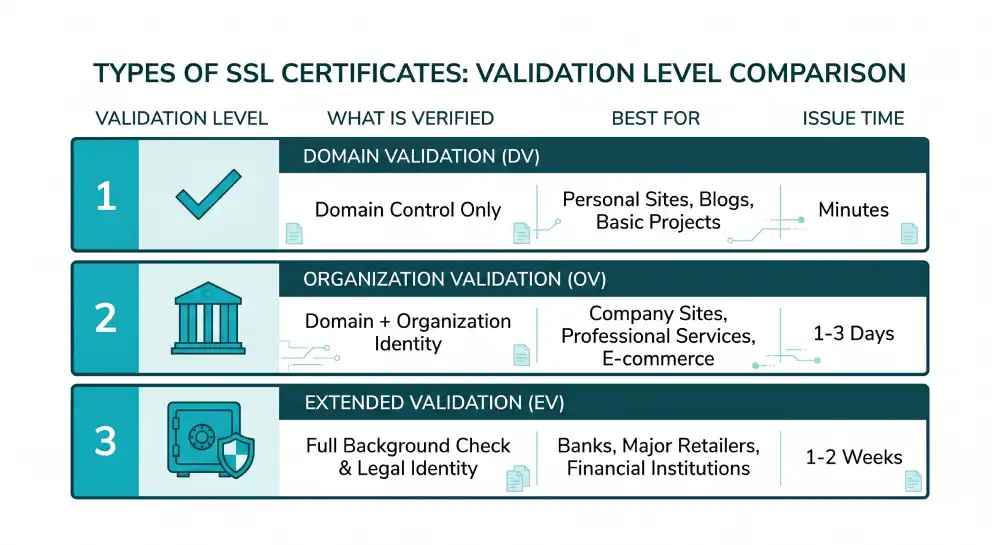
| Type | What’s Verified | Best For | Issue Time |
|---|---|---|---|
| Domain Validation (DV) | You control the domain | Blogs, small business sites, personal projects | Minutes |
| Organization Validation (OV) | Domain control + your business is real | Company websites, professional services | 1–3 days |
| Extended Validation (EV) | Full background check on your business | Banks, large e-commerce, financial services | 1–2 weeks |
By Coverage
- Single-domain certificate: Protects one domain (
yoursite.com). - Wildcard certificate: Protects a domain plus all its subdomains (
*.yoursite.com). - Multi-domain (SAN) certificate: Protects several different domains in one certificate.
For most small and medium websites, a DV certificate from Let’s Encrypt is enough. To understand where this fits in your overall architecture, read our guide on shared hosting explained, as most entry-level plans handle this setup automatically.
How to Get an SSL Certificate
You can get an SSL certificate in three main ways. Each fits a different need.
Option 1: Free Through Let’s Encrypt
Let’s Encrypt is a non-profit Certificate Authority that issues free DV certificates. Most modern hosting providers integrate it directly. Examples include cPanel, Plesk, Cloudflare, Vercel, Netlify, and many shared hosts.
If your host supports it, turning on SSL is often a single button click.
Option 2: Through Your Web Host
Many hosting plans now include SSL by default. Check your hosting dashboard before paying for one separately. You may already have it.
Option 3: From a Commercial Certificate Authority
If you need OV or EV validation, business warranties, or premium support, buy from a CA such as SSLs, DigiCert, Sectigo, GlobalSign, or GoDaddy. Costs range from about $10 to several hundred dollars per year.
How to Install an SSL Certificate
The exact steps depend on your hosting environment, but the general flow is the same.
- Generate a Certificate Signing Request (CSR). This is a small file your server creates. It contains your public key and basic details about your site.
- Submit the CSR to your Certificate Authority. The CA verifies your information based on the validation level.
- Receive your issued certificate. The CA sends you the certificate file along with any intermediate certificates.
- Install the certificate on your server. Upload it through your hosting control panel or place it in your web server’s config (Nginx, Apache, IIS, etc.).
- Force HTTPS for all traffic. Redirect every HTTP request to its HTTPS version using a 301 redirect.
- Update internal links. Make sure images, scripts, and stylesheets all load over HTTPS, you will see “mixed content” warnings.
- Set up auto-renewal. SSL certificates expire. Let’s Encrypt certificates last 90 days. Commercial ones often last one year. Automate renewal so your site never goes dark.
Common SSL Certificate Errors (and How to Fix Them)
Even with SSL set up, you may see errors. Here are the most common ones and the quick fix for each.
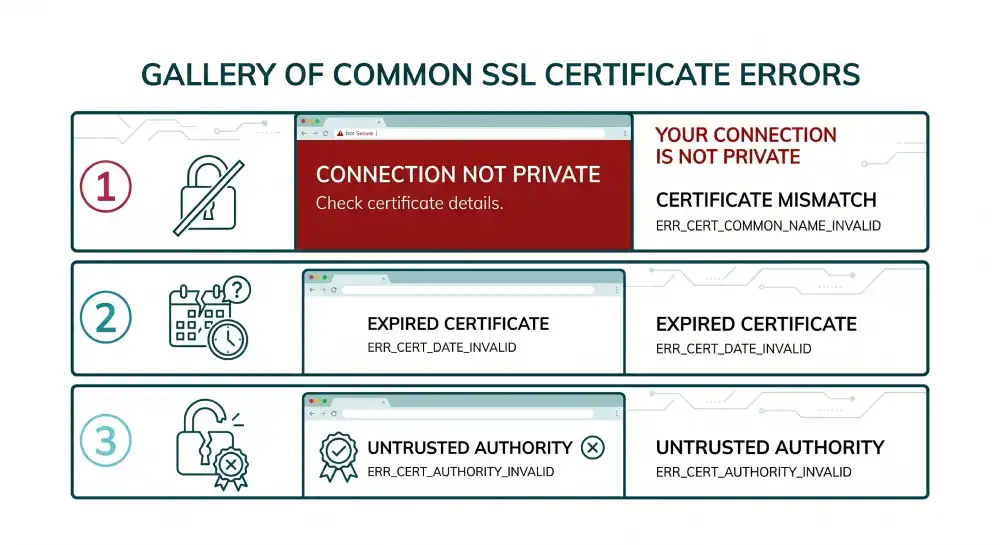
- NET::ERR_CERT_DATE_INVALID — Your certificate has expired. Renew it.
- NET::ERR_CERT_AUTHORITY_INVALID — The certificate is self-signed or from an untrusted CA. Switch to a trusted CA.
- NET::ERR_CERT_COMMON_NAME_INVALID — The certificate does not match the domain. Reissue with the correct domain name.
- Mixed Content Warning — Some assets load over HTTP. Update those links to HTTPS. This is a crucial element on our basic essential hosting security tips checklist for webmasters.
- Too Many Redirects — Your HTTPS redirect rules conflict. Check your
.htaccess, Nginx config, or CDN settings.
SSL Certificate vs TLS: What’s the Difference?
SSL and TLS are versions of the same idea. SSL came first, in the 1990s. TLS replaced it. Every connection today actually uses TLS, even when people call it SSL.
Here’s the short version:
- SSL 1.0, 2.0, 3.0 — All retired. None are safe.
- TLS 1.0, 1.1 — Officially deprecated in 2020.
- TLS 1.2 — Widely used. Considered secure.
- TLS 1.3 — The current standard. Faster and more secure.
When you buy an “SSL certificate” today, you are really buying a TLS certificate. The name is just tradition.
How Much Does an SSL Certificate Cost?
SSL certificate prices have dropped sharply over the last decade.
- Free: Let’s Encrypt, ZeroSSL, Cloudflare Universal SSL.
- $5 to $50 per year: Basic DV certificates from commercial CAs.
- $50 to $300 per year: OV certificates and wildcards.
- $200 to $1,000+ per year: EV certificates with extended warranty.
For 95% of websites, free SSL is enough.
Best Practices for SSL Security
Installing the certificate is the start, not the finish. To keep your site secure, follow these habits:
- Use TLS 1.2 or TLS 1.3 only. Disable older protocols.
- Enable HSTS (HTTP Strict Transport Security). This forces browsers to always use HTTPS.
- Renew before expiration. Use auto-renewal whenever possible.
- Monitor your certificate. Tools like SSL Labs offer free grading.
- Use strong cipher suites. Avoid weak or outdated encryption algorithms.
- Audit your site regularly. Check for mixed content, broken redirects, and weak settings.
Frequently Asked Questions
What is an SSL certificate in simple terms?
An SSL certificate is a digital ID for a website. It proves the site is real and turns the connection between the visitor and the site into scrambled code that no one else can read.
Are SSL certificates free?
Yes. Let’s Encrypt and ZeroSSL both offer free SSL certificates trusted by every major browser. Paid options exist for businesses that need stricter validation or extra warranty coverage.
How long does an SSL certificate last?
Most free certificates last 90 days. Most paid certificates last one year. After 2024, browsers began moving toward shorter validity periods to improve security, so plan to automate renewal.
What happens if my SSL certificate expires?
Visitors will see a large “Your connection is not private” warning. Most will leave immediately. Search rankings can drop. Always set up auto-renewal so your certificate never lapses.
Do I need an SSL certificate for a small website?
Yes. Even simple blogs and brochure sites need SSL. Browsers flag every HTTP site as “Not Secure,” and Google ranks HTTPS sites higher.
What’s the difference between SSL and TLS?
SSL is the old name. TLS is the current technology. People still say “SSL certificate” out of habit, but every modern certificate uses TLS.
How do I know if a website has an SSL certificate?
Look for the padlock icon next to the URL and an address that starts with https://. Click the padlock to see certificate details, including the issuer and expiration date.
Can SSL certificates be hacked?
The encryption itself is extremely strong. Attacks usually target weaker links, like outdated TLS versions, stolen private keys, or fake certificates issued through compromised certificate authorities. Keeping your software current and using modern TLS protects you.
How long does it take to install an SSL certificate?
A free DV certificate can be installed in under five minutes on most modern hosts. OV and EV certificates take longer because of the validation process, sometimes several days or weeks.
Does SSL slow down my website?
Modern SSL is fast. With TLS 1.3 and HTTP/2, secure sites often load faster than unsecured ones because they support newer, more efficient protocols.
Final Thoughts
An SSL certificate is one of the few web technologies where the upside is huge and the cost is essentially zero. Better security. Higher search rankings. More user trust. Access to modern features. All for free, in many cases, in under an hour of setup.
If your site still runs on plain HTTP in 2026, the question is no longer whether to add SSL. It is why you have not done it yet.
Lock the door. Your visitors will thank you.


