
Running a large business means handling heavy traffic, sensitive data, and apps that cannot afford to fail. Your hosting choice shapes monthly spend, performance, and risk exposure. Many enterprise teams ask if a dedicated server still makes financial sense in 2026, especially with cloud providers pushing aggressive pricing.
The short answer is yes, often. But only when the workload, scale, and compliance needs match what dedicated hardware does best.
In this guide, you’ll learn:
- What drives the real cost of dedicated servers
- How they compare with cloud and VPS hosting
- Hidden expenses that catch most teams off guard
- When dedicated hosting pays off and when it does not
- A simple way to calculate ROI for your business
By the end, you’ll have a clear framework for deciding if dedicated servers fit your budget and growth plans.
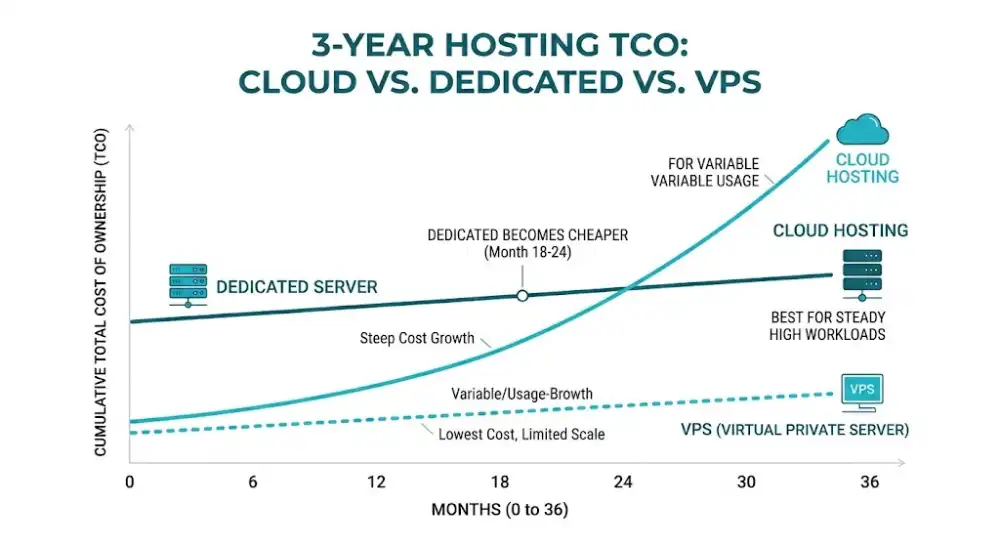
Table of Contents
Key Takeaways
- Dedicated servers often cost less per unit of performance for steady, high-volume workloads.
- Total cost of ownership matters more than the monthly invoice.
- Cloud platforms still win for unpredictable or short-term traffic spikes.
- Compliance-heavy industries usually save money long-term with dedicated infrastructure.
- The break-even point against cloud spend typically lands between 18 and 36 months.
Quick Answer
Dedicated servers are cost-effective for large businesses when workloads stay steady, traffic is predictable, and compliance or performance demands run high. Companies operating databases, e-commerce platforms, or data-heavy apps often save 30 to 50 percent over three years versus equivalent cloud setups. Smaller or volatile workloads usually cost less on cloud or VPS plans.
What Makes Dedicated Servers Cost-Effective for Large Companies
Three forces drive the cost advantage: flat pricing, full hardware use, and lower cloud overhead.
When you rent a dedicated server, you pay a fixed monthly or annual rate. That rate covers the full machine, including CPU, RAM, storage, and bandwidth. Cloud platforms bill for nearly every action: compute time, data transfer, API calls, storage tiers, and more. For a company processing millions of requests per day, those small fees pile up fast.
Large businesses also tend to use most of their capacity. A web app serving 10 million users hits CPU and memory limits regularly. That heavy use makes dedicated hardware efficient. Idle cloud instances waste money. Underused dedicated servers waste capacity, but they do not bill you extra.
Consider this scenario: a SaaS company moves its production database from a major cloud provider to a dedicated server cluster. The monthly hosting bill drops from about $42,000 to $18,000 while performance improves. The savings often pay back the migration within six months.
True Cost of Ownership: Breaking Down the Numbers
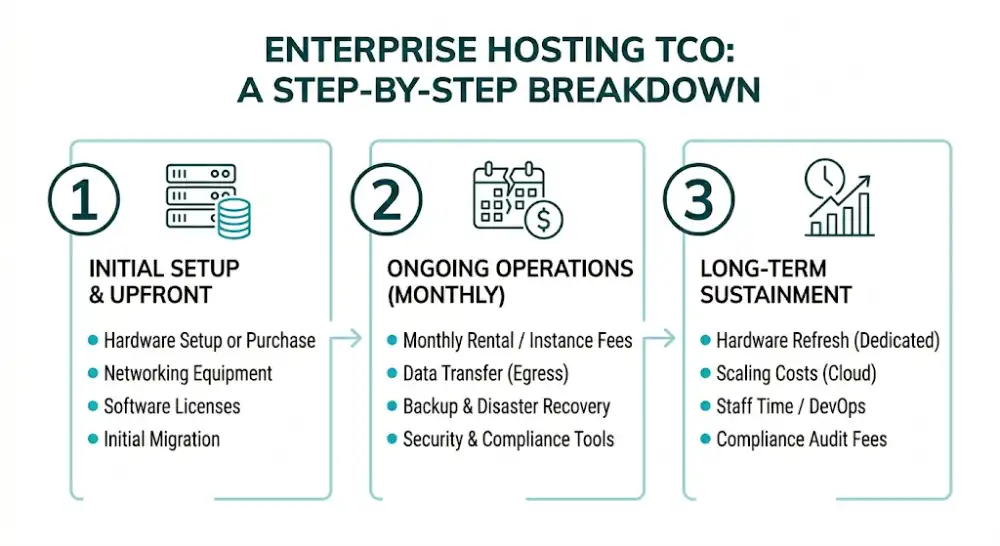
Total cost of ownership (TCO) goes well beyond your monthly bill. Knowing every line item helps you compare options fairly. The NIST definition of cloud computing is a useful reference for understanding the service models you are pricing against.
Upfront Costs
If you buy hardware outright, expect to spend $5,000 to $25,000 per server depending on specs. Add networking gear, racks, and software licenses. Most enterprises skip this and rent from a hosting provider, which spreads costs into monthly payments.
Monthly Operating Costs
Typical monthly costs include:
- Server rental: $200 to $2,500 based on configuration
- Bandwidth overages: variable
- Managed services: $150 to $1,000
- Backup and disaster recovery: $50 to $500
- Software licenses: variable
- Security tools: $100 to $1,000
Long-Term Costs
Long-term costs cover hardware refresh cycles (usually every three to five years), staff time for management, downtime impact, and migration costs when you scale. Cloud setups shift these costs but rarely remove them.
Dedicated Servers vs Cloud vs VPS: Cost Comparison
| Factor | Dedicated Server | Cloud Hosting | VPS |
|---|---|---|---|
| Upfront cost | Medium | Low | Low |
| Monthly cost (heavy use) | Low | High | Medium |
| Monthly cost (light use) | High | Low | Low |
| Scaling speed | Slow | Instant | Fast |
| Performance ceiling | High | High | Medium |
| Cost predictability | Excellent | Poor | Good |
| Compliance fit | Strong | Varies | Limited |
| Best for | Steady high traffic | Variable workloads | Mid-size apps |
For a company running sustained, heavy workloads, dedicated servers often beat cloud on raw cost. For workloads that scale up and down constantly, cloud usually wins.
Hidden Costs Most Businesses Miss
Several expenses surprise teams during the first year of cloud adoption. According to the Flexera 2026 State of the Cloud Report, wasted cloud spend rose to 29 percent in 2026, the first uptick in five years. That waste shows up in the line items below:
Bandwidth overage fees often cost $0.05 to $0.12 per gigabyte. A media-heavy site can rack up thousands each month.
Data transfer between regions adds fees for moving data across zones in multi-region cloud setups.
Egress charges during migration tend to cost more than expected when you move away from a cloud provider.
Engineering time goes up because cloud cost control needs DevOps expertise around tagging, autoscaling, and reserved instances.
Compliance audits run higher in regulated industries, since teams must verify that cloud configurations meet rules. Dedicated servers in known data centers simplify this work.
Quick tip: track every small cost line in your hosting bill for 90 days. Most teams find 10 to 20 percent in waste or unexpected fees.
How Do Dedicated Servers Save Money Over Time?
Dedicated servers save money over time through flat-rate pricing, full resource use, longer hardware life, and lower bandwidth costs at scale. After the break-even point, usually 18 to 36 months, savings compound each year.
Three patterns explain the savings:
Flat pricing protects budgets. Once you sign a contract, your hosting cost stays predictable. Cloud bills swing with usage, which makes budgeting harder.
Hardware lasts longer than software cycles. A well-maintained server runs reliably for five years or more. The longer you keep it, the better your return.
Bandwidth pricing favors heavy users. Many dedicated providers offer unmetered or high-cap bandwidth at flat rates. Cloud providers charge by the gigabyte, which punishes high-volume sites.
When Are Dedicated Servers Not Cost-Effective?
Dedicated servers do not fit every workload. Skip them if:
- Your traffic spikes wildly (product launches, viral campaigns, live events)
- You need to deploy in many global regions quickly
- Your team lacks server administration skills
- You are testing new ideas and need to scale up or down weekly
- Your app relies on serverless or container-native architectures
In these cases, cloud or hybrid setups usually cost less and move faster.
How to Calculate ROI on a Dedicated Server
Use this simple formula to estimate ROI:
ROI = (Cloud cost over 36 months minus Dedicated cost over 36 months minus Migration cost) ÷ Dedicated cost over 36 months × 100
Example calculation:
- Current cloud cost: $12,000 per month × 36 = $432,000
- Estimated dedicated cost: $4,000 per month × 36 = $144,000
- Migration cost: $25,000
- Savings: $432,000 minus $144,000 minus $25,000 = $263,000
- ROI: 263,000 ÷ 144,000 × 100 = 183 percent
A hosting cost calculator can speed this up if you want to compare several server configurations side by side.
Tips to Maximize Value From Your Dedicated Server
Get more from your investment with these practical steps:
Right-size your specs. Avoid paying for unused capacity. Start with realistic requirements and add resources as needs grow.
Choose managed hosting if your team is small. Managed services cost more upfront but save on staffing and reduce downtime.
Negotiate longer contracts. Annual or multi-year deals often unlock 15 to 25 percent discounts.
Use a hybrid setup. Run steady workloads on dedicated servers and burst to cloud for peak traffic. This combines low base costs with elastic capacity.
Monitor performance every month. Track CPU, RAM, disk, and bandwidth use to spot waste or bottlenecks early.
Plan for hardware refresh. Set aside budget every three to five years for upgrades. Old hardware costs more to maintain than to replace.
How Compliance Shapes Cost-Effectiveness
For finance, healthcare, and government workloads, compliance often tips the math toward dedicated servers. Auditors prefer fixed environments where you control the full stack. Cloud setups can meet the same rules but require more documentation, more security tooling, and more audit time.
A regulated business that pays $80,000 per year in cloud audit work might cut that figure in half with dedicated servers in a SOC 2 certified data center. Those savings rarely show up in basic hosting comparisons but matter a lot at scale. Reviewing the official requirements for HIPAA, PCI DSS, and GDPR helps you map which controls your hosting setup must support.
Frequently Asked Questions
Are dedicated servers worth it for large businesses in 2026?
Yes, for businesses with steady, high-volume workloads or strict compliance needs. Dedicated servers usually cost less than equivalent cloud setups over three years and offer better performance consistency. They are not ideal for unpredictable traffic or fast global expansion.
How much does a dedicated server cost per month for a large business?
Most enterprise dedicated servers cost between $300 and $2,500 per month, based on CPU, RAM, storage, and bandwidth. High-end builds with multiple GPUs or large NVMe arrays can exceed $5,000. Managed hosting adds another $200 to $1,000 per month.
When does a dedicated server pay for itself?
Most dedicated server setups break even against equivalent cloud spend within 18 to 36 months. After that, savings grow every year. Migration timing, hardware life, and traffic patterns shift the exact break-even point.
Is cloud hosting cheaper than dedicated servers?
Cloud hosting is cheaper for variable, unpredictable, or low-volume workloads. For sustained, high-volume workloads, dedicated servers typically cost 30 to 60 percent less over three years. The right answer depends on your usage patterns.
Can a dedicated server handle traffic spikes?
A single dedicated server has a fixed capacity ceiling. To handle spikes, large businesses often run load balancers across multiple dedicated servers or burst to cloud capacity during peak periods. Pure dedicated setups handle predictable scale better than sudden surges.
Do dedicated servers improve security and compliance?
Yes. Dedicated servers run in isolated environments, which removes shared-resource risks. They simplify audits for HIPAA, PCI-DSS, and GDPR because you control the full stack. Many compliance frameworks favor known data center locations over multi-region cloud setups.
Making the Final Decision
Dedicated servers stay financially smart for large businesses with steady traffic, heavy resource use, or strict compliance demands. Flat-rate pricing, predictable performance, and long hardware life often produce real savings within two to three years. Workloads with frequent spikes or rapid global growth still suit cloud platforms better.
Run your own TCO numbers, factor in compliance, and weigh your team’s skills before you choose. The right hosting setup depends on your specific workload, not on industry trends.


