
Every single website on the internet is a potential target for hackers. Distributed Denial of Service attacks have successfully taken down massive banks, government portals, gaming platforms, and small business sites. The size of your website does not matter to these attackers. What matters is whether your hosting provider is prepared to stop them.
DDoS protection is no longer an optional upgrade for web hosts. It is a basic requirement for doing business online. If your web hosting provider does not offer active mitigation, your site can be knocked offline for hours by anyone willing to rent an attack service for 20 dollars.
Without network protection, your physical server can be flooded with fake traffic until the system crashes. This leaves real visitors blocked from your content. It exposes your business revenue to extortion. It also puts your search engine rankings at severe risk due to prolonged downtime.
Our guide on what website downtime actually costs breaks down the real long-term impact on your business revenue and SEO authority.
This guide covers everything from basic networking terms to advanced routing strategies. You will understand exactly how these attacks work and how to check if your web host is keeping your digital property secure.
Key Takeaways
- A DDoS attack floods your web server with fake automated traffic to push out real users and force your website offline.
- Hosting level DDoS protection filters bad traffic at the network edge before it ever reaches your actual physical server.
- Modern attacks target database endpoints and use Artificial Intelligence to bypass simple firewalls.
- Premium hosting providers use Machine Learning to learn normal traffic patterns and prevent blocking real customers.
- When choosing a web host, you must verify their mitigation capacity and ensure they include Layer 7 application defenses.
Quick Answer
DDoS protection is a combination of network hardware, filtering software, and cloud tools that detect and absorb bad traffic during a cyber attack. Your hosting provider needs it because these attacks completely overwhelm server bandwidth and physical hardware. Without active filtering performed by your host, legitimate visitors simply cannot access your site. There is nothing a site owner can do locally using software plugins to stop a massive network flood once it hits the physical server.
Quick Glossary for Beginners
Before diving into the technical details, here are the core terms you need to understand.
| Term | Simple Definition |
| Botnet | A massive network of hacked computers and smart devices used by an attacker to send junk traffic. |
| Bandwidth | The maximum amount of data your server can send and receive at one time through its network cable. |
| WAF | Web Application Firewall. A security system that blocks malicious code and bad requests from reaching your database. |
| CDN | Content Delivery Network. A global group of servers that caches your website content closer to visitors to speed up loading times. |
| Anycast | A routing method that shares incoming traffic across multiple data centers worldwide to prevent bottlenecks. |
| Scrubbing Center | A specialized data facility built entirely to receive dirty network traffic, clean it, and send only the safe traffic back to the host. |
Part 1: Deep Dive Into DDoS Attacks
To understand why advanced protection is necessary, we must look at how these attacks function. A Distributed Denial of Service attack is a coordinated attempt to overwhelm a server with significantly more traffic than it can process. The primary goal is never to steal data. The sole goal is simply to make your website completely unavailable to the public.
The word distributed is what makes these attacks so difficult to block. Our dedicated DDoS protection hosting guide covers the structural differences, but a basic Denial of Service attack comes from one single computer.
You can block that single IP address easily. A Distributed Denial of Service attack uses millions of hacked devices located all around the world to send traffic at the exact same time. You cannot block millions of random IP addresses without also blocking your real customers.
The Anatomy of a Modern Botnet
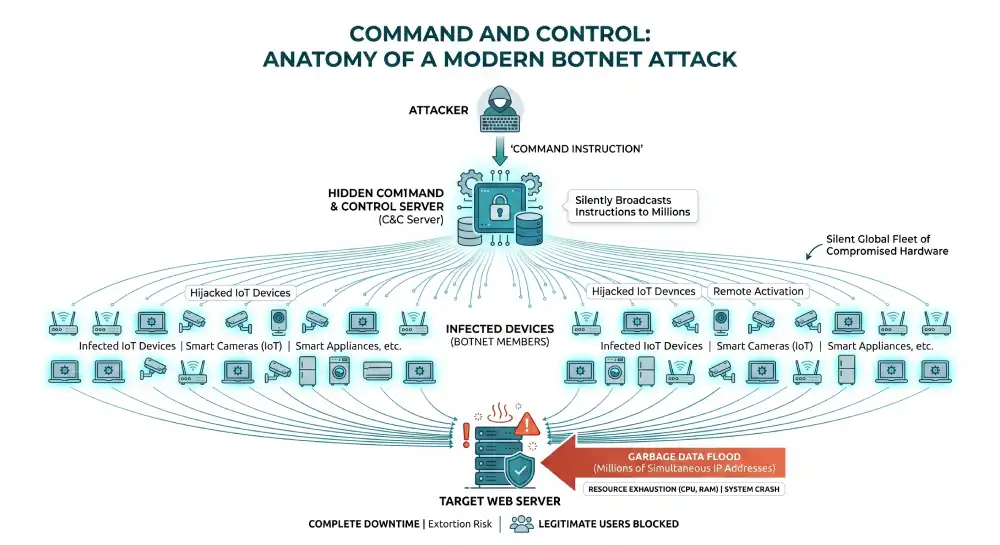
Modern botnets consist of hijacked home routers, infected laptops, and poorly secured smart devices like cameras and refrigerators. The device owners usually have no idea their hardware is being used against businesses. Because the traffic comes from everywhere at once, simple blocking rules fail completely.
Attackers control these massive fleets of devices using hidden servers. The attacker sends one instruction to their hidden server. That server then silently broadcasts the attack instructions to millions of infected devices globally. Within seconds, the devices wake up, connect to the internet, and begin rapidly flooding the target website with garbage data.
How Attacks Actually Work
From the perspective of your web server, an attack looks like a sudden and massive surge of traffic from countless global locations. Here is the exact sequence of events during a coordinated strike.
- Botnet Assembly: An attacker builds a network of hacked devices by scanning the internet for unpatched software. Alternatively, they simply rent an existing botnet on the dark web for a low hourly fee.
- Target Selection: The attacker identifies a specific IP address or domain name belonging to a business they wish to disrupt.
- Command Execution: The attacker issues the strike command to begin the assault.
- The Flood Begins: The botnet devices immediately begin sending junk data packets to your server at a totally unsustainable rate.
- Resource Exhaustion: Your server CPU, system memory, or network bandwidth maxes out at 100 percent capacity while frantically trying to process the data.
- Complete Downtime: Legitimate user requests time out and your site drops offline completely.
The Extortion Economy: Ransom DDoS
Attackers do not just take sites offline for fun. For enterprise platforms and ecommerce brands, Ransom DDoS is a primary financial threat.
In these extortion scenarios, an attacker sends a small warning flood to your server to prove their destructive capability. This warning attack usually lasts exactly five minutes. They immediately follow this demonstration with an encrypted email demanding a massive cryptocurrency ransom. If the business refuses to pay the ransom, the attacker launches a massive flood to cripple the target network entirely. Premium DDoS protection neutralizes this extortion threat by making the attacks completely ineffective.
Part 2: Breakdown of Attack Types
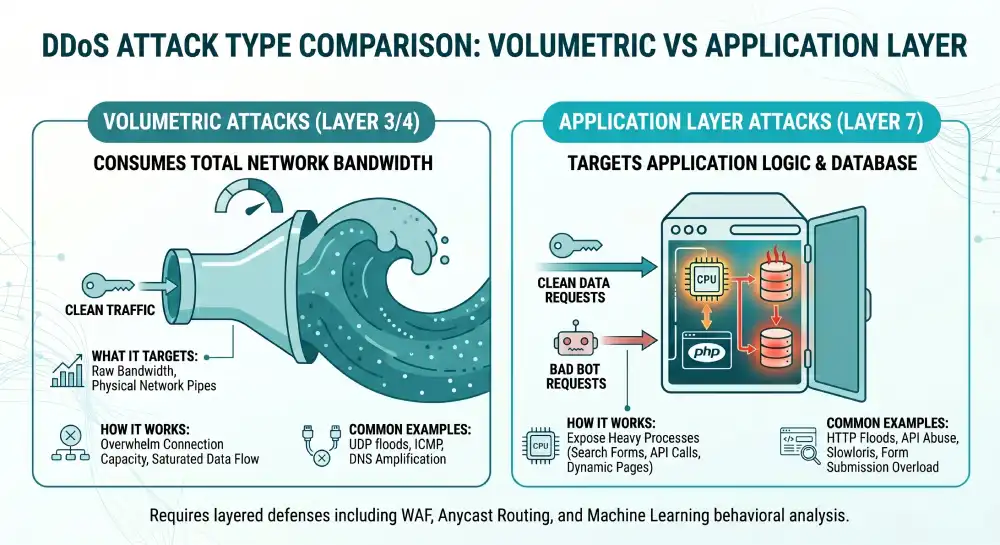
Attackers use different methods depending on the specific vulnerabilities they find in a target network. Knowing these distinct categories helps you understand exactly what your web host protection needs to cover.
| Attack Category | What It Targets | How It Works | Common Examples |
| Volumetric | Raw network bandwidth and internet pipes. | Consumes all available connection capacity by sending massive amounts of raw data measured in Terabits per second. | UDP floods, ICMP floods, DNS amplification. |
| Protocol | Server connection resources and memory limitations. | Exploits the fundamental way network protocols establish internet connections, leaving connections half open until the server crashes. | SYN floods, Ping of Death, Smurf attacks. |
| Application Layer 7 | Web application logic and database resources. | Sends real looking web requests to exhaust server CPU power, PHP workers, or database connections. | HTTP floods, Slowloris, API abuse. |
The Danger of Application Layer 7 Attacks
These are the absolute most sophisticated and dangerous threats today. They target the specific web application logic rather than the network pipe.
For example, an attacker might send massive numbers of requests to load heavy dynamic web pages or submit complex search forms. The server expends massive CPU computing power trying to generate these specific pages over and over again. Processing a form submission requires deep database queries, exhausting resources far more quickly than simply serving a static image.
Modern web development relies heavily on APIs. Attackers specifically target heavy API endpoints. Triggering complex database search queries takes extremely few requests to crash a database.
True Layer 7 WAFs must have advanced API validation to catch these highly precise strikes. Check out our list of critical secure hosting features to see how a modern web application firewall handles these application-layer threats.
Part 3: The Mechanics of DDoS Protection
Effective DDoS protection actively catches bad requests at the absolute edge of the network. It absorbs the massive bulk of the load and lets real visitors keep browsing normally. It relies on several synchronized mechanisms operating simultaneously in real time.
Traffic Inspection and Scrubbing Centers
Every single incoming request is heavily checked against known attack patterns. When a host detects a problem, all suspicious traffic is immediately redirected to a scrubbing center.
Inside the scrubbing center, specialized routing hardware analyzes the packets in real time. It drops the malicious automated packets and forwards only the clean human traffic back to your web server. This critical process is known as traffic scrubbing.
Anycast Routing Absorption
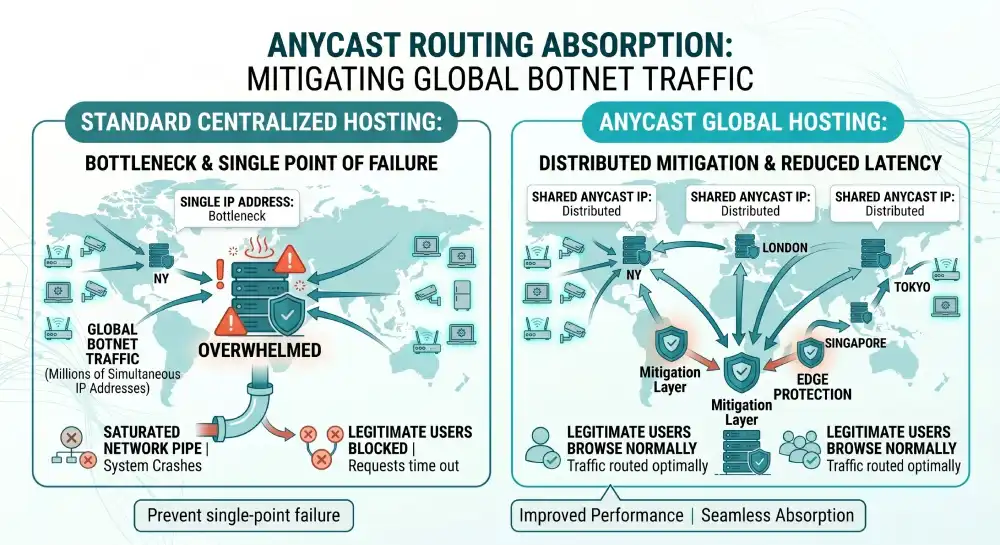
Anycast is an advanced network routing method where multiple physical servers located all across the globe share the exact same IP address.
When a massive botnet launches a global attack, the Anycast network intelligently routes the traffic to the data center physically closest to the source of the bad traffic. Instead of all the botnet traffic converging on your one single server located in New York, the traffic originating in Europe hits a server in Germany, and traffic from Asia hits a server in Japan. This spreads the massive flood across dozens of data centers, preventing any single location from ever being overwhelmed.
Rate Limiting and Behavioral Baselines
Rate limiting puts a very strict cap on exactly how many requests a single IP address can make within a specific short timeframe. If an IP requests the same secure login page one hundred times in one single second, the system simply blocks it.
However, simple rate limiting is no longer enough. Because modern attackers actively use Artificial Intelligence to dynamically alter their attack signatures, expert level DDoS protection relies heavily on Machine Learning behavioral baselines.
The defense system constantly learns what normal human traffic looks like for your specific website. It actively understands your peak hours, typical user navigation paths, and average session lengths. When an AI botnet attacks, the defense system recognizes the anomaly instantly and blocks the new threat automatically.
Challenge Mechanisms and False Positives
DDoS mitigation comes with inherent friction. Highly aggressive scrubbing can accidentally block legitimate human users. This scenario is known as a false positive.
Premium protection providers actively solve this problem by using advanced device fingerprinting and entirely invisible session challenges rather than executing blanket IP blocking. The system sends a tiny invisible mathematical puzzle to the visitor browser. A real web browser solves it instantly without the user ever knowing. A headless bot script cannot solve the puzzle, so the connection is silently dropped. This ensures a beautifully smooth user experience even while the network is under heavy fire.
Part 4: How Web Hosts Implement Defenses
Your web host ability to keep you online depends entirely on their specific infrastructure strategy. Not all web hosts build their internal networks the same way.
Network Level Upstream Protection
Enterprise hosting providers maintain highly expensive agreements with major internet service providers or dedicated mitigation platforms like Cloudflare to scrub incoming traffic. They actively filter traffic before it even reaches the core data center building. This is the most common form of robust protection for highly reputable hosting companies.
On Premise Hardware Appliances
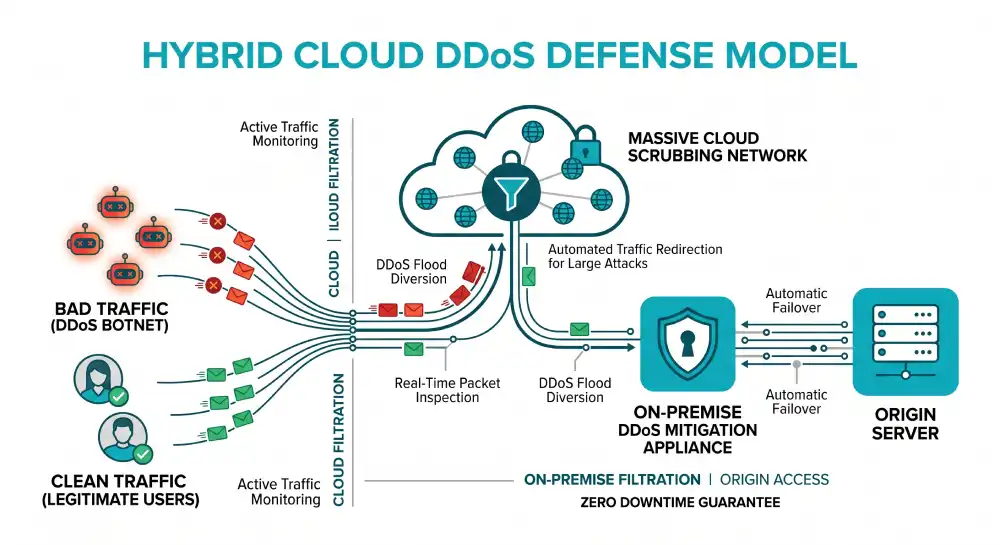
Some hosts prefer to install specialized hardware directly inside their data centers. This hardware rapidly inspects packets at line speed. While excellent for stopping known protocol attacks very quickly, on premise hardware is severely limited by the physical internet pipe coming into the building. If the physical pipe is exactly 100 Gbps, and the attack is 500 Gbps, the hardware cannot save the network because the pipe is totally clogged outside the building.
BGP Routing and RTBH
Network engineers heavily use the Border Gateway Protocol to announce highly secure routes across the internet. During a massive attack, engineers update the routes to rapidly pull traffic away from the vulnerable server and aggressively push it into a massive scrubbing center.
In extreme emergency cases, engineers use Remotely Triggered Black Holing. This explicitly commands the upstream internet service providers to simply drop all incoming traffic destined for the targeted IP address before it even reaches the host network. This entirely stops the attack from damaging other servers, but it absolutely guarantees total downtime for the target victim.
The Hybrid Cloud Approach
The absolute gold standard for premium web hosting infrastructure is a specialized hybrid setup. Large hosts combine on premise hardware appliances with massive cloud based scrubbing networks. Traffic is inspected locally for instant mitigation of very small attacks. If an attack strongly exceeds the local network capacity, the system automatically kicks the traffic over to the massive cloud scrubbing centers. This ensures zero downtime regardless of the attack size.
Part 5: Hosting Types and Your Vulnerability Risk
The specific type of hosting environment you choose drastically impacts your exposure to these attacks and the level of protection you actually receive.
| Hosting Type | Control Level | DDoS Risk Factor | Mitigation Responsibility |
| Shared Hosting | Very Low | Extremely High | Managed entirely by the host provider. You have no control over filtering. |
| Virtual Private Server | High | Medium | You manage the software firewall, but the host manages the physical network pipe. |
| Dedicated Server | Very High | Low to Medium | You manage hardware firewalls, but you rely on the host upstream network capacity. |
| Managed Cloud | Medium | Very Low | Handled automatically by massive global networks like AWS or Google Cloud. |
The Danger of Shared Hosting Environments
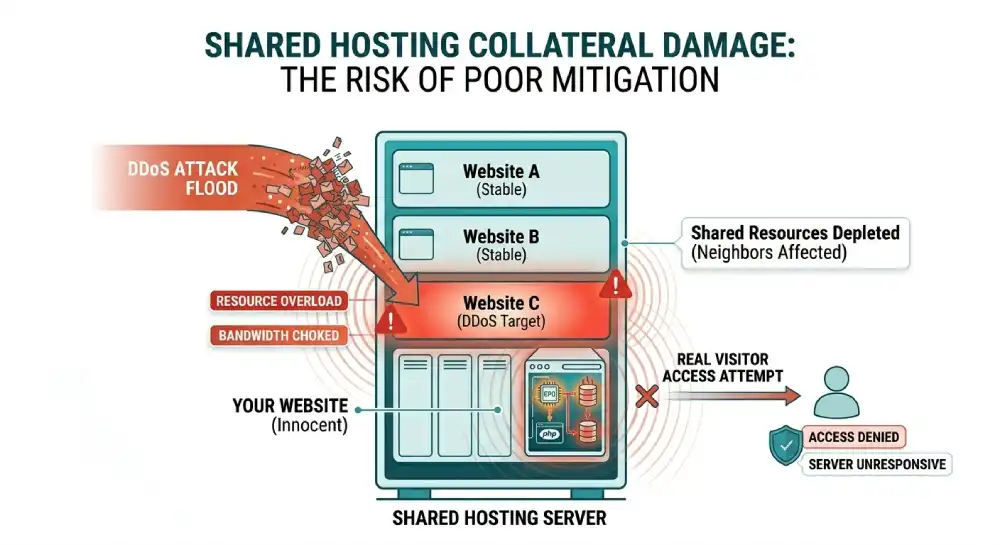
In a shared hosting environment, you share physical server resources with hundreds of other random websites. DDoS protection is managed entirely by the web host.
You can read our full post, what is shared hosting, to see how resource distribution works and why this collateral risk exists.
The massive risk here is extensive collateral damage. If another completely unrelated website on your shared server receives a massive DDoS attack, the entire server network connection becomes completely saturated. Your website will go offline even though you were absolutely not the target. Budget hosts offer exceptionally minimal protection, making your risk of collateral downtime exceptionally high.
Part 6: Why Your Hosting Provider Must Have Protection
Your host sits right exactly between the open internet and your website files. If they lack highly proper network defenses, absolutely no site level plugin or optimization technique can save you.
- You Cannot Block It Locally: By the time malicious traffic reaches your physical server, the physical network pipe is already saturated. Software firewalls inside WordPress cannot stop network floods. For a more comprehensive defense strategy at the application layer, review our hosting security guide to build a true multi-layered shield.
- Manual Intervention Fails: Attacks actively escalate from zero to terabits in a matter of mere seconds. If a host relies on human engineers to manually reroute traffic, your site will be completely down for hours before they even begin to fix it.
The True Cost of Website Downtime
The average financial cost of IT downtime reaches thousands of dollars per single minute for large organizations.
For ecommerce websites, this translates into immediate lost sales. If your checkout page is offline during a major seasonal promotion, that revenue is gone forever. For SaaS companies, downtime means heavily breached service level agreements, severely damaged brand reputation, and extreme customer churn. Furthermore, prolonged downtime heavily negatively impacts your SEO rankings. Search engine crawlers will deliberately lower your domain authority if they cannot access your pages reliably.
What Happens Without Host Protection?
If your web host does not have proper mitigation tools, your site simply goes down entirely. Furthermore, budget hosts will frequently null route your account. This means the host deliberately suspends your site entirely to protect the rest of their server network from the attack traffic. You end up actively taken offline by your own host. Attackers quickly learn your site is an incredibly easy target and will repeatedly strike whenever they want.
Part 7: Detecting an Attack in Real Time
Recognizing an attack very early allows you to actively communicate effectively with your web host and immediately implement emergency proxy measures. Several extremely clear signals typically trigger simultaneously during an active attack phase.
- Massive Unexplained Traffic Spikes: You will see a sudden surge of traffic from various global locations with no logical referral source. If you did not actively run a viral ad campaign, a massive traffic spike is a major warning sign.
- Unusual Geographic Patterns: A highly sudden flood of traffic originating entirely from a single foreign region where you do not normally do any business at all.
- Resource Exhaustion Warnings: Your server CPU usage, RAM consumption, or database concurrent connections max out at 100 percent in your hosting dashboard despite having no real human users on the site.
- Gateway Errors: Your site loads painfully slow, times out entirely, or frequently returns 502 Bad Gateway and 503 Service Unavailable error screens.
- Repetitive Server Logs: Checking your raw server access logs will show completely relentless identical requests to one single specific endpoint, such as your admin login portal or a heavy search query page.
Part 8: Step by Step Incident Response Plan
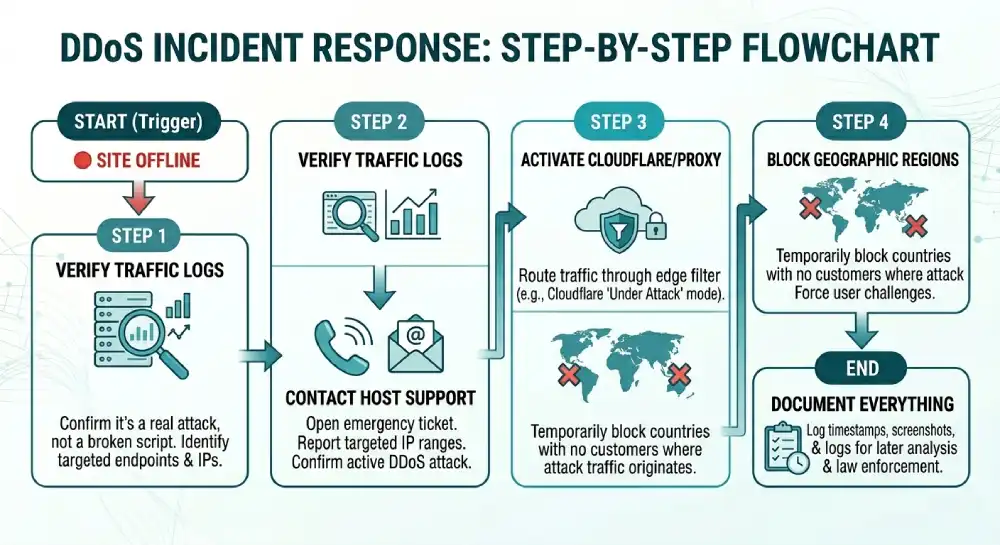
If you successfully determine your site is actively under attack, precisely follow these exact steps to restore service safely.
- Do Not Panic: Frantic reactions often cause significantly more configuration issues than the attack itself.
- Verify The Attack: Carefully check your analytics and raw server logs to absolutely confirm this is a real attack and not just a badly broken script causing an infinite server loop.
- Contact Host Support Immediately: Open an extremely urgent emergency ticket or call your host. Tell them you are actively experiencing a suspected DDoS attack and explicitly provide them with the specific IP ranges being targeted if you can see them.
- Activate Cloudflare or Proxy Services: If your host simply cannot stop the attack quickly, immediately change your domain nameservers to forcefully route traffic through a free proxy service like Cloudflare. Turn on their Under Attack mode, which absolutely forces maximum challenge pages for all incoming visitors.
- Block Geographic Regions: If the attack is explicitly originating from specific countries where you have absolutely zero real customers, heavily use your host control panel to temporarily completely block all traffic from those entire regions.
- Document Everything: Actively export your server access logs, extensively take screenshots of resource usage, and carefully record exact timestamps. You will deeply need this data to analyze the attack method later and potentially provide it to law enforcement.
Part 9: Legal and Compliance Frameworks
It is incredibly important to understand the broader legal landscape surrounding these severe cyber threats.
Launching a DDoS attack is highly illegal globally. In the United States, it strictly violates the Computer Fraud and Abuse Act. Severe penalties include massive financial fines and incredibly lengthy prison sentences. The United Kingdom, European Union member states, and most developed nations have identical extremely strict laws.
However, because botnets operate heavily globally across multiple international jurisdictions using completely spoofed IP addresses, strong technical defense is infinitely more highly reliable than legal recourse. Actually finding the actual physical person who secretly rented the botnet is incredibly difficult for authorities.
Furthermore, if your business website actively handles highly sensitive customer data, extensive downtime can have massive compliance implications. Under highly strict frameworks like GDPR or HIPAA, completely failing to strongly maintain highly adequate security and availability protections can result in incredibly severe regulatory scrutiny and massive fines.
Part 10: What to Look for When Evaluating a Host
Do not ever settle for vague marketing terms like enterprise grade security on a basic pricing page. You must actively ask your prospective web host these exact highly technical questions before ever moving your sites to their physical servers.
- Is the Protection Always On? The mitigation system must monitor incoming traffic absolutely continuously. On demand protection takes several full minutes to activate, which absolutely guarantees your site will experience severe downtime during the initial attack wave. The Cybersecurity and Infrastructure Security Agency explicitly recommends continuous always on mitigation as a baseline standard.
- What is the Total Mitigation Capacity? Look for network capacity explicitly measured in Terabits per second. If a host only has 50 Gigabits of total capacity, a highly modern attack will crush them absolutely instantly.
- Is Application Layer 7 Covered? Many hosts only actively block Layer 3 network floods. If you run complex dynamic web applications, you absolutely must have extensive Layer 7 WAF protection actively included. The OWASP Web Application Firewall guide is a perfect resource to understand how these application defenses function, and our web hosting firewall guide details exactly how providers set them up on the server side.
- Does the System use Machine Learning? Actively verify if their Web Application Firewall effectively adapts to entirely new threats completely automatically using intelligent behavioral analysis.
- Are Bandwidth Overages Waived? Heavily confirm in writing that you will absolutely not be billed massive financial overage fees for malicious attack traffic that simply happens to hit your account.
Part 11: Does Every Website Need Protection and What Does It Cost?
Technically yes, every single active website extremely deeply needs some form of baseline protection. However, the exact scale and total financial cost depend entirely on your specific business model.
| Protection Tier | Best Suited For | Monthly Cost Estimate | Key Features Included |
| Free Tier | Personal blogs, portfolios, and small local business sites. | 0 dollars. | Basic network level protection, Anycast DNS, global CDN caching. |
| Mid Tier | Ecommerce stores, growing SaaS products, medium traffic portals. | 20 to 200 dollars. | Layer 7 WAF rules, advanced bot management, detailed reporting analytics. |
| Enterprise | Financial institutions, high risk gaming servers, large SaaS platforms. | 1000 dollars plus. | Dedicated security engineers, custom SLA guarantees, massive multi Terabit scrubbing capacity. |
The Truth About Billing and Attack Traffic
This highly depends entirely on your specific hosting terms of service. Highly reputable edge hosts actively absorb the malicious attack network traffic completely and effectively waive the explicit bandwidth usage.
Extremely budget basic hosts completely without highly dedicated active protection often count the malicious active network traffic heavily against your specific monthly quota. This explicitly results in massive surprise billing. Always check your explicit server contract.
Part 12: Debunking Common Misconceptions
Several persistent internet myths quietly cost website owners incredibly real money and constantly cause totally unnecessary daily stress.
My site is too small to be successfully attacked.
Most network attacks are automated intelligent scripts actively scouring the entire internet for unpatched vulnerabilities. Automated bots do not care remotely about your specific company size. Small hobby forums, local business landing pages, and indie game servers actively get hit absolutely constantly.
A standard basic software firewall is totally enough.
Traditional local software firewalls drop network packets actively based entirely on static written rules. They cannot actively absorb massive terabit scale network floods or strongly distinguish a real human user from a highly sophisticated headless browser bot. Your simple software firewall will explicitly crash completely along with the highly overloaded server.
My Content Delivery Network actively handles it completely.
Standard simple edge content caching alone will absolutely not successfully stop an intelligent Application Layer flood explicitly targeting your central database. A basic CDN actively speeds up simple image loading, but it entirely does nothing to explicitly scrub completely malicious database queries unless it explicitly has a dedicated WAF actively attached securely to it.
DDoS protection severely slows my active website down.
Modern Anycast global protection explicitly routes incoming network traffic intelligently through massive global edge networks. The extremely slight computational overhead of actively inspecting incoming requests is usually completely offset actively by the significantly faster global delivery of intelligently cached assets. By processing network traffic significantly closer entirely to the physical user, totally proper network protection explicitly actually makes your active live site significantly faster.
Frequently Asked Questions
What is a DDoS attack?
A DDoS attack is a cyber attack where thousands of compromised devices flood a website with fake traffic to take it offline. It stands for Distributed Denial of Service. Attackers use massive networks of hacked computers and devices to overwhelm a target server’s bandwidth and resources.
What is the precise difference between a DoS and a DDoS attack?
A DoS attack originates from one single machine or internet connection. A DDoS attack uses thousands or even millions of compromised devices simultaneously. This makes a DDoS attack far harder to stop because blocking a single IP address does not stop the attack traffic.
Can I effectively protect my live website without changing my current host?
Only partially. You can place a reverse proxy or CDN security layer in front of your current host to filter malicious traffic. However, if the attack is large enough to overwhelm your hosting provider’s network connection itself, external protection alone may not be enough. Your hosting provider’s infrastructure still matters.
How do I know if my current host’s network protection is actually working?
Ask your hosting provider for exact mitigation capacity, attack detection speed, and WAF details. Check whether your dashboard includes attack logs or mitigation reports. If the provider gives only vague marketing claims without technical specifics, the protection is likely limited.
Can an SSL certificate prevent a DDoS attack?
No. SSL certificates encrypt data between the visitor and the server, but they do not stop malicious traffic floods. In some cases, SSL processing can even increase server CPU usage during certain types of attack traffic, such as SSL flood attacks.
Why do attackers use IoT devices instead of computers?
Internet of Things devices like smart cameras, routers, and smart plugs often ship with weak default passwords and receive few security updates. That makes them easier to compromise in large numbers compared to modern computers, which usually have stronger built-in security protections.
Conclusion
DDoS protection matters immensely because your hosting provider network is the absolute first line of defense between your website files and the hostile open internet. No amount of image optimization, security plugins, or careful coding practices can ever compensate for a web host that cannot absorb a massive network level traffic flood.
When choosing a reliable web host, you must demand clear specifics on mitigation capacity, Machine Learning integration, and continuous always on routing protocols. The vast difference between a host with real protection and one without it is the very real difference between a website that stays up dependably during an attack and one that goes totally dark until someone manually intervenes. Strong DDoS protection intelligently turns a potential business disaster into a quiet background event your visitors never even notice. Build your digital platform on a web host that takes infrastructure security seriously.


