
Your website is only as safe as the server it sits on. Most people pick a hosting plan based on price or speed, and never think twice about security. That is the moment hackers are counting on.
This guide walks you through every security feature that actually matters, in plain English. No jargon walls. No vague checklists. By the end, you will know exactly what to look for, what to skip, and what to run from.
Here is what you will learn:
- What secure hosting really means (and what providers hide in fine print)
- The non-negotiable features every host must have
- The settings you need to check yourself even after you sign up
- Red flags that signal a host is cutting corners on your security
- The right questions to ask before you hand over your payment details
Table of Contents
What Does Secure Web Hosting Actually Mean?
Secure web hosting means your hosting provider puts systems in place to protect your website, your data, and your visitors from attacks, breaches, and downtime caused by malicious activity.
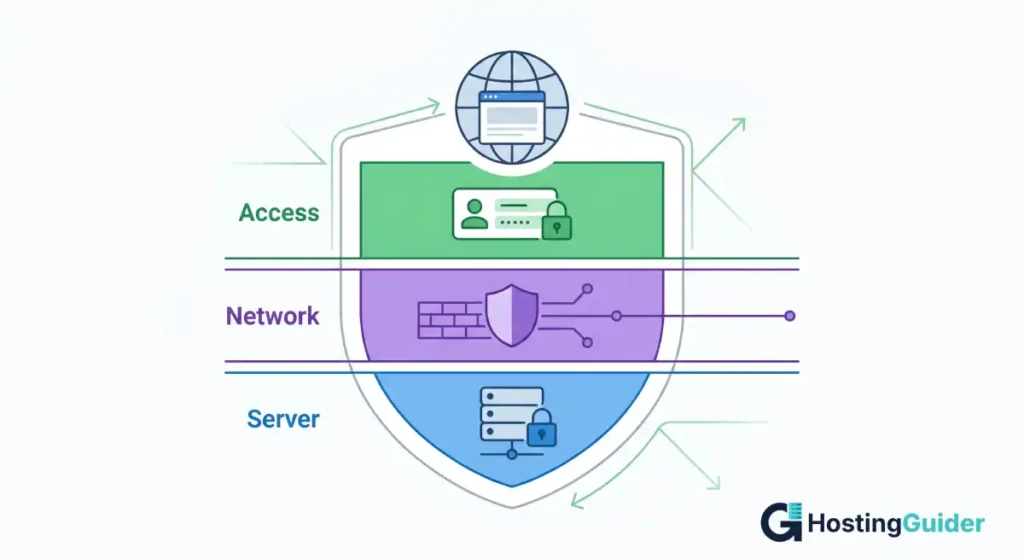
It covers three layers. First, the server itself (the physical or virtual machine your files live on). Second, the network around that server (what traffic gets in and out). Third, your account access (who can log in and what they can do).
A host that only focuses on one layer is not truly secure. You need all three working together.
Key Takeaways
- SSL/TLS certificates are the baseline. Any host that does not offer free SSL is not worth your time.
- Firewalls and malware scanning should be active by default, not sold as add-ons.
- Automated daily backups are non-negotiable. If a host only backs up weekly, keep looking.
- Two-factor authentication (2FA) on your hosting account is one of the easiest wins you can get.
- Uptime guarantees tell you how much the host trusts their own infrastructure. Look for 99.9% or higher, with compensation clauses.
- Read the data center compliance certifications. They tell you more than any marketing page ever will.
Quick Answer: What Security Features Should a Web Host Have?
A secure web host must include free SSL/TLS certificates, a hardware or software firewall, daily automated backups, malware scanning and removal, DDoS protection, and two-factor authentication for account access. Bonus features include a Web Application Firewall (WAF), server-side security hardening, and data center certifications like ISO 27001 or SOC 2. Missing even two of these puts your site at risk.
Start Here: SSL/TLS Certificates Are Not Optional
The padlock you see in your browser address bar is created by an SSL/TLS certificate. It encrypts data moving between your visitor’s browser and your server, so no one in between can intercept passwords, form submissions, or payment details.
Every credible hosting provider gives you a free SSL certificate through Let’s Encrypt, the free, automated certificate authority backed by major tech organizations. If a host is charging you extra for SSL on a basic plan, that is already a red flag.
Here is what to check:
- Is SSL included free on all plans, or only premium ones?
- Does the host auto-renew your certificate, or do you have to do it manually?
- Do they support wildcard SSL (covers all subdomains) if you need it?
A lapsed SSL certificate does not just break your padlock. It puts a giant browser warning in front of every visitor, which destroys trust and can tank your search rankings overnight.
Firewalls: Your First Line of Defense
A firewall sits between your server and the internet. Its job is to check every incoming connection request and block the ones that look suspicious.
There are two types you should know about. Our web hosting firewall guide explains both in more detail.
Network Firewall: Sits at the hosting provider’s data center level. It filters traffic before it even reaches your server. Most reputable hosts run these automatically, but confirm it is not an optional paid add-on.
Web Application Firewall (WAF): This one is smarter. It understands web traffic specifically, so it can block SQL injection attacks, cross-site scripting (XSS), and other application-layer exploits. The OWASP Top 10, the widely referenced list of critical web application security risks, shows exactly what a WAF is designed to stop.
When evaluating a host, ask these directly:
- Is a WAF included, or is it a paid upgrade?
- Which WAF rules are active by default?
- Can you see firewall logs if you need to investigate an incident?
Malware Scanning and Removal
Even with a great firewall, malware can slip through. Outdated plugins, compromised themes, weak FTP passwords, scripts that have not been patched in months. All of these are open doors.
A good host runs automated malware scanning daily. Some run it hourly. The scan checks your files for known malicious code patterns and flags or removes anything suspicious.
What separates a solid host from a great one is whether malware removal is also included. Some hosts will alert you that your site is infected but charge you hundreds of dollars to clean it. Others, like hosting providers that include the Imunify360 security suite, handle this automatically at no extra cost.
Ask the provider:
- How often do you scan for malware?
- Is malware removal included, or does it cost extra?
- Will you notify me immediately if something is found?
If the answer to the last question is “no”, move on.
DDoS Protection: Keeping Your Site Online Under Attack
A Distributed Denial of Service (DDoS) attack floods your server with fake traffic until it crashes. These attacks can be carried out by bored teenagers or hired by competitors. Either way, the result is the same: your site goes down, and it stays down.
According to data from Cloudflare, DDoS attacks grew significantly in both size and frequency through 2023 and into 2024, with thousands of attacks recorded daily. No site is too small to be targeted.
DDoS protection works by detecting unusual spikes in traffic and filtering out the fake requests before they reach your server. Quality providers either build this into their infrastructure or integrate with services like Cloudflare.
Questions to ask:
- Is DDoS protection included, or does it require a separate service?
- What is the maximum attack volume your infrastructure can absorb?
- Is there an automatic failover if one server gets overwhelmed?
Automated Backups: Your Safety Net When Everything Goes Wrong
Backups are not a security feature in the traditional sense. They do not stop attacks. But downtime from a breach is just as costly as the breach itself. Read our guide on what website downtime actually costs to understand why.
But they are the reason a security incident does not become a permanent disaster.
If your site gets hacked, defaced, or accidentally broken by a plugin update, a backup from yesterday means you are back online in minutes. Without one, you could lose weeks of work.
Here is the minimum you should accept:
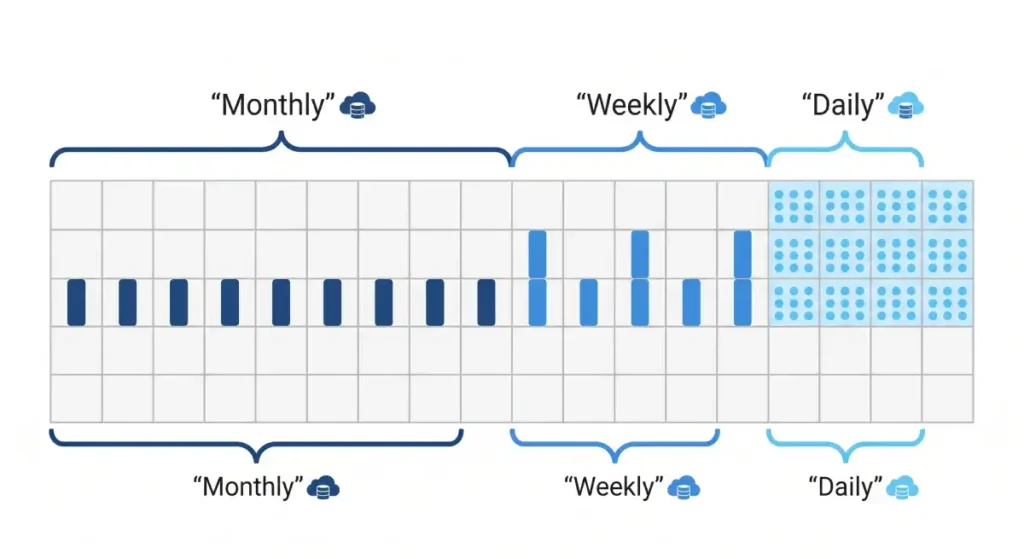
- Daily automated backups stored off-server (not on the same machine as your site)
- At least 7 to 14 days of backup history so you can roll back to before an incident started
- One-click restore functionality so you do not need to be technical to use it
Some hosts only back up on their own schedule and keep just 3 days of history. That sounds fine until an attack goes unnoticed for four days.
Two-Factor Authentication and Account Access Controls
Your hosting account is the master key to your entire website. If someone gets in, they can redirect your domain, delete your files, or plant code that steals your visitors’ data.
Two-factor authentication (2FA) adds a second step to login. Even if someone has your password, they cannot get in without the second code. This one setting blocks the vast majority of credential-based attacks.
Check these before signing up:
- Does the hosting control panel (cPanel, Plesk, or a custom dashboard) support 2FA?
- Can you set up separate user accounts with limited permissions for team members?
- Are there login attempt limits and automatic lockouts?
The NIST Digital Identity Guidelines recommend phishing-resistant multi-factor authentication as a baseline for any account protecting sensitive data. Your hosting account qualifies.
Server Hardening: What Happens Behind the Scenes
Server hardening is what your hosting provider does to the operating system and software running on your server to reduce the attack surface. Our hosting security guide covers what a properly hardened hosting environment looks like. Most of this happens without you seeing it.
A hardened server typically has:
- Unnecessary ports and services disabled
- Regular operating system patches and security updates applied automatically
- PHP versions updated and outdated versions removed
- File permissions locked to prevent unauthorized writes
- Fail2Ban or equivalent software running to block repeated failed login attempts
You will not always find this information on a pricing page. It often lives in technical documentation, security whitepapers, or support articles. If you cannot find any mention of server hardening in a host’s documentation, that says a lot.
What Data Center Certifications Actually Tell You
Data center certifications are the closest thing to independent proof that a hosting provider takes security seriously. They are not marketing badges. They require real audits by third-party organizations.
The three you will encounter most often:
ISO 27001: This is the international standard for information security management. Achieving it means the organization has a documented, tested, and audited system for handling security risks.
SOC 2 Type II: A US-standard audit that verifies security, availability, processing integrity, confidentiality, and privacy controls over time (not just at one point in time).
PCI DSS: Relevant if you are processing payments. This compliance standard is required by major card networks.
You can ask any host directly: what certifications do your data centers hold? If they cannot answer, that is a concern. The Electronic Frontier Foundation’s guidance on HTTPS also highlights why verified infrastructure matters for data in transit.
Uptime Guarantees and What They Actually Mean
A 99.9% uptime guarantee sounds impressive. But do the math. Our website uptime guide breaks down exactly how much downtime each percentage actually allows per year. 99.9% still allows for about 8.7 hours of downtime per year. For a business site, that is real money and real reputation damage.
Look for hosts that offer 99.95% or 99.99% SLAs (Service Level Agreements), and pay attention to what the compensation clause says. A host that offers “credit toward future hosting” if they miss the SLA is offering you much less than one that provides a proportional refund.
Things that affect uptime beyond the guarantee:
- How many redundant power systems does the data center have?
- Is your site on a shared server that could be hammered by another customer’s traffic spike?
- Does the host use a CDN (Content Delivery Network) to distribute the load?
Privacy Policy and Data Handling
This one gets overlooked constantly. Your hosting provider stores your website files, your database, and often your customer data. Where that data lives, who can access it, and what happens to it when you cancel matters.
Read the privacy policy for these specifics:
- Is your data stored in a jurisdiction with strong data protection laws?
- Does the provider share your data with third parties for advertising?
- What is the data deletion process if you leave?
If you are serving European customers, your host must handle data in compliance with GDPR. If you are in the US healthcare space, HIPAA rules may apply. Google’s Safe Browsing Transparency Report is one reference point for understanding how site safety is evaluated externally. A host that ignores compliance puts you at legal risk, not just security risk.
Red Flags That Tell You to Walk Away
Not every host is what it claims on the landing page. Here are the signs that should make you reconsider immediately.
- SSL is an optional paid upgrade, not included.
- No mention of firewalls or malware scanning in any documentation.
- Backups are weekly, not daily, and stored on the same server.
- 2FA is not supported on the control panel.
- No answer when you ask about data center certifications.
- Support response time is measured in days, not hours.
- Uptime SLA has no compensation clause.
- The company has no listed physical address or verifiable contact details.
Security is not something a hosting provider can fake for long. Look for specifics, not vague claims.
The Questions to Ask Before You Sign Up
Use this as your checklist. Copy it and send it to support before you pay. Our secure hosting features guide goes deeper on each of these points.
A legitimate provider will answer every single one.
- Is SSL included on all plans, and do you auto-renew it?
- Do you include a Web Application Firewall, or is it an add-on?
- How often do you run malware scans, and is removal included?
- Is DDoS protection built in?
- How often are automated backups taken, and how many days of history do you keep?
- Does your control panel support two-factor authentication?
- What data center certifications do you hold?
- What is your SLA uptime guarantee, and what is the compensation if you miss it?
- Where is my data stored, and what is your data deletion policy?
If a provider goes vague on any of these or pushes back with “our platform is inherently secure”, trust your gut.
Frequently Asked Questions
What is the most important security feature in web hosting?
SSL/TLS encryption is the baseline, but the most important single feature is automated daily backups stored off-server. An SSL certificate protects data in transit. Backups protect your entire site from permanent loss after an attack, a hack, or human error. No other feature compensates for missing backups when something goes wrong.
Is shared hosting secure enough for a small business?
Shared hosting can be secure if the provider has proper account isolation, which prevents one site on a shared server from accessing another. Look for hosts using container-based isolation or CloudLinux. That said, small businesses handling customer payments or sensitive data should consider VPS or managed hosting for stronger control over their environment.
How do I know if my current hosting provider is secure?
Log into your hosting account and check for 2FA support. Look for SSL certificates auto-renewing without your involvement. Check whether there is a built-in malware scanner in your dashboard. Run your domain through a tool like Sucuri SiteCheck (sucuri.net/website-scanner) to get an external view of your site’s current security status.
What is the difference between a firewall and a WAF?
A firewall controls which network traffic reaches your server based on IP addresses, ports, and protocols. A Web Application Firewall (WAF) goes deeper and inspects the actual content of web requests. It can block SQL injection, XSS attacks, and other application-layer exploits that a regular firewall would let through because they look like normal web traffic.
Do free hosting providers offer real security?
Most free hosting providers cut corners on security because there is no revenue to fund proper infrastructure. You typically get no firewall, no daily backups, shared resources with no account isolation, and no real support if something breaks. For anything beyond a hobby project, free hosting is a liability.
What does DDoS protection actually protect against?
DDoS protection defends your site against volumetric attacks where thousands of fake requests flood your server until it crashes under the load. Without it, even a moderate-sized attack can take your site offline within minutes. Good DDoS protection detects the traffic spike early, filters out the malicious requests, and keeps your site running for legitimate visitors.
How often should web hosting backups run?
Daily backups are the minimum standard for any site that updates content regularly. E-commerce stores and high-traffic blogs benefit from backups every 6 to 12 hours. The backup should be stored on a separate server or data center from your main site. That way, if the primary server fails completely, your backup is not lost with it.
Putting It All Together
Choosing secure hosting is not about finding the provider with the longest list of security buzzwords. It is about verifying that the fundamentals are actually in place: SSL that renews itself, a firewall that does not require your credit card to activate, daily backups that go somewhere safe, and an account you can lock down with 2FA.
Ask the hard questions before you sign up. Read the SLA carefully. Check the certifications. Your website represents your work, your brand, and in many cases your customers’ private data. The few extra minutes you spend evaluating security features upfront is far cheaper than recovering from a breach that could have been prevented.


