
Every website you visit starts with a domain name. You type one into your browser, hit enter, and a website loads in seconds. But what really happens behind the scenes? And if you want to start a blog, business, or portfolio, how do you get one of your own?
This guide breaks it all down in plain words. You will learn the parts of a domain, how it connects to a website, the types you can pick from, and how to register one without overpaying.
In this guide, you will learn:
- What a domain name is and why it exists
- How a domain name works step by step
- The parts that make up every domain
- The main types of domains and which one fits you
- How to register your own domain in minutes
- Common mistakes that cost beginners time and money
- Pro tips to pick a name that grows with your brand
By the end, you will know enough to register a domain with confidence and skip the traps that catch most first-time buyers.
Key Takeaways
- A domain name is the human-friendly address of a website, like google.com or wikipedia.org.
- The internet runs on numbers (IP addresses), and domains exist so you do not have to memorize them.
- Every domain has at least two parts: the name itself and the extension (.com, .net, .org, and so on).
- You do not buy a domain forever. You rent it from a registrar, usually one year at a time.
- A short, brandable, easy to spell name beats a clever or keyword-stuffed name every time.
- Most domains cost between $10 and $20 per year for popular extensions.
Quick Answer
A domain name is the address people type into a browser to reach a website. It replaces a long string of numbers (an IP address) with words that are easy to remember. Instead of typing 142.250.190.78, you just type google.com. You register a domain through a company called a registrar and pay a small yearly fee to keep it active.
What a Domain Name Really Means
A domain name is the readable name of a place on the Internet. Our domain name statistics cover global registration totals, extension market share, domain growth trends, and how the domain industry has evolved through 2026.
Think of the internet as a giant city. Every website is a building, and every building has a unique number on the wall (the IP address). A domain name is the street name and house number painted on the front, so people can actually find it.
Without domain names, you would need to remember strings like 172.217.16.142 just to visit one site. With domain names, you type a few easy words and the system handles the rest.
Here is a quick example. If you opened a bakery online, your domain might be sweetcrumbs.com. Customers see those words on your card, your packaging, and your ads. They never see the IP address running underneath.
According to ICANN, the global non-profit that helps coordinate the system, a domain name does not have to stay tied to one specific computer. You can switch hosting providers and the name keeps working, because the link between the name and the number can be updated anytime. Source: ICANN
How a Domain Name Works (Step by Step)
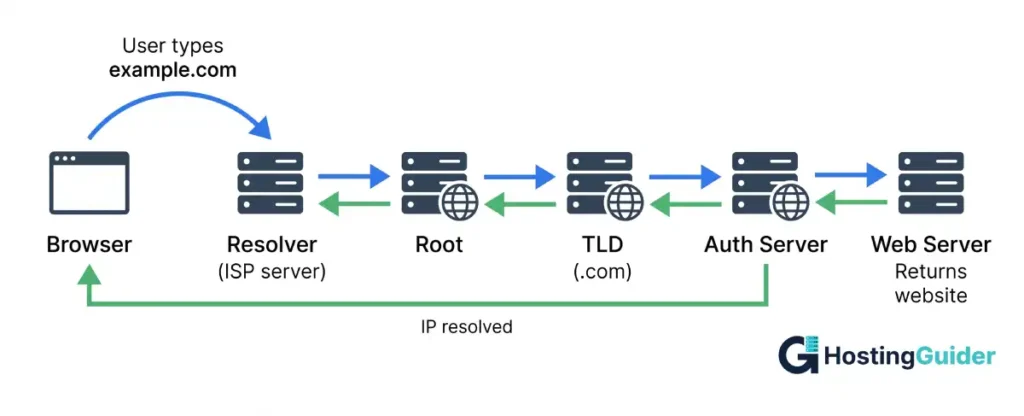
When you type a domain into your browser, a quick chain of events happens before the page loads. This system is called the Domain Name System, or DNS.
Here is what happens, step by step:
- You type a domain like example.com into your browser.
- Your browser asks a DNS resolver (often run by your internet provider) to find the matching IP address.
- The resolver checks its memory. If it has looked up that name recently, it returns the IP fast.
- If not, the resolver asks a root server, then a top-level domain server (for .com), then the domain’s authoritative name server.
- The authoritative server returns the right IP address, like 93.184.216.34.
- Your browser uses that IP to connect to the web server hosting the site.
- The web server sends back the page, and you see it on your screen.
All of this usually finishes in a fraction of a second. Most users never notice it happening.
According to Cloudflare, DNS works like a phone book that translates names into numbers so machines can talk to each other. Source: Cloudflare Learning Center
The Parts of a Domain Name
Every domain name has clear parts. Once you can spot them, the whole system makes more sense.
Take the domain blog.coolshop.com. It has three parts:
- blog is the subdomain
- coolshop is the second-level domain (the name you register)
- .com is the top-level domain, also called the TLD or extension
Read it from right to left. The TLD comes first in the hierarchy, then the second-level domain, then any subdomains.
Here is a simple breakdown:
| Part | Example | What it does |
|---|---|---|
| TLD (extension) | .com | Tells you the category or country |
| Second-level domain | coolshop | The unique name you choose |
| Subdomain | blog | A separate section under your main domain |
| Full domain | blog.coolshop.com | The complete address |
You can have many subdomains under one domain. For example, mail.google.com, drive.google.com, and maps.google.com all sit under google.com.
Domain Name vs URL vs Website
People often mix these three terms up. They are related but not the same.
- A domain name is the address. Example: wikipedia.org
- A URL is the full path to a specific page. Example: https://en.wikipedia.org/wiki/Domain_name
- A website is the actual content (pages, images, videos) sitting on a server, viewed through that URL.
Think of it this way. The domain is your home address. The URL is a specific room in your house. The website is everything inside the house. Source: Mozilla MDN
Types of Domain Names You Can Pick
There are many types of domains, but most fall into a few main groups. Knowing the differences helps you pick the right one for your goal.
Generic Top-Level Domains (gTLDs)
These are the most common extensions. They are open to anyone, anywhere. Examples include:
- .com (commercial, used by most businesses)
- .net (networks, often a backup to .com)
- .org (originally for non-profits, but open now)
- .info (general information sites)
- .biz (businesses)
According to the Verisign Domain Name Industry Brief, .com and .net together held about 173.5 million registrations at the end of Q4 2025, making them the largest TLDs in the world. Source: Verisign DNIB Q4 2025
Country Code Top-Level Domains (ccTLDs)
These are tied to a specific country or region. Each one is two letters long. Examples:
- .us for the United States
- .uk for the United Kingdom
- .ca for Canada
- .au for Australia
- .de for Germany
- .in for India
Use a ccTLD when your audience is local. A bakery in London might pick sweetcrumbs.co.uk to signal that it serves UK customers.
New Generic Top-Level Domains (ngTLDs)
Since 2014, hundreds of new extensions have launched. Examples:
- .shop for stores
- .tech for tech brands
- .blog for blogs
- .app for apps
- .store for ecommerce
- .ai for AI startups
These give you more naming choices, but renewal rates across this category remain lower than .com or ccTLDs, which suggests many users do not stick with them long term.
Sponsored Top-Level Domains (sTLDs)
These are limited to specific groups. You usually need to prove you qualify. Examples:
- .edu for accredited US schools and universities
- .gov for US government agencies
- .mil for the US military
- .aero for the aviation industry
You cannot just buy a .edu domain. The school has to apply and meet strict rules.
How to Register a Domain Name (Hands-On Steps)
Getting your own domain is faster than most people think. Here is the full process.
Step 1: Brainstorm Names
Write down 10 to 20 ideas. Aim for short, brandable, and easy to spell. Skip hyphens and numbers when you can. Say each one out loud. If you stumble, your visitors will too.
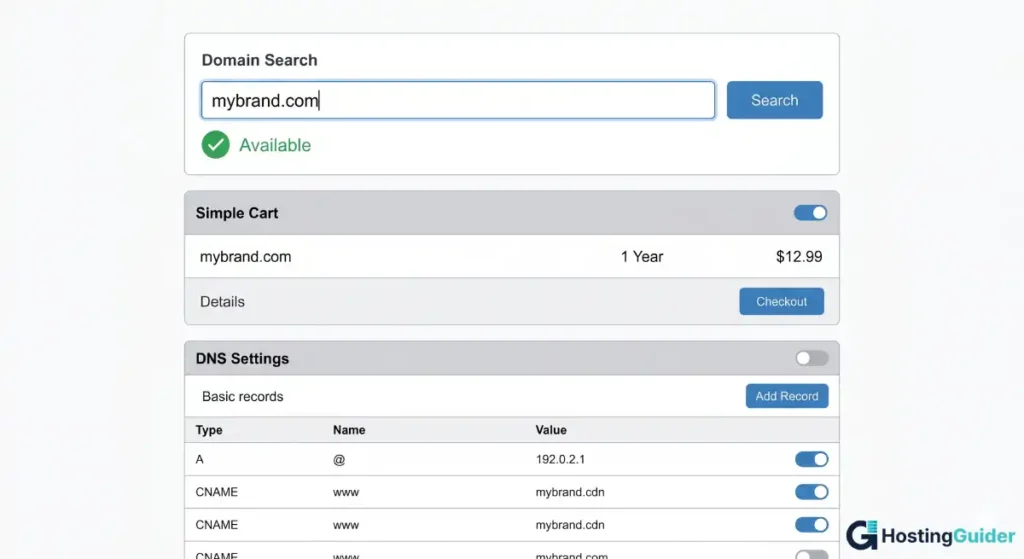
Step 2: Check Availability
If your preferred domain is taken, use a WHOIS lookup tool to find out who owns it and when it expires — sometimes a domain is about to drop and is worth watching.
Step 3: Pick a Trusted Registrar
A registrar is the company that sells you the domain. Popular options include Namecheap, Cloudflare Registrar, Porkbun, and GoDaddy.
Look for:
- Clear pricing with no hidden fees
- Free WHOIS privacy (hides your personal info from public records)
- Easy DNS controls
- Solid support reviews
Step 4: Buy and Register
Add your domain to the cart. Most registrars offer 1 to 10 year terms. One year is fine to start. Skip add-ons you do not need, like extra email or paid privacy if it is included free.
Step 5: Set Up DNS or Connect Hosting
After purchase, point your domain to a web host or a builder like Shopify, WordPress, Webflow, or Wix. The registrar will give you a DNS panel to enter the right records.
Step 6: Renew Before It Expires
Turn on auto-renew. If you forget, your domain can drop and someone else might grab it. Recovery is sometimes expensive or impossible.
How Much Does a Domain Name Cost?
Most popular extensions cost between $10 and $20 per year. Some cost more, some less. Here is a rough range:
| Extension | Typical first-year price | Typical renewal price |
|---|---|---|
| .com | $10 to $14 | $14 to $20 |
| .net | $10 to $15 | $15 to $20 |
| .org | $10 to $15 | $15 to $22 |
| .io | $30 to $60 | $40 to $70 |
| .ai | $70 to $100+ | $70 to $100+ |
| .shop | $1 to $5 (intro) | $30 to $40 |
Watch out for first-year discounts. A domain at $1 may renew at $40. Always check the renewal price before you buy.
Premium domains (short, common words, single keywords) can cost thousands or even millions. Most beginners do not need a premium domain. A clean two or three word brand works fine.
How to Choose a Good Domain Name
A good domain name does five things at once: it is easy to type, easy to say, easy to remember, hard to confuse with another brand, and matches what you do.
Practical tips:
- Keep it short. Aim for 6 to 14 characters when you can.
- Make it brandable. Made-up words like Spotify, Zomato, and Stripe stand out.
- Avoid hyphens. They are hard to say out loud and look unprofessional.
- Skip numbers unless they are part of the brand. People mix up the digit 4 with the word four.
- Match the spelling people will type. Avoid creative spellings (kwik, eazy, xtreme).
- Pick .com first if it fits your brand and budget. It is still the most trusted extension.
- Check for trademark conflicts before you buy. A quick search on the USPTO site saves headaches later. Source: USPTO Trademark Search
- Try the phone call test. If a friend can spell your domain after hearing it once, it passes.
If you want a quick way to test ideas, a domain availability checker or domain name generator can save hours of trial and error.
Common Domain Name Mistakes to Avoid
Beginners run into the same traps. Skip these and you will save money and stress.
- Buying a long, complex domain that nobody can spell.
- Picking a trendy extension that you might regret in two years.
- Ignoring trademark issues. Big brands do sue, even small sites.
- Forgetting to renew. Set auto-renew and a calendar reminder.
- Choosing a name too close to a popular brand. Traffic that lands on you by mistake is a lawsuit risk, not a win.
- Skipping WHOIS privacy. Your name, address, and phone end up in a public database without it.
- Locking into a 10 year term too early. Try one year first. You may rebrand.
- Buying many extensions at once (.net, .info, .biz). Start with one. Add more only if your brand grows.
A Quick Real-World Example
Say you are starting a freelance writing business. Your name is Maya Patel. You want a domain.
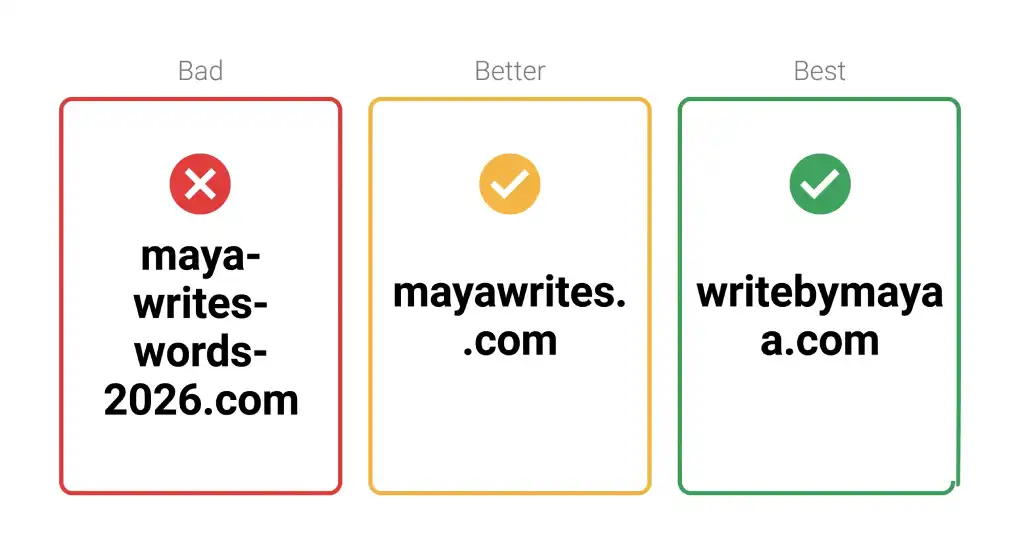
- Bad: maya-writes-words-2026.com (too long, has hyphens, and a year)
- Better: mayawrites.com (short, clear, brandable)
- Best: a clean 6 to 8 character brand name you trademark later
You search on Cloudflare Registrar. Mayawrites.com is taken. You try mayapatel.com (taken). You try writebymaya.com (free for around $10 per year). You register it, turn on auto-renew, and connect it to your portfolio site on Webflow. Total time: under 15 minutes.
That is exactly how most personal sites and small brands launch.
Frequently Asked Questions
Is a domain name the same as a website?
No. A domain name is the address you type to reach a site. A website is the actual content (pages, images, code) stored on a web server. You can own a domain without a website, and you can move a domain to a new website anytime.
How long does it take for a new domain to work?
Most domains are active within minutes of registration, but full DNS propagation across the internet can take up to 24 to 48 hours. During that window, some users may see your site while others do not. Be patient and avoid making more changes during that time.
Can I buy a domain name forever?
No. You rent a domain in 1 to 10 year terms from a registrar. As long as you renew on time, you keep it. If you let it expire, it goes through a grace period, then a redemption period, and finally back to the public pool where anyone can register it.
What happens if I do not renew my domain?
Your site goes offline first. You usually get a 30 to 45 day grace period to renew at the regular price. After that, a redemption period starts, where renewal can cost $80 or more. If you still do not act, the domain drops and someone else can buy it.
Can I transfer a domain to another registrar?
Yes. Most domains can be transferred after they are at least 60 days old. You unlock the domain at the old registrar, get a transfer code (sometimes called an EPP or auth code), and start the transfer at the new registrar. The process usually takes 5 to 7 days.
Do I need a domain name to start a website?
You can launch a free site on platforms like WordPress.com or Wix using their subdomain (yoursite.wordpress.com). For a serious brand, business, or portfolio, a custom domain looks more professional and is easier to remember. It also means you can move your site later without losing your address.
What is the most popular domain extension?
.com is by far the most popular extension. According to the Verisign Domain Name Industry Brief, the .com domain base reached 161.0 million registrations at the end of 2025, making it the largest top-level domain in the world.
Final Thoughts
A domain name is small but mighty. It is the front door to everything you build online: a blog, a shop, a portfolio, or a full business. Pick a name that is short, easy to say, and matches your brand. Use a trusted registrar, turn on auto-renew, and avoid the common traps.
You do not need to be a tech expert to own a great domain. You just need a clear name, a few minutes, and a small yearly fee. Once it is yours, the rest of your online presence has a solid place to grow.


