
Picking a domain name feels simple until you reach the dropdown menu. Suddenly you face dozens of choices like .com, .org, .net, .io, .co, .xyz, and many more. Each one carries a different meaning, price tag, and impression on visitors.
This guide breaks down every major domain extension in plain language. Whether you are launching your first blog or upgrading a business website, you will know exactly which extension fits your project and why.
What you will learn in this guide:
- What domain extensions are and how they actually work
- The five main categories every site owner should know
- A side by side look at popular options like .com, .org, and .net
- A simple framework to pick the right extension without overthinking
- Pricing, SEO impact, and step by step registration
- The mistakes that cost beginners time and money
By the end, you will treat the extension dropdown like a pro instead of guessing your way through it.
Table of Contents
Key Takeaways
- A domain extension is the part that comes after the dot in a web address (such as the .com in google.com).
- Over 1,500 active domain extensions exist, but most websites use fewer than 20 of them.
- .com remains the safest pick for most businesses, while .org suits nonprofits and .net works for tech projects.
- Country code extensions like .uk or .ca tell visitors and search engines where your site belongs.
- Domain extensions do not directly improve Google rankings, but they shape trust and click rates.
- New extensions like .io, .ai, and .app are popular but cost more and renew at higher rates.
Quick Answer
A domain extension is the suffix at the end of a web address, such as .com, .org, or .net. It signals the type of site, its location, or its purpose. The extension you pick affects branding, trust, and renewal cost, but rarely changes search rankings on its own.
The Anatomy of a Domain Name
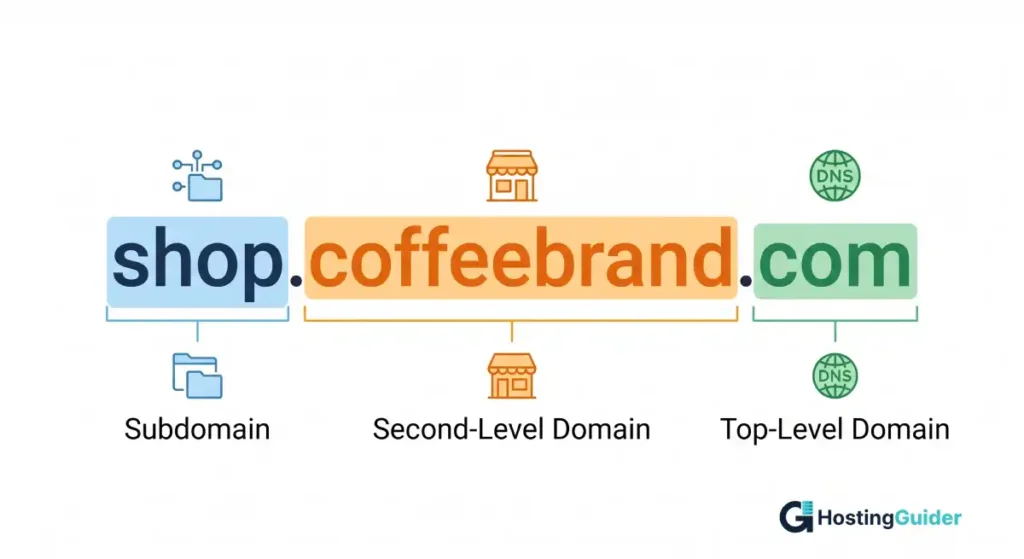
Before you compare extensions, look at how a full domain breaks apart. Take this example:
shop.coffeebrand.com
- shop is the subdomain (optional)
- coffeebrand is the second level domain (the unique name you choose)
- .com is the top level domain, also called the extension
The extension sits at the very end and lives inside the global Domain Name System. ICANN, the nonprofit that runs this system, decides which extensions exist and who can sell them.
The 5 Main Categories of Domain Extensions
Domain extensions fall into five buckets. Knowing the category helps you predict the price, the rules, and the audience.
- Generic Top Level Domains (gTLDs) These are open extensions anyone can register. Examples: .com, .net, .info, .biz, .xyz. They cover broad uses and have no location ties.
- Country Code Top Level Domains (ccTLDs) Two letter codes assigned to each country. Examples: .us (United States), .uk (United Kingdom), .ca (Canada), .in (India). Some require local residency, while many do not.
- Sponsored Top Level Domains (sTLDs) Reserved for specific groups. Examples: .edu (accredited US colleges), .gov (US government), .mil (US military), .museum (museums). You usually need proof of eligibility.
- New Generic Top Level Domains (new gTLDs) A wave of extensions added after 2013 to expand choice. Examples: .app, .blog, .shop, .ai, .design, .tech. They give brands more flexibility but cost more on average.
- Infrastructure and Restricted TLDs Used for technical or special purposes. Examples: .arpa (internet infrastructure), .int (international treaty groups). Regular users almost never register these.
The list of every approved extension lives inside the IANA Root Zone Database, the official record kept by the Internet Assigned Numbers Authority.
The Most Common Website Extensions and What They Mean
Here is a plain English breakdown of the extensions you will see most often.
.com The original commercial extension and still the most popular by a huge margin. According to the Verisign Domain Name Industry Brief, .com holds more registrations than any other TLD worldwide. Our domain market share statistics break down .com dominance, ccTLD adoption, and registration trends across the most popular domain extensions.
Use it for any business, blog, or personal brand if available. Real example: nike.com, medium.com
.org Originally for nonprofit organizations, but anyone can register one. Visitors still associate it with charities, foundations, and community groups. The Public Interest Registry manages it. Real example: wikipedia.org, redcross.org
.net Created for network providers and tech infrastructure. Today it works as a backup when .com is taken. It feels professional but lacks the instant trust of .com. Real example: speedtest.net, behance.net
.co Originally the country code for Colombia, now sold worldwide as a short alternative to .com. Startups love it for branding. Real example: angel.co
.io Country code for the British Indian Ocean Territory, now adopted by tech and SaaS companies. The letters mirror input/output, making it a favorite for developer tools. Real example: github.io
.ai Country code for Anguilla, now booming with artificial intelligence brands. Real example: character.ai, perplexity.ai
.info Open to anyone, often used for reference sites and informational projects. Cheaper than .com but carries less trust due to past spam abuse.
.biz Marketed for small businesses. It works fine, but most users still default to .com for commerce.
.me Country code for Montenegro, repurposed for personal sites and portfolios. Real example: about.me
.app A new gTLD that requires HTTPS, making it secure by default. Popular with mobile and web apps.
.xyz Open and cheap, used by both serious brands (abc.xyz, the parent company of Google) and budget projects. Mixed reputation overall.
How to Choose the Right Domain Extension: A 4 Step Framework
Stop guessing and run your idea through these four checks.
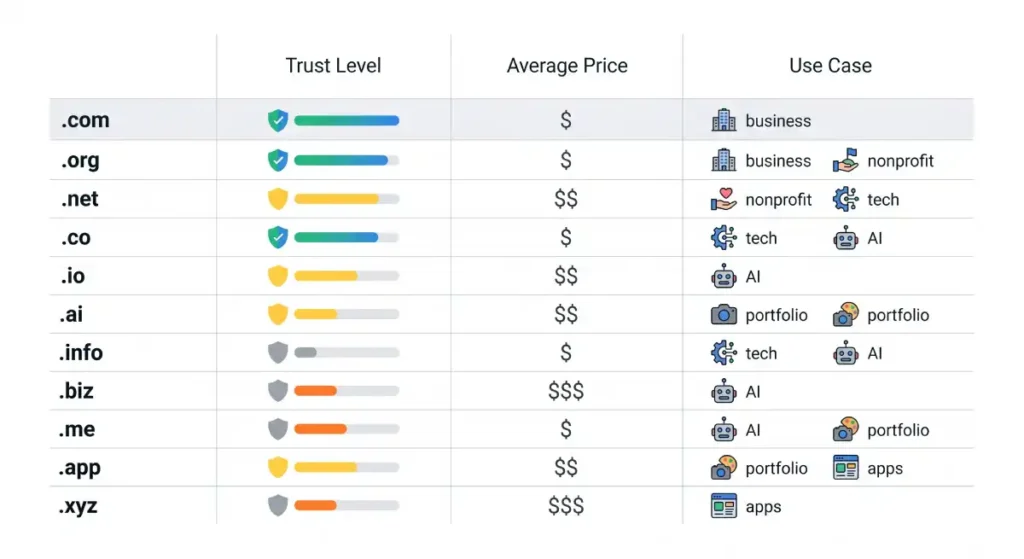
Step 1: Try .com first If your name is available as a .com, grab it. The cost is low and visitors who type out the address will not get lost.
Step 2: Match the audience A nonprofit fits .org. A US local service might use .us or stick with .com. A UK-only shop benefits from .co.uk because it signals local trust.
Step 3: Consider the industry Tech startups gain credibility with .io, .ai, or .dev. Creative brands pull off .design or .studio. Avoid niche extensions that confuse your customers.
Step 4: Check the long-term cost. First-year deals look great. Always compare the renewal price, which is what you pay every year after that. A .com renews around 12 to 20 dollars. Some new gTLDs renew at 60 dollars or more.
Quick decision rules:
- Going global and broad? Pick the .com extension.
- Running a charity or community? Use .org.
- Building tech or SaaS? .io or .ai work well.
- Targeting one country? Use that country code.
- Brand name taken on .com? Try .co before settling for hyphens or odd spellings.
Do Domain Extensions Affect SEO?
Short answer: not directly. Google has confirmed that the choice between .com and a new gTLD like .shop does not give a ranking boost or penalty. The Google Search Central documentation explains how Google handles different TLDs, especially country code ones.
That said, extensions still influence SEO through indirect signals:
- Click through rate: People click .com results more often, which can lift rankings over time.
- Geo targeting: A ccTLD like .de tells Google your site targets Germany. That helps for local searches but limits global reach.
- Trust and links: Extensions tied to spam (some cheap new gTLDs) attract fewer backlinks because writers hesitate to link to them.
Pick an extension that builds trust, and let the SEO benefits follow.
Pricing: What You Actually Pay
Domain pricing has three parts that catch beginners off guard.
Registration price: The first year cost. Often discounted heavily.
Renewal price: What you pay every year afterward. This is the real cost.
Transfer or premium fees: Some short or memorable names sell as premium domains for hundreds or thousands of dollars.
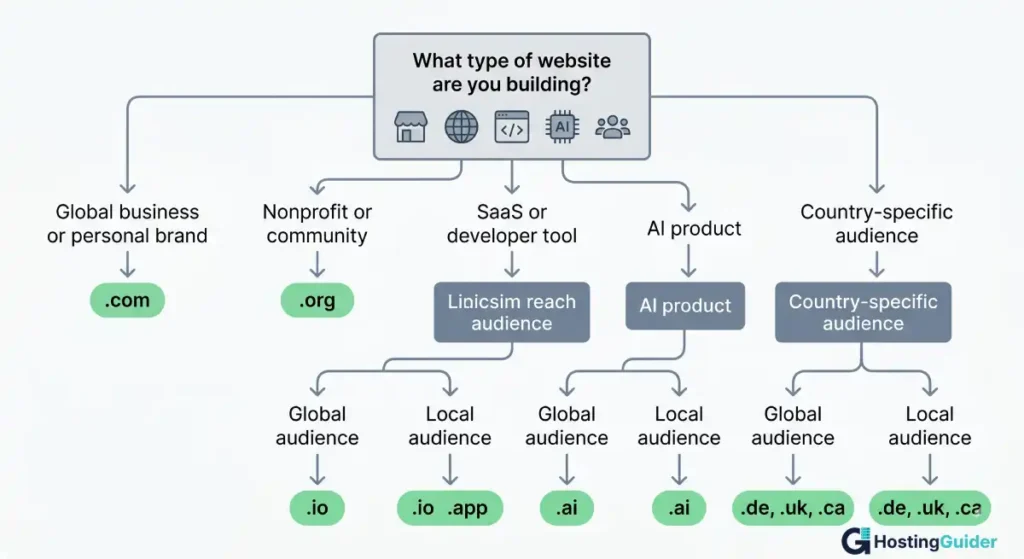
Rough yearly ranges (subject to change by registrar):
- .com: 10 to 20 dollars
- .org: 12 to 22 dollars
- .net: 12 to 20 dollars
- .co: 25 to 35 dollars
- .io: 35 to 60 dollars
- .ai: 70 to 200 dollars
- .xyz: 1 to 15 dollars
- ccTLDs: vary widely by country
Tip: Always check the renewal price, not just the first year deal. Many beginners get surprised when year two arrives.
How to Register a Domain in 6 Steps
You can register a domain in under ten minutes if you know what to do.
Step 1: Brainstorm 3 to 5 names. Keep it short, easy to spell, and free of trademarks.
Step 2: Search availability. Use a registrar or a domain availability checker. Many tools suggest alternatives if your first choice is taken. If a domain is already registered, a WHOIS lookup shows the current owner, expiry date, and registrar — handy if you want to track it or reach out.
Step 3: Pick the extension Apply the 4-step framework from earlier.
Step 4: Choose a registrar. ICANN keeps an accredited registrar list so you can verify legit providers before paying.
Step 5: Set privacy and auto renewal Turn on WHOIS privacy to hide your contact details. Enable auto-renewal so you do not lose the domain by accident.
Step 6: Connect your site. Point the domain to your hosting provider using DNS records. Most hosts have a one-click setup for popular registrars.
A quick domain availability tool can also help you test a name across many extensions at once before you commit. This saves time when your first pick is taken.
Common Mistakes to Avoid
Skip these traps that cost beginners money and momentum.
- Buying a name that sounds great but spells poorly out loud
- Ignoring the renewal price and getting hit by a 70 dollar bill in year two
- Using hyphens or numbers (they look spammy and people forget them)
- Picking a niche extension that confuses your audience
- Forgetting to enable auto renewal and losing the domain
- Registering trademarked names, which leads to legal disputes
- Skipping privacy protection and exposing your home address publicly
If you are still unsure, register the .com when available even if you also buy a niche extension for branding.
A Closer Look at Country Code Extensions
Country code extensions, or ccTLDs, deserve special attention. They use two letters tied to a country or territory.
Common examples:
- .us for the United States
- .uk for the United Kingdom (most use .co.uk)
- .ca for Canada
- .au for Australia
- .de for Germany
- .in for India
- .jp for Japan
Some require local residency or a business presence. Others, like .io and .ai, sell openly worldwide despite belonging to small territories. ICANN delegates ccTLD management to each country, so rules vary widely.
If your business serves a single country, a ccTLD signals strong local roots. If you plan to grow globally, stick with a gTLD instead so you do not box yourself into one region.
FAQ’s
What is a domain extension?
A domain extension is the part of a web address that comes after the last dot. Common ones are .com, .org, and .net. It tells visitors and search engines what kind of site they are visiting and sometimes where it is based.
How many domain extensions exist?
There are over 1,500 approved domain extensions in the official IANA root zone, including more than 250 country code extensions. Most websites use only a small group of popular options like .com, .org, .net, .io, and .co.
Is .com better than .net or .org for SEO?
No extension gives a direct SEO boost. Google treats .com, .net, and .org equally in search results. The advantage of .com is higher trust and stronger click through rates from users, which can lead to better performance over time.
Can I change my domain extension later?
Yes, but it requires buying a new domain and redirecting traffic. You will keep most SEO value if you set up proper 301 redirects and update internal links. Plan ahead because the move can take weeks to settle in search results.
Are cheap domain extensions safe to use?
Cheap extensions like .xyz or .info are technically safe and work fine. The catch is reputation. Spammers have abused some cheap TLDs in the past, so email providers and users may treat them with extra caution. Stick with trusted options for serious business projects.
Do I need to buy multiple extensions for the same name?
Not always. Big brands buy several to protect against copycats and typos. For a small project, one extension is enough. If your budget allows, grabbing the .com plus your local ccTLD is a solid middle ground.
Who controls domain extensions?
ICANN, a nonprofit organization, oversees the global domain system. It approves new extensions and accredits registrars. Each extension also has a registry operator, like Verisign for .com or PIR for .org, that handles the technical side.
What is the difference in domain extensions?
Domain extensions, also known as top-level domains (TLDs), are the endings of domain names such as .com, .net, .org, and .io. They serve the same technical purpose but can signal different types of websites. For example, .com is commonly used by businesses, .org by organizations, and country-code extensions like .uk or .ca target specific countries. Domain extensions do not directly affect SEO rankings.
Final Thoughts
Domain extensions look intimidating at first, but they follow a few simple patterns. Stick with .com when you can, lean on .org for missions, use ccTLDs for local roots, and treat new gTLDs as creative tools rather than safe defaults.
The right extension supports your brand without doing the heavy lifting on its own. Your content, design, and clear positioning still matter most. Pick a name you can say out loud with confidence, register it, lock in auto renewal, and move on to building.


