
Introduction
Most people who try to start a website hit the same wall in the first hour. They buy a domain. They pick a hosting plan. Then they realize they have no idea what either one actually does, why they paid for both, or why their new site is still showing a blank page.
Web hosting is the part that confuses almost every beginner, but the concept is simple once you stop reading marketing pages and start looking at what the service really gives you.
In this guide, you will learn:
- What web hosting actually is and how it works behind the scenes
- The real difference between a domain and hosting
- The 6 main types of hosting and which one fits your project
- A full hands-on walkthrough to launch your first website today
- The mistakes that quietly burn money and slow your site down
By the end, you will know enough to set up your first website, pick the right plan, and avoid the upsells that hosting companies push on checkout pages.
Quick Answer
Web hosting is a service that stores your website files on a server and delivers them to anyone who types your domain into a browser. Without hosting, your site has nowhere to live and no way to load. Providers like Bluehost, Hostinger, and SiteGround rent out space on their servers so your pages stay online 24/7.
Table of Contents
Key Takeaways
- Web hosting is renting server space so your site stays online and loads for visitors.
- A domain is your address. Hosting is the actual building. You need both to launch.
- Shared hosting fits most beginners and starts under $3 per month with providers like Hostinger.
- Speed, uptime, and customer support matter far more than fancy dashboard features.
- You can launch a working WordPress site in under an hour using one-click installers.
How Web Hosting Actually Works (The Restaurant Analogy)
Think of web hosting like renting a kitchen in a busy food court.
Your website files (HTML, images, videos, code) are the ingredients and recipes. The server is the kitchen. The hosting company is the food court owner who keeps the lights on, pays for water, and makes sure other vendors do not steal your stove.
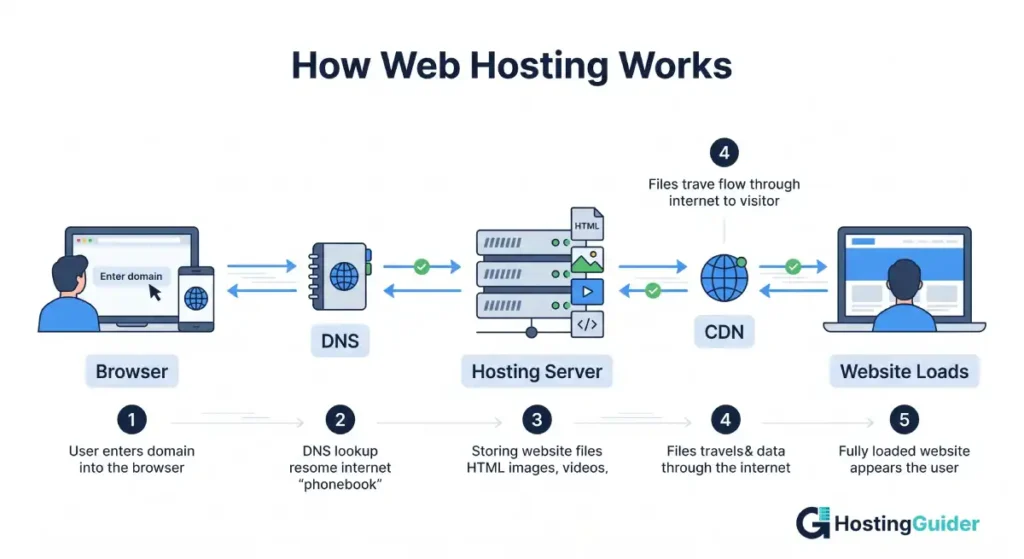
When someone types your domain into a browser, here is what happens in roughly half a second:
- The browser asks the internet’s phonebook (DNS) where your site lives.
- DNS points to your hosting server’s IP address.
- The server pulls your files from storage.
- Those files travel back to the visitor’s screen as a finished web page.
That is the whole loop. Hosting is a 24/7 delivery system. The company you pay handles the hardware, security patches, network bandwidth, and the cooling for the actual machines sitting in a data center. According to Cloudflare’s learning hub, modern hosting often pairs with a CDN to push your files closer to visitors so loading feels nearly instant.
Domain vs Web Hosting: What is the Difference?
A domain is the name people type to find your site (yourstore.com). Hosting is the physical storage where your site files actually live. A domain is your address. Hosting is the house at that address. You can own one without the other, but visitors will not see anything until both are connected.
You buy domains from registrars like Namecheap, GoDaddy, or Cloudflare Registrar. You buy hosting from companies like Bluehost, SiteGround, or Cloudways.
Many beginners assume the domain includes hosting because some companies bundle them. They do not have to come from the same provider. In fact, many pros split them on purpose. They keep the domain at one company and hosting at another, so if hosting goes down or they want to switch hosts, the domain is safe and portable.
According to ICANN, the body that manages domain names, there are over 2,400 accredited registrars worldwide where you can buy a domain.
The 6 Types of Web Hosting Explained (With Real Examples)
Different hosting types fit different projects. Here is the full breakdown.
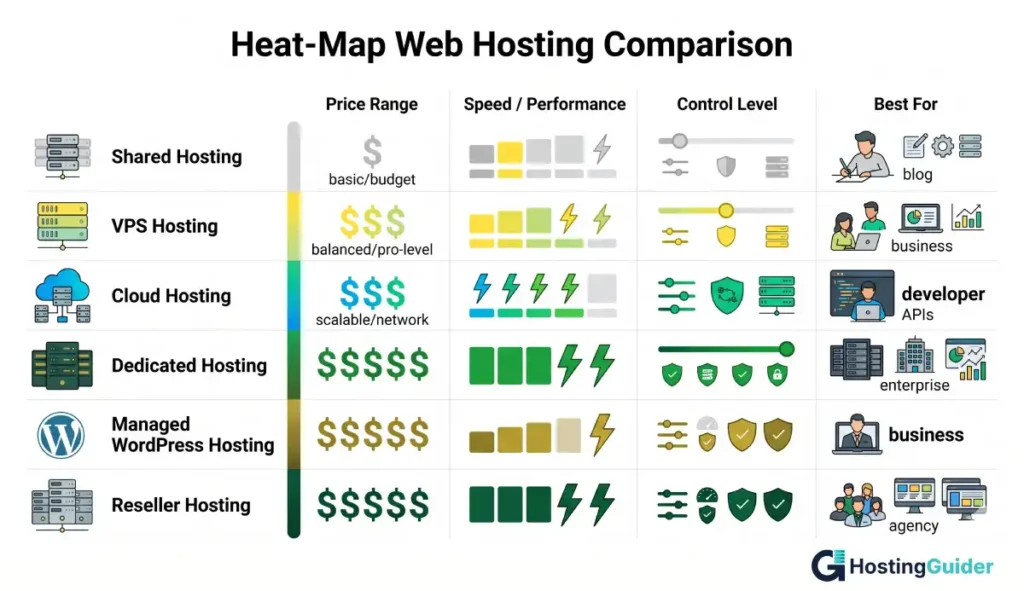
Shared hosting:
You share one physical server with hundreds of other websites. Cheap, simple, fine for small sites and personal blogs. Examples: Bluehost Basic, Hostinger Premium, HostGator Hatchling. Price range: $2 to $10 per month.
VPS hosting (Virtual Private Server):
You still share a server, but you get a sealed off slice with guaranteed CPU and RAM. Faster and more stable than shared. Examples: Hostinger VPS, Vultr, DigitalOcean Droplets. Price range: $6 to $80 per month.
Cloud hosting:
Your site runs on a network of servers instead of one machine. If one fails, another takes over. Best for traffic spikes. Examples: Cloudways, Kinsta, Amazon Lightsail. Price range: $10 to $200 per month.
Dedicated hosting:
You rent an entire physical server. Total control, total cost. Used by large sites with serious traffic or strict compliance needs. Examples: Liquid Web, Hetzner, IONOS. Price range: $80 to $500 per month.
Managed WordPress hosting
The host handles updates, backups, caching, and security so you only think about content. Examples: WP Engine, Kinsta, SiteGround StartUp. Price range: $15 to $150 per month.
Reseller hosting:
You buy hosting in bulk and sell smaller packages under your own brand. Used by agencies and freelancers who manage multiple client sites. Examples: A2 Hosting Reseller, Namecheap Reseller. Price range: $20 to $100 per month.
According to market research, Newfold Digital owns popular shared hosts like Bluehost, HostGator, and Web.com, while Hostinger, GoDaddy, OVHcloud, and SiteGround are also among the largest providers worldwide. Live market share data is published on W3Techs if you want to compare providers.
How to Choose a Web Hosting Plan in 5 Minutes
Skip the giant feature comparison chart. Use this 4-question filter instead.
- What is your project?
- Personal blog or small portfolio = shared hosting
- Small business site or startup landing page = shared or managed WordPress
- Online store under 1,000 daily visitors = managed WordPress or VPS
- High traffic store or app = cloud or dedicated
- What is your budget?
- Under $5/month = shared (Hostinger, Bluehost)
- $10 to $30/month = managed WordPress (SiteGround, Pressable)
- $50+/month = cloud or VPS (Cloudways, Kinsta)
- Are you technical?
- No coding skills = stick with managed or shared with a one-click installer
- Comfortable with the command line = VPS or cloud is fine
- Do you expect traffic spikes?
- Yes = cloud hosting absorbs surges without crashing
- No = shared or managed WordPress is enough
If two of your answers point to managed WordPress, just pick that. The slight extra cost saves hours of troubleshooting.
Real Setup Walkthrough: Launch Your First Website Today
Here is the exact 5-step process, start to finish. You can do this in under 30 minutes.
Step 1. Pick and buy a domain (5 minutes) Go to a registrar like Namecheap or Cloudflare Registrar. Search the name you want. Stick with .com if available. Avoid hyphens and numbers. Pay for one year. Most domains cost $8 to $15 per year.
Step 2. Choose a hosting plan (5 minutes) For your first site, pick shared hosting from Hostinger, Bluehost, or SiteGround. Look for a plan that includes:
- Free SSL certificate (HTTPS)
- One-click WordPress install
- At least 99.9% uptime guarantee
- Free email accounts on your domain
Skip the upsells like SiteLock, premium SEO tools, and domain privacy add-ons unless you actually need them.
Step 3. Connect your domain to hosting (5 minutes) If you bought your domain and hosting from different companies, log into your domain registrar. Find the DNS or nameserver settings. Replace the existing nameservers with the ones your host emailed you. Save. The change can take 30 minutes to 24 hours to spread across the internet.
If both came from the same provider, this step is automatic.
Step 4. Install WordPress or your site builder (5 minutes) Log into your hosting dashboard (usually called cPanel or hPanel). Find the WordPress one-click installer. Click install. Choose your domain. Set an admin username and a strong password. Done. WordPress is now live.
Step 5. Pick a theme and publish your first page (10 minutes) Log into WordPress at yourdomain.com/wp-admin. Go to Appearance, then Themes. Pick a free theme like Astra or Kadence. Add your homepage content. Hit publish.
That is a full website launch. You now have hosting, a domain, and a working site that anyone in the world can visit.
After launch, run your URL through Google’s PageSpeed Insights tool to see how your site performs. Aim for a score above 80 on mobile.
Web Hosting Cheat Sheet (Save This)
| Hosting type | Best for | Avg price | Speed |
|---|---|---|---|
| Shared | Beginners, small blogs | $2 to $10 | Slow to medium |
| VPS | Growing sites, dev work | $6 to $80 | Fast |
| Cloud | High traffic, scaling apps | $10 to $200 | Very fast |
| Dedicated | Enterprise, custom servers | $80 to $500 | Very fast |
| Managed WordPress | Bloggers, agencies | $15 to $150 | Fast |
| Reseller | Freelancers, agencies | $20 to $100 | Medium |
Quick rules to remember:
- Pay yearly to lock in promo prices.
- Always check the renewal rate, not just the first-term price.
- Trust uptime guarantees only if backed by a real refund clause.
- Free SSL is now standard. If a host charges extra for it, walk away.
9 Hosting Terms Every Beginner Should Know
Bandwidth: How much data your site can transfer to visitors per month.
Uptime: The percentage of time your site stays online. 99.9% is the modern minimum.
SSL certificate: Encrypts data between your site and visitors. Required for HTTPS and trusted by browsers.
cPanel: A common control panel where you manage files, email, and databases.
DNS: The system that translates your domain name into the server’s IP address. Mozilla calls DNS the phonebook of the internet.
Server: The actual computer that stores and serves your website files.
CDN: A network of servers that caches your site closer to visitors for faster page loads.
Database: Where dynamic site data (posts, users, products) is stored, usually MySQL.
FTP/SFTP: A protocol you use to upload files directly from your computer to your server.
7 Beginner Mistakes That Drain Your Budget
- Buying the cheapest plan with a 3-year lockup. The first-term price looks tiny, but renewal can triple. Compare both numbers before you click.
- Falling for unlimited bandwidth claims. Read the fine print. Most plans throttle or suspend accounts that hog server resources.
- Skipping backups. Many hosts charge extra for daily backups. If your host does not include them, install a free WordPress plugin like UpdraftPlus.
- Buying domain privacy from the host. Some registrars (Cloudflare, Porkbun, Namecheap) include WHOIS privacy free. Others charge $10 a year for the same service.
- Stacking pointless security add-ons. SiteLock and similar upsells often duplicate what a free Cloudflare account already gives you.
- Ignoring server location. If your audience is in Europe but your server sits in Texas, every page loads slower. Pick a data center close to your visitors.
- Not testing speed after launch. A slow site loses visitors and rankings. Google has confirmed that page experience signals factor into how it ranks pages, so loading speed directly affects SEO.
When Should You Upgrade Your Hosting Plan?
Upgrade your hosting when your site shows clear signs of strain: page loads above 3 seconds, frequent downtime, server timeout errors, or warnings from your host about resource limits. Most beginners move from shared to managed WordPress or VPS once they pass roughly 10,000 monthly visitors or launch a real online store.
Other clear upgrade triggers:
- You added a heavy plugin or theme that lags the site
- You accept payments and need PCI compliance
- You run multiple sites under one account
- Customer support response times slow down because of shared resources
A simple way to check is your host’s resource usage panel. If CPU usage stays above 80% for several days in a row, you are sharing too thin and need more power.
Frequently Asked Questions
What is web hosting in simple words?
Web hosting is renting space on a server so your website files are stored online and visible to anyone who visits your domain. You pay a monthly fee, and the host handles the hardware, security, and uptime so your site stays accessible 24/7 without you managing any equipment.
Can I host my website for free?
Yes, you can host a website for free using platforms like GitHub Pages, Cloudflare Pages, Netlify, and the free tier of Hostinger Lite. Free hosting works well for portfolios, static sites, and small projects. It usually limits bandwidth, blocks custom email, and may show ads on your domain.
Do I need web hosting if I have a domain?
Yes. A domain only points visitors to a location on the internet. Without hosting, that location is empty. You need both a domain and hosting to make a website actually load. Some companies bundle them in one purchase, but they are two separate services.
How much does web hosting cost per month?
Web hosting costs $2 to $10 per month for shared hosting, $10 to $30 for managed WordPress, $20 to $80 for VPS, and $80 or more for dedicated servers. Most beginners pay between $3 and $7 per month for the first year on a basic shared plan from Hostinger, Bluehost, or SiteGround.
Which web hosting is best for beginners?
Hostinger, Bluehost, and SiteGround are the top picks for beginners. They offer one-click WordPress installs, free SSL, beginner-friendly dashboards, and 24/7 support. Hostinger is the cheapest, SiteGround has the strongest support, and Bluehost is officially recommended on WordPress.org.
Is web hosting the same as cloud hosting?
No. Web hosting is the broad term for any service that puts your site online. Cloud hosting is one type of web hosting where your site runs across multiple connected servers instead of one. Cloud hosting is usually more reliable and scales better, but it can cost more than basic shared hosting.
How fast can I set up web hosting?
You can set up web hosting and launch a basic website in 30 to 60 minutes. The process includes buying a domain, picking a hosting plan, connecting the two through DNS, installing WordPress with one click, and publishing your first page. No coding skills required.
Final Thoughts
Web hosting stops feeling complicated the moment you stop treating it like a product and start treating it like rent. You pay for space. You get an online address. You launch.
Pick shared hosting if you are just starting out. Move to managed WordPress or cloud only when your site outgrows the basics. Avoid the long contracts on day one, ignore the upsells, and use free tools (Cloudflare, free SSL, one-click installers) to keep your costs low.
Your first website does not need a perfect setup. It needs to be live. The faster you launch, the faster you start learning what your site actually needs.


