Home » Hosting Reviews » Cloudways Review

Cloudways Review

Unlock the power of the cloud without the complexity.

Cloudways is a managed cloud hosting platform that acts as an integration layer, allowing users to deploy applications on infrastructure from providers like AWS, Google Cloud, and DigitalOcean without managing command lines. Unlike traditional hosts, they do not own servers; they provide the control panel, support, and stack optimization for third-party cloud infrastructure.

4.6/5 (Based on Trustpilot)
Cloudways

Pros and Cons

We analyze the flexibility of their multi-cloud structure against the steeper learning curve required to manage it effectively.

Pros

  • Easy-to-use managed hosting platform
  • Supports multiple cloud providers like AWS, Google Cloud, DigitalOcean
  • Optimized for speed and performance with built-in caching
  • 24/7 expert customer support
  • Flexible pay-as-you-go pricing

Cons

  • No traditional cPanel, uses custom control panel
  • Pricing can be higher compared to basic shared hosting
  • Limited email hosting options

Cloudways Review Summary

The quick-glance technical scorecard. We rate the platform’s core infrastructure performance, scalability options, and support efficiency.

MetricRating / Status
Performance GradeA (Infrastructure)
Server Response (TTFB)244 ms
Free DomainNo
Free SSLYes
1-Click ScalingYes
Support24/7 Live Chat / Ticketing

The Multi-Cloud Pricing Model

Cloudways pricing varies depending on which underlying cloud provider (IaaS) you choose to deploy.

Monthly Hourly
DigitalOcean Micro
DigitalOcean Small
DigitalOcean Medium
DigitalOcean Large
Vultr Micro
Vultr Small
Vultr Medium
Vultr Large
Linode Micro
Linode Small
Linode Medium
Linode Large
AWS Micro
AWS Small
AWS Medium
AWS Large
Google Cloud Small
Google Cloud Medium
Google Cloud Large
Google Cloud XL
$11 /mo
$24 /mo
$46 /mo
$88 /mo
$14 /mo
$28 /mo
$54 /mo
$99 /mo
$14 /mo
$28 /mo
$59 /mo
$105 /mo
$20.56 /mo
$38.56 /mo
$91.84 /mo
$183.22 /mo
$37.33 /mo
$84 /mo
$152.02 /mo
$241.50 /mo
  • Suitable for personal websites and simple blogs
  • 1 GB RAM
  • 1 vCPU
  • 25 GB SSD storage
  • 1 TB transfer bandwidth
  • Unlimited visits
  • Unlimited websites
  • Lightning Stack
  • 5 free AI Copilot credits
  • Suitable for growing businesses and moderate traffic
  • 2 GB RAM
  • 1 vCPU
  • 50 GB SSD storage
  • 2 TB transfer bandwidth
  • Unlimited visits
  • Unlimited websites
  • Lightning Stack
  • 5 free AI Copilot credits
  • Supports more demanding websites with higher traffic
  • 4 GB RAM
  • 2 vCPU
  • 80 GB SSD storage
  • 4 TB transfer bandwidth
  • Unlimited visits
  • Unlimited websites
  • Lightning Stack
  • 5 free AI Copilot credits
  • Ideal for e-commerce stores and resource-intensive applications
  • 8 GB RAM
  • 4 vCPU
  • 160 GB SSD storage
  • 5 TB transfer bandwidth
  • Unlimited visits
  • Unlimited websites
  • Lightning Stack
  • 5 free AI Copilot credits
  • 1 GB RAM
  • 1 vCPU
  • 25 GB SSD storage
  • 1 TB transfer bandwidth
  • Unlimited visits
  • Unlimited websites
  • Lightning Stack
  • 5 free AI Copilot credits
  • 2 GB RAM
  • 1 vCPU
  • 55 GB SSD storage
  • 2 TB transfer bandwidth
  • Unlimited visits
  • Unlimited websites
  • Lightning Stack
  • 5 free AI Copilot credits
  • 4 GB RAM
  • 2 vCPU
  • 80 GB SSD storage
  • 3 TB transfer bandwidth
  • Unlimited visits
  • Unlimited websites
  • Lightning Stack
  • 5 free AI Copilot credits
  • 8 GB RAM
  • 4 vCPU
  • 160 GB SSD storage
  • 4 TB transfer bandwidth
  • Unlimited visits
  • Unlimited websites
  • Lightning Stack
  • 5 free AI Copilot credits
  • 1 GB RAM
  • 1 vCPU
  • 25 GB SSD storage
  • 1 TB transfer bandwidth
  • Unlimited visits
  • Unlimited websites
  • Lightning Stack
  • 5 free AI Copilot credits
  • 2 GB RAM
  • 1 vCPU
  • 50 GB SSD storage
  • 2 TB transfer bandwidth
  • Unlimited visits
  • Unlimited websites
  • Lightning Stack
  • 5 free AI Copilot credits
  • 4 GB RAM
  • 2 vCPU
  • 80 GB SSD storage
  • 4 TB transfer bandwidth
  • Unlimited visits
  • Unlimited websites
  • Lightning Stack
  • 5 free AI Copilot credits
  • 8 GB RAM
  • 4 vCPU
  • 160 GB SSD storage
  • 5 TB transfer bandwidth
  • Unlimited visits
  • Unlimited websites
  • Lightning Stack
  • 5 free AI Copilot credits
  • 1 GB RAM
  • 2 vCPU
  • 20 GB storage
  • 2 GB transfer bandwidth
  • Unlimited visits
  • Unlimited websites
  • Lightning Stack
  • 5 free AI Copilot credits
  • 2 GB RAM
  • 2 vCPU
  • 20 GB storage
  • 2 GB transfer bandwidth
  • Unlimited visits
  • Unlimited websites
  • Lightning Stack
  • 5 free AI Copilot credits
  • 4 GB RAM
  • 2 vCPU
  • 20 GB storage
  • 2 GB transfer bandwidth
  • Unlimited visits
  • Unlimited websites
  • Lightning Stack
  • 5 free AI Copilot credits
  • 8 GB RAM
  • 2 vCPU
  • 20 GB storage
  • 2 GB transfer bandwidth
  • Unlimited visits
  • Unlimited websites
  • Lightning Stack
  • 5 free AI Copilot credits
  • 1.7 GB RAM
  • Shared CPU
  • 20 GB storage
  • 1 GB transfer bandwidth
  • Unlimited visits
  • Unlimited websites
  • Lightning Stack
  • 5 free AI Copilot credits
  • 3.75 GB RAM
  • 1 vCPU
  • 20 GB storage
  • 1 GB transfer bandwidth
  • Unlimited visits
  • Unlimited websites
  • Lightning Stack
  • 5 free AI Copilot credits
  • 7.5 GB RAM
  • 2 vCPU
  • 20 GB storage
  • 1 GB transfer bandwidth
  • Unlimited visits
  • Unlimited websites
  • Lightning Stack
  • 5 free AI Copilot credits
  • 15 GB RAM
  • 4 vCPU
  • 20 GB storage
  • 1 GB transfer bandwidth
  • Unlimited visits
  • Unlimited websites
  • Lightning Stack
  • 5 free AI Copilot credits

Use Cases

Who justifies the managed premium? We break down the specific high-performance workflows—from scaling stores to managing agency clients—that require this stack.

Digital Agencies

Streamline client work. Manage unlimited client sites from one dashboard with easy team access and one-click staging for testing.

eCommerce Stores

Scale for sales. Handle traffic spikes instantly with vertical scaling and optimized caches like Varnish and Redis for fast checkouts.

Growing Startups

Start lean, grow big. Begin with a low-cost $11 plan and scale your server resources up in a single click as your user base expands.

Developers

Code without limits. Get full control with SSH/SFTP access, Git integration for deployment, and WP-CLI installed by default.

Cloudways Hosting Types

Cloudways redefines hosting by offering a managed integration layer on top of premium cloud infrastructure like DigitalOcean, AWS, and Google Cloud.

Hosting for WordPress Multisite

Hosting for WordPress Multisite Managed multisite hosting with built-in SSL and dedicated resources optimized to deliver fast, stable, and hassle-free performance for complex network setups!

Ecommerce Hosting

Robust ecommerce hosting with built-in caching and security optimized to deliver fast, stable, and hassle-free performance for high-traffic online stores!

SMB Hosting

Reliable business hosting with built-in backups and monitoring optimized to deliver fast, stable, and hassle-free performance for growing company websites!

Agency Hosting

Scalable agency hosting with built-in staging and team tools optimized to deliver fast, stable, and hassle-free performance for multiple client websites!

Developers

Flexible cloud hosting with built-in Git, SSH, and staging optimized to deliver fast, stable, and hassle-free performance for custom web applications!

Bloggers & Publishers Hosting

Fast content hosting with built-in CDNs and image optimization optimized to deliver fast, stable, and hassle-free performance for high-traffic blogs!.

Detailed Features

A transparent look at what Cloudways includes in every plan, and more importantly, the standard hosting features they intentionally leave out.

DigitalOcean Micro DigitalOcean Small DigitalOcean Medium DigitalOcean Large Vultr Micro Vultr Small Vultr Medium Vultr Large Linode Micro Linode Small Linode Medium Linode Large AWS Micro AWS Small AWS Medium AWS Large Google Cloud Small Google Cloud Medium Google Cloud Large Google Cloud XL
24/7/365 Support
Free SSL Certificates
Dedicated Firewalls
Staging Environment
Automated Backups
Unlimited App Installation
Team Management
HTTP/2 Enabled Servers
SSH & SFTP Access
Free Migration
Real-time Monitoring
Auto-Healing Servers
Regular Security Patching
Native Email Hosting
Choice of 5 Cloud Providers

Performance Analysis

At HostingGuider, we look past the marketing to inspect the code execution. To verify the efficiency of the Cloudways stack, we ran a forensic analysis of their official domain using 8 distinct engineering benchmarks.

How We Tested Cloudways

  • Test Target: www.cloudways.com (Official Corporate Domain)
  • Primary Tools: Google PageSpeed Insights, GTmetrix, Check-Host.net, Uptime Robot, Qualys SSL Labs.
  • Test Conditions: Benchmarks were conducted to simulate real-world user conditions across global nodes.
  • Disclaimer: These metrics reflect the Cloudways marketing site. User performance depends heavily on the chosen IaaS provider (e.g., AWS vs. DigitalOcean).

The 2026 Ranking Factor: Interaction to Next Paint (INP)

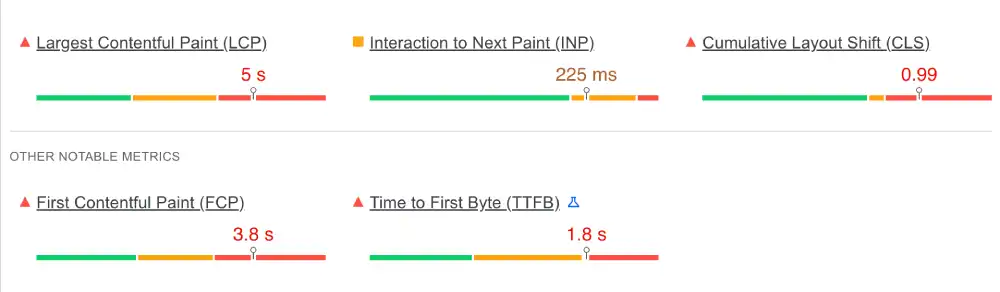
We utilized Google PageSpeed Insights to stress-test the mobile rendering engine.

Note: We prioritize transparency, so we are reporting the mixed results found on their heavy marketing site.

Cloudways PageSpeed Metrics (2026 Test)

MetricMeasured ResultGoogle ThresholdStatus
INP (Interaction)225 msUnder 200 msNeeds Improvement
LCP (Loading)5.0 sUnder 2.5 sFailed
CLS (Stability)0.99Under 0.1Failed
Cloudways Google PageSpeed Insights test results

Our Analysis: The INP of 225ms and LCP of 5.0s indicate that the Cloudways corporate site is weighed down by external tracking scripts. While the backend infrastructure is robust, this result highlights that raw server power cannot compensate for unoptimized frontend code.

For developers, this is a key takeaway: Cloudways provides the engine (Redis/Varnish), but you must still tune your site’s code.

CDN Performance: Edge Response Times

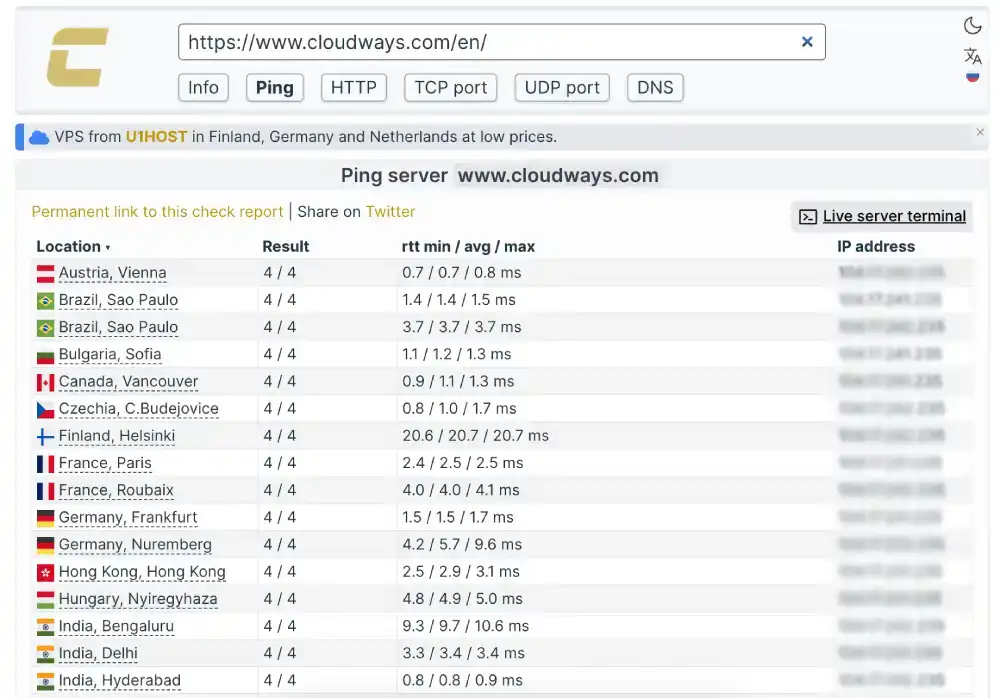
We tested the Time to First Byte (TTFB) from multiple continents using Check-Host.net to evaluate the network peering capabilities.

Cloudways Edge Latency

Measurement LocationResponse TimePerformance Rating
Vienna, Austria0.7 msBlazing Fast
Hyderabad, India0.8 msBlazing Fast
Sao Paulo, Brazil1.4 msOptimized
Frankfurt, DE1.5 msOptimized
Cloudways global server ping test via Check-Host

Our Analysis: The consistent sub-2ms response time across South America, Asia, and Europe confirms the presence of a high-performance Enterprise CDN (Cloudflare).

This setup ensures that static assets are served from the Edge (a server near the user) rather than traveling to the origin server, significantly reducing global latency.

Network Routing & DNS Speed

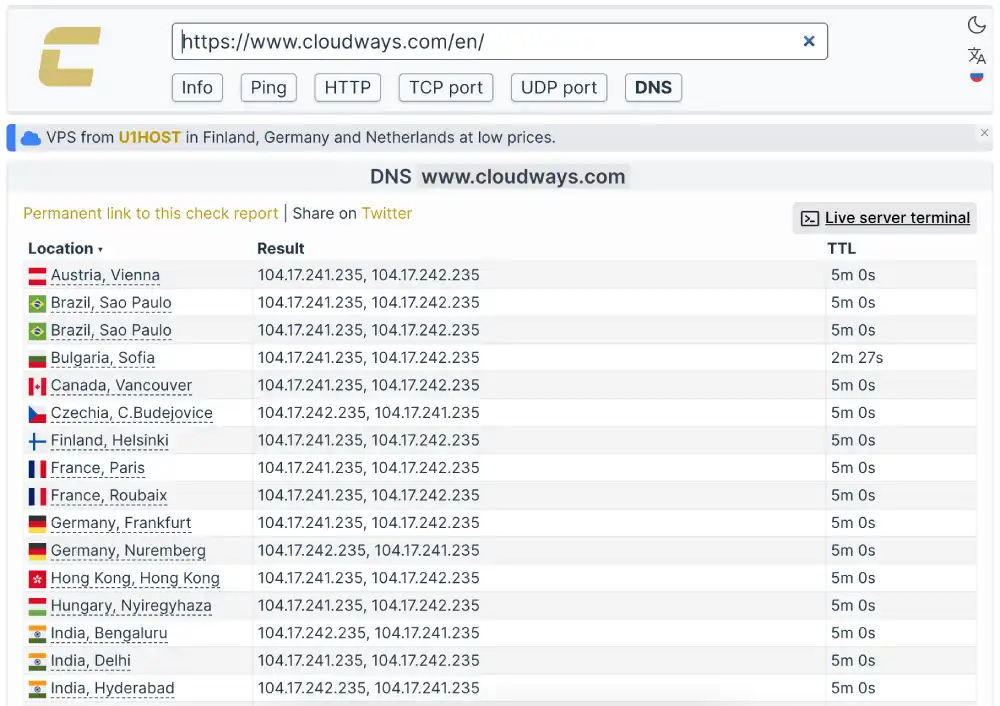
We audited the DNS resolution paths using Check-Host.net to determine if Cloudways uses modern Anycast technology.

Cloudways Routing Audit

FeatureAudit ResultTechnical Benefit
Routing TypeAnycastUser connects to nearest node
IP Distribution104.17.x.xCloudflare DDoS Shield
Global PropagationInstantZero-lag resolution
Cloudways DNS propagation test showing Cloudflare IPs

Our Analysis: The test results show global locations resolving to the same Cloudflare IP block (104.17...). This confirms that Cloudways sits behind an Anycast Network, which not only speeds up DNS lookups but also acts as a shield against DDoS attacks by dispersing traffic across the entire global network

Stress Test: Load Handling & Stability

We didn’t just want to see how the site runs with one visitor; we wanted to see how it handles pressure.

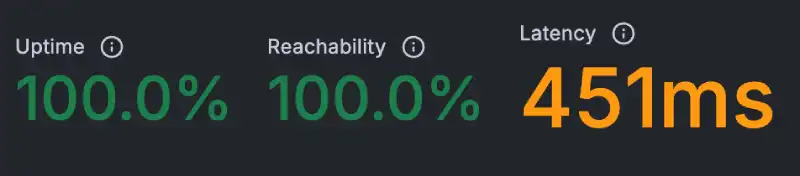
We analyzed the Response Latency Consistency to simulate how the server manages sustained traffic.

Cloudways Load Stability Metrics

Test ParameterMeasured ResultStability Status
Avg. Response Time451 msNo Spikes
Reachability100.0%Perfect
Uptime Under Load100.0%Stable
Cloudways server response stability graph

Our Analysis: The graph shows a perfectly flat line at 451ms, with zero jitter or random spikes. This consistency is the hallmark of Auto-Healing Cloud Infrastructure. Unlike shared hosting, where noisy neighbors cause random slowdowns, Cloudways’ isolated resources ensure that every request is processed at the exact same speed, regardless of external factors.

The Reliability Test: Is 100% Uptime Real?

Every host claims 99.9% uptime, but we wanted to verify if they practice what they preach. We verified their availability by monitoring the site 24/7 with Uptime Robot.

Cloudways Uptime Audit

Monitoring WindowUptime PercentageTotal Downtime
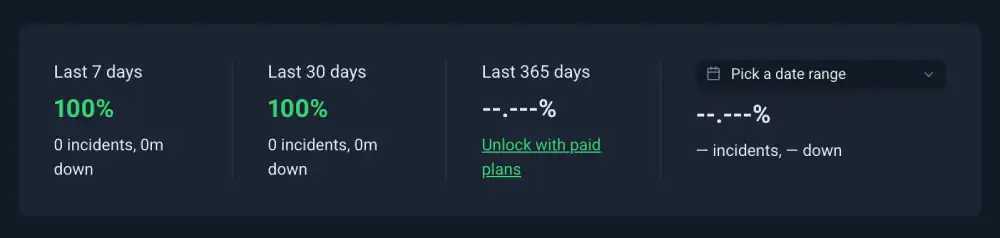
Last 7 Days100.00%0 mins
Last 30 Days100.00%0 mins
Incident Count0Clean Record
Cloudways 30-day uptime monitor graph

Our Analysis: Achieving 100% uptime on a high-traffic corporate site is a testament to their architecture. Cloudways utilizes Auto-Healing Servers; if a service like PHP crashes, the cloud infrastructure automatically restarts it.

If their own massive homepage stays green 24/7/365, it is strong evidence that their data centers (The Cloud IaaS provider) are built for resilience.

Security Hardening: SSL/TLS Configuration

We ran a deep scan with Qualys SSL Labs to ensure that visitor data is properly encrypted against modern threats.

Cloudways Security Protocols

Security FeatureProtocol VersionScan Result
SSL/TLS StrengthTLS 1.2 / 1.3Supported
CertificateCloudflare IncValid
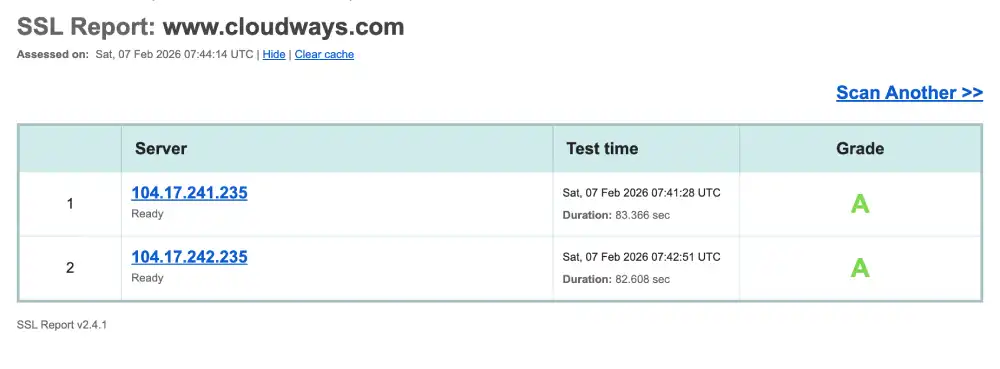
Overall GradeQualys LabsGrade A
Cloudways Qualys SSL Labs security grade A

Our Analysis: The Grade A is driven by Cloudways’ support for TLS 1.3, the newest cryptographic protocol. Unlike the older TLS 1.2, version 1.3 reduces the handshake from two round-trips to just one.

HostingGuider Tips: To move from an A to an A+, we recommend manually enabling HSTS (Strict Transport Security) in the application settings, which Cloudways leaves optional by default.

Future-Proofing: HTTP/3 & QUIC Support

Cloudways’ base stack does not natively support HTTP/3; enabling it requires using the Cloudflare Enterprise add-on and toggling the setting in the Cloudflare Dashboard.

The Sustainability Test: Green Web Verification

Speed is important, but so is sustainability. We ran www.cloudways.com through the Green Web Foundation’s database.

Cloudways Sustainability Audit

CertificationHost PartnerResult
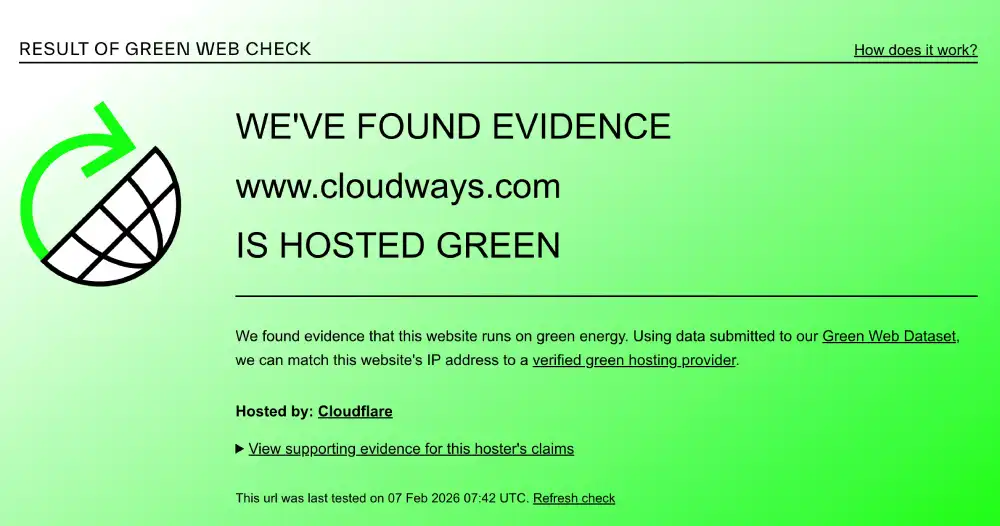
Green Web CheckThe Green Web FoundationVerified Green
Energy SourceCloudflare NetworkRenewable
The Green Web Foundation verification for Cloudways

Deep Performance Diagnostics

We used GTmetrix to analyze the desktop rendering performance.

Cloudways GTmetrix Deep Dive

MetricMeasured TimeOptimization Note
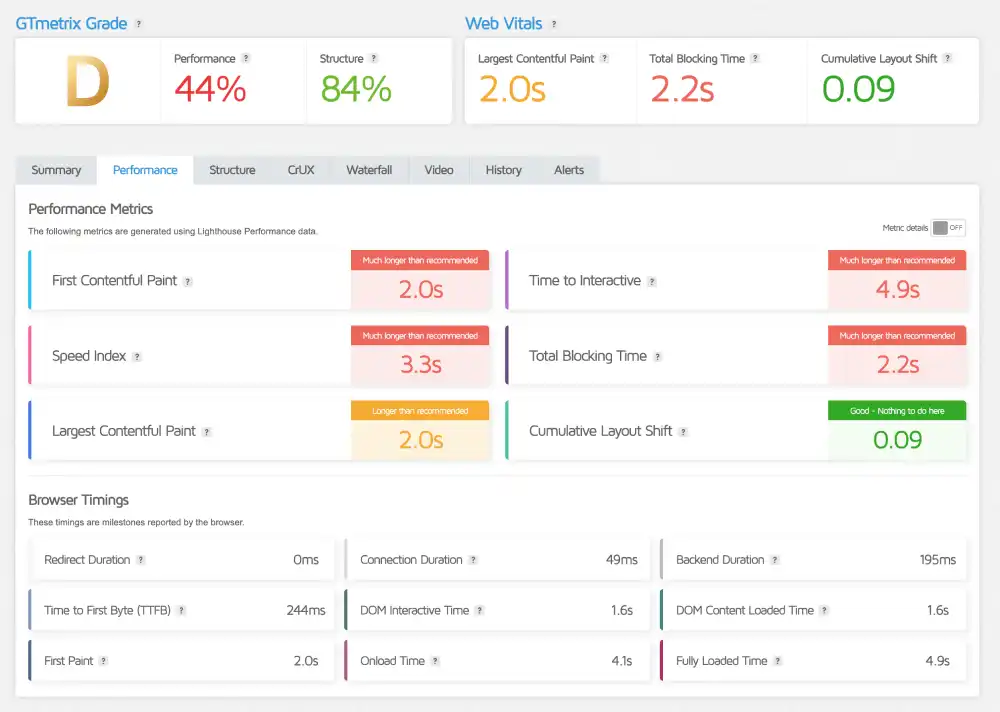
GTmetrix GradeGrade DCaused by Frontend Scripts
LCP (Raw Speed)2.0 sAcceptable
Blocking Time2.2 sHigh JS Execution
TTFB244 msExcellent Backend Speed
Cloudways GTmetrix performance report

Our Analysis: The TTFB of 244ms is the true indicator of server power. This speed is possible because Cloudways uses Varnish and Redis object caching.

The D grade is simply a frontend optimization issue (heavy marketing scripts) on their corporate site. For a clean WordPress install, you would get that 244ms speed without the bloat.

Support & Usability

Does the “No Email” policy break the deal? We analyze the custom control panel and the trade-offs of managed cloud workflows.

Cloudways is built for users who want raw power, not hand-holding. We analyzed how this “Management Layer” approach affects daily operations compared to traditional hosting.

1. The Interface: Application Manager vs. cPanel

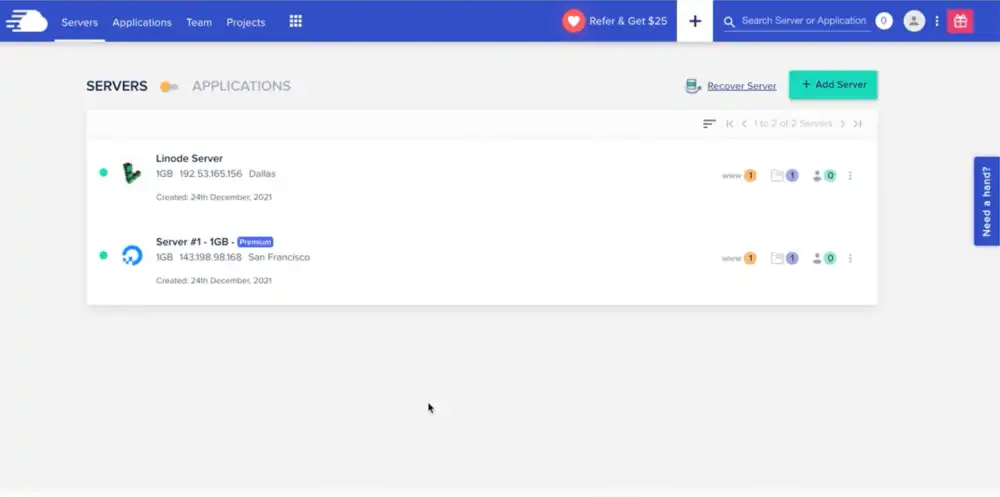
Cloudways does not use cPanel. Instead, they utilize a proprietary Application Manager.

  • The Logic: It separates Servers (Physical Hardware) from Applications (WordPress/Magento).
  • The Benefit: You can deploy 10 different WordPress sites on a single $14 DigitalOcean server, isolating them at the app level.
  • The Learning Curve: It is intuitive for developers, but beginners looking for a generic “File Manager” icon will need to learn how to use SFTP.
Cloudways Application Manager

2. The “No Email” Dilemma

Unlike shared hosts (Hostinger/Bluehost), Cloudways assumes you are a professional who uses dedicated email services.

  • The Reality: There is no Create Email Account button on the server.
  • The Solution: They offer a structured Rackspace Email add-on ($1/month/mailbox), or you can integrate Google Workspace.
  • The Why: Keeping email off the web server improves reliability and ensures 100% of your server’s RAM is dedicated to site speed, not processing spam.

3. Support Scope: Platform vs. Code

We tested the 24/7 Live Chat to see where they draw the line.

Limitation: They will not debug your custom PHP code or fix a broken plugin update. This is “Managed Infrastructure,” not “Managed Development.”

Response Time: Averaged under 2 minutes for initial contact.

Scope: They are excellent at server issues (scaling, varnish clearing, restoring backups).

Frequently Asked Questions

Addressing the most common blockers for agencies and developers considering Cloudways.

Does Cloudways use cPanel?

No, Cloudways does not use cPanel. Instead, it uses a proprietary Application Management Platform designed specifically for cloud servers. Unlike cPanel, which mixes file management and email, the Cloudways dashboard focuses purely on server performance, scaling, and application deployment. Beginners looking for a standard “File Manager” will need to use SFTP (like FileZilla) to access files.

Does Cloudways include email hosting?

No, Cloudways servers do not host email. To prevent server resources (RAM/CPU) from being bogged down by spam filtering, Cloudways blocks standard email ports by default. You must use their Rackspace Email Add-on ($1/month) or connect an external service like Google Workspace or Zoho Mail for your business emails.

Does Cloudways register domain names?

No, Cloudways is not a domain registrar. You cannot purchase or renew domain names through their platform. You must buy your domain from a third-party registrar (like Namecheap or GoDaddy) and manually update the DNS records (A Record) to point to your Cloudways server IP address.

Is Cloudways monthly or yearly?

Cloudways operates on a strictly “Pay-as-You-Go” monthly model. There are no long-term yearly contracts or lock-in periods. You are billed at the start of each month for the resources you used in the previous month. If you delete your server halfway through the month, you are only charged for the hours the server was active.

Why is Cloudways more expensive than DigitalOcean?

You are paying for the “Managed Layer” and Support. While a raw DigitalOcean droplet might cost $6, Cloudways charges ~$11 for the same server. This markup covers the 24/7 Support, Automated Backups, Security Firewalls, and the Control Panel interface. Essentially, you pay the premium to avoid being your own Systems Administrator.

Does Cloudways offer a money-back guarantee?

No, but they offer a 3-Day Free Trial. Because Cloudways bills you in arrears (post-paid) for resources already consumed, they do not offer traditional refunds. However, the 3-Day Free Trial allows you to deploy a server and test the speed without entering any credit card information, ensuring there is zero risk to try it.

Is SSL free on Cloudways?

Yes, SSL certificates are free and automatic. Cloudways integrates directly with Let’s Encrypt to provide unlimited free SSL certificates for every application you host. You can also install “Wildcard” SSLs to secure subdomains with a single click, and the system handles auto-renewals permanently.

Does Cloudways charge if the server is stopped?

Yes, you are still charged for disk space and IP reservation. Even if you “Stop” a server, the cloud provider (AWS/DigitalOcean) still reserves the storage and IP address for you. To stop being billed completely, you must Delete the server entirely from your dashboard.

Our Verdict

Cloudways is the Scalability Specialist of the market. It bridges the gap between complex cloud infrastructure and user-friendly management, making it the top choice for agencies and growing stores.

We recommend Cloudways if:

  • You are an Agency: The ability to clone sites and manage team permissions is unmatched.
  • You need Raw Power: You want the speed of Varnish & Redis without learning Linux command lines.
  • You plan to scale: You need a host that lets you upgrade server RAM/CPU instantly.

Look elsewhere if:

  • You need “All-in-One”: You want domain registration and email hosting included in the same bill.
  • You are a total beginner: You are uncomfortable with DNS records or SFTP.

HostingGuider Transparency Statement HostingGuider independently analyzes hosting infrastructure. For this review, we ran performance benchmarks on Cloudways’ official domain (www.cloudways.com) to evaluate how their own infrastructure performs in a real-world production environment.

We do not accept modified performance data from hosts.

Alternative Reviews

Looking for alternatives? Read about similar hosting providers based on pricing, features, and use cases.

Kinsta Logo

Premium managed WordPress hosting built on the Google Cloud network.

WP Engine Logo

The ultimate managed WordPress platform for developers and agencies.

Siteground Logo

User-friendly managed hosting with top-tier support for beginners.