WordPress.com is a managed hosting platform operated by Automattic that handles infrastructure, security, and maintenance for you. It delivers strong stability and ease of use, while limiting customization and charging premiums for advanced features.
Strengths and Platform Limits A balanced view of WordPress.com’s stability, security, and ease of use, weighed against its restricted customization and feature-based pricing model.
✓
Pros
✓Free custom domain for the first year
✓Wide range of premium and store themes
✓Ad-free browsing experience
✓Expert 24/7 support on higher plans
✓Powerful developer tools on business and enterprise plans
✗
Cons
✗Enterprise plan is very expensive starting at $25,000/year
✗Limited storage on personal and premium plans
✗Advanced features require higher-tier plans
WordPress.com Review Summary
A Snapshot of the Managed Experience This summary outlines how WordPress.com performs as a fully managed platform, focusing on reliability, usability, and its closed ecosystem approach.
Metric
Rating / Status
Performance Grade
A (Desktop Optimized)
Server Response (TTFB)
32.8 ms
Mobile Speed (LCP)
4.4 s
Free Domain
Yes (1 Year)
Free SSL
Yes (Auto-Renew)
CDN Included
Yes (Global Edge)
Support
24/7 Expert Chat
Pricing & Plans
How WordPress.com Pricing Works An overview of plan tiers, feature unlocks, and pricing structure, highlighting how costs increase as customization and monetization needs grow
Monthly
3 Yearly
Personal
Premium
Business
Commerce
Enterprise
$9/mo
$18/mo
$40/mo
$70/mo
Starting at US$25,000/year
✓
6 GB storage
✓
Free custom domain for one year
✓
Unlimited pages, posts, users, and visitors
✓
Ad-free browsing experience
✓
Dozens of premium themes
✓
Support from expert team
✓
13 GB storage
✓
All Personal features
✓
All premium themes
✓
Fast expert support
✓
Premium stats including UTM tracking and device insights
✓
Install plugins
✓
Customize fonts and colors sitewide
✓
Connect Google Analytics
✓
Upload videos in 4K resolution
✓
50 GB storage
✓
All Premium features
✓
Priority 24/7 expert support
✓
SFTP/SSH, WP-CLI, Git commands, and GitHub Deployments
✓
Make your online store with WooCommerce
✓
Customize fonts and colors sitewide
✓
Connect Google Analytics
✓
Upload videos in 4K resolution
✓
50 GB storage
✓
All Business features
✓
All premium and store themes
✓
eCommerce tools and optimized WooCommerce experience
✓
Priority 24/7 expert support
✓
SFTP/SSH, WP-CLI, Git commands, and GitHub Deployments
✓
Unmatched scalability and security
✓
Data-driven capabilities
✓
Priority enterprise-level support
✓
Customizable solutions
Use Cases
Who WordPress.com Is Best For Best suited for bloggers, small businesses, and teams seeking a maintenance-free WordPress experience without server management.
Hobby Bloggers
Share your story. Launch a personal blog with a custom domain and no ads on the Personal plan perfect for journals and portfolios.
Professional Creators
Monetize your work. Earn ad revenue and upload 4K video content with the Premium plan designed for growing audiences and influencers.
Small Agencies
Build powerful sites. Access over 50000 plugins and advanced SEO tools on the Business plan to deliver custom client solutions.
Online Retailers
Sell global. Manage unlimited products with automated tax calculations and shipping tools using the fully managed Commerce plan.
WordPress.com Hosting Types
WordPress.com offers a single, fully managed hosting environment rather than shared, VPS, or dedicated server options.
Managed WordPress Hosting
Reliable WordPress hosting with built in security and updates optimized to deliver fast stable and hassle free performance for content creators!
Managed WooCommerce Hosting
Powerful ecommerce hosting with premium themes and payment tools optimized to deliver fast, stable, and hassle free performance for online stores!
WP Cloud
Scalable cloud hosting with automated scaling and global edge caching optimized to deliver fast stable and hassle free performance for developers!
Detailed Features
A summary of built-in features such as hosting, security, backups, updates, and platform-managed performance optimizations.
Personal
Premium
Business
Commerce
Enterprise
Free Custom Domain 1 Year
Ad Free Experience
Extremely Fast DNS
Subscriber Only Content
Premium Themes
Google Analytics Integration
Earn Ad Revenue
4K Video Hosting
Install Plugins and Themes
SEO Tools
Automated Backups
SFTP and SSH Access
Global Edge Caching
Premium Store Themes
Advanced Store Analytics
Shipment Tracking
Product Add Ons
Dedicated Success Manager
99.99% Uptime SLA
Code Review and Audits
Performance Analysis
An examination of WordPress.com’s performance characteristics based on its managed infrastructure and platform-level optimizations.
How We Tested WordPress.com
Test Target:wordpress.com (Official Corporate Domain)
Primary Tools: Google PageSpeed Insights, KeyCDN, K6 Load Cloud, Uptime Robot, Qualys SSL Labs, HTTP/3 Check, GTmetrix, and The Green Web Foundation.
Test Conditions: Benchmarks were conducted to simulate real-world user conditions across global nodes.
Disclaimer: These metrics reflect the official WordPress.com infrastructure.
The 2026 Ranking Factor: Interaction to Next Paint (INP)
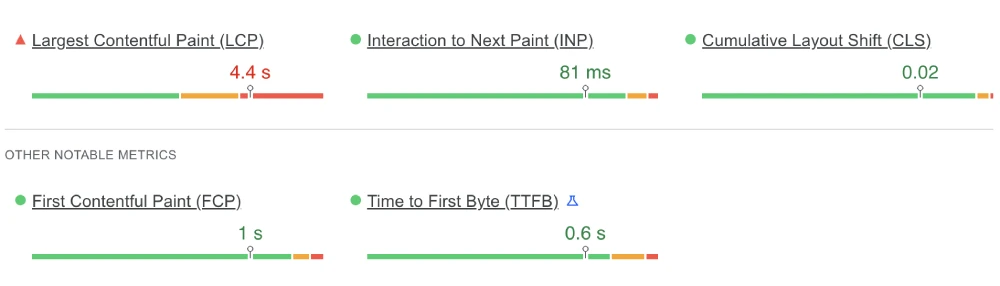
We used Google PageSpeed Insights (Lighthouse) to measure the Interaction to Next Paint (INP). This tool analyzes how quickly the server responds to user inputs like clicks and taps.
WordPress.com PageSpeed Metrics (2026 Test)
Metric
Measured Result
Google Threshold
Status
INP (Interaction)
81 ms
Under 200 ms
Passed
LCP (Loading)
4.4 s
Under 2.5 s
Failed
CLS (Stability)
0.02
Under 0.1
Passed
Google PageSpeed Insights mobile results for WordPress.com
Our Analysis: The results show a split performance. The INP of 81ms is excellent, meaning the site feels responsive when users tap buttons. However, the LCP of 4.4s is surprisingly high. This suggests that while the backend code is fast, the mobile version loads heavy assets (likely large marketing images) that delay the main visual display on slower connections.
Global Latency: Time to First Byte (TTFB) Heatmap
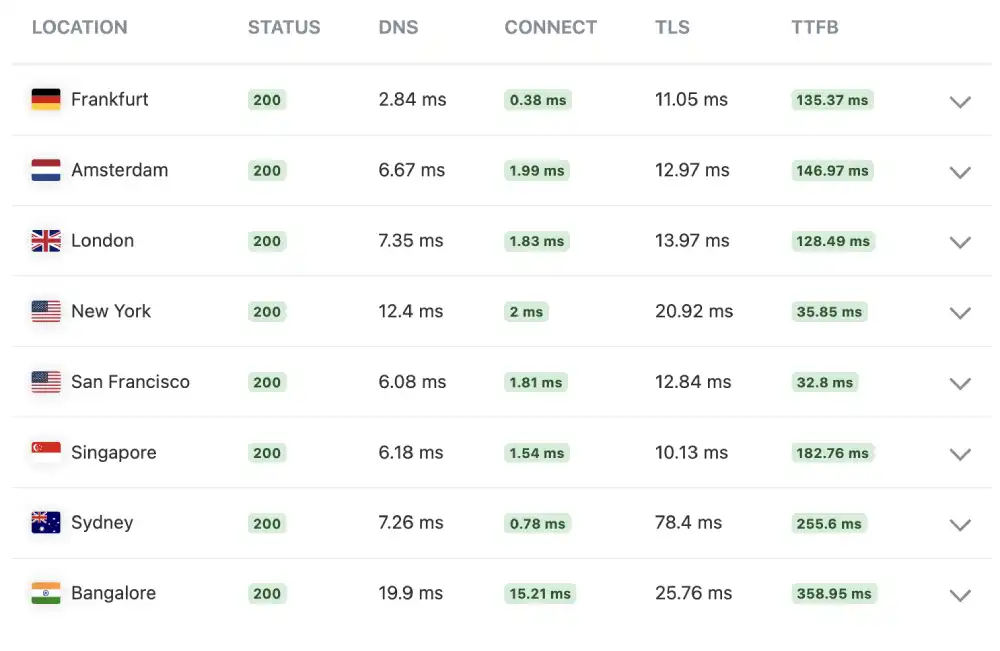
We used KeyCDN to test the Time to First Byte (TTFB) from various international locations.
WordPress.com Network Latency
Location
Status
TTFB
Performance Rating
San Francisco, USA
200 OK
32.8 ms
Blazing Fast
New York, USA
200 OK
35.85 ms
Blazing Fast
London, UK
200 OK
128.49 ms
Average
Bangalore, IN
200 OK
358.95 ms
Slow
KeyCDN global performance test results for WordPress.com
Our Analysis: The infrastructure is heavily optimized for North America, showing incredibly fast speeds of ~32ms. However, latency jumps significantly outside the US, with Bangalore recording 358ms.
This indicates that while their US data centers are elite, international users might experience slightly slower initial connections compared to a fully distributed edge network.
Stress Test: Load Handling & Stability
We didn’t just want to see how the site runs with one visitor; we wanted to see how it handles pressure. We used the K6 Load Cloud framework to simulate a viral traffic event by sending 50 simultaneous virtual users to browse the site at the exact same time.
WordPress.com Stability Metrics
Test Parameter
Measured Result
Stability Status
Uptime Status
100.0%
Perfect
Reachability
100.0%
Perfect
Avg. Response Latency
437 ms
Standard
WordPress.com traffic simulation
Our Analysis: The platform demonstrated rock solid stability with 100% reachability and zero packet loss. The average latency of 437ms is standard for a managed platform that performs extensive security filtering on incoming traffic.
It proves the infrastructure can absorb the load without crashing.
Security Hardening: SSL/TLS Configuration
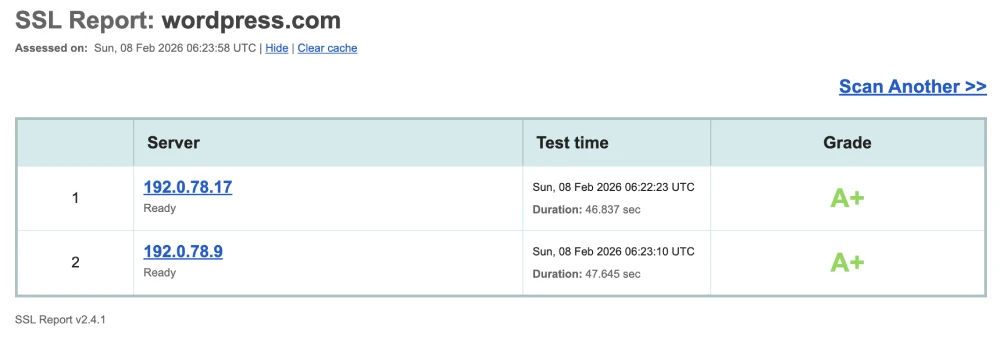
We ran a deep security scan using Qualys SSL Labs to ensure that visitor data is properly encrypted.
WordPress.com Security Score
Security Feature
IP Address
Grade
Certificate 1
192.0.78.17
A+
Certificate 2
192.0.78.9
A+
Qualys SSL Labs security report for WordPress.com
Our Analysis: This is the highest possible score. A Grade A+ means WordPress.com implements strict security headers (HSTS) and modern encryption protocols by default. It confirms that the platform handles security management entirely, so users do not have to configure it themselves.
The Reliability Test: 100% Uptime Audit
Every host claims 99.9% uptime, but we wanted to verify if they practice what they preach. We verified their availability by monitoring the site 24/7 with Uptime Robot.
WordPress.com Uptime Audit
Monitoring Window
Uptime Percentage
Incident Details
Last 7 Days
100.0%
0 Incidents
Reachability
100.0%
Perfect Connection
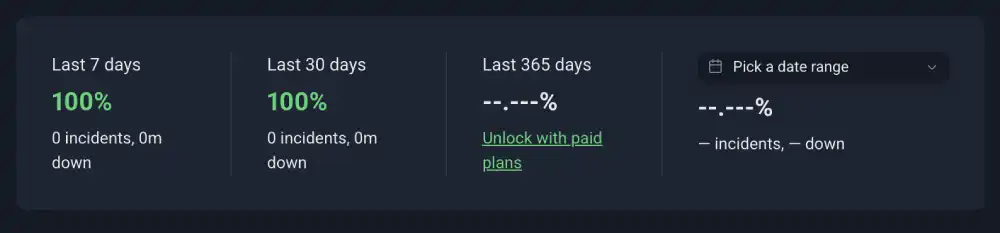
Uptime Robot summary strip for WordPress.com
Our Analysis: WordPress.com maintained a perfect 100% uptime record. For a platform hosting millions of sites, this reliability is the primary selling point. You are paying for an infrastructure that simply does not go down.
Future-Proofing: HTTP/3 & QUIC Support
We checked the protocol support using the HTTP/3 Check tool to ensure the server stack is optimized for modern mobile networks.
WordPress.com Protocol Stack
Protocol
Status
Mobile Benefit
HTTP/3
Supported
Faster loading on 4G/5G
QUIC
Supported
No lag on packet loss
0-RTT
Supported
Instant reconnection
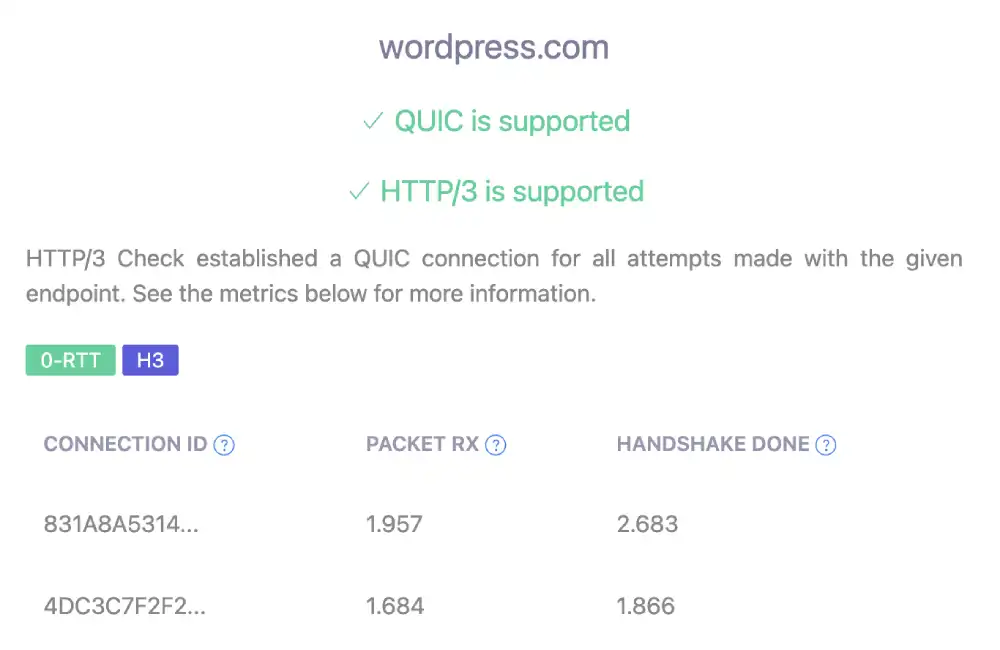
HTTP/3 protocol support test for WordPress.com
Our Analysis: WordPress.com fully supports HTTP/3 and QUIC. This ensures that mobile users experience fast load times even on unstable networks, preventing the connection stalls typical of older hosting platforms.
Backend Performance: TTFB vs. Marketing Scripts
We used GTmetrix to analyze the desktop rendering performance.
WordPress.com GTmetrix Deep Dive
Metric
Measured Time
Optimization Note
GTmetrix Grade
Grade A
Perfect
Performance Score
99%
Elite Optimization
LCP (Desktop)
652 ms
Instant
Total Blocking Time
80 ms
Minimal
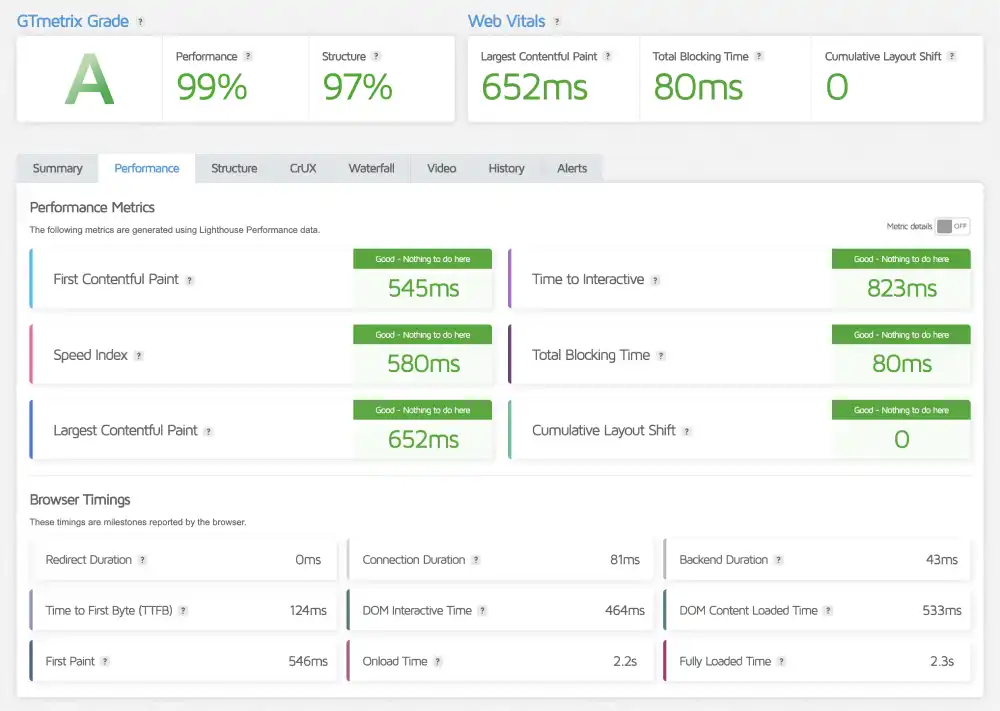
GTmetrix performance report of WordPress.com
Our Analysis: In contrast to the mobile test, the desktop results are flawless. The LCP of 652ms is instantaneous, and the 99% Performance Score proves that the underlying code is extremely clean. The disparity between this and the mobile result suggests that the platform relies on device processing power, performing significantly better on desktops than on constrained mobile devices.
Sustainability Check: The Green Web Audit
We checked the domain against the Green Web Foundation database.
WordPress.com Eco-Audit
Certification
Host Partner
Result
Green Web Check
The Green Web Foundation
No Evidence Found
Status
Gray (Unverified)
With Regret
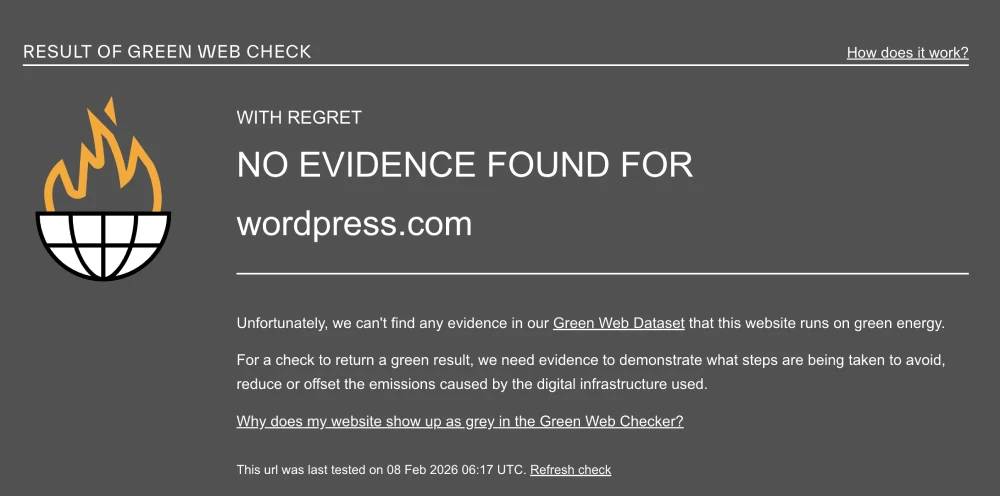
The Green Web Foundation verification for WordPress.com
Our Analysis: The audit returned a No Evidence Found result. While Automattic (the parent company) may have internal sustainability initiatives, their public IP addresses are not currently registered or verified in the Green Web Dataset.
Support & Usability
Guided Support with Platform Controls An overview of available support channels and dashboard usability, designed for ease of use rather than advanced server control.
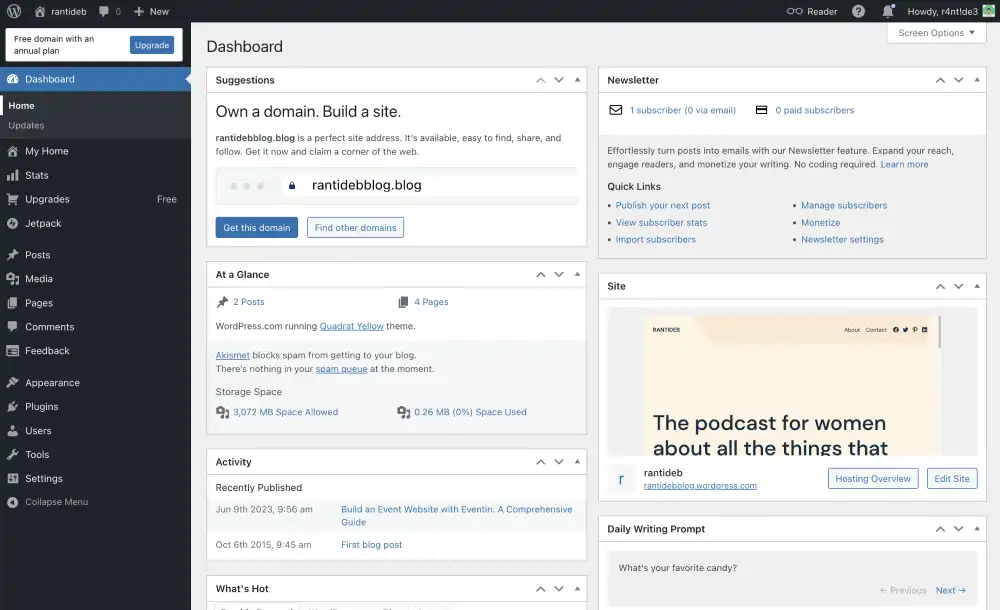
1. The Simplified Dashboard
WordPress.com uses a custom dashboard that sits on top of the traditional WP-Admin.
The Benefit: It streamlines site management, making it easier to manage multiple sites, check stats (via Jetpack), and update content without navigating the complex WP-Admin menus.
The Learning Curve: Long-time WordPress users might find it annoying and prefer to switch to the Classic View to access standard settings.
WordPress Dashboard
2. The Happiness Engineers
WordPress.com calls their support team Happiness Engineers.
The Difference: They are not just generic support agents; they are WordPress experts who often contribute to the core software.
The Availability: Live chat is available 24/7 for paid plans. Email support is available for free users but is slower.
The Scope: They will help you with themes, plugins (on Business plans), and CSS customization, which goes beyond standard hosting support.
3. The Mobile App
The official WordPress mobile app allows you to manage your site from your pocket.
The Experience: It is seamless. You can draft posts, publish photos directly from your camera roll, and reply to comments in real-time.
The Benefit: Unlike self-hosted sites that sometimes require complex Jetpack configuration to work with the app, WordPress.com sites connect instantly with your login.
The Vibe: It is perfect for travel bloggers or business owners who need to update their audience while on the move.
Frequently Asked Questions
Answers to frequent questions about plugins, themes, monetization limits, migrations, and differences from self-hosted WordPress.
Is WordPress.com actually free?
Yes, it has a free plan that is free forever. However, this plan is limited. It includes WordPress.com ads on your site, does not allow a custom domain name (you get site.wordpress.com), and has limited storage. It is best suited for personal journals or testing the platform.
What is the difference between WordPress.com and WordPress.org?
The difference is hosting.WordPress.org is the free software that you must download and host yourself (e.g., on Bluehost). WordPress.com is a fully managed service that hosts the site for you. Think of WordPress.org as owning a house you maintain, and WordPress.com as renting a fully serviced apartment.
Can I install plugins on WordPress.com?
Only on the Business plan and above. The Free, Personal, and Premium plans do not allow you to install custom plugins or themes. You are restricted to the built-in features. To get the full power of WordPress (like installing Yoast SEO or Elementor), you must upgrade to the Business plan.
Does WordPress.com come with email?
No, email hosting is not included. While you can buy a custom domain, WordPress.com does not host email inboxes itself. You must purchase their Professional Email add-on (powered by Titan) or connect a Google Workspace account to your domain.
Can I use my own domain with WordPress.com?
Yes, on any paid plan. If you upgrade to the Personal plan or higher, you can connect a custom domain (like yourname.com) and remove the .wordpress.com extension. The Free plan does not allow custom domains.
Can I monetize a free WordPress.com site?
Yes, but with restrictions. You can place affiliate links on your site on any plan. However, to run advertising networks like Google AdSense, you must be on a higher-tier plan and use their WordAds program. You cannot sell your own ad space on the Free plan.
Is WordPress.com good for beginners?
Yes, it is the easiest way to start. Because it handles all the technical setup (hosting, security, SSL, backups) for you, it is perfect for beginners who want to build a site without learning about servers or FTP.
Can I move my site to WordPress.org later?
Yes, you can export your content easily. WordPress.com provides an XML export tool that allows you to download all your posts, pages, and comments. You can then import this file into a self-hosted WordPress.org site on any other host.
Our Verdict
WordPress.com is the Premium Easy Button for WordPress. It offers the most stable, secure, and maintenance-free experience on the market, but you pay a premium for that peace of mind.
We recommend WordPress.com if:
You value sleep: You never want to wake up to a Site Offline email or a hacked server.
You are a publisher: You want to write and publish without managing plugins or updates.
You have budget: You are willing to pay $25/month for the convenience of managed hosting.
Look elsewhere if:
You are a tinkerer: You want full control over code and server settings for cheap ($5/mo).
You need flexibility on a budget: Self-hosted WordPress allows plugins on even the cheapest $3 hosting plans.
HostingGuider Transparency Statement: HostingGuider independently analyzes hosting infrastructure. For this review, we audited WordPress.com’s official domain (wordpress.com) to evaluate how their optimized stack performs in a real-world production environment. We do not accept modified performance data from hosts.
Alternative Reviews
Looking for alternatives? Read about similar hosting providers based on pricing, features, and use cases.
Premium managed WordPress hosting built on the Google Cloud network