
A single security gap in your hosting setup can wipe out years of work in minutes. Hackers do not just target large enterprises anymore. Small business websites, blogs, and online stores are now their preferred targets because most lack basic protection.
The good news is that strong hosting security does not require a dedicated IT team or a huge budget. It comes down to a handful of clear, repeatable habits.
In this guide, you will learn:
- Why hosting security matters more than ever in 2026
- The 10 most effective steps to protect your website
- How to spot weak hosting setups before attackers do
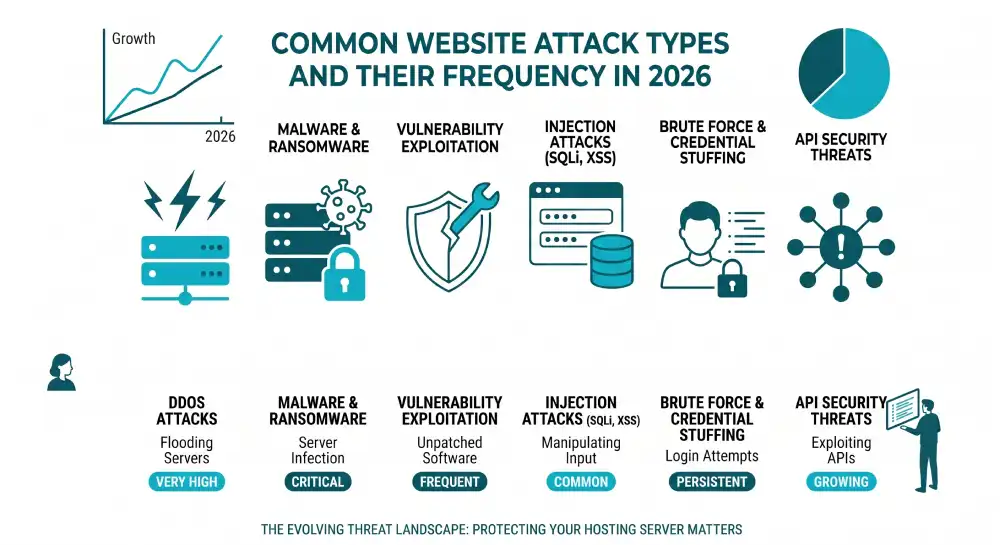
- The most common threats targeting websites today
- Whether managed hosting is worth the upgrade for security
Each tip below works whether you run a personal blog or a busy ecommerce store.
Table of Contents
Key Takeaways
- Your hosting provider is your first line of defense, choose one with built-in firewalls, daily backups, and DDoS protection.
- Multi-factor authentication blocks roughly 99.9% of automated account attacks, according to Microsoft.
- Keeping software, plugins, and your CMS updated prevents the most common attack vector.
- Daily backups stored offsite are the single best protection against ransomware.
- Regular malware scans and audits catch threats before they cause damage.
Quick Answer
The most essential hosting security tips for your website include choosing a secure hosting provider, installing an SSL certificate, enabling multi-factor authentication, keeping all software updated, using a web application firewall, automating offsite backups, limiting user permissions, running malware scans, enabling DDoS protection, and using strong unique passwords with a password manager.
Why Hosting Security Matters in 2026
Hosting security protects your website at the server level, where attackers do the most damage. A weak hosting setup can leak customer data, drop your search rankings, and shut your business down for days or weeks.
The threat landscape continues to grow. According to IBM’s Cost of a Data Breach Report, the average cost of a data breach for organizations with fewer than 500 employees reached $3.31 million in 2024, a 13.4% jump year over year. Verizon’s 2025 Data Breach Investigations Report found that small and mid-sized businesses experienced roughly four times more confirmed breaches than large organizations in 2024.
Search engines also factor security into rankings. Sites flagged as compromised lose visibility fast, and rebuilding that trust takes months. Strong hosting security protects revenue, reputation, and SEO at the same time.
Top 10 Hosting Security Tips for Your Website
Each tip below tackles a specific weak point that hackers actively exploit. Apply them in order for the strongest defense.
1. Choose a Secure Hosting Provider
Your hosting provider sets the foundation. Cheap, oversold shared hosting often skips basic security measures, leaving every site on the server exposed.
Look for these features when comparing providers:
- Server-level firewalls and intrusion detection
- Free SSL/TLS certificates included with all plans
- Built-in DDoS protection
- Daily automated backups stored offsite
- Active malware scanning and removal
- 24/7 technical and security support
Managed hosting providers handle most of this work for you. If your team lacks server administration skills, managed hosting is usually worth the higher monthly fee.
2. Install an SSL/TLS Certificate
An SSL/TLS certificate encrypts data moving between your visitors and your server. Without it, login credentials, payment details, and form submissions travel as plain text.
According to W3Techs, more than 91% of active websites now use HTTPS by default. Running on HTTP in 2026 signals to visitors and search engines that you do not take security seriously.
Most hosting providers include free SSL certificates from Let’s Encrypt. For ecommerce sites or businesses handling sensitive financial data, premium certificates with extended validation provide added trust signals and warranty coverage.
After installing your certificate, enable HTTP Strict Transport Security (HSTS). This forces all browsers to use the encrypted connection automatically.
3. Enable Multi-Factor Authentication on Every Account
Passwords alone no longer provide enough protection. Verizon’s DBIR reports that around 80% of hacking incidents involve compromised or stolen credentials.
Multi-factor authentication (MFA) adds a second layer of verification, usually a one-time code sent to your phone, an authenticator app, or a biometric check. Even if attackers steal your password, they cannot log in without the second factor.
Microsoft research shows MFA blocks roughly 99.9% of automated account attacks. Enable it everywhere it matters:
- Hosting control panel (cPanel, Plesk, or your provider’s dashboard)
- CMS admin accounts (WordPress, Drupal, Magento)
- Domain registrar account
- FTP and SSH access
- Email accounts tied to your domain
For high-risk actions like changing payment settings or accessing customer data, configure adaptive MFA rules that require stronger verification.
4. Keep All Software Updated
Outdated software is the single most common cause of website hacks. When developers release security patches, attackers immediately scan the web for sites still running vulnerable versions.
Update everything on a regular schedule:
- Server operating system and kernel
- Web server software (Apache, Nginx, LiteSpeed)
- PHP, MySQL, and other runtime environments
- CMS core (WordPress, Joomla, Drupal)
- Themes and plugins
- Third-party libraries and frameworks
Enable automatic updates for security patches where possible. For major version upgrades, test in a staging environment before pushing to production.
If a plugin or theme has not received an update in over a year, replace it. Abandoned code becomes an open door for attackers.
5. Use Strong Passwords and a Password Manager
Weak or reused passwords account for the majority of successful brute force attacks. A simple password rule fixes most of this risk.
Strong password practices for hosting accounts:
- Minimum 16 characters combining uppercase, lowercase, numbers, and symbols
- A unique password for every service and account
- Never store passwords in plain text or unencrypted files
- Use a reputable password manager (1Password, Bitwarden, Dashlane)
- Rotate critical passwords every 90 to 180 days
Password managers also generate truly random passwords, removing the temptation to reuse memorable phrases across multiple accounts.
6. Set Up Automatic Backups
Backups will not prevent an attack, but they decide whether a hack ruins your business or just costs you a few hours. Ransomware operators count on the fact that most small businesses do not have clean, recent backups.
Build a backup routine that follows the 3-2-1 rule:
- Three copies of your data
- On two different storage types
- With one copy offsite or in a separate cloud account
Daily automated backups work for most websites. For ecommerce platforms or high-traffic sites, run hourly or real-time backups. Store at least one copy completely separate from your hosting account, so a server compromise cannot wipe your backups too.
Test your restoration process regularly. A backup you cannot restore is no backup at all.
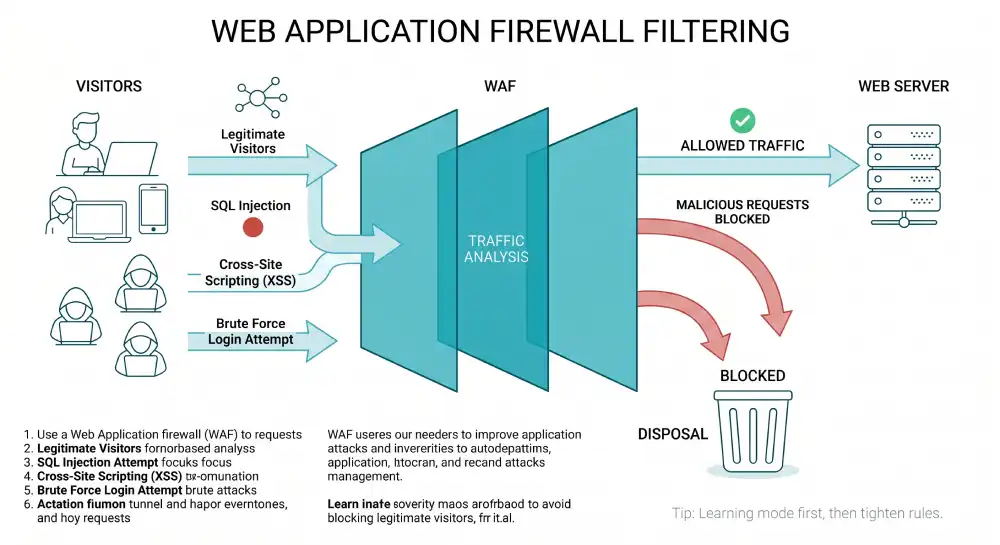
7. Use a Web Application Firewall
A web application firewall (WAF) sits between your visitors and your server, filtering out malicious traffic before it reaches your site. WAFs block common attack patterns like SQL injection, cross-site scripting, and brute force login attempts.
Quality WAF options to consider:
- Cloudflare (free tier available, paid plans add advanced rules)
- Sucuri (focused on website security)
- Wordfence (WordPress-specific protection)
- Imperva or AWS WAF (enterprise-level options)
Many hosting providers now include WAF protection at the server level. Set your WAF to “learning mode” first to avoid blocking legitimate visitors, then tighten the rules as you observe normal traffic patterns.
8. Limit User Access and Permissions
The principle of least privilege says users should only have access to what they need to do their job, nothing more. This contains the damage if any single account gets compromised.
Apply least privilege across your hosting environment:
- Grant the minimum role required for each user
- Use separate accounts for admin work and daily editing
- Remove accounts immediately when team members leave
- Review and audit user permissions quarterly
- Disable default admin usernames like “admin” or “root”
- Restrict SSH access by IP address where possible
For WordPress sites, avoid using the Administrator role for content writers. The Editor or Author role is usually enough.
9. Enable DDoS Protection
A distributed denial-of-service (DDoS) attack overwhelms your server with junk traffic, knocking your site offline for hours or days. These attacks have grown cheaper and easier to launch, putting even small sites at risk.
Most quality hosting providers offer always-on DDoS mitigation as part of their security stack. If yours does not, route your traffic through a service like Cloudflare or Akamai, which absorb attack traffic before it reaches your origin server.
A few practical DDoS-prevention habits:
- Hide your origin IP address behind a CDN or reverse proxy
- Avoid hosting email and web services on the same server
- Set up rate limiting on login pages and forms
- Monitor traffic patterns for unusual spikes
10. Run Regular Malware Scans and Security Audits
Even with strong defenses, infections can slip through. Regular scans catch malware early, before it spreads or damages your reputation.
Schedule weekly automated scans using tools like Sucuri, Wordfence, MalCare, or your hosting provider’s built-in scanner. Look for:
- Modified core files
- Unauthorized admin users
- Suspicious outbound connections
- Hidden iframes or redirects
- Backdoors in plugin or theme files
Beyond daily scanning, run a deeper security audit every quarter. Review server logs for suspicious access attempts, check user accounts for unusual activity, and verify that all software is up to date. If anything looks off, investigate immediately.
How Do You Know If Your Hosting Is Secure?
You can tell your hosting is secure when the provider offers SSL by default, runs daily backups, includes a firewall and DDoS protection, supports MFA on the control panel, and provides clear security documentation. If you cannot find these features listed, or support cannot answer basic security questions, that is a red flag.
A quick checklist to evaluate your current host:
- Do they publish their uptime SLA and security policies?
- Are backups included and stored in a separate location?
- Do they support recent versions of PHP, MySQL, and other software?
- Is there an active monitoring system for malware and intrusions?
- Can you reach technical support 24/7?
If your provider falls short on more than one of these, it is time to consider switching.
What Are the Most Common Hosting Security Threats?
The most common hosting security threats include malware infections, brute force login attacks, SQL injection, cross-site scripting (XSS), DDoS attacks, ransomware, phishing aimed at admin credentials, and outdated software exploits. Most successful attacks combine two or more of these methods.
Phishing is especially dangerous because it targets people, not systems. According to the 2025 MySecurityMarketplace small business security survey, phishing accounts for around 33.8% of all attacks against small businesses. Train every team member to recognize suspicious emails, fake login pages, and social engineering tactics.
Should You Use Managed Hosting for Better Security?
Managed hosting is worth the upgrade for most small and mid-sized businesses. With managed hosting, the provider handles OS updates, security patches, server monitoring, malware scanning, and backups. You focus on your content and customers while their team handles the infrastructure.
Unmanaged hosting costs less, but only makes sense if you have an experienced system administrator on staff. For everyone else, the cost of even one preventable breach far exceeds the price difference between managed and unmanaged plans.
Frequently Asked Questions
Is shared hosting safe for business websites?
Shared hosting can be safe for low-traffic business sites if the provider invests in proper security, like account isolation, server-level firewalls, and active malware monitoring. However, shared environments carry higher risk because a compromise on one site can affect neighbors. For sensitive data or growing businesses, VPS or dedicated hosting offers stronger isolation.
How often should I update my website security?
Update your CMS, plugins, and themes as soon as security patches are released, ideally within 24 to 48 hours. Run malware scans weekly, and conduct a full security audit at least once every quarter. Backups should run daily for most sites, and hourly for ecommerce or high-traffic platforms.
What should I do if my website gets hacked?
Take the site offline immediately to stop the spread, then change every password tied to your hosting, CMS, FTP, and database. Contact your hosting provider’s security team for help identifying the entry point. Restore from a clean backup that predates the infection, scan the restored site, and only bring it back online once it tests clean. Submit a review request through Google Search Console if your site was flagged.
Is a free SSL certificate enough for my business?
For most small to mid-sized business websites, free SSL certificates from Let’s Encrypt provide solid encryption that meets browser and SEO requirements. Ecommerce sites and businesses handling sensitive financial or healthcare data may benefit from premium certificates with extended validation, which include warranty coverage and stronger trust signals.
Can a web application firewall block all attacks?
A WAF blocks most common attacks like SQL injection, XSS, and brute force attempts, but no single tool blocks everything. Treat your WAF as one layer in a defense-in-depth strategy that also includes patching, MFA, backups, and user training. Layered protection is what stops sophisticated attackers.
Does HTTPS alone protect my website from hackers?
HTTPS encrypts data in transit, but it does not protect against malware, weak passwords, outdated software, or server-side vulnerabilities. Think of HTTPS as a baseline requirement, not a complete security solution. Combine it with the other tips in this guide for real protection.
Final Thoughts
Hosting security in 2026 is less about chasing every new threat and more about getting the fundamentals right. The ten tips in this guide cover the attack vectors behind most successful website breaches.
Start with the basics this week: confirm your SSL is active, enable MFA on every account, and verify your backups are running and recoverable. Then work through the rest of the list over the next month. A consistent, layered approach beats expensive tools every time, and it costs far less than recovering from a breach.


