
Your website is your storefront, your support desk, and your sales team rolled into one. When it goes offline, all of that stops working. A few minutes of downtime can mean lost sales, broken trust, and weaker search rankings.
Website uptime is the percentage of time your site is online and reachable. It sounds simple, but it directly shapes how fast your pages load, how Google ranks you, and how visitors feel about your brand.
In this guide, you’ll learn:
- What website uptime is and how hosts calculate it
- The link between uptime and site performance
- Common reasons websites go down
- How to monitor uptime with free and paid tools
- Practical steps to push your uptime past 99.9%
- How uptime affects SEO, conversions, and revenue
By the end, you’ll know how to read an uptime report, spot weak points in your hosting setup, and pick services that keep your site live around the clock.
Table of Contents
Key Takeaways
- Website uptime is the share of time a site is online and serving requests, usually shown as a percentage like 99.9%.
- Even small dips in uptime translate into hours of downtime each year, which hurts SEO, sales, and user trust.
- Speed and uptime work together. A slow site that responds is technically up, but it still drives users away.
- Most reliable hosts target 99.9% to 99.99% uptime and back it with a Service Level Agreement (SLA).
- You can track uptime for free using tools like UptimeRobot, Better Stack, or StatusCake.
- Smart caching, a CDN, and active monitoring are the three fastest ways to improve uptime.
Quick Answer
Website uptime measures how long your site stays online and reachable, usually as a percentage of total time. Higher uptime means fewer outages, faster response times, and stronger search performance. A site with 99.9% uptime is offline for about 8 hours and 45 minutes per year. Anything below 99% signals serious hosting or infrastructure problems.
What Is Website Uptime?
Website uptime is the amount of time your website is live, accessible, and able to serve real visitors. It is the opposite of downtime, when the site is unreachable.
Uptime is shown as a percentage. A site that is online 99.9% of a 30 day month is unreachable for about 43 minutes that month.
Hosts measure uptime by sending automatic checks to your server every minute or two. If the server fails to respond within a set time window, that period counts as downtime.
For most online businesses, uptime is one of the top three signs of healthy infrastructure. The other two are page speed and security.
How Website Uptime Is Measured
Uptime is measured against total time using a simple formula:
Uptime % = (Total time minus Downtime) divided by Total time, then multiplied by 100.
Hosts and monitoring tools usually report uptime over a 30 day or yearly window. The widely used uptime tiers are called the nines.
| Uptime % | Downtime per year | Downtime per month |
|---|---|---|
| 99% | ~3 days, 15 hours | ~7 hours, 12 minutes |
| 99.5% | ~1 day, 19 hours | ~3 hours, 36 minutes |
| 99.9% | ~8 hours, 45 minutes | ~43 minutes |
| 99.95% | ~4 hours, 22 minutes | ~21 minutes |
| 99.99% | ~52 minutes | ~4 minutes |
| 99.999% | ~5 minutes | ~26 seconds |
You can verify these numbers with a free uptime calculator like Uptime.is, which converts any percentage into real time.
The more nines a host promises, the harder it is to hit. Going from 99.9% to 99.99% is not a 0.09% upgrade. It is a tenfold jump in reliability and infrastructure cost.
Why Website Uptime Affects Performance
Uptime and performance are closely tied. A site that is up but slow feels broken. A site that is fast but offline is useless. You need both.
Here is how uptime shapes real performance:
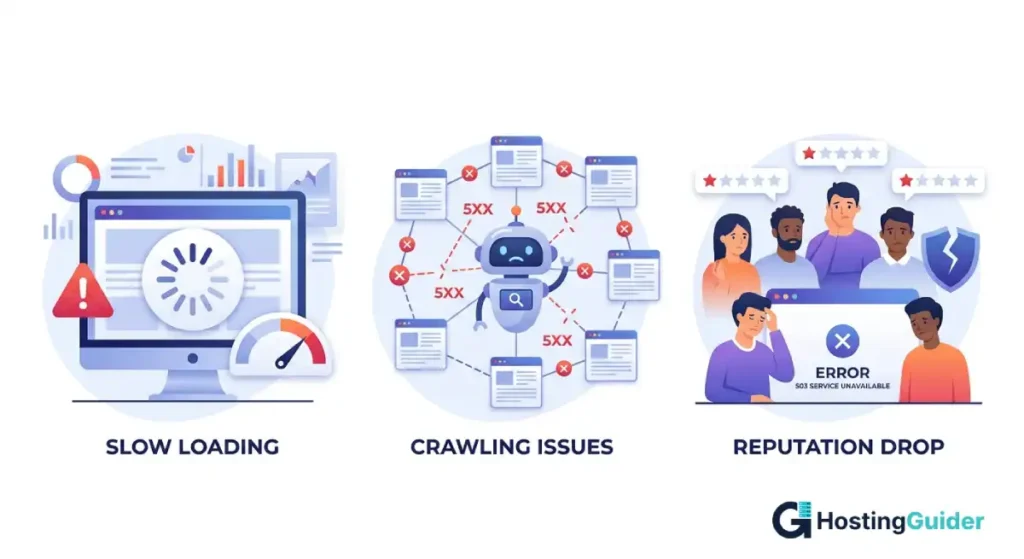
- Page response time. When a server is overloaded or partially down, pages take longer to load. Visitors leave before the first byte arrives.
- Crawl efficiency. Search engines reduce crawl rate when they hit repeated server errors, which slows new content from getting indexed.
- API and feature failures. Modern sites depend on third party APIs for payments, chat, and analytics. If your server is flaky, those features break too.
- Cache misses. After downtime, caches need to rebuild. The first visitors after an outage often see slower load times.
Google has confirmed that page experience signals, including Core Web Vitals, are part of its ranking systems. You can read more on Google’s web.dev guide to Core Web Vitals.
Common Causes of Website Downtime
Most outages come from a handful of repeat offenders. Knowing them helps you build defenses early.
- Server overload: A spike in traffic from a viral post, ad campaign, or bot attack can crash a small server.
- Hosting hardware failure: Disks, power supplies, and network cards do fail. Shared hosting users share these risks across many sites.
- Software updates gone wrong: A bad plugin update, theme conflict, or PHP version mismatch can take a site offline within seconds.
- DDoS attacks: Distributed denial of service attacks flood your site with junk traffic until it cannot serve real visitors.
- DNS issues: If your DNS provider has an outage, users cannot find your site even if your server is fine.
- Expired domains or SSL certificates: A simple billing oversight can pull a healthy site offline overnight.
- Cloud region failures: Even large clouds like AWS, Azure, and Google Cloud have rare regional outages that affect every site hosted there.
How Does Uptime Affect SEO and Rankings?
Frequent downtime hurts SEO in three ways. Google’s crawlers cannot reach unreachable pages, so new content is not indexed quickly. Repeated 5xx errors reduce crawl budget. And users who hit downtime bounce back to search results, which signals a poor experience.
Google does not publish a strict uptime threshold. But sustained outages over hours or days can lead to temporary deindexing. Once your site returns, rankings usually recover within days, but full traffic can take longer.
What Is a Good Uptime Percentage?
A good uptime percentage for a business website is 99.9% or higher. That equals less than 9 hours of downtime across an entire year. For ecommerce, SaaS, and high traffic blogs, aim for 99.95% or better.
Anything below 99% means your hosting cannot meet basic reliability standards. Time to switch.
How to Monitor Your Website Uptime
You do not need expensive tools to monitor uptime. Many free services run checks every five minutes and email you the moment something breaks.
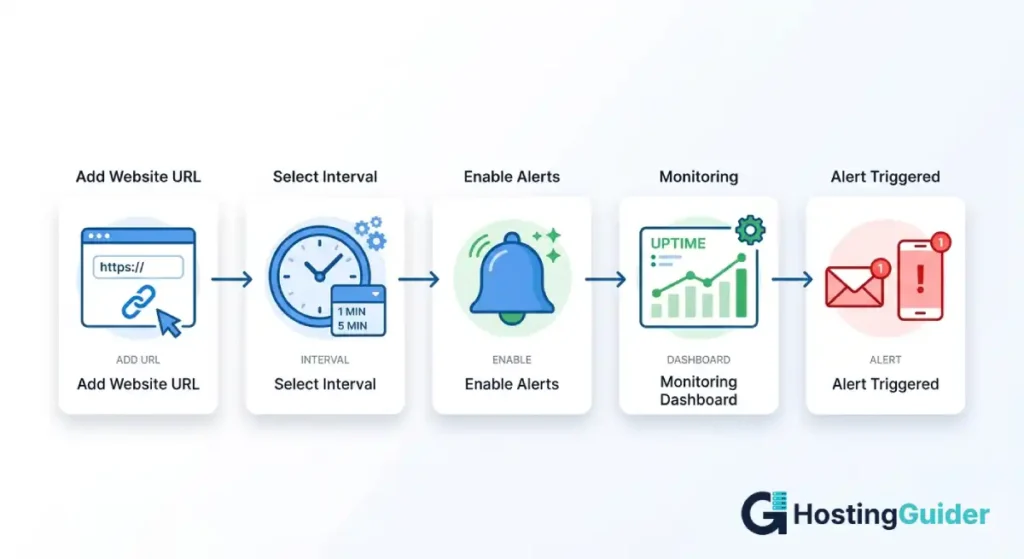
Here is a simple setup any beginner can finish in 10 minutes:
- Pick a free monitoring tool. Solid options include UptimeRobot, Better Stack, Freshping, and StatusCake.
- Add your website URL. Use the full address, including https.
- Set a check interval. Five minutes is fine for most sites. One minute is better for stores.
- Add an email or SMS alert. Some tools also support Slack and Discord.
- Create a public status page. This builds trust with users and customers when issues happen.
For larger sites, paid tools like Pingdom, Datadog, and New Relic add deeper checks, including transaction monitoring that simulates a real user logging in and clicking through.
How to Improve Website Uptime
You can lift your uptime from 98% to 99.9% or higher with a few targeted changes. Most do not need a developer.
- Use quality hosting. Pick a host with a clear SLA and a public uptime track record. Avoid the cheapest shared plans for any site that earns money.
- Add a CDN. Services like Cloudflare, Fastly, and Bunny.net cache your site across the globe. If your origin server slows or fails, the CDN can still serve cached pages.
- Set up DNS failover. Use a managed DNS provider that can route traffic to a backup server when your main one fails.
- Keep software updated. Outdated plugins and themes are the top cause of crashes for WordPress sites. Update them on a schedule.
- Enable backups and one click restore. Daily backups will not stop downtime, but they cut recovery time when something breaks.
- Test before deploying. Use a staging site to test updates and code changes. Never push untested changes straight to production.
- Watch resource usage. If CPU or RAM stays above 80% during normal hours, you have outgrown your plan.
The Real Cost of Website Downtime
Downtime is not just an annoyance. It costs real money. The exact figure depends on your traffic and revenue, but the formula is simple:
Hourly downtime cost = (Annual revenue divided by total business hours) plus recovery costs.
A small store earning $200,000 a year loses around $40 to $60 per hour offline during business hours. A SaaS platform serving thousands of users can lose far more, including SLA refunds and churned customers.
According to Atlassian’s incident management guidance, mean time to recovery (MTTR) is one of the strongest signals of a healthy operations team. Lower MTTR keeps both downtime and its costs in check.
Soft costs also matter. Customers who hit a broken site often do not return. Search rankings dip. Ad spend during downtime is wasted. Your team spends hours on emergency fixes instead of building features.
Choosing Hosting With Strong Uptime
Your host is the single biggest factor in your uptime score. When comparing hosting providers, check these specifics:
- Published SLA. Look for 99.9% or higher with clear refund terms.
- Status page history. A good host shows past incidents publicly. Avoid hosts that hide their record.
- Infrastructure type. Cloud and managed hosting usually beat shared hosting on reliability.
- Region redundancy. Multi region or multi zone setups survive single data center failures.
- Support response time. Fast 24/7 support cuts downtime when problems do happen.
For example, Amazon EC2 publishes its Compute Service Level Agreement on the AWS website, which sets a public benchmark for cloud reliability. Many quality hosts run on top of AWS, Google Cloud, or Azure and pass on similar uptime.
How CDNs and Caching Boost Uptime
A content delivery network (CDN) keeps copies of your site on servers around the world. When users visit, the CDN serves them from the closest location. This setup gives you three big wins.
- Faster pages, since static files load from a nearby server.
- Lower load on your origin, which means fewer crashes during traffic spikes.
- Built in failover, since some CDNs serve cached versions of your pages even when your origin is down.
Cloudflare’s guide on why site speed matters is a good starting point if you want to learn how CDNs reduce origin load and protect uptime.
How Often Should You Check Uptime?
Most monitoring tools default to a five minute check interval, which is fine for blogs and brochure sites. For ecommerce stores, SaaS dashboards, and login systems, drop the interval to one minute. The faster you spot an outage, the faster you can fix it.
Run a weekly uptime review. A simple spreadsheet with the date, percentage, and total downtime helps you spot trends.
Frequently Asked Questions
What does 99.9% uptime mean?
99.9% uptime means a website is online for 99.9% of all time and unreachable for 0.1%. In real numbers, that equals about 8 hours and 45 minutes of downtime per year, or roughly 43 minutes per month. It is the standard target for most quality hosting plans and SaaS platforms.
How do I check my website’s uptime?
Check website uptime by signing up for a free monitoring tool such as UptimeRobot, Better Stack, or StatusCake. Add your site URL, set a check interval of one to five minutes, and turn on email alerts. The tool tracks uptime, logs every outage, and notifies you the moment your site goes offline.
Does Google penalize websites with frequent downtime?
Google does not apply a direct penalty, but frequent downtime hurts rankings indirectly. Crawlers reduce visit rates when they hit repeat errors, pages may drop from the index, and users who see error messages bounce back to search results. Sustained outages over many hours can cause temporary deindexing.
What is the difference between uptime and availability?
Uptime is the time your server is technically running. Availability is the time the full service, including the website, login, and key features, works for real users. A server can be up while the site itself is broken. Most modern monitoring tools measure availability through synthetic user checks.
Can a CDN improve website uptime?
Yes, a CDN improves website uptime by serving cached pages from data centers near your visitors. If your origin server slows down or fails, the CDN can still deliver cached content. CDNs also absorb traffic spikes and DDoS attacks, both of which are common causes of unplanned downtime.
How often should I check my website uptime?
Check most websites every five minutes through an automated monitoring tool. Stores, SaaS platforms, and high traffic sites should switch to one minute checks for faster outage alerts. Manual checks are not reliable, since outages often happen at night or on weekends when no one is watching.
What is a healthy uptime SLA for business websites?
A healthy uptime SLA for a business website is 99.9% or higher, with refund terms tied to missed targets. For mission critical platforms like ecommerce stores, banking apps, and B2B SaaS tools, aim for 99.95% to 99.99% uptime backed by clear penalty clauses if the host fails to deliver.
Conclusion
Website uptime is one of the simplest numbers in tech, and one of the most important. It tracks how often your site is there for the people who need it. Every percentage point you gain pays back in faster pages, stronger rankings, more sales, and happier users.
Start by measuring where you are today. Pick a free monitoring tool, run it for a month, and look at the result. If your uptime is below 99.9%, work through the steps in this guide. Better hosting, a CDN, smart updates, and active monitoring cover most cases.
Treat uptime as an ongoing habit, not a one time fix. The sites that earn trust over time are the ones their visitors can always reach.


