
Your domain name is the front door of your business. People type it, share it, repeat it on calls, and remember it (or not). Pick a strong one, and trust starts before anyone reads a word. Pick a weak one, and you spend years apologizing for it on every podcast and business card.
This guide is built to be hands-on. You will not just read tips. You will follow along with three real example brands, watch their owners make decisions in real time, and see exactly which tools they use to land on the perfect name.
In this guide, you will learn how to:
- Brainstorm 30+ name ideas in under an hour
- Pick the right extension (.com, .co, .io, and more)
- Run a free trademark search on the USPTO website
- Check a domain’s past history for hidden penalties
- Compare registrar prices like Namecheap, Cloudflare, and Porkbun
- Lock the domain so it cannot get stolen or expire
Grab a notepad. By the end, you will own a domain you are proud of.
Table of Contents
Key Takeaways
- Brainstorm 30 names first, then narrow down using filters
- Stick with .com when possible since it stays the most trusted globally
- Always run a trademark check on USPTO and WIPO before buying
- Skip hyphens, numbers, and tricky spellings that confuse people
- Compare both the first-year and renewal price at every registrar
- Lock the domain and turn on auto-renewal the moment you buy
Quick Answer
To choose the perfect domain name, brainstorm at least 30 ideas, then filter for short length (under 15 characters), easy spelling, .com availability, and no trademark conflicts. Buy from a trusted registrar like Namecheap or Cloudflare, enable WHOIS privacy and auto-renewal, and lock the domain to prevent transfers.
Why a Domain Name Decides So Much About Your Brand
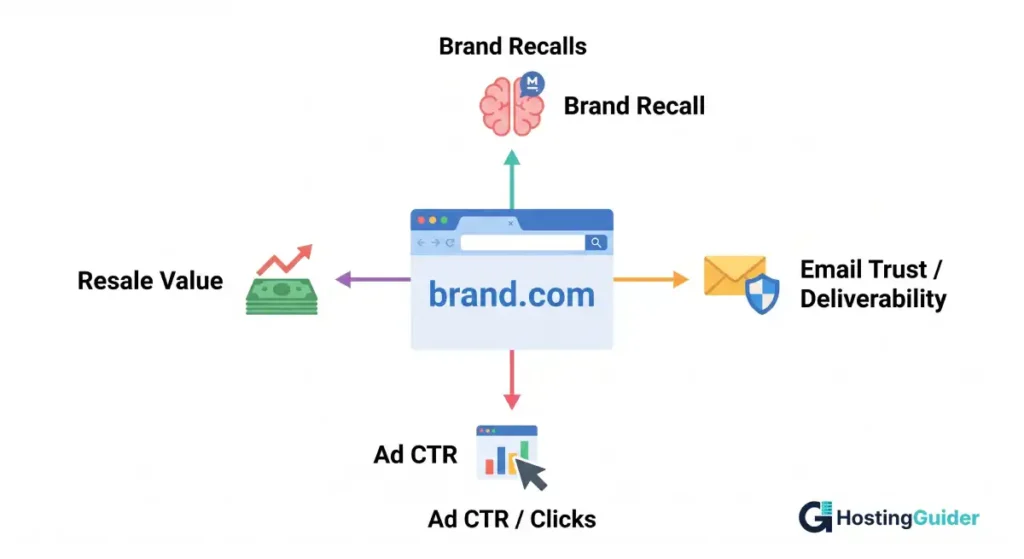
A domain name shapes how people see your business before they read a single line on your homepage. It affects email trust, ad performance, search rankings, social handles, and word-of-mouth.
The internet closed Q4 2025 with 386.9 million registered domain names across all extensions, according to Verisign’s Domain Name Industry Brief. HostingGuider’s domain industry statistics break down registration growth, extension market share, and long-term trends across the global domain ecosystem. With that much competition, the strong names get scarce fast.
With that much competition, the strong names get scarce fast. The right method matters more than ever.
Meet Your Three Example Brands
Three real-style examples will follow you through every step of this guide. When a step feels abstract, look at how each owner solved it.
Sarah runs a small handmade soap shop from her home in Austin. She wants something warm, natural, and easy to remember.
Alex is launching a fitness tracking app for runners. He wants a short, brandable name that fits a tech startup.
Maria is a freelance writer building a personal brand for content marketing clients. She wants a name that travels well on LinkedIn and email.
You will watch all three pick a name by the end.
Step 1: Brainstorm Names From Your Brand, Not the Search Box
Most people open a domain checker first and start typing random ideas. That is backwards. Start from your brand instead.
Try this 15-minute exercise. Open a blank document and answer these prompts:
- In one sentence, write what your business does and who it serves.
- List 5 feelings the brand should make people feel.
- List 5 keywords your customers might use when searching.
- List 5 metaphors or images linked to your business.
- Mix 2 words from any of the lists above into 30 candidate names.
Here is what each example brand wrote down.
Sarah’s lists:
- Business: handmade soap for sensitive skin
- Feelings: clean, calm, gentle, natural, trusted
- Keywords: handmade soap, lavender, gift bar, natural skincare
- Metaphors: garden, bloom, dew, meadow
- Names: SoapSpring, BloomBar, GentleLather, MeadowSoap, DewBarCo, PureLatherShop
Alex’s lists:
- Business: a running tracker app for casual runners
- Feelings: fast, focused, energized, light, fun
- Keywords: run tracker, pace, miles, runner
- Metaphors: stride, sprint, pulse, pace
- Names: PacePulse, StrideKit, RunWell, MileMark, SprintLab, PaceUp
Maria’s lists:
- Business: B2B content writing for SaaS companies
- Feelings: sharp, professional, original, clear
- Keywords: content writer, SaaS writer, marketing copy
- Metaphors: pen, ink, quill, signal
- Names: InkSignal, MariaWrites, ClearPenCo, SaaSInkpot, MWriteShop
This single exercise gives you a working list to filter through the next 11 steps.
Step 2: Pick the Right Domain Extension (TLD)
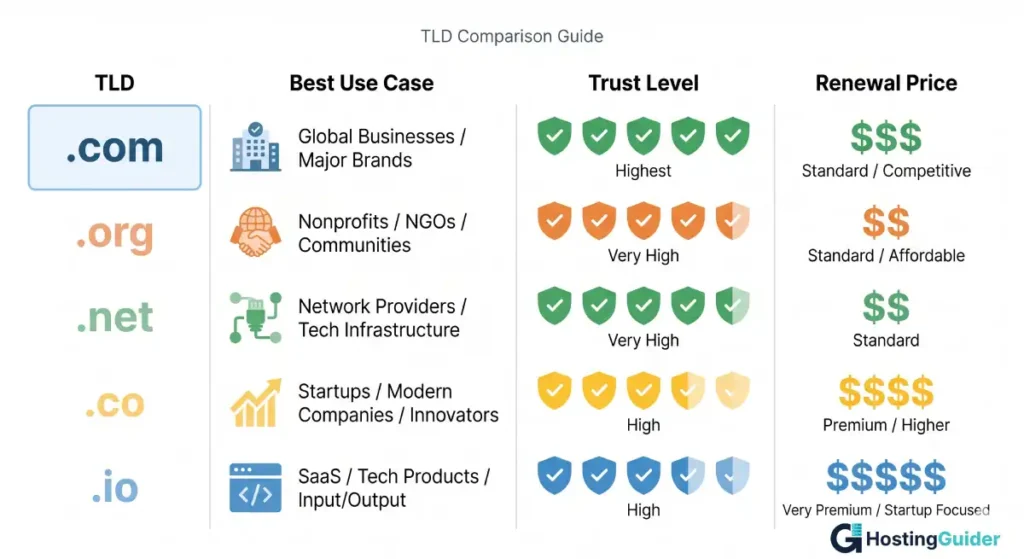
The TLD is the part after the dot, like .com or .org. Your choice signals what kind of site you run.
Best uses for the most common extensions:
- .com is the global default and stays the most trusted. Verisign data shows .com held over 159 million registrations through 2025, well ahead of every other extension.
- .org fits nonprofits, communities, and open-source projects.
- .net works for tech and infrastructure when .com is taken.
- .co is short and brandable for startups and shops.
- .io is popular with software, SaaS, and tech tools.
- Country-code TLDs like .uk, .ca, .de, and .au help if you serve one country.
Watch out: cheap new TLDs like .shop, .online, and .xyz often cost less but carry weaker brand trust. If you only own yourbrand.shop, expect to lose visitors to whoever owns yourbrand.com.
How the example owners decided:
- Sarah: a soap shop targeting US gift buyers chose .com as the priority.
- Alex: a runner-focused tech app picked .com first, with .io as backup.
- Maria: a personal brand for B2B writing picked .com first, with .co as backup.
Step 3: Apply the Short and Memorable Filter
Short names win. They fit on business cards, podcasts, ads, and verbal handoffs.
Aim for these targets:
- Under 15 characters
- 2 to 3 words maximum
- 1 to 4 syllables when said aloud
Real-world test: read each candidate to a friend over a phone call. If they need it spelled twice, drop it.
Apply this to the lists from Step 1:
- Sarah’s cuts: PureLatherShop (15 chars, too long), GentleLather (passes)
- Alex’s cuts: SprintLab (passes), PacePulse (passes), PaceUp (passes)
- Maria’s cuts: ClearPenCo (passes), SaaSInkpot (sounds awkward, cut), InkSignal (passes)
Step 4: Run the Spell Test
If a name needs spelling out, you lose visitors every time someone hears it on a podcast or radio ad.
Avoid:
- Silent letters like in Pneumatic or Knack
- Spellings English speakers will misread
- Letters that sound the same: C versus S, K versus Q, F versus Ph
- Made-up words that look nothing like they sound
Hands-on test: read your top 5 names to 10 different people over the phone. Ask each one to type the name. If 3 or more get it wrong, drop the name.
Sarah’s test: SoapSpring scored 10 out of 10 correct typing. BloomBar scored 9 out of 10. GentleLather scored 6 out of 10 because of the th sound. Sarah dropped GentleLather.
Step 5: Skip Hyphens, Numbers, and Tricky Characters
Hyphens and numbers create three problems:
- Confusion in speech: was that the number 4 or the word four?
- Lost traffic: people forget hyphens and land on competitor sites.
- Spam association: spammers often use hyphens, which lowers trust signals.
Avoid examples like best-cheap-shoes-2024.com, 4urstartup.net, or my-cool-blog-site.com.
If your top pick is taken, do not slap a hyphen or a number on a similar name to grab it. Switch to a different word entirely. The frustration of working around a taken name leads to ugly choices that haunt you later.
Step 6: Run a Free Trademark Search (Step-by-Step)
This step protects you from lawsuits and forced name changes.
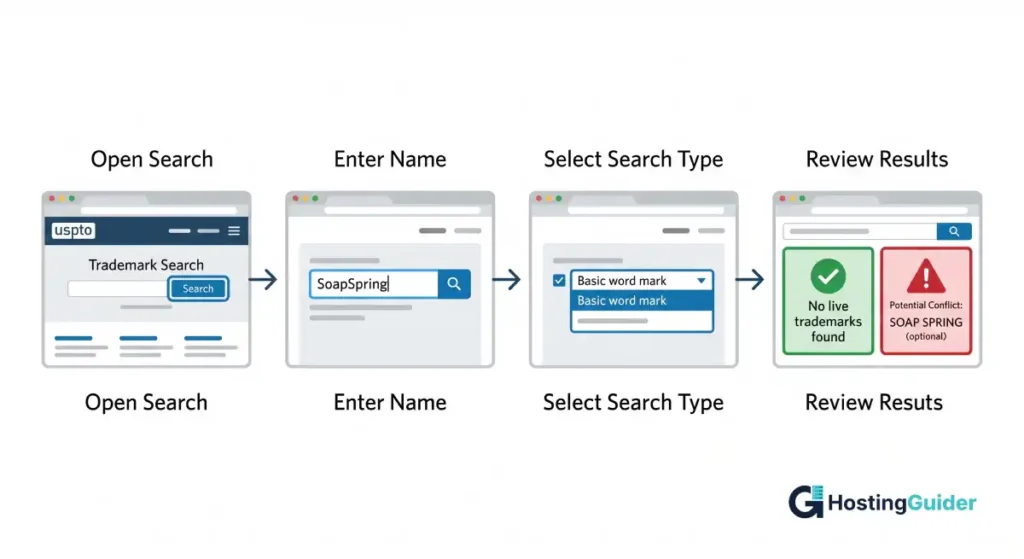
Hands-on walkthrough using the USPTO trademark search system:
- Open the USPTO trademark search page in a new tab.
- Click the search button to open the search interface.
- Type your candidate name in the search field.
- Select the basic word mark search option.
- Press search and review the results.
What to look for in the results:
- Live trademarks in your industry are red flags. Skip the name.
- Dead or abandoned marks usually do not block you, but check with a trademark lawyer if you are unsure.
- Marks in unrelated industries are usually safe but still worth noting.
For global checks, repeat the same process on the WIPO Global Brand Database. It covers more than 50 national and international trademark collections.
When Sarah ran SoapSpring through USPTO, she found 0 live marks. Safe. When Alex ran PacePulse, he found a fitness watch brand using a similar mark. He dropped the name and moved to StrideKit instead. The 10 minutes saved him a possible lawsuit.
Step 7: Check the Domain’s History on the Wayback Machine
Some domains were owned before. If the previous owner spammed Google or built a banned site, that baggage transfers to you.
Hands-on walkthrough:
- Open the Wayback Machine at archive.org/web.
- Paste the candidate domain (for example, soapspring.com) into the search bar.
- Look at the timeline. Click any year that shows snapshots.
- View 3 to 5 random snapshots from different years.
- Look for spam, gambling content, adult themes, or sketchy redirects.
Also, try this search in Google: site:yourcandidate.com. Run a WHOIS lookup on the candidate domain too. It shows the original registration date, current registrar, and name servers — useful signals for spotting recently dropped or flipped domains. If old pages still appear, the site had real prior content. Investigate before buying.
A clean history ranks faster on Google. A penalized one can take months to recover, even with good content.
Step 8: Use Domain Generators When You Run Out of Ideas
If your shortlist runs dry, free generators help you break out of a creative rut.
Tools to use right now:
- Lean Domain Search combines your keyword with thousands of words.
- Namelix uses AI to invent brandable, made-up names.
- Domainr shows clever extension combinations.
- Instant Domain Search shows real-time availability across TLDs.
Hands-on workflow with Namelix:
- Open namelix.com.
- Type 1 or 2 keywords (Sarah typed soap and bloom).
- Pick a name style: shorter, longer, branded, or auto.
- Set creativity from low to high.
- Click generate and scroll the first 50 results.
- Save 10 favorites to your shortlist.
Sarah’s Namelix run added 4 fresh ideas: Soapella, Blooma, Sapora, and Sudbloom. She added all 4 to her shortlist. Sapora made it through later filters and almost won.
Step 9: Think About SEO Without Forcing Keywords
Exact-match keyword domains like buycheapshoes.com used to dominate search. That trick stopped working years ago. Google now favors brandable names backed by real content and links.
What still helps SEO today:
- A short, easy-to-recall name lifts direct traffic and brand searches
- Brand search volume (people typing your name into Google) is a strong ranking signal
- Clean, readable URLs improve click-through rates from search results
What to avoid:
- Stuffing 3 keywords into a domain (a clear spam signal)
- Picking a name so generic that no one searches for it specifically
A balanced choice mixes brand identity with a subtle topical hint. Example: BrewBetterCoffee.com hints at the topic while still feeling like a brand. PaceUp suggests running without locking Alex into one feature.
Step 10: Plan for Future Growth and Social Handles
You may pivot. Many businesses do.
Ask yourself before buying:
- Will this name still fit if I expand my product line next year?
- Does it lock me into one country, city, or single niche?
- Can it work as both a website and a brand on social media?
Bad fit: BostonDogWalkers.com locks you to one city and one service.
Better fit: PawPath.com works in any city, any country, across walking, training, or grooming.
Hands-on social handle check:
- Open namecheckr.com.
- Paste your top candidate name.
- Review the green checkmarks (available) and red marks (taken) across Instagram, X, TikTok, YouTube, and LinkedIn.
- If 3 or more handles are taken, consider a different candidate.
Maria found InkSignal had every major handle available. She locked them all in 1 hour using free signups before someone else grabbed them.
Step 11: Compare Registrars Before You Buy
A registrar is the company that sells you the domain. Stick with established providers:
- Namecheap
- Cloudflare Registrar (often cheapest at-cost pricing)
- Squarespace Domains (formerly Google Domains)
- Porkbun
- GoDaddy
Hands-on price comparison: open all 5 in different tabs, search the same domain at each, and compare 3 numbers:
- First-year price
- Renewal price (this is the real long-term cost)
- WHOIS privacy fee (Cloudflare and Namecheap include it free)
Sarah priced soapspring.com:
- Cloudflare: $10.44/year (renewal stays the same)
- Namecheap: $5.98 first year, then $14.98/year
- GoDaddy: $0.01 first year, then $21.99/year, plus $9.99 privacy fee
She picked Cloudflare. Over 5 years, she saves nearly $50 versus GoDaddy on the same domain.
Step 12: Lock Down Your Domain Right After Purchase
Once the domain is yours, take 5 minutes to secure it. Skipping this is how owners lose domains to expiration or theft.
Do these 5 things in your registrar dashboard:
- Turn on auto-renewal so the domain never expires.
- Enable WHOIS privacy to hide your name, email, and address.
- Activate registrar lock to block unauthorized transfers.
- Add 2-factor authentication on your registrar account.
- Set a strong, unique password (a password manager helps).
Lost or expired domains are among the most painful website disasters. According to Google Search Central guidance on changing domains, even a planned domain move takes weeks for traffic to recover. An accidental loss is far worse since redirects break and squatters can grab your name within hours.
How the Three Examples Ended
After all 12 steps, here is what each owner picked:
- Sarah chose SoapSpring.com on Cloudflare for $10.44/year. Trademark clear, all socials open, 9 out of 10 spell-test score.
- Alex chose StrideKit.com on Cloudflare for $10.44/year. Trademark clear after dropping PacePulse.
- Maria chose InkSignal.com on Namecheap for $9.98 first year. Trademark clear, all handles claimed inside 1 hour.
All 3 followed the same 12 steps. Their results differ because their brands differ, but the method holds.
Common Domain Mistakes to Skip
- Picking a name no one can pronounce on first hearing
- Buying only the .net while leaving .com to a competitor
- Skipping the trademark check entirely
- Trusting a $1 first-year deal that hides $30 renewals
- Adding a year or city in the name (BestPizza2024.com ages overnight)
- Forgetting to renew the domain before expiration
- Buying without checking social handle availability
Strong vs Weak Domain Examples
Strong picks and why they work:
- Airbnb.com: made-up, brandable, short, memorable
- Notion.so: clean, sticky, fits the product
- Stripe.com: 1 word, easy to spell, clear brand
- Calm.com: 1 word, perfect product fit, premium
Weak picks and why they fail:
- thebestphotographyservicesinatlantageorgia.com: far too long, locks to one city
- 4u-design-shop.net: numbers, hyphens, weak TLD, spammy feel
- klphtgrphy.com: no vowels, unspellable, looks like a typo
Notice that strong names do not describe the service in detail. They do not have to. The brand carries the weight, and the website does the explaining.
Should You Use Your Own Name as a Domain?
Personal names work well for:
- Freelancers (writers, designers, coaches, consultants)
- Authors and speakers
- Personal brand creators on YouTube or Substack
- Independent service professionals like therapists or photographers
They work less well for product companies that may scale beyond the founder. A scalable product brand should stand on its own so you can step back, hire a CEO, or sell the company later.
Quick test: if you sold the business tomorrow, would the new owner keep the name? If not, choose a brand-style name from day one.
FAQ
What is the perfect length for a domain name?
The perfect length is 6 to 14 characters. Shorter names are easier to remember, type, share verbally, and fit on marketing materials. Most top brands stay under 12 characters. Anything over 15 characters becomes harder to recall and far more likely to be mistyped or misspelled.
Is .com still the best domain extension in 2026?
Yes, .com remains the most trusted and widely used extension worldwide. Verisign data shows .com held more than 159 million registrations in 2025, far ahead of every other TLD. Most users assume a real brand uses .com by default. Other extensions like .co or .io can work, but .com signals credibility fastest.
How do I check if a domain name is available?
Open a registrar like Namecheap, Cloudflare, or Porkbun and type the name into their search bar. The system shows availability across multiple TLDs in seconds. You can also use generators like Instant Domain Search and Namelix to brainstorm and check availability at the same time, which speeds up the early stage.
Can I change my domain name later without losing SEO?
Yes, but expect a temporary traffic drop. Google Search Central confirms that proper 301 redirects, a Search Console change-of-address request, and at least 180 days of redirect maintenance are needed to retain rankings. Most sites recover in 3 to 7 weeks if every step is handled correctly without errors.
Should I buy multiple domain extensions for my brand?
Yes, when budget allows. Buying the .com plus 1 or 2 close matches like .net, .co, or your country-code TLD blocks competitors and squatters. You can redirect the extras to your main domain. For most small businesses, owning the .com plus your country TLD provides enough protection for the first few years.
How much should I pay for a domain name?
A standard new domain costs 8 to 20 dollars per year for common TLDs like .com or .net at most reputable registrars. Premium or already-owned names can range from hundreds to millions. Always check the renewal price before buying since cheap first-year deals at some registrars often triple or quadruple at renewal.
Do keywords in domain names still help SEO?
A keyword in your domain offers only a small SEO boost today. Google ranks sites mainly on content quality, backlinks, and user experience. A short, brandable name often outperforms a keyword-stuffed one because it earns more direct traffic, brand searches, and natural mentions over time, which feed back into rankings.
Final Thoughts
Picking a domain name blends creativity with research. Block off a focused weekend. Brainstorm 30 ideas, narrow to 10, run trademark and history checks, test pronunciation with real friends, and buy from a trusted registrar. Lock everything down before you celebrate.
A solid domain quietly works for you for years. It strengthens every email you send, every ad you run, and every word-of-mouth referral that comes in. Sarah, Alex, and Maria each spent one weekend on it. You can too.


