
Building a website is only half the job. The other half is making sure people can actually find it on Google.
Search engine optimization, or SEO, is what determines whether your pages show up when someone searches for what you offer. And the platform you build on plays a bigger role in that than most people expect. Some builders give you deep control over every SEO setting. Others handle the basics well but lock you out of anything advanced.
This guide compares the SEO features of five major website builders: Wix, Squarespace, WordPress.com, Shopify, and Webflow. You will see exactly what each platform offers, where it falls short, and which one gives you the best foundation for ranking on Google.
If you are still deciding which platform to use overall, our Wix vs Squarespace vs WordPress.com guide covers the full comparison beyond just SEO. And if you are using one of these platforms for an online store, our Website Builders for E-commerce: Top Choices article covers how each platform handles product and store SEO specifically.
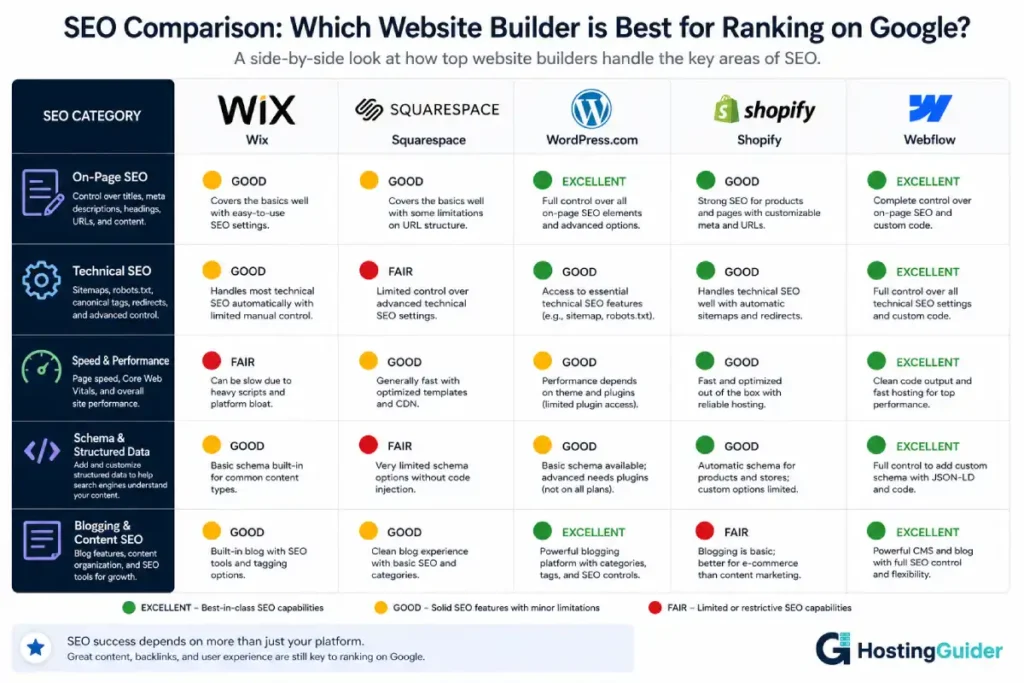
Table of Contents
Key Takeaways
- WordPress.com gives you the deepest SEO control of any hosted builder
- Wix and Squarespace handle basic SEO well but have limits on advanced features
- Shopify has strong product page SEO but weaker blogging and content tools
- Webflow produces the cleanest code and fastest pages of any visual builder
- All five platforms include the SEO basics: page titles, meta descriptions, and sitemaps
- The SEO gap between platforms matters most when you publish a lot of content
- Your content quality matters more than your platform, but your platform sets the ceiling
Quick Answer
For SEO, WordPress.com is the strongest hosted platform because it supports plugins like Yoast SEO, gives you full control over technical settings, and has the best content publishing tools for ranking blog posts. Webflow produces the cleanest code and fastest pages but requires more technical knowledge. Shopify is excellent for product page SEO. Wix and Squarespace both handle basic SEO well enough for small sites but offer less depth for advanced optimization.
What SEO Features Actually Matter on a Website Builder?
Before comparing platforms, it helps to understand which SEO features actually make a difference. Not all SEO settings are equally important. Some are essential for every website. Others only matter at scale.
| SEO Feature | Why It Matters | How Important |
|---|---|---|
| Page title control | The blue clickable text on Google, directly affects click-through rate | Essential |
| Meta description control | The preview text under your title on Google | Essential |
| Custom URL slugs | Clean, keyword-focused URLs help Google understand your pages | Essential |
| SSL certificate | Google uses HTTPS as a ranking signal | Essential |
| XML sitemap | Helps Google find and index all your pages | Essential |
| Image alt text | Helps Google understand images, improves accessibility | Essential |
| Canonical tags | Prevents duplicate content issues | Important |
| Redirect management | Preserves SEO value when you change page URLs | Important |
| Structured data or schema | Helps Google display rich results like stars and FAQs | Important |
| Page speed | Faster pages rank better and keep visitors longer | Important |
| Mobile responsiveness | Google indexes mobile versions of pages first | Essential |
| Blogging tools | Fresh content helps you rank for more keywords over time | Important |
| SEO plugin support | Plugins like Yoast give you deeper optimization tools | Very useful |
| Open Graph tags | Controls how your pages look when shared on social media | Useful |
| Google Search Console integration | Monitors how Google sees and crawls your site | Useful |
The platforms below are compared across all of these features.
Wix SEO Features
Wix has invested heavily in its SEO tools over the past few years. It used to be criticized for poor SEO, but that criticism is largely outdated now. Today, Wix handles all the essential SEO features and more.
On-Page SEO
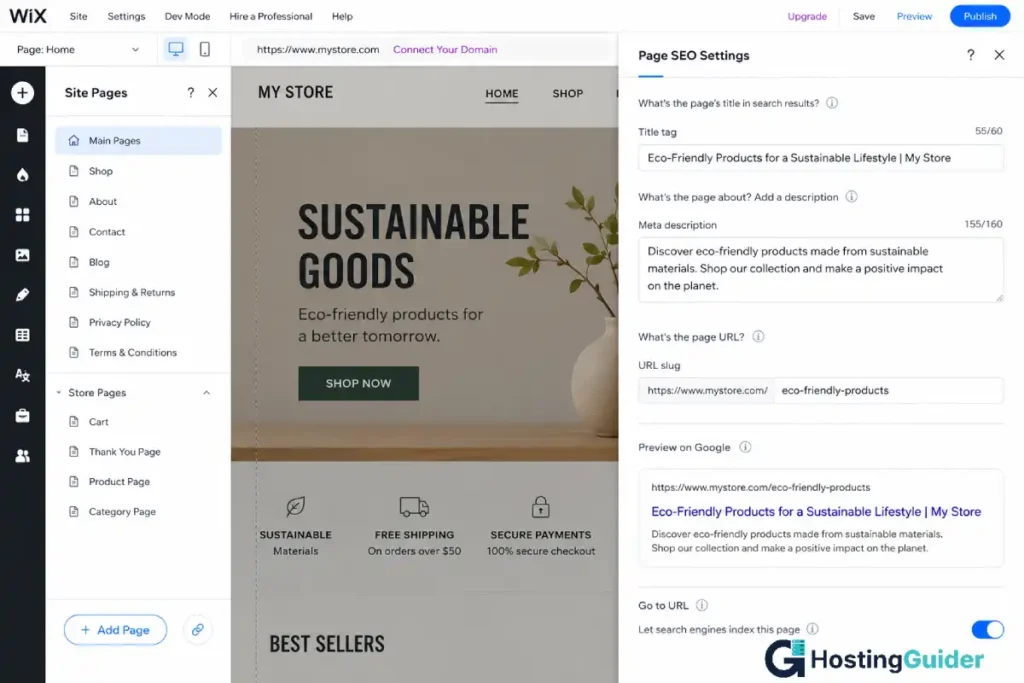
Every page and post on Wix has its own SEO settings panel. You access it by hovering over a page in the Pages menu and clicking the three-dot icon, then SEO Basics.
Inside you can set a custom page title, meta description, and URL slug for every page. Wix shows you a live character counter so you know when your title or description is too long.
Wix also has an SEO Setup Checklist inside the Marketing and SEO section of your dashboard. It creates a personalized checklist based on your site type and walks you through the most important optimization steps. This is genuinely useful for beginners who do not know where to start.
Technical SEO
Wix generates and submits an XML sitemap automatically. You do not need to create or manage it. Your sitemap is always up to date as you add new pages and posts.
Wix handles canonical tags automatically to prevent duplicate content issues. You can also set custom canonical URLs manually in the Advanced SEO settings for any page.
Wix supports 301 redirects through the SEO Settings section of your dashboard. This is important when you rename or delete pages. Without a redirect, people who click an old URL get a 404 error and Google loses the ranking value of that page.
Wix allows header and footer code injection on paid plans. This means you can add custom structured data, Google tag codes, and other tracking scripts without a plugin.
Page Speed
Page speed is a known Google ranking factor. Wix pages have historically been slower than self-hosted WordPress or Webflow pages. Wix has made improvements to its infrastructure over recent years, but some Wix sites still score lower on tools like Google PageSpeed Insights compared to other platforms. This is worth checking after you build your site.
Blogging SEO
Wix has a built-in blog with categories, tags, and author profiles. You can set individual SEO titles and descriptions for each post. Blog posts support image alt text and custom URL slugs.
The blogging tools are functional but basic compared to WordPress. If publishing a large volume of content to rank on Google is your main strategy, the Wix blog will serve your needs at a beginner level but starts to show limitations at scale.
Wix SEO Summary
| SEO Feature | Available on Wix |
|---|---|
| Custom page titles and meta descriptions | Yes |
| Custom URL slugs | Yes |
| XML sitemap | Automatic |
| SSL certificate | Yes, automatic |
| Image alt text | Yes |
| 301 redirects | Yes |
| Canonical tags | Yes |
| Structured data | Basic, manual code injection required |
| Google Search Console integration | Yes |
| SEO plugin support | No |
| Page speed | Moderate |
| Blogging tools | Basic to moderate |
Squarespace SEO Features
Squarespace handles SEO cleanly and covers everything a small to medium website needs. The platform takes a simplified approach where most technical SEO is handled automatically in the background, which suits beginners well but limits advanced customization.
On-Page SEO
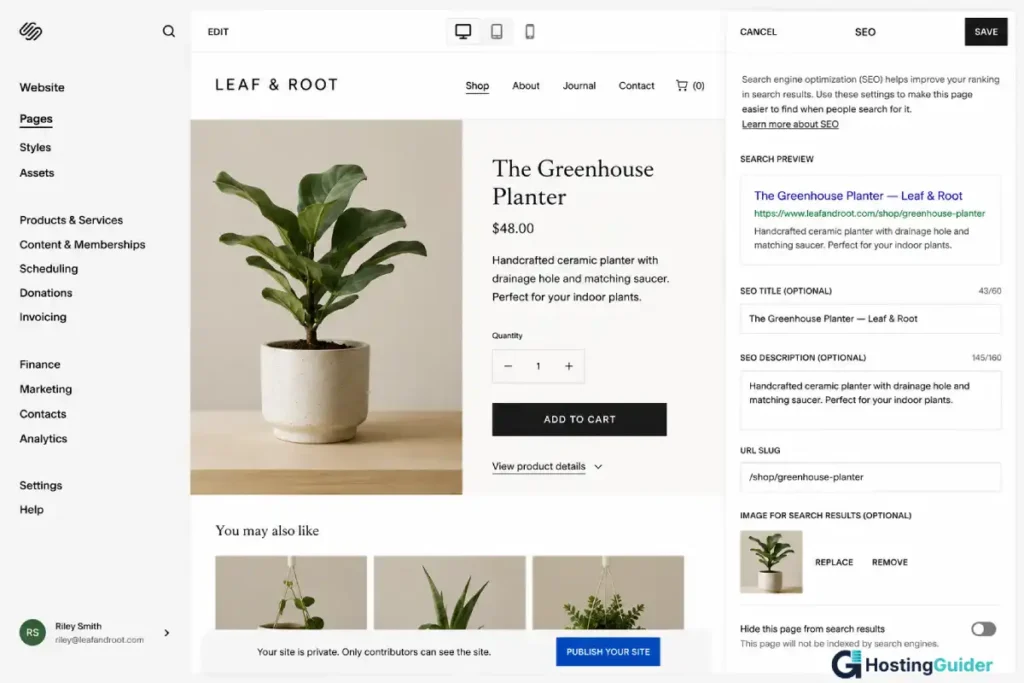
Every Squarespace page has an SEO tab in its settings. Click the gear icon next to any page in the Pages panel, then click the SEO tab.
You can set a custom SEO title, meta description, and URL slug for every page. Squarespace uses your page title as the default SEO title if you do not set a custom one, which is a common oversight. Always set a keyword-focused custom title rather than relying on the default.
Squarespace also has a global SEO panel in Settings. Here you set a title format that applies across all pages, like Page Name | Site Name, and a site description used when no specific meta description is set.
Technical SEO
Squarespace automatically generates an XML sitemap at yourdomain.com/sitemap.xml. You submit this to Google Search Console manually during setup.
Squarespace handles canonical tags automatically. It manages duplicate content between regular pages and AMP versions of pages if you enable AMP.
Squarespace includes a clean URL structure. Page URLs are based on the page names you set and are generally clear and keyword-friendly. You can customize the slug for any page.
301 redirects are available in Settings under Advanced and then URL Mappings. The interface is text-based rather than visual, which is less beginner-friendly than Wix but fully functional.
Squarespace does not support custom code injection for structured data on the Personal plan. On the Business plan and above, you can add custom header code, which allows you to add JSON-LD structured data manually.
Page Speed
Squarespace pages are generally fast. The platform optimizes images automatically and uses a global CDN to serve your site quickly to visitors in different countries. Squarespace scores consistently well on speed tests, especially for template-based pages without heavy custom code.
Blogging SEO
Squarespace has a solid blog. Each post supports a custom SEO title, meta description, URL slug, image alt text, categories, and tags. You can set a featured image for social sharing. The Squarespace blog handles the content side of SEO well for small to medium publishing needs.
Squarespace SEO Summary
| SEO Feature | Available on Squarespace |
|---|---|
| Custom page titles and meta descriptions | Yes |
| Custom URL slugs | Yes |
| XML sitemap | Automatic |
| SSL certificate | Yes, automatic |
| Image alt text | Yes |
| 301 redirects | Yes, text-based |
| Canonical tags | Yes, automatic |
| Structured data | Manual code injection on Business plan and above |
| Google Search Console integration | Yes |
| SEO plugin support | No |
| Page speed | Good |
| Blogging tools | Good |
WordPress.com SEO Features
WordPress.com is the strongest hosted website builder for SEO among the five platforms covered here. It combines the power of the world’s most widely used CMS with a suite of built-in and plugin-based SEO tools that no other hosted platform can match at scale.
For a step-by-step guide to setting up SEO on WordPress.com including how to connect Google Search Console and use the block editor, see our How to Create a Website with a Drag-and-Drop Builder tutorial.
On-Page SEO
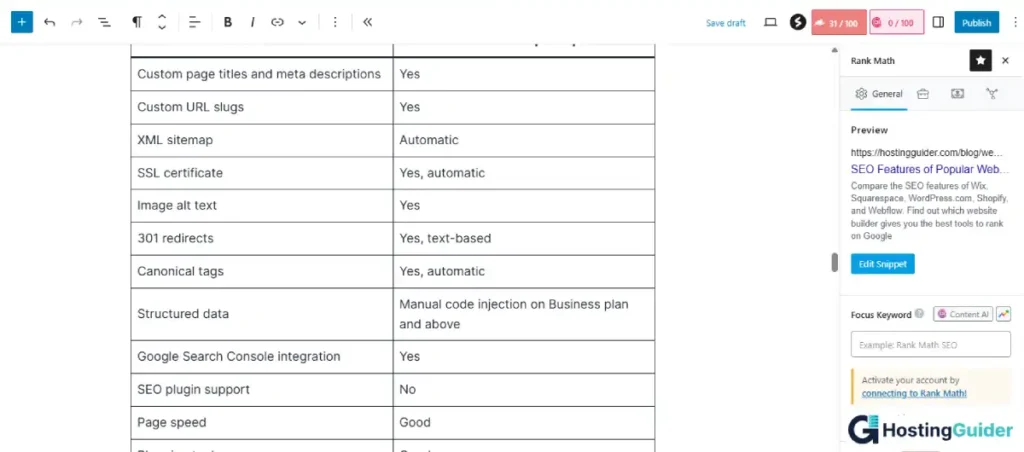
Every post and page in WordPress.com includes SEO settings directly inside the editor. You can edit the SEO title, meta description, and URL slug without leaving the page.
On the Creator plan and above, you can install advanced SEO plugins like Rank Math. Rank Math adds a dedicated Focus Keyword field to every post and page and gives you a live optimization score while you write.
After entering your target keyword, Rank Math checks whether it appears in important places such as:
- The SEO title
- The first paragraph
- Subheadings
- The meta description
- Image alt text
- The URL slug
It also analyzes readability, content length, internal linking, and other optimization signals.
Instead of simple pass-or-fail feedback, Rank Math gives you a numeric SEO score along with color-coded indicators so you can quickly see what still needs improvement.
This level of detailed per-post SEO analysis and optimization guidance is far deeper than what most hosted website builders provide by default.
Technical SEO
WordPress.com generates an XML sitemap automatically and updates it as you add content. On paid plans, you can connect Google Search Console directly from your dashboard.
WordPress.com supports 301 redirects on paid plans. You manage them through the Upgrades or Settings section depending on your plan level.
Canonical tags are handled automatically. WordPress.com prevents common duplicate content issues between category pages, tag pages, and individual posts by default.
On the Creator plan and above, you can install SEO plugins that add full structured data support, open graph tag control, and advanced technical SEO settings. Yoast SEO, Rank Math, and other major SEO plugins all work with WordPress.com on eligible plans.
Page Speed
WordPress.com hosts all sites on a fast, distributed infrastructure. Basic speed is good. On higher plans where you can install plugins, you can add caching and optimization plugins that improve performance further. Image compression, lazy loading, and minification are available through plugins on eligible plans.
Blogging SEO
This is where WordPress.com stands clearly ahead of every other platform on this list. WordPress was built for publishing. Its content tools include categories, tags, author profiles, RSS feeds, related posts, comment management, and full control over post metadata.
Publishing high-quality content consistently is the most reliable long-term SEO strategy. WordPress.com gives you the best infrastructure for doing that at any scale. You can publish 10 posts or 10,000 posts and the platform handles it equally well.
WordPress.com SEO Summary
| SEO Feature | Available on WordPress.com |
|---|---|
| Custom page titles and meta descriptions | Yes |
| Custom URL slugs | Yes |
| XML sitemap | Automatic |
| SSL certificate | Yes, automatic |
| Image alt text | Yes |
| 301 redirects | Yes |
| Canonical tags | Yes, automatic |
| Structured data | Yes, via plugins on Creator plan |
| Google Search Console integration | Yes |
| SEO plugin support (Yoast, Rank Math) | Yes, on Creator plan and above |
| Page speed | Good to excellent |
| Blogging tools | Best in class |
Shopify SEO Features
Shopify is built for selling, and its SEO tools reflect that priority. Product page and collection page SEO is strong. Content and blogging SEO is weaker. If your main goal is ranking product pages and category pages for commercial search terms, Shopify gives you a solid foundation. If you need to rank dozens or hundreds of informational blog posts, it has limitations.
For a full comparison of Shopify as an e-commerce platform including how it compares to WooCommerce, Wix, and others, see our Website Builders for E-commerce: Top Choices guide.
On-Page SEO
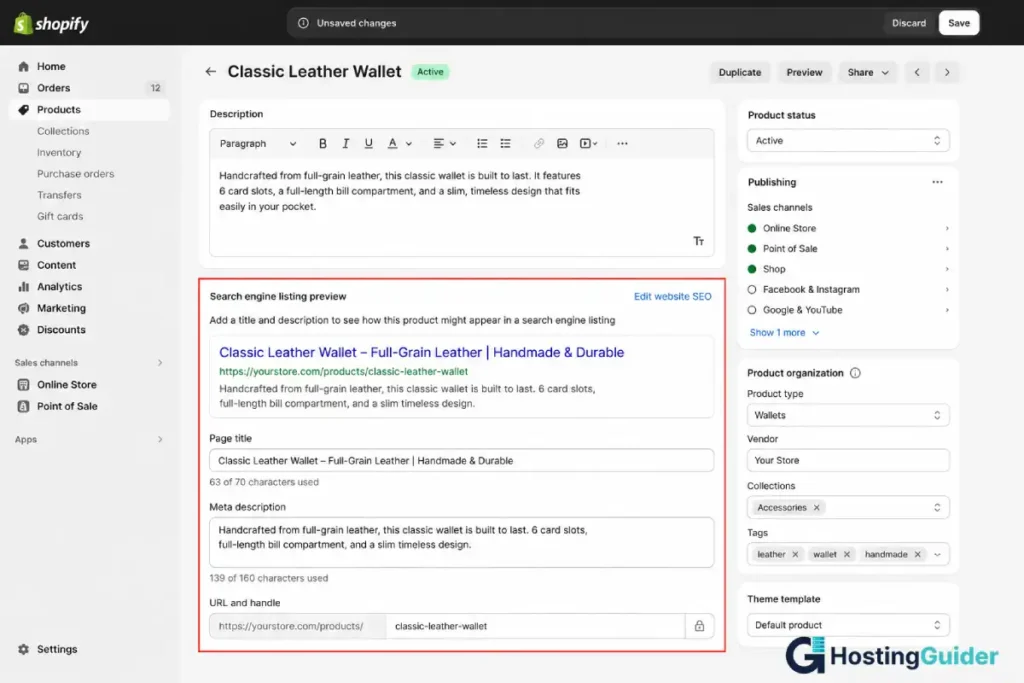
Every Shopify product, collection, page, and blog post has a Search Engine Listing Preview section at the bottom of its editor. This shows a live preview of how your page will look on Google. You edit the page title, meta description, and URL directly inside this section.
Shopify auto-generates titles and descriptions based on your product names and descriptions if you do not set custom ones. Always write custom SEO titles and descriptions for your most important product and collection pages rather than relying on auto-generated ones.
Technical SEO
Shopify automatically generates an XML sitemap at yourdomain.com/sitemap.xml. This sitemap includes products, collections, pages, and blog posts.
Shopify handles canonical tags automatically to prevent duplicate content between product pages, collection pages, and filtered pages.
301 redirects are managed through Online Store, then Navigation, then URL Redirects in the Shopify admin. The interface is clean and easy to use.
Shopify supports Google Search Console integration. You verify your domain through the Shopify admin under Preferences.
Shopify has limited structured data support built in for product pages. It automatically adds basic product schema including price, availability, and name. For richer schema like FAQ schema, review schema, or breadcrumb schema, you need a third-party Shopify app or custom theme code.
Page Speed
Shopify pages are generally fast. The platform uses a CDN to serve pages quickly worldwide. However, the Shopify App Store contains many apps that add tracking scripts and code to your pages. Installing too many apps can significantly slow down your store. Audit your installed apps regularly and remove anything you do not actively use.
Blogging SEO
Shopify has a built-in blog that supports categories, tags, and author information. Each post has its own SEO title, meta description, and URL slug. The blog editor is functional but simple compared to WordPress.
If content marketing is a major part of your growth strategy and you plan to publish a lot of educational or informational content to drive organic traffic, Shopify’s blogging tools will feel limiting compared to WordPress.com. Some Shopify store owners run a separate WordPress blog to handle content marketing and link it to their Shopify store.
Shopify SEO Summary
| SEO Feature | Available on Shopify |
|---|---|
| Custom page titles and meta descriptions | Yes |
| Custom URL slugs | Yes |
| XML sitemap | Automatic |
| SSL certificate | Yes, automatic |
| Image alt text | Yes |
| 301 redirects | Yes |
| Canonical tags | Yes, automatic |
| Structured data | Basic product schema, advanced needs apps |
| Google Search Console integration | Yes |
| SEO plugin support | Via third-party apps |
| Page speed | Good (watch app bloat) |
| Blogging tools | Basic |
Webflow SEO Features
Webflow offers the most technically precise SEO implementation of any visual builder on this list. Because Webflow generates clean HTML and CSS code rather than wrapping your content in proprietary code layers, the output is lean and fast. This gives Webflow sites a natural performance advantage that benefits SEO.
On-Page SEO
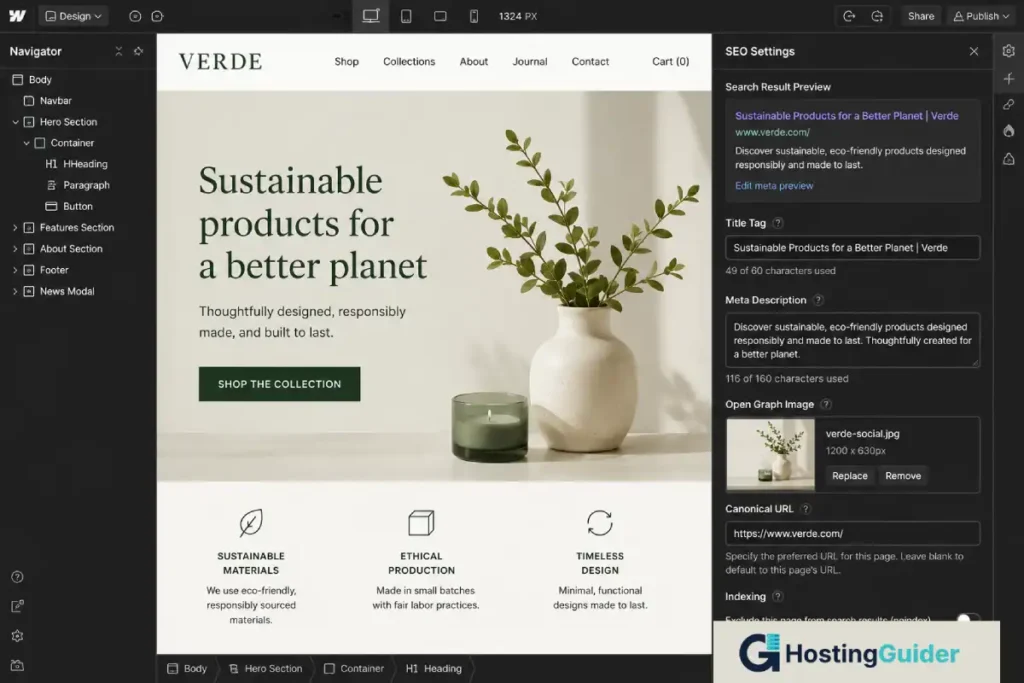
Every page in Webflow has a dedicated SEO settings panel. You access it from the Page Settings icon in the left toolbar of the Designer. Inside you can set a custom title tag, meta description, Open Graph title, Open Graph description, and Open Graph image for every page.
Webflow also supports setting a page as noindex directly from the page settings. This is useful for pages you do not want Google to index, like thank you pages, cart pages, or staging versions.
For CMS collections, which is how Webflow handles blogs and dynamic content, you can set up template-based SEO titles and meta descriptions that automatically pull in the collection item’s name, category, or other fields. This means every blog post automatically gets a unique and properly formatted SEO title without you writing each one manually.
Technical SEO
Webflow automatically generates an XML sitemap. You can also control which pages are included in or excluded from the sitemap from the page settings panel.
Webflow gives you full control over canonical URLs at the page level. You can set a custom canonical for any page directly from the page settings without any plugin or code.
301 redirects in Webflow are managed through the Project Settings under the Hosting tab. The interface is straightforward.
Webflow supports custom code in the head and body of every page. This makes it easy to add JSON-LD structured data, custom tracking scripts, and any other code-level SEO implementation you need.
Page Speed
This is where Webflow stands out from every other platform on this list. Webflow generates clean, minimal code. It does not add unnecessary HTML wrappers or proprietary code layers around your content. The output is lean.
Webflow also uses a global CDN, automatically compresses images, and lazy-loads images by default. The result is pages that consistently score well on Google PageSpeed Insights without any additional optimization needed. For SEO purposes, Webflow’s speed advantage over platforms like Wix or Squarespace is real and measurable.
Blogging SEO
Webflow’s CMS is powerful for a developer or designer but requires more setup than a traditional blog. You create a blog by setting up a CMS Collection with the fields you need: title, body, author, category, date, and so on. You then build a template page that displays the content dynamically.
Once set up, writing and publishing posts is straightforward. Each post can have its own SEO title, meta description, URL slug, and Open Graph image. The CMS approach gives you more structural flexibility than a standard blog platform, but the initial setup is more involved.
Webflow SEO Summary
| SEO Feature | Available on Webflow |
|---|---|
| Custom page titles and meta descriptions | Yes |
| Custom URL slugs | Yes |
| XML sitemap | Automatic, with page-level control |
| SSL certificate | Yes, automatic |
| Image alt text | Yes |
| 301 redirects | Yes |
| Canonical tags | Yes, full manual control |
| Structured data | Yes, via custom code injection |
| Google Search Console integration | Yes |
| SEO plugin support | No, not needed at code level |
| Page speed | Excellent |
| Blogging tools | Good but requires initial setup |
Side-by-Side SEO Feature Comparison
| SEO Feature | Wix | Squarespace | WordPress.com | Shopify | Webflow |
|---|---|---|---|---|---|
| Page titles and meta descriptions | Yes | Yes | Yes | Yes | Yes |
| Custom URL slugs | Yes | Yes | Yes | Yes | Yes |
| Automatic XML sitemap | Yes | Yes | Yes | Yes | Yes |
| SSL certificate | Yes | Yes | Yes | Yes | Yes |
| Image alt text | Yes | Yes | Yes | Yes | Yes |
| 301 redirect manager | Yes | Yes | Yes | Yes | Yes |
| Canonical tag control | Basic | Automatic | Full | Automatic | Full manual |
| Structured data | Manual code | Manual code | Plugins (Creator+) | Basic product schema | Manual code |
| Google Search Console | Yes | Yes | Yes | Yes | Yes |
| SEO plugin support | No | No | Yes (Creator+) | Via apps | No |
| Open Graph control | Basic | Basic | Yes (plugins) | Basic | Full |
| noindex control per page | Yes | Limited | Yes | Yes | Yes |
| Page speed | Moderate | Good | Good | Good | Excellent |
| Blogging and content tools | Basic | Good | Excellent | Basic | Good |
| Overall SEO depth | Moderate | Moderate | Deep | Moderate | Deep |
Which Platform Is Best for SEO?
The honest answer is that the best platform for SEO depends on what type of site you are building.
| Your Situation | Best Platform for SEO |
|---|---|
| You publish a lot of blog posts to rank for informational terms | WordPress.com |
| You run an e-commerce store and want to rank product pages | Shopify |
| You want the fastest page speed and cleanest code | Webflow |
| You are a beginner who needs basic SEO handled automatically | Squarespace |
| You want beginner-friendly SEO tools with a guided checklist | Wix |
| You need full structured data and advanced technical SEO control | WordPress.com or Webflow |
| You want to rank locally for a small business site | Wix or Squarespace |
If SEO is your primary growth channel and you plan to publish content consistently over time, WordPress.com on the Creator plan with Yoast SEO installed is the strongest hosted option. The combination of the world’s most used publishing platform with the world’s most used SEO plugin is hard to beat.
If you are building a visually custom site and care about page speed, Webflow gives you the cleanest technical foundation.
For most small business owners and beginners, Wix and Squarespace both cover all the essential SEO features and the differences between them and WordPress.com will not matter until your site reaches a significant scale.
SEO Settings You Should Always Configure on Any Platform
Regardless of which platform you choose, these are the SEO settings you must configure before your site goes live. Leaving any of these blank or at their default values is one of the most common and most costly beginner mistakes.
| Setting | What to Do |
|---|---|
| Page title | Write a keyword-focused title under 60 characters for every page |
| Meta description | Write a 140 to 155 character description for every page |
| URL slug | Use short, clean, keyword-focused slugs with no dates or random numbers |
| Image alt text | Describe every image in plain words, include your keyword where it fits naturally |
| XML sitemap submission | Submit your sitemap to Google Search Console after launch |
| Google Search Console | Connect your site and verify ownership within the first week |
| SSL certificate | Confirm HTTPS is active before you publish any page |
| 301 redirects | Set these up whenever you change a page URL |
Setting these up correctly from day one saves you from losing ranking potential that is very difficult to recover later.
Frequently Asked Questions
Does the website builder I use affect my Google rankings?
Yes, but not in the way most people think. Google does not rank websites higher simply because they use WordPress or penalize them for using Wix. What Google cares about is the quality of your content, the speed of your pages, the strength of your technical SEO setup, and the number of other websites that link to yours. Your platform affects how easy it is to control those factors. WordPress.com and Webflow give you the most control over technical SEO. Wix and Squarespace handle the basics automatically but give you less room to go deeper.
Is Wix bad for SEO?
No. Wix used to have a poor reputation for SEO several years ago, largely because of how it handled JavaScript rendering and page speed. Wix has addressed most of those issues since then. Today, Wix covers all the essential on-page and technical SEO features including custom titles, meta descriptions, URL slugs, sitemaps, SSL, alt text, canonical tags, and 301 redirects. For small business sites and beginner bloggers, Wix is a perfectly capable SEO platform. Its limitations become relevant only when you need advanced features like SEO plugins or deeply customized structured data.
Do I need the Yoast SEO plugin to rank on Google?
No. You do not need Yoast or any SEO plugin to rank on Google. Yoast is a helpful tool that guides you through optimizing each post and page, but it does not directly affect how Google crawls or ranks your site. Google ranks pages based on content quality, relevance, page experience, and backlinks. Yoast just helps you make sure you have not missed obvious on-page optimization steps. Platforms like Shopify, Squarespace, and Wix all rank well without any plugin, and many WordPress sites rank without Yoast too.
Which platform has the best page speed for SEO?
Webflow produces the fastest pages of any visual website builder because it generates clean, minimal HTML and CSS code. Squarespace performs well on speed tests due to its global CDN and automatic image optimization. Shopify is fast out of the box but can slow down significantly when too many third-party apps are installed. Wix has improved its speed considerably but still trails Webflow and Squarespace on benchmark tests for many site types. WordPress.com is fast at its base and can be optimized further with caching plugins on higher plans. You can test any page for free using Google PageSpeed Insights.
Can I do local SEO on a website builder?
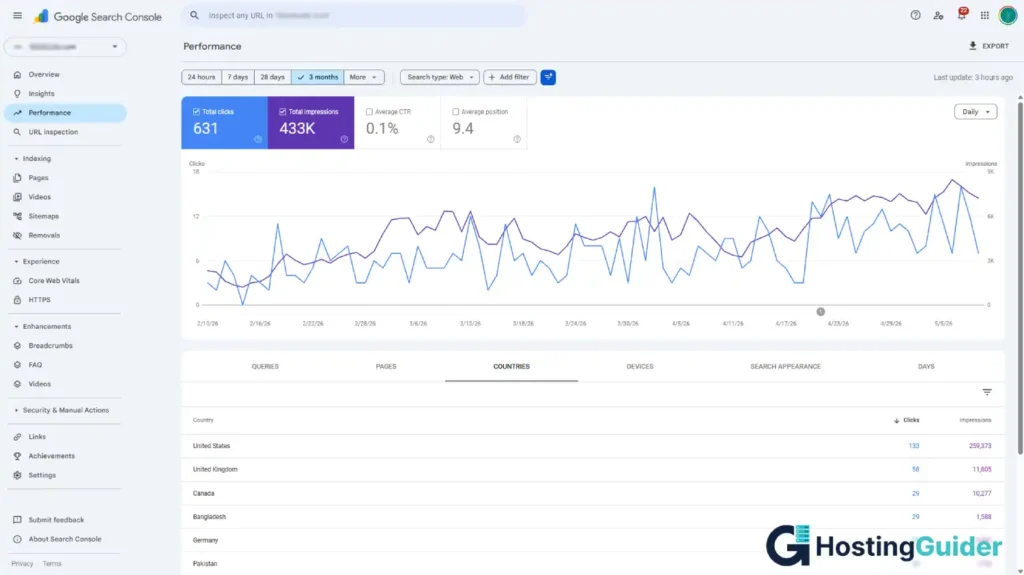
Yes. All five platforms on this list support the core requirements of local SEO. You can set location-specific page titles and meta descriptions, add your business address and phone number to your pages, embed Google Maps, and add structured data markup for local businesses. For local SEO, the most important step is creating a Google Business Profile and ensuring your business name, address, and phone number are consistent across your website and Google Business listing. Read Google’s SEO Starter Guide for more detail on what Google looks for when ranking local businesses.
Does having a blog help with SEO on a website builder?
Yes, significantly. Publishing useful, relevant content on a regular basis is one of the most effective long-term SEO strategies. Each blog post is a new page that Google can index and rank for search terms. Over time, a consistent blog builds topical authority in your subject area, which helps all your pages rank better. Platforms differ in how well they support blogging at scale. WordPress.com is the strongest for blogging and content publishing. Squarespace and Webflow are good for moderate blogging needs. Wix and Shopify cover basic blogging but are less suited to high-volume content strategies.


