
Namecheap Review 2026: Real Test Data From Our Account
Namecheap sells five shared, WordPress, VPS, and dedicated tiers. We tested Stellar Plus, their mid-tier shared plan and the closest thing to a base plan most small sites and small businesses actually buy, not the flagship tier a host would rather show off.
That’s the point: this review is about what Namecheap hosting is actually like for a typical buyer, not the best number a premium plan can produce.
We ran it through the same tests we run on every host: page speed on the closest server, response time from multiple continents, TLS configuration, and a month-scale uptime check.
4.2/5 (Based on Trustpilot)
HostingGuider uses affiliate links. We may earn a commission if you purchase through them, at no extra cost to you.
Pros and Cons
✓ Pros
- ✓ Affordable pricing with significant introductory discounts
- ✓ Wide range of hosting types: Shared, WordPress, VPS, Dedicated
- ✓ Free domain name with some hosting plans
- ✓ SSD storage and unmetered bandwidth on many plans
- ✓ Advanced security features including Imunify360 and HackGuardian
✗ Cons
- ✗ Renewal rates can be substantially higher than introductory prices
- ✗ Some advanced features only available on higher-tier plans
- ✗ Customer support response times can vary
Namecheap Review Summary
| Performance grade | 99/100 (PageSpeed, both desktop and mobile) |
|---|---|
| Closest Server LCP | 0.3s desktop, 1.5s mobile |
| Fastest regions in testing | San Francisco (126ms), New York (232ms) |
| Slowest regions in testing | Bangalore (707ms), Singapore (650ms) |
| SSL Labs grade | A |
| Green hosting | Not verified (Green Web Foundation) |
| Free domain | No (bring your own or buy separately) |
| Free SSL | Yes, 50 free Standard SSL certs for a year |
| 1-click WordPress | Yes, via Softaculous |
| Support | 24/7 Live Chat, no phone confirmed |
Pricing & Plans
Namecheap sells across four product lines: shared hosting, managed WordPress (EasyWP), VPS, and dedicated servers, plus reseller hosting for anyone hosting on behalf of clients. Here’s the current lineup.
Stellar |
Stellar Plus |
EasyWP Starter |
EasyWP Turbo |
EasyWP Supersonic |
Spark |
Pulsar |
Quasar |
Magnetar |
Hypernova |
Xeon E3-1230 v5 |
Xeon E-2236 (New) |
Dual AMD EPYC 7313 |
Stellar Business |
|---|---|---|---|---|---|---|---|---|---|---|---|---|---|
$4.88
/mo |
$6.88
/mo |
$9.88
/mo |
$13.88
/mo |
$20.88
/mo |
$4.88
/mo |
$9.88
/mo |
$15.88
/mo |
$28.88
/mo |
$50.88
/mo |
$42.88
/mo |
$79.88
/mo |
$275.88
/mo |
11.88
/mo |
|
|
|
|
|
|
|
|
|
|
|
|
|
|
VPS pricing is unmanaged by default, no control panel included. cPanel adds $17.88/mo on any tier, Webuzo adds $2.88/mo, and managed support (Basic or Complete) adds $10-25/mo on top of that.
Namecheap’s VPS is genuinely cheap until you start adding the software most people actually want running on it, worth pricing out the full stack before comparing the headline number to a managed host.
Reseller Hosting and Dedicated Servers
Reseller plans (Nebula, Galaxy Expert, Universe Pro) start at $19.88/mo, cPanel included, for anyone hosting websites on behalf of their own clients under their own brand. Dedicated servers start at $44.88/mo, single US datacenter (Phoenix, Arizona), for workloads that need a full physical machine rather than a shared or virtualized one.
Neither is relevant to the account we tested, both are here for completeness since this review covers what Namecheap sells, not just the plan we’re running.
We’re on Stellar Plus. The jump from Stellar to Stellar Plus isn’t really about storage, Stellar’s 20GB is plenty for a small site, it’s the website cap. Stellar limits you to 3 domains under one account; Stellar Plus removes that limit entirely, which matters the moment you’re managing more than a couple of sites the way we are across our own portfolio.
Every shared tier includes unmetered bandwidth, Imunify360 security (malware scanning, a firewall, automatic patching), free SSL, and free migration from another cPanel host. None of that is gated behind a higher tier, which isn’t universal in this market.
One thing worth knowing before you buy: the 30-day money-back guarantee only applies if you skip the 30-day free trial and pay immediately. Use the trial first, and you’ve used your one shot at that account tier, per Namecheap’s own terms. A dedicated IP costs $4/mo extra on every shared and VPS tier.
Use Cases
Who Namecheap Is Best For
We identify the specific high-value workflows that benefit most from this accessible infrastructure.
Personal Bloggers
Start cheap. Launch a personal blog on Stellar with a free domain name and unmetered bandwidth to share your stories with the world.
Small Business Sites
Go online. Build a professional presence on Stellar Plus with unmetered SSD storage and auto backup tools to keep data safe.
Portfolio Owners
Showcase work. Host high res images on EasyWP Supersonic with 100GB storage and a 99.99 percent uptime guarantee for clients.
WordPress Creators
Manage less. Use EasyWP Turbo to handle more visitors with Supersonic speed and free CDN integration for faster page loads.
App Developers
Code freely. Deploy custom apps on Quasar VPS with 4 CPU cores and full root access to configure the server exactly how you need.
Enterprise Security
Protect assets. Secure sensitive data on Xeon E 2236 with isolated hardware and advanced firewalls in a Tier IV datacenter.
Big Data Projects
Process fast. Run complex queries on Magnetar VPS with 8 CPU cores and high RAM to ensure smooth database performance at scale.
High Traffic Media
Serve millions. Handle viral traffic on Dual AMD EPYC dedicated servers with 32 cores and unmetered bandwidth for zero lag.
Hosting Types
Hosting for WordPress
Fast WordPress hosting with EasyWP setup optimized to deliver fast stable and hassle free performance for quick launches!
Shared Hosting
Affordable shared hosting with online presence tools optimized to deliver fast stable and hassle free performance for easy building!
VPS Hosting
Control rich VPS hosting with virtual server flexibility optimized to deliver fast stable and hassle free performance for growing needs!
Email Hosting
Professional email hosting with personal branding tools optimized to deliver fast stable and hassle free performance for business communication!
Reseller Hosting
Flexible reseller hosting with client management tools optimized to deliver fast stable and hassle free performance for hosting businesses!
Dedicated Servers
Top tier dedicated hosting with high performance hardware optimized to deliver fast stable and hassle free performance for business scaling!
If you’re deciding between these, shared is the right starting point for nearly everyone; the others are for once shared hosting’s limits actually become a problem you’ve run into, not a problem you’re anticipating.
Detailed Features
A breakdown of included features such as cPanel access, unmetered bandwidth, email hosting, and basic security tools.
Cloud Storage is the one feature that doesn’t scale the way you’d expect. On a US datacenter, it’s Stellar Business only, Stellar Plus doesn’t get it regardless of price.
Pick the EU or Singapore datacenter instead and every tier, including the base Stellar plan, includes it. Worth knowing which datacenter your account is actually on before assuming a feature is or isn’t available to you.
Performance Analysis
Is It Fast Enough?
Close to the server, yes, comfortably. PageSpeed Insights scored the page:

- Desktop: 99 Performance, 96 Accessibility, 100 Best Practices, 83 SEO. First Contentful Paint 0.3s, Largest Contentful Paint 0.3s, Total Blocking Time 0ms, Cumulative Layout Shift 0, Speed Index 1.3s.

- Mobile: 99 Performance, 100 Accessibility, 100 Best Practices, 92 SEO. First Contentful Paint 0.9s, Largest Contentful Paint 1.5s, Total Blocking Time 0ms, Cumulative Layout Shift 0, Speed Index 3.5s.
Mobile runs slower in absolute terms, that’s expected, PageSpeed deliberately simulates a throttled connection and a weaker phone for that test.
What’s mildly interesting is Accessibility and SEO actually score higher on mobile than desktop here, a small enough gap it’s more likely test noise than a real difference worth chasing down.
None of that tells you how the site performs for a visitor who isn’t near the server, which is the more important question for most buyers, and the one the next section actually answers.
Does Your Visitor’s Location Change the Answer?
Yes, substantially. We measured response time from eight locations, and the pattern is one-directional: the closer to the US, the faster the result.
| Location | TTFB |
|---|---|
| San Francisco, United States | 126ms |
| New York, United States | 232ms |
| Amsterdam | 489ms |
| London | 523ms |
| Frankfurt | 538ms |
| Sydney | 604ms |
| Singapore | 650ms |
| Bangalore | 707ms |

San Francisco’s result points to a US West Coast server. Every location outside the US came back above 480ms, more than double New York’s domestic result, and Bangalore’s 707ms is roughly 5.6 times San Francisco’s number.
If most of your visitors are in North America, this isn’t a concern. If they’re not, it is, and a separate, wider check confirms the same pattern at a larger scale.

We ran a second monitor across 22 locations, which recorded 100% uptime and reachability with a blended average latency of 971ms across every location combined, a number pulled down hard by the slowest results.
From the portion of that regional breakdown we could read clearly: São Paulo averaged 1.12s, Seoul 952ms, Singapore 1.15s, Spain 1.08s, Stockholm 1.06s, Sydney 1.09s, Tokyo 817ms, the UAE 1.50s, and Zurich 1.02s.

The UAE’s 1.50s is the slowest result in either test, over 11 times San Francisco’s local TTFB. We couldn’t read the full 22-location table from the dashboard view we captured, so the locations above are what was legible, not the complete set, worth knowing if you’re trying to check a specific region we didn’t list.
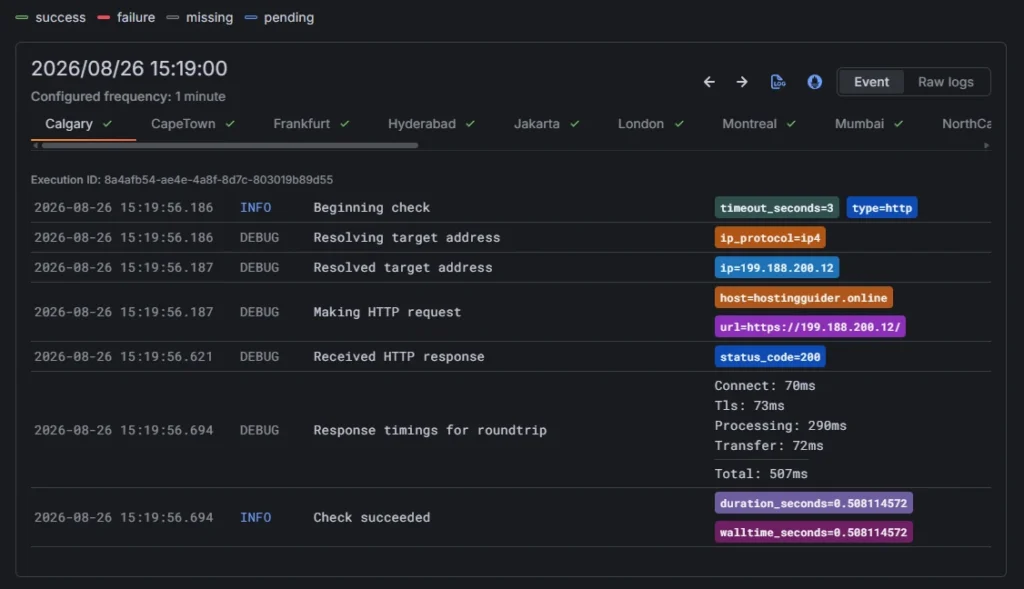
A single logged request from this monitor shows where that time actually goes: a 70ms connection, a 73ms TLS handshake, 290ms of server processing, and 72ms to transfer the response, 507ms total for that one check.
What We Couldn’t Fully Confirm
Three things here are worth knowing before you treat this account as a settled case, because each one narrows what the evidence actually proves.
SSL Labs graded the TLS setup an A, strong marks on certificate configuration and protocol support, slightly lower on key exchange and cipher strength, still comfortably in the green range.
But the report only surfaced one connection path, not the four (two IPv4, two IPv6) we’ve seen on other hosts. That’s either a real gap in IPv6 support or a limitation of how SSL Labs found the endpoint, and we can’t tell which from here.
If IPv6 reachability matters for your project, ask Namecheap’s support directly rather than assume either way.

The Green Web Foundation found no evidence this account runs on green energy.

That’s a genuine negative result, not a testing gap.
Namecheap does advertise renewable-powered datacenters, in the Netherlands, Singapore, and the UK, which lines up with this account most likely sitting on a US datacenter instead, outside that list.
If green hosting is a requirement for you specifically, that’s worth asking about at signup, since it clearly depends on which datacenter you land on.
Our uptime monitor showed 100% across the windows it reported, with response time holding steady at 245ms.

This monitor was deployed alongside the rest of this testing, so the current numbers are a first read, not the kind of extended history we build our reliability claims on.
We’re continuing to watch this account and will update these figures as the data accumulates.
Support & Usability
cPanel is the control panel here, not a proprietary alternative.
If you’ve used shared hosting anywhere else, the layout will already be familiar: file manager, email accounts, database tools, and the Softaculous installer for WordPress and everything else, all in the same place they usually are.
Namecheap lists 24/7 live chat and a ticket-based help desk. We tested it for real: an SSL installation issue, resolved in under 40 minutes from first contact to a working fix.
That’s a genuinely fast turnaround for a support ticket, not a chat bot answer, an actual hosting-related solution.

The reason we needed support at all is worth noting on its own. SSL installation isn’t as hands-off here as it is on Hostinger, where a certificate gets applied without the account holder doing much of anything.
On this account it took enough manual effort that opening a ticket was the faster path, which says something about the setup experience even before you factor in how well that ticket got handled.
Frequently Asked Questions
Which Namecheap plan did you actually test?
Stellar Plus, their mid-tier shared plan. Unlimited websites and storage, no dedicated IP or Cloud Storage on the US datacenter, both of which start at Stellar Business.
Is Namecheap fast?
Close to the server, yes, 99/100 on PageSpeed for both desktop and mobile, and sub-250ms response times from the two US cities we tested. Response time climbed substantially outside North America, over 600ms from Asia and the Middle East in our testing.
Is Namecheap hosting green?
Not verifiably, on the account and datacenter we tested. The Green Web Foundation found no evidence of renewable-energy backing for this specific site, though Namecheap does operate renewable-powered datacenters elsewhere in their network.
Does the 30-day money-back guarantee actually apply if I use the free trial first?
No. Namecheap’s own terms state the guarantee only covers first-time customers who skip the 30-day trial and pay immediately. Using the trial uses up that protection.
Do I need a dedicated IP?
Not for most sites. It’s a $4/mo add-on on every tier, including the top one, and most shared hosting use cases don’t require it.
Our Verdict
Namecheap earns the recommendation for what it’s actually built for: an affordable, no-frills shared plan that gets a first site or a small business online without extra complexity.
The page loads fast, 99 on PageSpeed for both desktop and mobile, and response times for visitors near the server are genuinely quick.
Geography is the variable that changes the calculation, and it does on any single-region shared host, not something specific to Namecheap. The closer your audience is to North America, the more the numbers above hold. The further outside it they are, the more that changes.
Support held up when it mattered. An SSL issue got a working fix in under 40 minutes, real evidence rather than a promise on a features page.
We’re continuing to monitor uptime on this account and will update these figures as that history builds.
Evaluation method: Hands-On Purchase. We run Namecheap’s Stellar Plus plan, and hostingguider.online, our standardized test site on this account.
How we use a standardized test site across every host we review is explained on our Methodology page, and how this page makes us money is explained in our Affiliate Disclosure.
Alternative Reviews
Comparing Business-Focused Hosts
A look at alternative providers offering different balances of speed, pricing flexibility, and infrastructure design.

Managed WordPress Hosting by Automattic

The managed WordPress host struggling under pressure

The budget-friendly giant for small businesses