
HostGator vs Bluehost: The Shared Hosting Showdown Beginners Actually Need
Bluehost has the WordPress.org endorsement. HostGator has the lower price, the monthly billing, and the longer refund window. On paper they are built for the same beginner. In testing, only one of them actually wins on performance.
Quick Verdict
HostGator wins on raw mobile performance, concurrent load handling, and billing flexibility. Bluehost wins on WordPress integration, beginner onboarding, and the WordPress.org endorsement.
Both providers are built for beginners. Neither supports HTTP/3. Both hold Qualys SSL Grade A. Both deliver near-identical global latency through Cloudflare Anycast. Both offer 24/7 phone and live chat support.
The decision comes down to one question: do you want better performance metrics or a better guided setup experience?
Category Winners
| Category | Winner | Why |
|---|---|---|
| Pricing and Flexibility | HostGator | Monthly billing available, 45-day refund vs Bluehost’s 30-day minimum annual commitment |
| Mobile Core Web Vitals | HostGator | Passes all 3: LCP 1.6s, INP 176ms, FCP 1.4s. Bluehost fails FCP at 2.1s |
| Desktop Rendering | HostGator | TBT 913ms vs Bluehost’s 2,500ms; both Grade C but HostGator significantly less blocked |
| Global Latency | Tie | Both Cloudflare Anycast, sub-10ms from every continent tested |
| Concurrent Load Handling | HostGator | 277ms avg under 50 users vs Bluehost’s 308ms |
| SSL Security | Tie | Both Qualys Grade A, both on Cloudflare IPs |
| HTTP/3 Protocol | Tie | Neither supports HTTP/3 or QUIC |
| Ease of Use | Bluehost | Guided WordPress wizard with automatic plugin setup; HostGator uses standard Softaculous |
| Customer Support | Tie | Both 24/7 phone and live chat |
| WordPress Integration | Bluehost | Official WordPress.org recommended host; HostGator is not endorsed |
| Monthly Billing | HostGator | Available on all shared plans; Bluehost requires minimum 12 months upfront |
| Refund Window | HostGator | 45 days vs Bluehost’s 30 days |
| Sustainability | Tie | Both verified green through Cloudflare infrastructure |
Who Should Choose Which
| Choose HostGator if… | Choose Bluehost if… |
|---|---|
| Mobile SEO performance matters and you want all Core Web Vitals passing | You want the official WordPress.org recommended environment |
| You need monthly billing without a long upfront commitment | You want a guided WordPress setup wizard that configures plugins automatically |
| You want 45 days to test the platform before committing | You want everything managed from one dashboard with AI-enhanced onboarding |
| You want standard unmodified cPanel without a branded overlay | You are building a WooCommerce store and want a dedicated ecommerce hosting tier |
| You want lower desktop JavaScript blocking time | You prefer a beginner-focused interface with marketing tools surfaced at login |
| You run multiple sites and want baby plan multi-site access | You want an established brand with over two decades of WordPress platform history |
HostGator vs Bluehost: Full Feature Comparison
| Feature | HostGator | Bluehost |
|---|---|---|
| Founded | 2002, Houston, Texas, USA | 2003, Utah, USA |
| Best For | Budget beginners, multi-site users | First WordPress sites, guided setup |
| Trustpilot Rating | 4.6/5 | 4.6/5 |
| Infrastructure | Cloudflare Anycast | Cloudflare Anycast |
| GTmetrix Grade | C (71%) | C (69%) |
| Desktop TTFB | 161ms | Not measured |
| Desktop Total Blocking Time | 913ms | 2,500ms |
| Desktop Time to Interactive | Not recorded | 11.6 seconds |
| Mobile LCP | 1.6s (Pass) | 2.4s (Pass) |
| Mobile INP | 176ms (Pass) | 199ms (Pass) |
| Mobile FCP | 1.4s (Pass) | 2.1s (Needs Work) |
| Load Test (50 users avg) | 277ms | 308ms |
| Global Latency (India/Mumbai) | 8.3ms | 9.7ms |
| HTTP/3 Support | No | No |
| QUIC Support | No | No |
| SSL Grade | A | A |
| HSTS Enforced | No | No |
| 30-Day Uptime | 100% | 100% |
| Green Hosting | Verified (Cloudflare) | Verified (Cloudflare) |
| Free Domain | Year 1 (annual plans) | Year 1 included |
| Free SSL | Yes, auto-renew | Yes, permanent |
| Control Panel | Standard cPanel | Modified cPanel overlay |
| WordPress.org Endorsement | No | Yes, official |
| WordPress Setup Wizard | No (Softaculous) | Yes, guided with plugin install |
| Phone Support | Yes, 24/7 | Yes, 24/7 |
| Live Chat | Yes, 24/7 | Yes, 24/7 |
| Monthly Billing | Yes | No, minimum 12 months |
| Money-Back Period | 45 days | 30 days (domain fee deducted) |
| Data Centers | US (Provo, Houston) + Cloudflare edge | US + Cloudflare edge |
How We Tested
We ran direct technical audits against each provider’s live corporate domain: www.hostgator.com for HostGator and www.bluehost.com for Bluehost.
Tools: Google PageSpeed Insights for mobile Core Web Vitals (LCP, INP, FCP), GTmetrix for desktop rendering, K6 Load Cloud for 50-user concurrent traffic simulation, Check-Host and Ping Server for international latency, Uptime Robot for 30-day availability monitoring, Qualys SSL Labs for encryption grade, HTTP/3 Check for protocol verification, and The Green Web Foundation for environmental status.
All tests target each provider’s own live infrastructure. Customer site results vary by plan, configuration, theme, and plugin load. For complete raw data from each provider individually, see our HostGator review and Bluehost review.
Performance: Eight Tests, Head to Head
Test 1: Mobile Core Web Vitals (Google PageSpeed Insights)
HostGator Mobile
| Metric | Result | Google Threshold | Status |
|---|---|---|---|
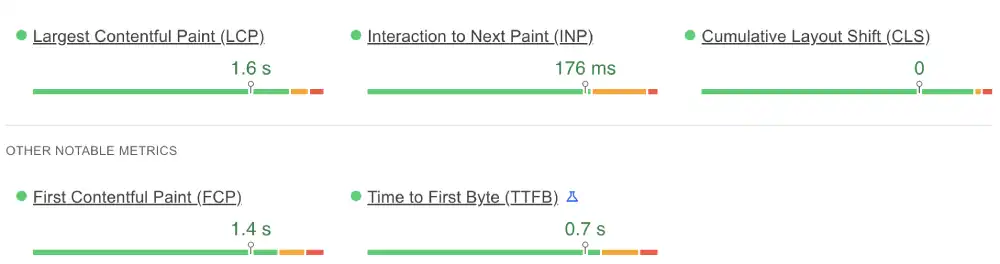
| LCP (Loading) | 1.6s | Under 2.5s | Pass |
| INP (Interaction) | 176ms | Under 200ms | Pass |
| FCP (First Paint) | 1.4s | Under 1.8s | Pass |
Bluehost Mobile
| Metric | Result | Google Threshold | Status |
|---|---|---|---|
| LCP (Loading) | 2.4s | Under 2.5s | Pass |
| INP (Interaction) | 199ms | Under 200ms | Pass |
| FCP (First Paint) | 2.1s | Under 1.8s | Needs Work |
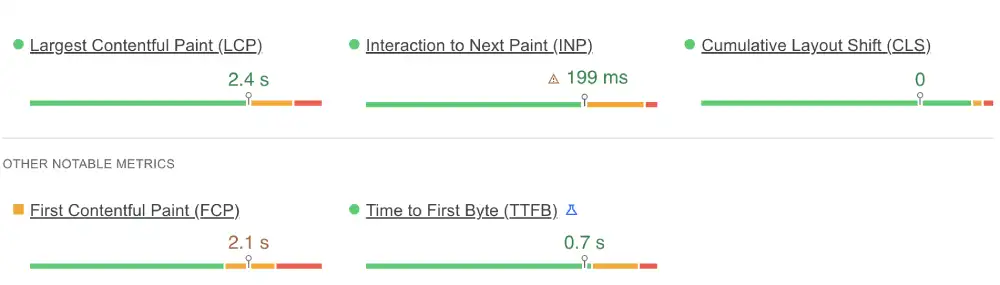
This is the most commercially significant test in the comparison. Google uses Core Web Vitals as a ranking signal in mobile search. HostGator passes all three. Bluehost passes two. HostGator’s LCP of 1.6s is 800ms under the threshold. Its FCP of 1.4s is one of the faster results in this price category. Bluehost’s LCP passes with only 100ms to spare. Its FCP is flagged.
For any site where mobile search traffic drives revenue, HostGator’s clean pass carries a daily SEO advantage. Understanding how PageSpeed scores affect real user experience and search rankings helps put these numbers in their full context.
Winner: HostGator
Test 2: Global Latency (International Ping)
HostGator (Check-Host Ping Server)
| Location | Ping Time | Rating |
|---|---|---|
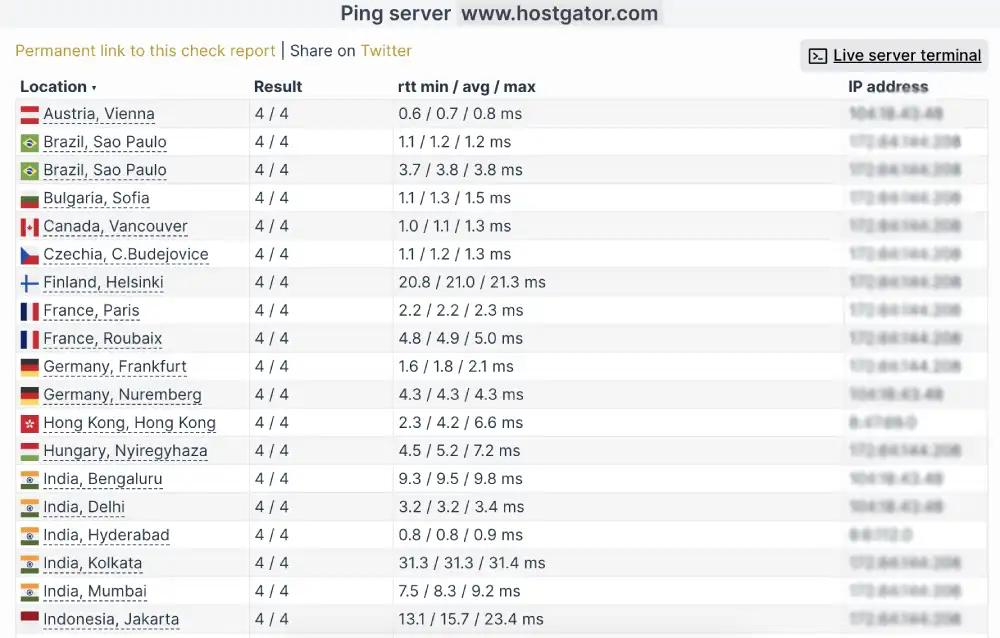
| Vienna, AT | 0.7ms | Instant |
| Sao Paulo, BR | 1.2ms | Instant |
| Vancouver, CA | 1.1ms | Instant |
| Mumbai, IN | 8.3ms | Fast |
Bluehost (Check-Host Ping Server)
| Location | Ping Time | Rating |
|---|---|---|
| Vienna, AT | 0.7ms | Instant |
| Vancouver, CA | 1.1ms | Instant |
| Sao Paulo, BR | 1.8ms | Instant |
| Bengaluru, IN | 9.7ms | Fast |
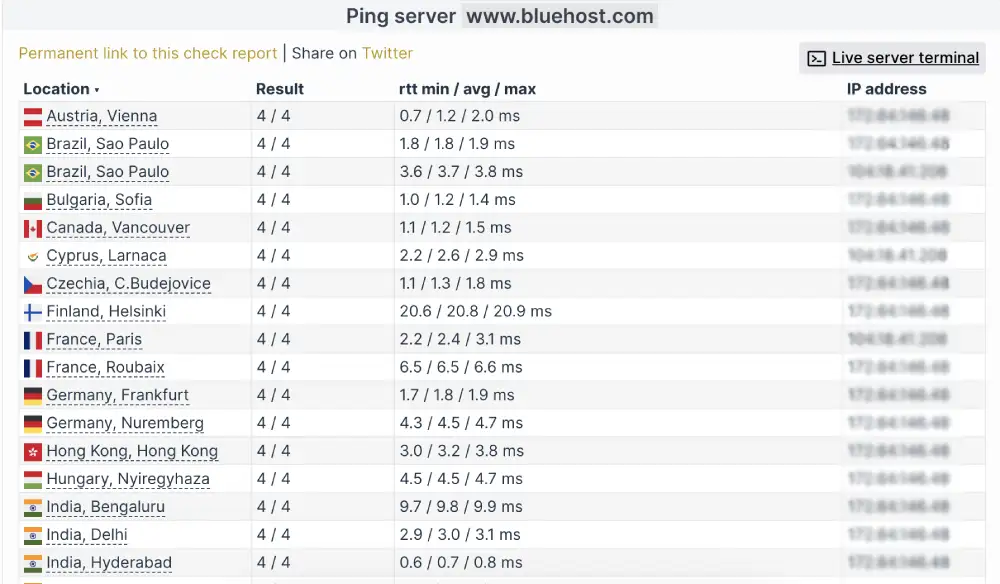
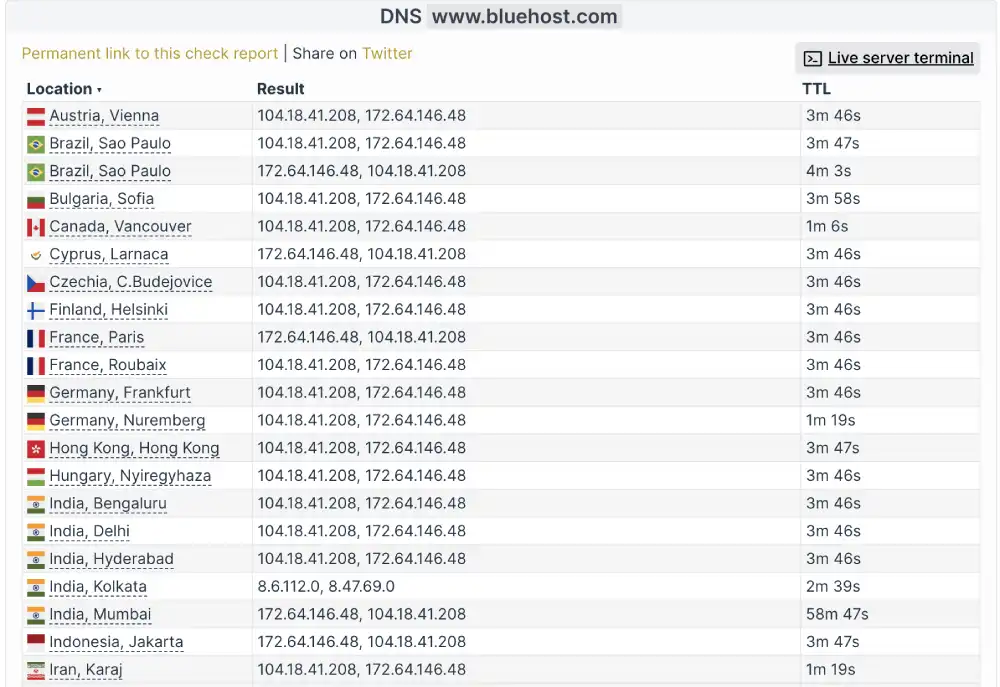
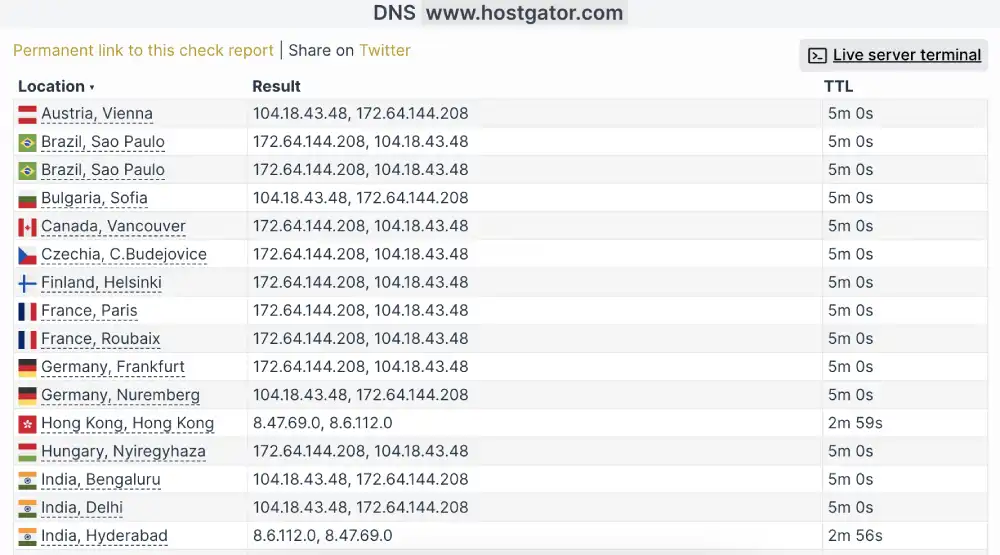
Both providers run Cloudflare Anycast. The latency numbers are nearly identical from every continent tested. This is the expected result when two hosts use the same global CDN infrastructure. Neither has a meaningful advantage here.
Winner: Tie
Test 3: Desktop Rendering (GTmetrix)
| Metric | HostGator | Bluehost |
|---|---|---|
| GTmetrix Grade | C (71%) | C (69%) |
| First Contentful Paint | 737ms | 779ms |
| TTFB | 161ms | Not measured |
| Total Blocking Time | 913ms | 2,500ms |
| Time to Interactive | Not recorded | 11.6 seconds |
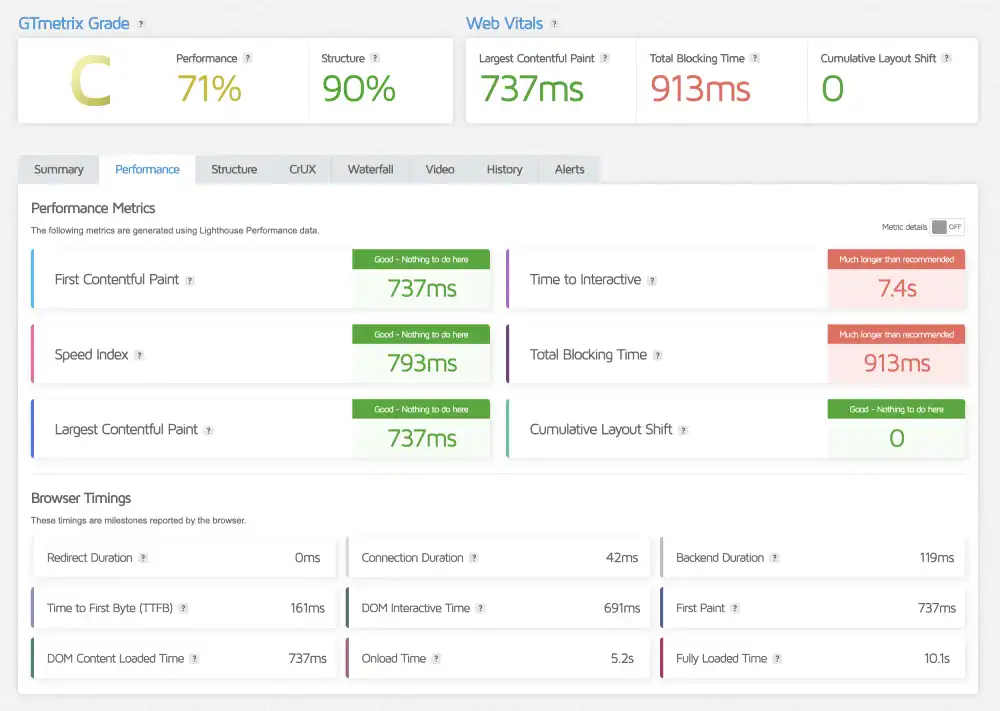
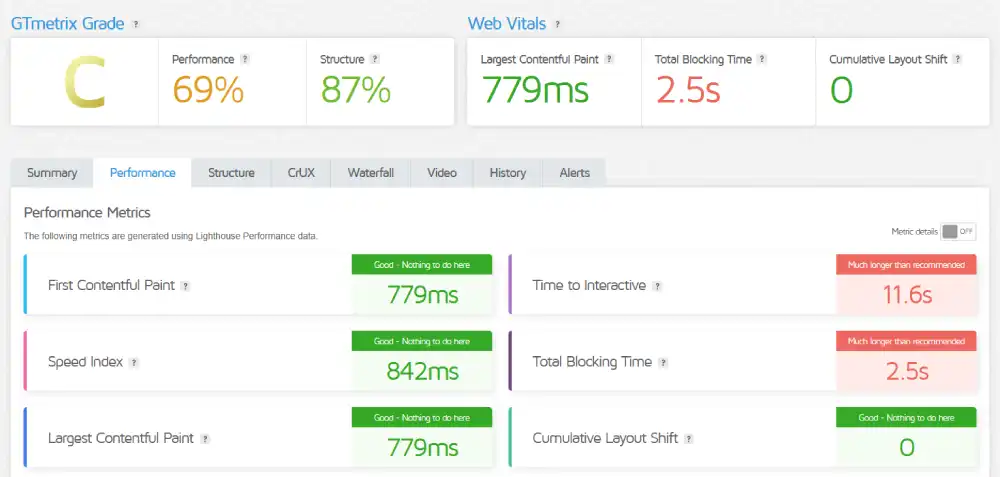
Both providers earn Grade C on desktop. Neither wins cleanly. But the margin inside Grade C is significant. HostGator’s Total Blocking Time of 913ms is problematic but manageable. Bluehost’s 2,500ms TBT and 11.6-second Time to Interactive represent nearly three times the JavaScript blocking time. A desktop visitor on HostGator can interact with the page roughly 10 seconds earlier than a Bluehost visitor after the page visually loads.
HostGator’s 161ms TTFB is notably fast for a shared host, indicating a responsive origin server behind the CDN layer.
Winner: HostGator
Test 4: Concurrent Load (K6 Cloud, 50 Virtual Users)
| Parameter | HostGator | Bluehost |
|---|---|---|
| Uptime Under Load | 100.0% | 100.0% |
| Reachability | 100.0% | 99.9% |
| Avg Response Latency | 277ms | 308ms |


HostGator handles concurrent traffic faster and maintains perfect reachability where Bluehost drops 0.1%. The 31ms latency difference is not dramatic in isolation, but combined with HostGator’s better uptime score, HostGator handles pressure slightly more cleanly.
Winner: HostGator
Test 5: Uptime (Uptime Robot, 30-Day Monitor)
| Window | HostGator | Bluehost |
|---|---|---|
| Last 7 Days | 100%, 0 incidents | 100%, 0 incidents |
| Last 30 Days | 100%, 0 incidents | 100%, 0 incidents |
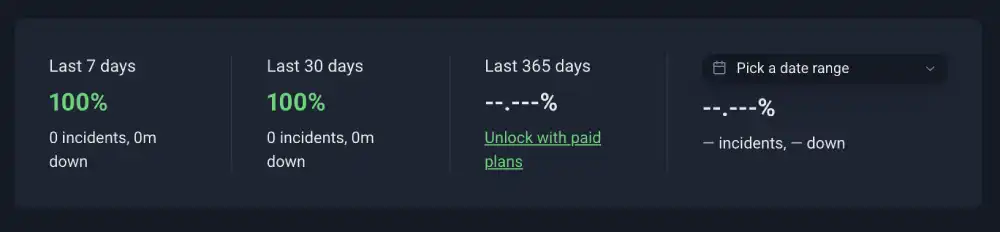
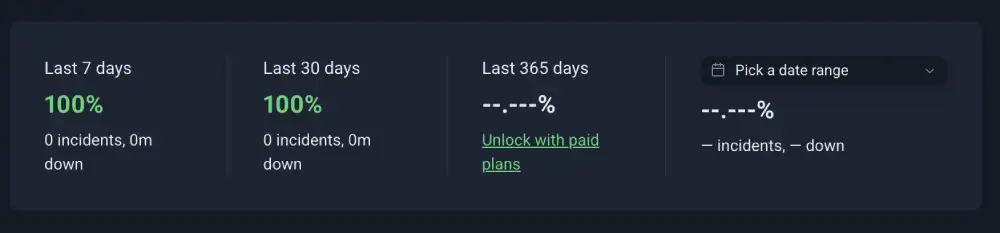
Both providers recorded perfect availability across the monitoring window.
Winner: Tie
Test 6: SSL Security (Qualys SSL Labs)
| Feature | HostGator | Bluehost |
|---|---|---|
| Certificate 1 | Grade A (172.64.144.208) | Grade A (172.64.146.48) |
| Certificate 2 | Grade A (104.18.43.48) | Grade A (104.18.41.208) |
| HSTS Enforced | No | No |
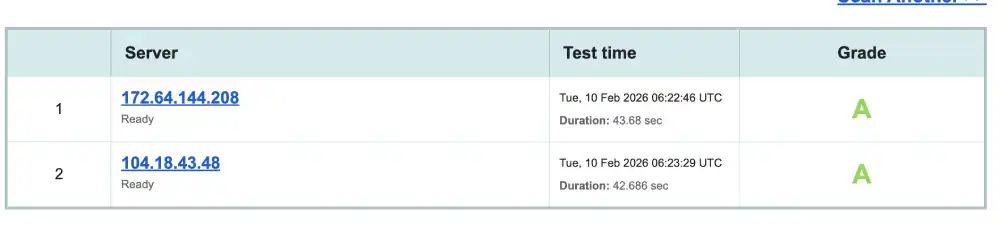
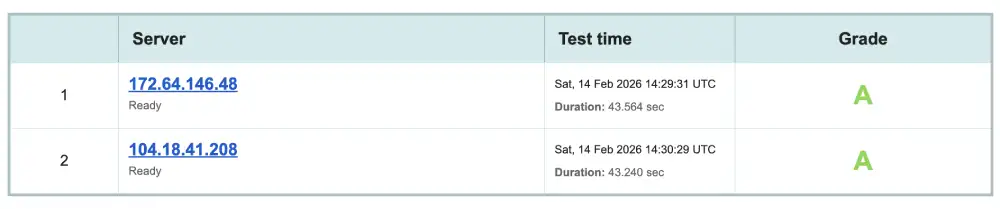
Both providers hold Grade A on Qualys SSL Labs confirmed across both Cloudflare IP addresses. Neither enforces HSTS by default, which is why neither earns A+. Both can be upgraded to A+ by enabling HSTS manually in cPanel settings.
Winner: Tie
Test 7: Protocol Support (HTTP/3 Check)
| Protocol | HostGator | Bluehost |
|---|---|---|
| HTTP/3 | Not Supported | Not Supported |
| QUIC | Not Supported | Not Supported |
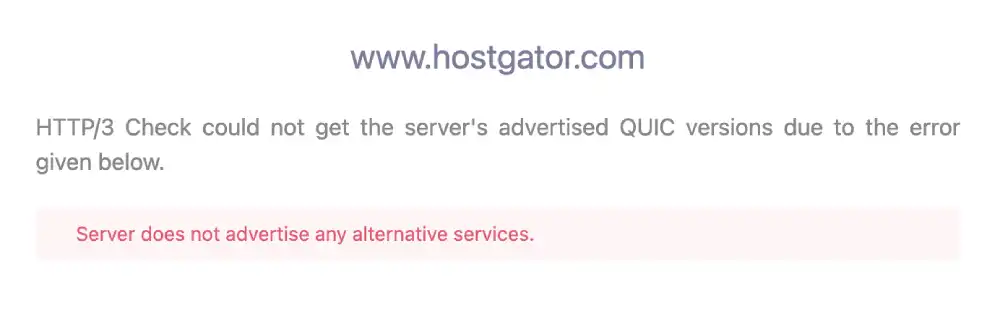
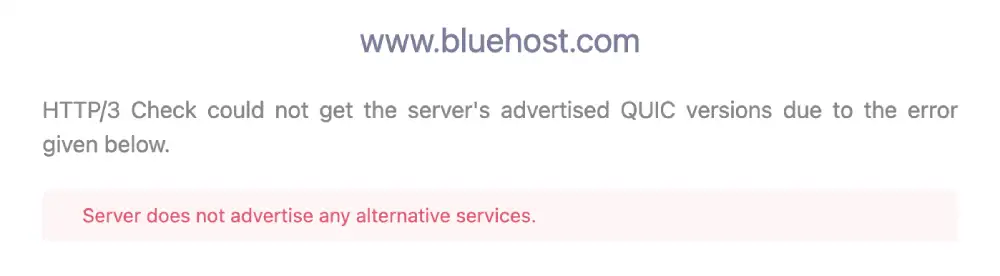
Both providers are on HTTP/2 only. Neither supports HTTP/3 or QUIC, which means neither benefits from the packet loss resilience that QUIC provides on mobile connections. This is a shared limitation of both platforms, not a differentiator.
Winner: Tie
Test 8: Environmental Impact (Green Web Foundation)
| Provider | Status | Energy Source |
|---|---|---|
| HostGator | Verified Green | Cloudflare renewable infrastructure |
| Bluehost | Verified Green | Cloudflare renewable infrastructure |

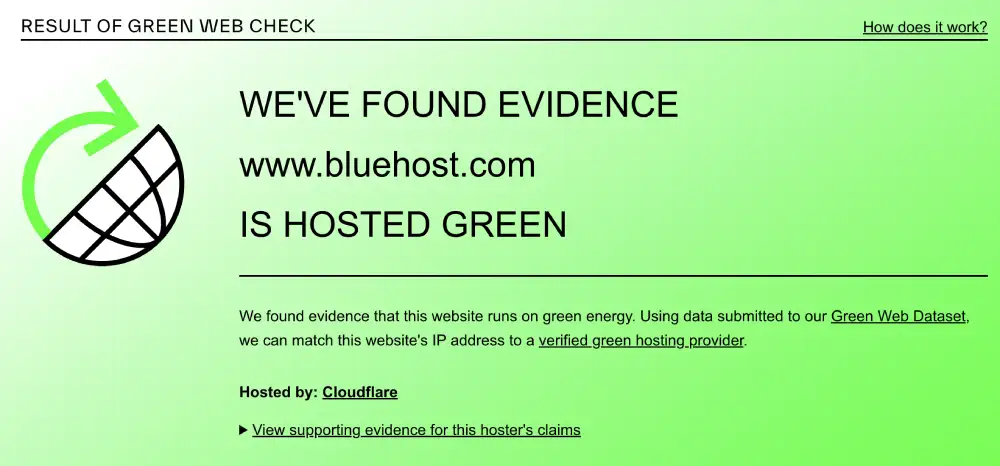
Both providers receive their green verification through the same Cloudflare infrastructure. The result is identical.
Winner: Tie
Performance Summary
| Test | Winner |
|---|---|
| Mobile Core Web Vitals | HostGator |
| Global Latency | Tie |
| Desktop GTmetrix | HostGator |
| Concurrent Load | HostGator |
| Uptime | Tie |
| SSL Security | Tie |
| HTTP/3 Protocol | Tie |
| Environmental | Tie |
HostGator wins three of eight tests outright. The remaining five are ties. Bluehost wins none of the eight performance tests.
Desktop and Mobile Speed Summary
| Metric | HostGator | Bluehost | Winner |
|---|---|---|---|
| GTmetrix Grade | C (71%) | C (69%) | HostGator |
| Desktop TTFB | 161ms | Not measured | HostGator |
| Desktop FCP | 737ms | 779ms | HostGator |
| Desktop TBT | 913ms | 2,500ms | HostGator |
| Desktop TTI | Not recorded | 11.6 seconds | HostGator |
| Mobile LCP | 1.6s (Pass) | 2.4s (Pass) | HostGator |
| Mobile INP | 176ms (Pass) | 199ms (Pass) | HostGator |
| Mobile FCP | 1.4s (Pass) | 2.1s (Needs Work) | HostGator |
| HTTP/3 | No | No | Tie |
| SSL Grade | A | A | Tie |
Global Network and Load Test Summary
| Metric | HostGator | Bluehost | Winner |
|---|---|---|---|
| European Latency | 0.7ms (Vienna) | 0.7ms (Vienna) | Tie |
| North American Latency | 1.1ms (Vancouver) | 1.1ms (Vancouver) | Tie |
| South American Latency | 1.2ms (Sao Paulo) | 1.8ms (Sao Paulo) | HostGator |
| Asian Latency | 8.3ms (Mumbai) | 9.7ms (Bengaluru) | HostGator |
| DNS Routing | Cloudflare Anycast | Cloudflare Anycast | Tie |
| Load Test Avg (50 users) | 277ms | 308ms | HostGator |
| Load Test Reachability | 100.0% | 99.9% | HostGator |
| 30-Day Uptime | 100% | 100% | Tie |
Pricing and Value
Both providers use introductory pricing that rises substantially at renewal. The structural difference is billing flexibility: HostGator offers monthly billing, Bluehost does not.
HostGator Pricing
HostGator shared hosting plans (Hatchling, Baby, Business) offer monthly billing on all tiers. Monthly rates are significantly higher than the annualized discount rate, but the flexibility matters for users who want to test the platform before committing.
The free domain is included on annual plans only. Monthly billing does not include the free domain offer. The money-back guarantee extends to 45 days, which is longer than the industry standard of 30 days and gives new users more time to evaluate the platform.
The Hatchling plan covers one website. The Baby plan unlocks unlimited websites on the same plan, making it more cost-efficient for anyone managing two or more projects.
Hatchling Plan |
Baby Plan |
Business Plan |
Baby Plan |
Business Plan |
Pro Plan |
Snappy 2000 – NVMe 4 |
Snappy 4000 – NVMe 8 |
Snappy 8000 – NVMe 16 |
Value Dedicated – NVMe 32 |
Power Dedicated – NVMe 64 |
Enterprise Dedicated – NVMe 128 |
|---|---|---|---|---|---|---|---|---|---|---|---|
$2.75
/mo |
$3.50
/mo |
$5.25
/mo |
$3.50
/mo |
$5.25
/mo |
$13.95
/mo |
$34.99
/mo |
$53.99
/mo |
$82.99
/mo |
$144.19
/mo |
$241.79
/mo |
$346.79
/mo |
|
|
|
|
|
|
|
|
|
|
|
|
Bluehost Pricing
Bluehost requires a minimum 12-month upfront commitment on all shared hosting plans. Monthly billing is not available. The introductory discount applies to the first term. Renewal rates are significantly higher.
The Basic plan covers one website. Choice Plus adds unlimited websites, domain privacy, and backup tools. The free domain is included on all shared plans for year one, with standard registration rates applying from year two.
Daily backups are not included on base plans by default. CodeGuard is the paid add-on backup product. Domain privacy is free only from Choice Plus and above. If you claimed the free domain and cancel within 30 days, the domain registration fee is deducted from your refund.
Starter |
Business |
eCommerce |
Starter |
Business |
eCommerce |
NVMe 2 |
NVMe 4 |
NVMe 32 |
NVMe 128 |
|---|---|---|---|---|---|---|---|---|---|
$3.99
/mo |
$14.99
/mo |
$3.99
/mo |
$6.99
/mo |
$14.99
/mo |
$4.99
/mo |
$11.99
/mo |
$144.19
/mo |
$315.19
/mo | |
|
|
|
|
|
|
|
|
|
|
Pricing Comparison
| Factor | HostGator | Bluehost | Winner |
|---|---|---|---|
| Monthly Billing | Yes, available | No, minimum 12 months | HostGator |
| Money-Back Period | 45 days | 30 days | HostGator |
| Multi-Site Base Plan | Yes (Baby plan) | No (requires upgrade) | HostGator |
| Free Domain Year 1 | Annual plans only | All shared plans | Bluehost |
| Domain Privacy | Paid add-on | Paid (Choice Plus+) | Tie |
| Daily Backups | Paid add-on | Paid (CodeGuard) | Tie |
| Renewal Behaviour | Significant increase | Significant increase | Tie |
| WooCommerce Tier | eCommerce plan | Dedicated plan | Bluehost |
Pricing Winner: HostGator on flexibility: monthly billing, 45-day refund window, and multi-site access on the mid-tier plan.
Features and Hosting Plans
HostGator Hosting Types
Web Hosting: Standard shared hosting with cPanel, Softaculous one-click installs, unmetered bandwidth, and free SSL. Three tiers: Hatchling (one site), Baby (unlimited sites), Business (dedicated IP, SSL upgrade).
WordPress Hosting: Optimized WordPress environment with speed tools, security configurations, and pre-installed plugins for WordPress-specific workloads.
eCommerce Hosting: Shared hosting configured for online stores with selling tools, payment security, and ecommerce-focused setup guidance.
VPS Hosting: Scalable virtual private servers with root access and selectable resource tiers at more accessible price points than Bluehost’s managed VPS.
Dedicated Hosting: Single-tenant physical servers with maximum performance and full server control for high-resource requirements.
Reseller Hosting: WHM-based reseller accounts with client management tools, white-label capabilities, and WHMCS integration options.
Bluehost Hosting Types
Web Hosting (AI Enhanced): Shared hosting with AI-driven onboarding, site builder tools, and beginner-focused security configurations.
WordPress Hosting (AI Optimized): Guided WordPress environment with automated updates, plugin management, and the onboarding wizard that differentiates Bluehost from HostGator.
WooCommerce Hosting: Dedicated ecommerce hosting with WooCommerce pre-installed, payment security tuning, and store-specific performance configurations.
Managed VPS Hosting: VPS infrastructure with root access and additional management support. Higher entry price than HostGator’s VPS.
Self-Managed VPS Hosting: Full root access VPS for users comfortable with Linux server administration.
Dedicated Hosting: Single-tenant servers at enterprise pricing.
Feature Comparison
| Feature | HostGator | Bluehost |
|---|---|---|
| WordPress.org Endorsement | No | Yes, official |
| Guided WordPress Wizard | No (Softaculous only) | Yes, with plugin recommendations |
| AI Website Builder | No | Yes, basic AI-enhanced |
| Control Panel | Standard cPanel | Modified cPanel overlay |
| Reseller Hosting | Yes, dedicated product | Limited |
| Monthly Billing | Yes | No |
| Multi-Site Base Plan | Baby plan | Requires upgrade |
| WooCommerce Dedicated Tier | eCommerce plan | WooCommerce hosting plan |
| Phone Support | Yes, 24/7 | Yes, 24/7 |
| Free SSL | Yes, auto-renew | Yes, permanent |
| HTTP/3 | No | No |
| VPS Entry Price | Lower | Higher (managed tier) |
Ease of Use and Control Panel
HostGator: Standard cPanel
HostGator provides standard cPanel without a branded overlay. Every tutorial on the internet assumes cPanel. Every plugin guide, hosting walkthrough, and WordPress help article references the same interface you see in HostGator.
WordPress installs via Softaculous: a one-click installer in cPanel that handles the database setup and file placement automatically. HostGator does not run a wizard that pre-selects plugins for you. You arrive at a clean WordPress install and make your own choices. This suits users who know what they want. It creates friction for users who do not.
The knowledge base covers most common tasks with video guides available. Phone support is accessible at every plan level.
Bluehost: Modified cPanel with Guided Wizard
Bluehost wraps standard cPanel in a branded skin that brings domains, billing, and marketing tools to the front. More complex server settings sit in secondary menus, reducing the chance that a beginner accidentally modifies something important.
The onboarding wizard is the defining feature for first-time users. It asks about your site goals and automatically installs plugins and themes matched to your answers. A user with zero hosting experience can reach a live WordPress homepage in approximately ten minutes. This level of guidance is not available on HostGator.
The custom overlay also surfaces the Bluehost Marketplace of paid add-ons prominently. Worth being aware of as you navigate the dashboard.
Ease of Use Comparison
| Feature | HostGator | Bluehost | Winner |
|---|---|---|---|
| Control Panel | Standard cPanel | Modified cPanel overlay | HostGator (for familiarity) |
| WordPress Setup Wizard | No, Softaculous only | Yes, guided with plugin install | Bluehost |
| Learning Curve (Beginners) | Moderate | Low with wizard | Bluehost |
| Standard cPanel Tutorials Apply | Yes, directly | Yes, with UI differences | HostGator |
| Phone Support | Yes, 24/7 | Yes, 24/7 | Tie |
| Marketplace Upsell Visibility | Moderate | High | HostGator |
| Knowledge Base | Extensive, mature | WordPress-focused | Tie |
Ease of Use Winner: Bluehost for first-time WordPress site owners who need guidance. HostGator for users who want standard cPanel without customization layered over it.
Security and Reliability
HostGator Security
HostGator earns Qualys SSL Grade A across both Cloudflare IP addresses (172.64.144.208 and 104.18.43.48). Modern TLS protocols and secure cipher suites are confirmed. Outdated protocols including SSLv3 and TLS 1.0 are rejected. HSTS is not enforced by default, which keeps the grade at A rather than A+. Enabling HSTS in cPanel is straightforward.
Free SSL via Let’s Encrypt is included on all plans and renews automatically every 90 days without manual action. The Cloudflare edge layer provides baseline DDoS mitigation across all plans.
Bluehost Security
Bluehost holds Qualys Grade A across its two Cloudflare IPs (172.64.146.48 and 104.18.41.208). The grade is identical to HostGator in both level and configuration. HSTS is also absent by default on Bluehost, for the same reason: enabling it requires a manual cPanel step.
Both providers handle SSL and DDoS protection through the same underlying Cloudflare infrastructure. The security posture of both hosts at the SSL and network level is essentially equivalent.
Security Comparison
| Feature | HostGator | Bluehost | Winner |
|---|---|---|---|
| SSL Grade | A | A | Tie |
| HSTS Enforced | No | No | Tie |
| Free SSL | Yes, auto-renew | Yes, permanent | Tie |
| DDoS Protection | Cloudflare edge | Cloudflare edge | Tie |
| HTTP/3 and QUIC | No | No | Tie |
| Daily Backups | Paid add-on | Paid (CodeGuard) | Tie |
| 30-Day Uptime | 100% | 100% | Tie |
Security Winner: Tie — Both providers have equivalent SSL configuration and security infrastructure at this tier.
Customer Support
HostGator Support
HostGator provides 24/7 live chat and phone support on all shared plans. Phone support is notably rare at this price point and is a meaningful comfort for beginners who need to talk to a human. The knowledge base is one of the oldest and largest in the shared hosting market, covering everything from email configuration to WordPress debugging, often with video guides.
Bluehost Support
Bluehost also provides 24/7 phone and live chat on every plan. The support scope extends to WordPress-specific issues including plugin conflicts and failed updates, not just server infrastructure tickets. The guided wizard reduces the volume of basic setup calls by handling common configuration questions automatically.
Support Comparison
| Channel | HostGator | Bluehost |
|---|---|---|
| Phone Support | Yes, 24/7 | Yes, 24/7 |
| Live Chat | Yes, 24/7 | Yes, 24/7 |
| Ticket or Email | Yes | Yes |
| WordPress-Specific Support | Yes | Yes |
| Knowledge Base Depth | Very extensive | WordPress-focused |
Support Winner: Tie — Both providers offer equivalent support access on all plans.
Who Should Use Which
Choose HostGator if you:
- Want all three Google Core Web Vitals passing on mobile from day one
- Need monthly billing without committing to a year upfront
- Want 45 days to evaluate the platform before the refund window closes
- Prefer standard cPanel without a branded overlay
- Are managing two or more sites and want multi-site access on the mid-tier plan
- Want lower desktop JavaScript blocking time without paying extra
- Are building a project where mobile search performance is a daily priority
Choose Bluehost if you:
- Are launching your first WordPress site and want a guided setup wizard
- Want the official WordPress.org-endorsed environment
- Are building a WooCommerce store and want a dedicated ecommerce hosting tier
- Prefer a beginner-friendly interface with marketing tools at the front
- Want the familiarity of a brand with two decades in the WordPress ecosystem
- Need one dashboard for domains, hosting, email, and SSL management
Situation and Use Case Recommendations
| Your Situation | Recommended | Why |
|---|---|---|
| First WordPress site, non-technical | Bluehost | Guided wizard, plugin auto-setup, WordPress.org endorsed |
| Mobile SEO priority site | HostGator | Passes all 3 Core Web Vitals; Bluehost fails FCP |
| Multi-site developer or student | HostGator | Baby plan covers unlimited sites; lower monthly commitment |
| WooCommerce store | Bluehost | Dedicated WooCommerce plan, guided ecommerce setup |
| User who needs monthly billing | HostGator | Only option in this comparison with monthly billing |
| User who needs phone support | Tie | Both offer 24/7 phone access |
| Standard cPanel preference | HostGator | Unmodified cPanel vs Bluehost’s custom overlay |
| Longest trial period | HostGator | 45-day refund vs Bluehost’s 30-day |
| Global audience performance | Tie | Both run Cloudflare Anycast with identical latency results |
| Budget-first, one site | Either | Entry pricing is comparable; check current promotional rates |
Final Verdict
Both providers are genuine entry-level hosts with overlapping audiences. Neither is obviously wrong for a beginner. The right choice depends on what you optimize for.
HostGator is best for: Users who prioritize mobile Core Web Vitals compliance, billing flexibility, the standard cPanel experience, and multi-site access on a single plan. Its performance data outperforms Bluehost in head-to-head testing across mobile, desktop, and concurrent load.
Bluehost is best for: First-time WordPress site owners who want the most guided onboarding experience available at this price point, the WordPress.org endorsement, and a dedicated WooCommerce tier for ecommerce beginners.
| Category | Winner |
|---|---|
| Mobile Core Web Vitals | HostGator |
| Desktop Rendering | HostGator |
| Global Latency | Tie |
| Concurrent Load | HostGator |
| Uptime | Tie |
| SSL Security | Tie |
| HTTP/3 | Tie |
| Environmental | Tie |
| Pricing Flexibility | HostGator |
| Ease of Use | Bluehost |
| WordPress Integration | Bluehost |
| Customer Support | Tie |
HostGator wins or ties every performance test. Bluehost wins on the onboarding and endorsement side. If your priority is measurable site speed and billing flexibility, the performance data points to HostGator. If your priority is the most guided WordPress setup experience with the platform’s deepest ecosystem integration, Bluehost earns its recommendation.
Tactical Recommendations
Enable HSTS on either provider to get Grade A+ SSL. Both HostGator and Bluehost hold Grade A by default. Enabling HTTP Strict Transport Security in cPanel takes under two minutes and upgrades the Qualys SSL Labs grade to A+. Look for the HSTS option under your domain’s SSL settings in cPanel.
Optimize JavaScript to fix desktop blocking time on both platforms. HostGator’s 913ms TBT and Bluehost’s 2,500ms TBT are both caused by JavaScript execution, not server hardware. Installing a caching plugin with JavaScript deferral (WP Rocket or LiteSpeed Cache) resolves most of the blocking time without a plan upgrade. Bluehost needs this more urgently given its 2.5-second TBT.
Use HostGator’s 45-day window deliberately. If you are unsure which host suits your site best, HostGator’s extended 45-day refund gives you six weeks to benchmark your actual site’s performance before committing. Run real PageSpeed tests, monitor uptime, and test support before the window closes.
For the only host in this series with no renewal increase, see InterServer vs Hostinger.
Budget for backup coverage on both platforms. Neither host includes automated daily backups on base shared plans. Before publishing content or collecting user data, configure a third-party backup solution. UpdraftPlus covers this for WordPress sites at no cost. The real reasons hosting backups fail when you need them apply to both providers equally.
Consider your upgrade path before choosing. Both providers operate shared hosting with resource limits. If your site grows past 30,000 monthly visitors, neither shared hosting tier will hold up comfortably. The signs your site has outgrown its hosting plan apply equally to both providers. HostGator’s VPS plans start at a lower price point than Bluehost’s managed VPS tier, which is relevant for budget-conscious operators planning ahead.
For how Bluehost compares to a premium managed host, see SiteGround vs Bluehost.
Frequently Asked Questions
Is HostGator or Bluehost faster?
In performance testing, HostGator outperforms Bluehost across every measured metric. HostGator passes all three Google Core Web Vitals on mobile with LCP 1.6s, INP 176ms, and FCP 1.4s. Bluehost passes two of three, failing FCP at 2.1s. On desktop, HostGator’s Total Blocking Time is 913ms versus Bluehost’s 2,500ms. Under concurrent load, HostGator responds at 277ms average versus Bluehost’s 308ms. Bluehost’s global latency is nearly identical to HostGator’s because both run Cloudflare Anycast, which is the most relevant factor for visitors worldwide.
Does HostGator or Bluehost support HTTP/3?
Neither supports HTTP/3 or QUIC. Both platforms operate on HTTP/2 only. This is a shared limitation that affects mobile performance on unstable connections for both providers. Hosts at a higher price point such as SiteGround, Kinsta, and others support HTTP/3. If HTTP/3 is a requirement, neither of these two providers currently meets it.
Which is better for WordPress, HostGator or Bluehost?
Bluehost holds the official WordPress.org endorsement and a guided setup wizard that configures plugins automatically. For a first-time WordPress user with no preferences about plugin selection, Bluehost’s wizard removes friction. HostGator installs WordPress via Softaculous without a guidance layer, resulting in a clean install you configure manually. For an experienced WordPress user who knows what they want, HostGator’s standard setup is equally capable. For a complete beginner, Bluehost’s guided experience is more supportive.
Can I pay monthly with HostGator and Bluehost?
HostGator offers monthly billing on all shared plans, though the monthly rate is significantly higher than the annualized discount rate. Bluehost does not offer monthly billing. A minimum 12-month upfront commitment is required to open a Bluehost shared hosting account. If billing flexibility matters, HostGator is the only option in this comparison.
Which host has the better refund policy?
HostGator offers a 45-day money-back guarantee, which is longer than the industry standard. Bluehost offers 30 days. Both apply to hosting fees only. Bluehost deducts a non-refundable domain registration fee from refunds if you claimed the free domain. HostGator’s domain registration fees are also non-refundable if applicable. For users who want more time to evaluate before committing, HostGator’s 45-day window is the more generous option.
Do both hosts offer phone support?
Yes. Both HostGator and Bluehost provide 24/7 phone and live chat on all shared hosting plans. Phone support at this price point is increasingly rare among budget hosting providers. Having it available on both platforms in this comparison means phone support is not a differentiator here.
Is HostGator good for a WooCommerce store?
HostGator’s eCommerce plan includes selling tools and payment security configurations. It runs WooCommerce as a standard WordPress plugin. Bluehost has a dedicated WooCommerce hosting tier with more specific ecommerce performance tuning and WooCommerce pre-installed. For a first WooCommerce store, Bluehost’s dedicated ecommerce tier provides a more configured starting point. For an experienced WooCommerce user who manages their own plugin setup, HostGator’s eCommerce plan works equally well.
Which host is more beginner-friendly?
Bluehost is more beginner-friendly for WordPress specifically. Its guided setup wizard makes decisions for new users automatically, which reduces the blank-canvas paralysis that often stalls first-time site launches. HostGator uses standard Softaculous for WordPress installation, which is functional but provides no guidance on plugin selection or site configuration. Outside of WordPress onboarding specifically, both providers use cPanel and both offer phone support, making them equally accessible for general hosting tasks.
Do both hosts include a free domain?
Both include a free domain registration for year one under specific conditions. HostGator includes the free domain on annual plans only. Monthly billing on HostGator does not include the free domain offer. Bluehost includes the free domain on all shared hosting plans. From year two onward, both providers charge standard domain renewal rates. The free domain offer at both hosts covers only the initial registration, not renewals.
When should I upgrade from either host to a VPS?
When your site consistently exceeds 30,000 monthly visitors, experiences PHP worker exhaustion during traffic peaks, or runs WooCommerce with steady active orders, shared hosting from either provider will create performance pressure. HostGator’s VPS plans start at a lower price point than Bluehost’s managed VPS entry. If an upgrade is likely in your future, HostGator’s VPS path is more cost-accessible. The signals that mean you need to upgrade your hosting plan apply equally to both platforms.


