Only a few hosts promise to clean a hacked site at no extra cost. Kinsta, WP Engine, Pressable, and WPX say so in their own terms, and each attaches conditions.
Most shared hosts include a malware scanner but charge for the cleanup itself. The table below shows what each host’s official pages said on October 5, 2026.
Cleanup terms are one of the least compared parts of hosting security terms.
The question here is simple: will your host clean a hack for free, or send you a bill?
Malware scanning vs malware removal: why the words matter
A malware scanner only finds infected files, while malware removal actually cleans them. Hosts often advertise the first in words that sound like the second.
Malware is code planted on your site to steal data, send spam, or redirect visitors. A scanner compares your files against known threats and alerts you.
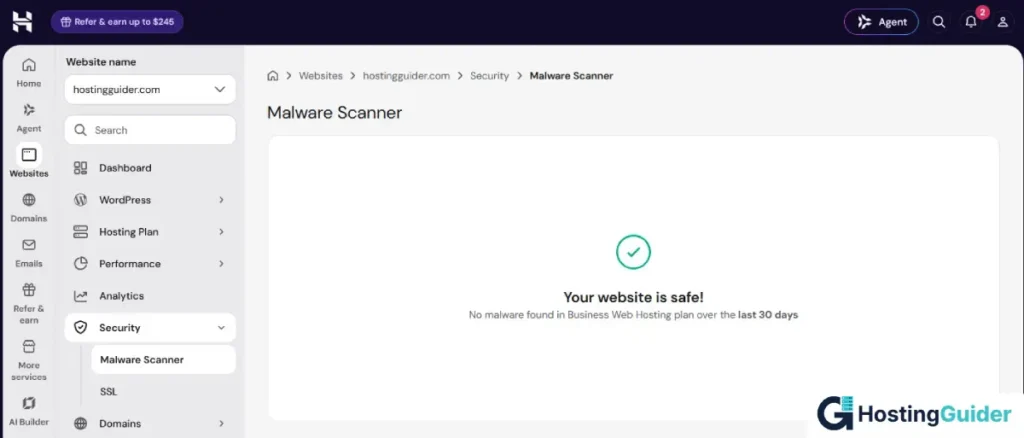
Removal is the cleanup. It can be automatic, where a tool deletes or repairs the bad code, or manual, where a person works through files and the database.
The gap between the two is where surprise bills come from. If your plan says “malware protection,” check which of the two it means.
General security features to compare before buying, like firewalls and backups, are covered in the guide to choosing secure web hosting. The rest of this article sticks to cleanup.
Malware removal by host: the 2026 table
The table shows, for each host, whether scanning and removal are included, on which plans, the paid option, and the limits written in its own help pages or terms.
| Host | Scanning included? | Removal included? | Plans | Paid option | Fine print | Source |
|---|---|---|---|---|---|---|
| Hostinger | Yes, automatic scanner | Automatic cleanup of files only | Web and Cloud hosting | One-time paid cleanup by its security team (price not stated) | Scanner detects malicious files, not database infections | Malware scanner docs |
| Bluehost | Yes | Pricing page lists “Malware Scanning & Removal” | All plans, per its pricing page | SiteLock paid plans (prices not on help article) | Help article says the free SiteLock scan “doesn’t include automatic malware removal” | Pricing, SiteLock help |
| SiteGround | Only with Site Scanner add-on | One-click cleanup on Site Scanner Premium only | Add-on for any site | Site Scanner Basic or Premium (price shown in Client Area only) | “Additional cleanup fee may apply” if automated cleanup fails | Site Scanner KB |
| GoDaddy (Managed WordPress) | Yes | Yes, “automated malware scans and removal” | Every Managed WordPress plan | Not needed on these plans | Wording covers automated removal; manual cleanup terms not stated | WordPress hosting |
| GoDaddy (Web Hosting) | “Daily malware scanning” in page overview | Not listed per plan | Web Hosting plans | Website Security: $6.99, $11.99 or $16.99 a month on a 2-year term | Cleanups: 1 a year (Standard), 5 a year (Advanced), unlimited (Premium) | Web hosting, Website Security |
| Namecheap | Yes, Imunify360 | Self-service cleanup in cPanel | Shared and Reseller | SiteLock plans and SiteLock 911 | “We do not specialize in malware analysis or manual malware removal” | Imunify360 KB, Hacked account KB |
| HostGator | Yes, SiteLock complimentary scanner | No | Hatchling, Baby, Business | Premium SiteLock with automatic removal; Root Cause Analysis $37.50 | Free scan checks only “the first five pages” daily | Scanner FAQ, Infected site help |
| DreamHost | Only with DreamShield | Disables threats it finds; more steps may be needed | Add-on | DreamShield $3 a month per site; Hacked Site Repair (price not stated) | One domain or subdomain per DreamShield plan | DreamShield |
| InMotion | Not stated for shared plans | No | None stated | Hacked Website Repair $299 (48 hours) or $399 (24 hours) | 30 days of coverage after a repair | Hacked website repair |
| Kinsta | Not stated on its removal docs | Yes, free | Sites hosted on Kinsta | $100 fee for later cleanups if conditions are missed | Post-cleanup steps due within one business day; nulled plugins and non-WordPress code excluded | Malware removal docs |
| WP Engine | Yes, on request | Yes, by support | No plan limit stated | Not stated | Only for infections that happen while on WP Engine; needs a “specific indication” of malware | Malware cleaning support |
| Cloudways | Only with add-on | Only with add-on | Add-on per application | Malware Protection (Imunify360): $4, $3 or $2 per app a month by volume | Price per app drops with more apps | Malware Protection |
| Pressable | Not stated; Jetpack must stay connected | Yes, by support | “Every Pressable plan” | Not needed | No forensics or manual code review; you fix the cause | Malware cleanup KB |
| Rocket.net | Yes, Imunify360 real-time scanning | Automatic “patching” stated; cleanup terms not stated | Every WordPress install | Not stated | Manual cleanup policy not on its security page | Secure hosting page |
| WPX | Yes | Yes, “Free Removal” | All plans | Not needed | Limits not stated on the pricing page | Pricing |
| Liquid Web | Not stated on the add-on page | No | None | One-time $200 cleanup | Only for managed WordPress and WooCommerce customers | Malware removal add-on |
“Not stated” means the host’s public pages didn’t say so, as of October 5, 2026. It doesn’t mean the answer is no. Ask support and get the reply in writing.
The fine print that decides whether cleanup is really free
Free cleanup usually comes with conditions, such as when the infection started, what software you run, and how fast you finish the follow-up work.
Here are the limits that matter most, in plain words.
Kinsta: you have one business day. Kinsta’s docs say, “You must complete the post-cleanup steps we provide within one business day of our request to remain covered.”
Miss that deadline, and later cleanups carry a $100 fee.
Kinsta also excludes sites running nulled (pirated) plugins or themes, plus non-WordPress software and custom scripts.
WP Engine: the hack must happen on its platform. Its support article covers sites infected “while on the WP Engine platform.” A site that arrives already infected isn’t eligible.
WP Engine also needs a “specific indication” of infection before it runs a deep scan. Cleaning “can take up to 24 hours.”
Pressable: cleanup, not investigation. Pressable says cleanup is “included with every Pressable plan at no extra cost.” It doesn’t do forensics, formal security analysis, or manual code review.
It also leaves the root cause to you. If an old plugin let the attacker in, you update or remove it.
Hostinger: files, not the database. Its scanner works on files. Malware hidden in database tables, such as injected spam links in posts, needs separate cleanup.
HostGator: five pages a day. The free SiteLock scanner “inspects the first five pages of your website daily.” A hack buried deeper in the site may not show up.
Bluehost: two pages, two answers. The pricing page lists “Malware Scanning & Removal” on all plans. Its SiteLock help article says the free scan “doesn’t include automatic malware removal.”
If you’re on Bluehost, ask support which tool does the removal on your plan, and whether a manual cleanup costs extra.
The Bluehost plan and pricing review covers the rest of the shared plan.
What paid malware cleanup costs
When cleanup isn’t included, published prices range from a $3 monthly add-on to a $399 one-time repair, depending on whether you buy ongoing protection or an emergency fix.
| Option | Type | Listed price |
|---|---|---|
| DreamHost DreamShield | Ongoing scanning, per site | $3 a month |
| Cloudways Malware Protection | Ongoing, per application | $2 to $4 a month |
| GoDaddy Website Security | Ongoing, with set cleanups | $6.99 to $16.99 a month (2-year term) |
| HostGator Root Cause Analysis | One-time report | $37.50 |
| Liquid Web malware removal | One-time cleanup | $200 |
| InMotion Hacked Website Repair | One-time cleanup | $299 or $399 |
Prices are as listed on each host’s page on October 5, 2026. Renewal prices for GoDaddy Website Security weren’t shown on the page we checked.
Watch the cleanup count. GoDaddy’s Standard tier includes one cleanup a year. A site that gets reinfected in the same year pays again or needs an upgrade.
Which setup fits your site
The right choice depends on how much a day offline costs you and whether you can handle a cleanup yourself.
If you run a personal blog on shared hosting, a scanner plus your own backups is usually enough, in our view.
Restoring a copy made before the hack can cost less than a paid cleanup.
That only works if you can tell which copy predates the infection, one of the reasons covered in why hosting backups fail.
If you run a small shop, a hack can stop sales and expose customer data. Paying for a plan with included removal can cost less than one emergency repair.
If you manage client sites, read each host’s conditions before you promise anything. Kinsta’s one-day rule and WP Engine’s “on our platform” rule both put deadlines on you.
Hosts that include cleanup on every plan, like Kinsta, Pressable, and WPX, typically cost more each month than shared hosting. You’re paying partly for that safety net.
The hands-on Kinsta account test gives one data point. In its first 3 days, the dashboard logged 114 malicious requests, all blocked.
That shows blocking at work, not a cleanup, and 3 days is a short window.
For a ranked list that weighs security alongside speed and price, compare the managed WordPress hosts we tested and ranked.
What free malware removal doesn’t cover
Even a free cleanup usually leaves three jobs to you: closing the hole the attacker used, cleaning anything outside the host’s scope, and dealing with search engine warnings.
The scope is narrower than many owners expect. Kinsta excludes non-WordPress software and custom scripts, and Pressable leaves out manual code review.
If you need the full recovery process, the guide on what to do after a WordPress hack walks through it step by step.
If the host suspended your account instead of cleaning it, the separate guide Hosting Account Suspended for Malware: How to Get It Reinstated covers dealing with the host.
Managed WordPress hosts add other protections beyond cleanup. Those are compared in how managed WordPress hosting improves security.
Questions to ask a host before you buy
Five short questions, asked by chat or ticket before you pay, tell you more than any feature list.
- Is malware removal included on this exact plan, or only scanning?
- Is cleanup automatic, manual, or both? Does it cover the database?
- How many cleanups a year are included?
- Are there conditions, like deadlines, excluded software, or infections from before signup?
- What does a cleanup cost if I’m not covered?
Save the replies. A written answer helps if you claim a free cleanup later.
Frequently asked questions
Does my web host remove malware for free?
Usually not on shared hosting, where the free part is typically detection and the repair is a paid extra.
Managed WordPress hosts like Kinsta, WP Engine, Pressable, and WPX state that cleanup is included, with conditions.
What is the difference between malware scanning and malware removal?
Scanning finds infected files and alerts you. Removal cleans them, either automatically or by a person.
A plan that lists only “malware scanning” will tell you about a hack but leave the cleanup to you.
Is SiteLock worth paying for?
It depends on the plan you buy. Free SiteLock scans at Bluehost and HostGator don’t remove malware, and HostGator’s checks only the first five pages.
Paid SiteLock tiers add automatic removal. Compare the yearly cost with a managed host that includes cleanup.
How much does malware removal cost if my host doesn’t include it?
It depends on whether you need ongoing protection or a one-time fix.
For a one-time cleanup, Liquid Web lists $200, and InMotion lists $299 or $399 depending on how fast you need it.
Will my host clean a site that was hacked before I moved it there?
Often not. WP Engine’s support article says sites that arrive already infected aren’t eligible for its scan and cleaning.
Clean the site before migrating, or ask the new host in writing first.
How we researched this
Sadia Akther read each host’s official help articles, terms, plan pages, and add-on pages on October 5, 2026. The table quotes or closely paraphrases only those pages.
Where a host’s page didn’t state something, the table says “not stated” rather than guessing.
WPX’s removal line and Cloudways’ add-on prices come from our October 4, 2026 pricing checks.
The Kinsta request figures come from the WP 2 account we bought on August 27, 2026, and cover its first 3 days only.
The wider process is described in how we test and verify hosting claims.