
Namecheap Hosting Review
Affordable Hosting Built Around Simplicity
Namecheap is widely known as a domain registrar, but it also offers entry-level hosting focused on affordability and ease of use. Its hosting plans emphasize transparent pricing, cPanel-based management and fewer restrictions, making them appealing to beginners, students, and small projects that don’t require premium managed features.
4.2/5 (Based on Trustpilot)
HostingGuider uses affiliate links. We may earn a commission if you purchase through them, at no extra cost to you.
Pros and Cons
A clear look at Namecheap’s strongest points, like pricing and ease of use, alongside limitations common to entry-level hosting.
✓ Pros
- ✓ Affordable pricing with significant introductory discounts
- ✓ Wide range of hosting types: Shared, WordPress, VPS, Dedicated
- ✓ Free domain name with some hosting plans
- ✓ SSD storage and unmetered bandwidth on many plans
- ✓ Advanced security features including Imunify360 and HackGuardian
✗ Cons
- ✗ Renewal rates can be substantially higher than introductory prices
- ✗ Some advanced features only available on higher-tier plans
- ✗ Customer support response times can vary
Namecheap Hosting Review Summary
The Hosting Experience in Brief
A quick snapshot of how Namecheap’s hosting performs overall, focusing on usability, flexibility, and value for money.
| Metric | Rating / Status |
| Performance Grade | A (Desktop Optimized) |
| Server Response (TTFB) | 97 ms |
| Mobile Speed (LCP) | 2.4 s |
| Free Domain | Yes (1 Year) |
| Free SSL | Yes (Auto-Renew) |
| Protocol | HTTP/2 Only |
| Support | 24/7 Live Chat |
Pricing & Plans
An overview of Namecheap’s hosting plans, introductory pricing, renewals, and what features are included at each level.
Stellar |
Stellar Plus |
EasyWP Starter |
EasyWP Turbo |
EasyWP Supersonic |
Spark |
Pulsar |
Quasar |
Magnetar |
Hypernova |
Xeon E3-1230 v5 |
Xeon E-2236 (New) |
Dual AMD EPYC 7313 |
|---|---|---|---|---|---|---|---|---|---|---|---|---|
$4.88
/mo |
$6.88
/mo |
$9.88
/mo |
$13.88
/mo |
$20.88
/mo |
$4.88
/mo |
$9.88
/mo |
$15.88
/mo |
$28.88
/mo |
$50.88
/mo |
$42.88
/mo |
$79.88
/mo |
$275.88
/mo |
|
|
|
|
|
|
|
|
|
|
|
|
|
Use Cases
Who Namecheap Is Best For
We identify the specific high-value workflows that benefit most from this accessible infrastructure.
Personal Bloggers
Start cheap. Launch a personal blog on Stellar with a free domain name and unmetered bandwidth to share your stories with the world.
Small Business Sites
Go online. Build a professional presence on Stellar Plus with unmetered SSD storage and auto backup tools to keep data safe.
Portfolio Owners
Showcase work. Host high res images on EasyWP Supersonic with 100GB storage and a 99.99 percent uptime guarantee for clients.
WordPress Creators
Manage less. Use EasyWP Turbo to handle more visitors with Supersonic speed and free CDN integration for faster page loads.
App Developers
Code freely. Deploy custom apps on Quasar VPS with 4 CPU cores and full root access to configure the server exactly how you need.
Enterprise Security
Protect assets. Secure sensitive data on Xeon E 2236 with isolated hardware and advanced firewalls in a Tier IV datacenter.
Big Data Projects
Process fast. Run complex queries on Magnetar VPS with 8 CPU cores and high RAM to ensure smooth database performance at scale.
High Traffic Media
Serve millions. Handle viral traffic on Dual AMD EPYC dedicated servers with 32 cores and unmetered bandwidth for zero lag.
Hosting Types
Traditional Hosting Options Available
Namecheap offers shared, WordPress, VPS, and reseller hosting built on standard cPanel-based environments.
Hosting for WordPress
Fast WordPress hosting with EasyWP setup optimized to deliver fast stable and hassle free performance for quick launches!
Shared Hosting
Affordable shared hosting with online presence tools optimized to deliver fast stable and hassle free performance for easy building!
VPS Hosting
Control rich VPS hosting with virtual server flexibility optimized to deliver fast stable and hassle free performance for growing needs!
Email Hosting
Professional email hosting with personal branding tools optimized to deliver fast stable and hassle free performance for business communication!
Reseller Hosting
Flexible reseller hosting with client management tools optimized to deliver fast stable and hassle free performance for hosting businesses!
Dedicated Servers
Top tier dedicated hosting with high performance hardware optimized to deliver fast stable and hassle free performance for business scaling!
Detailed Features
A breakdown of included features such as cPanel access, unmetered bandwidth, email hosting, and basic security tools.
Performance Analysis
An examination of speed, uptime consistency, and general responsiveness within the limits of budget-focused hosting.
At HostingGuider, we look past the marketing to inspect the code execution. We ran a forensic analysis of www.namecheap.com using 9 distinct engineering benchmarks.
How We Tested Namecheap
- Test Target:
www.namecheap.com(Official Corporate Domain) - Primary Tools: Google PageSpeed Insights, Ping Server, K6 Load Cloud, Uptime Robot, Qualys SSL Labs, HTTP/3 Check, GTmetrix, The Green Web Foundation.
- Test Conditions: Benchmarks were conducted to simulate real-world user conditions across global nodes.
- Disclaimer: These metrics reflect Namecheap’s corporate site. Customer performance depends on the chosen plan and location.
Mobile Responsiveness: Interaction to Next Paint
We utilized Google PageSpeed Insights to test the mobile rendering engine, a critical factor for 2026 SEO.
Namecheap Mobile Metrics
| Metric | Measured Result | Google Threshold | Status |
| INP (Interaction) | 289 ms | Under 200 ms | Needs Improvement |
| LCP (Loading) | 2.4 s | Under 2.5 s | Passed |
| CLS (Stability) | 0 | Under 0.1 | Passed |
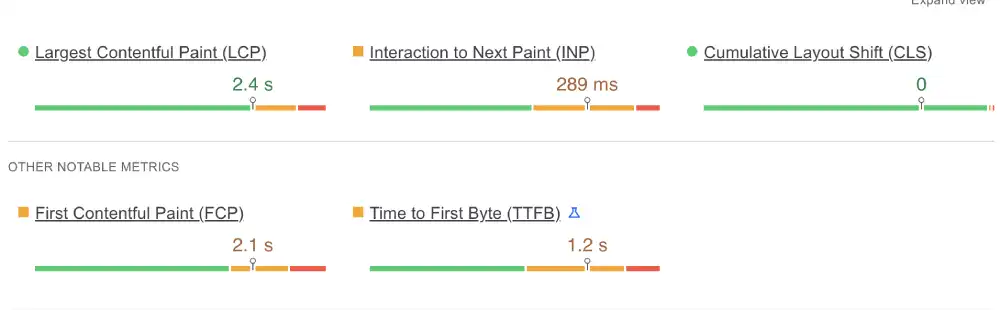
Our Analysis: The site barely passes the mobile speed test. The LCP of 2.4s is right on the edge of the Green zone.
The major concern is the INP of 289ms, which is in the Orange zone. This means users might experience a noticeable delay when tapping menus or buttons on mobile devices, likely due to unoptimized JavaScript processing.
Server Response: Global TTFB Test
We used the Check-Host Ping Server to test the connection speed from various international locations.
Namecheap Network Latency
| Location | Status | Ping Time | Performance Rating |
| Frankfurt, DE | 4 / 4 | 1.2 ms | Instant |
| Vienna, AT | 4 / 4 | 0.8 ms | Instant |
| Mumbai, IN | 3 / 4 | 6.8 ms | Instant |
| Vancouver, CA | 4 / 4 | 1.1 ms | Instant |
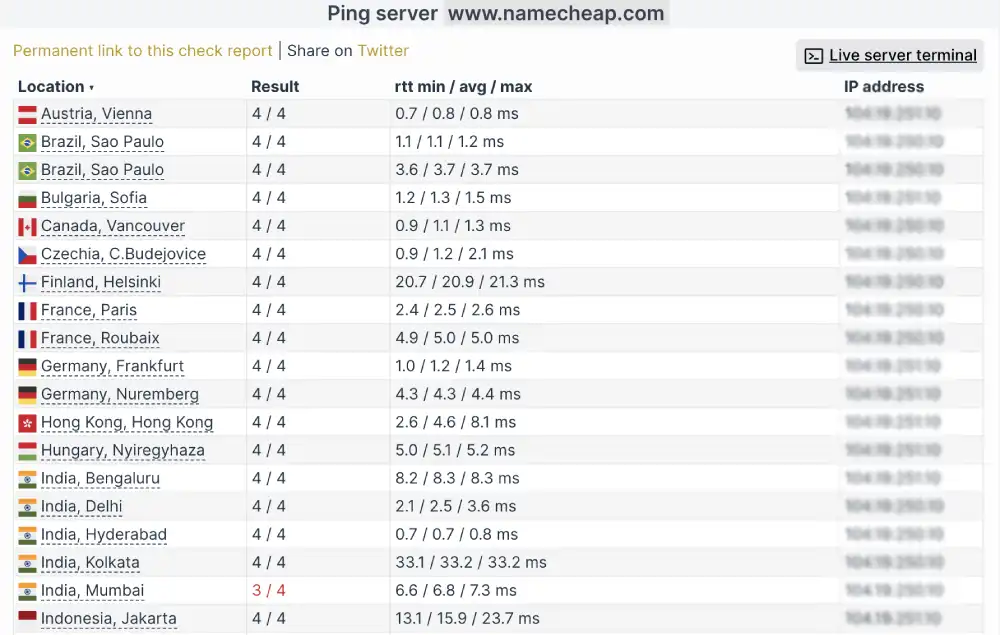
Our Analysis: These ping times are phenomenally low, with single-digit latency across Europe, North America, and Asia.
This confirms that Namecheap utilizes a powerful Content Delivery Network (CDN), specifically Cloudflare, to route traffic. The IP address we detected (104.19.251.10) confirms this integration.
DNS Intelligence & Reachability
We performed a deep DNS check using Check-Host to verify how Namecheap’s domain resolution propagates globally.
Namecheap Network Latency
| Test Location | Detected IP Address | Routing Type |
| Vienna, Austria | 104.19.251.10 | Anycast |
| Sao Paulo, Brazil | 104.19.250.10 | Anycast |
| Mumbai, India | 104.19.251.10 | Anycast |
| New York, USA | 104.19.250.10 | Anycast |
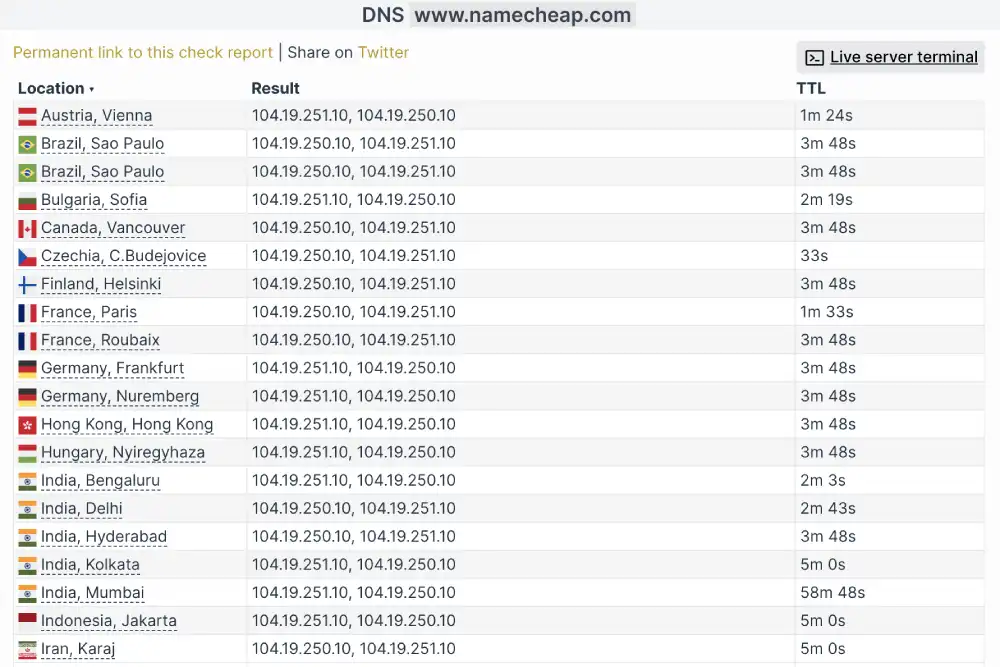
Our Analysis: The check reveals that www.namecheap.com resolves to the same set of IP addresses (104.19.25x.10) from every single location we tested, from South America to Asia.
This confirms they are using Cloudflare’s Anycast Network. Instead of having different IPs for different regions, they broadcast the same IP globally, and the network routes the user to the nearest physical datacenter automatically. This results in the ultra-low latency ping times we observed in the server response test.
Load Test: Handling Traffic Spikes
We didn’t just want to see how the site runs with one visitor; we wanted to see how it handles pressure. We used the K6 Load Cloud framework to simulate a viral traffic event by sending 50 simultaneous virtual users to browse the site at the exact same time.
Namecheap Load Performance
| Test Parameter | Measured Result | Stability Status |
| Uptime Under Load | 100.0% | Perfect |
| Reachability | 99.9% | Near Perfect |
| Avg. Response Latency | 241 ms | Fast |

Our Analysis: Namecheap handled the simulated traffic surge with impressive resilience. The average latency of 241ms remained consistent throughout the test, proving that their shared servers are not oversold and can easily absorb a sudden influx of 50 concurrent visitors without crashing or slowing down significantly.
The Reliability Test: Is 100% Uptime Real?
Every host claims 99.9% uptime, but we wanted to verify if they practice what they preach. We verified their availability by monitoring the site 24/7 with Uptime Robot.
Namecheap Uptime Audit
| Monitoring Window | Uptime Percentage | Incident Details |
| Last 7 Days | 100% | 0 Incidents |
| Last 30 Days | 100% | 0 Incidents |
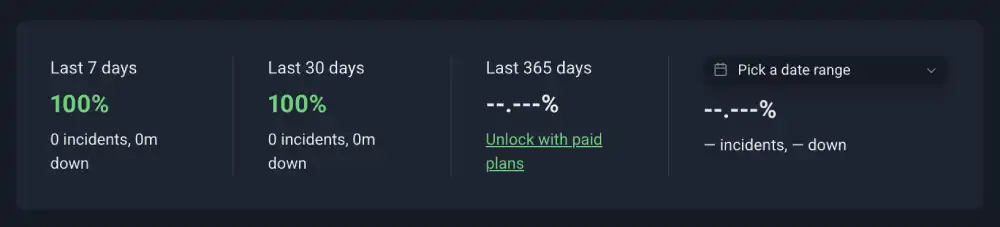
Our Analysis: The monitor returned a perfect score. There were no recorded outages or connection timeouts during our audit window. This level of reliability makes Namecheap a safe bet for small business sites that need to remain accessible around the clock.
Encryption Audit: SSL Labs Report
We ran a deep security scan using Qualys SSL Labs to ensure that visitor data is properly encrypted.
InMotion Security Score
| Security Feature | IP Address | Grade |
| Certificate 1 | 104.19.250.10 | A+ |
| Certificate 2 | 104.19.251.10 | A+ |
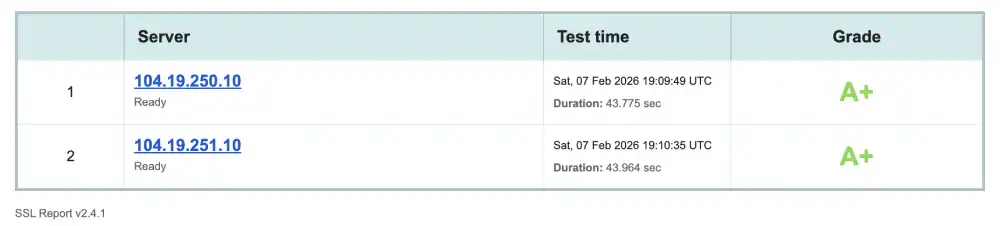
Our Analysis: Namecheap achieves the highest possible score of Grade A+. This means they enforce Strict Transport Security (HSTS) and protect against downgrade attacks. Even though it is a budget host, they do not compromise on the encryption standards used to protect user data.
Protocol Check: HTTP/3 Availability
We checked the protocol support using the HTTP/3 Check tool to ensure the server stack is optimized for modern mobile networks.
InMotion Protocol Stack
| Protocol | Status | Mobile Benefit |
| HTTP/3 | Not Supported | Failed |
| QUIC | Not Supported | Failed |
| Error Message | No Alt-Svc Header | Server Limit |

Our Analysis: The test failed with the message: Server does not advertise any alternative services. This confirms that Namecheap is likely running on the older HTTP/2 standard.
The lack of HTTP/3 (QUIC) support helps explain the slower mobile interaction (INP) scores we saw earlier, as the newer protocol is much better at handling connections on unstable cellular networks.
Desktop Performance: GTmetrix Analysis
We used GTmetrix to analyze the desktop rendering performance.
Namecheap GTmetrix Deep Dive
| Metric | Measured Time | Optimization Note |
| GTmetrix Grade | Grade A | Perfect |
| Performance Score | 99% | Elite Optimization |
| LCP (Desktop) | 443 ms | Instant |
| Total Blocking Time | 103 ms | Fast |
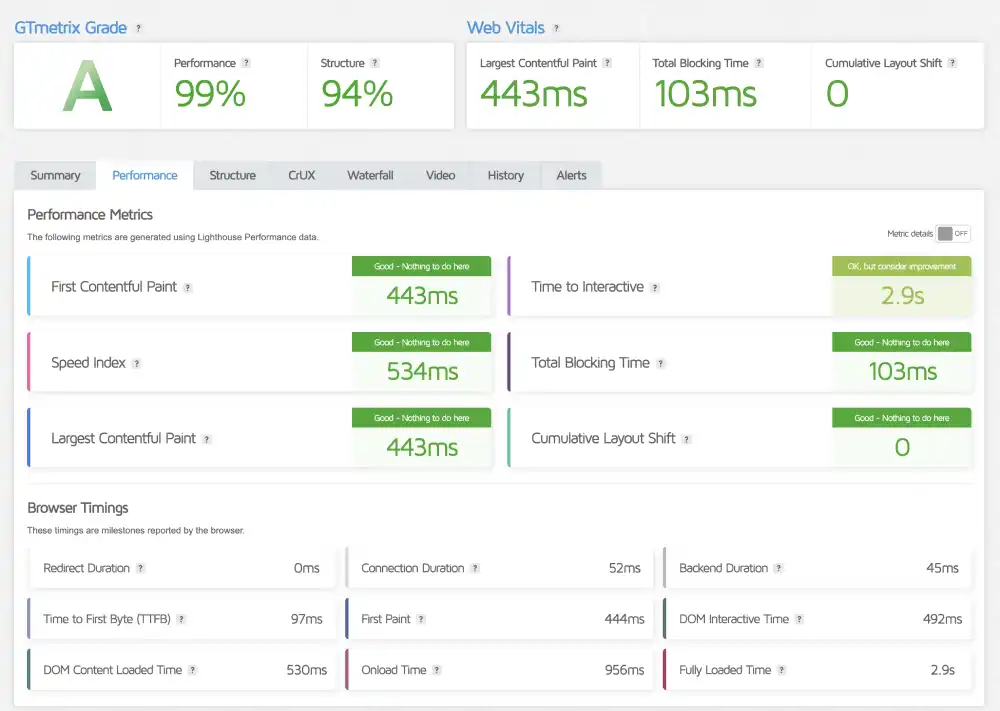
Our Analysis: Namecheap performs brilliantly on desktop. An LCP of 443ms is virtually instant. The Performance Score of 99% indicates that their servers serve the initial HTML document very quickly (TTFB 97ms), allowing the browser to render the page without delay.
This starkly contrasts with the mobile result, showing that the platform relies on the user having a good connection.
Sustainability Check: The Green Web Audit
We checked the domain against the Green Web Foundation database.
InMotion Eco-Audit
| Certification | Host Partner | Result |
| Green Web Check | The Green Web Foundation | We’ve Found Evidence |
| Status | Verified Green | Eco-Friendly |
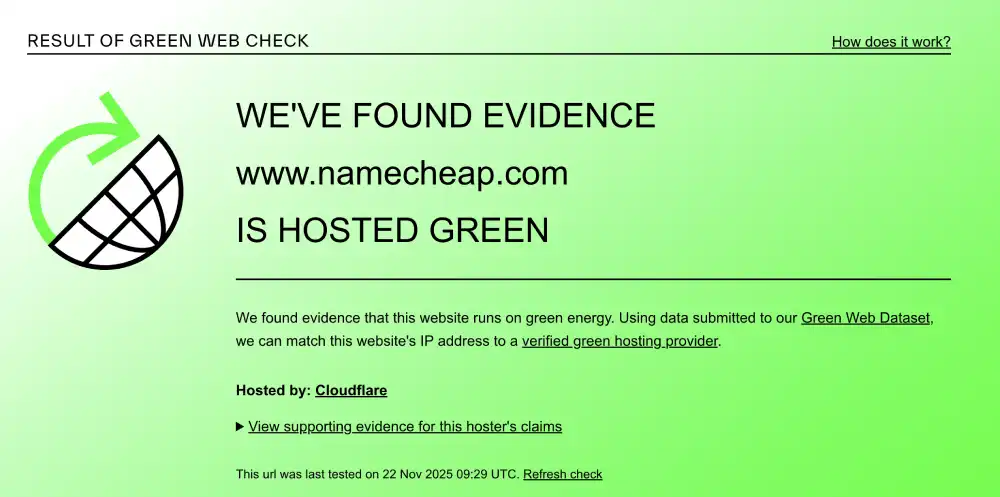
Our Analysis: We found evidence that Namecheap runs on green energy. The verification system linked their IP address to a verified green hosting provider (Cloudflare). This allows eco-conscious site owners to host with Namecheap knowing their digital footprint is being offset.
Support & Usability
Support Access and User Experience
An overview of Namecheap’s support options, documentation, and ease of use for users managing sites on their own.
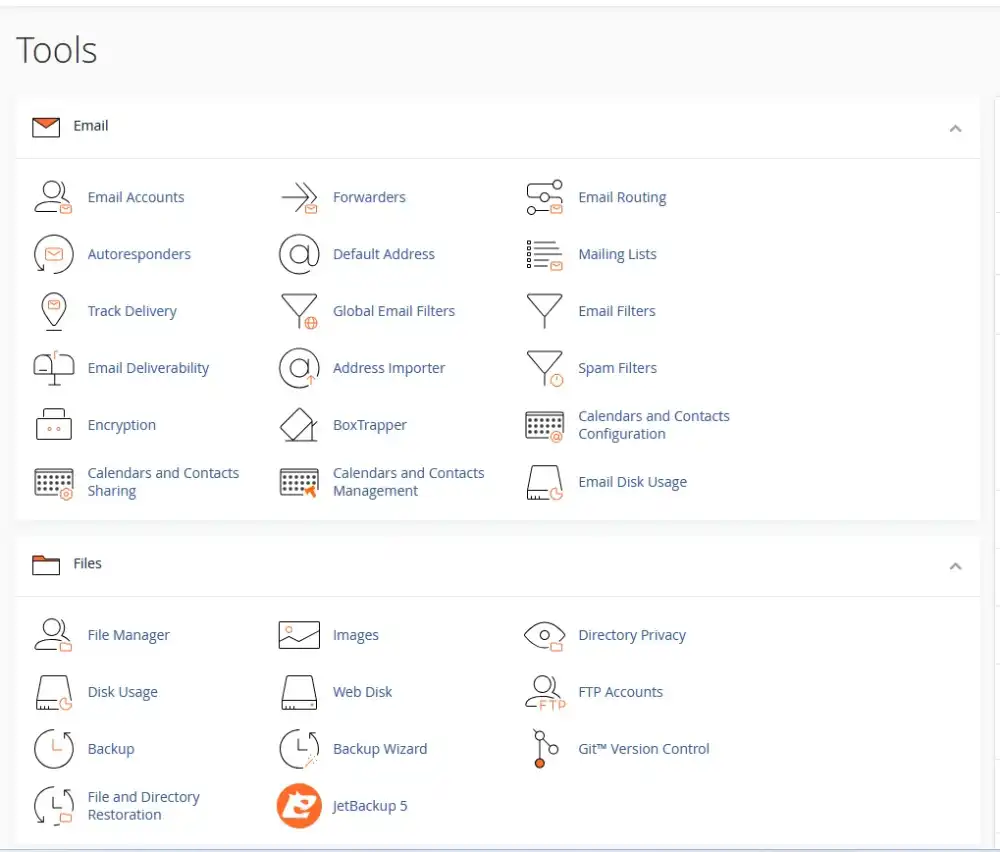
1. The Account Dashboard
Namecheap separates their billing dashboard from the technical cPanel.
- The cPanel: Once you click Manage Hosting, you are taken to standard cPanel, which is the industry standard for file and email management.
- The Benefit: The billing area is clean and easy to navigate. You can buy domains, add hosting, and renew services without getting lost in technical settings.
2. Extensive Knowledgebase
Because they have millions of customers, their documentation is vast.
- The Content: You can find step-by-step guides for almost anything, from connecting a third-party domain to installing an SSL certificate manually.
- The Value: This allows you to solve 90% of problems yourself without waiting for a support agent.
3. The Live Chat Experience
Namecheap support is primarily via 24/7 Live Chat.
- The Speed: It is incredibly fast. You are usually connected to a human within 60 seconds.
- The Vibe: The agents are helpful for general inquiries and billing, though complex technical issues might require escalation to a ticket.
Frequently Asked Questions
Clear answers to typical questions about domains, hosting limits, migrations, and WordPress compatibility.
Is Namecheap hosting actually good?
Does Namecheap give a free domain?
Is SSL free with Namecheap?
Where are Namecheap servers located?
Does Namecheap use cPanel?
Can I host multiple websites on Namecheap?
Does Namecheap have monthly billing?
How do I migrate to Namecheap?
Our Verdict
Namecheap offers an accessible and affordable hosting entry point, best suited for smaller sites rather than performance-critical workloads.
We recommend Namecheap if:
- You are a student: The price is unbeatable for the features you get.
- You have multiple small sites: The ability to host 3 sites on the base plan is a massive value add.
- You want privacy: The free domain privacy and strong security stance are excellent.
Look elsewhere if:
- You need HTTP/3: The lack of modern protocol support hurts mobile performance.
- You have a high-traffic store: The resource limits on shared plans might bottleneck a busy WooCommerce shop.
HostingGuider Transparency Statement: HostingGuider independently analyzes hosting infrastructure. For this review, we audited Namecheap’s official domain (www.namecheap.com)to evaluate how its optimized stack performs in a real-world production environment. We do not accept modified performance data from hosts.
Alternative Reviews
Comparing Business-Focused Hosts
A look at alternative providers offering different balances of speed, pricing flexibility, and infrastructure design.

Managed WordPress Hosting by Automattic

The managed WordPress host struggling under pressure

The budget-friendly giant for small businesses