
Picking the wrong VPS type can drain your budget, eat up your time, or leave your site exposed to threats. The difference between managed and unmanaged VPS goes far beyond price. It determines who handles your server, who fixes problems, and how much technical work lands on your plate.
This guide breaks it all down. Whether you have zero server experience or you live in a Linux terminal, you will find a clear answer by the end.
Here is what you will learn:
- What managed and unmanaged VPS actually include
- The real pros and cons of each option
- Honest cost comparisons for 2026
- Which option suits each person, and which one does not
- Hidden costs most guides skip
- A practical decision framework to pick the right one
Key Takeaways
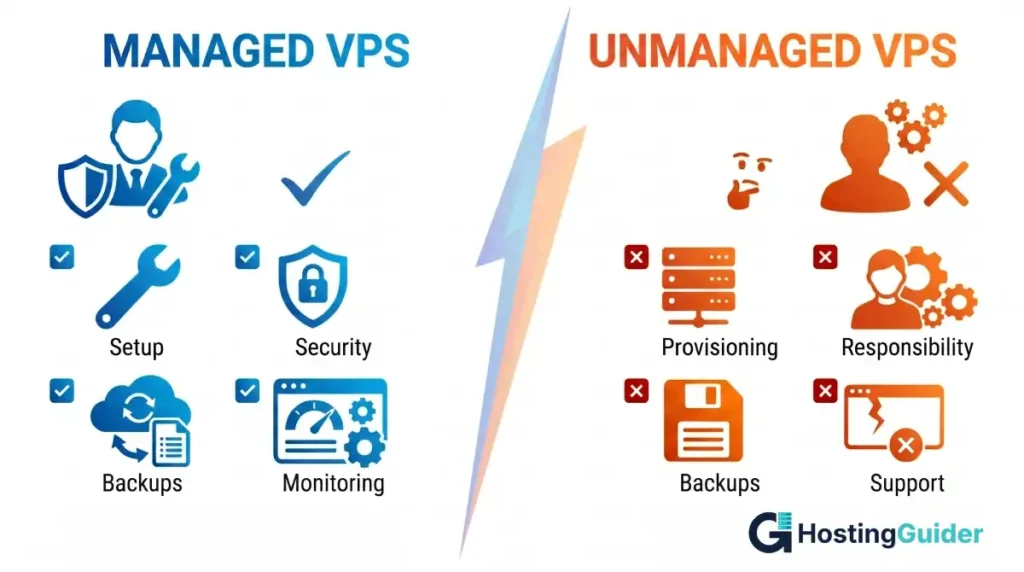
- Managed VPS means the hosting provider handles updates, security, monitoring, and support. You focus on your site.
- Unmanaged VPS gives you full root access and total control. All server tasks are yours.
- Managed VPS typically costs 2x to 5x more than an unmanaged plan with similar hardware.
- Unmanaged VPS suits developers, sysadmins, and teams with strong Linux skills.
- Managed VPS suits businesses, non-technical founders, and anyone who cannot afford downtime.
- The true cost of unmanaged VPS rises sharply once you factor in your time, tools, and potential errors.
Quick Answer
Managed VPS includes server setup, security patching, software updates, monitoring, and expert support from your provider. Unmanaged VPS gives you a bare server with root access. Everything beyond basic network connectivity is your responsibility. Managed hosting costs more but saves time. Unmanaged hosting costs less but demands real technical skill to run safely.
What Is a VPS and Why Does the Management Type Matter?
A Virtual Private Server (VPS) is a hosting environment where one physical machine is divided into isolated virtual servers. Each VPS gets its own dedicated CPU, RAM, and storage. You share the physical hardware with others, but your environment stays completely separate from theirs.
According to Cloudflare, VPS hosting sits between shared hosting and dedicated servers, offering dedicated resources without the full cost of owning physical hardware.
The VPS market reached USD 5.7 billion globally in 2025, according to IMARC Group, reflecting just how many businesses and developers rely on this hosting model. The management type you choose shapes your entire experience on that server.
What Is a Managed VPS?
A managed VPS means the hosting provider takes care of the technical side of running your server. You get a working, secure environment from day one without needing to configure anything yourself.
Most managed VPS plans include:
- Operating system installation and ongoing updates
- Security patches applied promptly by the provider
- Server monitoring and uptime alerts
- Firewall configuration and basic security hardening
- Control panel setup, usually cPanel, Plesk, or DirectAdmin
- 24/7 technical support via chat, phone, or ticket
- Automated or on-demand backups
- Malware scanning on many plans
- DDoS protection at the network level
Some premium managed plans also include managed databases, staging environments, and proactive performance tuning. The provider acts as your server admin team.
What Is an Unmanaged VPS?
An unmanaged VPS hands you a bare server. The provider keeps the physical hardware running and the network connected. That is where their responsibility ends.
When you sign up for an unmanaged VPS, you typically receive:
- Root or administrator access to the server
- A choice of operating systems, usually Linux distributions like Ubuntu, Debian, or AlmaLinux
- Basic network connectivity and an uptime guarantee for the hardware
- No included support for software, configuration, or application errors
You install your own web server software, such as Apache or Nginx, configure your database, set up your firewall, and apply security patches yourself. According to ScalaHosting, roughly 60% of VPS servers run Linux, which means command-line fluency is non-negotiable for most unmanaged users. (Ubuntu Server Documentation)
Managed VPS: Full Pros and Cons Breakdown
Pros of Managed VPS
No technical background needed: You do not need to understand Linux commands, server configuration, or security hardening. The provider handles all of that.
Faster time to launch: Most managed plans come pre-configured. You can have your site live the same day you sign up, often within minutes.
Built-in security layer Providers apply patches, monitor for threats, configure firewalls, and often include malware scanning. This removes the biggest risk area for non-technical users.
Support when things break: You get access to technical experts around the clock. This matters most at 2 AM when your site goes down, and you have no idea why.
Time saved every week: Server maintenance, log monitoring, and update management take real hours every week. A managed VPS gives that time back to you.
Control panel included: Most managed plans include a graphical control panel. Tasks like creating email accounts, managing files, and handling databases become point-and-click operations.
Cons of Managed VPS
Higher monthly cost: You pay a premium for the management layer. Managed plans often cost 2x to 5x more than unmanaged plans with comparable hardware specs.
Less control over your environment: Some providers restrict what software you can install or what server settings you can change. This frustrates developers who need non-standard configurations.
Dependency on provider speed: If the support team is slow or makes an error during maintenance, you cannot easily step in and fix it yourself.
Preset configurations: Managed environments often use standard server setups. Running custom kernel modules, unusual software stacks, or highly specific configurations may not be possible.
Unmanaged VPS: Full Pros and Cons Breakdown
Pros of Unmanaged VPS
Lower monthly cost: Unmanaged plans are significantly cheaper. You get more raw server power for less money because you are not paying for a support team.
Full root access: You control every part of the server. Install any software, change any setting, build any configuration you need.
Better raw performance per dollar: Your money goes directly toward server resources like CPU, RAM, and SSD storage rather than toward a management layer.
Total flexibility: You can run Docker containers, set up Kubernetes clusters, configure custom load balancers, build VPN servers, or host unusual applications. There are no restrictions as long as you stay within the provider’s terms of service.
Strong fit for developers: Docker, for example, works best in environments where you have complete root-level freedom. Developers who need precise control over their stack will find unmanaged VPS much more practical. (Docker Documentation)
Cons of Unmanaged VPS
Steep learning curve: If you are not comfortable with the command line, you will struggle from day one. Root-level mistakes can break your entire server instantly.
Security is entirely your job: Unpatched software, weak firewall rules, and exposed ports create real vulnerabilities. You need to stay on top of every update, every configuration change, and every security advisory.
No software support from your host: If Nginx crashes or your database is corrupted, you have to solve it yourself. The provider will only confirm that the hardware and network are functioning.
Time-intensive maintenance: Regular patch cycles, log audits, backups, and performance tuning take consistent time every week. This adds up fast.
Downtime risk without monitoring: Without third-party monitoring tools in place, you may not know your site is offline until a visitor tells you.
Managed vs Unmanaged VPS: Real Cost Comparison for 2026
Price is where most people make fast decisions without looking at the full picture.
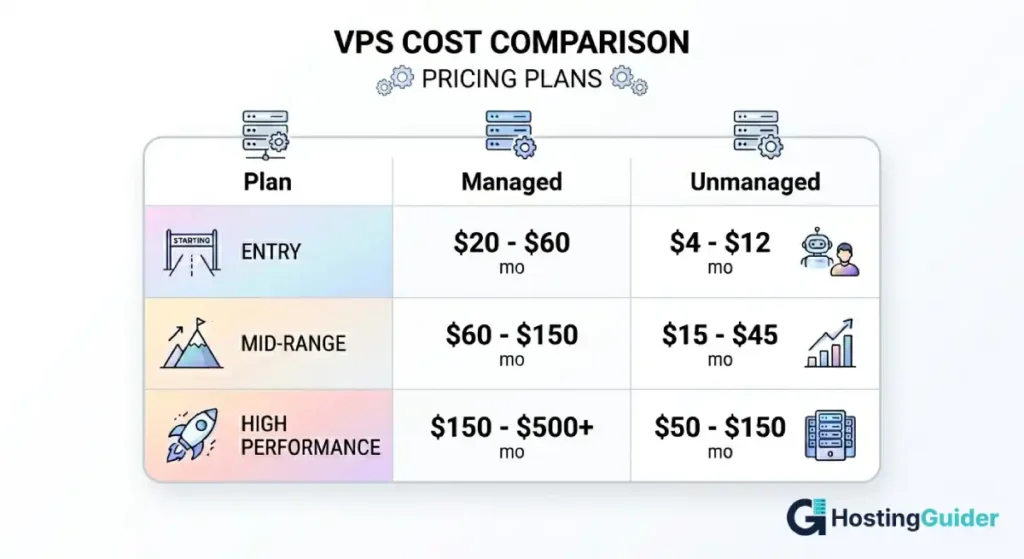
| Plan Level | Managed VPS | Unmanaged VPS |
|---|---|---|
| Entry Level | $20 to $60 per month | $4 to $12 per month |
| Mid-Range | $60 to $150 per month | $15 to $45 per month |
| High Performance | $150 to $500+ per month | $50 to $150 per month |
These ranges reflect pricing from providers like DigitalOcean, Vultr, Linode (Akamai Cloud), Hostinger, and Liquid Web. DigitalOcean’s managed database services alone start at around $15 per month, which shows how quickly individual managed components add up when you try to replicate them on an unmanaged server. (DigitalOcean Pricing)
What the managed premium actually covers
The price difference rarely means you are overpaying. It reflects real costs that you would otherwise handle yourself:
- A dedicated sysadmin team monitoring and maintaining your environment
- Control panel licenses (cPanel licenses alone cost $20 to $45 per month)
- Third-party monitoring tools like UptimeRobot or Datadog
- Automated backup storage and management
- Security scanning software
When you add those costs to your own hourly rate for maintenance work, the gap between managed and unmanaged often shrinks considerably. For many business owners, the managed option turns out cheaper in real terms.
Hidden Costs Most People Overlook
Both options carry costs that do not show up in the advertised price.
Hidden costs of managed VPS
- Bandwidth overage charges when traffic spikes
- Separate backup storage fees on some plans
- Control panel upgrades for advanced features
- Priority support tiers that cost extra
- Add-on services like dedicated IPs or CDN integration
Hidden costs of unmanaged VPS
- Your time for maintenance, which averages $50 to $150 per hour if you outsource it
- Third-party monitoring tools and security scanners
- Control panel licenses if you want a graphical interface
- Firewall and intrusion detection software
- Potential revenue losses from self-inflicted downtime
A realistic comparison adds all of these in. The total cost of ownership tells a very different story from the base monthly price.
Security: Where the Gap Shows Up Most
Security is the single biggest practical difference between the two options.
Managed VPS security
Providers typically include:
- Automated OS and software update management
- Firewall rules configured by security professionals
- Intrusion detection and active monitoring
- Malware scanning and removal on most plans
- SSL certificate installation support
- DDoS mitigation at the network level
Unmanaged VPS security
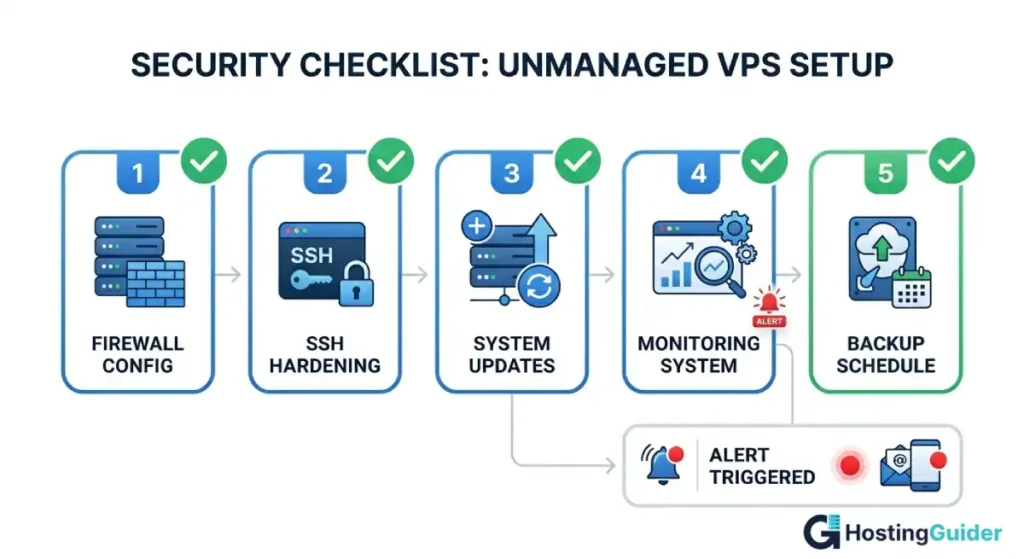
Everything falls on you:
- You configure firewall rules using tools like UFW or iptables
- You apply security patches manually or via scheduled automation
- You monitor server logs for suspicious activity
- You harden SSH access by disabling root login and using key-based authentication
- You install and maintain tools like Fail2ban to block brute-force attacks
The NIST Cybersecurity Framework identifies regular patching and proper access control as two of the most effective defenses against server compromise. On an unmanaged VPS, both fall completely in your hands. (NIST Cybersecurity Framework)
Who Should Use a Managed VPS?
Managed VPS is the right choice if you match any of these situations:
- You run a business website, e-commerce store, or client site where downtime means lost revenue
- You have no background in Linux administration or server configuration
- You want to stay focused on growing your business, not babysitting a server
- You need reliable 24/7 technical support without hiring an in-house sysadmin
- You use WordPress, WooCommerce, Magento, or similar platforms that benefit from a pre-optimized stack
- You are a freelancer or agency managing multiple client sites and cannot afford unpredictable outages
Managed VPS works especially well for small business owners and non-technical founders who need strong performance without taking on the complexity of server management.
Who Should Use an Unmanaged VPS?
Unmanaged VPS makes sense if you fit this profile:
- You have solid Linux command-line skills and understand server administration
- You are a developer, DevOps engineer, or system administrator by trade
- You need custom server stacks, containerized workloads, or non-standard configurations
- You are building a side project and want to keep monthly costs minimal
- You have a dedicated IT team or a DevOps engineer on staff
- You use configuration management tools like Ansible, Terraform, or Chef
Many developers prefer unmanaged VPS specifically because it mirrors the production environments they work with professionally. You get the freedom to build your environment exactly the way your application needs it.
How to Choose: A 4-Question Decision Framework
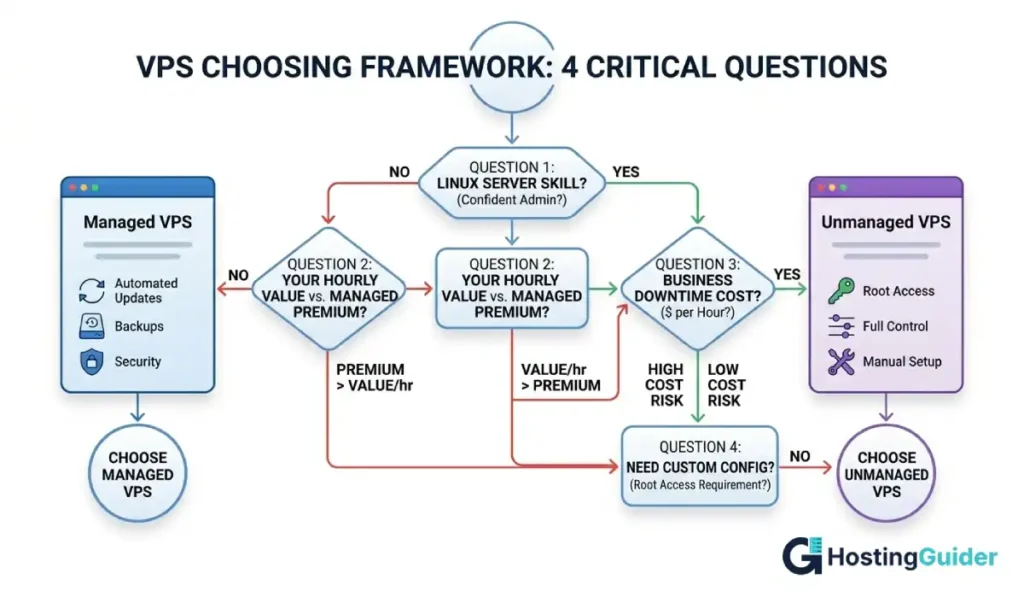
Answer these four questions honestly. The right option becomes clear.
Question 1: Can you manage a Linux server confidently? If no, managed VPS is your answer. If yes, either option can work depending on your other needs.
Question 2: How much is an hour of your time worth? If your hourly value exceeds the monthly managed premium divided by the hours you would spend on maintenance, pay for managed hosting.
Question 3: What does one hour of downtime cost your business? For a site that generates $500 per hour, a single self-inflicted outage from a configuration error wipes out months of savings from choosing the cheaper plan.
Question 4: Do you need a custom server configuration? If yes, an unmanaged VPS gives you the root-level freedom that managed plans often restrict.
Performance: Does Management Affect Speed?
The management layer itself does not slow your server down. Both types use the same underlying hardware from the same provider.
What can affect real-world performance:
- Control panel overhead (cPanel adds some resource usage compared to a lean Nginx-only setup)
- Background monitoring agents on managed servers
- How well the server stack is configured for your specific application
A well-optimized unmanaged VPS can outperform a managed one at the same price point. But this requires genuine expertise in Linux tuning and application configuration. For most users, a properly configured managed VPS delivers better real-world performance because it is set up correctly from the start, not pieced together from tutorials.
A Quick Comparison Table
| Feature | Managed VPS | Unmanaged VPS |
|---|---|---|
| Server setup | Provider handles it | You do it yourself |
| Security patches | Automated by provider | Your responsibility |
| Technical support | 24/7 expert support | Hardware/network only |
| Control panel | Usually included | You purchase separately |
| Root access | Limited or full | Full root access |
| Monthly cost | Higher | Lower |
| Flexibility | Moderate | Maximum |
| Best for | Businesses, non-technical users | Developers, sysadmins |
FAQ: Managed vs Unmanaged VPS
What is the difference between managed and unmanaged VPS hosting?
The core difference is who handles server maintenance. With a managed VPS, your hosting provider manages operating system updates, security patches, monitoring, backups, and technical support. With an unmanaged VPS, you get root access to the server and handle all of that yourself. Managed VPS costs more. Unmanaged VPS costs less but requires strong Linux and server administration skills to run safely.
Is an unmanaged VPS cheaper than a managed VPS?
Yes, unmanaged VPS plans are significantly cheaper upfront. Entry-level unmanaged plans start at around $4 to $12 per month. Comparable managed plans typically start at $20 to $60 per month. However, the real cost of unmanaged VPS rises when you factor in your time, third-party security tools, monitoring software, and control panel licenses. For many users, managed hosting is cheaper in total cost of ownership.
Which VPS type is better for WordPress?
Managed VPS is generally the better fit for WordPress users without technical backgrounds. Most managed providers pre-configure and optimize their stack for WordPress, handle automatic updates, and offer security features tailored for WordPress vulnerabilities. If you are a developer comfortable configuring LAMP or LEMP stacks and securing WordPress manually, an unmanaged VPS works fine and saves money.
Can a beginner use an unmanaged VPS?
Not comfortably. Unmanaged VPS requires solid knowledge of Linux commands, server configuration, firewall management, and security hardening. Without these skills, you risk misconfiguring the server, leaving it exposed to attacks, or accidentally breaking it. Most hosting experts recommend beginners start with managed VPS or managed shared hosting and move to unmanaged once they have built the necessary skills.
What happens if my unmanaged VPS gets hacked?
Recovery is entirely your responsibility. You will need to identify the attack vector, clean the compromised files, close the vulnerability, rebuild affected services, and restore from backups if necessary. This is why security hardening from day one is not optional on an unmanaged server. Regular backups, strong SSH authentication, a properly configured firewall, and automated patch management are your first line of defense.
Can I switch from unmanaged to managed VPS later?
Yes, most providers allow you to upgrade your plan or switch to a managed tier. Some offer migration assistance for free or at a flat fee. If you switch providers entirely, you will need to back up your data and reconfigure your environment on the new managed server. Many managed hosts provide onboarding support to help with this transition.
Is managed VPS worth the extra cost?
For most non-technical users and businesses, managed VPS is worth the cost. The time savings alone often justify the price premium. When you add up the cost of a freelance sysadmin at $50 to $150 per hour, monitoring and security tools, and the risk of downtime from self-managed errors, managed hosting frequently delivers better value in real terms. For developers with strong server skills who want maximum control, unmanaged VPS offers better value at the hardware level.
The Bottom Line
Your choice comes down to three things: your technical skills, your available time, and the cost of failure for your specific situation.
If you run a business where downtime means lost customers or revenue, managed VPS protects that. If you are a developer who wants full control and understands the responsibilities that come with it, an unmanaged VPS gives you that freedom at a lower price.
Use the decision framework above. Calculate your true total costs, not just the monthly plan price. Then pick the option that fits your actual situation, not just your budget.


