
Most people building their first website end up on shared hosting without fully understanding what they signed up for. That is not necessarily a bad thing, but it does explain a lot of the frustration that comes later, like unexpected slowdowns, confusing resource limits, or the shock of a renewal price that doubled overnight.
You will learn how it works, what you genuinely get, and where it falls short, so you can decide with confidence whether it is the right fit for your site.
Quick Answer
Shared hosting is a type of web hosting where your website lives on the same physical computer as hundreds of other websites. They all share the same storage, memory, and processing power. It is the cheapest and easiest way to get a website online, which is why most beginners start here. Plans typically cost between $2 and $10 per month.
What You Will Learn
- Exactly what shared hosting is (with simple real world comparisons).
- How it works behind the scenes.
- Every major pro and con, explained simply.
- When shared hosting is the right choice (and when it is not).
- What to look for when picking a provider.
- A deeper look into the “noisy neighbor” problem.
Table of Contents
What Is Shared Hosting?
Think of shared hosting like renting a room in a large, shared apartment building. Everyone shares the same building, the same electricity, and the same plumbing infrastructure. You have your own space, but the underlying systems are communal. You each pay a fraction of the total rent, which is why it is so affordable.
A server is just a powerful computer that stores website files and sends them to visitors. According to ICANN, the global organization that coordinates how the internet works, web hosting is the service that stores your website’s files and makes them accessible to anyone online. Shared hosting is the most affordable and beginner friendly version of that service, which is why it is the most popular starting point for new website owners worldwide.
Your website works the same way on a shared server: you get your own files and settings, but the server’s processing power, memory, and storage are split among all the tenants.
How Does Shared Hosting Actually Work?
When someone visits your website, their browser sends a request to the server where your site is stored. The server reads your files and sends them back to the browser, which then displays your site on screen. This all happens in a matter of seconds.
With shared hosting, that server is handling similar requests from many websites at the same time. The hosting company uses software to separate and manage each account, so your files stay private and your settings do not interfere with others.
When you sign up, here is what happens:
- You get an account on a shared server: This is your slice of the pie, a set amount of storage space, bandwidth, and processing power.
- You get a control panel: Usually cPanel or a similar tool, this acts as your website’s dashboard. From here you can upload files, set up email addresses, install apps, and check basic statistics.
- Your website goes live: One click installation tools make it easy to launch platforms like WordPress, WooCommerce, or Joomla without any coding knowledge.
- The hosting company does the maintenance: They take care of the server hardware, operating system, software updates, and security patches. They monitor for threats and keep everything running. You do not need to interact with any of that. Your job is simply to build and manage your website.
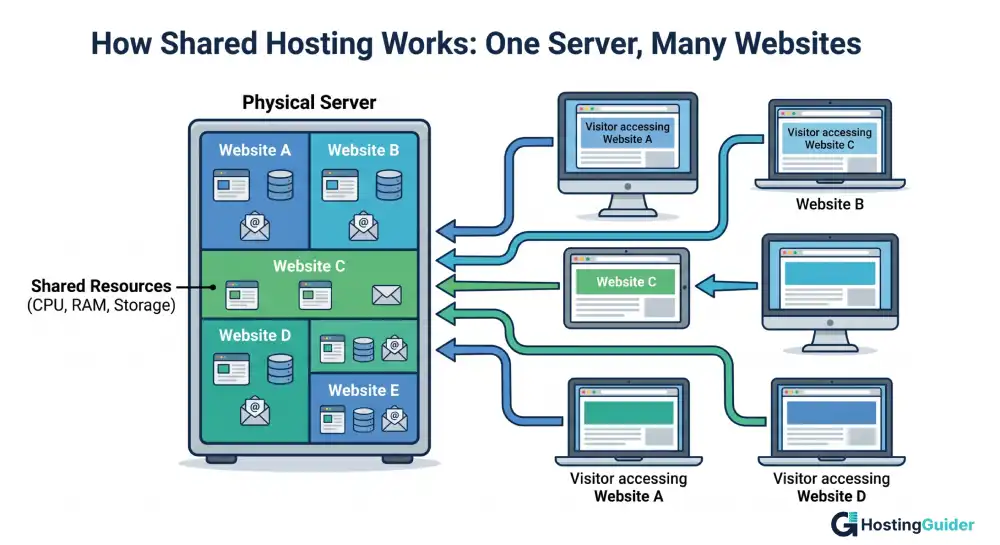
The key thing to understand is that all websites on that server are sharing the same pool of resources. If one website gets a sudden flood of visitors, it can temporarily slow down the other websites sitting on the same server.
The Honest Pros of Shared Hosting
1. The Price Is Hard to Beat
Shared hosting typically costs between $2 and $10 per month. Entry level plans can even start as low as $2 to $3 per month. Because the hosting company spreads the server cost across many accounts, every user pays a small fraction of the total. You can launch a real, functioning website for less than the cost of a monthly streaming subscription.
2. You Do Not Need Any Technical Knowledge
Everything is managed for you. You do not need to know what Linux is or how to configure a server. You interact only with a beginner friendly dashboard. Most providers also include guided setup wizards, video tutorials, and knowledge base articles written specifically for people who have never run a website before.
3. Getting Online Takes Minutes
Between one click app installers, pre built templates, and drag and drop website builders, you can have a working website live in under an hour. There is no server configuration, no code deployment, and no waiting for a technical team to spin things up. WordPress.org officially recommends checking whether your host supports one click WordPress installation, and virtually every shared host does.
4. The Hosting Company Handles Maintenance
Security patches, software updates, hardware repairs, and server restarts are all handled by the host. When you opt for shared hosting, your provider is responsible for monitoring security threats and addressing technical issues so you can focus on creating content. You are not a sysadmin, and you should not have to act like one.
5. Most Plans Include Essential Features Out of the Box
A typical shared hosting plan comes with a free domain name for the first year, a free SSL certificate (which makes your site display as “secure” in browsers), email accounts connected to your domain, automatic backups on some plans, and basic traffic analytics. These features cover the fundamentals a new website needs without requiring extra purchases.
6. 24/7 Support Is Usually Included
Reputable shared hosting companies offer around the clock customer support through live chat, email, or phone. For someone new to websites, having a real support team available at 2 a.m. when something looks broken is genuinely reassuring.
7. Easy to Scale Up Later
Shared hosting does not trap you. When your website grows, most hosting companies let you upgrade to a VPS or dedicated plan (often without moving your files). You start small and step up when you actually need to.
The Real Cons of Shared Hosting
1. Shared Resources Mean Shared Performance
This is the most important trade off to understand. Because your website shares CPU power, memory, and bandwidth with other sites, your performance can be affected by what your neighbors are doing. If another website on your server gets a sudden traffic spike, it may consume a larger share of resources, which can slow down your site temporarily.
2. Resource Limits Cap Your Growth
Every shared hosting plan sets limits on storage space, monthly data transfer (bandwidth), the number of email accounts, and how much processing power your site can use at once. For a new website with modest traffic, those limits are usually more than enough. Problems arise when your site grows faster than expected. A viral blog post, a product launch, or a seasonal sales rush can push you against your plan’s limits quickly. When that happens, the host may throttle your site, suspend it temporarily, or require you to upgrade.
3. Uptime Is Not Always Consistent
Most shared hosts advertise 99.9% uptime. That sounds excellent, but it still allows for roughly 8 to 9 hours of downtime per year. More importantly, shared servers are sometimes vulnerable to cascading issues: if one account consumes all available memory, other sites on that server may go offline until the issue is resolved. Google’s Core Web Vitals documentation confirms that page loading speed is a direct ranking factor in search results. A slow shared server could hurt your SEO if the provider is overloaded.
4. Security Risks Are Slightly Higher
While your files are kept separate through software isolation, you are on the same physical machine as potentially thousands of other websites. A severe security vulnerability in one account could create risk for neighboring accounts. The FTC’s cybersecurity guidance for small businesses recommends choosing hosting providers that apply account isolation, run regular security audits, and offer automatic backups. It also stresses that keeping your own software updated is one of the most effective things you can do to stay secure.
5. You Have Very Little Control Over the Server
You cannot access the server’s root settings, install custom software at the system level, or change server configurations. You may face restrictions on advanced caching or custom payment processing tools. For most beginners and small website owners, this does not matter. But developers who need specific environments will find shared hosting too restrictive.
6. Not Built for High Traffic Sites
If you expect tens of thousands of visitors per month from day one (or if you are running a busy online store), shared hosting will likely struggle. High volume sites need a VPS, cloud hosting, or dedicated server.
The Noisy Neighbor Problem: A Deeper Look
Imagine you are in a shared apartment. One of your housemates throws a huge party. They use all the hot water, fill the fridge with their stuff, and the noise keeps you awake. You did nothing wrong, but you are affected anyway.
On a shared server, the equivalent happens when another website gets an unexpected surge in traffic. Their pages suddenly need much more RAM and CPU. The server works overtime for them. Your pages load a bit slower as a result.
Good hosting companies limit how much any single website can consume using “resource throttling” to stop one site from hogging everything. But this protection is imperfect. On cheap shared plans especially, the noisy neighbor effect is real.
Shared Hosting vs. Other Hosting Types
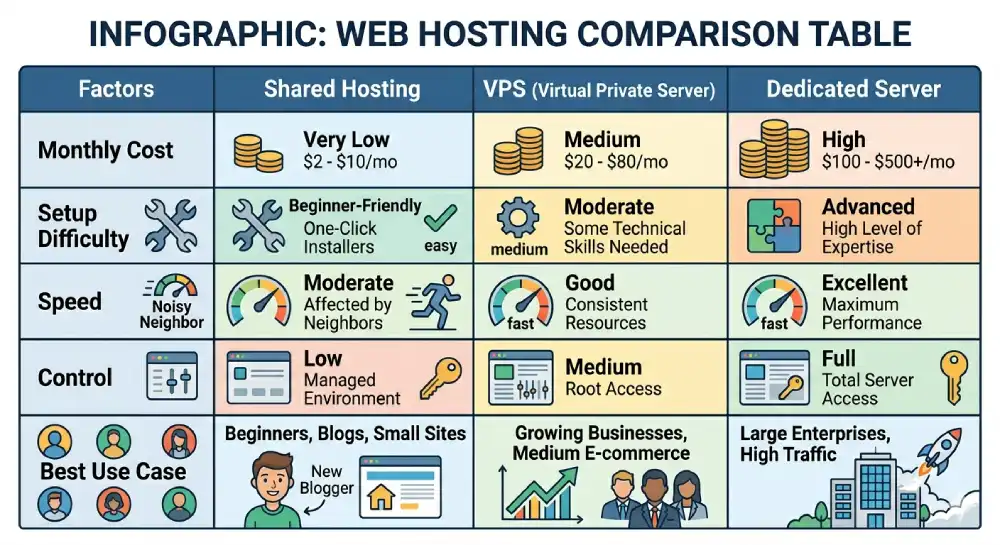
| Hosting Type | Monthly Cost | Speed | Control | Best For |
| Shared Hosting | $2 to $10 | Moderate | Low | Beginners, blogs, small sites |
| VPS Hosting | $20 to $80 | Good | Medium | Growing businesses |
| Cloud Hosting | Pay as you go | Very Good | Medium to High | Scalable workloads |
| Dedicated Server | $100 to $500+ | Excellent | Full | Large enterprises |
Who Should Use Shared Hosting?
Shared hosting is the right call if:
- You are building your first website and still learning the basics.
- You are launching a personal blog, hobby site, journal, or portfolio.
- You are setting up a small business website with fewer than 10,000 to 20,000 monthly visitors.
- You want to test a new project before investing in bigger infrastructure.
- You are a student or beginner learning how websites work.
- You are a nonprofit or community organization on a tight budget.
- You do not have technical experience and want someone else to handle the server.
Who Should NOT Use Shared Hosting?
Think twice about shared hosting if:
- Your website already experiences heavy traffic (10,000+ monthly visits) or sudden, unpredictable traffic surges.
- You run an online store handling high daily transaction volumes and sensitive customer data.
- You need custom server software or specific configurations not supported by shared environments.
- Your website is mission critical and cannot afford performance dips from noisy neighbors.
- You need guaranteed speed for a high converting landing page or app.
What Comes After Shared Hosting?
The most common upgrade path runs from shared hosting to VPS hosting, then cloud or dedicated hosting.
- VPS (Virtual Private Server) hosting gives your website a dedicated slice of a server’s resources. You still share physical hardware, but your RAM and CPU are reserved for you alone. VPS plans typically offer significantly better performance and control.
- Cloud hosting distributes your website across multiple servers, so traffic spikes are absorbed without crashing your site. Pricing is usually pay as you go, which makes costs variable but scalable.
- Dedicated hosting gives you an entire server to yourself. It is the most powerful option suited for large websites with heavy, consistent traffic.
As Cloudflare’s web performance learning center explains, the right hosting type always depends on your traffic volume, budget, and technical requirements. The correct move is to match the hosting type to where your site actually is, not where you hope it will be in three years.
Tips for Picking a Shared Hosting Provider
The differences between companies matter more than most beginners realize. Here is what to compare:
- Uptime guarantee: Look for 99.9% or higher. Anything below 99% means your site could be down for hours every month.
- Renewal pricing: Introductory rates often double or triple at renewal. Always check what the plan costs after year one.
- Money back guarantee: A 30 day refund window gives you time to test the platform without financial risk.
- Included features: Confirm whether free SSL certificates, backups, and email accounts are included in the base price or sold as add ons.
- Speed and Server Location: Choose a provider with servers in the same region as most of your visitors.
- Support response time: Try contacting support before buying to see how fast and helpful they are.
- Storage and bandwidth: Watch out for “unlimited” plans. Read the fine print for fair use caps that can cause problems if your site grows.
CISA (the Cybersecurity and Infrastructure Security Agency) advises individuals and small businesses to evaluate the security practices of any third party platform before storing data on it. Asking your host about their backup policies, malware scanning, and data breach procedures is a reasonable first step.
Frequently Asked Questions
Can a beginner set up shared hosting without help?
Yes. Shared hosting is specifically designed for people with no technical background. Most providers walk you through the process with step by step wizards. The process is comparable to creating an account on any major website.
Does shared hosting slow down my website?
It can, especially during peak usage hours or if a neighbor consumes too many resources. Reputable hosts manage this well through account limits. Choosing a well reviewed provider and keeping your site lean (compressed images, minimal plugins) significantly reduces the chance of noticeable slowdowns.
What does “unlimited” storage or bandwidth actually mean?
It almost never means truly unlimited. Hosting companies use this term for plans with no hard numerical cap, but their terms of service include acceptable use policies. If your site uses far more resources than the average account, the host can throttle or suspend you.
How do I know when I have outgrown shared hosting?
Signs include consistent slow load times, your host notifying you that you have exceeded resource limits, or your site going down during moderate traffic events. Most providers make it easy to move to a VPS or cloud plan without losing your data.
Is shared hosting secure enough for a small online store?
For a small store just getting started, it can work. However, you need to confirm your host provides SSL certificates (non negotiable for taking payments), regular backups, and malware scanning. As your store grows, moving to a VPS or managed hosting plan reduces your security exposure.
Is shared hosting safe?
Reputable providers have strong security measures (firewalls, malware scanning, and account isolation) that make shared hosting reasonably safe for most websites. The risk is higher than a dedicated server but manageable. Avoid shared hosting if you store sensitive payment or medical data.
Can I run WordPress on shared hosting?
Yes. WordPress runs perfectly well on shared hosting for small to medium sites. Most shared hosts offer one click WordPress installation and keep it updated automatically.
Is shared hosting good for SEO?
It can be. If your host maintains good uptime and reasonable speeds, shared hosting will not hurt your SEO. Problems arise only if the server is consistently slow or frequently down (both signs of a low quality provider).
How many websites can I host on one shared plan?
It depends on the provider and plan tier. Some allow one website, others allow unlimited. Check the plan details before signing up.
What is the difference between shared hosting and web hosting?
Web hosting is the broad category. Shared hosting is one specific type of web hosting. Others include VPS, dedicated, cloud, and managed hosting.
Start Simple, Scale When You Need To
Shared hosting is not perfect, but it is the most sensible starting point for the vast majority of beginners. The low cost, ease of setup, and managed infrastructure let you focus on building your site rather than managing a server.
Its limits around speed, control, and security only become genuine problems as your site grows, and by that point, you will have the experience to know you need something bigger and the revenue to pay for it. The smarter move is always to start with what your site actually needs today, then scale up when the evidence says it is time.


