
You’ve probably outgrown shared hosting, or maybe you’re setting up your first serious website and wondering what “VPS” means and whether it’s right for you. Either way, choosing the wrong type of hosting can cost you in speed, security, and money.
VPS hosting sits right between budget-friendly shared hosting and expensive dedicated servers. It gives you your own dedicated chunk of a physical server, with real control over how it’s configured.
Whether you’re running a growing blog, an e-commerce store, or a client-facing web application, understanding VPS hosting is one of the most practical things you can do before spending a dollar on infrastructure.
For a broader context, our web hosting market statistics cover global market size, cloud provider share, uptime benchmarks, and how pricing has shifted across hosting segments in 2026.
In this guide, you’ll learn:
- What VPS hosting actually is, explained simply
- How the technology behind it works (without the jargon)
- The different types of VPS hosting and when each makes sense
- How VPS compares to shared, dedicated, and cloud hosting
- The real advantages and disadvantages
- Who should use VPS hosting and when to upgrade
- How to pick the right VPS plan
By the end, you’ll have a clear, honest picture of what VPS hosting is – and whether it makes sense for your situation.
Key Takeaways
- A VPS gives you dedicated server resources (CPU, RAM, storage) on a shared physical machine, using virtualization technology.
- Your environment is fully isolated from other users on the same server, so their traffic and activity don’t affect your site.
- VPS hosting is more powerful than shared hosting and more affordable than a dedicated server.
- There are two main types: managed VPS (the host handles the technical side) and unmanaged VPS (you’re in full control, including maintenance).
- According to IMARC Group, the global VPS market was valued at $5.7 billion in 2025 and is expected to reach $15.6 billion by 2034 – a clear sign of how fast businesses are adopting it.
- VPS is ideal for growing websites, developers, e-commerce stores, and businesses that need reliable performance without the cost of a full dedicated server.
Quick Answer: What Is VPS Hosting?
VPS stands for Virtual Private Server. It’s a type of web hosting where a single physical server is divided into multiple isolated virtual environments using special software called a hypervisor. Each VPS gets its own dedicated CPU, RAM, and storage, and runs its own operating system. You get the control and performance of a private server without paying for an entire physical machine.
What Is a VPS? Breaking It Down Simply
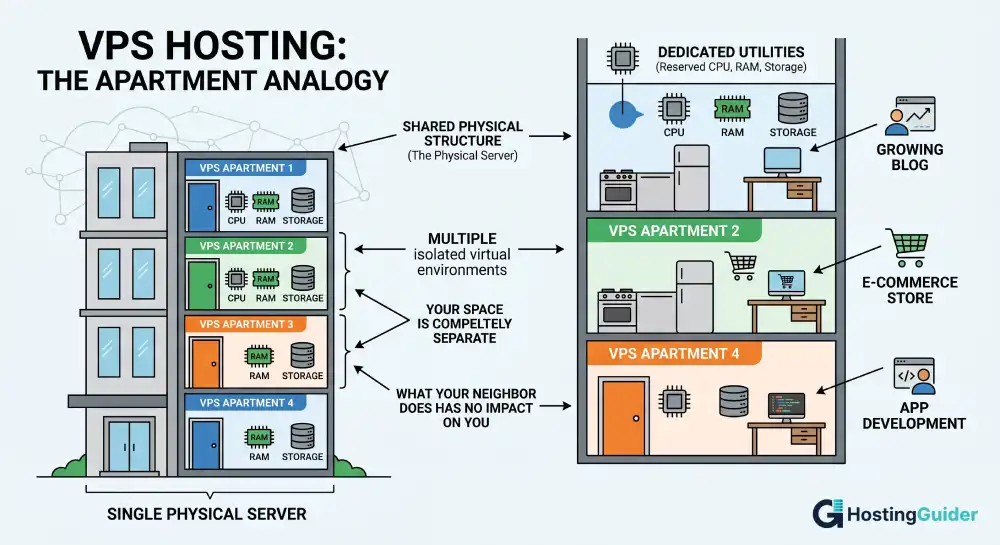
Think about a large apartment building. The building itself is one physical structure, but inside, each apartment is completely separate. You have your own front door, your own kitchen, your own utilities. What your neighbor does in their apartment doesn’t affect your space – and vice versa.
VPS hosting works the same way.
A single physical server (the building) is divided into multiple virtual servers (the apartments) using software. Each virtual server – your VPS – gets its own dedicated slice of that machine’s resources: processing power (CPU), memory (RAM), and disk space. You can restart your VPS, install software, change configurations, and manage everything as if you owned a private machine.
According to Google Cloud, a VPS acts as an isolated, virtual environment on a physical server owned and operated by a hosting provider. While users share the underlying hardware, each VPS environment remains fully independent.
The term “private” in VPS is the key distinction. You’re not sharing resources with other users. What you’re allocated is yours.
How Does VPS Hosting Actually Work?
The Role of Virtualization
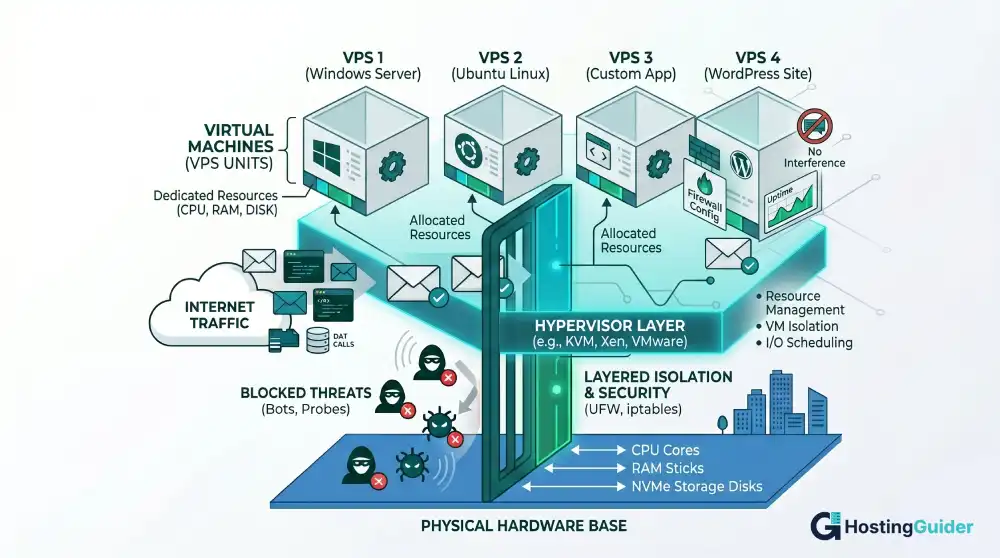
The technology that makes VPS hosting possible is called virtualization. Instead of physically cutting up a server, software creates virtual divisions. The tool responsible for this is called a hypervisor.
A hypervisor is a layer of software that sits between the physical hardware and the virtual machines running on top of it. Its job is to:
- Divide the server’s CPU, RAM, and storage into separate virtual environments
- Allocate a fixed portion of those resources to each VPS
- Keep each VPS completely isolated from the others
- Ensure no single VPS can use another’s resources
Popular hypervisors used by hosting providers today include KVM (Kernel-based Virtual Machine), VMware, and Xen. KVM is open-source and widely used in Linux-based VPS environments.
As explained by Wikipedia’s entry on virtual private servers, each VPS runs its own copy of an operating system, and users typically have superuser-level (root) access – meaning they can install almost any software that runs on that OS.
What Happens When You Buy a VPS Plan
Here’s the simplified version of what goes on behind the scenes:
- The host installs a hypervisor on a powerful physical server in a data center.
- The hypervisor creates virtual machines (your VPS) and assigns each one a set amount of CPU cores, RAM, and disk storage.
- Your VPS boots its own operating system – usually a Linux distribution like Ubuntu or CentOS, or Windows Server.
- You connect via SSH (for Linux) or Remote Desktop (for Windows) and start managing your server.
- Your resources are reserved for you. If your plan says 4 GB of RAM and 2 CPU cores, those resources are yours – they don’t fluctuate based on what other VPS users on the same machine are doing.
This is a fundamental difference from shared hosting, where resource allocation is loose, and usage by other sites can slow yours down.
Types of VPS Hosting Explained
Not all VPS hosting is the same. The type you choose will depend on your technical comfort level and what you need your server to do.
Managed VPS Hosting
With a managed VPS, the hosting provider handles the technical maintenance for you. This includes:
- Server setup and configuration
- Operating system updates and security patches
- Software installations
- Performance monitoring
- Technical support
This option is ideal for business owners, bloggers, and e-commerce operators who want the power of a VPS without needing to understand the backend. You pay a bit more, but the time savings are significant.
Managed VPS is currently the dominant segment in the market. According to IMARC Group’s VPS market research, managed VPS offerings are growing at a CAGR of approximately 16.5% — faster than unmanaged services — as more businesses prefer to outsource server maintenance.
Unmanaged VPS Hosting
With an unmanaged (also called self-managed) VPS, you receive a bare server with root access. Everything else – configuring software, applying security patches, setting up a firewall, handling backups – is your responsibility.
This option suits developers, sysadmins, and technically experienced users who want full control and don’t want to pay for management they can do themselves.
If you’re new to servers, an unmanaged VPS has a steep learning curve. Mistakes can take your site offline or leave it exposed to security vulnerabilities.
Cloud VPS Hosting
Cloud VPS hosting uses the same virtualization concept, but instead of running on a single physical server, your VPS runs on a network of interconnected servers. This means:
- If one physical server fails, your VPS migrates to another automatically
- Resources can scale up or down more flexibly
- Uptime is generally better
As noted by Google Cloud, traditional VPS relies on one machine, while cloud VMs leverage a distributed architecture – making them better suited for enterprise workloads that need high availability.
The trade-off is pricing. Cloud VPS often uses a pay-as-you-go model rather than flat monthly rates, which can make billing less predictable.
Linux vs. Windows VPS
Most VPS hosting runs on Linux. It’s open-source, performs well for web hosting, and costs less because there’s no licensing fee. Common distributions include Ubuntu, Debian, CentOS, and AlmaLinux.
Windows VPS is available if you need to run Microsoft-specific technologies – like ASP.NET applications or MS SQL Server. Expect to pay more due to Windows Server licensing costs.
For most websites, apps, and developer projects, Linux is the default and the better-performing choice.
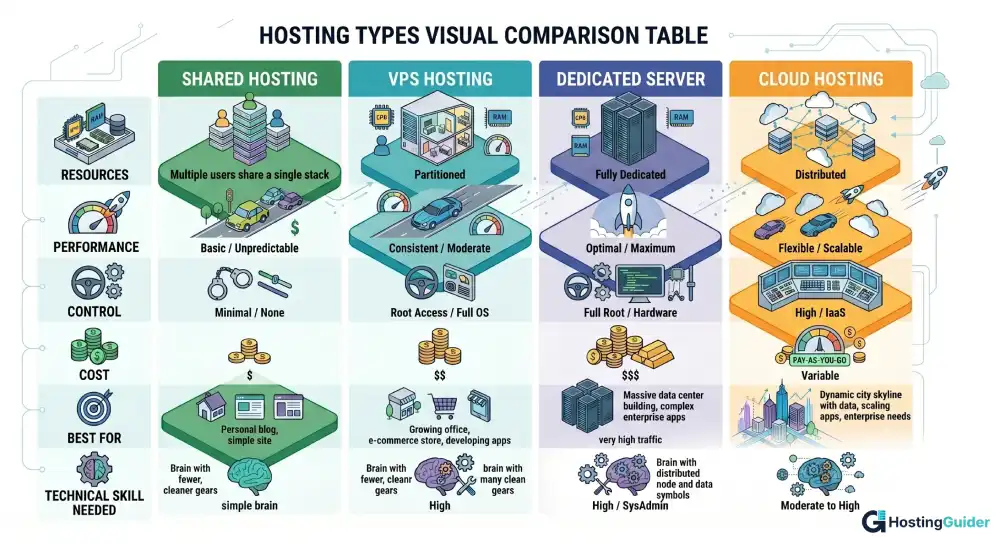
VPS vs. Other Hosting Types: A Clear Comparison
| Feature | Shared Hosting | VPS Hosting | Dedicated Server | Cloud Hosting |
| Resources | Shared with all users | Dedicated per VPS | Fully dedicated | Distributed/scalable |
| Performance | Low to moderate | Moderate to high | Highest | High |
| Control | Minimal | Full root access | Full access | Varies |
| Cost | $3-$10/month | $13-$50+/month | $100-$600+/month | Pay-as-you-go |
| Best for | Beginners, small sites | Growing sites, devs | High-traffic enterprise | Scalable apps |
| Technical skill needed | None | Low to medium | High | Low to medium |
Shared Hosting vs. VPS
Shared hosting is like living in a studio apartment with three other people. You all share the same resources – bandwidth, processing power, memory. If one person runs an intensive process, it affects everyone else.
VPS removes that problem. Your resources are partitioned and reserved. If someone else on the same physical server gets a traffic spike, your site won’t feel it.
VPS vs. Dedicated Server
A dedicated server gives you an entire physical machine, no sharing at all. The performance ceiling is higher, but so is the price. Entry-level dedicated servers typically start around $100 per month and can exceed $600 for high-spec configurations.
VPS gives you most of the control and much of the performance of a dedicated server at a fraction of the cost. According to Hostinger’s web hosting statistics, entry-level VPS plans average $13 to $15 per month, while mid-range plans average around $21 to $25 per month.
For most small and medium businesses, VPS hits the sweet spot.
VPS vs. Cloud Hosting
Cloud hosting and VPS are often confused. The distinction comes down to architecture:
- VPS runs on one physical server. If that server has hardware issues, your VPS goes down until it’s repaired.
- Cloud hosting runs across multiple servers with redundancy built in, so failures are handled automatically.
Cloud hosting offers better fault tolerance, but VPS is often simpler to manage and more predictably priced. Many providers now offer “cloud VPS” that blends both.
Key Benefits of VPS Hosting
Dedicated Resources You Can Count On
Your CPU, RAM, and storage are reserved exclusively for your account. This means consistent performance regardless of what other users on the physical server are doing. For websites where speed directly affects user experience and conversion rates, this stability matters.
Full Root Access and Customization
VPS hosting gives you root (administrator-level) access to your server environment. You can install any software, configure settings, set up custom security rules, and run virtually any application stack – things shared hosting simply won’t allow.
This level of control is essential for developers building custom applications, running non-standard software, or setting up specific server environments.
Better Security and Isolation
Because your VPS is isolated from other users at the hypervisor level, a security compromise on another VPS on the same physical server won’t automatically affect yours. You can also implement your own firewall rules, intrusion detection software, and access policies.
This is significantly more secure than shared hosting, where one compromised account can sometimes affect neighboring sites on the same server.
Scalable as You Grow
Most VPS providers allow you to upgrade your resources – more RAM, more CPU, more storage – without migrating to a different server. This makes VPS a practical long-term solution. You start with what you need and scale up when your traffic grows.
Improved Website Speed and SEO
Faster hosting contributes to better performance. Studies consistently show that page speed affects both user experience and search engine rankings. Since VPS resources are dedicated, your site typically loads faster and more consistently than it would on shared hosting. SSD-based VPS storage makes this even more pronounced, with significantly faster read/write speeds compared to traditional HDD storage.
Cost-Effective Middle Ground
VPS delivers dedicated-server-like performance without the dedicated-server price tag. For a small business, a growing blog, or a startup, that’s a meaningful difference.
Potential Downsides to Know Before You Buy
It Costs More Than Shared Hosting
There’s no way around it – VPS hosting is pricier than shared hosting. If you’re running a personal blog or a site with low traffic, shared hosting at $3 to $5 per month may be all you need. Jumping to VPS before you need it means paying for resources you won’t use.
Unmanaged VPS Requires Technical Knowledge
An unmanaged VPS is essentially a blank slate. If you don’t know how to configure a web server, set up SSL certificates, manage databases, or apply system updates – you’ll need to learn fast, hire someone, or choose managed VPS instead.
Mistakes on an unmanaged server can take your site offline or leave it vulnerable to attacks.
Limited by the Physical Server (For Traditional VPS)
Unlike cloud hosting, a traditional VPS is tied to one physical machine. If that machine’s hardware fails, your VPS goes offline until the host resolves it. Good VPS providers mitigate this with hardware redundancy and fast response times, but it’s worth understanding the difference compared to cloud hosting.
Resource Caps Still Apply
While your VPS resources are dedicated, they’re still finite. If your site suddenly gets far more traffic than your plan supports, you may hit your limits and need to upgrade. Unlike cloud hosting, resources don’t auto-scale without manual intervention (unless you’re on a cloud VPS plan).
Who Should Use VPS Hosting?
VPS hosting isn’t for everyone, but for many people, it’s exactly what they need.
You’re ready for VPS if:
- Your shared hosting plan is causing slow load times or frequent errors under traffic
- You need to install custom software or specific server configurations
- You’re running an e-commerce store that processes transactions (security and uptime matter here)
- You’re a developer who needs a staging environment or a dedicated environment for client projects
- You run multiple websites and want to manage them from a single, controlled environment
- You need compliance with data security standards that shared hosting can’t guarantee
VPS may be overkill if:
- You’re running a personal blog with under a few hundred visits per day
- You have no technical experience and don’t plan to use managed VPS
- Your budget is tight, and shared hosting is handling your traffic just fine
The most common trigger for upgrading to VPS is outgrowing shared hosting. When your site starts experiencing slowdowns during traffic spikes, shared hosting’s resource limits are usually the culprit.
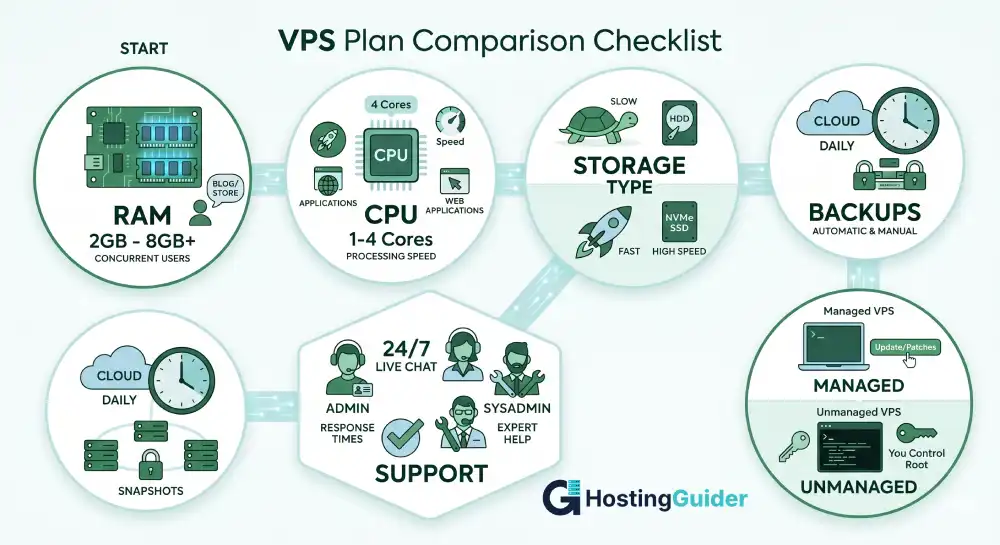
What to Look for When Choosing a VPS Plan
Not all VPS providers offer the same quality. Here’s what to evaluate:
RAM and CPU: For a basic website, 2 GB of RAM and 1-2 CPU cores is a reasonable starting point. E-commerce stores and applications may need 4-8 GB of RAM to handle concurrent connections smoothly.
Storage type: Always prefer SSD storage over HDD. SSDs are faster and more reliable, which directly affects site speed.
Bandwidth and data transfer: Check whether your plan includes unlimited bandwidth or a monthly data transfer cap. High-traffic sites need generous limits.
Operating system options: Confirm you can choose the OS you need – most providers offer multiple Linux distributions and Windows Server.
Managed vs. unmanaged: Be honest about your technical skills. If you’re not comfortable managing a server, a managed VPS is worth the extra cost.
Backups: Look for automatic backups and snapshot features. Data loss from a misconfigured server or an attack can be catastrophic if you have no restore point.
Support quality: Even on managed plans, support response time matters. Look for providers with 24/7 live chat or ticket support.
Control panel availability: Tools like cPanel, Plesk, or custom dashboards make server management far more manageable for non-technical users.
According to Hostinger’s hosting tutorials, providers that include AI-powered management tools are making VPS accessible even to users with minimal technical experience – a useful development for beginners transitioning from shared hosting.
Common Uses for VPS Hosting
VPS hosting is versatile. Here are the most common real-world applications:
- Website hosting: Running one or multiple websites with consistent performance
- E-commerce stores: Handling secure transactions and variable traffic spikes on platforms like WooCommerce or Magento
- Web applications: Deploying Node.js, Python, Ruby on Rails, or PHP-based applications that need specific server configurations
- Development and staging environments: Testing code before it goes live, isolated from production
- Game servers: Hosting multiplayer game servers for communities
- Email servers: Running a dedicated mail server with full control over deliverability settings
- Database hosting: Running MySQL, PostgreSQL, or MongoDB databases that serve external applications
- VPN hosting: Setting up a private VPN server for secure remote access
Frequently Asked Questions
What is VPS hosting in simple terms?
VPS hosting gives you your own private section of a physical server. You get dedicated CPU, RAM, and storage – all isolated from other users on the same machine. Think of it as renting a private apartment inside a shared building, where what your neighbors do doesn’t affect your space.
Is VPS hosting good for beginners?
Managed VPS hosting is beginner-friendly because the hosting provider handles server configuration, updates, and security for you. Unmanaged VPS requires technical knowledge and is better suited for developers or experienced users. If you’re new to servers, start with a managed VPS.
How much does VPS hosting cost?
Entry-level VPS plans typically start around $13 to $15 per month. Mid-range plans with more resources average $21 to $25 per month. Managed VPS costs more than unmanaged due to the added support and configuration. High-spec plans for demanding applications can run significantly higher.
What’s the difference between VPS and cloud hosting?
VPS runs on a single physical server, while cloud hosting distributes your environment across multiple servers. Cloud hosting offers better fault tolerance and easier resource scaling, but often comes at a higher or less predictable cost. VPS is simpler and well-suited for most small to medium-sized projects.
Do I need technical skills to manage a VPS?
For unmanaged VPS, yes – you’ll need comfort with Linux command-line management, server configuration, and security hardening. For managed VPS, much less so. Many managed plans include control panels that simplify day-to-day management without requiring you to touch the command line.
When should I upgrade from shared hosting to VPS?
The clearest signs are: your site is slowing down during traffic spikes, you’re getting resource limit warnings from your shared host, you need to install software not available on shared plans, or you’re handling sensitive customer data that requires stronger security controls.
Final Thoughts
VPS hosting is one of the most practical upgrades you can make as your online presence grows. You get real control over your environment, dedicated resources that don’t get stolen by other users, and performance that scales with your needs – all without paying for a full dedicated server.
The market reflects this value. Over 24 million websites worldwide already run on VPS hosting, and the industry is projected to continue growing steadily through the next decade as more businesses recognize that shared hosting has real limits.
For beginners, starting with a managed VPS removes the technical burden while giving you the benefits. For developers and more advanced users, unmanaged VPS hands you the keys to configure everything exactly as needed.
The right choice depends on your current needs, your budget, and how much technical control you want. But if you’re running anything beyond a simple personal site, VPS hosting is almost always worth the step up.


