
Picture a restaurant on a normal Tuesday. Eight tables, enough staff, everything runs smoothly. Then the same restaurant gets featured in a popular food magazine. The following Saturday, 200 people show up instead of the usual 40. The kitchen cannot keep up. Customers wait too long. Some leave. The restaurant was not built to handle that sudden demand.
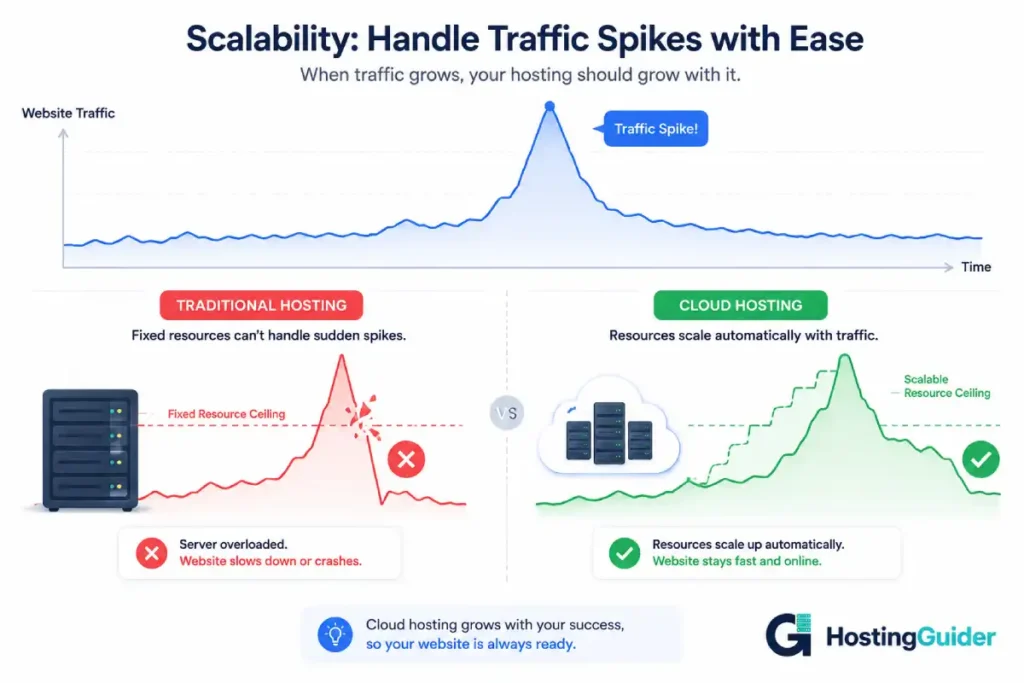
Websites face the exact same problem. A site built for 1,000 daily visitors will struggle or crash when 50,000 show up at once. Traditional hosting cannot expand fast enough. Cloud hosting can. And the reason comes down to one concept: scalability.
This guide explains what scalability means, how cloud hosting achieves it, what the different types of scaling look like, and how to know whether you actually need scalable hosting for your site.
If you are new to cloud hosting or want to understand the difference between cloud and traditional hosting before reading about scalability specifically, start with our What is Cloud Hosting? An Easy Explanation and Cloud Hosting vs Traditional Hosting: Key Differences guides first.
Table of Contents
Key Takeaways
- Scalability means your hosting can grow to handle more traffic without going offline
- Traditional hosting gives you a fixed amount of resources that cannot expand on demand
- Cloud hosting draws from a shared pool of resources and scales up or down automatically
- Horizontal scaling adds more servers to share the load
- Vertical scaling adds more power to existing servers
- Auto-scaling does both automatically based on real-time traffic
- Scalability matters most for e-commerce stores, growing blogs, and any site expecting traffic spikes
Quick Answer
Cloud hosting enhances scalability by connecting your website to a network of many servers rather than one fixed machine. When traffic increases, the network automatically allocates more resources to handle the demand. When traffic drops, resources scale back down. This happens in real time with no manual action and no downtime. Traditional hosting gives you a fixed ceiling. Cloud hosting removes that ceiling entirely.
What Scalability Actually Means
Scalability is the ability of a system to handle more demand without breaking down or performing poorly.
For a website, demand means visitors. Every visitor who loads your page uses a small amount of your server’s resources. Processing power to run your scripts. Memory to store temporary data. Bandwidth to send the page files to their browser. Storage to hold your content.
On a server with limited resources, there is a point where too many visitors at once means the server runs out of capacity. Pages load slowly. Some requests time out. At the worst, the site crashes entirely and nobody can access it.
A scalable hosting setup avoids this ceiling. When demand rises, more resources become available. When demand falls, those resources are released. The site always has what it needs regardless of whether ten people or ten thousand people are visiting at the same time.
Think of it like a water pipe. Traditional hosting gives you a pipe of one fixed size. If you need more water to flow through, you cannot change the pipe without stopping everything and doing manual work. Cloud hosting gives you a pipe that widens automatically when more water is needed and narrows when demand drops.
Why Traditional Hosting Fails at Scaling
Traditional hosting, whether shared, VPS, or dedicated, is built around fixed resources.
When you sign up for a shared hosting plan, you get a set amount of storage, a monthly bandwidth allowance, and a share of the server’s processing power. Those limits are defined at signup. They do not change automatically when your traffic changes.
The same is true of VPS hosting. You choose a plan with a specific amount of RAM, CPU cores, and storage. That allocation is fixed until you manually upgrade.
Even dedicated hosting, where you rent an entire physical server, hits a ceiling. That server has a maximum amount of RAM it can hold and a maximum number of CPU cores it can use. When traffic exceeds what that hardware can process, performance degrades.
| Hosting Type | Resource Model | What Happens During a Traffic Spike |
|---|---|---|
| Shared hosting | Fixed, shared with other sites | Site slows dramatically or goes offline |
| VPS hosting | Fixed, dedicated to your site | Site slows and may go offline at extreme loads |
| Dedicated hosting | Fixed, single server maximum | Site slows as hardware hits its ceiling |
| Cloud hosting | Dynamic, drawn from network pool | Resources scale up automatically, site stays fast |
To scale on traditional hosting, you have to manually upgrade your plan. That takes time. You contact the host, choose a higher plan, they migrate your account, and at some point during that process your site may experience brief downtime. By the time the upgrade is complete, the traffic spike may already be over.
That delay is the fundamental scalability problem with traditional hosting. It cannot respond to demand in real time.
How Cloud Hosting Scales: The Mechanics
Cloud hosting solves the scalability problem by connecting your website to a network of many servers that share a large pool of resources. Your site is not dependent on one machine. It draws from the collective capacity of the entire network.
When your site needs more resources, the network provides them immediately from the shared pool. When your site needs less, those resources go back into the pool for other uses. This all happens automatically, managed by software that monitors your site’s resource usage in real time.
There are two main ways cloud hosting scales: horizontally and vertically.
Horizontal Scaling
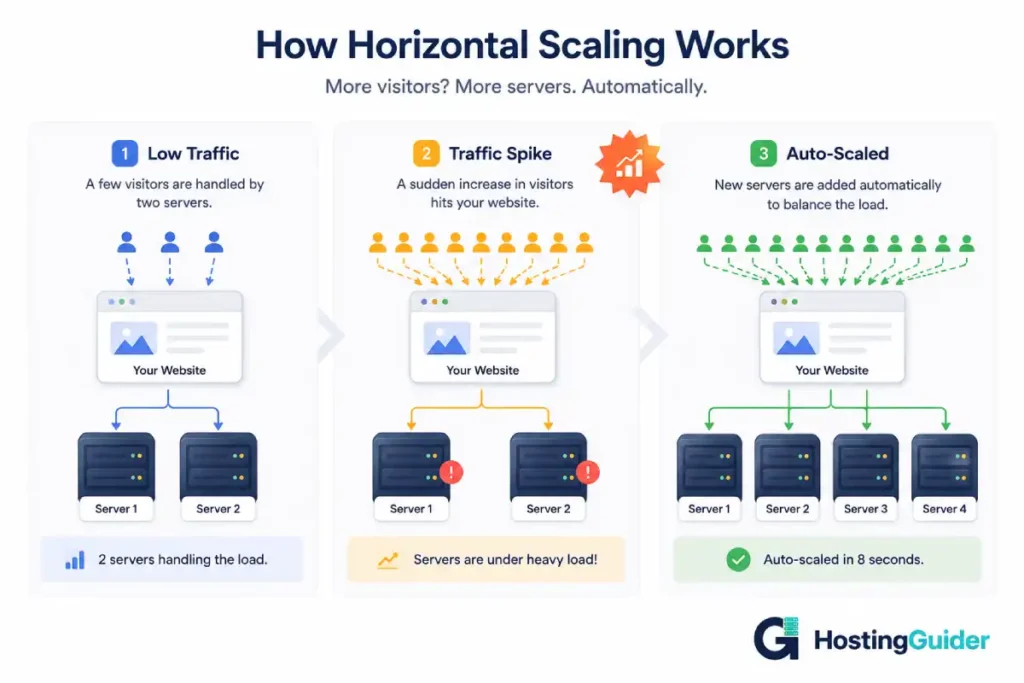
Horizontal scaling means adding more servers to share the load. Instead of one server handling all your traffic, the network splits incoming requests across multiple servers simultaneously.
Imagine your website normally runs on two servers. Traffic doubles. The cloud network adds two more servers and now four servers share the load. Traffic doubles again. Four more servers join. The load is always distributed evenly so no individual server is overwhelmed.
This is sometimes called scaling out. You are widening your capacity by adding more units rather than making one unit bigger.
Horizontal scaling is one of the biggest advantages cloud infrastructure has over traditional hosting. Adding more servers happens in seconds through software, with no human involvement and no downtime.
Vertical Scaling
Vertical scaling means giving existing servers more power. More RAM, more CPU cores, more processing capacity added to the servers that are already running your site.
This is sometimes called scaling up. Instead of adding more units, you make the existing units more powerful.
In traditional hosting, vertical scaling requires physical action. Someone has to add more RAM to a server or move your account to a more powerful machine. In cloud hosting, vertical scaling happens through software. Resources from the shared pool are allocated to your existing servers automatically.
| Features | Horizontal Scaling | Vertical Scaling |
|---|---|---|
| What it does | Adds more servers | Adds more power to existing servers |
| Also called | Scaling out | Scaling up |
| Downtime required | No | Sometimes briefly |
| Best for | Handling more simultaneous visitors | Handling more complex or resource-heavy tasks |
| Limit | Virtually unlimited | Limited by the largest available server size |
| How it happens in cloud | Automatic | Automatic or manual depending on provider |
Most cloud hosting systems use a combination of both. Auto-scaling software monitors your site and decides in real time whether to add more servers, give existing servers more power, or both.
Auto-Scaling
Auto-scaling is the system that makes both horizontal and vertical scaling happen without any manual action from you.
Cloud providers like Amazon Web Services and Google Cloud have built auto-scaling systems that monitor server metrics continuously. CPU usage, memory usage, network traffic, and request volume are all tracked in real time.
When any of these metrics crosses a defined threshold, the auto-scaling system kicks in. It spins up additional server instances within seconds. Traffic routes to the new instances immediately. When metrics drop back to normal levels, the additional instances are terminated to avoid unnecessary cost.
This is how large websites handle millions of visitors without a team of engineers watching the servers around the clock. The system manages itself.
For managed cloud hosting providers like Kinsta or WP Engine, auto-scaling is built into the platform and managed entirely by the provider. You do not configure it. You do not monitor it. It simply works.
| Auto-Scaling Stage | What Happens | Time It Takes |
|---|---|---|
| Traffic begins to spike | System detects rising CPU or memory usage | Real time, constant monitoring |
| Threshold crossed | Auto-scaling rule triggers | Milliseconds |
| New servers spin up | Additional instances launched from resource pool | Seconds to 1 minute |
| Traffic routes to new servers | Load balancer distributes requests | Seconds |
| Traffic drops back down | System detects falling resource usage | Real time |
| Extra servers shut down | Unnecessary instances terminated | Minutes |
| Normal operation resumes | Site runs on original configuration | Immediate |
Load Balancing: The Traffic Director
Auto-scaling works together with a system called a load balancer. A load balancer is software that sits in front of your servers and decides which server should handle each incoming request.
Without a load balancer, visitors might pile up on one server while others sit underused. A load balancer prevents this by distributing requests evenly. When auto-scaling adds new servers, the load balancer immediately starts sending traffic to them.
Cloudflare provides load balancing as part of its network services, which is one reason it is used by millions of websites to improve performance and reliability. Many managed cloud hosting providers include load balancing as a standard part of their infrastructure.
Think of a load balancer as a traffic controller at a busy junction. Cars arrive from one direction. The controller sends them down whichever road is currently least congested. Drivers get to their destination faster. The roads do not get jammed.
[IMAGE: LOAD BALANCER DIAGRAM — A clean diagram showing visitors arriving from the internet on the left, passing through a load balancer box in the middle, which then distributes arrows to four server boxes on the right. Each server box shows different traffic levels indicated by a small bar, with the load balancer directing new traffic to the least busy server. A simple label reads Traffic distributed evenly across all servers]
Real-World Examples of Cloud Scalability
Understanding scalability in abstract terms is one thing. Seeing how it works in real situations makes it click.
An Online Store During a Sale
A fashion brand runs a normal online store with around 3,000 monthly visitors. They announce a 48-hour flash sale on social media. Within the first hour, 25,000 people visit. Within six hours, 80,000 people have visited.
On traditional shared hosting, the site crashes within the first few minutes of the sale going live. On cloud hosting, auto-scaling detects the traffic surge and spins up additional servers within seconds. All 25,000 visitors in that first hour are served without any slowdown. The sale generates significant revenue. The hosting worked because it scaled.
For online stores specifically, scalability is directly tied to revenue. A site that crashes during a promotion loses every sale that would have happened while it was down. Our Website Builders for E-commerce: Top Choices guide covers how different e-commerce platforms handle traffic and scalability in detail.
A Blog That Gets Featured in the News
A food blogger writes an article that gets picked up by a major news outlet. The article is shared widely. In 24 hours, the blog receives 500,000 page views instead of its usual 5,000.
On traditional shared hosting, the host’s terms of service may even suspend the account for using excessive resources. On cloud hosting, the traffic spike is handled automatically. The blogger wakes up to thousands of new subscribers rather than a suspended website.
A Ticket Sales Website
Concert tickets go on sale at 10am. Thousands of fans try to buy at the same time. Every second of slowness during this window means frustrated users who may give up or turn to competitors.
Cloud hosting with auto-scaling handles the 10am burst automatically. Resources scale up moments before the sale opens if the traffic pattern is predictable, or within seconds once the surge begins. Tickets sell. Fans are served.
Types of Websites That Benefit Most from Scalability
Not every website needs the same level of scalability. Here is an honest breakdown of who benefits most and at what level.
| Website Type | Traffic Pattern | Scalability Need | Recommended Hosting |
|---|---|---|---|
| Personal blog, low traffic | Steady and low | Low | Shared traditional hosting |
| Growing content site | Gradually increasing | Medium | VPS or entry cloud hosting |
| E-commerce store | Steady with seasonal spikes | High | Managed cloud hosting |
| News or media site | Unpredictable viral spikes | High | Managed cloud hosting |
| SaaS application | Growing with user base | High | Cloud infrastructure |
| Event or ticketing site | Extreme burst on sale day | Very high | Enterprise cloud hosting |
| Local business website | Low and predictable | Low | Shared traditional hosting |
| Membership or subscription site | Growing steadily | Medium to high | Cloud hosting |
How to Know If You Actually Need Scalable Hosting
Many website owners upgrade to cloud hosting because they assume they need it, when their actual traffic levels do not justify the cost. Here are honest signals that your site genuinely needs scalable hosting.
Your site has crashed or slowed significantly during a traffic spike. If this has already happened, scalable hosting is overdue.
Your site is growing consistently month over month. If your traffic doubles every few months, you will outgrow fixed hosting before long.
You are planning a product launch, sale, press release, or marketing campaign that could drive a sudden traffic increase.
Your business loses money when your site goes down. Even brief periods of downtime have real financial consequences.
Your audience is global and page speed matters. Cloud hosting with CDN delivers better performance to international visitors.
On the other hand, if your site receives fewer than 10,000 monthly visitors, has steady and predictable traffic, and you are working with a limited budget, traditional shared or VPS hosting is probably sufficient for now. Good shared hosting from a reputable provider handles light to moderate traffic without scalability issues.
Choosing a Cloud Host with Good Scalability
If you have decided scalable cloud hosting is right for your site, here are the key features to look for when choosing a provider.
| Feature | Why It Matters for Scalability |
|---|---|
| Auto-scaling built in | Resources expand automatically without your involvement |
| Load balancing | Traffic distributes evenly across all active servers |
| Multiple data centre regions | Reduces latency for global visitors |
| CDN integration | Delivers static content fast globally |
| Real-time performance monitoring | You can see how resources are being used |
| Transparent pricing caps | Prevents unexpected bills during traffic spikes |
| Staging environment | Test changes without affecting your live site |
| Automatic backups | Protects your data during and after scaling events |
| WordPress optimisation | Especially important if you use WordPress |
| 24/7 support | Someone available when a traffic event happens at 2am |
Common Misconceptions About Cloud Scalability
There are a few things people often get wrong about cloud scalability. Clearing these up helps you make a better decision.
Misconception: cloud hosting is automatically faster than traditional hosting for small sites.
Reality: for a small site with low traffic, a well-configured traditional VPS can be just as fast as or faster than entry-level cloud hosting. Speed improvements from cloud hosting become most noticeable at higher traffic levels or for globally distributed audiences using a CDN.
Misconception: cloud hosting eliminates all risk of slowdowns.
Reality: cloud hosting significantly reduces the risk of slowdowns from traffic spikes. But slowdowns can still happen if your website code, database queries, or third-party scripts are inefficient. Scalability handles the hosting infrastructure layer. Poor code is a separate problem that scaling cannot fix.
Misconception: you need to be technical to benefit from cloud scalability.
Reality: managed cloud hosting handles all the scaling infrastructure for you. You do not configure auto-scaling rules, manage load balancers, or monitor server metrics. The provider does all of that. You see the benefit through reliable uptime and consistent performance without doing any technical work.
Misconception: cloud hosting always costs more over time.
Reality: for growing sites, cloud hosting can actually cost less than repeatedly upgrading traditional hosting plans plus paying for emergency support during downtime events. The cost calculation changes significantly once you factor in the revenue lost during downtime and the time cost of managing hosting problems.
Cloud Scalability and SEO
Scalability affects your search rankings indirectly but meaningfully.
Page speed is a direct Google ranking factor. A site that handles traffic efficiently loads faster for all visitors, which positively impacts rankings. A site that slows down or crashes during peak traffic loses rankings for the pages Google tries to crawl during those periods.
Uptime affects crawlability. When Google’s crawler visits your site and finds it unavailable or very slow, it records the issue. Repeated crawl failures can cause Google to reduce how frequently it crawls your site, which slows down how quickly new content gets indexed. Cloud hosting’s reliability keeps your site crawlable consistently.
User experience signals also feed into rankings over time. Visitors who leave a slow site quickly send signals that the page did not serve them well. Cloud hosting keeps pages fast under load, which reduces this problem.
For a full breakdown of how hosting performance connects to search rankings across different platforms, see our SEO Features of Popular Website Builders guide.
Frequently Asked Questions
What does scalability mean in cloud hosting?
Scalability in cloud hosting means the ability to increase or decrease your website’s server resources automatically based on how much traffic your site is receiving. When more visitors arrive, the cloud network provides more processing power, memory, and bandwidth to handle them. When traffic drops, those resources are released back to the shared pool. This happens automatically without any manual action from you and without any downtime. It means your site can go from handling 1,000 visitors to handling 100,000 visitors without crashing or slowing down.
What is the difference between horizontal and vertical scaling?
Horizontal scaling means adding more servers to share the traffic load. If your site runs on two servers and traffic doubles, the cloud network adds two more servers and now four share the work. Vertical scaling means making your existing servers more powerful by adding more RAM or CPU capacity. Cloud hosting does both types automatically. Horizontal scaling is generally preferred for handling large traffic spikes because it has virtually no upper limit and can be done with no downtime. Vertical scaling is useful for handling more resource-intensive tasks on existing servers.
Does auto-scaling mean I never have to worry about traffic spikes?
Auto-scaling significantly reduces the risk that a traffic spike will bring your site down. For most managed cloud hosting setups, auto-scaling handles unexpected traffic increases smoothly and automatically. However, extremely sudden and massive spikes can briefly stress even cloud infrastructure before scaling catches up. Most auto-scaling systems respond within seconds to minutes, which is fast enough for the vast majority of real-world traffic situations. The bigger risk for most sites during a traffic spike is not the hosting infrastructure but rather inefficient website code, slow database queries, or unoptimised images that create bottlenecks regardless of how many servers are running.
Is scalable cloud hosting worth it for a small website?
For most small websites with low and steady traffic, scalable cloud hosting is not necessary and shared traditional hosting is more cost-effective. A personal blog, a small local business site, or a portfolio with a few thousand monthly visitors does not experience the traffic spikes that make scalability valuable. The extra cost of cloud hosting delivers no practical benefit if your traffic is consistently low and predictable. Cloud hosting becomes worth the investment when your traffic is growing, when you run promotions that could spike demand, or when your business genuinely loses money if your site goes down.
How quickly does cloud hosting scale up during a traffic spike?
Most modern cloud hosting platforms with auto-scaling can spin up additional server instances within seconds to one minute. The exact time depends on the provider and how the auto-scaling is configured. Some setups pre-warm additional servers during predictable high-traffic periods, like the start of an advertised sale, so that capacity is already in place before the rush begins. For most real-world traffic spikes, the auto-scaling response is fast enough that visitors experience no slowdown. The scenario most likely to cause issues is an extremely sudden spike of millions of requests within the first few seconds, which is a challenge even for cloud infrastructure.
Can cloud scalability handle viral traffic?
Yes, in most cases. Cloud infrastructure is designed specifically for this scenario. If your site goes viral and receives hundreds of thousands of visitors in an hour, a well-configured cloud hosting setup with auto-scaling should handle it without going down. The main variables are how quickly auto-scaling responds, whether your site’s underlying code is efficient enough to serve pages quickly under load, and whether you are using a CDN to offload static content delivery. A site that goes viral with clean, fast code on managed cloud hosting typically handles the surge well. The same site with slow database queries and unoptimised images may still struggle even with perfect hosting infrastructure.
Does cloud scalability affect my hosting bill?
It depends on your provider’s pricing model. Some managed cloud hosts charge a fixed monthly price regardless of traffic volume. In that case, traffic spikes do not increase your bill. Others, particularly raw cloud infrastructure providers like AWS, charge based on actual resource usage. In those setups, a significant traffic spike results in a higher bill for that month. If billing predictability matters to you, choose a managed cloud host with fixed or capped monthly pricing rather than a pay-per-use raw cloud provider. Most beginner-friendly cloud hosts offer fixed pricing plans that give you cloud-level scalability without unexpected billing surprises.


