
Two websites. Both run WordPress. Both look identical to visitors. But behind the scenes, one owner spends Sunday afternoons applying plugin updates, chasing down a security warning, and waiting on a support ticket. The other has not touched a server setting in months.
The difference is managed WordPress hosting versus regular WordPress hosting. Same platform. Very different experience.
This guide breaks down exactly what separates these two hosting types across every factor that matters: cost, performance, security, support, control, and scalability. By the end, you will know which one fits your situation and why.
Table of Contents
Key Takeaways
- Regular WordPress hosting gives you a server and leaves all WordPress management to you
- Managed WordPress hosting handles updates, security, backups, caching, and support automatically
- Regular hosting costs less but requires more time and technical knowledge
- Managed hosting costs more, but removes the ongoing technical burden
- Performance and security are meaningfully better on managed hosting for most providers
- Regular hosting suits beginners, developers who want control, and low-traffic sites
- Managed hosting suits businesses, established bloggers, and anyone where downtime costs money
Quick Answer
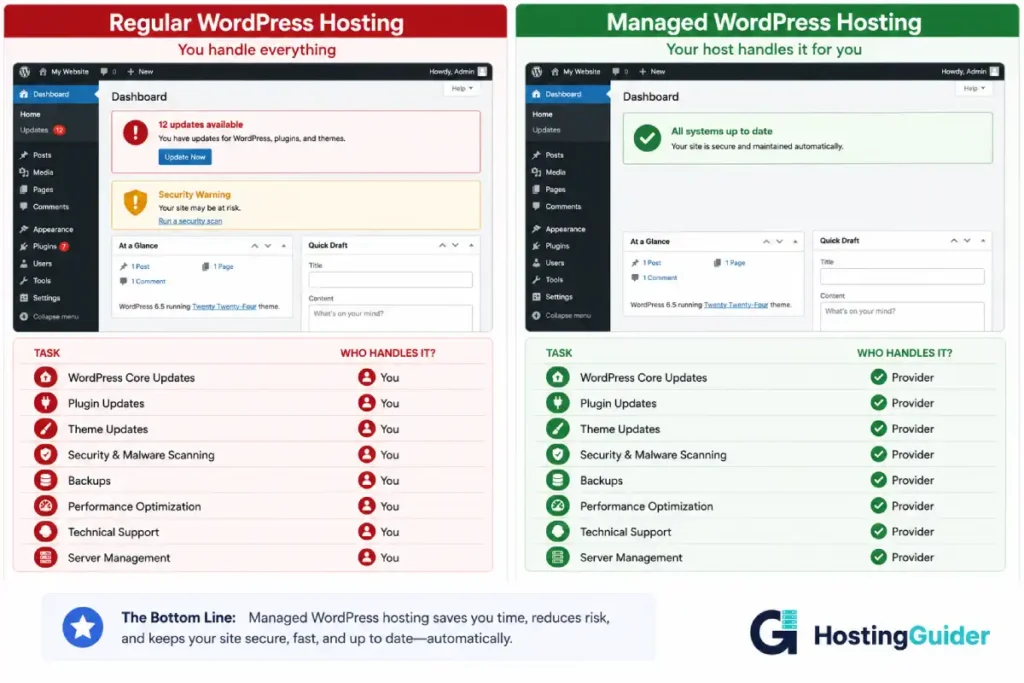
Regular WordPress hosting provides server space where you install and manage WordPress yourself. Managed WordPress hosting provides server space plus a full layer of technical management covering updates, backups, security, caching, staging, and specialist support. Regular hosting is cheaper and gives you more server-level control. Managed hosting costs more but delivers better performance, stronger security, and removes all ongoing maintenance from your plate.
What Regular WordPress Hosting Is
Regular WordPress hosting, often called standard or shared WordPress hosting, means you rent space on a server and install WordPress on it. The host keeps the server running. Everything inside WordPress is your responsibility.
You choose a hosting provider, sign up for a plan, install WordPress using your host’s one-click installer, and then manage the site yourself from that point forward. Updates, security, backups, performance, and troubleshooting. All of it sits with you.
Most regular WordPress hosting runs on shared servers where your site shares resources with hundreds or thousands of other websites. Some providers offer VPS plans that give you a dedicated virtual server slice with more resources and better isolation from other users.
Common regular WordPress hosting providers include Bluehost and SiteGround at the entry level, and various VPS providers at the mid-range. These plans start from around $2 to $5 per month for shared hosting and $10 to $40 per month for VPS.
Understanding the difference between cloud and traditional hosting helps clarify where regular shared hosting fits into the broader hosting landscape.
What Managed WordPress Hosting Is
Managed WordPress Hosting is a premium service where the hosting provider takes responsibility for the technical management of your WordPress installation alongside providing the server infrastructure.
Instead of maintaining WordPress yourself, the provider’s systems and team handle it. Automatic updates keep WordPress core and plugins current. Daily backups run without your involvement. Security monitoring and malware scanning happen continuously. Server-level caching makes your pages fast. A staging environment lets you test changes safely. Support teams that specialise in WordPress are available around the clock.
The server infrastructure underlying most managed WordPress hosting is cloud-based, which means your site also benefits from the reliability and scalability that cloud infrastructure provides.
The Key Differences of Managed vs Regular WordPress Hosting
Who Handles Technical Maintenance
This is the most fundamental difference between the two types.
| Maintenance Task | Regular WordPress Hosting | Managed WordPress Hosting |
|---|---|---|
| WordPress core updates | You apply manually | Applied automatically |
| Plugin updates | You apply manually | Often managed automatically |
| Theme updates | You apply manually | Often managed automatically |
| PHP version updates | Managed by the provider | Host handles the server, you handle WordPress |
| Database optimisation | Your responsibility | The provider manages it |
| Server software updates | Handled by the provider | Provider handles both layers |
| Performance tuning | Your responsibility | Provider manages it |
On regular hosting, keeping WordPress current is an ongoing task. WordPress releases core updates several times a year. Plugins and themes release updates continuously. Security patches for known vulnerabilities need to be applied quickly because automated bots scan for unpatched WordPress installations and exploit vulnerabilities within hours of public disclosure.
On managed hosting, this maintenance layer runs automatically. You log in to WordPress and find everything already up to date. The time this saves, typically two to four hours per month for a site with several active plugins, compounds significantly over months and years.
Security
Security approaches differ dramatically between the two hosting types.
On regular WordPress hosting, you are responsible for your site’s security. You install a security plugin, configure a firewall, set up login protection, scan for malware, and respond to any incidents. If your site gets hacked, you clean it up yourself or pay someone to do it. The host secures the server. The WordPress layer is your problem.
On managed WordPress hosting, security is layered and active. The provider monitors for threats, blocks suspicious traffic via a web application firewall, automatically scans for malware, protects against DDoS attacks at the network level, and manages SSL certificate renewals. If a security incident occurs, most managed hosts include hack remediation as part of the service.
| Security Feature | Regular Hosting | Managed WordPress Hosting |
|---|---|---|
| Web application firewall | Plugin-based, configured by you | Network-level, enterprise-grade |
| Malware scanning | Plugin-based, scheduled by you | Automatic, continuous |
| DDoS protection | Basic server-level only | Network-level, enterprise grade |
| Login brute force protection | Plugin-based | Built-in infrastructure limit |
| SSL certificate | Often included, you renew manually | Automatic installation and renewal |
| Hack remediation | Your responsibility | Included in most managed plans |
| Security updates | Your responsibility | Provider applies automatically |
The practical risk difference matters most when a vulnerability is discovered in a popular WordPress plugin. On regular hosting, your site is vulnerable until you notice the update and apply it. On managed hosting, the provider’s monitoring and update system addresses it without waiting for you.
The security benefits of cloud infrastructure are particularly relevant here, since most managed WordPress hosts run on cloud architectures with enterprise-grade security at the network layer.
Performance and Speed
Performance is one of the clearest measurable differences between regular and managed WordPress hosting.
Regular shared hosting puts your site on a server with hundreds of other websites. When those sites are busy, your resources are constrained. WordPress without caching runs database queries for every page request, which is slow under load.
Most regular hosting plans require you to install and configure a caching plugin to improve performance. This adds complexity and requires a correct setup to work effectively. CDN access is usually an additional cost or an entirely separate service.
Managed WordPress hosting builds performance optimisation into the infrastructure:
| Performance Feature | Regular WordPress Hosting | Managed WordPress Hosting |
|---|---|---|
| Caching | Plugin required, user configured | Server-level, automatic |
| CDN | Separate cost or not included | Usually included |
| Server resources | Shared, contended | Cloud-based, better availability |
| PHP configuration | Default shared settings | Optimised for WordPress |
| Database optimisation | Manual or plugin-based | Managed by provider |
| Image optimisation | Plugin required | Often built-in or assisted |
The infrastructure quality also matters. Providers like Kinsta run on Google Cloud infrastructure, which uses premium hardware in global data centres. A $5 shared hosting plan runs on shared hardware that is orders of magnitude less capable.
You can test the real difference by measuring page load times with any page on both setups using a tool like Google PageSpeed Insights. Most sites moving from regular shared hosting to managed WordPress hosting see meaningful load time reductions.
Backups
Backups are an area where managed hosting delivers a substantially different experience.
| Backup Feature | Regular Hosting (Typical) | Managed WordPress Hosting |
|---|---|---|
| Frequency | Daily or weekly | Daily to real-time |
| Storage location | Same server, nearby storage | Separate redundant cloud storage |
| Retention | 7 to 14 days | 14 to 60 days |
| Restore process | Support ticket, hours of waiting | Self-serve dashboard, minutes |
| Cost | Sometimes an add-on charge | Included in plan |
The restore process is the critical difference in practice. When something goes wrong on regular hosting, you submit a support ticket, wait for the team to respond, and then wait for them to complete the restoration. This can take hours.
On managed hosting, you log into the dashboard, select a backup point, and click restore. The process completes in minutes. For a business where being offline costs money, the difference between a two-hour restore and a ten-minute restore is significant.
Support Quality
Support is one of the places where the cost difference between regular and managed hosting is most clearly justified.
Regular hosting support teams handle general server and account problems. They help with billing, account access, email setup, and server errors. WordPress-specific questions, like a plugin conflict, a theme error, or a performance issue specific to WordPress, are often outside the scope of what they handle effectively. Responses frequently point you to external documentation rather than solving the problem directly.
Managed WordPress hosting support teams specialise in WordPress. They have deep knowledge of the platform, common plugins, WooCommerce, the block editor, and the performance characteristics of WordPress at scale. When something breaks, they diagnose and solve WordPress-specific problems directly.
| Support Factor | Regular Hosting | Managed WordPress Hosting |
|---|---|---|
| Team expertise | General hosting | WordPress specialists |
| Response time | Often hours for tickets | Often minutes for live chat |
| WordPress knowledge | Basic to moderate | Deep and specific |
| Problem resolution | May redirect to external docs | Direct diagnosis and solution |
| Availability | Usually 24/7 | Usually 24/7 |
For website owners who are not technically confident with WordPress, this support difference is one of the most valuable aspects of managed hosting. Knowing that a specialist is available immediately when something breaks removes a significant source of stress.
Staging Environments
A staging environment is a private copy of your live site where you can test changes before they affect real visitors.
Regular WordPress hosting rarely includes staging environments at entry price points. Some VPS plans offer them. Most shared plans do not. Without staging, testing a major plugin update or theme change means testing it on your live site with real traffic.
Managed WordPress hosting includes staging environments as a standard feature on most plans. You push changes to staging, test them thoroughly, and push to live only when everything works correctly. Visitors only see the finished, tested version.
For anyone who has experienced a plugin update breaking their live site while visitors were actively using it, the value of this feature is immediately clear.
Cost
Cost is where regular WordPress hosting has its most straightforward advantage.
Regular shared hosting starts from $2 to $5 per month. A mid-range VPS costs $10 to $40 per month. Entry-level managed WordPress hosting starts from around $14 to $35 per month. Premium managed plans range from $50 to $200 or more.
| Hosting Option | Monthly Cost | Annual Cost |
|---|---|---|
| Regular shared hosting | $2 to $10 | $24 to $120 |
| Regular VPS hosting | $10 to $40 | $120 to $480 |
| Entry managed WordPress | $14 to $35 | $168 to $420 |
| Mid-tier managed WordPress | $35 to $100 | $420 to $1,200 |
| Premium managed WordPress | $100 to $400 | $1,200 to $4,800 |
The cost argument changes when you factor in what regular hosting requires you to either buy separately or provide yourself. A quality caching plugin costs $50 to $200 per year. A backup plugin subscription runs $50 to $100 per year. A security plugin adds another $50 to $100 per year. A CDN service costs extra. Your own time spent on maintenance has a value too.
When you count these additions, the effective cost difference between regular hosting with all necessary add-ons and entry managed hosting narrows considerably.
Understanding why cloud hosting pricing works the way it does helps make sense of why managed hosting costs more at the base level but often delivers more total value.
Control and Flexibility
This is an area where regular hosting, specifically VPS hosting, has a genuine advantage over managed hosting.
On a VPS, you have root server access. You can install any software, configure PHP settings to any value, modify web server configuration files, set up custom cron jobs, and adjust every aspect of the server environment. Developers building custom WordPress applications often need this level of access for specific technical requirements.
Managed WordPress hosting restricts server access in exchange for the management layer. You work within the provider’s configuration. Most managed hosts do not give you direct SSH access to modify server files. You configure WordPress through the WordPress admin and through the hosting provider’s dashboard.
For the vast majority of WordPress site owners, this restriction is completely invisible. They never need to touch server configuration files. The provider’s optimised setup performs better than anything they would configure themselves.
For developers with specific custom requirements, the restriction can be limiting. Cloudways is an exception in the managed space. It provides SSH access alongside managed features, making it more flexible than fully locked-down managed hosts for developers who need it.
Scalability
Scalability describes how well your hosting handles traffic growth and sudden spikes.
Regular shared hosting does not scale with traffic. Your plan has fixed resources. When traffic exceeds what those resources can handle, your site slows down or goes offline. Upgrading requires manually changing your plan, which takes time and sometimes involves a brief period of downtime.
Managed WordPress hosting is built on cloud infrastructure that scales automatically with your traffic. When a traffic spike arrives, the network allocates more resources automatically. When traffic drops, resources scale back down. No manual action. No downtime during scaling.
| Scalability Feature | Regular Shared Hosting | Managed WordPress Hosting |
|---|---|---|
| Handles traffic spikes | No, slows or crashes | Yes, scales automatically |
| Manual plan upgrades needed | Yes, as traffic grows | No, scales within plan limits |
| Downtime during upgrade | Sometimes | Rarely |
| Resource ceiling | Fixed at plan level | Dynamic, drawn from cloud pool |
| Cost during low traffic | Same fixed price | Some plans scale down too |
Full Side-by-Side Comparison
| Factor | Regular Shared Hosting | Regular VPS | Managed WordPress Hosting |
|---|---|---|---|
| Monthly cost | $2 to $10 | $10 to $40 | $14 to $200+ |
| WordPress updates | Manual | Manual | Automatic |
| Plugin updates | Manual | Manual | Often automatic |
| Backups | Basic, sometimes extra cost | Basic to moderate | Daily automatic, self-serve restore |
| Security management | Your responsibility | Your responsibility | Provider manages |
| Caching | Plugin required | Plugin or server config | Built into infrastructure |
| CDN | Rarely included | Rarely included | Usually included |
| Staging environment | Rarely available | Sometimes available | Standard feature |
| Support expertise | General hosting | General to moderate | WordPress specialists |
| Server control | Low | High | Low to moderate |
| Scalability | Fixed resources | Fixed resources | Auto-scales with traffic |
| Performance | Moderate | Good | Good to excellent |
| Technical knowledge needed | Low to moderate | Moderate to high | Low |
When Regular WordPress Hosting Makes Sense
Regular hosting is the right starting point when your site is brand new and receiving minimal traffic. A new personal blog, a small local business site, or a portfolio that you are building for the first time does not need the features that managed hosting provides. The problems managed hosting solves are problems of scale and consequence. When your site is new, those problems do not exist yet.
Regular VPS hosting makes sense for developers who need full server control. If you are building a custom WordPress application that requires specific server software, custom PHP configuration, or unusual server settings, a VPS gives you complete freedom that most managed hosts cannot match.
It also makes sense when your budget is under $10 per month. At that price point, shared hosting from a reputable provider delivers a functional and reasonably reliable WordPress site. The jump to managed hosting at $25 to $35 per month is hard to justify when traffic is low, and the site generates no revenue.
Real example: James is a student who built a personal portfolio on WordPress. He gets around 300 visitors per month, mostly from people he sends the link to directly. He pays $4 per month for shared hosting. A plugin update occasionally breaks something minor, and he spends 20 minutes fixing it. The idea of paying $35 per month for managed hosting is absurd for his situation. Shared hosting is exactly right.
When Managed WordPress Hosting Makes Sense
Managed hosting makes sense when your site is generating revenue or has built an audience worth protecting. At that point, downtime, security incidents, and poor performance have real consequences.
It makes sense when your time is worth more than the cost difference. If you value your time at any reasonable rate, the two to four hours per month of technical maintenance that managed hosting removes is worth more than the $15 to $25 monthly cost difference.
It makes sense when you have been hacked before. A site that has experienced a security incident is at elevated risk of recurrence. Active security monitoring, malware scanning, and web application firewalls from a managed host address the root causes.
It makes sense when you run a WooCommerce store. Every hour of downtime means lost orders. Every slow page means abandoned carts. The specific demands of running an e-commerce site make managed hosting a practical necessity rather than a luxury.
Real example: Priya runs a food blog that grew to 80,000 monthly visitors over two years. She used shared hosting at $8 per month. Her site crashed twice during high-traffic periods, she got hacked once, and she spent roughly three hours per month on maintenance. She moved to managed WordPress hosting at $35 per month. Her site has not gone down since. She has not been hacked since. She spends zero time on maintenance. The $27 monthly difference is the best investment her blog has made.
Making the Switch from Regular to Managed Hosting
If you are on regular WordPress hosting and considering managed hosting, the migration process is straightforward.
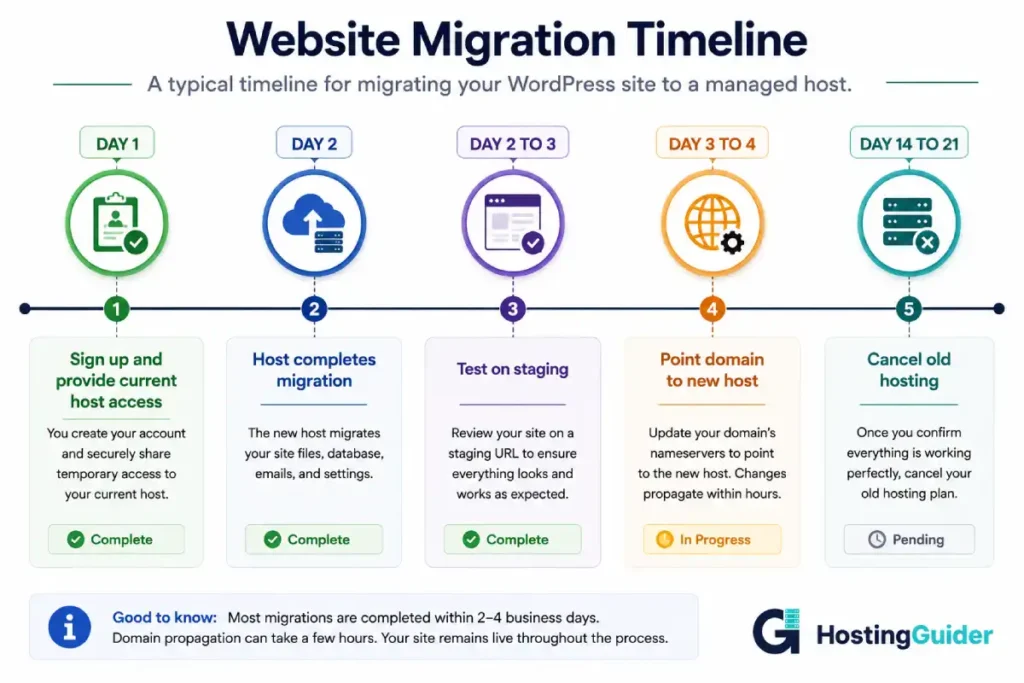
Most managed WordPress hosts offer free migration as part of onboarding. You provide access to your current hosting account and they handle the transfer. Your WordPress content, plugins, and themes move cleanly. The host’s infrastructure handles the rest.
After migration, you will notice the difference in your hosting dashboard, which will be more feature-rich than a standard cPanel interface. You will also notice the difference in performance, particularly if you test your page speed before and after.
The key steps after migration are verifying all content transferred correctly, testing on the staging environment, checking page speed and performance, and pointing your domain to the new host when ready. Keep your old hosting active for two weeks as a safety net before cancelling.
For a detailed walkthrough of the migration process and how to protect your SEO rankings during a hosting migration, that guide covers it step by step.
Frequently Asked Questions
What is the main difference between managed and regular WordPress hosting?
The main difference is who handles the technical management of your WordPress installation. With regular hosting, you manage everything inside WordPress yourself including updates, security, backups, and performance. The host only keeps the server running. With managed WordPress hosting, the provider handles all of that automatically through their own systems and team. You focus on your content and your business. They handle the technical maintenance layer that keeps WordPress running securely and efficiently.
Is managed WordPress hosting faster than regular hosting?
For most sites, yes. Managed WordPress hosting includes server-level caching that serves pre-built page versions without running database queries for every request. It also typically includes CDN integration that delivers static content from servers near each visitor globally. Regular shared hosting requires a caching plugin that you install and configure yourself, and CDN access is usually an additional cost. The underlying infrastructure also matters. Managed hosts running on Google Cloud or AWS hardware outperform budget shared hosting hardware significantly in server response times.
Can I install any WordPress plugin on managed hosting?
You can install the vast majority of plugins. Most managed WordPress hosts allow unrestricted plugin installation from the WordPress plugin directory. A small number of plugins that conflict with built-in managed hosting features are restricted, most commonly alternative caching plugins that would interfere with the host’s own caching system, and some redundant backup plugins. Each provider publishes their restricted plugin list. These exceptions cover a very small fraction of the 59,000+ available plugins and rarely affect typical WordPress sites.
How much more does managed WordPress hosting cost?
Entry-level managed WordPress hosting starts from around $14 to $35 per month compared to $2 to $10 per month for regular shared hosting. The gap narrows when you account for what regular hosting users typically add separately, including a caching plugin, backup plugin, security plugin, and CDN service, which together can add $100 to $400 per year. At mid-range and premium tiers, managed WordPress hosting at $50 to $100 per month competes on total value with a well-equipped VPS setup that includes all the same add-ons and your own time for maintenance.
Should I use managed WordPress hosting for a new website?
For most new websites, regular shared hosting is the better starting choice. Entry-level managed hosting costs five to ten times more than shared hosting. The features that justify that cost become meaningful only when your site has traffic worth protecting, when downtime has real consequences, and when the time savings from automated management are worth the cost. Start on good shared hosting, grow your site, and move to managed hosting when the features become relevant to your situation.
Which managed WordPress hosts are the most reliable?
Kinsta and WP Engine are consistently ranked among the most reliable managed WordPress hosts based on independent performance testing and user reviews. Both run on premium cloud infrastructure and maintain strong uptime records. Cloudways is highly rated for flexibility and value, allowing you to choose your underlying cloud provider from options including AWS and Google Cloud. SiteGround offers managed features at a lower price point and is well-regarded for support quality. The best choice depends on your budget, traffic level, and whether you need specific features like multi-site management or developer tools.
What happens to my SEO if I switch from regular to managed hosting?
Switching from regular to managed WordPress hosting should improve your SEO foundation rather than harm it. Faster page load times from server-level caching and CDN delivery positively affect the page experience signals Google measures. Higher uptime keeps your content consistently accessible to Google’s crawlers. The main SEO risk during any hosting migration is URL changes and redirect management. If your URLs stay the same during the migration, which they should in a standard WordPress hosting migration, your rankings should remain stable and likely improve as performance improves. Monitor Google Search Console after the switch to catch any crawl issues quickly.


