
Every month, thousands of WordPress site owners look at their hosting bill and ask the same question. Is this actually worth it?
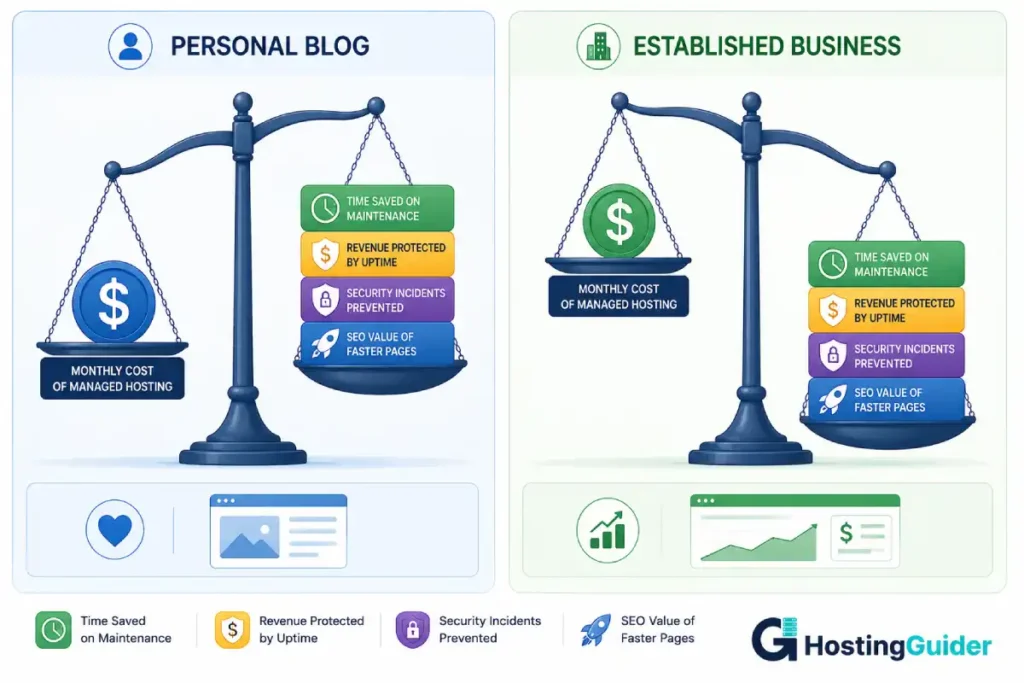
It is a fair question. Managed WordPress hosting costs three to ten times more than standard shared hosting. The features it promises, automatic updates, daily backups, better security, faster pages, are real. But so is the extra cost. And for someone running a personal blog that earns nothing, or a new business site that gets two hundred monthly visitors, that cost is hard to justify.
The honest answer is that managed WordPress hosting is absolutely worth it for some situations and genuinely wasteful for others. The line between those two situations is not defined by the marketing pages of any hosting company. It is defined by your traffic, your revenue, your time, and what a bad hosting day actually costs your business.
This guide helps you find where you sit on that line.
Table of Contents
Key Takeaways
- Managed WordPress hosting costs more per month but often costs less in total when you count add-ons and time
- The investment makes clear financial sense when your site generates revenue or has significant traffic
- For new sites, personal blogs, and low-traffic projects, standard hosting is the smarter starting point
- The hidden costs of not using managed hosting include time spent on maintenance, security incident recovery, and revenue lost during downtime
- The right question is not whether managed hosting is expensive but whether the alternative is actually cheaper
Quick Answer
Managed WordPress hosting is worth the investment when your website generates income, serves a growing audience, or is critical to your business. At that point the cost of downtime, security incidents, slow pages, and time spent on maintenance exceeds the price difference between managed and standard hosting. It is not worth the investment when your site is new, generates no revenue, receives minimal traffic, or when your budget cannot support it yet.
What You Are Actually Paying For
Before evaluating whether managed WordPress hosting is worth the cost, it helps to be precise about what the cost actually buys.
When you pay $35 per month for managed hosting instead of $5 for shared hosting, the $30 difference does not go toward a faster server alone. It buys a bundle of services that you would otherwise need to source, configure, and maintain yourself.
| What the Extra Cost Covers | DIY Alternative on Standard Hosting |
|---|---|
| Automatic WordPress and plugin updates | Your time, roughly 1 to 3 hours per month |
| Daily backups with self-serve restore | Backup plugin subscription, $50 to $100 per year |
| Web application firewall and malware scanning | Security plugin subscription, $50 to $150 per year |
| Server-level caching | Caching plugin, free to $100 per year |
| CDN integration | Separate CDN service, $10 to $50 per month |
| Staging environment | Staging plugin, $50 to $100 per year |
| WordPress-specialist support | Developer fees when issues arise |
When you add the DIY alternatives together, the real cost gap between managed and unmanaged hosting narrows considerably. A properly equipped self-managed WordPress setup costs $150 to $500 per year in plugin subscriptions alone, before counting your time.
The full breakdown of what managed WordPress hosting includes makes this comparison more concrete if you want to go deeper on each feature.
The Real Cost Comparison
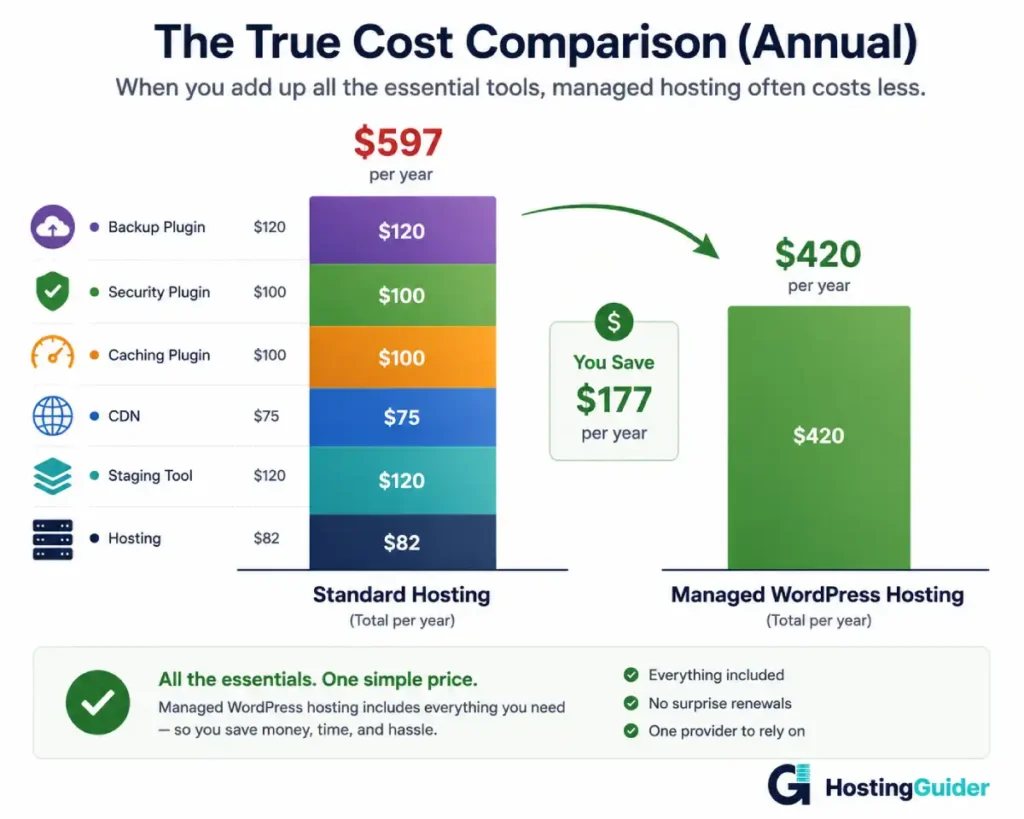
Here is what a realistic annual cost looks like for both setups when you account for the tools most WordPress sites actually need.
Standard Hosting: Full Annual Cost
| Cost Item | Annual Cost |
|---|---|
| Shared hosting plan at $5/month | $60 |
| Backup plugin (UpdraftPlus Premium) | $70 |
| Security plugin (Wordfence Premium) | $119 |
| Caching plugin (WP Rocket) | $59 |
| CDN service (Cloudflare Pro) | $240 |
| Staging plugin | $49 |
| Total | $597 per year |
Managed WordPress Hosting: Full Annual Cost
| Cost Item | Annual Cost |
|---|---|
| Managed WordPress hosting at $35/month, all features included | $420 |
| Additional plugins needed | $0 |
| Total | $420 per year |
On these numbers, managed hosting is actually cheaper by around $177 per year when standard hosting is equipped properly. Most comparisons ignore the plugin cost stack entirely and compare only base hosting prices, which creates a misleading picture.
Cloudways entry plans start lower at around $14 per month, which makes the cost argument for managed hosting even stronger. Kinsta sits at the $35 range with premium Google Cloud infrastructure included.
When Managed WordPress Hosting Is Clearly Worth It
Your website generates revenue
If your website brings in money through product sales, services, affiliate links, advertising, or lead generation, downtime has a direct dollar cost. Every hour offline is an hour where customers cannot reach you, buy from you, or contact you.
A site earning $500 per month that experiences a four-hour outage loses roughly $28 in direct revenue during that window. Over a year, quarterly downtime incidents add up to $112 in lost revenue from outages alone, not counting leads that went to competitors or rankings that dropped from crawl errors. As revenue scales, the cost argument for managed hosting becomes increasingly straightforward.
Your time has real value
Maintaining WordPress on standard hosting is a recurring time cost. If you value your time at $30 per hour and spend two hours per month on hosting-related maintenance, that is $60 per month in time cost. Managed hosting at $35 per month that eliminates that maintenance is not a $35 cost. It is a net saving of $25 per month.
The higher your hourly rate and the more hours you spend on maintenance, the faster managed hosting pays for itself.
You have been hacked before
A WordPress site that has been compromised once is at elevated risk of recurrence. Attackers often leave backdoors that allow re-entry even after cleanup. The active security layer on managed hosting addresses root causes through continuous monitoring, firewall management, and automated threat detection rather than just cleaning up after the fact.
Professional site cleanup services charge $150 to $500 per incident. One prevented security incident per year covers the cost difference between standard and managed hosting at most price tiers.
You run a WooCommerce store
WooCommerce stores have a direct and immediate relationship between hosting performance and revenue. Slow pages mean abandoned carts. Downtime means lost orders. A security breach can expose customer payment data and destroy trust overnight.
For an e-commerce operation processing regular orders, managed hosting is infrastructure cost in the same category as payment processing fees. The question is not whether to invest in it but which provider offers the best value at your order volume.
You have more than 10,000 monthly visitors
At this traffic level, the performance gap between managed and standard shared hosting becomes measurable for real visitors. Server-level caching, CDN delivery, and optimised infrastructure produce faster page load times that affect bounce rates and search rankings. A one-second improvement in load time at this scale produces a real improvement in conversions.
When Managed WordPress Hosting Is Not Worth It Yet
Your site is brand new
A new site has no audience to protect, no revenue to lose, and minimal traffic that standard hosting handles without effort. The problems managed hosting solves are problems of consequence. When your site is new, those consequences do not exist yet.
Start on a reliable shared hosting plan from SiteGround or Hostinger. Build the site. Grow the audience. Move to managed hosting when the features become relevant to your actual situation.
You have under 2,000 monthly visitors
At this traffic level, shared hosting handles the load easily and performance improvements from managed hosting are largely invisible to visitors. The staging environment and automated updates are useful but not critical at very low scale.
Your site generates no revenue
If your WordPress site is a personal blog, hobby project, or experimental site you run for enjoyment rather than income, the financial case for managed hosting does not apply in its usual form. You can still benefit from the time savings and security features. But the investment is a personal comfort choice rather than a business calculation.
Your budget is under $15 per month
Some budgets simply do not accommodate managed hosting pricing. A well-configured shared hosting plan with free security and backup tools is far better than an unprotected site. Start where your budget allows.
SiteGround offers a middle ground with managed features at a lower price point than fully managed providers. It is worth considering as a step between pure shared hosting and premium managed hosting when budget is a constraint.
The Hidden Costs of Not Using Managed Hosting
Most hosting comparisons stop at monthly fees. The full cost of standard hosting includes the cost of things going wrong.
The cost of a security incident
A hacked WordPress site costs money in multiple directions simultaneously. Professional cleanup runs $150 to $500. If the hack exposes customer data, there are notification obligations and potential liability. If Google blacklists the site, recovering rankings takes weeks to months. If the site is down during cleanup, revenue stops.
A single significant security incident can cost more than a full year of managed hosting fees. The security features covered in our feature checklist are what prevent these incidents on managed hosting.
The cost of downtime at the wrong moment
Traffic spikes from product launches, press coverage, seasonal events, or viral content are exactly the moments when standard shared hosting is most likely to fail. Cloud-based managed hosting scales automatically with demand. Standard hosting does not. The lost revenue from a site that crashes during its best traffic moment is impossible to recover.
The cost of slow pages
Pages that load slowly lose visitors before they see your content. If managed hosting reduces your page load time from four seconds to under two seconds, the improvement in conversion rate at any meaningful traffic volume has a real dollar value that compounds over time.
The cost of maintenance time
| Maintenance Task | Monthly Time (Non-Technical User) |
|---|---|
| Reviewing and applying plugin updates | 30 to 60 minutes |
| Checking backup status | 20 to 30 minutes |
| Running security scans | 20 to 30 minutes |
| Troubleshooting conflicts after updates | 0 to 120 minutes, unpredictable |
| Monitoring uptime and performance | 20 to 40 minutes |
| Total | 90 minutes to 4+ hours per month |
At any reasonable hourly rate, this time cost exceeds the monthly price difference between standard and managed hosting for most site owners.
A Simple Framework for Making the Decision
Rather than applying general advice, run your own numbers. This takes about five minutes.
| Question | Your Number |
|---|---|
| Monthly revenue your site generates | $ |
| Hours spent on WordPress maintenance monthly, times your hourly rate | $ |
| What a security incident would cost you to resolve | $ divided by 12 |
| What eight hours of downtime would cost in lost revenue or leads | $ |
| Total monthly cost of not upgrading | $ |
If the total is greater than the cost difference between your current hosting and managed hosting, managed hosting pays for itself. If the total is less, the financial case does not exist yet.
Real example: A freelance consultant earns $2,000 per month in leads from her WordPress site. She spends 90 minutes per month on maintenance at her $80 hourly rate, a $120 time cost. Eight hours of downtime would cost roughly $500 in missed leads. Her monthly risk exposure is around $141. The cost difference between her $8 shared plan and managed hosting at $35 is $27. It is worth it by a significant margin.
Second example: A student runs a travel blog with no monetisation and 400 monthly visitors. Spends 30 minutes per month on maintenance. No financial exposure from downtime. Monthly risk exposure is close to zero. Cost to upgrade: $30 per month. Not worth it. Stay on shared hosting until circumstances change.
Which Provider Gives the Best Value
If managed hosting is the right decision for your situation, the value you get varies significantly by provider and price tier.
| Budget | Best Value Provider | Standout Reason |
|---|---|---|
| $14 to $20/month | Cloudways | Real cloud infrastructure, no visitor limits, choose your cloud provider |
| $20 to $30/month | SiteGround | Managed features at accessible price, strong support |
| $25 to $35/month | Pressable | Automattic-owned, Jetpack included, deep WordPress focus |
| $30 to $50/month | Kinsta | Google Cloud infrastructure, excellent dashboard, strong performance data |
| $23 to $40/month | WP Engine | Developer tools, Genesis themes, strong multi-site management |
For most small to mid-size business sites, Cloudways at the entry level or Kinsta at the next tier represent the strongest value. Cloudways is particularly strong for anyone who wants genuine cloud infrastructure without the premium pricing of a fully managed service.
Frequently Asked Questions
Is managed WordPress hosting worth it for a small business?
For most small businesses with an established site, yes. A business site that generates leads, bookings, or direct sales has a financial relationship with its hosting reliability that makes managed hosting easy to justify. The cost of one missed lead or one lost booking often exceeds the monthly price difference between standard and managed hosting. Calculate your specific exposure using the framework in this guide rather than applying a general rule.
At what point should I switch from shared to managed WordPress hosting?
The clearest signal is when downtime or security incidents have already cost you something. The second clearest signal is when your site begins generating consistent revenue and the hosting cost becomes a small fraction of what the site produces. A practical rule of thumb: when your site earns more than $300 per month consistently, managed hosting at $35 per month represents roughly 10% or less of revenue, which is a reasonable infrastructure investment.
Can I get the same features without paying for managed hosting?
Partially. Free and paid plugins can replicate some managed hosting features. However, server-level caching, automatic cloud scaling, enterprise-grade DDoS protection, and WordPress-specialist support cannot be replicated with plugins on standard hosting. The features that matter most in a crisis are exactly the ones that plugins cannot replace.
Does managed WordPress hosting improve my Google rankings?
Indirectly but meaningfully. Faster page load times from server-level caching and CDN delivery improve the page experience signals Google measures. Higher uptime keeps your content consistently accessible to Google’s crawlers, which supports thorough and regular indexing. Neither factor transforms rankings on its own, but together they strengthen the technical foundation that your content quality builds on.
What is the cheapest managed WordPress hosting that is actually worth using?
Cloudways at around $14 per month is the strongest entry point for genuinely managed hosting on real cloud infrastructure. It runs on DigitalOcean, AWS, or Google Cloud depending on your choice, includes server-level caching, automated backups, free SSL, a staging environment, and has no visitor limits. The trade-off is a slightly more technical interface than fully managed providers like Kinsta, but for anyone comfortable with a hosting dashboard it is entirely accessible and delivers infrastructure quality that most providers charge significantly more to provide.
Is it worth switching if I have never had a hosting problem?
This is the trickiest version of the question. The absence of problems does not mean the risk is low. It may mean you have been fortunate, or that your traffic is low enough that the risk has not had a chance to materialise. The relevant question is not whether problems have happened but whether your current setup is adequately protected against the problems that could happen. Run the cost framework above with your specific numbers. If the risk exposure calculation comes out well above the upgrade cost, the fact that nothing has gone wrong yet is not a reason to stay on standard hosting.


