
Every minute, thousands of automated programs crawl the internet looking for vulnerable websites. They are not humans sitting at keyboards. They are bots running continuously across millions of IP addresses, testing for known WordPress vulnerabilities, guessing login credentials, and probing for unpatched plugins.
Most of these attacks never make headlines because they target ordinary websites just like yours. A small bakery. A personal finance blog. A local gym. A handmade jewellery store. These sites are not targeted because of who they are. They are targeted because WordPress powers over 40% of the internet and attackers automate their tools to find any site with a vulnerability they can exploit.
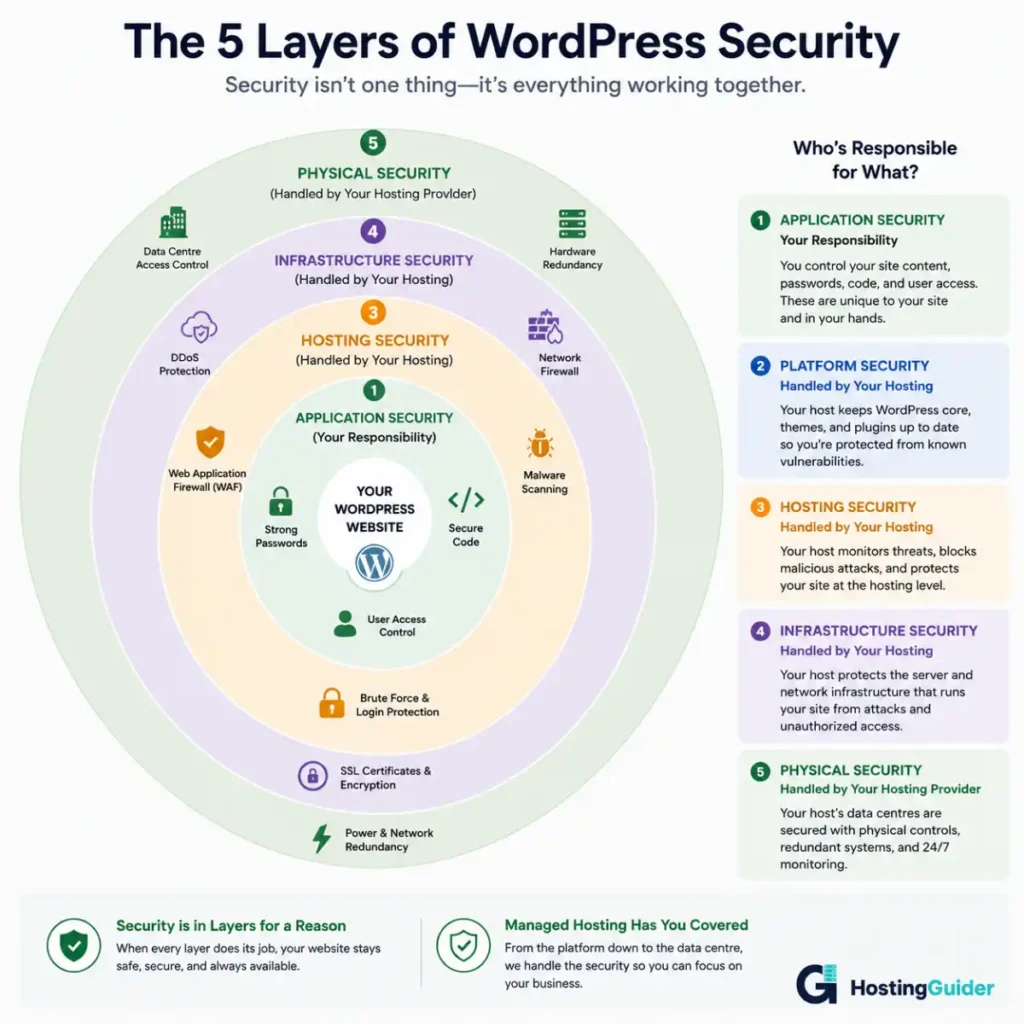
What makes managed WordPress hosting different is not just the convenience. At its core, it is a security architecture. Every feature a managed host provides, from automatic updates to isolated containers, exists because of a specific threat it defends against. This guide explains every security benefit in full: why it exists, how it works, and what it actually protects your site from.
This article goes deeper than most.
Table of Contents
Key Takeaways
- WordPress is the most attacked CMS in the world because its popularity makes it a mass target for automated bots
- Managed WordPress hosting provides security at multiple layers simultaneously, not just one protection
- A web application firewall, malware scanning, DDoS protection, automatic updates, and isolation all work together as a system
- No single security feature is enough on its own, and managed hosting provides all of them together
- Even with managed hosting, some security responsibilities remain yours and this guide covers both
- Understanding what each protection does helps you choose a host and configure your site correctly
Quick Answer
Managed WordPress hosting secures your site at multiple layers simultaneously. The web application firewall blocks attacks before they reach WordPress. Automatic updates patch known vulnerabilities before bots can exploit them. Malware scanning detects problems that get through. DDoS protection keeps your site online during traffic attacks. Isolated environments prevent one compromised site from affecting others. Automatic backups give you a clean restore point if something does go wrong. Together these create a security posture that most website owners cannot replicate independently on standard hosting.
Why WordPress Is Attacked More Than Any Other Platform
Before explaining the protections, it is worth understanding clearly why they are necessary.
WordPress powers a huge proportion of the internet. That popularity is also why it is the most targeted website platform. Attackers build automated tools that scan the internet for WordPress sites with specific vulnerabilities. When they find one, they exploit it. Because WordPress is so common, even a very specific attack that only works on one particular plugin version can affect millions of sites simultaneously.
Here is a simple way to understand this. Imagine a city where 40 out of every 100 houses use the same brand of lock. A locksmith discovers a flaw in that lock. Instead of picking locks one by one, they build a machine that drives down every street, tries every door with the flawed lock, and marks the ones it can open. WordPress attackers do exactly this, but across the entire internet at once.
The attacks WordPress sites face fall into several categories:
| Attack Type | What It Means in Simple Terms | How Common |
|---|---|---|
| Brute force login | Trying thousands of username and password combinations until one works | Extremely common |
| Plugin vulnerability exploit | Using a known flaw in an outdated plugin to access your site | Very common |
| SQL injection | Sending malicious commands through a form or URL to manipulate your database | Common |
| Cross-site scripting | Injecting malicious code into your pages that runs in visitors’ browsers | Common |
| DDoS attack | Flooding your site with fake traffic until it crashes | Moderately common |
| Malware injection | Planting hidden code that steals data or redirects visitors | Common after a breach |
| Credential stuffing | Using stolen usernames and passwords from other sites to attempt login | Increasingly common |
| Zero-day exploit | Attacking through a vulnerability just discovered with no patch yet available | Rare but severe |
Managed WordPress hosting provides specific defences against every one of these attack types. The sections below explain each defence in detail.
Security Benefit 1: Web Application Firewall
The simple explanation
Imagine your website is a shop. A web application firewall is like a security guard standing at the entrance who checks everyone who tries to come in. They let real customers through and stop known troublemakers at the door before they even step inside.
The key word is before. The firewall stops threats before they reach your website. It does not wait to see if something goes wrong. It analyses every visitor and every request the moment it arrives and decides whether to allow or block it.
How it actually works
A web application firewall, commonly called a WAF, sits between the internet and your WordPress site. Every request, whether from a real visitor, a search engine bot, or an attacker, passes through the WAF first.
The WAF analyses each request against a continuously updated set of rules built from patterns observed across millions of attacks on millions of websites.
Signature-based detection matches incoming requests against a database of known attack patterns. A SQL injection attempt has a recognisable structure. A cross-site scripting payload has a recognisable structure. When a request matches a known signature, the WAF blocks it immediately.
Rate limiting identifies when a single IP address is making too many requests in a short time. A real visitor might load five to ten pages in a minute. A brute force bot might try a thousand login attempts in the same minute. The WAF detects this pattern and blocks the source.
Bot detection distinguishes between legitimate bots like Google’s search crawler and malicious bots. A managed host’s WAF maintains lists of trusted bot signatures and blocks requests from bots that imitate legitimate ones without matching their actual behaviour.
What experienced users should know
Not all WAFs are equal in a way that matters significantly. A plugin-based WAF like Wordfence runs inside PHP, which means the malicious request has already reached your server before the plugin can analyse it. A server-level or CDN-level WAF blocks requests before they consume any of your server resources at all.
This distinction matters for performance as well as security. A plugin WAF uses your server’s processing power to analyse every request. A server-level WAF offloads that work entirely so your site’s resources are used only for legitimate visitors.
Cloudflare operates one of the largest WAF networks in the world. Managed WordPress hosts like Kinsta partner with Cloudflare to provide WAF protection at the network edge rather than at the server level. This is one of the meaningful technical differences between managed hosts.
WAF rules also need continuous updating. New attack patterns emerge daily. A WAF with outdated rules provides false confidence. A managed host that actively updates its WAF rules from a threat intelligence network fed by millions of sites provides substantially stronger protection than one that updates rules infrequently.
| WAF Type | Where It Runs | Performance Impact | Update Frequency |
|---|---|---|---|
| WordPress plugin WAF | Inside PHP on your server | High, uses your server resources | Varies by plugin developer |
| Server-level WAF | At web server before PHP executes | Low, does not consume site resources | Managed by host |
| CDN-level WAF | At network edge before reaching server | Minimal, stops traffic before it arrives | Continuous from threat network |
Security Benefit 2: Automatic Updates and Patch Management
The simple explanation
Think of your WordPress site like a house with many doors and windows. Each plugin and theme is a door or window. Developers find security flaws in them regularly. When they patch the flaw, they release an update. Leaving a door or window with a known flaw unlocked after a patch exists is like knowing your lock is broken but choosing not to fix it.
Automatic updates ensure every lock gets fixed as soon as the patch is available, without you having to remember to do it.
How it actually works
WordPress publishes its security vulnerabilities publicly after a patch is released. This is standard practice in software development. The problem is that publishing the vulnerability publicly also tells attackers exactly what to look for. The window between a patch being released and a site applying it is when attack attempts spike dramatically.
Managed WordPress hosts apply security updates automatically and immediately. Core WordPress security patches typically apply within hours of release. This closes the vulnerability window before automated attack tools have time to scan for and exploit it.
Plugin updates on managed hosting vary by provider. The most thorough approach tests updates in a staging environment for conflicts before applying to the live site. Less thorough providers simply notify you of available updates and leave applying them to you, which is not meaningfully better than standard hosting for security purposes.
What experienced users should know
PHP version management is a security dimension that is often overlooked entirely. PHP is the programming language WordPress runs on. Older PHP versions receive fewer security patches as they approach end of life. A site running PHP 7.4 in 2026 is running software that has not received security updates for years.
On standard hosting, PHP version upgrades require your action. You update it through your hosting control panel and if a plugin or theme is not compatible with the newer version, your site breaks. Many site owners avoid PHP upgrades for this reason, leaving their sites on unsupported versions indefinitely.
Managed WordPress hosts handle PHP version management proactively. They test your site against newer PHP versions, communicate any conflicts they find, and manage the upgrade process. This keeps your site on a supported and patched PHP version without you needing to manage it yourself.
Some managed hosts also participate in vulnerability intelligence networks such as the WPScan vulnerability database. This allows them to deploy temporary WAF rules that block exploitation attempts targeting a specific vulnerability even before you have applied the plugin update, a capability called virtual patching covered in detail in Benefit 9 below.
| Update Type | Why It Matters Securitywise | Managed Hosting Approach |
|---|---|---|
| WordPress core security release | Patches known exploitable vulnerabilities | Automatic, applied within hours |
| Plugin security updates | Closes specific plugin vulnerability windows | Automatic or one-click with testing |
| Theme security updates | Prevents theme-level code injection | Notification and tools provided |
| PHP version | Keeps runtime on supported patched version | Managed by host with compatibility checks |
| Server software like Nginx or Apache | Patches server-level vulnerabilities | Managed entirely by host, invisible to you |
Security Benefit 3: Malware Scanning and Removal
The simple explanation
A malware scanner is like a doctor who checks your site regularly for signs of infection. If something malicious gets in despite your defences, the scanner finds it. And on managed hosting, when the scanner finds something, the host’s team removes it, the same way a doctor treats the infection they find rather than just telling you it exists.
How it actually works
Malware on a WordPress site typically falls into four categories. Backdoors give attackers ongoing access even after you change your password. Redirects send your visitors to malicious or spam websites invisibly. SEO spam injects hidden links and keywords into your content to boost other sites’ rankings without your knowledge. Cryptominers use your server’s processing power to mine cryptocurrency without your awareness.
All four types can exist on your site without you noticing anything wrong. Your pages look normal to you. Visitors on certain devices or from certain countries get redirected. Google starts flagging your site in search results. Your server runs slowly because of hidden mining activity. By the time you notice, significant damage is already done.
Managed WordPress hosts run automated malware scans regularly, usually daily. These scans compare your site’s files against known clean versions, look for code patterns associated with malware, and check for unauthorised file modifications.
When a scan finds something, the response matters as much as the detection. The best managed hosts include malware removal in the service. Their security team investigates the infection, identifies how it got in, removes it completely, and helps close the entry point. This is significantly different from being notified your site is infected and left to handle it yourself.
What experienced users should know
File integrity monitoring is a more sophisticated approach that the best managed hosts use alongside signature-based scanning. It works by maintaining a cryptographic hash of every file in your WordPress installation and comparing the current state of each file against the stored hash on every scan.
A hash is a unique fingerprint for a file’s content. If a file changes even by a single character, its hash changes completely. File integrity monitoring catches malware that is new and does not yet appear in signature databases, because even if the scanner does not recognise the malicious code pattern, it knows the file changed when it should not have.
Database scanning is another layer some managed hosts provide. Malware is not always in your files. It can live in your WordPress database, injected into post content, widget settings, or option values. A thorough malware scan checks both the file system and the database.
Quarantine capabilities separate infected files from the rest of your site without deleting them immediately. This preserves evidence for investigation while stopping the malicious code from executing and allows restoration if a legitimate file is flagged incorrectly.
| Malware Detection Method | What It Catches | Level |
|---|---|---|
| Signature scanning | Known malware code patterns | Standard |
| File integrity monitoring | Any unauthorised file change including new unknown malware | Advanced |
| Database scanning | Malware stored in WordPress database tables | Advanced |
| Behavioural analysis | Code that behaves suspiciously even without a known signature | Very advanced |
| Quarantine and sandboxing | Isolates suspicious files for safe investigation | Advanced |
Security Benefit 4: DDoS Protection
The simple explanation
A DDoS attack, which stands for Distributed Denial of Service, is like someone organising a flash mob to crowd the entrance of a shop. Real customers cannot get in because the entrance is completely blocked by people who have no intention of buying anything. The shop is technically still open. Nobody can reach it.
DDoS protection is like having a team that identifies the flash mob participants at a distance, redirects them before they reach the shop entrance, and makes sure real customers can still walk in and buy things.
How it actually works
DDoS attacks work by sending enormous volumes of traffic to your server from many different sources simultaneously. The traffic volume overwhelms the server’s capacity to respond. Legitimate visitors get error messages or extremely slow load times. The site is effectively offline even though nothing is technically broken.
Managed WordPress hosts defend against DDoS attacks at the network level, before the traffic ever reaches your server.
Traffic scrubbing centres receive all incoming traffic and filter it before passing it on. Scrubbing centres have the capacity to absorb enormous traffic volumes because they are built specifically for this purpose. Legitimate requests pass through to your server. Attack traffic is absorbed and discarded.
Anycast routing distributes incoming traffic across multiple global data centres. When an attack targets your site, the traffic is spread across many locations simultaneously rather than all hitting one point. No single data centre is overwhelmed.
Rate limiting at the network level detects when a single IP or group of IPs is sending traffic at a volume no real visitor would generate, and throttles or blocks them automatically.
What experienced users should know
There are three distinct types of DDoS attacks and each requires a different defence layer.
Volumetric attacks flood the network with raw traffic. These are what most people picture when they think of DDoS. Network-level scrubbing and anycast routing handle these effectively.
Protocol attacks exploit weaknesses in network protocols such as SYN floods and ping-of-death attacks. These target the connection layer and require stateful inspection at the firewall level to detect and block.
Application layer attacks are the most sophisticated. They send requests that look like legitimate web traffic but target specific WordPress resources. A login page flooded with credential attempts, a search form exploited to trigger intensive database queries, or a WooCommerce cart page hit repeatedly to force database writes. These require an application-aware WAF to detect and block because they appear as normal traffic at the network level.
Managed hosts using CDN-level WAF combined with network-level DDoS scrubbing address all three attack types. This is meaningfully stronger than hosting providers that only handle volumetric attacks at the network level, leaving your application layer exposed to the more sophisticated third category.
DDoS attacks have taken down far more powerful servers when the right protection was not in place. Managed hosting absorbs these at the network level before they reach your site.
Security Benefit 5: SSL Certificate Management
The simple explanation
When you visit a website with a padlock icon in the browser bar, it means the connection between your browser and the website is encrypted. Nobody reading the network traffic between you and the site can understand what is being sent in either direction.
SSL certificates are what create that padlock. Managing them yourself means buying them, installing them correctly, and renewing them every year before they expire. An expired SSL certificate shows visitors a full-screen security warning that drives almost everyone away immediately.
Managed WordPress hosting installs and renews SSL certificates automatically. You never see an expired certificate warning on your site.
How it actually works
Every managed WordPress host provides free SSL certificates through Let’s Encrypt or through their CDN partner like Cloudflare. The certificate installs automatically when your domain is connected. Renewal happens automatically typically 30 days before expiry. This entire process is invisible to you.
HTTPS enforcement is configured at the server level. Visitors who type your address without https:// are automatically redirected to the secure version through a server-level redirect rather than a WordPress plugin, which is more reliable and faster.
What experienced users should know
HSTS, which stands for HTTP Strict Transport Security, is a security policy that goes beyond basic SSL. When HSTS is enabled, it tells browsers to always connect to your site via HTTPS even before they make the first request. It also prevents browsers from accepting a downgraded HTTP connection, which protects against a specific attack called SSL stripping where an attacker intercepts traffic and forces the connection down from HTTPS to unencrypted HTTP.
HSTS preloading takes this further. You submit your domain to the HSTS preload list maintained by browser vendors. Your domain is hardcoded as HTTPS-only in every major browser’s code. No browser anywhere will ever attempt an unencrypted connection to your site.
Some managed hosts configure HSTS automatically. Others require you to add a header manually through your hosting configuration. For security-conscious site owners, this is worth asking about specifically before choosing a provider.
Mixed content is another SSL-related issue managed hosting helps address. Mixed content occurs when an HTTPS page loads resources like images or scripts from HTTP URLs. Browsers block these resources and show security warnings. Managed hosts often include tools that detect and fix mixed content issues automatically during migration from HTTP to HTTPS.
| SSL Feature | What It Does | Managed Hosting Approach |
|---|---|---|
| SSL certificate | Encrypts connection between visitor and site | Automatic installation and renewal |
| HTTPS redirect | Sends all HTTP visitors to HTTPS automatically | Server-level redirect, no plugin needed |
| HSTS | Tells browsers to always use HTTPS for your domain | Configured by better providers |
| HSTS preloading | Hardcodes HTTPS-only in browser code | Available on request at some providers |
| Mixed content detection | Finds resources still loading over HTTP after migration | Tools included on most managed hosts |
Security Benefit 6: Isolated Hosting Environments
The simple explanation
On standard shared hosting, your website lives on a server with hundreds of other websites. Imagine those websites are businesses sharing one office building. If one business gets a pest infestation, it can spread to neighbouring offices through shared walls and ventilation.
Managed WordPress hosting uses isolated containers. Each website lives in its own sealed unit. If something goes wrong in one unit, it cannot spread to another. Your neighbour’s problem stays entirely their problem.
How it actually works
Standard shared hosting runs all websites on the same server processes. A PHP script on one site can potentially access the file system of another site on the same server. A compromise of one site creates a risk for all sites sharing the same server environment.
Managed WordPress hosts use container-based isolation. Each WordPress installation runs in its own Linux container with its own file system, its own process space, and its own resource allocation. Code running in one container cannot access any file, process, or resource belonging to another container.
This means cross-site contamination is architecturally impossible. A hacked site on the same physical server cannot inject malware into your site’s files because it has no access to your container’s file system whatsoever.
Resource isolation also means another site’s traffic spike cannot consume your resources or slow your site down. Each container has its own CPU and memory allocation that is never shared.
What experienced users should know
The container technology underlying this isolation is typically Docker, LXC (Linux Containers), or in some cases custom virtualisation layers built by the hosting provider. The specific implementation affects the strength of isolation provided.
Container escape vulnerabilities, where code running inside a container finds a way to break out into the host system, are a known and studied category of security issue in containerisation technology. Managed hosts running on major cloud infrastructure like Google Cloud or AWS benefit from the security engineering investment those platforms make in their container security, which is substantially more sophisticated than what smaller hosting providers can build independently.
File system permissions at the container level add another layer. Each WordPress installation should run under its own unique system user with permissions restricted strictly to its own files. Writing to files outside its own directory should be architecturally impossible. The best managed hosts configure this correctly by default. Standard hosts often use overly permissive configurations for convenience that create unnecessary risk.
SSH and SFTP access on managed hosting is typically restricted to SFTP or SSH keys with password-based SSH access disabled entirely. This eliminates brute force attacks against the SSH layer, which is a separate attack vector from the WordPress login page entirely.
Security Benefit 7: Login Protection and Two-Factor Authentication
The simple explanation
Your WordPress login page is the most attacked page on your entire website. Bots try thousands of username and password combinations every day hoping one works. This is called a brute force attack.
Login protection is like putting a second lock on that specific door. Even if a bot guesses your password correctly, it still cannot get in without a second piece of verification that only you have on your phone.
How it actually works
Managed WordPress hosts implement multiple layers of login protection at the infrastructure level, not through plugins that run inside WordPress.
Login attempt limiting blocks an IP address automatically after a set number of failed attempts. Standard limits are three to five failed attempts before the IP is locked out for a period. This makes brute force attacks impractical because millions of attempts are needed to succeed and the host blocks the source IP long before that volume is reached.
Two-factor authentication adds a second verification step after a correct username and password. A second code from an authenticator app or SMS is required. Even if an attacker has your password from a data breach, they cannot log in without that second factor which only you possess.
Some managed hosts restrict WordPress admin access by IP address. You provide your home or office IP address and the admin area is completely invisible to all other IP addresses. Attackers scanning for wp-admin receive a 404 error rather than a login form.
What experienced users should know
XML-RPC is a WordPress feature that provides remote access to your site through a specific URL endpoint. It was created long before the REST API and is now largely redundant for legitimate uses. However, it remains enabled by default on most WordPress installations and is heavily targeted because it allows unlimited login attempts within a single HTTP request, bypassing many per-request rate limiting systems.
Many managed hosts disable XML-RPC by default at the server level. This closes an entire category of brute force attack vector that no WordPress-level security setting can fully address, because the protection needs to happen at the web server before the request reaches WordPress.
The WordPress REST API exposes user enumeration by default at the /wp-json/wp/v2/users endpoint. This allows any external request to discover valid WordPress usernames on your site. Valid usernames combined with a brute force password attack is significantly more effective than guessing both credentials. Managed hosts that restrict unauthenticated user enumeration from the REST API prevent this reconnaissance step entirely.
Login URL obscuring through a non-standard admin URL reduces automated attack volume because bots look for the default /wp-admin and /wp-login.php paths. It is a modest measure on its own but meaningfully reduces attack noise and server load from bot scanning.
Security Benefit 8: Automatic Backups as a Security Recovery Net
The simple explanation
Even with every security measure in place, things can still go wrong. A new vulnerability that nobody knew about. A plugin that gets compromised at the source. An honest mistake you make yourself while editing your site.
A backup is your undo button. On managed hosting, that undo button is available for every day in the past two to four weeks, and you can press it yourself in minutes from your hosting dashboard.
How it actually works
The security value of backups is specifically in the recovery. When a site is compromised, restoring from a clean backup taken before the infection is often faster and more reliable than attempting to identify and remove every infected file manually.
Manual cleaning of a compromised WordPress site is notoriously unreliable. Attackers plant multiple backdoors. Clean one and another remains hidden. Miss a malicious database entry and the infection returns within days. A clean backup restore eliminates all of this uncertainty in a single action.
Managed WordPress hosts store backups in a separate location from your live site. This means a compromise of your site does not compromise your backups. If an attacker gains access and attempts to delete your backups to prevent recovery, they cannot reach them because the backups live outside the environment they have accessed.
What experienced users should know
Point-in-time recovery is the capability to restore to the exact state at any specific moment, not only to daily backup snapshots. Some managed hosts offer this through continuous or near-continuous backup schedules. For an e-commerce site processing orders continuously, the difference between losing a full day of orders and losing one hour of orders represents significant revenue.
Backup encryption at rest means your backup files are encrypted while stored in their separate location. This protects sensitive customer data in your database backup from being readable if the backup storage is somehow accessed by an unauthorised party.
Backup integrity verification is a feature some providers offer where they periodically perform test restores from backup to confirm the backup is actually complete and functional. A backup that cannot be restored is worthless, and this failure is typically discovered at the worst possible moment without proactive verification.
Security Benefit 9: Proactive Vulnerability Intelligence and Virtual Patching
The simple explanation
Imagine a security guard who not only checks everyone coming in today but also reads intelligence reports about planned attacks and prepares extra defences in advance. Proactive vulnerability intelligence is exactly that applied to website security.
The host monitors the threat landscape and adds temporary protections before vulnerabilities are even publicly announced, protecting your site during the window when a flaw is known but no official patch yet exists.
How it actually works
Security researchers discover vulnerabilities in WordPress plugins and themes constantly. The responsible disclosure process means researchers notify the plugin developer privately before going public. The developer has time to create and release a patch. Then the vulnerability is disclosed publicly.
The problem is that some developers are slow to release patches. The researcher eventually discloses publicly whether or not a patch is ready. At that point, attackers have the full details of the vulnerability but no patch exists yet.
Managed WordPress hosts that participate in vulnerability intelligence networks receive early notifications. They create temporary WAF rules that block exploitation attempts targeting the vulnerable code path. Sites on their platform are protected even before the plugin developer releases an official patch.
This virtual patching capability is one of the most sophisticated and least discussed security benefits of managed hosting. It is genuinely not something you can replicate yourself on standard hosting.
| Vulnerability Timeline | Standard Hosting | Managed Hosting with Vulnerability Intelligence |
|---|---|---|
| Vulnerability discovered privately | No protection needed yet | No protection needed yet |
| Patch released, not yet public | Still no specific protection | No specific protection needed yet |
| Vulnerability disclosed publicly, patch available | Exposed until you apply update | WAF rule deployed within hours |
| No patch available yet | Fully exposed | Virtual patch deployed, protected without official fix |
| Patch applied by site owner | Protected by update | Protected by both update and WAF rule |
Security Benefit 10: 24/7 Security Monitoring and Incident Response
The simple explanation
The internet does not sleep. An attack that starts at 3am on a Sunday will not wait until Monday morning to cause damage. Managed WordPress hosting security teams monitor for threats around the clock, every day of the year. If something is detected at 3am, the response starts at 3am, not when someone gets to the office.
How it actually works
24/7 security monitoring on managed hosting combines automated systems with human security teams. Automated monitoring watches server metrics, traffic patterns, file system changes, login attempts, and error rates continuously. Anomalies trigger alerts. Humans investigate and respond.
Server-level metrics can reveal an attack in progress before it causes visible damage. A sudden spike in PHP process count, an unusual increase in database write operations, or a burst of 404 errors from the same IP range all suggest an attack in progress. Automated systems correlate these signals and escalate to the security team.
Incident response on managed hosting means when your site is compromised, you have a professional team to help. They investigate how the breach occurred, clean the malicious code, help close the entry point, and advise on preventing recurrence. This service is included in the managed hosting subscription at quality providers rather than billed separately as emergency support.
What experienced users should know
Security information and event management, known as SIEM, is the enterprise-grade approach to centralised security monitoring. Major managed hosts run SIEM systems that aggregate logs from thousands of servers simultaneously and apply pattern analysis to detect attack campaigns that would not be visible by watching any single server in isolation.
This cross-site threat intelligence is genuinely powerful. If an attack pattern appears against one site on the network, the system identifies the same pattern targeting other sites before damage occurs. The protection you receive is informed by threats actively targeting every other site on the same hosting platform simultaneously.
Hosting providers running on major cloud infrastructure benefit from this most significantly. Kinsta runs on Google Cloud which provides enterprise-grade monitoring infrastructure. WP Engine maintains a dedicated security operations function. Cloudways extends the security capabilities of whichever underlying cloud provider you select. SiteGround operates its own AI-based monitoring system that learns from attack patterns across its entire customer base.
What Managed Hosting Cannot Protect You From
Being honest about the limits of managed hosting security matters as much as explaining the benefits.
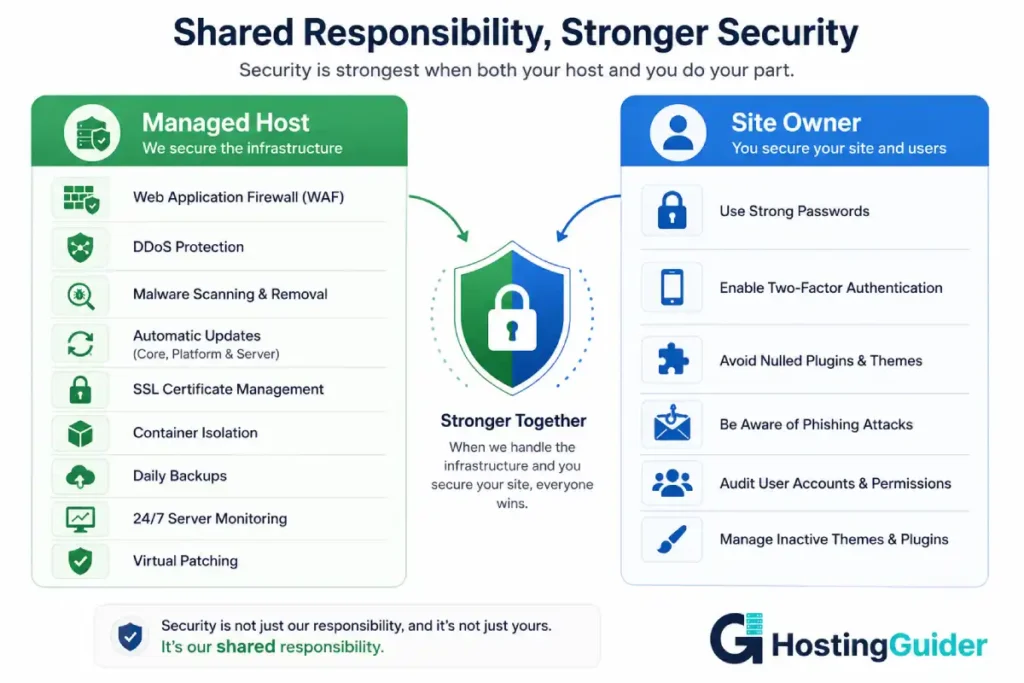
Weak passwords on your WordPress admin account remain a vulnerability regardless of what your host provides. If your password is short or common, a brute force attack will eventually succeed. Use a long unique password generated by a password manager.
Nulled plugins are paid plugins distributed for free with the licence removed, often containing malware already embedded at installation. Installing a plugin that is already compromised brings malware inside your site regardless of what the hosting environment does at the perimeter. Never install plugins from unofficial sources.
Social engineering attacks target you directly through phishing emails that convincingly imitate your hosting provider and ask you to log in through a fake link. No hosting security feature protects against this. Always navigate directly to your host’s website rather than clicking links in emails.
Abandoned admin accounts for former team members remain active login opportunities. Managed hosting does not manage your WordPress users. Audit your admin accounts regularly and remove any that are no longer needed.
Inactive themes with known vulnerabilities are frequently overlooked. Site owners update active plugins and themes but neglect inactive ones. Inactive themes with unpatched vulnerabilities remain exploitable even on managed hosting.
| Security Responsibility | Managed Host Handles | You Handle |
|---|---|---|
| WordPress core updates | Yes, automatic | Not required |
| Plugin updates | Usually automatic or one-click | Confirm setting on your plan |
| Server-level security | Yes, entirely | Not required |
| Your admin password strength | No | Yes, use a strong unique password |
| Two-factor authentication | Tools provided | You must enable it for your account |
| Nulled plugin prevention | Cannot stop you installing them | Yes, only use official plugin sources |
| Social engineering and phishing | No | Yes, verify all communications yourself |
| Removing old admin accounts | No | Yes, audit your users regularly |
| Inactive theme vulnerabilities | Varies by host | Monitor and remove unused themes |
Frequently Asked Questions
Is managed WordPress hosting really more secure than regular hosting?
Yes, meaningfully so. The security difference comes from three compounding factors. First, the attack surface is smaller because managed hosts automatically apply updates that close known vulnerabilities before bots can exploit them. Second, the defences are more sophisticated because managed hosts provide server-level and network-level security tools that individual site owners cannot replicate with plugins alone. Third, the response capability is stronger because managed hosts have security teams available around the clock to investigate and remediate incidents. A site on managed hosting is not impossible to attack, but it is significantly harder to attack successfully and recovers much faster when something does go wrong.
What is a web application firewall and why is it different from a security plugin?
A web application firewall analyses the content of web requests and blocks those matching known attack patterns before they reach your site. A security plugin like Wordfence also provides WAF functionality, but it runs inside PHP on your server. This means the malicious request has already reached your server and consumed resources before the plugin can analyse and block it. A server-level or CDN-level WAF, which is what managed hosts provide, stops the request before it reaches your server at all. The managed hosting WAF is stronger in both security terms and performance terms because it operates at a layer above the application.
Can my site still get hacked on managed WordPress hosting?
Yes, though significantly less likely. No security system provides a guarantee against every possible attack. The threats most likely to still breach managed hosting involve vulnerabilities introduced through code or plugins you install yourself, credentials obtained through phishing rather than brute force, or sophisticated zero-day exploits not yet covered by WAF rules. The important additional distinction is that managed hosting also provides faster recovery through daily automatic backups with self-serve restore. Even if a breach occurs, a clean version of your site is available and the site can be back online in minutes.
What is container-based isolation and why does it matter for security?
Container-based isolation means your WordPress site runs in its own sealed environment with its own file system, processes, and resources entirely separate from every other site on the same physical server. No other site can read or write your files regardless of what happens to them. This matters because on traditional shared hosting, a security breach on one site can potentially spread to neighbouring sites through shared system access. Container isolation eliminates this vector entirely. The security or insecurity of other sites sharing the same hardware has no effect on your site.
Should I still use a security plugin on managed WordPress hosting?
If your managed host provides a server-level WAF, automated malware scanning, login protection, and file integrity monitoring as infrastructure features, adding a security plugin that duplicates those functions adds server overhead without meaningful additional protection. In some cases it creates conflicts with the host’s own security systems. Before installing a security plugin, ask your managed host specifically what security features they handle at the infrastructure level and what gaps, if any, a plugin would address. Some managed hosts explicitly recommend against specific security plugins because they interfere with their own systems.
How do managed hosts protect against zero-day vulnerabilities?
A zero-day vulnerability is one just discovered with no patch yet available. Managed hosts with vulnerability intelligence capabilities deploy virtual patches, which are temporary WAF rules that block requests attempting to exploit the vulnerable code path while the plugin or theme developer works on an official fix. This is one of the most sophisticated security capabilities managed hosting provides and one that standard hosting users have no equivalent protection against. The speed of virtual patch deployment varies between providers. The strongest providers can deploy a blocking rule within hours of a zero-day being confirmed in their intelligence network.
What security responsibilities do I keep even on managed WordPress hosting?
Managed hosting handles the infrastructure and platform security layer. You remain responsible for several application-level security factors. These include using a strong unique password for your WordPress admin account, enabling two-factor authentication for all admin users, only installing plugins and themes from official sources and never installing nulled versions, recognising phishing attempts that target your hosting credentials, auditing your WordPress user accounts regularly to remove any that are no longer needed, and removing inactive themes that may contain unpatched vulnerabilities. These responsibilities exist regardless of your hosting provider because they relate to how you use your site rather than how the host secures its infrastructure.


