
Your website is offline right now. A visitor types your address. A blank error page appears. They leave. They do not come back.
This happens to thousands of websites every day. Some owners never even know it happened.
Website uptime is one of the most important factors in running a successful website. It affects your visitors. It affects your revenue. It affects your search rankings. It affects how much people trust your brand.
This guide explains what uptime is. It explains why it matters. It shows what different uptime levels mean in practice. It tells you exactly how to protect your website from going offline.
Table of Contents
Key Takeaways
- Website uptime is the percentage of time your website is online and accessible to visitors
- Even 99.9% uptime allows for almost 9 hours of downtime per year
- Downtime costs businesses money, visitors, and search rankings
- Your hosting provider is the biggest factor in your uptime performance
- You can monitor your uptime for free with simple tools
- Cloud and managed hosting deliver better uptime than standard shared hosting
What is Website Uptime?
Website uptime is the percentage of time your website is available to visitors.
A website with 100% uptime is always online. No visitor ever sees an error page.
A website with 99% uptime is offline for about 87 hours per year. That is more than three and a half days.
Uptime is measured as a percentage. Hosting providers express it in their service agreements. The higher the uptime percentage, the less time your site spends offline.
What is Website Downtime?
Downtime is the time when your website is not accessible to visitors.
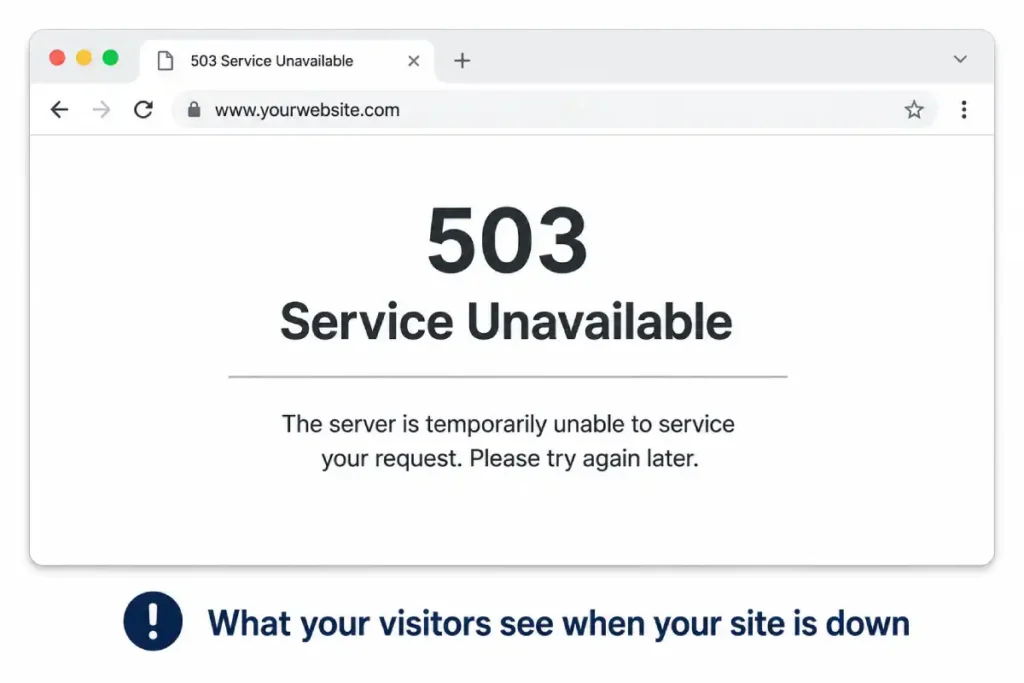
During downtime, visitors cannot load your pages. They see an error message instead. Common error messages are “503 Service Unavailable” and “Connection Timed Out.”
Downtime can last for seconds. It can last for hours. In serious cases, it lasts for days.
Downtime is not always visible to you. Your site can be down for visitors while you are asleep. It can be down for visitors in one country while working in another. Without monitoring, you may not know downtime happened at all.
How is Uptime Calculated?
Uptime is calculated as a percentage.
Take the total time a site was up. Divide it by the total time in the measurement period. Multiply by 100.
Example: A site was up for 719 hours in a 720-hour month. Divide 719 by 720. Multiply by 100. The result is 99.86% uptime.
The Uptime Percentage Table
Most people think 99.9% uptime is excellent. The real numbers tell a different story.
| Uptime | Downtime Per Year | Downtime Per Month | Downtime Per Week |
|---|---|---|---|
| 90% | 36 days, 12 hours | 3 days | 16 hours, 48 min |
| 95% | 18 days, 6 hours | 1 day, 13 hours | 8 hours, 24 min |
| 99% | 3 days, 15 hours | 7 hours, 18 min | 1 hour, 40 min |
| 99.5% | 1 day, 19 hours | 3 hours, 39 min | 50 minutes |
| 99.9% | 8 hours, 45 min | 43 minutes | 10 minutes |
| 99.95% | 4 hours, 22 min | 21 minutes | 5 minutes |
| 99.99% | 52 minutes | 4 minutes | 1 minute |
| 99.999% | 5 minutes | 26 seconds | 6 seconds |
Look at 99% uptime. It sounds close to perfect. But it allows more than 3 days of downtime every single year.
Hosting providers usually promise 99.9% or 99.99% uptime. The difference between these two figures is more than 7 hours of downtime per year.
Why Does Uptime Matter?
Uptime matters for four main reasons.
It affects your visitors. It affects your revenue. It affects your search rankings. It affects trust in your brand.
Each of these deserves a clear explanation.
Uptime and Your Visitors
Visitors come to your website with a purpose. They want information. They want to buy something. They want to contact you.
When your site is down, none of that happens.
The visitor sees an error. They feel frustrated. They do not wait. They close the tab. They move on.
In most cases, they do not come back. They find a competitor instead.
One downtime event can push a visitor to a competitor permanently. That visitor may have become a long-term customer. Now they never will.
This applies to every type of website. A blog loses a potential subscriber. A business site loses a potential client. A store loses a potential buyer.
The visitor experience is immediate. Downtime destroys it in seconds.
Uptime and Your Revenue
Every minute your website is offline has a financial cost.
For e-commerce stores, the calculation is direct. A store generating £200 per hour in revenue loses £200 for every hour of downtime. One day of downtime costs £4,800 in direct lost sales.
For service businesses, the cost is indirect. A potential client cannot see your work. They cannot read your case studies. They cannot find your contact form. They go elsewhere.
For content websites, fewer visitors means fewer ad impressions. Fewer ad impressions means lower ad revenue.
| Business Type | How Downtime Costs Money |
|---|---|
| E-commerce store | Direct lost sales during the outage |
| Service business | Lost enquiries and potential clients |
| Content or blog site | Lost ad revenue and audience growth |
| SaaS product | Lost trials, cancellations, and damaged reputation |
| Portfolio site | Missed client opportunities |
| Booking website | Missed appointments and reservations |
The financial cost of downtime is almost always higher than the cost of better hosting. This is the core reason uptime matters so much for any website generating value.
Uptime and Your SEO
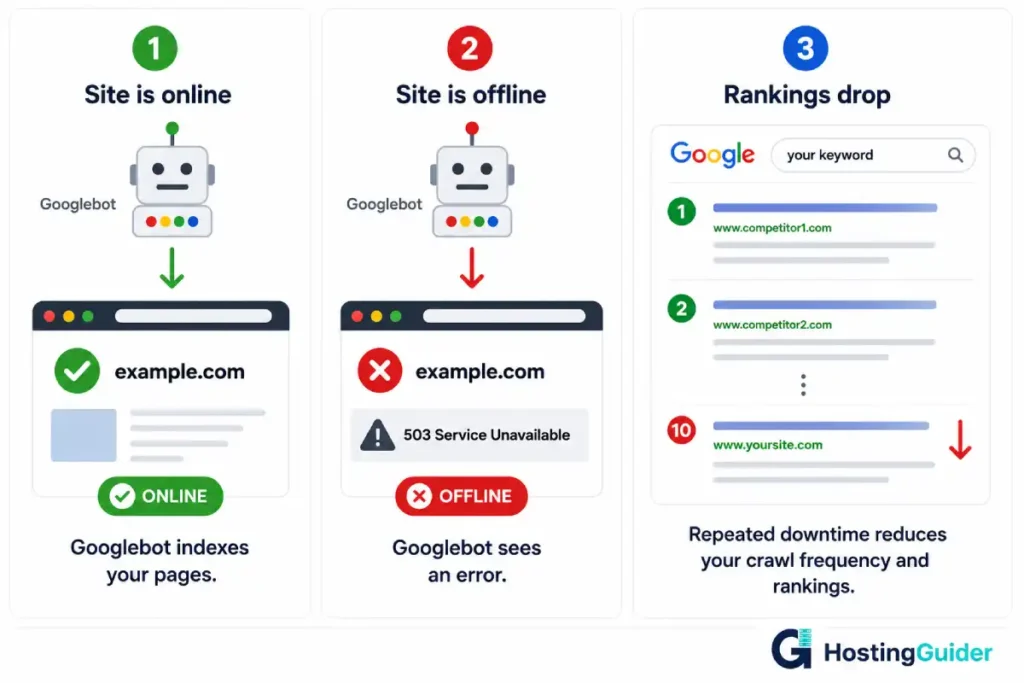
Google crawls your website regularly. A Googlebot visits your pages. It reads your content. It indexes your pages. This is how your site appears in search results.
When your site is down, Googlebot visits an error page instead of your content. It cannot index your pages.
Repeated downtime during crawls causes Google to crawl your site less often. It can temporarily lower your rankings. It can temporarily remove pages from the index.
A single short downtime event rarely causes lasting SEO damage. Repeated or extended downtime creates real problems.
Good uptime and fast response times work together for SEO. Your hosting provider directly affects your search performance. Choosing the right host is a genuine SEO decision.
Uptime and Trust
Trust is hard to earn. It is easy to lose.
A visitor who sees your site offline once may return. A visitor who sees it offline twice starts to doubt you. A visitor who sees it offline three times does not trust your brand.
This applies to customers, readers, business partners, and anyone who depends on your website.
If someone recommends your website and it is down when their contact visits, both parties are affected. Your credibility suffers. Their recommendation looks unreliable.
Uptime protects your brand reputation. It signals professionalism. It tells every visitor your business takes itself seriously.
What Causes Website Downtime?
Understanding the causes helps you prevent them.
| Cause | How Common | How to Prevent |
|---|---|---|
| Shared server overload | Very common on cheap hosting | Upgrade to VPS or managed hosting |
| Hardware failure | Occasional | Choose hosts with redundant hardware |
| Traffic spike | Common for growing sites | Choose scalable cloud hosting |
| Scheduled maintenance | Predictable | Choose hosts with zero-downtime maintenance |
| DDoS attack | Moderately common | Choose hosts with DDoS protection |
| Plugin or software error | Common | Test updates on staging before live |
| Human error | Occasional | Limit who has server access |
| DNS misconfiguration | Occasional | Use reliable DNS, double check changes |
| Expired SSL certificate | Preventable | Use a host with automatic SSL renewal |
Hosting quality is the biggest single factor. A cheap shared host puts your site on an overcrowded server. When other sites on that server get busy, yours suffers. When the hardware fails, your site goes offline.
Better hosting prevents most of these causes. Cloud hosting spreads your site across multiple servers. If one fails, others take over. Your site stays online.
Uptime and Your Hosting Provider
Your hosting provider controls most of your uptime.
Their infrastructure quality matters. Their hardware redundancy matters. Their network connections matter. Their response time to problems matters.
Shared hosting providers guarantee 99.9% uptime. Premium managed hosting providers guarantee 99.95% or 99.99%.
Kinsta runs on Google Cloud infrastructure. It uses multiple redundant data centres. SiteGround guarantees 99.99% uptime backed by cloud infrastructure.
Cloudways routes your site through major cloud providers including AWS and Google Cloud. It achieves 99.99% uptime by running on the most reliable infrastructure available.
The hosting provider is your most important uptime decision. Read more about how cloud infrastructure improves reliability.
How Cloud Hosting Improves Uptime
Traditional hosting stores your website on one physical server. If that server has a problem, your site goes offline.
Cloud hosting stores your website across a network of many servers. If one server fails, others take over automatically. Your site stays online.
This is called redundancy. It is the main reason cloud hosting delivers better uptime than traditional hosting.
Cloud hosting also scales automatically. When your site receives a sudden spike of traffic, cloud infrastructure adds resources. Traditional hosting cannot do this. A traffic spike on traditional hosting causes slowdowns or crashes.
The scalability of cloud hosting is directly connected to uptime. A server that cannot handle a traffic spike goes offline. A cloud server that scales with traffic stays online.
What is a Good Uptime Guarantee?
A good uptime guarantee is 99.9% or higher.
99.9% is the minimum. Most reputable shared hosts offer this level.
99.95% is better. Premium shared and managed hosts often reach this.
99.99% is excellent. Cloud-based and managed WordPress hosts at the premium tier guarantee this level.
Anything below 99.9% is not acceptable for a business website.
Read the guarantee carefully. Check what compensation the host offers when they fail to meet it. A guarantee without consequence is just a marketing claim.
Also check whether the host publishes a public status page. A status page shows real-time uptime data. It shows historical incidents. A host that publishes this information is confident in its reliability.
How to Monitor Your Website Uptime
You need to know when your site goes down. You cannot fix a problem you do not know about.
Several tools check your website and alert you when it goes offline. Most of them are free for basic use.
UptimeRobot checks your site every five minutes. It sends an email or text when your site goes down. The free plan monitors up to 50 websites. It shows your historical uptime percentage in a clear dashboard.
Pingdom is another widely used monitoring tool. It offers more detailed performance reports alongside uptime monitoring.
Both tools run checks from multiple locations worldwide. This tells you whether a downtime event is global or affecting only specific regions.
Set up uptime monitoring on day one. Do not wait until something goes wrong.
| Monitoring Tool | Free Plan | Check Interval | Alert Methods |
|---|---|---|---|
| UptimeRobot | Yes, up to 50 sites | Every 5 minutes | Email, SMS, Slack |
| Pingdom | Free trial | Every 1 minute on paid | Email, SMS, push |
| Better Uptime | Yes, up to 10 sites | Every 3 minutes | Email, phone call, Slack |
| StatusCake | Yes, up to 10 sites | Every 5 minutes | Email, SMS |
| Freshping | Yes, up to 50 sites | Every 1 minute | Email, Slack, webhook |
How to Improve Your Website Uptime
You cannot control everything. But you can control the most important factors.
Choose better hosting
This is the single most impactful step. Move from cheap shared hosting to cloud or managed hosting.
Managed WordPress hosting handles server maintenance for you. The provider monitors your site around the clock. They respond to problems before you even know about them.
Hostinger offers a 99.9% guarantee at an affordable entry price. WP Engine offers 99.95% uptime with managed infrastructure and dedicated WordPress support.
Use a CDN
A Content Delivery Network stores copies of your static files across data centres worldwide. When your main server has a brief problem, the CDN continues serving cached content to many visitors.
Cloudflare is a free CDN option. Many managed hosts include Cloudflare integration automatically.
Keep your software updated
Outdated WordPress, plugins, and themes cause crashes. A plugin update gone wrong is one of the most common causes of preventable downtime.
Test updates on a staging environment first. Apply them to your live site only after confirming they work correctly.
Use a staging environment
A staging environment is a private copy of your live site. Test all changes there first. If something breaks, it breaks on staging. Your live site stays online.
Set up monitoring
You cannot improve what you do not measure. Set up a free uptime monitoring tool. Check your monthly uptime report. Look for patterns in your downtime events.
Use reliable DNS
DNS is the system that connects your domain name to your server. If your DNS provider goes offline, your domain stops working even if your server is fine.
Use a DNS provider with multiple redundant servers. Cloudflare DNS is free and highly reliable.
Uptime for E-commerce: Why Online Stores Cannot Afford Downtime
Uptime matters for all websites. It matters most for online stores.
A visitor browsing a store has buying intent. They came to purchase something. Downtime at that moment kills the sale permanently.
Payment processing adds additional risk. A transaction that starts on a live site can fail if the site goes down mid-checkout. The customer’s card may be charged. The order may not complete. This creates customer service problems and refund requests.
Seasonal peaks make this worse. A flash sale generates more traffic. Traffic spikes cause server overload. Server overload causes downtime. Downtime during a sale is the worst possible timing.
Cloud hosting with auto-scaling handles these peaks automatically. Resources expand when traffic increases. The store stays online during its most important moments.
Every e-commerce store should be on cloud or managed hosting. The uptime improvement directly protects revenue.
The Real Cost of Downtime: A Practical Calculation
Here is a simple example. Use your own numbers to make it relevant to your site.
A WooCommerce store generates £500 per day in revenue. That is about £21 per hour.
The store is on shared hosting with 99.9% uptime. That allows 8 hours and 45 minutes of downtime per year.
Downtime cost: 8.75 hours multiplied by £21 equals approximately £184 in direct lost revenue per year.
The store upgrades to managed cloud hosting with 99.99% uptime. Downtime drops to 52 minutes per year. Revenue loss from downtime drops to less than £20 per year.
The hosting upgrade costs an extra £20 to £30 per month. The direct revenue saved is £164 per year. The indirect savings from protected SEO and reputation are higher.
The upgrade pays for itself. It pays for itself many times over when you count the full picture.
[IMAGE: COST OF DOWNTIME COMPARISON — A two-column visual. Left column labelled 99.9% Uptime shows Downtime per year of 8 hours 45 minutes, Direct revenue loss of £184 per year, SEO risk of Moderate, and Trust damage of Possible. Right column labelled 99.99% Uptime shows Downtime per year of 52 minutes, Direct revenue loss of £18 per year, SEO risk of Low, and Trust damage of Minimal. A footer note reads Hosting upgrade cost is often less than the downtime saving]
Understanding Hosting SLAs
SLA stands for Service Level Agreement. It is the formal document where your hosting provider commits to an uptime level.
Read the SLA before you buy any hosting plan.
Check the uptime percentage they guarantee. Check how they define uptime. Some providers exclude scheduled maintenance windows from their uptime calculations. This can add significant downtime hours that do not count against their guarantee.
Check the compensation they offer for missing the guarantee. Most providers offer hosting credits. Compensation should be automatic. You should not need to submit a manual claim.
Check the measurement period. Monthly measurement is standard. Annual measurement catches problems less quickly.
| SLA Factor | What to Look For |
|---|---|
| Uptime percentage | 99.9% minimum, 99.99% preferred |
| Maintenance exclusions | Scheduled maintenance should be minimal and disclosed |
| Compensation type | Credits or refunds when guarantee is missed |
| Claim process | Automatic preferred over manual claim submission |
| Measurement period | Monthly is standard and preferable |
| Status page | Public page with real historical data |
Frequently Asked Questions
What is website uptime?
Website uptime is the percentage of time a website is online and accessible to visitors. It is measured as a percentage of total time in a given period. A website with 99.9% uptime is online for 99.9% of the time. In practical terms, this allows for approximately 8 hours and 45 minutes of downtime per year. Hosting providers publish their uptime guarantees in their service level agreements. Higher uptime percentages mean less downtime and a more reliable website experience for every visitor.
Why is website uptime important for business?
Website uptime is important because downtime costs money, drives away visitors, and can hurt your search rankings. Every hour an e-commerce store is offline is an hour of lost sales. Every hour a service business is unreachable is an hour of missed enquiries. Repeated downtime also damages brand trust. A visitor who sees your site offline multiple times loses confidence in your business. Good uptime protects your revenue, your reputation, and your relationship with search engines.
What is a good uptime percentage for hosting?
A good uptime percentage is 99.9% or higher. This is the minimum standard for any reputable hosting provider. Premium cloud and managed hosting providers offer 99.95% or 99.99%. The difference between 99.9% and 99.99% is more than 7 hours of downtime per year. For a business website where downtime has a financial cost, 99.99% uptime is worth the higher hosting investment.
How does downtime affect Google rankings?
Downtime can affect your Google rankings over time. Google crawls your website regularly. When Googlebot visits during downtime, it sees an error page. A single short downtime event rarely causes permanent ranking damage. Repeated or extended downtime is more serious. If Google consistently finds your site offline, it crawls your site less often. This slows how quickly new content gets indexed. Over time it can reduce your rankings in competitive search results.
How can I monitor my website uptime for free?
The most popular free uptime monitoring tool is UptimeRobot. It checks your site every five minutes. It sends an email or text alert when your site goes offline. The free plan covers up to 50 websites. It shows a dashboard with your historical uptime percentage. Setting up monitoring takes less than five minutes. You should do it immediately after your site goes live, not after a downtime event has already happened.
Which type of hosting has the best uptime?
Cloud hosting and managed WordPress hosting consistently deliver the best uptime. Both types run your website across multiple servers. If one server fails, others take over automatically. Standard shared hosting runs your website on a single physical server. One hardware problem takes your site offline. Kinsta and Cloudways both use cloud infrastructure to achieve 99.99% uptime. Standard shared hosting typically achieves 99.9%. The infrastructure difference explains most of the gap between these figures.
What should I do if my website keeps going offline?
First, set up uptime monitoring to understand how often and how long the downtime lasts. Check your hosting provider’s status page for known issues. Contact your host’s support team with the specific times and error messages. If downtime is frequent and your host cannot explain or fix it, consider switching to a more reliable provider. Repeated downtime on a cheap shared host usually means the server is overcrowded. Moving to cloud or managed hosting almost always solves recurring uptime problems.


