
Customer support is the most critical feature of any web hosting plan. When a website drops offline or faces a critical database error, the quality of your hosting support team determines how fast your business recovers. However, there is often a massive gap between what a customer expects and what a hosting company actually provides.
Customers want instant, human answers that resolve complex coding errors immediately. Web hosting business owners must balance these high expectations against the operational costs of hiring specialized server engineers. Aligning these two perspectives is the best way to avoid technical frustration and choose a provider that keeps your platform stable.
Technical Support Realities at a Glance
For website creators and hosting operators who need to understand service boundaries quickly, here is the baseline operational division of labor for modern technical support.
- Account Demarcation Rules: Hosts manage physical server hardware, operating systems, and network connections. Customers retain absolute responsibility for internal website code, theme styles, and third-party plugins.
- The Acknowledgment Illusion: A quick customer service response time means an agent has answered your chat window. It does not mean your complex technical issue has been fully resolved.
- Support Channel Efficiencies: Live chat windows are optimized for simple configuration fixes. Deep infrastructure repairs require structured email ticket tracking to escalate issues safely to senior system administrators.
- The Cost of Management Tiers: Low-cost hosting accounts feature basic, self-managed support. Premium managed plans include comprehensive technical optimization and automated problem solving.
The Core Conflict: What Customers Want vs. What Businesses Provide
To build a healthy technical relationship, both sides must understand the operational perspective of the other. Misunderstandings here are the primary cause of poor reviews and canceled hosting contracts.
The Customer Perspective
As a website owner, your site is your livelihood. If your checkout page displays a critical error code, you are losing money every minute. You expect the hosting agent to log into your account, analyze your custom code files, identify the conflict, and fix it for you immediately.
To a customer, “24/7 support” means having an expert web developer on standby at all times to repair any issue that occurs inside their dashboard.
The Hosting Business Owner Perspective
Hosting providers operate on strict resource margins, especially on entry-level plans. A hosting business model treats server space as a utility, similar to electricity. The provider is legally responsible for delivering stable power and data connections to your server slot. They are not responsible for how you build your website inside that slot.
Hiring tier-three Linux systems administrators costs significant capital. If a host allowed their support staff to debug custom code for every starter account, the business would collapse financially. Therefore, hosts enforce rigid support boundaries to keep service costs predictable.
Demarcation: The Invisible Support Boundary
The concept of demarcation defines exactly where the host’s legal responsibility ends and where your responsibility as a webmaster begins. Crossing this invisible boundary blindly is where most support disputes happen.
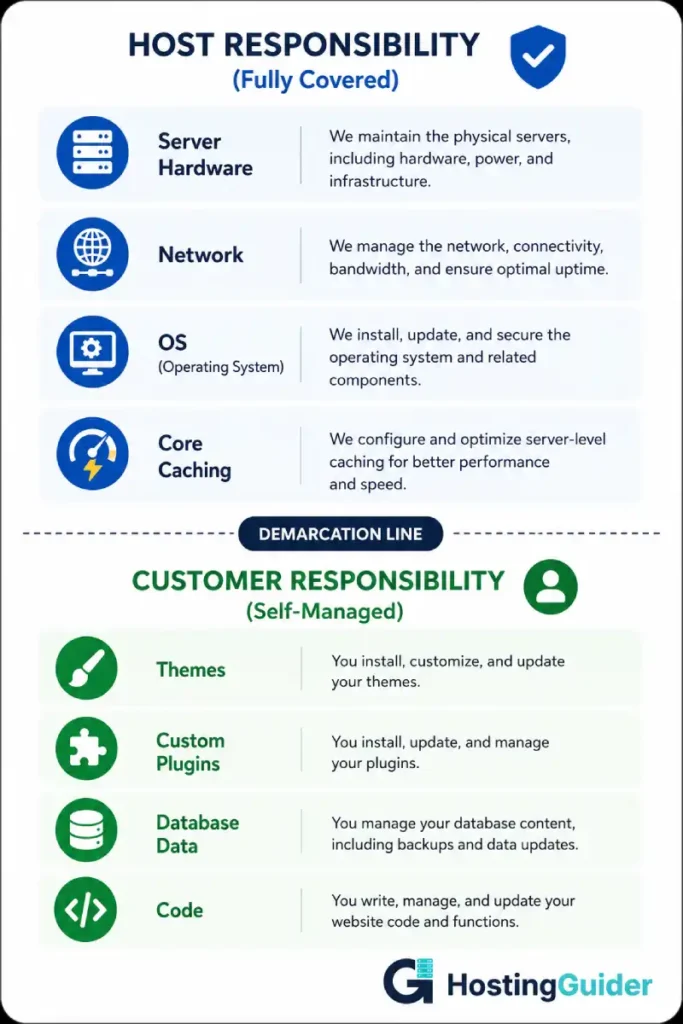
What the Hosting Support Team Is Responsible For
- Repairing physical server hardware failures and power outages inside the data center.
- Maintaining core network routing to ensure global traffic reaches your server IP address.
- Securing the primary operating system, server-level firewalls, and base caching software.
- Managing default control panel licensing and basic account billing systems.
- Ensuring default email protocols like SMTP and IMAP can transmit data across their network.
What Is Completely Beyond the Scope of Standard Support
- Debugging custom PHP script errors or broken JavaScript files inside your theme template.
- Resolving software conflicts caused by installing poorly coded third-party plugins.
- Optimizing your internal database indexing or cleaning up corrupt database tables.
- Fixing layout design errors that look broken on mobile devices.
- Cleaning up malware infections that entered the system through weak user passwords.
If an outage stems from a network card failure inside the data center, the host must fix it instantly. If an outage occurs because you updated an outdated plugin that crashed your database, the host will expect you to restore a backup or hire an independent developer to fix your code.
Understanding these boundaries helps you choose the right tier of service. Small businesses handling regular consumer transactions should upgrade to VPS hosting or managed hosting to receive more hands-on assistance past the standard demarcation line.
Response Time vs. Resolution Time (The SLA Trap)
Marketing teams love to advertise lightning-fast response times to attract new buyers. However, you must look past the initial sales pitch and analyze the strict terms inside the corporate Service Level Agreement.
Official industry metrics compiled by service design portals like Freshworks Guide to ITSM highlight a critical difference between an introductory response and a complete technical fix.
- SLA Response Time: The exact duration from when you submit a help ticket until a support agent formally acknowledges it. A live chat agent saying “Hello, let me review your account” satisfies the response target within seconds. This metric tracks attentiveness, not problem-solving capability.
- SLA Resolution Time: The actual duration required to completely diagnose, repair, and close the technical incident. Resolving a complex server side cache failure or data corruption issue can take multiple hours or days, regardless of how fast the initial chat box opened.
| Support Channel | Expected Response Goal | Expected Resolution Window | Best Used For |
| Live Chat Interface | Under 2 minutes | 15 to 30 minutes | Password resets, basic domain mapping, billing updates |
| Email Ticket Queue | Under 2 hours | 2 to 24 hours | Complex file restores, firewall blocks, database migration errors |
| Direct Phone Routing | Under 5 minutes | 20 to 60 minutes | Immediate, high-priority site-wide service outages |
Watch out for providers that promise rapid initial responses but refuse to commit to firm resolution windows. A fast response means nothing if your business asset remains broken in a support queue for a week.
To track how consistent availability protects your business image, check our analytical article detailing website uptime importance metrics.
Navigating the Hidden Tiers of Technical Support
When you open a support ticket, you do not connect directly to the head server engineer. Your request moves through a strict hierarchy of technical skill levels.
Tier 1 Support (The General Help Desk)
This is the front line of customer service. These agents handle high volumes of basic chat traffic. They rely heavily on pre-written documentation, internal knowledge bases, and standard troubleshooting scripts.
Tier-one agents can help you reset your control panel password, check your billing dates, or guide you through a basic software installation. They do not have root server access and cannot modify complex system variables.
Tier 2 Support (The Advanced Technical Team)
If your issue involves complex script configurations or persistent email delivery failures, your ticket moves to Tier 2. These technicians possess deeper software knowledge and specialized server access permissions.
They can analyze custom configuration files, adjust account resource allocations, and identify specific plugin resource leaks.
Tier 3 Support (The Systems Administrators)
This is the ultimate escalation path for critical infrastructure issues. Tier 3 consists of senior systems administrators, network engineers, and database architects. These experts manage the core server clusters, physical hardware setups, and root level security perimeters.
If a massive distributed denial of service attack bypasses edge defenses, or a physical hard drive array fails under load, Tier 3 engineers manage the recovery. They communicate primarily via formal email tickets rather than fast public chat windows to focus entirely on code repair.
How to Communicate with Support to Get Faster Fixes
Many customers waste hours arguing with support agents simply because they communicate poor data. If you provide vague information, the technician must ask clarifying questions, which delays your resolution.
Follow these hands-on communication rules to skip low-level troubleshooting loops and get your issues escalated to senior engineers quickly:
- State the Exact Error Code: Do not simply say “My website is broken.” Copy and paste the exact error message displayed on your screen (e.g., 502 Bad Gateway or Error Establishing a Database Connection).
- Provide Documented Timestamps: Tell the agent exactly when the issue started. This allows the technician to search through thousands of lines of server logs to find the precise moment the crash occurred.
- List Your Recent Adjustments: Be completely honest about what you changed right before the site broke. If you installed a new security plugin or updated your database username, tell the host immediately. This cuts out guessing and points the engineer straight to the problem area.
- Attach Independent Monitoring Data: If you connect your site to an independent uptime tracking tool, share those logs with support. This prevents the agent from claiming that the issue is just a local internet connection glitch on your home computer. You can track these performance patterns using validation networks recommended by tech analysts at web.dev/vitals.
Choosing the Right Plan to Secure Expert Attention
If your business requires comprehensive technical assistance that regularly extends past the standard demarcation line, you must choose your hosting plan tier carefully.
Entry-Level Shared Environments
Basic shared plans match users with entry-level support paths. Because you pay low monthly rates, the host cannot afford to dedicate senior engineering hours to your account.
If your site goes down due to a custom code mistake, you are expected to resolve it yourself using their standard online guides. Review our breakdown of the risks involved in entry level plans by reading why cheap hosting becomes expensive later.
Fully Managed Ecosystems
Premium managed hosting plans shift the support dynamic completely. Providers like Kinsta and SiteGround hire specialized technical experts who understand specific software frameworks inside and out.
Their teams actively monitor your site stability, manage your daily backups, and tune your server caching automatically. When an error occurs, their support staff will often fix the software conflict for you, even if it falls past the traditional line of demarcation.
This advanced support level saves you from technical stress and removes the need to hire an external web developer. Discover how these managed setups operate by reading our post explaining what is managed WordPress hosting.
The Role of Support in Data Recovery and Backup Restoration
Disaster recovery is the ultimate test of a hosting company’s support apparatus. When a critical data loss occurs due to a human error or site breach, you need to know exactly how your host’s backup systems operate.
Reputable business hosting plans include automated, server root level daily backups with off-site retention. During an emergency, you should check if your hosting dashboard supports one-click self service restoration.
If the automated system fails, you must escalate the ticket to a tier-two administrator immediately to manually inject your data caches. To review your security options against modern server vulnerabilities, read our guide on essential hosting security tips.
FAQ
Why does my hosting support agent refuse to fix my WordPress theme layout?
Theme layout adjustments fall outside the legal scope of standard web hosting support. The host is responsible for maintaining a stable server environment; they are not web designers or front-end developers. You must hire an independent specialist or modify the CSS files yourself.
What should I do if a support agent keeps copying and pasting generic help guides?
If you get stuck in a loop with a tier-one support agent who uses generic scripts, politley ask them to escalate your request. Use specific, technical terminology and present clear server logs to prove your issue requires tier-two or tier-three administrative access.
Is phone support always better than live chat support?
Not necessarily. While phone support feels reassuring during an emergency, live chat is often more efficient for technical troubleshooting. Chat windows allow you to paste long error codes, share diagnostic screenshots, and transmit direct file links instantly to the engineer.
Do hosting companies charge extra fees for website migrations?
Most premium web hosts offer free expert migration services to new clients to help win their business safely. However, some legacy providers charge steep, hidden fees to handle manual data transfers. Review our evaluation roadmap on questions to ask before buying hosting to spot these hidden fees early.
Conclusion
Web hosting customer support operates on clear technical boundaries and resource limitations. As a website creator, recognizing the demarcation line between server infrastructure and internal website code prevents frustration and helps you build an efficient technical workflow.
As a business owner, investing in an isolated, managed cloud environment ensures you have immediate access to high-level system engineers when emergencies strike. Choose a provider that respects their service agreements, provides transparent communication tracking, and delivers the fast, human-centric technical support your digital platform deserves.


