DNS records are short instructions stored for your domain that tell browsers and mail servers where to go.
An A record points a name to an IPv4 address, and an MX record says which server accepts your email.
Each record type has one job.
Your website usually needs A or AAAA records; your email needs MX and TXT records, and NS records decide which company answers for your domain at all.
Records are the working layer of every domain, alongside registration, transfers, and privacy in the domain and DNS guides.
If you are new to domains, start with how domain names map to servers, then come back here.
DNS record types at a glance
The table below lists the record types you will meet in a typical DNS zone, what each one does, and an example value.
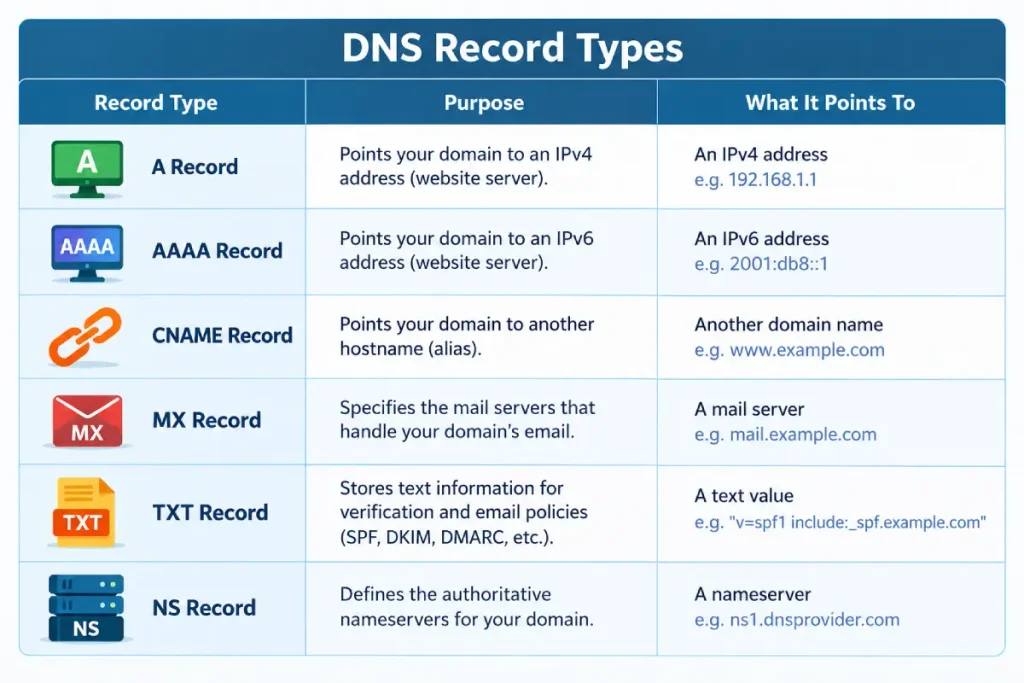
A DNS zone is the full set of records for one domain, stored at your DNS provider. All examples use the reserved name example.com and documentation IP addresses.
| Record | What it does | Example value | Typical use |
|---|---|---|---|
| A | Points a name to an IPv4 address | 192.0.2.10 | Send example.com to your web server |
| AAAA | Points a name to an IPv6 address | 2001:db8::10 | Same job as A, for IPv6 visitors |
| CNAME | Makes one name an alias of another name | shop.example.net. | Point www or a subdomain at a platform |
| MX | Names the mail server for the domain, with a priority | 10 mail.example.com. | Deliver email to your mailbox provider |
| TXT | Stores free-form text | “v=spf1 include:_spf.example.net ~all” | SPF, ownership checks, DKIM, DMARC |
| NS | Names the servers that answer for the domain | ns1.example-dns.com. | Choose your DNS provider |
| CAA | Lists which certificate authorities may issue certificates | 0 issue “letsencrypt.org” | Limit who can issue SSL certificates |
| SRV | Names the host and port for a specific service | 10 5 5060 sip.example.com. | VoIP, chat and office apps |
Cloudflare’s DNS record type reference describes the same core set. The original definitions for A, CNAME, MX, NS, and TXT come from RFC 1035, the base DNS standard.
How a DNS lookup uses these records
A DNS lookup asks your domain’s nameservers one question, such as “what is the A record for example.com?”, and gets back the matching record.
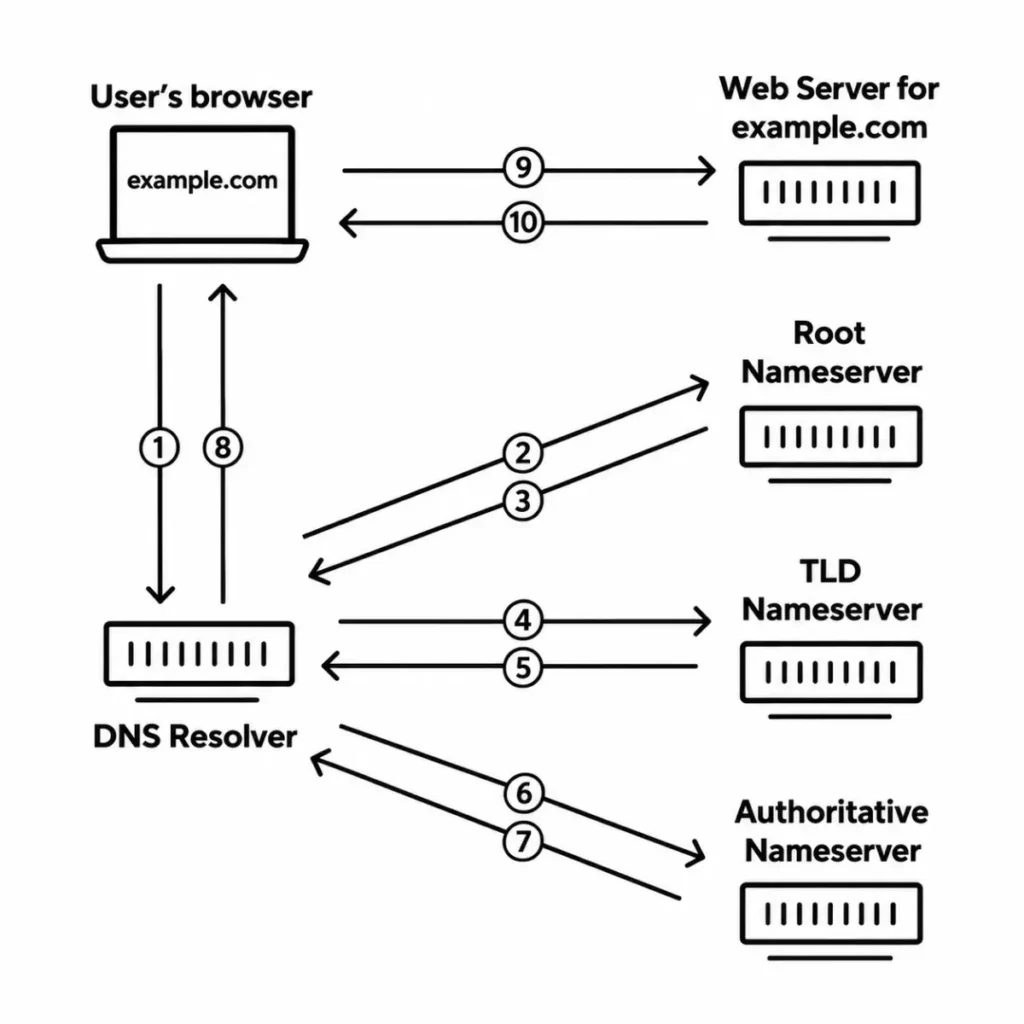
Here is the order of events when someone types your domain:
- The visitor’s device asks a resolver, usually run by their internet provider or a public DNS service.
- The resolver finds which nameservers are listed for your domain (the NS records).
- It asks those nameservers for the record type it needs, such as A or AAAA.
- It caches the answer for the time set by the record’s TTL, then returns it.
A resolver is a server that looks up DNS answers on behalf of devices and remembers them for a while.
For your site, this means: your records only work if they live at the nameservers your domain actually uses. Editing a zone at the wrong company changes nothing.
A record: your site’s IPv4 address
An A record connects a hostname, such as example.com, to one IPv4 address, such as 192.0.2.10.
An IPv4 address is the four-part numeric address most servers still use. Your host shows it in your control panel or welcome email.
A typical pair of A records looks like this:
example.com.      3600  IN  A  192.0.2.10
www.example.com.  3600  IN  A  192.0.2.10
The “@” symbol in many DNS panels means the root of your domain, so “@” and example.com are the same name.
For your site, this means: when you move hosts, the A record is usually the one record that sends visitors to the new server.
AAAA record: the IPv6 version
An AAAA record does the same job as an A record, but points to an IPv6 address instead of an IPv4 address.
IPv6 addresses are longer, written in hexadecimal groups separated by colons. The AAAA type is defined in RFC 3596.
example.com. 3600 IN AAAA 2001:db8::10For your site, this means: add an AAAA record only if your host gives you a working IPv6 address.
A stale AAAA record can send some visitors to a dead address while IPv4 users see no problem.
CNAME record: an alias for another name
A CNAME record says “this name is an alias; look up that other name instead”. It points to a hostname, never to an IP address.
www.example.com.   3600  IN  CNAME  example.com.
shop.example.com.  3600  IN  CNAME  stores.example-platform.net.
Platforms such as store builders and CDNs often ask for a CNAME because they can change their own IP addresses without you editing anything.
The CNAME coexistence rule
A name that has a CNAME record cannot have any other record.
RFC 1034, section 3.6.2, states that if a CNAME is present at a node, no other data should be present.
So you can’t put a CNAME and an MX record, or a CNAME and a TXT record, on the same name. Many DNS panels refuse to save that combination.
Why a CNAME can’t sit at the root domain
The root of your domain (example.com, also called the apex) always holds NS records and an SOA record. Because of the coexistence rule, a standard CNAME can’t go there.
The SOA (start of authority) record holds administrative details for the zone, such as the primary nameserver and timing values.
Some DNS providers offer a workaround under names like CNAME flattening or ALIAS records.
They resolve the target behind the scenes and answer with plain A or AAAA records. Check your DNS provider’s own documentation for the exact behavior.
For your site, this means: use A or AAAA records for the root, and use a CNAME for www or subdomains.
If you are unsure which names count as subdomains, read about when a subdomain makes sense.
MX record: where your email goes
An MX (mail exchange) record names the server that accepts email for your domain, along with a priority number.
example.com.  3600  IN  MX  10  mx1.mail-provider.example.
example.com.  3600  IN  MX  20  mx2.mail-provider.example.
RFC 1035 defines the priority field as a preference where lower values are preferred. Sending servers try 10 first and fall back to 20 if the first server doesn’t respond.
An MX record must point to a hostname, not an IP address. That hostname then needs its own A or AAAA record.
For your site, this means: your mailbox provider gives you its exact MX values.
Copy them as written, and remove old MX records from a previous provider, or some mail may land in the wrong place.
TXT record: text for verification and email rules
A TXT record stores a line of text on a name. Other services read that text to check ownership or to apply email rules.
Common uses include:
- Domain verification. Google, Microsoft, and many SaaS tools ask you to add a unique TXT value to prove you control the domain.
- SPF. A TXT record starting with v=spf1 lists the servers allowed to send email as your domain.
- DKIM. A TXT record at a selector name, such as s1._domainkey.example.com, publishes a public key for signed email.
- DMARC. A TXT record at _dmarc.example.com tells receivers what to do when SPF and DKIM checks fail.
example.com.         3600  IN  TXT  "v=spf1 include:_spf.mail-provider.example ~all"
example.com.         3600  IN  TXT  "site-verification=abc123example"
_dmarc.example.com.  3600  IN  TXT  "v=DMARC1; p=none; rua=mailto:dmarc@example.com"
RFC 1035 limits a single text string to 255 characters. Long values, such as DKIM keys, are often split into several quoted strings in one record.
For your site, this means: TXT records pile up as you add tools, so note which service each one belongs to before you delete any.
Writing the email ones correctly is a separate job, covered in HostingGuider’s guide to setting up SPF, DKIM and DMARC.
NS record: who answers for your domain
NS (nameserver) records list the servers that hold the official copy of your DNS zone. They decide which company’s records the world sees.
example.com.  86400  IN  NS  ns1.example-dns.com.
example.com.  86400  IN  NS  ns2.example-dns.com.
The NS records that count are the ones set at your registrar, which passes them to the registry for your domain extension.
Your nameservers also appear in a domain registration lookup.
For your site, this means: switching nameservers moves control of every record at once.
The safe order for that switch is in HostingGuider’s guide to pointing a domain at your host.
CAA and SRV records
CAA and SRV records are less common, but you will meet them when you add SSL controls or certain business apps.
CAA: who may issue your certificates
A CAA (Certification Authority Authorization) record lists the certificate authorities allowed to issue SSL/TLS certificates for your domain, as described in the Cloudflare reference above.
example.com. 3600 IN CAA 0 issue "letsencrypt.org"If you add a CAA record, every authority you use must be listed, including the one your host or CDN uses.
Otherwise, renewals can fail. The basics of how SSL certificates get issued explain where certificate authorities fit.
SRV: service location
An SRV record tells an app which host and port provide a named service. The name starts with the service and protocol, such as _sip._tcp.example.com.
The value has four parts: priority, weight, port, and target host. Most site owners only add SRV records when a VoIP, chat, or office tool asks for them.
What TTL means and which value to use
TTL (time to live) is the number of seconds a resolver may cache a record before asking again. RFC 1035 defines it as a time interval in seconds.
A TTL of 3600 means one hour. A TTL of 86400 means one day.
How TTL affects your changes:
- A long TTL means fewer lookups but slower updates, because resolvers keep the old answer until it expires.
- A short TTL, such as 300 seconds, means changes take effect sooner, at the cost of more lookups.
- Lowering the TTL only helps if you do it at least one full old-TTL period before the change.
For your site, this means: a short TTL is a tool for planned changes, not an everyday setting, because it adds lookups without adding speed.
The full timing picture is in why DNS edits take time to appear.
How to view your DNS records with dig and nslookup
You can check any public DNS record from your own computer with the dig or nslookup commands. Both ship with most operating systems or are easy to install.
dig is built into macOS and most Linux systems. nslookup works on Windows, macOS, and Linux.
dig example.com A
dig +short example.com MX
dig example.com TXT
dig example.com NS
dig @ns1.example-dns.com example.com A
The last command asks one nameserver directly. Use it to confirm your new record exists at the source, even before other resolvers see it.
On Windows, nslookup does the same job:
nslookup -type=MX example.com
nslookup -type=TXT example.com
In dig output, the ANSWER SECTION shows each record with its name, TTL, class (IN), type, and value.
If the answer section is empty, the record doesn’t exist for that name.
For your site, this means: after any DNS change, query your own nameserver first. If it shows the new value, the change is saved, and any delay elsewhere is caching.
Common DNS record mistakes
Most DNS problems come from a small set of repeat mistakes, and each one has a quick check.
| Mistake | What happens | Fix |
|---|---|---|
| CNAME at the root domain | Panel rejects it, or email and verification records break | Use A/AAAA records at the root, or a provider’s flattening feature |
| CNAME plus other records on one name | Conflicting answers or a rejected save | Keep only the CNAME on that name |
| Editing records at the wrong DNS provider | Nothing changes for visitors | Check NS records, then edit there |
| Missing trailing dot in a raw zone file | The domain gets added twice, such as mail.example.com.example.com | Use full names ending in a dot in zone files |
| MX pointing to an IP or a CNAME | Some senders reject or misroute mail | Point MX to a hostname with an A record |
| CAA missing your host’s certificate authority | Certificate issue or renewal fails | Add every authority you use |
DNS settings are also a target for attackers. Locking your registrar login is part of protecting your domain from hijacking.
If you are still comparing web hosts ranked after hands-on testing, check that the plan gives you a DNS zone editor or lets you use outside nameservers.
Short definitions of related terms are in the plain-English hosting term definitions.
Frequently asked questions
What is the difference between an A record and a CNAME?
An A record points a name to an IP address, while a CNAME points a name to another name.
Use an A record for your root domain and a CNAME for aliases such as www.
Can I have more than one A record for the same domain?
Yes. Several A records on one name return several IP addresses, and resolvers may rotate between them. Only do this if every address serves the same site.
What does the number in an MX record mean?
It is the priority. Lower numbers are tried first, so a server set to 10 receives mail before a server set to 20.
How many TXT records can a domain have?
A domain can have many TXT records on the same name. The limit that matters most is SPF: only one TXT record per name may start with v=spf1.
What TTL should I use?
3600 seconds (one hour) is a common default for records that rarely change.
Short values, such as 300 seconds, suit the hours around a planned edit, while the NS examples above use 86400.
Do DNS changes take effect immediately?
The change is live at your nameserver as soon as you save it. Other resolvers keep the old answer until their cached copy’s TTL runs out.
How we researched this
Rantideb Howlader wrote the guide from the DNS standards themselves. RFC 1034 and RFC 1035 cover the core record types, TTL, and the CNAME rule.
RFC 3596 covers AAAA records. We checked all three on October 11, 2026.
We cross-checked record descriptions against Cloudflare’s DNS documentation on the same date. Every example uses example.com and documentation IP ranges, so none of the values points to a real server.
The dig and nslookup commands are standard tools, shown with their default output fields. Our wider rules for checking claims against primary standards apply to every HostingGuider guide.