
Shopping for web hosting can feel completely overwhelming. Every sales page looks identical, featuring endless feature lists, technical acronyms, and flashing discount timers. Providers deliberately use complicated marketing phrases to make direct comparisons difficult for beginners.
If you evaluate services based entirely on flashy badges or low introductory prices, you will likely end up with a slow, restrictive server environment. You can cut through the marketing noise by ignoring vague promises and focusing strictly on verifiable hardware allocations.
The Core Comparison Framework at a Glance
For website creators who need to evaluate plans quickly, use this prioritized framework to filter out bad options immediately.
- Discard Vague Pricing: Ignore the big introductory discount text and locate the permanent renewal rate hidden in the fine print.
- Filter Out Marketing Buzzwords: Disregard claims of unlimited space and search for the explicit file counts or execution process limits.
- Isolate Server Types: Separate basic shared nodes from isolated cloud architectures before looking at individual features.
- Verify Core Allocations: Prioritize hosts that include free automated daily backups and secure sockets layer data shields natively.
- Audit Technical Execution: Test support availability and track actual hardware response times independently before committing long-term.
Step 1 — Deconstruct the True Cost of Ownership
The biggest point of confusion for new buyers stems from introductory pricing strategies. A host will promote an incredibly low rate to win your initial click, but that entry cost does not reflect the long-term expense of running your website.
You must calculate the Total Cost of Ownership across a multi-year window. Many budget platforms strip critical performance and safety features from their baseline tiers, forcing you to purchase them later as expensive account upgrades.
Independent industry cost analysis highlights the massive price gaps that occur when you choose a fragmented, bare-bones starter plan instead of an integrated ecosystem.
| Baseline Account Expense | Ultra Cheap Base Plan | Premium Integrated Platform |
| Introductory Signup Rate | $2.00 to $4.00 per month | $15.00 to $25.00 per month |
| Standard Account Renewal | $10.00 to $15.00 per month | $15.00 to $25.00 per month |
| Server-Side Caching Plugin | Paid Upsell ($50 / year) | Included Natively |
| Automated Data Backups | Paid Upsell ($60 / year) | Included Natively |
| Web Application Firewall | Paid Upsell ($100 / year) | Included Natively |
| Content Delivery Network | Paid Upsell ($50 / year) | Included Natively |
When you add up the individual costs of mandatory speed and security plugins, the cheap initial offer becomes significantly more expensive over time. Focus your comparison on the all-inclusive renewal price rather than the initial teaser rate.
Step 2 — Translate Marketing Hype into Technical Reality
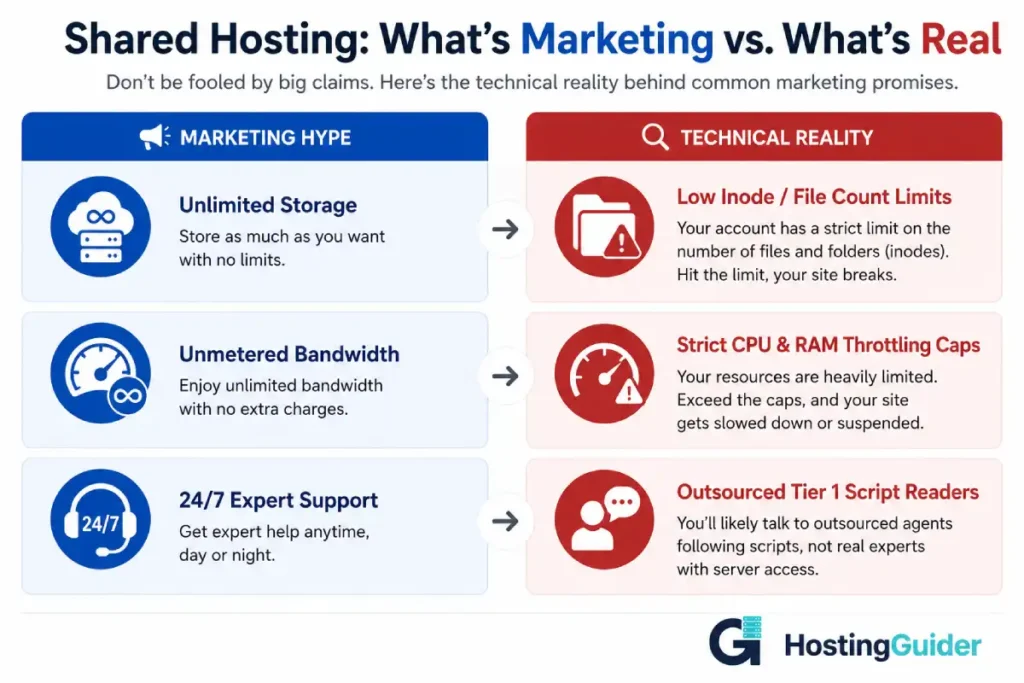
Hosting sales copy relies heavily on vague terms to hide physical hardware limitations. You must translate these promotional claims into concrete engineering boundaries to protect your digital platform from sudden suspensions.
The Unlimited Storage Trap
Physical hard drives always feature hard storage limits. When a host promises unlimited space, their legal terms page restricts your total file count, technically known as inodes.
A single WordPress site containing extensive media libraries can easily exceed a low inode limit of 100,000 files, triggering an immediate account freeze even if you use minimal gigabyte space.
The Unmetered Bandwidth Myth
Bandwidth tracks the total volume of data your site transmits to visitors over a month. While a host might not charge you for data volume, they strictly limit the number of visitors who can access your data simultaneously.
If your platform experiences a sudden rush of concurrent users, the server will run out of central processing power or system memory, causing immediate page crashes regardless of your unmetered bandwidth status.
Step 3 — Align Server Architecture with Project Scope
You cannot compare a shared hosting plan directly against a managed cloud system. They use completely different backend layouts that change how your website performs under load.
You must match your specific traffic goals with the correct tier of server technology.
Shared Infrastructure Nodes
- How it functions: Places your website on a physical computer alongside hundreds of alternative accounts, forcing everyone to fight for a shared pool of hardware resources.
- Best use case: Low-budget personal projects, small portfolio designs, and brand new blogs with minimal daily traffic.
- Inherent risk factor: High. A resource surge or malware infection on a neighboring account can instantly slow down or crash your live site.
Virtual Private Servers (VPS)
- How it functions: Utilizes hypervisor software to divide a physical server into completely isolated, dedicated virtual slots.
- Best use case: Growing business platforms, custom application software, and developer testing zones.
- Inherent risk factor: Medium. Small businesses handling customer payments or sensitive data should consider VPS hosting or managed hosting for stronger control over their environment.
Managed Cloud Frameworks
- How it functions: Distributes your website data across a resilient network of multiple virtual machines with fully dedicated memory containers.
- Best use case: High-traffic e-commerce storefronts, high-profile corporate brands, and viral media platforms.
- Inherent risk factor: Low. Outages are incredibly rare because alternative network nodes take over processing tasks instantly if local hardware elements fail.
Step 4 — Use a Standardized Feature Checklist
To keep your research organized, evaluate every potential provider against a strict baseline of mandatory technical specifications. If a host charges extra for any item on this list, remove them from your consideration pool.
- Non-Volatile Memory Express (NVMe) Drives: Modern solid-state connections that read database tables significantly faster than older legacy drives.
- Free Secure Sockets Layer (SSL) Certificates: Automated data encryption that activates the required HTTPS prefix inside browser bars.
- Server-Root Backup Automation: Incremental daily snapshots stored on separate, isolated data networks for a recovery safety window of at least fourteen days.
- One-Click Staging Areas: Completely private testing sandboxes that clone your live database so your team can test design updates safely.
- Integrated Global Content Delivery Networks: Edge proxy nodes spread worldwide to cache your static files directly next to your global audience.
Step 5 — Run Independent Performance Audits
Never trust a hosting provider’s self-reported performance scores. You can verify their actual speed capabilities using free, independent testing tools.
- Measure Response Latency: Test an active site hosted by the provider using public speed testing dashboards. Isolate the critical server reaction metric known as Time to First Byte (TTFB). According to core performance guidelines at web.dev, a reliable server must respond in under 0.8 seconds.
- Track Long-Term Availability: Connect your domain to a third-party synthetic tracking tool like UptimeRobot to verify server consistency over a full week. If your logs record frequent drops, the provider is overcrowding their physical server hardware.
- Test the Technical Support Escalation Path: Open a support inquiry chat box at midnight on a weekend. Skip basic billing questions and ask a complex question about server-side caching rules. Measure how many minutes it takes to bypass first-level script readers and connect with an actual systems engineer.
Step 6 — Finalize Choices Across Industry Leaders
To help you make a definitive decision without getting lost in comparison loops, look at how the top recommended platforms position their server features.
Hostinger
- Core Advantage: Exceptional balance of low initial signup rates and modern LiteSpeed performance hardware.
- Best App Usage: Perfect for value-focused beginners who want an easy setup via a custom dashboard. Learn more about planning your project foundation in our guide on how to choose the best web hosting for a WordPress site.
SiteGround
- Core Advantage: Runs a fully optimized management stack on top of premium Google Cloud infrastructure.
- Best App Usage: Ideal for content creators who require rapid customer support responses and elite platform safety controls.
Kinsta
- Core Advantage: Provides completely isolated isolated application containers that scale resource memory automatically during traffic surges.
- Best App Usage: Mandatory for professional enterprise properties and intensive e-commerce stores that cannot risk unexpected downtime.
Cloudways
- Core Advantage: Allows you to pick your preferred underlying cloud infrastructure network with flexible pay-as-you-go hourly resource billing.
- Best App Usage: Built for technical developers and media sites looking for unmatched vertical scaling capability.
FAQ’s
Why do hosting comparison blogs always recommend different providers?
Many online comparison portals prioritize platforms based entirely on affiliate commission rates rather than actual hardware performance. You must ignore generic list recommendations and judge providers strictly using raw independent performance data.
Can I migrate my files easily if I pick the wrong host?
Yes, you can move your data layers at any time. Most premium providers offer free manual migration assistance to new clients to help you transition safely without data loss.
Is cPanel access mandatory for managing a server?
No, cPanel is simply a legacy commercial control panel brand. Many modern hosts now deploy custom dashboards like Hostinger’s hPanel or custom cloud portals that run significantly faster and are much easier for beginners to navigate.
What happens if my website exceeds its allocated storage limits?
A reputable host will notify you via email and ask you to optimize your databases or upgrade to a higher resource tier. Restrictive providers will instantly throttle your connection speeds or display a resource limit error screen to your public audience.
Conclusion
Comparing web hosting providers without confusion requires stripping away marketing hype and looking directly at raw hardware boundaries. Focus your financial analysis on the long-term renewal rates rather than the initial introductory discounts.
Insist on foundational features like NVMe drive arrays, automated daily backups, and isolated resource environments. Audit response speeds aggressively before making a final commitment to ensure your online presence lands on a fast, reliable, and secure server foundation.


