
You decided to get a VPS. Now you are stuck at the very first question.
Linux or Windows?
Most guides answer this with technical jargon. This one does not. Every difference is explained in plain language. Real examples show you exactly which option fits your situation.
By the end of this guide, you will know the right answer for your website or application.
Key Takeaways
- Linux VPS costs less than Windows VPS because Linux is free and open source
- Windows VPS costs more because Microsoft charges a licence fee for every server
- Linux is better for WordPress, PHP, Python, Ruby, and Node.js applications
- Windows is better for ASP.NET, Microsoft SQL Server, and Windows-specific software
- Linux is more widely used and has a larger support community
- Most web hosting applications run better and faster on Linux
- Windows VPS is essential when your software only runs on Windows
Quick Answer
Linux VPS is the right choice for most websites and web applications. It is cheaper, faster, and more secure for typical web workloads. Windows VPS is the right choice when your application specifically requires Windows. This includes ASP.NET applications, Microsoft SQL Server databases, and software built only for Windows environments.
What is a VPS?
A VPS is a Virtual Private Server.
It is a portion of a physical server. That portion behaves like its own independent server. It has its own CPU, RAM, and storage.
You choose an operating system for your VPS. The two main choices are Linux and Windows.
The operating system is the software that runs everything on your server. Your applications, your files, and your settings all depend on the operating system you choose.
This decision matters. The wrong choice can mean your software does not run at all. The right choice means your server runs smoothly and efficiently.
Read our full guide on VPS hosting to understand how VPS works before choosing your operating system.
What is Linux VPS?
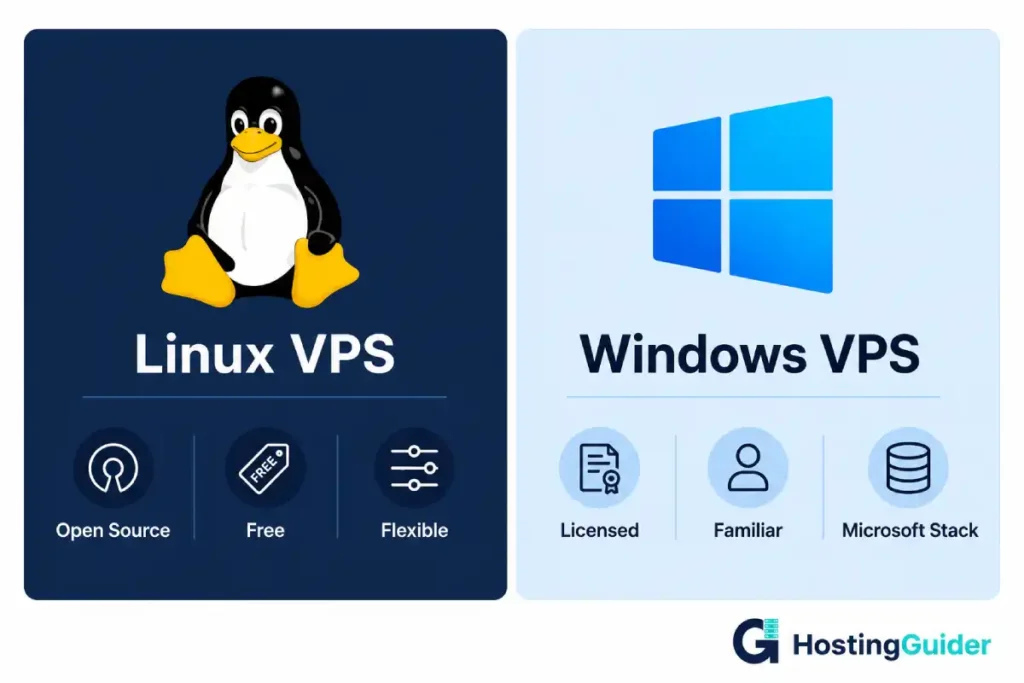
Linux is an open-source operating system. Open source means the code is free. Anyone can use it, modify it, and distribute it.
Linux VPS uses Linux as its operating system. Popular Linux distributions for VPS servers include Ubuntu, CentOS, Debian, and AlmaLinux.
Ubuntu is the most beginner-friendly. CentOS is popular for production servers. Debian is known for its stability.
You do not have to pay a licence fee for Linux. This is one reason Linux VPS plans cost less than Windows VPS plans.
Linux is the dominant operating system for web servers worldwide. Most websites on the internet run on Linux servers.
What is Windows VPS?
Windows VPS uses Microsoft Windows Server as its operating system. This is a server version of Windows.
Windows Server looks and behaves similarly to the Windows you use on a desktop computer. It has a graphical user interface. You can use a mouse to click through menus and settings.
Windows Server requires a licence. Microsoft charges for every server that runs Windows. Hosting providers pass this cost to customers. This is why Windows VPS plans cost more than Linux VPS plans at the same specifications.
Windows VPS is the only option when your application is built for Windows. ASP.NET, Visual Basic applications, and Microsoft Access databases all require a Windows environment.
The Key Differences
Cost
Linux VPS is cheaper. This is because Linux itself is free.
Windows VPS is more expensive. Microsoft charges a licence fee for Windows Server. Hosting providers add this cost to your monthly bill.
The difference is usually between $10 and $20 per month for equivalent specifications.
| VPS Type | Average Starting Price | Reason for Price |
|---|---|---|
| Linux VPS | $5 to $20/month | No operating system licence fee |
| Windows VPS | $15 to $40/month | Includes Windows Server licence |
Hands-on example: You want to host a WordPress blog. WordPress runs on Linux. You choose Linux VPS at $10 per month. The same specifications on Windows VPS cost $25 per month. You save $15 every single month for no technical benefit.
Performance
Linux generally performs better than Windows for web workloads.
Linux uses fewer system resources. It runs more efficiently on the same hardware. This means more of your server’s power goes to your actual applications.
Linux servers also handle large numbers of simultaneous connections better. This matters for busy websites.
Windows uses more resources for its own processes. The graphical interface alone consumes significant memory. Even when no one is logged in, Windows Server uses more RAM than Linux.
Hands-on example: You run a high-traffic blog. Both Linux and Windows are on identical hardware with 4GB of RAM. The Linux server uses 512MB of RAM for its own processes. The Windows server uses 1.5GB to 2GB. Your applications get more memory on Linux.
Security
Both Linux and Windows can be secured properly. But they have different security profiles.
Linux has a strong security reputation. It uses a permission-based system. Each user and process has only the access it needs. Nothing else.
Most malware targets Windows. This is because Windows is the dominant desktop operating system. Malware written for Windows does not affect Linux.
Linux vulnerabilities exist. But the open-source community finds and patches them quickly. Security updates are released fast.
Windows Server is also secure when properly configured. Microsoft releases regular security patches. But the Windows attack surface is larger. More malware targets Windows environments.
Hands-on example: Your website gets targeted by a common piece of malware. The malware was written for Windows environments. Your Linux VPS is completely unaffected. The malware does not know how to interact with Linux file systems or processes.
Software Compatibility
This is the most critical difference. Some software only runs on one operating system.
Linux supports: PHP, Python, Ruby, Node.js, WordPress, Laravel, Django, MySQL, PostgreSQL, and most open-source web technologies.
Windows supports: ASP.NET, .NET Core, Microsoft SQL Server, Visual Basic applications, Microsoft Access, and Windows-specific software.
Some software runs on both. .NET Core, for example, runs on Linux and Windows.
| Technology | Linux | Windows |
|---|---|---|
| WordPress | Yes | Yes (but slower) |
| PHP | Yes | Yes (but less efficient) |
| Python | Yes | Yes |
| Node.js | Yes | Yes |
| ASP.NET (classic) | No | Yes |
| .NET Core | Yes | Yes |
| Microsoft SQL Server | Yes (limited) | Yes (full support) |
| MySQL | Yes | Yes |
| PostgreSQL | Yes | Yes |
| Ruby on Rails | Yes | Limited |
| Microsoft Access | No | Yes |
Hands-on example: Your company uses an ASP.NET web application. The application was built for Windows. It uses Windows authentication and Microsoft SQL Server. You must use Windows VPS. Linux cannot run this application at all.
Control Panel
A control panel is the graphical interface you use to manage your server. It lets you add websites, set up email, manage files, and configure settings without using the command line.
Linux VPS commonly uses cPanel, Plesk, DirectAdmin, or Webmin. cPanel is the most widely used. Most web hosting tutorials assume cPanel. Most web developers know how to use it.
Windows VPS commonly uses Plesk for Windows. Windows Server also includes its own Internet Information Services (IIS) manager. IIS handles web hosting on Windows servers.
Plesk works on both Linux and Windows. It is a good option if you want a consistent experience on either operating system.
| Control Panel | Linux | Windows |
|---|---|---|
| cPanel | Yes | No |
| Plesk | Yes | Yes |
| DirectAdmin | Yes | No |
| Webmin | Yes | No |
| IIS Manager | No | Yes |
Hands-on example: You switch from a shared hosting account where you used cPanel. You want to continue using cPanel on your VPS. You must choose Linux VPS. cPanel does not run on Windows.
Ease of Use
Windows VPS feels more familiar to most people. The graphical interface looks like the Windows desktop they already know.
You connect to Windows VPS using Remote Desktop Protocol (RDP). This gives you a full visual desktop on your server. You can click, drag, and use menus just like on your home computer.
Linux VPS is usually managed through a command line. You type text commands to manage the server. This feels unfamiliar to many beginners.
The command line is actually faster once you learn it. Common tasks take seconds instead of clicking through multiple menus.
Many managed Linux VPS providers include a graphical control panel. This reduces the need for command-line knowledge. Providers like ScalaHosting include SPanel. This gives Linux users a full graphical management interface without needing command-line skills.
Hands-on example: You are not a developer. You have never used a command line. You want to host a simple website. You choose a managed Linux VPS from ScalaHosting. SPanel gives you a graphical interface. You manage your website through a browser. You never need to touch the command line.
Flexibility and Customisation
Linux offers more flexibility. It is open source. You can install almost any software. You can modify system settings deeply. You can choose from hundreds of different Linux distributions.
Windows has more restrictions. Microsoft controls the operating system. You cannot modify the source code. Your customisation options stay within what Microsoft allows.
For developers who need fine-grained server control, Linux is almost always the better choice.
For businesses that need to run standard Microsoft software, Windows provides the controlled environment that software requires.
Hands-on example: You want to run a custom Python web scraper on your VPS. You also want to schedule it with a cron job. You want to configure Nginx as your web server. All of this is straightforward on Linux. On Windows, the same setup requires significantly more configuration work.
Community and Support
Linux has a much larger support community. Millions of developers use Linux servers. Millions of tutorials, guides, and Stack Overflow answers cover Linux problems.
When you have a question about Linux, the answer almost certainly exists online. Usually in multiple places.
Windows Server also has a large community. But Linux-specific knowledge is more widely distributed across the internet.
For web development specifically, most documentation assumes Linux. Most example code assumes Linux. Most server configurations in tutorials are for Linux.
Hands-on example: You encounter an error on your VPS. You search for the error message online. For Linux, you find 47 results explaining the fix. For the equivalent Windows Server error, you find 6 results. This difference in documentation depth is a real daily-use advantage.
Remote Access
Both Linux and Windows VPS support remote access. But the methods are different.
Windows VPS uses Remote Desktop Protocol. You connect with the Windows Remote Desktop application. You see a full graphical desktop. You manage everything visually.
Linux VPS uses SSH. SSH stands for Secure Shell. It is a secure text-based connection. You type commands and see text responses.
Linux VPS can also have graphical remote access set up. But this requires extra configuration and uses more resources.
For beginners, Windows Remote Desktop feels easier. You see a familiar interface. You can click and navigate normally.
For developers and system administrators, SSH is faster and more powerful. You can automate tasks. You can run scripts. You can manage multiple servers simultaneously.
| Remote Access Method | Linux VPS | Windows VPS |
|---|---|---|
| SSH (command line) | Yes, standard | Yes, but non-standard |
| Remote Desktop (RDP) | Possible but complex | Yes, standard |
| VNC (graphical) | Yes, optional | Yes, optional |
| Web-based panel | Yes, with cPanel or SPanel | Yes, with Plesk |
Hands-On Examples by Use Case
Here are real-world scenarios. Each one shows the right VPS choice for the situation.
Running a WordPress Website
WordPress runs on PHP and MySQL. Both work perfectly on Linux. Linux is faster for PHP than Windows.
Choose Linux VPS.
Hostinger offers affordable Linux VPS plans starting from under $6 per month. These work well for WordPress sites.
Running an ASP.NET Application
ASP.NET classic applications are built for Windows. They use Windows authentication and Windows-specific APIs.
Choose Windows VPS.
AccuWeb Hosting provides Windows VPS plans with full ASP.NET and Microsoft SQL Server support.
Running a Python or Django Application
Python and Django run natively on Linux. The Python ecosystem is built around Linux servers.
Choose Linux VPS.
Running a Microsoft Access Database
Microsoft Access databases only run on Windows. There is no Linux equivalent.
Choose Windows VPS.
Hosting Multiple PHP Websites
Multiple PHP websites need PHP, MySQL, and a web server like Apache or Nginx. All of these run better on Linux.
Choose Linux VPS.
Contabo offers Linux VPS plans with exceptional value for hosting multiple websites at a low monthly cost.
Running a Custom Game Server
Most game servers run on Linux. They are built for Linux environments. Linux handles network connections more efficiently.
Choose Linux VPS.
Building a .NET Core Application
.NET Core is Microsoft’s cross-platform framework. It runs on both Linux and Windows.
On Linux, .NET Core is cheaper to host. On Windows, it integrates more easily with other Microsoft tools.
Choose based on your other requirements. If you use SQL Server heavily, choose Windows. If not, Linux saves money.
Learning Server Administration as a Beginner
Both Linux and Windows can be learned. But Linux administration skills are more valuable in the web hosting industry.
Choose Linux VPS for career development. Choose Windows VPS if you are more comfortable with Windows environments.
Running Visual Basic Applications
Visual Basic applications are Windows-specific. They do not run on Linux.
Choose Windows VPS.
Who Should Choose Linux VPS?
Linux VPS is right for you if:
- You run a WordPress site or blog
- You build PHP, Python, Ruby, or Node.js applications
- You want to keep hosting costs as low as possible
- You use open-source databases like MySQL or PostgreSQL
- You are comfortable with or willing to learn the command line
- You use cPanel or want cPanel support
- You want the most flexibility and customisation options
- You want the largest possible community of support and documentation
Who it is for: Developers, bloggers, small business owners, and anyone running standard web applications without specific Windows dependencies.
Who Should Choose Windows VPS?
Windows VPS is right for you if:
- You run ASP.NET classic applications
- You use Microsoft SQL Server as your primary database
- You work with Windows-specific APIs or authentication
- Your software was built exclusively for Windows environments
- You use Microsoft Access databases
- You need to run Visual Basic or other Windows-only tools
- You are more comfortable managing a server through a familiar Windows interface
Who it is for: Businesses running Microsoft technology stacks, enterprises using legacy Windows applications, and developers who build in .NET or ASP.NET classic.
Full Comparison Table
| Factor | Linux VPS | Windows VPS |
|---|---|---|
| Cost | Lower, no licence fee | Higher, includes Windows licence |
| Performance | Better for web workloads | Good, but uses more resources |
| Security | Strong, smaller attack surface | Good, larger attack surface |
| PHP support | Excellent | Good but less efficient |
| ASP.NET classic | No | Yes |
| .NET Core | Yes | Yes |
| MySQL / PostgreSQL | Yes | Yes |
| Microsoft SQL Server | Limited | Full support |
| cPanel | Yes | No |
| Plesk | Yes | Yes |
| Remote access | SSH (command line) | RDP (graphical desktop) |
| Command line required | Usually | Less common |
| Community support | Larger | Smaller for web hosting |
| Customisation | Very high | Moderate |
| Open source | Yes | No |
| Best for | Web hosting, PHP, Python, open source | ASP.NET, MSSQL, Windows apps |
How to Make the Final Decision
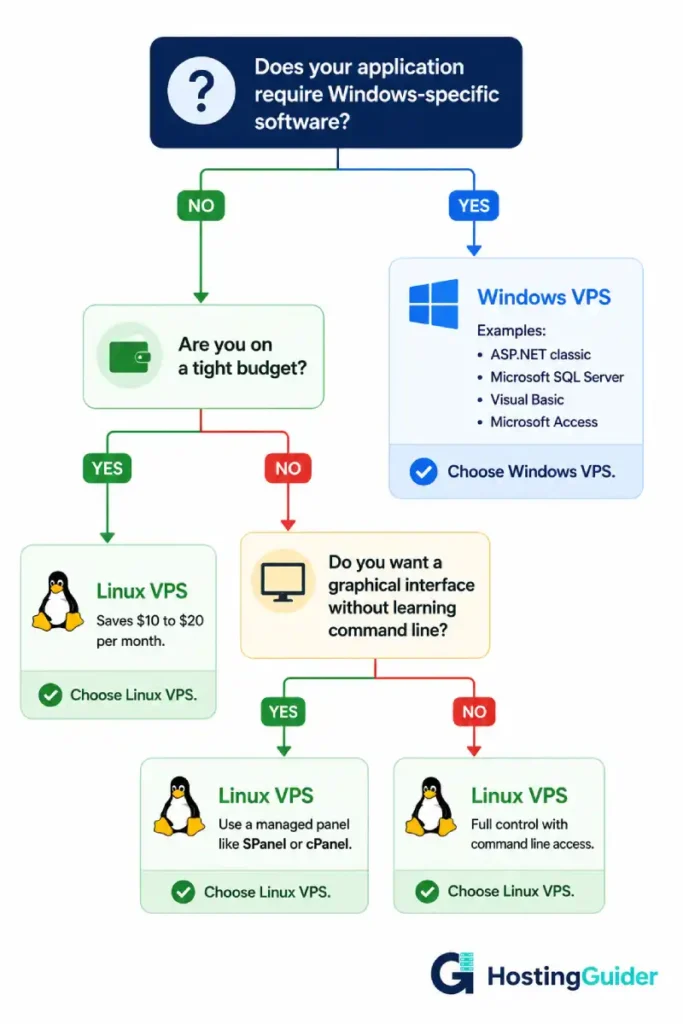
Ask yourself one question first: Does my application require Windows?
If yes, choose Windows VPS. There is no alternative.
If no, choose Linux VPS. It costs less. It performs better for web workloads. It has better community support.
If you are unsure what your application requires, check the documentation. Look for the system requirements section. It will tell you which operating system is supported.
If you are building something new and have no Windows-specific requirements, start with Linux. Most modern frameworks and tools work better on Linux.
InterServer offers both Linux and Windows VPS. You can start with one and switch if your requirements change. Their price-lock guarantee means your rate stays the same regardless of which option you choose.
Understanding the full picture of how cloud hosting works also helps you see how operating system choice fits into the broader infrastructure decisions you need to make.
Frequently Asked Questions
What is the main difference between Linux VPS and Windows VPS?
The main difference is the operating system. Linux VPS runs on Linux, which is free and open source. Windows VPS runs on Microsoft Windows Server, which requires a paid licence. This licence cost makes Windows VPS more expensive than Linux VPS at equivalent specifications. Linux is better for web hosting, PHP applications, and open-source software. Windows is required for ASP.NET classic applications, Microsoft SQL Server, and Windows-specific software.
Is Linux VPS cheaper than Windows VPS?
Yes. Linux VPS is almost always cheaper than Windows VPS at the same specifications. Linux itself is free. Hosting providers do not pay a licence fee. Windows Server requires a Microsoft licence. Providers pass this cost to customers. The price difference is typically $10 to $20 per month. Over a full year, Linux VPS saves you $120 to $240 compared to Windows VPS at the same server specifications.
Can I run WordPress on Windows VPS?
Yes, WordPress can technically run on Windows VPS. But it is not recommended. WordPress is built for Linux environments. PHP, the language WordPress uses, runs more efficiently on Linux. Almost all WordPress documentation assumes a Linux server. Most WordPress-related troubleshooting guides and tutorials assume Linux. Running WordPress on Windows adds unnecessary cost and complexity. Choose Linux VPS for WordPress every time.
Do I need to know the command line to use Linux VPS?
Not necessarily. Unmanaged Linux VPS requires command-line knowledge. But managed Linux VPS comes with a graphical control panel. Providers like ScalaHosting include SPanel. Others include cPanel or Plesk. These graphical panels let you manage your server through a browser without typing commands. If you are comfortable with graphical interfaces and choose a managed Linux VPS, you can manage your server without touching the command line at all.
Which VPS is more secure, Linux or Windows?
Both Linux and Windows can be made secure. But Linux has some natural security advantages for web hosting. Linux uses a strict permission system. Each user and process has only the access it needs. Most malware in the wild is written for Windows. It does not affect Linux environments. Linux also has a faster security patch cycle because of the open-source community. For typical web hosting workloads, Linux has a smaller attack surface and a strong security track record.
Can I switch from Linux VPS to Windows VPS later?
Switching operating systems on the same VPS is not straightforward. You cannot simply change the OS of a running server like changing settings. You would need to set up a new VPS with the new operating system and migrate your data and applications. For this reason, choose your operating system carefully before you start. If your application requirements are clear, the right choice is obvious from the beginning. InterServer offers both Linux and Windows VPS options and their support team can help you choose the right one before you commit.
Which is faster, Linux VPS or Windows VPS?
For web hosting workloads, Linux VPS is faster. Linux uses fewer resources for its own processes. More server resources go to your actual applications. Linux handles high numbers of simultaneous connections more efficiently. The web server software Nginx, which is among the fastest available, runs on Linux. For .NET Core applications where both options are technically viable, Linux often delivers equivalent or better performance at lower cost. For Microsoft SQL Server or Windows-only applications, Windows is the appropriate choice regardless of performance comparisons.


