
WordPress.com looks like a free website.
WordPress.org is free software that needs hosting.
Both have WordPress in the name. Both run on the same underlying code. One of them will let you do everything a serious website needs. The other will ask you to upgrade every single time you try to install something.
Most beginners choose WordPress.com because of the free tier and the familiar name. Most of them eventually migrate to WordPress.org because the limitations become too severe for a real website. That migration is possible. It is not painless. And it is almost fully avoidable if you understand the difference before you start.
This post explains that difference in plain terms and covers the specific moments where people realise they chose the wrong one.
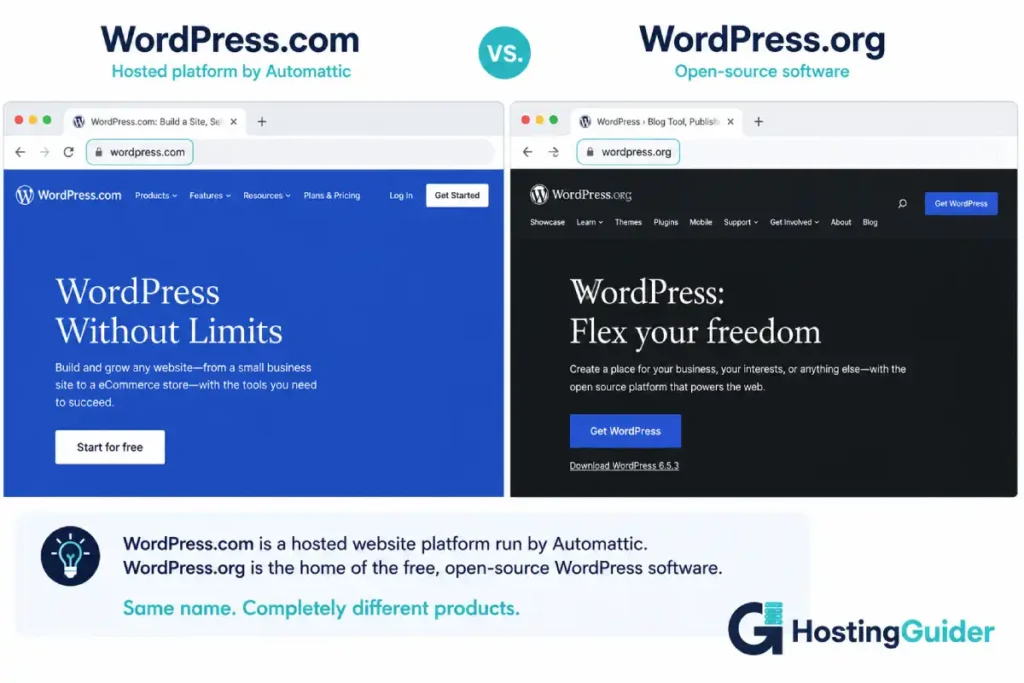
The 60-Second Explanation of the WordPress.com vs WordPress.org Confusion
Here is the situation in plain terms.
WordPress is a piece of software. It is open-source, owned by the non-profit WordPress Foundation, and has been free to download since 2003. Over 800 million websites run on it. When someone says “I built my website on WordPress,” they almost always mean this version. According to current data, it powers more than 40% of all websites on the internet. You get it at wordpress.org.
WordPress.com is a product built on top of that software. It is run by Automattic, a private company founded by Matt Mullenweg, who is also the co-creator of the original WordPress software. Automattic takes the WordPress software and runs it on their servers, then charges for hosting plans. You sign up at wordpress.com.
The confusion is structural. Both sites have “WordPress” in the URL. Both use the same dashboard. Both run on identical code underneath. The difference is that WordPress.com wraps that software in a managed product with pricing tiers, feature restrictions, and platform decisions that the free software version does not have.
The clearest way to say it: WordPress.org is the software. WordPress.com is a hosting service that uses that software.
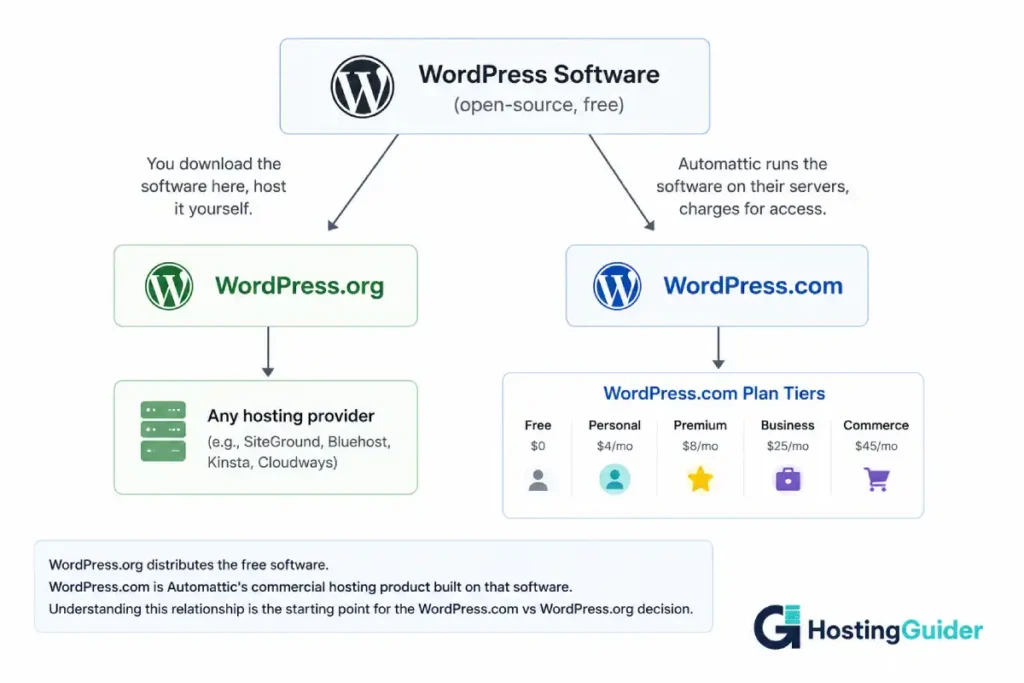
WordPress.com vs WordPress.org: Quick Comparison
| Feature | WordPress.com | WordPress.org (Self-Hosted) |
|---|---|---|
| Software cost | Free (hosting costs money) | Free |
| Hosting | Included (Automattic’s servers) | Separate purchase required |
| Custom plugins | Business plan and above only ($25/mo+) | Unlimited on all plans |
| Custom themes | Business plan and above only | Unlimited |
| Storage | 1GB to unlimited (by plan) | Your hosting limit |
| Custom domain | Personal plan+ ($4/mo+) | Yes, from any registrar |
| WordPress.com branding removed | Personal plan+ | Not applicable |
| Advertising shown | Free plan only | Never (unless you add it) |
| Transaction fees (ecommerce) | 0% on Commerce, varies below | Zero (WooCommerce is free) |
| Full code access (FTP/SSH) | No | Yes |
| SEO plugin (Yoast etc.) | Business plan+ | Any plan |
| Design flexibility | Plan-dependent | Unlimited |
| Support | Included | Hosting provider |
| Backups | Included | Plugin or host |
| Managed updates | Yes | Yes (managed hosts) |
| Move to another host | Possible (with effort) | Minutes (migration plugin) |
| Data ownership | Partial (Automattic stores it) | Full |
| Free tier | Yes (with .wordpress.com URL) | No (hosting required) |
What WordPress.com Actually Is and What It Restricts
WordPress.com is a legitimate hosting platform. Millions of websites run on it. The technical infrastructure is solid. The support is real. For a specific type of user, it is genuinely the right choice.
The product is built around tiers. Each tier unlocks more of the underlying WordPress software’s capability. The free tier gives you a website at yourname.wordpress.com with WordPress-served advertisements on your pages. You do not control those ads. You do not earn from them.
The paid tiers, in order:
Free: yourname.wordpress.com, 1GB storage, WordPress ads displayed to your visitors, no custom domain, no plugins, no custom themes.
Personal (~$4/month, billed annually): Custom domain, no WordPress ads, 6GB storage. Still no plugins. Still no custom themes beyond WordPress.com’s curated selection.
Premium (~$8/month): Custom themes from WordPress.com’s library, 13GB storage, simple payment buttons, basic monetization. Still no third-party plugins.
Business (~$25/month): Third-party plugins finally unlocked. Custom theme installation unlocked. 50GB storage. This is the first tier that approximates what self-hosted WordPress.org gives you on the cheapest $3/month hosting plan.
Commerce (~$45/month): Full WooCommerce integration, no transaction fees, ecommerce-specific tools.
The critical WordPress.com vs WordPress.org cost point: The Business plan at $25/month is the minimum WordPress.com tier that gives you what free self-hosted WordPress.org gives you on $10/month hosting. The $4 and $8/month plans are not cheaper versions of the same product. They are a fundamentally restricted product that happens to share a name.
Most people who sign up for a free or Personal WordPress.com account discover this when they try to install their first plugin and receive: “Upgrade your plan to install plugins.”
What WordPress.org Actually Is and What It Requires
WordPress.org hosts the software you download and install on a server. The software is free. The server costs money. That is the full transaction.
Once installed, every feature of WordPress is available immediately regardless of what you pay for hosting. A $3/month hosting plan gets you the same plugin library and theme library as a $300/month hosting plan. The difference is performance and support, not capability.
What WordPress.org requires:
A hosting account. Most people use managed WordPress hosting, which installs WordPress for you with a one-click installer. You do not need to know what FTP is. You do not need to configure a server. You click “Install WordPress” in your host’s dashboard and it is running in sixty seconds.
A domain name. Approximately $12 to $15 per year from any domain registrar.
That is the complete requirement for most non-technical users. After that, the WordPress dashboard looks nearly identical to WordPress.com’s dashboard. The difference is that nothing is locked behind a plan upgrade.
What WordPress.org does not include:
Hosting support. If something breaks at the server level, you contact your hosting provider, not WordPress. Managed WordPress hosts like SiteGround, WP Engine, and Pressable handle security, updates, and backups automatically. Budget shared hosts do not.
Automatic backups are not guaranteed. Managed hosts include them. Budget hosts may not.
This is where the “WordPress.org is harder” perception comes from. It is not the software that is harder. It is the responsibility of choosing a hosting provider and understanding that the hosting provider is separate from the software.
Plugin and Theme Access: The Biggest Gap in the WordPress.com vs WordPress.org Comparison
This is the comparison that matters most for what your website can actually do.
On WordPress.com (Free, Personal, Premium plans)
You cannot install plugins from the WordPress.org plugin directory. You cannot install themes from the WordPress.org theme directory or from third-party theme sellers.
This means you cannot install:
- Yoast SEO or RankMath (the standard WordPress SEO tools)
- Contact Form 7 or WPForms (standard contact form plugins)
- WooCommerce (the standard WordPress ecommerce platform)
- Any booking, reservation, or appointment system plugin
- Any specific business function that requires a plugin
- Any premium theme from ThemeForest, Elegant Themes, or any third-party source
You are limited to the features WordPress.com builds natively and the curated selection of themes they offer.
On WordPress.com (Business plan, $25/month)
Plugin and theme installation are unlocked. You can now use Yoast SEO, install premium themes, and access WooCommerce. This plan is where WordPress.com becomes functionally comparable to self-hosted WordPress.org.
The cost comparison at this point: WordPress.com Business at $25/month versus managed WordPress.org hosting at $15 to $25/month. Similar price. WordPress.org on managed hosting gives you more control, better performance on most benchmarks, and no platform restrictions going forward.
On WordPress.org (Any Hosting)
The full WordPress plugin directory contains over 60,000 free plugins. Every premium theme marketplace is available. Every developer-built custom plugin is installable. There are no feature restrictions based on a plan tier.
Pricing: When WordPress.com vs WordPress.org Costs More Than You Expected
The WordPress.com free plan exists. It is not a viable option for a professional website. Understanding what each tier actually gives you shows where the real price comparison lies.
WordPress.com Pricing Reality
| Plan | Monthly (annual billing) | Plugin Access | Custom Domain |
|---|---|---|---|
| Free | $0 | No | No (.wordpress.com) |
| Personal | ~$4/month | No | Yes |
| Premium | ~$8/month | No | Yes |
| Business | ~$25/month | Yes | Yes |
| Commerce | ~$45/month | Yes (WooCommerce) | Yes |
The free plan serves WordPress.com ads on your site. Your visitors see advertisements you did not choose and do not earn from. This is not a minor limitation. It is a meaningful user experience problem for any professional context.
The Personal plan at $4/month removes the ads and adds a custom domain. It does not add plugin access. A $4/month WordPress.com site cannot install a contact form plugin, an SEO plugin, or any other third-party tool.
The honest minimum for a functional professional website on WordPress.com: $25/month.
WordPress.org Total Cost
| Item | Annual Cost |
|---|---|
| WordPress software | Free |
| Domain name | ~$15/year |
| Entry managed hosting (SiteGround, DreamHost) | $36 to $120/year |
| Premium theme (optional, one-time) | $0 to $100 |
| SEO plugin (Yoast free) | Free |
| Contact form plugin (WPForms free) | Free |
Total for a functional professional website: $51 to $135/year. Monthly equivalent: $4 to $11/month.
This WordPress.org setup with a $10/month managed host gives you every plugin, every theme, full customisation capability, and more design flexibility than WordPress.com Business at $25/month.
Three-Year Cost Comparison for a Business Website
| Configuration | Monthly | Three-Year Total |
|---|---|---|
| WordPress.com Free | $0 (ads on site) | $0 (plus Automattic’s ad revenue from your visitors) |
| WordPress.com Personal (no plugins) | $4 | $144 (still no plugins) |
| WordPress.com Business (with plugins) | $25 | $900 |
| WordPress.org on entry hosting | $5 to $10 | $180 to $360 |
| WordPress.org on managed hosting | $15 to $25 | $540 to $900 |
The WordPress.com vs WordPress.org pricing conclusion: WordPress.org on managed hosting costs the same as or less than WordPress.com Business while giving you more.
The only way WordPress.com costs less for a serious website is the Personal plan at $4/month, which does not allow plugins. That is not a comparable product.
Who Controls Your Site and Data: WordPress.com vs WordPress.org Ownership
WordPress.com Data Control
Your content lives on Automattic’s servers. Automattic can and does suspend accounts that violate their terms of service. If your content is suspended, you may or may not have advance notice or a migration path depending on the reason.
WordPress.com provides content export tools. You can download your posts and pages as XML files. However, you cannot access the server directly, download your files via FTP, or access the database. Moving away from WordPress.com requires using their export tool and rebuilding on the new platform.
Automattic can also change the platform’s terms, pricing, or features. In 2022, WordPress.com converted some users from legacy free plans to plans with limitations they did not previously have. Users on grandfathered terms found their site configuration changed by platform decision.
WordPress.org Control
On self-hosted WordPress.org, you access the server directly. Your files are yours. Your database is yours. You create backups whenever you want. You move to a new host by copying files and database, a process that takes minutes with a migration plugin.
No platform operator can change your hosting terms without your hosting provider’s involvement. No company holds your content on your behalf.
Our comparison of SiteGround vs Cloudways covers the two most common managed WordPress.org hosting choices for small businesses. For non-technical users wanting maximum management with minimal decisions, our DreamHost DreamPress vs Pressable comparison covers two managed platforms built specifically for users who want WordPress.org capability without server administration.
SEO Capability: WordPress.com vs WordPress.org Performance in Search
WordPress.com SEO
WordPress.com provides basic SEO tools across all plans. Meta titles and descriptions are editable. Sitemaps are generated automatically. The Jetpack plugin (owned by Automattic) provides some SEO features.
On the Business plan and above, you can install Yoast SEO or RankMath. On lower plans, you cannot. For any website targeting competitive search terms, running without Yoast or RankMath is a meaningful disadvantage: no real-time content analysis, no schema markup controls, no breadcrumb structured data, no granular sitemap management.
On lower WordPress.com plans, you are also limited in your ability to control technical SEO factors like URL structures, redirect management, and canonical tags.
WordPress.org SEO
Yoast SEO is free and available on any WordPress.org installation. Every post and page gets real-time SEO analysis, keyword density guidance, readability scoring, meta preview, and schema markup options. The technical SEO control is complete.
For a business that depends on Google organic search for customers, WordPress.org with Yoast and a quality managed host is the strongest available platform. The SEO ceiling on WordPress.com lower plans is a genuine limitation that affects search performance.
E-Commerce: WordPress.com vs WordPress.org for Selling Online
WordPress.com E-Commerce
WooCommerce is available on WordPress.com Commerce plans ($45/month). The integration is managed and pre-configured.
For a simple store with basic products and standard payment needs, WordPress.com Commerce works. The platform handles hosting, security, and WooCommerce setup.
The limits: Commerce plan locks you into Automattic’s managed environment. Custom WooCommerce extensions are available but you are still operating within WordPress.com’s platform restrictions. Moving the store later requires migrating WooCommerce data, which is more complex than migrating a blog.
WordPress.org E-Commerce
WooCommerce is a free plugin on WordPress.org. Install it on any plan from any hosting provider. No platform fee. No revenue cut. Full access to the entire WooCommerce extension library covering subscriptions, memberships, bookings, custom pricing, and every other commerce need.
For a store that plans to grow, self-hosted WordPress.org with WooCommerce on managed hosting is more flexible, more portable, and at the $25 to $45/month price point, comparable in cost to WordPress.com Commerce.
The Migration Trap: The WordPress.com vs WordPress.org Switch Nobody Warns You About
This is the most expensive lesson most WordPress.com users learn.
The migration path from WordPress.com to WordPress.org is well-documented. It works. It is not smooth. Here is what actually happens.
What transfers easily:
- Posts and pages export as XML and import into WordPress.org cleanly
- Images can be exported and re-downloaded
- Basic site structure transfers
What does not transfer easily:
- WordPress.com’s custom themes do not transfer to WordPress.org. The theme files are Automattic’s property. You rebuild the design from scratch using a WordPress.org theme.
- Comments, if you had them, require manual work or a specific plugin to migrate
- Custom domain settings need to be manually pointed at the new host
- Any third-party service integrations need to be reconfigured
The real cost of migrating:
For a technical user, the migration takes four to eight hours of focused work. For a non-technical user, it requires hiring a developer (typically $200 to $500 for a straightforward migration) or following a detailed tutorial while things go wrong in unpredictable places.
The content migrates. The look does not. The URLs may or may not remain the same (URL changes affect SEO ranking). Every inbound link that pointed to your WordPress.com URL needs a redirect if you want to preserve search rankings.
If you had started on WordPress.org from day one with a managed host, this migration never happens. The content is already in a database you own, on a server you control, with a design you own.
The migration trap is this: WordPress.com’s free and cheap tiers feel like a way to start without commitment. The commitment is actually deeper than it appears, because moving away from WordPress.com requires a full site rebuild rather than a simple host transfer.
Who WordPress.com Is Actually For in the WordPress.com vs WordPress.org Decision
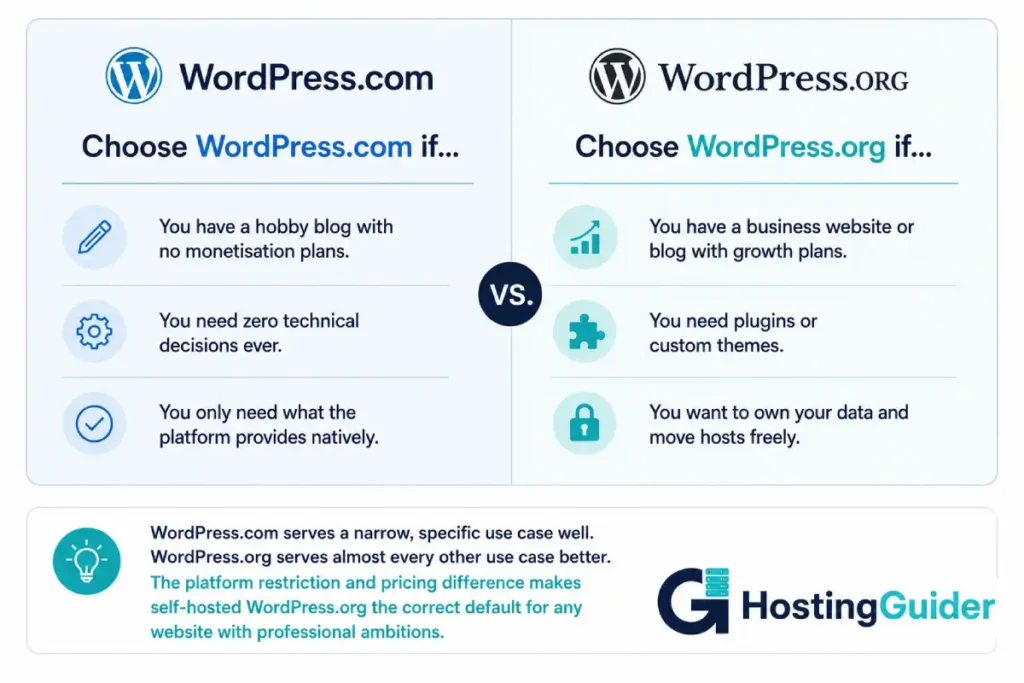
WordPress.com is the right choice in specific, limited situations.
WordPress.com is genuinely right for:
- A hobby blogger who wants to write occasionally and has no plans to monetise, grow an email list, use plugins, or customise the design significantly
- A private journal or family website where the audience is known, traffic is minimal, and professional appearance is not a priority
- Someone who tried building a website and wants the absolute minimum viable presence with no technical decisions whatsoever, even at the cost of functionality
- An organisation that uses the WordPress.com VIP service (enterprise tier for major media companies with a support and compliance requirement)
- A student or beginner who wants to practice using a WordPress dashboard before committing to a self-hosted setup (WordPress.com’s dashboard is nearly identical to WordPress.org’s)
WordPress.com is the wrong choice for:
- Any business with a website as a growth channel
- Any blogger with monetisation goals
- Anyone who will eventually want to install any plugin whatsoever
- Anyone targeting competitive keywords who needs full SEO control
- Anyone building an online store
- Anyone who cares about not having a competitor’s ads on their site without paying to remove them
The free and Personal plan specifically are not viable options for a professional website. They are practice environments or very specific personal publishing cases.
Who WordPress.org Is Actually For in the WordPress.com vs WordPress.org Decision
WordPress.org is the right choice for almost every website that is more than a personal hobby.
WordPress.org is right for:
- Any business that uses its website to generate customers through search, content, or advertising
- Any blogger who intends to grow an audience, monetise, or build an email list
- Any online store, regardless of size
- Any membership site, course platform, or subscription-based content business
- Any developer or agency building websites for clients
- Any organisation that needs specific functionality from the plugin ecosystem
- Any publisher who wants full ownership of their content and subscriber data
- Any website that may change significantly in the next two years and needs the flexibility to do so
The managed hosting solution for non-technical users:
The objection most WordPress.com users have to WordPress.org is technical complexity. This objection is significantly reduced by managed WordPress hosting. Our Kinsta vs WP Engine comparison covers the two premium managed WordPress.org platforms. Both handle security, performance, backups, and updates automatically. The user experience for daily publishing is identical to WordPress.com at a comparable or lower price with none of the plugin restrictions.
For budget-conscious users, SiteGround’s managed WordPress hosting starts at approximately $3/month for the first year and handles one-click installation, daily backups, and managed security. The plugin library is fully available from day one.
Final Verdict
The WordPress.com vs WordPress.org comparison is not really a competition between equals. It is a question of which product matches your situation.
WordPress.com is a hosting service with tiered feature access. The free tier is not functional for professional use. The cheap tiers ($4 to $8/month) do not allow plugins. The functional tier ($25/month Business) costs as much or more than managed WordPress.org hosting with full capability. The platform holds your data on its servers.
WordPress.org is free software with unlimited capability. It requires a hosting account. It does not restrict plugins, themes, or customisation by plan tier. The data is yours. The design is yours. Moving to a different host takes minutes.
For anyone building anything they care about, WordPress.org on managed hosting is the right choice. It costs less than the comparable WordPress.com plan, gives you more, and removes every platform restriction.
WordPress.com is appropriate for users who genuinely need zero hosting decisions and will never install a plugin. Those users exist. They are a small percentage of people who start a WordPress.com site with ambitions.
Final Comparison Summary
| Factor | WordPress.com | WordPress.org |
|---|---|---|
| Software cost | Free | Free |
| Hosting cost | $0 to $45/month (plan tier) | $3 to $50/month (separate) |
| Plugin access | Business plan+ ($25/mo) | All plans |
| Theme access | Business plan+ | All plans |
| Minimum cost for full features | $25/month | ~$10/month |
| Three-year cost (functional) | $900 (Business plan) | $360 to $900 |
| Data ownership | Partial | Full |
| Platform restrictions | Yes (plan-based) | None |
| SEO tools (Yoast) | Business plan+ | All plans |
| Custom design | Business plan+ | All plans |
| Migration away | Complex (design rebuild) | Minutes |
| Hosting support | Automattic | Your chosen host |
Frequently Asked Questions
WordPress.com vs WordPress.org: What Is the Actual Difference?
WordPress.org is the website where you download the free, open-source WordPress software. WordPress.com is a commercial hosting service run by Automattic that uses the WordPress software on its servers and charges monthly plans to access it. WordPress.org software can be installed on any hosting provider. WordPress.com is only available through Automattic’s service.
Is WordPress.com free?
WordPress.com has a free plan. It displays Automattic’s advertisements on your site, limits you to a wordpress.com subdomain (yoursite.wordpress.com), gives you 1GB storage, and does not allow plugin installation or custom themes. For a professional website, the free plan is not viable. The minimum functional paid tier is the Business plan at approximately $25/month.
Is WordPress.org really free?
The software is free. Hosting is not. You download WordPress from wordpress.org at no cost and install it on a server you pay for separately. Entry-level managed WordPress hosting costs $3 to $10/month. The total cost of a WordPress.org website is the hosting fee plus a domain name (~$15/year). There is no per-feature charge and no plan tier that restricts what you can install.
Can I use plugins on WordPress.com?
Only on the Business plan ($25/month) and above. The free, Personal, and Premium plans on WordPress.com do not allow installing plugins from the WordPress.org directory or from third-party sources. This includes contact form plugins, SEO plugins, WooCommerce, booking systems, and every other plugin-based functionality. WordPress.org (self-hosted) allows unlimited plugin installation on every hosting plan at every price point.
Should I use WordPress.com or WordPress.org for a business website?
WordPress.org on managed hosting is almost always the correct choice for a business website. It costs less at the functional tier (managed hosting at $10 to $25/month versus WordPress.com Business at $25/month), gives you full plugin and theme access from any hosting plan, gives you complete data ownership, and has a migration path to any other host without a site rebuild. WordPress.com is appropriate for personal blogs with no growth or monetisation plans.
WordPress.com vs WordPress.org Migration: Can I Switch Between Them?
Yes, with effort. WordPress.com allows you to export your posts and pages as XML files, which WordPress.org can import. Images require a separate download and re-upload. The biggest challenge is your theme: WordPress.com’s themes do not transfer to WordPress.org. You rebuild the design from scratch on the new platform. If you had significant custom styling on WordPress.com, the visual rebuild takes additional time. The earlier you make this switch, the less work it involves.
WordPress.com vs WordPress.org: What Does Self-Hosted WordPress Mean?
Self-hosted WordPress means using the free WordPress.org software on a hosting server you pay for and control, rather than using WordPress.com’s managed platform. When someone refers to “WordPress” in the context of building a website, they almost always mean self-hosted WordPress. The “self-hosted” distinction exists specifically to differentiate it from WordPress.com.
WordPress.com vs WordPress.org SEO: Which Version Performs Better in Search?
WordPress.org is better for SEO at every comparable price point. On any WordPress.org hosting plan, you can install Yoast SEO or RankMath immediately, giving you real-time content analysis, full schema markup control, sitemap management, redirect handling, and every other SEO tool available. WordPress.com restricts Yoast SEO and similar tools to the $25/month Business plan. A $10/month self-hosted WordPress.org installation has better native SEO capability than a $20/month WordPress.com plan.


