
Linode (Akamai Cloud Computing) Review 2026: Plans, Pricing, and Who It’s Actually For
Linode has spent over twenty years as one of the developer-favorite names in cloud VPS hosting, the kind of provider people recommend by word of mouth rather than ad spend. In 2022, Akamai Technologies bought it for $900 million and folded it into “Akamai Cloud Computing,” pairing Linode’s compute instances with Akamai’s edge and security network, one of the largest content-delivery networks in the world.
That combination is also where most of the confusion starts. The product is still called Linode in the dashboard and in most day-to-day use, but pricing pages, documentation, and marketing now live under the Akamai brand, and reviews that don’t explain the name change leave readers wondering if they’re looking at the same company.
4.6/5 (Based on Capterra)
HostingGuider uses affiliate links. We may earn a commission if you purchase through them, at no extra cost to you.
This review is built from Linode and Akamai’s own published documentation plus named independent sources. See “How We Evaluated Linode” near the end, and our Methodology page, for what that means.
Pros and Cons
✓ Pros
- ✓ Simple, transparent hourly and monthly pricing published for every plan
- ✓ Phone support available, unusual among developer-focused cloud providers at this price point
- ✓ Akamai\'s edge network sits behind the platform, a genuine architectural difference from most VPS competitors
- ✓ Strong G2 rating (4.6/5) from business and IT reviewers
- ✓ Free managed Kubernetes control plane (LKE)
- ✓ Long track record, operating continuously since 2003
✗ Cons
- ✗ No blanket free tier, though a time-limited signup credit exists (see Pricing)
- ✗ Not a managed WordPress host, initial setup and ongoing maintenance are on you
- ✗ Dedicated CPU and High Memory entry prices are higher than some direct VPS competitors at the cheapest tier
- ✗ Support has no stated response-time SLA published on the official support page
- ✗ GPU instance pricing and availability shift often enough that the sticker price needs a direct check
Linode Review Summary
| Best for | Developers and small technical teams who want simple VPS pricing backed by a large network operator |
| Starting price | $5/mo shared compute (Nanode 1GB) |
| Data center locations | 20+ core compute regions across multiple continents, expanding regularly |
| Uptime SLA | 100% (per Linode’s own service level agreement) |
| Support channels | Ticket, phone (multiple regions), community Q&A, documentation |
| Free trial/credit | $100 credit for 60 days on qualifying new accounts, GPU excluded |
| Refund policy | Unused signup credit expires at trial end; standard usage billed per Akamai’s terms, check current terms before signing up |
| G2 rating | 4.6/5 (406 reviews) |
Good fit if you: want simple, predictable VPS pricing, need phone support as an option rather than ticket-only, are comparing providers where a large edge/CDN network matters to your architecture, or want a free managed Kubernetes control plane.
Look elsewhere if you: want a fully managed WordPress or website-builder experience, need the absolute cheapest entry-level dedicated CPU price, or want a provider with a permanently free starter tier rather than a time-limited credit.
Pricing & Plans
Linode (Akamai Cloud Computing) publishes exact hourly and monthly rates for every compute tier, with the monthly price acting as a cap so a partial month never costs more than the listed rate.
RTX PRO 6000 Blackwell x1 |
RTX PRO 6000 Blackwell x2 |
RTX PRO 6000 Blackwell x4 |
RTX 6000 Quadro x1 |
RTX 6000 Quadro x2 |
RTX 6000 Quadro x3 |
RTX 6000 Quadro x4 |
G8 Dedicated Compute 4×2 |
G8 Dedicated Compute 8×4 |
G8 Dedicated Compute 16×8 |
G8 Dedicated Compute 32×16 |
G8 Dedicated Compute 64×32 |
G8 Dedicated Compute 128×64 |
G8 Dedicated General 8×2 |
G8 Dedicated General 16×4 |
G8 Dedicated General 32×8 |
G8 Dedicated General 64×16 |
Nanode 1 GB |
Linode 2 GB |
Linode 4 GB |
Linode 8 GB |
Linode 16 GB |
High Memory 24 GB |
High Memory 48 GB |
High Memory 90 GB |
High Memory 150 GB |
NETINT Quadra T1U VPU x1 Small |
NETINT Quadra T1U VPU x1 Medium |
NETINT Quadra T1U VPU x2 Small |
|---|---|---|---|---|---|---|---|---|---|---|---|---|---|---|---|---|---|---|---|---|---|---|---|---|---|---|---|---|
$2.50
/hr |
$5.00
/hr |
$10.00
/hr |
$1.50
/hr |
$3.00
/hr |
$4.50
/hr |
$6.00
/hr |
$0.07
/hr |
$0.14
/hr |
$0.27
/hr |
$0.54
/hr |
$1.08
/hr |
$2.16
/hr |
$0.11
/hr |
$0.21
/hr |
$0.42
/hr |
$0.84
/hr |
$0.0075
/hr |
$0.018
/hr |
$0.036
/hr |
$0.072
/hr |
$0.144
/hr |
$0.09
/hr |
$0.18
/hr |
$0.36
/hr |
$0.72
/hr |
$0.42
/hr |
$0.53
/hr |
$0.73
/hr |
|
|
|
|
|
|
|
|
|
|
|
|
|
|
|
|
|
|
|
|
|
|
|
|
|
|
|
|
|
All figures above come from Linode/Akamai’s own published pricing documentation. Dedicated CPU scales up to 256 vCPU / 512GB RAM configurations, and higher-tier GPU options (including RTX PRO 6000 Blackwell cards) are available at higher hourly rates with limited regional availability, check Akamai’s current pricing pages for the exact number at the tier and region you need, since GPU availability and pricing shift more often than standard compute.
A real cost example: the 2 vCPU / 4GB shared instance most small production workloads would reach for runs $24/mo on paper. Add backups (Linode/Akamai’s own backup service is priced separately per instance size) and a NodeBalancer if you need load balancing across more than one instance, and the realistic monthly total climbs past the sticker price, the same pattern seen across almost every VPS provider, so budget for it rather than comparing bare instance prices alone.
Free credit: new accounts that haven’t used a Linode/Akamai free trial before can qualify for a $100 signup credit valid for 60 days, per Akamai’s own offer page. It applies to Compute, Object Storage, Block Storage, and NodeBalancers, but explicitly excludes GPU plans, and unused credit expires when the trial period ends rather than rolling over.
Refund policy: Linode/Akamai’s public terms don’t describe a blanket money-back guarantee beyond the signup credit itself. Check the current Promotional Policy and Terms of Service pages directly before assuming a refund path exists for standard usage.
Full, current pricing for every configuration: Akamai Cloud Computing Pricing
Use Cases
AI Model Training & Inference
The GPU lineup spans budget NVIDIA RTX 4000 Ada instances for lighter inference work up to higher-end Blackwell-class cards for training, sized to the job rather than one option fits all.
High-Performance Application Hosting
Dedicated CPU instances remove the shared-vCPU noisy-neighbor risk for production apps and APIs with real, consistent traffic.
Media Rendering & Video Processing
The Accelerated tier, built around NETINT video processing units, targets transcoding and rendering workloads specifically rather than general compute.
Database & Enterprise Workloads
High Memory instances and managed MySQL/PostgreSQL databases fit workloads where RAM for caching and in-memory processing matters more than raw CPU count.
Linode Hosting Types
Akamai Cloud Computing groups its products under the Linode name in a few distinct lines, worth knowing before comparing prices across the wrong tier:
Cloud Compute (Linodes)
Shared-vCPU VPS instances, Linode’s original and still most-used product, spanning the Nanode entry tier through larger shared configurations.
Dedicated CPU
Isolated CPU cores for consistent, resource-intensive workloads. No noisy neighbours. Best for high-traffic applications, CI/CD pipelines, and database servers that need predictable performance.
Managed Kubernetes (LKE)
Production-grade Kubernetes clusters with automated upgrades and scaling. Worker nodes are billed at standard compute rates. The control plane is provided free of charge.
GPU Instances
NVIDIA GPU instances for AI training, inference, and rendering workloads. Available in shared and dedicated configurations with hourly billing.
Managed Databases
Fully managed MySQL and PostgreSQL clusters. Automated backups, failover, and high-availability configurations included. No database administration required.
Object Storage
S3-compatible object storage with a global CDN. Pay per GB stored and transferred. No minimum commitment.
Detailed Features
About Linode and Akamai
Linode was founded in 2003 by Christopher Aker, the name a portmanteau of “Linux” and “node.” It operated out of Galloway, New Jersey before relocating to Philadelphia’s historic Corn Exchange National Bank building in 2018, and ran independently for nearly two decades before Akamai Technologies acquired it in February 2022 for $900 million.
Akamai is a much larger company: a content delivery and edge security network operator whose infrastructure spans thousands of points of presence globally, and it has folded Linode’s compute products into “Akamai Cloud Computing” (also called Akamai Connected Cloud), pairing VPS hosting with Akamai’s own edge network.
Linode disclosed multiple security incidents in its earlier, independent history: roughly 40,000 bitcoins were reported stolen from a small number of customer accounts in 2012, an intrusion via an Adobe ColdFusion vulnerability affected web servers in 2013, and the company weathered sustained DDoS attacks in late 2015 and again in 2016. Worth knowing as historical context, none of these are recent events under Akamai ownership.
Sources: Linode on Wikipedia, Akamai to Acquire Linode press release
Performance Data
Linode/Akamai’s own published SLA and specifications provide the baseline. Independent benchmark data from an external testing service adds real, measured performance evidence on top of that.
What independent benchmarking shows
VPSBenchmarks.com runs its own automated performance trials against Linode/Akamai instances on a recurring basis, tracking CPU, disk, network, and stability across plan tiers. This is a benchmarking database, not another site’s editorial review of Linode, citing it adds independently measured data without leaning on a competing review for the facts.
One tier from VPSBenchmarks’ most recent published trial:
| Plan | Web performance | Raw CPU | Stability | Disk I/O | Network | Source |
| Shared 4GB ($24/mo) | Grade C (10.5/20) | Grade E (5.3/20) | Grade B (16.1/20) | Grade D (9.9/20) | Grade C (11.4/20) | VPSBenchmarks.com, trial dated October 17, 2025 |
The tested instance ran an AMD EPYC 7542 processor and took an average of 80 seconds to provision. It scored 54 out of 100 on VPSBenchmarks’ consistency measure, meaning individual servers of the same plan type show moderate variation rather than identical results every time.
VPSBenchmarks also notes Linode across 24 data center locations spanning 4 continents at the time of testing, and that the platform previously placed third for “Best Value” in two of the service’s own award rounds (April 2023 and December 2021).
The low raw-CPU grade on this shared tier matches what you’d expect from Linode’s own architecture: shared vCPU cores on the standard Cloud Compute line, with Dedicated CPU as the separate, higher-priced tier built specifically to avoid that ceiling. If raw CPU performance matters for your workload, that’s a real reason to budget for Dedicated CPU rather than the cheapest shared listing.
Source: VPSBenchmarks.com, Linode/Akamai performance data. These figures reflect a specific instance tested at a specific point in time by an independent benchmarking service, not a guarantee of what any given new deployment will see.
Uptime
| Metric | Result | Source |
| Uptime SLA | 100% | Linode/Akamai’s own service level agreement |
Linode/Akamai’s published SLA guarantees 100% uptime, backed by service credits if unmet. This is a contractual SLA, not a historical uptime measurement. If you want to check actual recent incident history yourself, Akamai publishes a live status dashboard covering Cloud Computing services.
Security and network
Linode/Akamai states that DDoS protection is included at the network level rather than sold as a separate add-on, a genuine point of difference from several VPS competitors that price it separately.
On the compliance side, Linode’s own support documentation states it adheres to PCI DSS requirements and that its services can be configured to meet HIPAA environment standards, with data center compliance certifications available on request. Akamai as a company holds broader certifications including ISO/IEC 27001, relevant to the infrastructure Linode now runs on, though Linode-specific certification documents are typically provided directly through a support request rather than published openly.
Sources: Linode Security Certifications, Linode Community, Akamai ISO/IEC 27001 certification
Global network
Akamai has been actively expanding Linode’s data center footprint since the acquisition, adding core compute regions across North America, Latin America, Europe, and Asia in successive rollouts, cities named in Akamai’s own recent expansion announcements include Miami, Los Angeles, Amsterdam, Jakarta, Milan, Osaka, and São Paulo. Because this footprint changes faster than most providers’ regional maps, check Akamai’s own current data center list before committing to a region-dependent deployment.
Sources: Akamai Expands World’s Most Distributed Cloud Network press release, Akamai Continues to Expand US and Global Cloud Footprint, Data Center Frontier
Support & Usability
1. The Control Panel: Linode Cloud Manager
Linode’s control panel, the Cloud Manager, is built for developers rather than someone wanting a one-click “install WordPress and walk away” experience. It includes a 1-click app marketplace, backup and snapshot management, and Linode’s own longtime performance-monitoring tool, Longview.
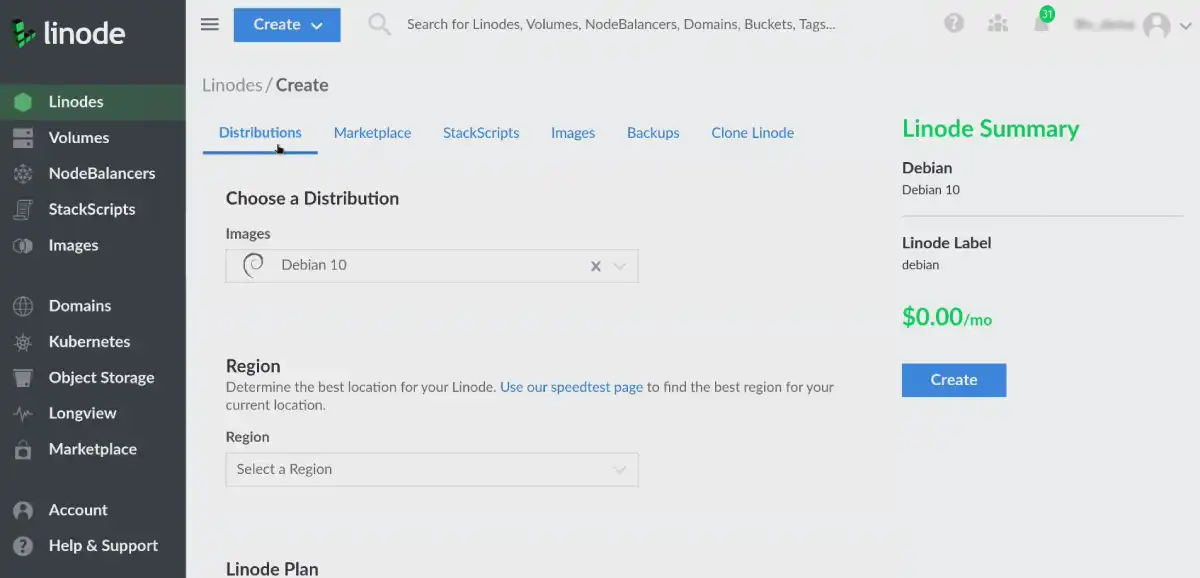
There’s no drag-and-drop site builder and no managed setup service bundled into standard plans. You’re expected to configure the server yourself, or use Linode Managed as a separate paid add-on for hands-on operational support.
What public reviews say about support
Linode/Akamai’s support page lists ticket support, phone support across multiple regional numbers, a searchable community Q&A knowledge base, and email support for account matters. Phone support at this price point is genuinely unusual among developer-focused cloud providers, most ticket-only competitors don’t offer it at all.
Akamai’s own support page doesn’t publish a stated response-time SLA, so treat any specific response-time figure you see elsewhere as anecdotal rather than an official commitment.
Public review aggregator scores, for context: G2 rating 4.6/5 across 406 reviews. HostingGuider could not independently verify a current Trustpilot rating for Linode’s own domain directly at the time of writing, so no Trustpilot figure is cited here, check Trustpilot’s own page directly for the current number.
Sources: Akamai Cloud Support, G2 Reviews, Akamai Cloud Computing
The trade-off: no managed WordPress, developer-first design
Linode doesn’t offer managed WordPress hosting the way a provider built around content sites does. There’s no automatic WordPress-specific caching layer, no managed plugin updates, and no support team that will troubleshoot a broken theme for you. The 1-click marketplace installs WordPress, everything after that is on you.
If none of that sounds familiar yet, a managed hosting provider will get a WordPress site running faster and with less ongoing maintenance. Linode rewards existing server-management comfort rather than teaching it.
Frequently Asked Questions
Is Linode the same as Akamai Cloud?
Yes. Akamai Technologies acquired Linode in February 2022 for $900 million and now sells its compute products as Akamai Cloud Computing (also called Akamai Connected Cloud), while the dashboard and community still commonly use the Linode name.
How much does Linode cost?
Shared compute starts at $5/mo (Nanode, 1 vCPU / 1GB RAM). Dedicated CPU starts around $36/mo, High Memory around $60/mo, and GPU instances start around $0.52/hour, per Akamai’s own current pricing pages, which are worth checking directly since GPU pricing shifts more often than standard compute.
Is Linode good for WordPress?
It can host WordPress via the 1-click installer, but it’s not a managed WordPress host. You’re responsible for updates, security, caching, and performance tuning yourself. If you want a provider that manages WordPress for you, look at a managed WordPress hosting plan instead.
Where are Linode’s data centers located?
20+ core compute regions across North America, Latin America, Europe, and Asia as of Akamai’s most recent expansion announcements, with new regions added on a rolling basis. Check Akamai’s own current data center list for the exact, up-to-date count.
Does Linode offer phone support?
Yes, across multiple regional numbers, alongside ticket support and a community Q&A knowledge base. This is unusual among developer-focused VPS providers, most competitors are ticket-only.
Is Linode reliable?
Linode/Akamai’s own SLA guarantees 100% uptime with service credits if unmet. That’s a contractual guarantee, not an independently measured historical average, check Akamai’s public status dashboard if you want to see real incident history yourself.
Does Linode include DDoS protection?
Per Linode/Akamai’s own documentation, network-level DDoS protection is included rather than sold as a separate add-on, a genuine difference from several competitors that charge extra for it.
Is Linode GDPR compliant?
Linode/Akamai states its services can be configured to support GDPR compliance, and Akamai as a company holds broader data-protection and security certifications. Specific compliance documentation for your region and use case is typically available through a support request rather than a single public page.
How does Linode compare to DigitalOcean?
Both are developer-focused VPS providers with transparent, published pricing. Linode’s clearest current differentiator is Akamai’s edge network sitting behind it and its inclusion of phone support, DigitalOcean’s ecosystem leans more heavily on its own managed app platform and marketplace. The right choice depends on which specific features and regions matter for your project.
Our Verdict
Linode, now Akamai Cloud Computing, is a capable, developer-oriented VPS provider with a long track record, transparent pricing, and the backing of one of the world’s largest edge networks. It’s not a hosting company built for hand-holding, non-technical users, or anyone expecting a managed WordPress experience.
Based on the published data above, Linode is worth considering if:
- You’re comfortable managing your own Linux server
- You want phone support as an option, not just tickets
- A large edge/CDN network behind your compute provider matters to your architecture
- You want a free managed Kubernetes control plane
Look elsewhere if:
- You want a fully managed WordPress or website-builder experience
- You need the lowest possible entry price on dedicated CPU specifically
- You’re hosting a single site with no server-management experience
- A permanent free tier matters more than a time-limited signup credit
Alternative Reviews
Looking for alternatives? Read about similar hosting providers based on pricing, features, and use cases.

Raw server power built for developers and technical teams

Raw cloud power and unbeatable server resources on a budget

Cloud infrastructure built for developers, startups, and scaling teams
How We Evaluated Linode
This review is based on Linode and Akamai’s own published pricing, product documentation, SLA, and compliance pages, supported by independent public benchmark and review data where cited.
Linode/Akamai sells products from $5/month shared instances to enterprise GPU clusters, this review covers the overall lineup and public track record, not a performance guarantee for any specific plan.
See our Methodology page for how HostingGuider defines Hands-On Purchase, Provider-Provided Access, and Research-Based evaluations. Some links on this page are affiliate links, see our Affiliate Disclosure. See our Editorial Guidelines for how we fact-check and correct content like this.