
The honest answer up front: shared hosting is fine until it is not. For a new blog, a portfolio site, or a small business page getting a few hundred visitors a day, shared hosting does the job for a fraction of the cost. But the moment your traffic grows, your app gets more complex, or you need consistent performance, shared hosting starts working against you.
This guide breaks down both options, compares them side by side, and helps you figure out which one fits where you actually are right now, not where you hope to be in five years.
What you will find here:
- How each hosting type actually works under the hood
- A direct comparison across speed, security, cost, and control
- Real-world scenarios that show which hosting fits which situation
- A clear framework to make the call without second-guessing yourself
Table of Contents
The Verdict:
Shared hosting is the right choice if you are starting out, have a tight budget, and run a simple website with low to moderate traffic.
VPS hosting is the right choice if you need consistent performance, more server control, or your site has outgrown its shared environment.
The dividing line is not always traffic volume. It is a combination of your workload, your tolerance for slowdowns, your technical confidence, and how much your site’s performance affects your revenue or reputation.
How Shared Hosting Works
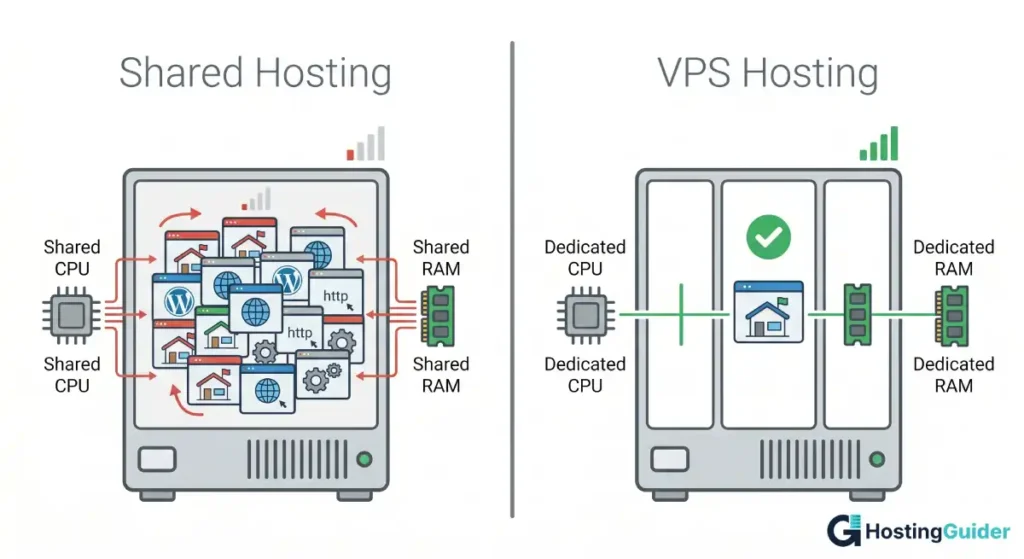
Shared hosting puts your website on a physical server alongside dozens or hundreds of other websites. Everyone on that server shares the same CPU, RAM, and disk resources.
The hosting provider manages everything: the server operating system, software updates, security patches, and the control panel (usually cPanel or Plesk). You get a portion of the storage space and an email account. That is about the extent of your control.
This model works because most websites do not use many resources most of the time. A personal blog that gets 200 visitors a day consumes a tiny fraction of what a shared server can provide. The hosting company banks on that reality and packs many customers onto one machine.
The problem shows up when a neighboring site gets a traffic spike. Since resources are shared, a busy neighbor can slow down your site. This is sometimes called the noisy neighbor problem, and it is the central trade-off of shared hosting.
According to the Cloudflare Learning Center, server response time is one of the most significant factors affecting page load speed, and resource contention on shared servers is a known cause of elevated response times.
How VPS Hosting Works
A VPS (Virtual Private Server) uses virtualization technology to divide a single physical server into multiple isolated virtual machines. Each VPS gets its own guaranteed allocation of CPU cores, RAM, and storage.
Your VPS runs its own operating system. You have root access, meaning you can install any software, configure the server how you want, and manage it on your own schedule. Nothing you do affects other users on the same physical host, and nothing they do affects you.
This isolation is what makes VPS hosting fundamentally different. You are not competing for resources. The CPU cores assigned to your VPS are yours. The RAM does not disappear when another site spikes. According to Google’s web performance guidelines, consistent server response time directly supports better Core Web Vitals scores, and that consistency is something shared hosting cannot guarantee.
Most VPS plans come in two management styles:
- Unmanaged VPS: You handle the OS, updates, security, and configuration. Full control, lower cost, requires technical know-how.
- Managed VPS: The provider handles server maintenance, updates, and often backups. Costs more but removes the administrative burden.
Shared vs VPS Hosting: Side-by-Side Comparison
| Feature | Shared Hosting | VPS Hosting |
|---|---|---|
| Resource allocation | Shared with all users | Dedicated to your server |
| Performance consistency | Variable (noisy neighbor risk) | Stable and predictable |
| Root/server access | No | Yes (unmanaged plans) |
| Customization | Very limited | Full control |
| Scalability | Limited | Easily scalable |
| Security isolation | Low (shared environment) | High (fully isolated) |
| Monthly cost | $2 to $15 | $5 to $100+ |
| Technical skill required | None | Low to high (depends on plan) |
| Best for | Beginners, low-traffic sites | Growing sites, apps, developers |
| Server management | Provider handles everything | You handle it (or provider does on managed plans) |
Performance: Where the Biggest Gap Lives
This is where shared hosting loses the argument for serious projects.
On a shared server, your site’s performance depends on what your neighbors are doing. If five other sites on your server get traffic spikes at the same time, everyone slows down. You have no control over this. The hosting company controls resource limits, and those limits exist to protect the server, not to protect your site.
A VPS gives you dedicated resources. Your 2 GB of RAM is yours whether your neighbors are idle or maxed out. Your vCPUs do not get borrowed. This means your response times stay consistent under load, which matters for both user experience and search rankings.
There is also the matter of storage. Most shared hosting plans use older SATA SSD or even HDD storage shared across many users. Many VPS plans offer NVMe storage with far lower latency. As documented in DigitalOcean’s community tutorials, switching from shared-tier storage to dedicated NVMe on a VPS can cut database query times significantly for dynamic sites.
One practical test: if your site currently takes more than 2 to 3 seconds to reach Time to First Byte (TTFB) on a shared plan, that is often the server response time, not your code. Moving to a VPS typically brings TTFB under 200 milliseconds for most stacks.
Security: Shared Risk vs Isolated Environment
Shared hosting has a structural security limitation. Because all accounts live on the same server, a compromised account can sometimes affect others. Most providers use tools like PHP open_basedir restrictions and isolation techniques to limit this, but the risk is not zero.
A VPS is fully isolated at the OS level. Even if another VPS on the same physical host is compromised, it cannot reach your server. You control your firewall rules, your SSH configuration, your installed packages, and your update schedule.
That said, a VPS also means security responsibility falls partly on you. If you leave an outdated PHP version running or skip a critical update, no one will patch it for you on an unmanaged plan. OWASP’s Web Application Security resources cover the server-level hardening practices that VPS users should implement from the start.
Shared hosting providers handle all of this for you automatically, which is one of its genuine advantages for non-technical users.
Cost: What You Actually Get for the Price
Shared hosting is inexpensive. You can find plans starting at $2 to $5 per month. Most include a domain name, email hosting, and a one-click installer for WordPress or other CMS platforms.
VPS hosting starts around $5 to $6 per month for entry-level plans (1 vCPU, 1 GB RAM) and scales to $40, $100, or more depending on specs. Managed VPS plans cost more on top of that.
The comparison looks clear on paper, but there are hidden costs on both sides.
Shared hosting often locks you into promotional pricing that jumps sharply on renewal. A $3/month plan sometimes renews at $10 to $12. Read the renewal price before you sign up, not just the promotional rate.
VPS hosting, especially unmanaged, requires either your own technical time or the cost of a server administrator. Factor that in honestly. If you spend two hours per month managing a server at any professional hourly rate, that adds more to the true cost than the plan itself.
Managed VPS plans sit in the middle: more expensive than unmanaged, but they remove the maintenance burden and are comparable to what shared hosting includes.
Control and Customization: A Real Difference
This matters more than most people realize before they hit the wall.
On shared hosting, you cannot install custom software, change PHP configurations beyond what cPanel allows, or run persistent background processes. If your application needs a specific version of Node.js, a Redis cache layer, or a custom Nginx configuration, shared hosting simply will not allow it.
A VPS gives you root access. You can install anything the Linux ecosystem offers, configure your web server precisely, run background workers, schedule cron jobs at any frequency, and set up custom SSL configurations. If your stack is even slightly non-standard, a VPS is the only realistic option.
The Linux Foundation’s documentation on Linux server administration is a practical starting point for anyone stepping into VPS management for the first time. The learning curve is real but not steep, especially with modern providers offering one-click server setup tools.
Scalability: Growing Without Starting Over
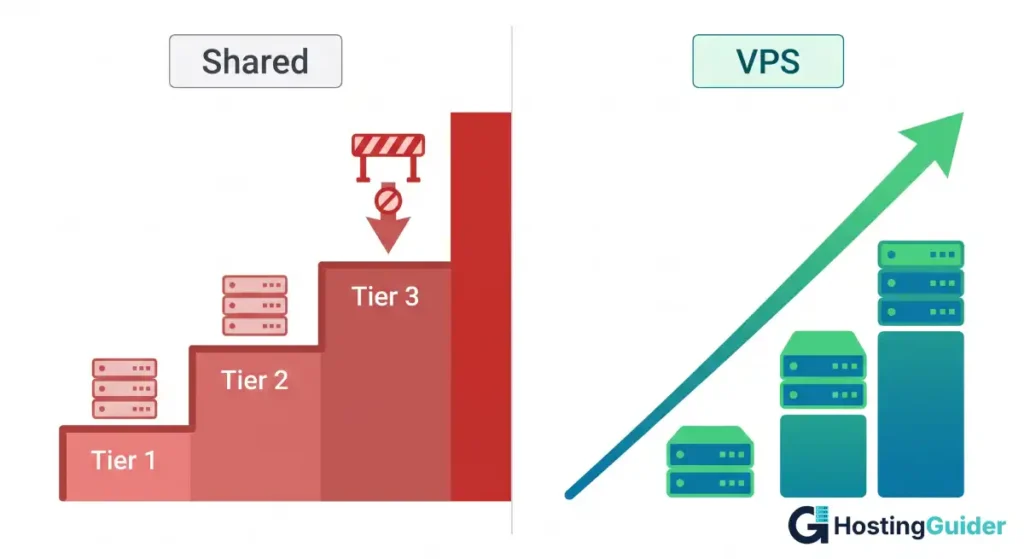
Shared hosting scales up to a point, usually the next shared tier. Beyond that, you have to migrate. And migration from shared hosting to a VPS means setting up a server, reconfiguring your application, and handling the move yourself or paying someone to do it.
Starting on a VPS means scaling is usually a resize. Most providers let you move from a 1 vCPU plan to a 4 vCPU plan with a reboot and no data migration. Some allow live resizing with zero downtime. You stay on the same IP, same configuration, same file system, and just get more resources.
This is a meaningful advantage. The cost of migration (time, potential downtime, DNS propagation delays) is easy to underestimate when you are choosing a plan upfront.
Who Should Choose Shared Hosting
Shared hosting is a genuinely good choice in specific situations. It is not just a beginner tax.
Choose shared hosting if:
- You are launching a new blog, portfolio, or informational site with no established traffic
- Your site is built on WordPress or a standard CMS with no custom server requirements
- You have little to no experience managing a Linux server and do not want to learn right now
- Your monthly budget for hosting is under $10 and you do not expect significant growth in the next 12 months
- You want email hosting, a domain, and a control panel included without extra configuration
A shared plan from a reputable provider with solid uptime (99.9 percent SLA or higher) handles thousands of low-to-moderate traffic sites reliably every day. Do not move to VPS just because it sounds more professional. Move when you have a reason.
Who Should Choose VPS Hosting
VPS hosting earns its cost when you genuinely need what shared hosting cannot provide.
Choose VPS hosting if:
- Your site consistently gets more than 10,000 to 15,000 monthly visitors and performance matters
- You run an e-commerce store where a slow checkout page costs you money
- Your application requires custom server software, specific PHP versions, or persistent processes like Node.js workers
- You are building or running a SaaS product, a web app, or an API
- You need to host multiple websites on one server without paying for separate shared accounts
- You have experienced unexplained slowdowns or downtime on a shared plan during traffic spikes
- Security isolation is a business or compliance requirement
The NIST Computer Security Resource Center documents the security isolation principles that make VPS environments the baseline recommendation for any server handling sensitive user data or financial transactions.
The Migration Question: When to Make the Move
A common mistake: waiting too long to move. Shared hosting shows its limits gradually, through slower response times, occasional 503 errors during traffic spikes, and growing TTFB. By the time most people recognize the pattern, they are already losing traffic to slow page speeds.
A practical trigger point: if your shared hosting CPU usage is consistently hitting its limit, if your average TTFB is above 400 to 500 milliseconds, or if you have had unexplained downtime twice in six months, it is time to evaluate a move.
The migration process for most WordPress sites takes two to four hours with the right tools. Many VPS providers offer migration plugins or step-by-step guides. If you are on an unmanaged VPS, services like ServerPilot or RunCloud simplify the server setup so you do not need deep Linux knowledge to get running.
Frequently Asked Questions
Is VPS hosting faster than shared hosting?
Yes, in most cases. A VPS gives you dedicated CPU cores and RAM that do not fluctuate based on what other users are doing. This produces more consistent response times and lower Time to First Byte (TTFB). Shared hosting performance varies depending on server load from neighboring sites, which you have no control over. For dynamic sites running a database or an application, the performance gap is significant and measurable.
Can a beginner manage a VPS?
Yes, with the right starting setup. Managed VPS plans handle server maintenance, updates, and security for you, similar to shared hosting. Unmanaged VPS requires more technical comfort, but tools like ServerPilot, Cloudflare, and provider-specific dashboards have reduced the barrier considerably. If you can follow written setup guides and are comfortable with a command line at a basic level, an unmanaged VPS is approachable.
How much traffic can shared hosting handle?
It depends on your provider and plan, but most shared hosting plans begin to struggle around 10,000 to 30,000 monthly visitors for a standard WordPress site. This varies based on your page weight, caching setup, and the hosting company’s server quality. A well-optimized site with aggressive caching and a CDN can punch above this range, but you are working around shared hosting limits rather than with the infrastructure.
What is the main security difference between shared and VPS hosting?
On shared hosting, all accounts share the same server environment. A security vulnerability in one account can potentially affect neighbors, though most providers use isolation measures to limit this. A VPS runs a fully separate operating system. Compromises on other VPS instances on the same physical machine cannot reach yours. For sites handling user data, logins, or payments, VPS-level isolation is the safer default.
Is VPS hosting worth the extra cost for a small business?
It depends on what your website does for your business. If your site generates leads, processes orders, or is your primary customer touchpoint, the cost of a VPS (often $10 to $20 per month more than shared) is trivial compared to the revenue impact of a slow or unavailable site. If your site is purely informational and rarely updated, a good shared plan at a reputable provider is sufficient and cost-effective.
Can I host multiple websites on a single VPS?
Yes, and this is one of the practical advantages of VPS hosting. You can configure Nginx or Apache virtual hosts to serve multiple domains from the same server. Tools like Cyberpanel, Virtualmin, or HestiaCP make this manageable without writing configuration files manually. If you currently pay for three separate shared hosting accounts, consolidating onto a single VPS often costs less in total and gives you better control.
What happens if I start on shared hosting and want to switch to VPS later?
Most reputable providers either offer their own VPS plans alongside shared plans or have migration guides to help you move. A WordPress site migration typically involves exporting your database, transferring your files via SFTP or a migration plugin, and updating DNS. The process takes a few hours and does not require significant technical skill with the right tools. Starting on shared hosting and moving to VPS later is a valid and common path.
Make the Decision Based on Where You Are Now
Shared hosting is not a compromise. It is the right tool for a specific stage. Most websites start there, and many stay there for years without a problem.
VPS hosting is not overkill. It is what you need when your site has real performance, customization, or security requirements that shared infrastructure cannot meet.
Pick based on your actual situation today. Set up monitoring early either way. Let your server’s real behavior tell you when the next step makes sense.


