
Most people have used cloud storage without realising it. When you save a photo to Google Photos, stream a movie on Netflix, or send a file through Gmail, you are using the cloud. The files are not sitting on your phone or computer. They live on servers in a data centre somewhere in the world, and you access them through the internet.
Cloud hosting works the same way, but instead of storing files, it hosts entire websites.
This guide explains what cloud hosting is, how it works, why people use it, how it compares to other types of hosting, and whether it is the right choice for your website. Every concept is explained in plain language with real-world examples. No technical background needed.
If you are building a website and trying to figure out which type of hosting fits your needs, our Migrating from a Website Builder to Self-Hosted WordPress guide covers hosting as part of the full WordPress setup process.
Table of Contents
Key Takeaways
- Cloud hosting stores your website across multiple servers instead of one single server
- If one server has a problem, others take over instantly so your site stays online
- It scales up or down based on how much traffic your site receives
- You usually pay only for the resources you actually use
- Cloud hosting is more reliable and flexible than traditional shared hosting
- It suits growing websites, online stores, and high-traffic sites well
- It is not the cheapest option for very small sites with low traffic
Quick Answer
Cloud hosting is a type of web hosting where your website runs across a network of multiple connected servers rather than living on just one physical server. This means your site is more reliable because if one server has a problem, another one takes over. It also means your site can handle sudden spikes in traffic because the network can add resources automatically. Most major websites you visit every day run on cloud hosting infrastructure.
What is Hosting in the First Place?
Before explaining cloud hosting specifically, it helps to understand what web hosting is at a basic level.
When you build a website, all the files that make it up need to be stored somewhere. The text, the images, the code, the database. All of it has to sit on a computer that is connected to the internet around the clock so that anyone in the world can visit your site at any time.
That computer is called a server. Web hosting is the service of renting space on a server to store your website files.
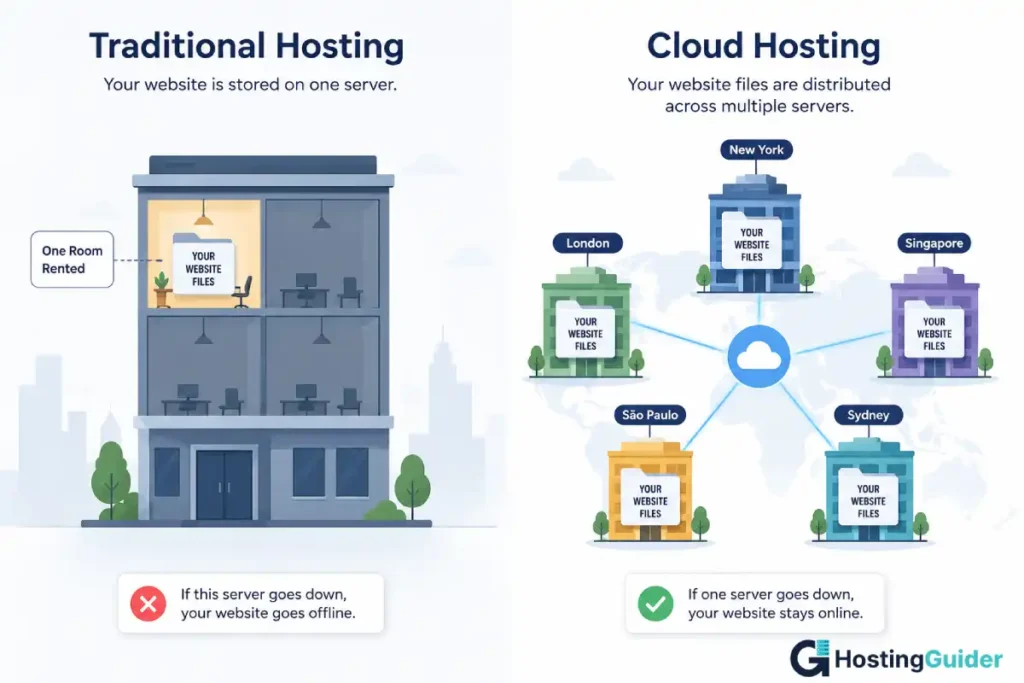
Think of it like renting space in a building. The building is the data centre. The rooms are the servers. Your website’s files live in your rented space. When someone types your web address into their browser, their computer connects to the server where your files live, downloads the page, and shows it on their screen.
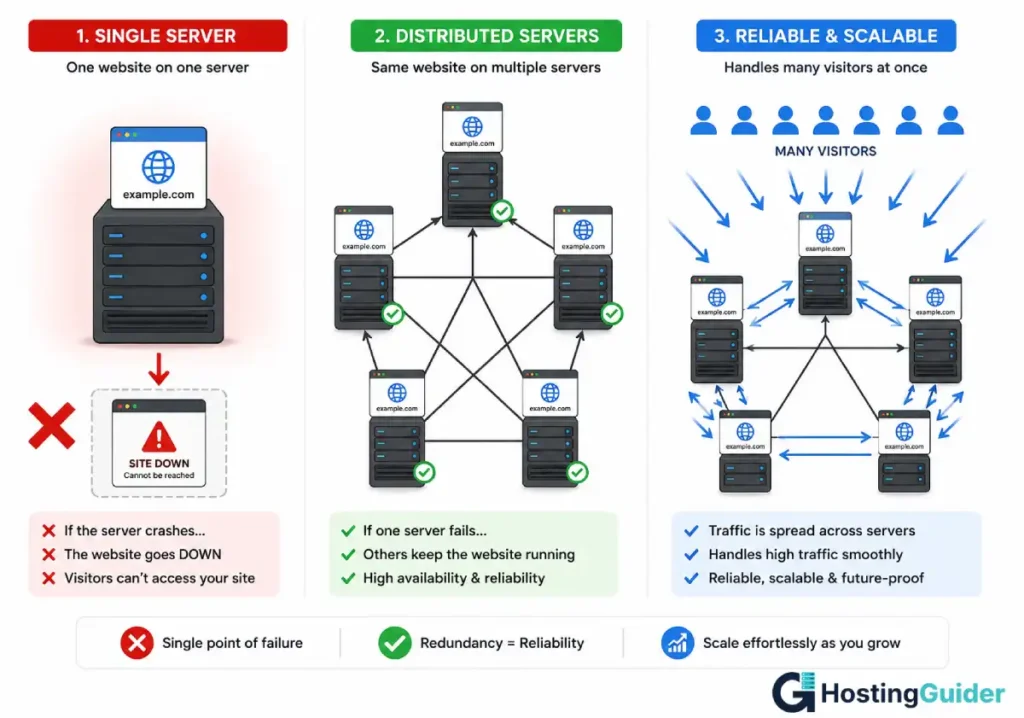
Traditional hosting usually means your website lives on one specific server in one specific location. Cloud hosting changes that by spreading your website across many servers in multiple locations.
How Cloud Hosting Actually Works
Cloud hosting uses a network of servers that all work together. Your website does not live on one machine. It lives across many machines that share the load.
Here is a simple step-by-step of what happens when someone visits your cloud-hosted website:
| Step | What Happens |
|---|---|
| 1 | A visitor types your web address into their browser |
| 2 | The request goes to the cloud hosting network |
| 3 | The network routes the request to the nearest or least busy server |
| 4 | That server retrieves your website files |
| 5 | The files are sent back to the visitor’s browser |
| 6 | The page loads on their screen |
This all happens in a fraction of a second. The visitor never knows which server they connected to. They just see your website load.
Now imagine one server in the network develops a fault. On traditional hosting, your website goes offline until someone fixes the problem. On cloud hosting, the network detects the fault, stops sending traffic to that server, and automatically routes all requests to the other healthy servers. Your website stays online. Your visitors never notice anything happened.
That automatic failover is the core advantage of cloud hosting over traditional single-server setups.




The Difference Between Cloud Hosting and Other Types of Hosting
There are several types of web hosting. Understanding the differences helps you pick the right one for your situation.
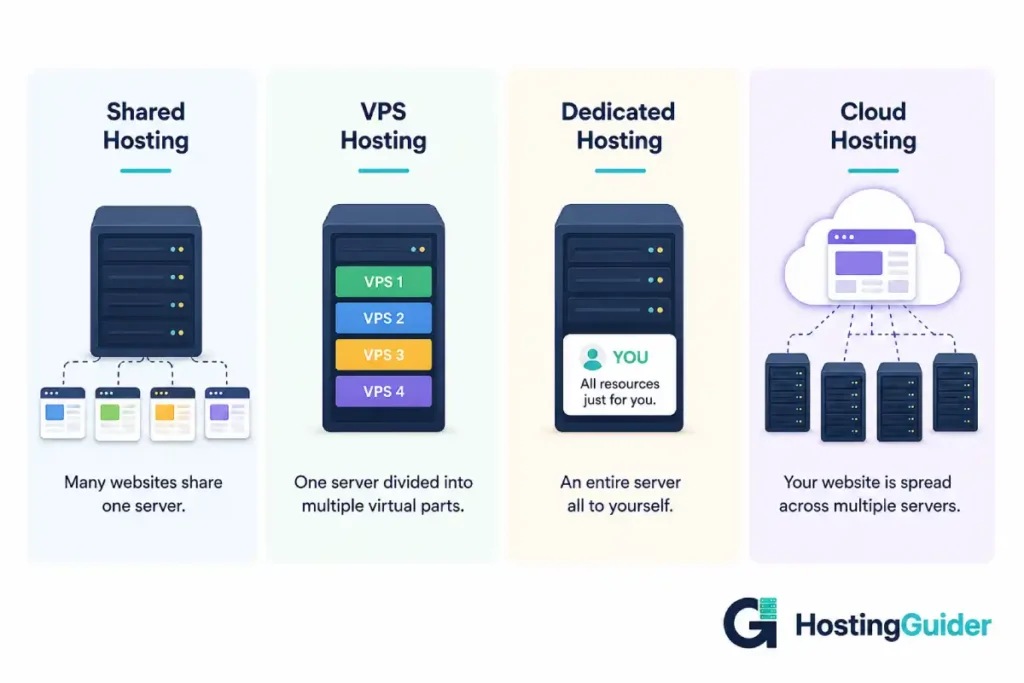
| Hosting Type | How It Works | Best For | Cost |
|---|---|---|---|
| Shared hosting | Your site shares one server with hundreds of other sites | Beginners, small personal sites | Cheapest, from $2/month |
| VPS hosting | You get a dedicated slice of one physical server | Growing sites that need more control | Mid-range, from $10/month |
| Dedicated hosting | You rent an entire physical server just for your site | Large sites needing maximum power | Expensive, from $80/month |
| Cloud hosting | Your site runs across a network of multiple servers | Sites needing reliability and scalability | Variable, pay for what you use |
| Managed WordPress hosting | Cloud or server infrastructure managed entirely for you | WordPress sites, hands-off management | Mid to high, from $15/month |
Shared Hosting vs Cloud Hosting
Shared hosting is the most common starting point for new websites. You share one server with many other websites. It is cheap and easy to set up.
The problem is that you share resources with everyone else on that server. If another site on the same server gets a sudden burst of traffic, your site slows down. If the server has a hardware problem, your site goes offline.
Cloud hosting spreads your site across many servers. Your site is not affected by what other sites do. If one server has a problem, others take over. You get more of the resources you need when you need them.
Real example: Imagine you and twenty other people all share one car. If the car breaks down, nobody goes anywhere. Cloud hosting is like having access to a whole fleet of cars. If one breaks, you get in another one and keep going.
VPS Hosting vs Cloud Hosting
A VPS, or Virtual Private Server, gives you a dedicated slice of one physical server. It is more reliable than shared hosting because your resources are not shared with other sites. But it still relies on one physical machine.
If that machine has a hardware failure, your site goes down until the host fixes it. Cloud hosting eliminates that risk by using many machines simultaneously.
VPS hosting is cheaper than cloud hosting for a fixed amount of resources. Cloud hosting is more flexible because you can scale up or down as needed.
Dedicated Hosting vs Cloud Hosting
Dedicated hosting gives you an entire physical server just for your website. It is powerful and fast. But it is expensive, it still relies on one machine, and you pay the same amount whether your site uses all the resources or none of them.
Cloud hosting is more flexible. You pay based on what you actually use. And because your site runs across many servers, it is more reliable than even a powerful dedicated server.
The Main Benefits of Cloud Hosting
Reliability
The biggest advantage of cloud hosting is that your website stays online even when individual servers have problems. Because your site runs across multiple servers, there is no single point of failure. The industry term for this is high availability.
For most websites on shared hosting, downtime happens occasionally. The server has a problem, the host fixes it, and in the meantime your site shows an error to visitors. On cloud hosting, that almost never happens because the network automatically reroutes traffic around any server with a problem.
Scalability
Cloud hosting scales automatically. If your site gets a sudden spike in traffic, the network allocates more resources to handle it. When traffic drops back to normal, the resources scale back down.
Real example: You run a small online store. You share a post on a popular social media account and 10,000 people visit your site in the next hour. On shared hosting, your site would likely crash or slow to a crawl under that load. On cloud hosting, the network detects the increased demand and scales up resources to handle all 10,000 visitors smoothly.
Pay for What You Use
Most cloud hosting providers charge based on actual usage. You pay for the storage, bandwidth, and computing power you actually consume. During quiet months, your bill is lower. During busy months, it is higher. AI inference platforms increasingly use similar usage-based pricing models. For example, our Kimi K3 on DigitalOcean guide compares dedicated GPU infrastructure with DigitalOcean’s per-token Serverless Inference pricing, showing how each approach affects your monthly costs.
This is different from traditional hosting where you pay a fixed price regardless of whether your site is busy or sitting idle.
Speed
Cloud hosting networks often include a CDN, which stands for Content Delivery Network. A CDN stores copies of your website files in data centres in multiple locations around the world. When a visitor loads your site, they receive the files from the nearest location rather than from one far away.
This reduces the physical distance the data has to travel, which makes pages load faster. A visitor in Tokyo gets your content from a nearby server in Asia. A visitor in London gets it from a server in Europe. Neither has to wait for data to travel across the world.
Global Reach
Because cloud hosting uses servers in multiple locations worldwide, your site performs well for visitors in different countries. Traditional hosting based in one country can feel slower for visitors far from that location. Cloud hosting reduces that gap significantly.
The Drawbacks of Cloud Hosting
Cost for Small Sites
For a small personal blog or a basic business site with low traffic, cloud hosting can be more expensive than simple shared hosting. If you only need a few gigabytes of storage and your site receives a few hundred visitors per month, a $3 per month shared hosting plan serves your needs perfectly well. Cloud hosting at that scale is overkill.
Variable Billing
The pay-for-what-you-use pricing model is an advantage when traffic is predictable. But if your site receives an unexpected traffic spike, your bill for that month can be higher than you expected. Major cloud providers like AWS and Google Cloud have surprised users with bills much higher than anticipated during traffic surges. Most managed cloud hosting providers cap this risk with fixed or capped pricing plans.
More Technical to Manage
Raw cloud hosting from providers like Amazon Web Services or Google Cloud requires technical knowledge to configure and manage. You are not just uploading a website. You are configuring servers, networking, security, and deployments. This is not suitable for beginners without technical help.
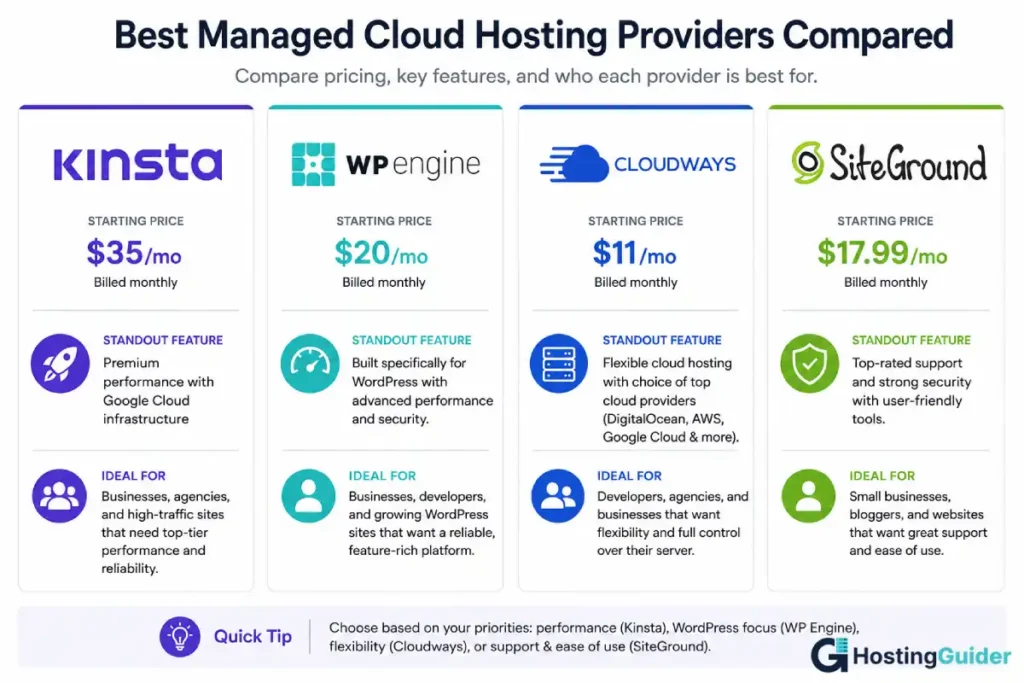
Managed cloud hosting providers like Kinsta, WP Engine, or Cloudways solve this by handling all the technical management for you. You get the benefits of cloud infrastructure without needing to know how to run it.
Types of Cloud Hosting
Not all cloud hosting is the same. It comes in different forms depending on how much control and management you want.
| Type | What It Means | Who It Is For |
|---|---|---|
| Public cloud | Shared cloud infrastructure owned by a provider like AWS or Google | Developers and technical teams |
| Private cloud | Dedicated cloud infrastructure just for your organisation | Large businesses with security requirements |
| Hybrid cloud | A mix of public and private cloud infrastructure | Businesses with varying workloads |
| Managed cloud hosting | Cloud infrastructure managed entirely by the hosting provider | Website owners who want simplicity |
| WordPress cloud hosting | Managed cloud hosting optimised specifically for WordPress | WordPress site owners |
For most people reading this guide, managed cloud hosting or managed WordPress cloud hosting is the relevant category. You get all the reliability and scalability benefits of cloud infrastructure without needing to configure or manage it yourself.
Popular Cloud Hosting Providers
| Provider | Type | Starting Price | Best For |
|---|---|---|---|
| Kinsta | Managed WordPress cloud | From $35/month | WordPress sites, excellent performance |
| WP Engine | Managed WordPress cloud | From $23/month | WordPress sites, strong support |
| Cloudways | Managed cloud (multiple providers) | From $14/month | Flexibility to choose your cloud provider |
| SiteGround | Managed cloud | From $5/month | Beginners wanting cloud features at low cost |
| AWS | Public cloud (raw infrastructure) | Pay per use | Developers and large technical teams |
| Google Cloud | Public cloud (raw infrastructure) | Pay per use | Developers and large technical teams |
| DigitalOcean | Developer-friendly cloud | From $6/month | Developers wanting affordable cloud servers |
For someone building a WordPress website and wanting cloud-level reliability without technical complexity, Kinsta, WP Engine, or Cloudways are the most practical starting points.
Who Should Use Cloud Hosting?
Cloud hosting is not the right choice for every website. Here is an honest breakdown of who benefits most and who does not need it yet.
Cloud Hosting Works Best For
| Who You Are | Why Cloud Hosting Fits |
|---|---|
| A growing business with increasing traffic | Scales automatically as your audience grows |
| An online store during busy seasons | Handles traffic spikes without crashing |
| A content site publishing frequently | Reliability means readers always reach your content |
| A business where downtime costs money | High availability keeps your site running when it matters |
| A site with global visitors | CDN delivers fast load times in multiple countries |
| A developer building a web application | Cloud infrastructure handles complex workloads |
Cloud Hosting Is Probably Not Needed Yet For
| Who You Are | Why Shared Hosting Is Fine for Now |
|---|---|
| A beginner with a brand new site | Low traffic does not need cloud-level resources |
| A personal blog with under 10,000 monthly visitors | Shared hosting handles this comfortably |
| A small local business site | A few pages and a contact form do not need cloud infrastructure |
| Someone on a very tight budget | Shared hosting at $3 to $5 per month is the smarter start |
The honest advice is to start on good shared hosting or managed WordPress hosting and upgrade to a cloud solution when your traffic or reliability needs genuinely justify the cost.
How to Choose a Cloud Hosting Provider
If you have decided cloud hosting is right for your site, here are the key things to look for when choosing a provider.
| Factor | What to Look For |
|---|---|
| Uptime guarantee | Look for 99.9% or higher, check their status page history |
| Data centre locations | More locations means better global performance |
| Scalability | Can resources scale up automatically during traffic spikes |
| Managed vs unmanaged | Managed providers handle server setup and maintenance for you |
| Support quality | 24/7 live chat or phone support matters when something goes wrong |
| Backups | Automatic daily backups should be included |
| WordPress optimisation | If you use WordPress, look for a host optimised specifically for it |
| Pricing model | Fixed monthly pricing is easier to budget than pure pay-per-use |
| Free migration | Many managed cloud hosts migrate your existing site for free |
| Trial or money-back guarantee | Lets you test the service before committing long-term |
Cloud Hosting and SEO
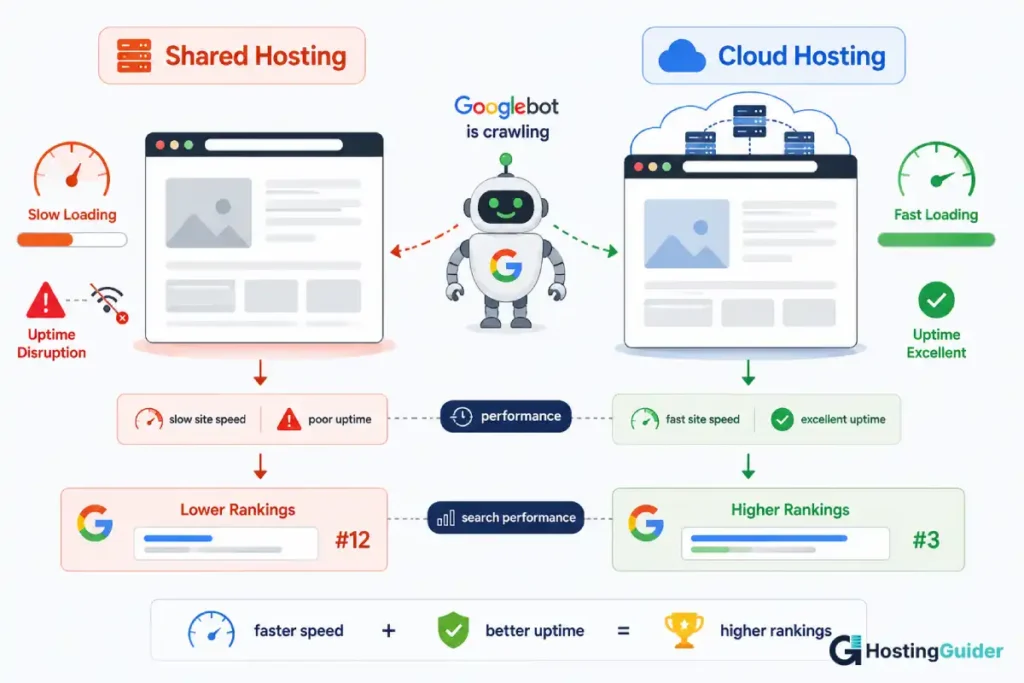
Page speed is a confirmed Google ranking factor. Cloud hosting contributes to faster page load times in two main ways. First, the distributed server network routes visitors to the nearest server, reducing latency. Second, the CDN caches your static content globally so pages load from locations close to each visitor.
Uptime also affects SEO indirectly. If your site goes down and Google’s crawler tries to visit during that downtime, it records the error. Repeated downtime can hurt how Google views your site’s reliability. Cloud hosting’s high availability reduces this risk significantly.
For a deeper look at how hosting and platform choice affects your SEO, our SEO Features of Popular Website Builders guide covers how different setups perform in search.
Real-World Examples of Cloud Hosting
Understanding how big companies use cloud hosting helps make the concept more concrete.
Netflix runs on Amazon Web Services. When millions of people start streaming at the same time on a Friday evening, AWS scales the infrastructure automatically to handle the load. No engineers have to manually add servers. The cloud does it.
Airbnb also runs on AWS. During peak travel seasons, their traffic multiplies. The cloud infrastructure handles it without the engineering team having to spin up new servers manually.
Spotify uses Google Cloud for parts of its infrastructure. Delivering music to hundreds of millions of listeners in different countries requires a globally distributed network of servers. That is exactly what cloud hosting provides.
Your website is not Netflix. But the same principles apply at any scale. The reliability, scalability, and global distribution that make cloud hosting work for Netflix make it work for a growing e-commerce store or a high-traffic blog too.
Frequently Asked Questions
What is the difference between cloud hosting and regular hosting?
Regular hosting, usually called shared hosting, stores your website on one physical server that you share with many other websites. If that server has a hardware problem or gets overloaded, your site goes down. Cloud hosting stores your website across a network of multiple servers.
If one server has a problem, others take over automatically and your site stays online. Cloud hosting also scales its resources up or down based on your traffic, while regular shared hosting gives you a fixed amount of resources regardless of demand.
Is cloud hosting suitable for beginners?
It depends on the type of cloud hosting. Raw cloud infrastructure from providers like Amazon Web Services or Google Cloud requires significant technical knowledge and is not suitable for beginners.
Managed cloud hosting from providers like Kinsta, WP Engine, or SiteGround is designed specifically for non-technical users. These providers handle all the server management for you.
You get the benefits of cloud infrastructure through a simple dashboard without needing to understand how the servers work. If you want cloud reliability without technical complexity, managed cloud hosting is the beginner-friendly version.
Is cloud hosting faster than shared hosting?
Generally yes. Cloud hosting networks typically include a CDN that delivers your site from servers near each visitor, which reduces load times. Cloud servers also tend to have more resources available than shared hosting servers, which means your pages process and load faster.
The difference is most noticeable for visitors in different countries from where your site is hosted, and for sites that receive moderate to high traffic.
For a brand new site with very low traffic, the practical speed difference between good shared hosting and entry-level cloud hosting may be small.
How much does cloud hosting cost?
Cloud hosting costs vary widely. Managed cloud WordPress hosting from providers like Kinsta or WP Engine starts from around $23 to $35 per month. More flexible managed cloud options like Cloudways start from around $14 per month.
Raw cloud infrastructure from AWS or Google Cloud uses pay-per-use pricing that can start at just a few dollars per month for very small workloads, but can scale to hundreds or thousands of dollars as usage grows.
For most small to medium website owners, managed cloud hosting in the $15 to $50 per month range is the practical cost range.
Can I use cloud hosting for a WordPress website?
Yes. WordPress works very well on cloud hosting and many cloud providers offer plans specifically optimised for WordPress. Managed WordPress cloud hosts like Kinsta and WP Engine handle WordPress-specific optimisations including caching, automatic updates, security monitoring, and staging environments.
These features make WordPress run faster and more reliably than it would on basic shared hosting.
If you are running WordPress and your site is growing, managed WordPress cloud hosting is one of the best investments you can make in your site’s performance.
What happens to my website if the cloud provider has an outage?
Large cloud providers do occasionally have outages, though they are rare and usually brief. In 2021, a major AWS outage affected thousands of websites temporarily.
The key difference between cloud hosting and traditional hosting is recovery time. Cloud providers have enormous engineering teams, redundant systems, and established recovery procedures that typically resolve issues in minutes to hours rather than days.
Most managed cloud hosting providers also offer uptime guarantees with compensation if they fall below the promised uptime level.
Choosing a provider with multiple data centre regions reduces your risk further, because a regional outage does not affect servers in other regions.
Is cloud hosting secure?
Cloud hosting from reputable providers is highly secure. Major cloud providers invest heavily in physical data centre security, network security, and encryption. They have dedicated security teams and comply with industry standards like ISO 27001, SOC 2, and PCI DSS.
Your responsibility as a website owner is to keep your own software updated, use strong passwords, enable two-factor authentication on your hosting account, and follow security best practices for your website platform.
Our Pros and Cons of Using a Website Builder guide covers security in more detail for those using builder platforms on top of hosting infrastructure.


