
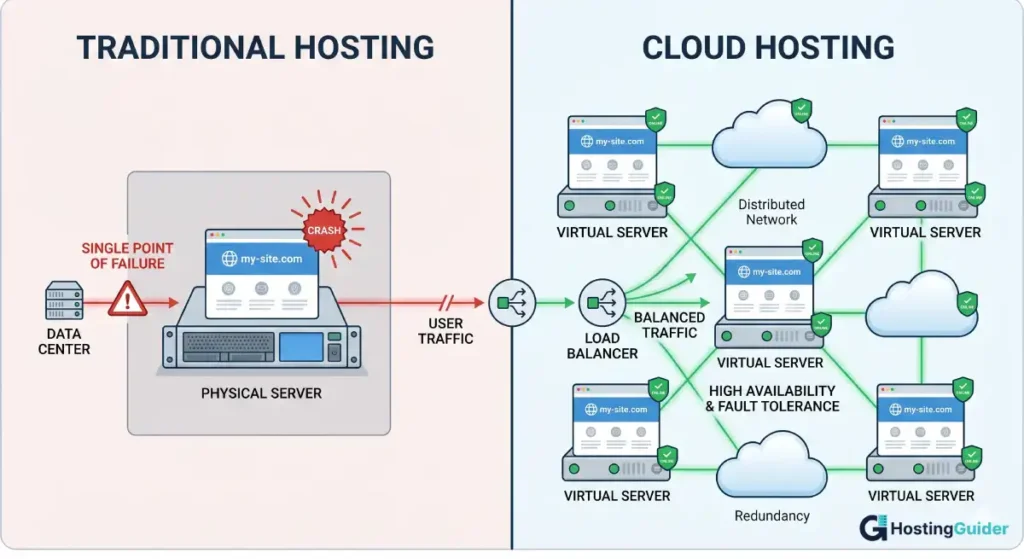
Ten years ago, almost every website ran on a single physical server sitting in a data centre. One server, one website, one point of failure. That was traditional hosting, and it worked well enough for most sites at the time.
Then cloud hosting changed the rules. Instead of one server, your website spreads across a network of many servers. Resources scale up when traffic grows and scale back down when things are quiet. Reliability improves dramatically because no single server failure can take your site down.
Today, both types of hosting are widely used. Traditional hosting is not dead. It is still the right choice for many situations. Cloud hosting is not always better. It is more expensive in some cases and more complex in others.
This guide explains the key differences between cloud and traditional hosting clearly and honestly. By the end, you will know exactly what separates them and which type fits your website.
If you are new to cloud hosting and want a full explanation of what it is before comparing it to traditional hosting, read our What is Cloud Hosting? An Easy Explanation guide first.
Table of Contents
Key Takeaways
- Traditional hosting stores your website on one physical server in one location
- Cloud hosting spreads your website across a network of many servers in multiple locations
- Cloud hosting is more reliable because it has no single point of failure
- Traditional hosting is generally cheaper for sites with low, predictable traffic
- Cloud hosting scales automatically with your traffic, traditional hosting does not
- Security strengths differ but both types can be made secure with the right setup
- The right choice depends on your site size, budget, and growth expectations
Quick Answer
Traditional hosting stores your website on one server. Cloud hosting stores it across many servers simultaneously. Cloud hosting wins on reliability, scalability, and global performance. Traditional hosting wins on simplicity and cost for small sites with steady, predictable traffic. For a growing website, an online store, or any site where downtime costs you money, cloud hosting is the stronger choice. For a small personal site, a basic blog, or a brand new website, traditional shared hosting is a sensible and affordable starting point.
What Traditional Hosting Is
Traditional hosting means your website lives on one physical server. That server is a real computer, sitting in a rack in a data centre somewhere in the world. It has a fixed amount of storage, memory, and processing power.
There are three main types of traditional hosting:
| Type | How It Works | Typical Cost |
|---|---|---|
| Shared hosting | Your site shares one server with hundreds of other websites | $2 to $10 per month |
| VPS hosting | You get a dedicated virtual slice of one physical server | $10 to $60 per month |
| Dedicated hosting | You rent an entire physical server just for your site | $80 to $400 per month |
All three types have something in common. Your website ultimately depends on one physical machine or a fixed set of machines. If that machine has a hardware problem, your site goes offline until someone fixes it. If your site suddenly receives far more traffic than usual, it struggles or crashes because the fixed resources cannot expand on demand.
That is the fundamental constraint of traditional hosting. The ceiling is fixed. The reliability depends on one machine staying healthy.
What Cloud Hosting Is
Cloud hosting removes the single-server dependency. Your website runs across a network of many connected servers. These servers work together, share the load, and back each other up automatically.
If one server in the network develops a fault, traffic automatically reroutes to the others. Your website stays online. Visitors notice nothing. If your site receives a sudden surge in traffic, the network draws on more resources from the available pool. Your site handles the load instead of crashing.
For a complete explanation of how cloud hosting works including a step-by-step breakdown and real-world examples, see our What is Cloud Hosting? An Easy Explanation guide.
The Key Differences
Infrastructure
The most fundamental difference is how each type stores and serves your website.
| Traditional Hosting | Cloud Hosting | |
|---|---|---|
| Server setup | One physical server (or fixed set) | Network of many servers |
| Location | Usually one data centre | Multiple data centres, often globally distributed |
| Redundancy | Little or none | Built-in, automatic |
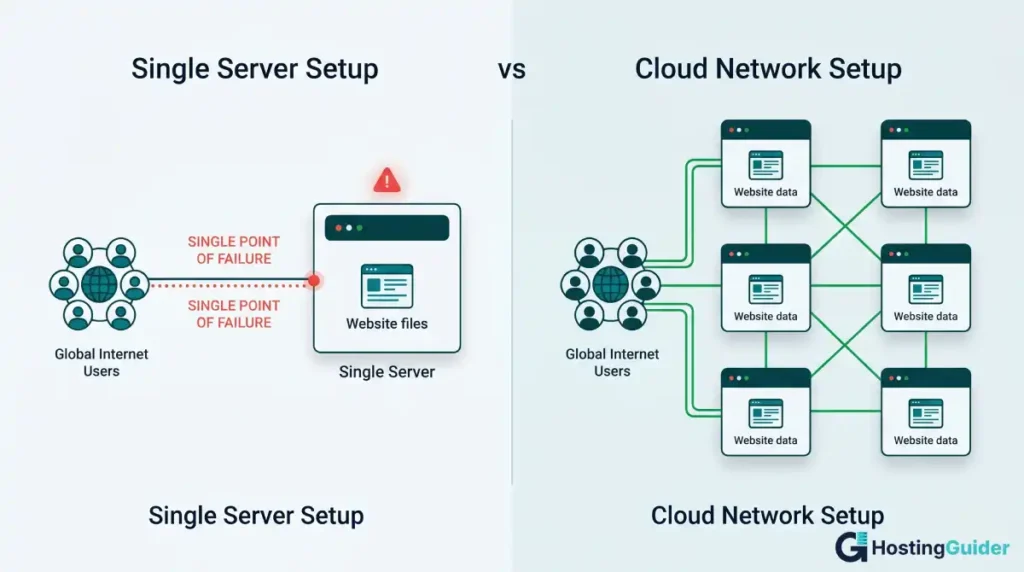
| Point of failure | Single point of failure exists | No single point of failure |
| Resource pool | Fixed, set at purchase | Dynamic, drawn from shared network |
Traditional hosting is like having your website in one locked room. Cloud hosting is like having it distributed across many rooms in many buildings simultaneously. If one room has a problem, all your content is still safely available in the others.
Reliability and Uptime
Uptime is the percentage of time your website is online and accessible. A site that is online 99% of the time is actually offline for about 87 hours per year. That sounds like a lot, and it is.
| Uptime Percentage | Annual Downtime |
|---|---|
| 99% | 87 hours, 36 minutes |
| 99.9% | 8 hours, 46 minutes |
| 99.95% | 4 hours, 23 minutes |
| 99.99% | 52 minutes |
| 99.999% | 5 minutes |
Traditional shared hosting providers typically guarantee around 99.9% uptime. That sounds impressive until you calculate what it means in practice. About nine hours of downtime per year. For a business website, nine hours offline is significant.
Cloud hosting providers typically guarantee 99.95% or higher. Some guarantee 99.99%. The difference in reliability comes directly from the infrastructure. On cloud hosting, a single server failure does not cause downtime because the network reroutes traffic automatically. On traditional hosting, a server failure means downtime until the host’s technical team addresses it.
For businesses where downtime directly costs money, whether through lost sales, missed bookings, or damaged reputation, the reliability gap between traditional and cloud hosting is one of the most important practical differences.
Scalability
Scalability means your hosting can grow with your website. It is one of the clearest differences between the two types.
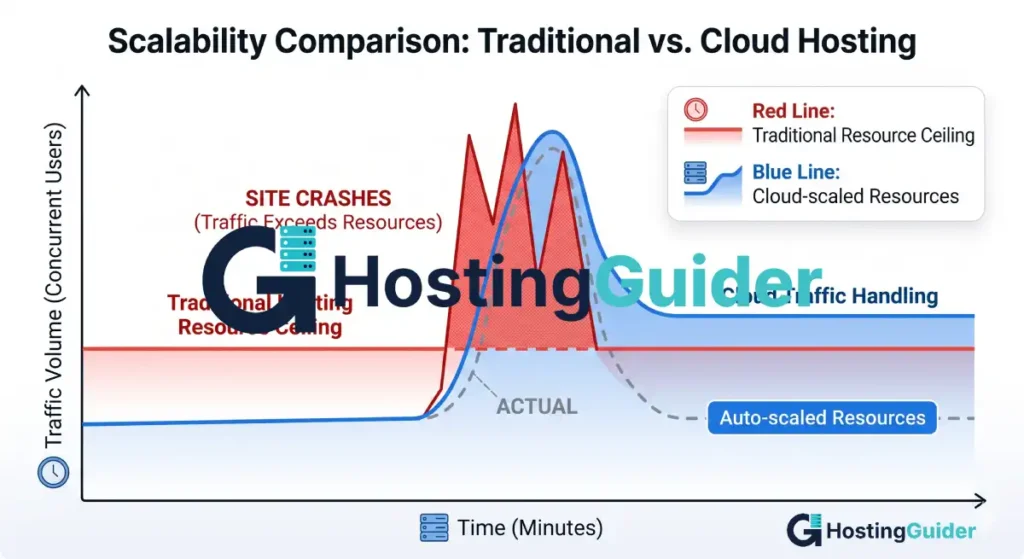
Traditional hosting gives you a fixed amount of resources. On a shared hosting plan, you have a set storage limit, a bandwidth cap, and a defined share of the server’s processing power. On a VPS, you have more resources but they are still fixed. On dedicated hosting, you have even more, but again, the ceiling is the physical limits of that one machine.
To get more resources on traditional hosting, you upgrade your plan. That process takes time. You request the upgrade, the host applies it, sometimes with a brief period of downtime, and then you have more capacity. If your traffic surged today and your plan cannot handle it, your site struggles right now, not after the upgrade is processed.
Cloud hosting scales in real time. When traffic increases, the network automatically allocates more resources from its shared pool to your site. When traffic drops, resources scale back down. No manual action. No waiting. No downtime during the scaling process.
Real example: You run an online store. You partner with a popular influencer and they post about your products. In two hours, your site receives ten times its normal traffic. On traditional shared hosting, your site crashes or slows to an unusable state. On cloud hosting, the network scales up to absorb the traffic spike automatically. Customers keep shopping. You keep selling.
For e-commerce websites specifically, scalability is not a luxury. It is a business requirement. Our Website Builders for E-commerce: Top Choices guide covers how e-commerce platforms handle hosting and scalability in detail.
Performance and Speed
Several factors determine how fast your website loads. Both hosting types affect them differently.
Server response time is how quickly the server starts sending data to a visitor’s browser. Cloud hosting infrastructure typically has lower response times than shared traditional hosting because resources are more available and less contended.
Geographic delivery matters too. Traditional hosting based in one country serves visitors in that country well. Visitors in other countries wait longer because data has to travel further.
Most cloud hosting providers include a CDN as part of their service. A CDN, which stands for Content Delivery Network, stores copies of your static files like images and scripts in data centres around the world. When a visitor loads your site, files come from the nearest CDN location rather than from a central server. Cloudflare, one of the largest CDN providers in the world, powers millions of websites by distributing content this way.
| Speed Factor | Traditional Hosting | Cloud Hosting |
|---|---|---|
| Server response time | Moderate on shared, better on VPS or dedicated | Generally fast |
| Geographic delivery | From one central location | From nearest CDN node globally |
| Handling traffic spikes | Slows down or crashes | Scales automatically, stays fast |
| Resource contention | Possible on shared hosting | Reduced due to network distribution |
| Page caching | Available with plugins or server config | Often built in |
For most sites, cloud hosting delivers faster and more consistent page load times than shared traditional hosting. Page speed matters for both user experience and search rankings. Our SEO Features of Popular Website Builders guide explains in detail how hosting performance connects to search engine rankings.
Security
Both hosting types can be made secure. But the security model differs in important ways.
On traditional shared hosting, your website sits on a server with hundreds of other websites. If one of those sites has a security vulnerability and gets hacked, there is a small risk that the attack could affect other sites on the same server. Good hosts use server-level isolation to prevent this, but the risk exists in a shared environment.
On VPS or dedicated traditional hosting, you are more isolated from other sites. You have more control over your security configuration. But that also means you are more responsible for maintaining it.
On cloud hosting, the infrastructure security is managed by the provider. Major cloud providers like Amazon Web Services and Google Cloud invest enormous resources into security. Their data centres comply with international security standards including ISO 27001 and SOC 2. Network-level DDoS protection, encryption in transit, and automated threat monitoring are standard.
| Security Feature | Shared Traditional | VPS Traditional | Cloud Hosting |
|---|---|---|---|
| Isolation from other sites | Low | High | High |
| DDoS protection | Basic | Basic to moderate | Strong, built-in |
| Infrastructure security management | Host manages | Shared responsibility | Provider manages |
| Compliance certifications | Varies by host | Varies by host | ISO 27001, SOC 2 (major providers) |
| Automatic threat monitoring | Limited | Limited | Included on managed plans |
| Your responsibility for security | Platform-level settings | Server configuration | Application-level only |
One important note: cloud hosting does not automatically make your website secure. The hosting provider secures the infrastructure. You are still responsible for keeping your website software updated, using strong passwords, and following security best practices for your platform. The hosting layer is just one part of the full security picture.
Pricing and Cost
This is where traditional hosting has a genuine advantage for small sites.
Traditional shared hosting is inexpensive. Plans start from $2 to $5 per month for most providers. That price covers everything you need to run a basic website: storage, bandwidth, email, and technical support. The price is fixed and predictable every month regardless of how much or how little traffic your site receives.
Cloud hosting costs more for equivalent resources. Managed cloud hosting starts from around $14 to $35 per month from providers like Cloudways or Kinsta. Raw cloud infrastructure from AWS or Google Cloud uses variable pay-per-use pricing that can be very low for small workloads or very high during traffic spikes.
| Cost Scenario | Traditional Shared | Traditional VPS | Managed Cloud |
|---|---|---|---|
| New website, low traffic | $2 to $5/month | $10 to $20/month | $14 to $35/month |
| Growing site, moderate traffic | $5 to $15/month | $20 to $60/month | $35 to $100/month |
| High-traffic site | $15 to $30/month (may struggle) | $60 to $200/month | $100 to $500/month |
| Traffic spike month | Same fixed price | Same fixed price | Higher if pay-per-use |
For a small personal blog or basic business website, the cost difference between shared hosting and cloud hosting is hard to justify. Shared hosting at $5 per month handles thousands of monthly visitors without breaking a sweat.
For a growing site, an online store, or a business where downtime has real consequences, the extra cost of cloud hosting is often justified by the reliability, scalability, and performance advantages it provides.
Control and Management
Traditional hosting, especially VPS and dedicated plans, gives you direct server access. On a VPS, you can install custom software, configure your server environment precisely, and manage every setting. That level of control appeals to developers who want to optimise their setup specifically for their application.
Shared traditional hosting gives you the least control. The host manages the server environment. You work within their configuration. You cannot install arbitrary server software or change core server settings.
Managed cloud hosting sits in the middle. The hosting provider manages the server infrastructure completely. You do not have access to the server level. But you get a clean dashboard to manage your websites, databases, backups, and caching without dealing with server configuration.
Raw cloud infrastructure from AWS or Google Cloud gives you maximum control but requires you to know exactly what you are doing. You configure everything from scratch.
| Control Level | Hosting Type |
|---|---|
| Most control | Raw cloud (AWS, Google Cloud) or dedicated traditional |
| Good control | VPS traditional |
| Managed with easy dashboard | Managed cloud hosting |
| Least control | Shared traditional hosting |
For most website owners who are not developers, managed cloud hosting provides the best balance. You get cloud-level reliability without needing to manage server configuration yourself.
Support
Support quality varies by provider more than by hosting type. However, there are some general patterns.
Traditional shared hosting providers often handle very large numbers of customers. Response times for support tickets can be slow and answers are sometimes generic rather than specific to your situation. Premium VPS and dedicated hosting plans from the same providers usually come with faster, more experienced support.
Managed cloud hosting providers typically offer higher-quality support as part of their value proposition. Because their plans cost more, they invest more in support quality. Providers like Kinsta and SiteGround are consistently rated highly for support responsiveness and expertise.
| Support Factor | Traditional Shared | Traditional VPS/Dedicated | Managed Cloud |
|---|---|---|---|
| Response time | Often slow | Usually faster | Generally fast |
| Technical expertise | Varies | Better | Strong |
| 24/7 availability | Most providers | Most providers | Most managed providers |
| Support channel options | Ticket, chat | Ticket, chat, sometimes phone | Chat, ticket, sometimes phone |
Full Side-by-Side Comparison
| Factor | Traditional Shared | Traditional VPS | Managed Cloud |
|---|---|---|---|
| Infrastructure | One shared server | One virtual server | Network of many servers |
| Typical uptime | 99.9% | 99.9% | 99.95% to 99.99% |
| Scales with traffic | No | No | Yes, automatically |
| Global CDN included | Rarely | Rarely | Usually yes |
| Starting cost | $2 to $5/month | $10 to $20/month | $14 to $35/month |
| Pricing model | Fixed monthly | Fixed monthly | Fixed or usage-based |
| Server control | Low | High | Low but managed |
| Security management | Shared | Your responsibility | Provider managed |
| Best for | Small sites, beginners | Growing sites needing control | Reliability, performance, scale |
| Technical knowledge needed | Very little | Moderate to high | Very little (managed) |
When to Choose Traditional Hosting
Traditional hosting is the right choice when:
You are just starting out and your site has minimal traffic. A new blog, a basic portfolio, or a small local business website does not need cloud infrastructure. Shared hosting handles tens of thousands of monthly visitors comfortably for most sites.
Your budget is tight. If $3 per month is what you can spend, shared hosting delivers a functional, reliable website at that price. Cloud hosting does not offer that entry point for managed solutions.
Your traffic is low and predictable. If your site receives a consistent and modest amount of traffic every month without spikes, you do not need the scalability that cloud hosting provides. Paying for scalability you will never use does not make financial sense.
You need server-level control and are technically capable of managing it. A VPS gives experienced developers full control over their server environment at a reasonable cost.
Real example: Tom runs a small plumbing business. He has a five-page website with his services, contact form, and location. He gets maybe 200 visitors per month. A $5 per month shared hosting plan from a reliable provider is everything he needs. Paying $35 per month for managed cloud hosting would give him zero additional benefit for his use case.
When to Choose Cloud Hosting
Cloud hosting is the right choice when:
Your site is growing and you need reliability as your audience expands. As your traffic grows, the risk of downtime on traditional hosting increases. Cloud hosting handles growth without manual plan upgrades.
Your business loses money when your site goes down. An online store that is offline for two hours loses sales directly. A booking platform that goes down loses appointments. For any business where uptime translates directly to revenue, cloud hosting’s reliability is worth the cost.
You experience or expect traffic spikes. Product launches, seasonal promotions, viral content, press coverage. Any of these can send your traffic up ten times overnight. Cloud hosting handles this automatically. Traditional shared hosting typically cannot.
Your visitors are spread across multiple countries. Cloud hosting’s CDN delivers faster load times globally. If you have a significant audience outside your home country, this makes a real difference to user experience and bounce rates.
You want someone else to manage the server environment. Managed cloud hosting removes the technical maintenance burden entirely. The provider handles updates, security patches, server configuration, and backups.
Real example: Fatima runs a fashion e-commerce store. She has 5,000 monthly visitors normally. During her seasonal sale, traffic hits 40,000 visitors in one day. She switched to managed cloud hosting after her old VPS crashed during a previous sale. Since switching, every sale has run smoothly regardless of traffic volume.
Making the Decision: A Simple Framework
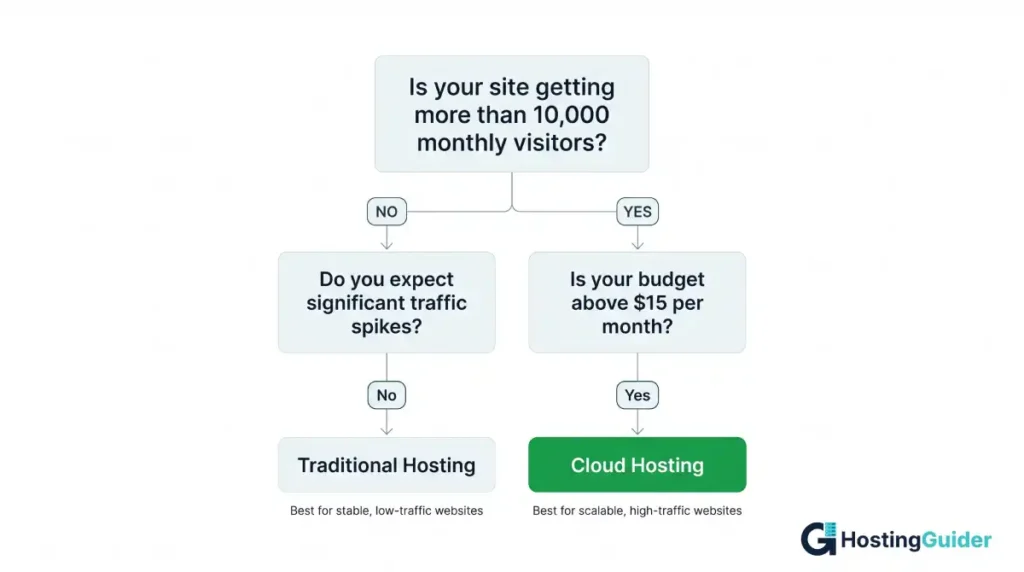
Ask yourself these five questions in order. Your answers will point you to the right choice.
| Question | If Yes | If No |
|---|---|---|
| Is your site brand new with little traffic? | Start with shared traditional hosting | Move to next question |
| Is your budget under $10 per month? | Shared traditional hosting is your only option | Move to next question |
| Does downtime cost your business money? | Cloud hosting is worth the investment | Move to next question |
| Do you expect sudden traffic spikes? | Cloud hosting handles this automatically | Move to next question |
| Do you have visitors in multiple countries? | Cloud hosting with CDN improves their experience | Either type works |
Most beginners starting their first website land on shared traditional hosting and that is the right answer. Most businesses with established traffic and growth plans land on cloud hosting and that is also the right answer.
If you are in the middle, running a growing site that is outgrowing shared hosting but not yet sure about cloud, a VPS is a reasonable stepping stone. It gives you more resources and control than shared hosting without the cost of managed cloud. You can migrate to cloud hosting later when the need becomes clear. Our Migrating from a Website Builder to Self-Hosted WordPress guide covers how to manage hosting migrations without losing SEO rankings.
Frequently Asked Questions
Which is better: cloud hosting or traditional hosting?
Neither is universally better. Cloud hosting is better for reliability, scalability, and global performance. Traditional hosting is better for cost on small sites with low, predictable traffic. The right choice depends on your site’s size, your budget, your growth expectations, and how important uptime is to your specific situation. A brand new personal blog is fine on shared traditional hosting. A growing e-commerce store benefits significantly from cloud hosting.
Is cloud hosting more expensive than traditional hosting?
Yes, for most plan tiers. Traditional shared hosting starts from $2 to $5 per month. Managed cloud hosting starts from around $14 to $35 per month. However, the cost difference narrows as you move up to higher tiers. A high-performance VPS at $60 per month and an entry-level managed cloud plan at $35 per month are relatively close in cost with the cloud option offering better reliability. For large websites, the cost of traditional dedicated hosting and enterprise cloud hosting become comparable.
Can I switch from traditional to cloud hosting later?
Yes. Switching from traditional hosting to cloud hosting is a manageable process. Most managed cloud providers offer free or low-cost migration assistance. You move your website files, database, and domain to the new hosting environment. If you are running WordPress, the process is well-documented and most hosts have tools or support to handle it. The key thing to watch during any hosting migration is maintaining your SEO by managing URL redirects and monitoring Google Search Console after the switch.
Does cloud hosting improve my Google rankings?
Indirectly, yes. Cloud hosting typically delivers faster page load times and higher uptime, both of which are factors Google considers when ranking websites. Faster pages rank better and provide a better user experience. Higher uptime means Google’s crawler always finds your site accessible when it visits. However, hosting type alone does not determine your rankings. Content quality, backlinks, and on-page SEO are all more directly influential. Hosting is the foundation that supports your SEO efforts rather than a ranking factor in isolation.
Is traditional shared hosting reliable enough for a small business?
For most small businesses, yes. Reputable shared hosting providers offer 99.9% uptime guarantees and solid technical infrastructure. The risk of significant downtime on a quality shared hosting provider is low. The limitation of shared hosting becomes relevant when your traffic grows significantly, when you cannot afford any downtime at all, or when you need better performance for visitors in multiple countries. For a local service business with a few hundred monthly visitors and a five-page website, good shared hosting from a reputable provider is entirely sufficient.
What is the difference between cloud hosting and managed WordPress hosting?
Managed WordPress hosting is a type of cloud hosting that is specifically optimised for WordPress websites. It includes WordPress-specific features like automatic WordPress updates, WordPress security scanning, WordPress caching, staging environments for testing changes, and support teams who specialise in WordPress issues. General cloud hosting handles any type of website or application. Managed WordPress hosting runs on cloud infrastructure but adds a WordPress-specific management layer on top. If you run a WordPress site and want cloud reliability with WordPress-specific tools, managed WordPress hosting combines both.
Which type of hosting is more secure?
Both types can be made highly secure with the right setup. Cloud hosting from major providers includes infrastructure-level security like DDoS protection, encrypted connections, and compliance certifications that small traditional hosting providers cannot always match. However, traditional dedicated hosting gives security-conscious users full control over their server environment, which some organisations prefer. For most website owners, the security provided by a reputable managed cloud host is more than sufficient and easier to maintain than managing server-level security on a traditional VPS or dedicated server.


