
Your website is growing. More visitors arrive each week. Pages take longer to load. Orders slow down during busy periods. Your server is struggling.
This is a scalability problem.
Scalability is the ability of your hosting to handle more demand. A scalable server grows with your website. An unscalable one breaks under pressure.
VPS hosting is one of the most scalable options available. But it does not scale automatically. You need to understand how it works. You need to know when to act.
This guide explains everything. It covers what scalability means, how VPS scaling works, the different types of scaling, and exactly when and how to scale your server.
Key Takeaways
- Scalability means your hosting can handle more traffic and demand without going offline
- VPS hosting is more scalable than shared hosting but less flexible than cloud hosting
- There are two types of scaling: vertical (adding more power) and horizontal (adding more servers)
- Most VPS plans allow vertical scaling with minimal or no downtime
- Signs you need to scale include slow load times, high CPU usage, and frequent timeouts
- Scaling proactively is always better than scaling during a crisis
Quick Answer
Scalability with VPS hosting means upgrading your server resources when your website needs more power. You can scale vertically by adding more RAM, CPU, or storage to your existing VPS. You can scale horizontally by adding more servers to share the load. Most VPS providers allow vertical scaling with a few clicks. Horizontal scaling requires more planning. The key is to monitor your server and scale before performance problems affect your visitors.
What is Scalability?
Scalability is the ability of a system to handle more work.
For websites, more work means more visitors. More visitors means more requests to your server. More requests means more CPU, RAM, and bandwidth consumption.
A scalable server grows to meet that demand. A non-scalable server hits a wall.
Think of a small café. On a quiet Tuesday, two staff members handle everything fine. On a busy Saturday morning, the queue stretches out the door. The café needs to scale. It can do this by calling in extra staff or opening a second location.
VPS hosting works the same way. You can add more resources to your current server. Or you can add more servers.
Why Scalability Matters
Your website traffic is not constant. It changes.
A blog post goes viral. Your product gets featured on a popular website. You run a flash sale. A seasonal rush hits your store.
These events send more visitors than usual. Your server receives more requests than it was set up to handle.
Without scalability, your server struggles. Pages load slowly. Some visitors get error messages. Your checkout stops working during the busiest hour of your sale.
With scalability, you increase your server resources before or during the spike. Your site stays fast. Your visitors stay happy. Your sales continue.
Downtime and slow pages cost real money. Read our website uptime importance guide to understand the full financial impact of server performance problems.
How VPS Hosting Compares to Other Hosting Types for Scalability
Before explaining VPS scalability in detail, it helps to understand where VPS sits.
| Hosting Type | Scalability | How You Scale | Time to Scale |
|---|---|---|---|
| Shared hosting | Very limited | Change plan, may require migration | Hours to days |
| VPS hosting | Good | Upgrade plan or add resources | Minutes to hours |
| Cloud hosting | Excellent | Automatic or instant | Seconds to minutes |
| Dedicated server | Limited but powerful | Add hardware or migrate | Days |
VPS hosting sits between shared and cloud. It is far more scalable than shared. It requires more manual action than cloud.
Our guide on shared vs VPS hosting explains when to move from shared to VPS in detail.
The Two Types of VPS Scaling
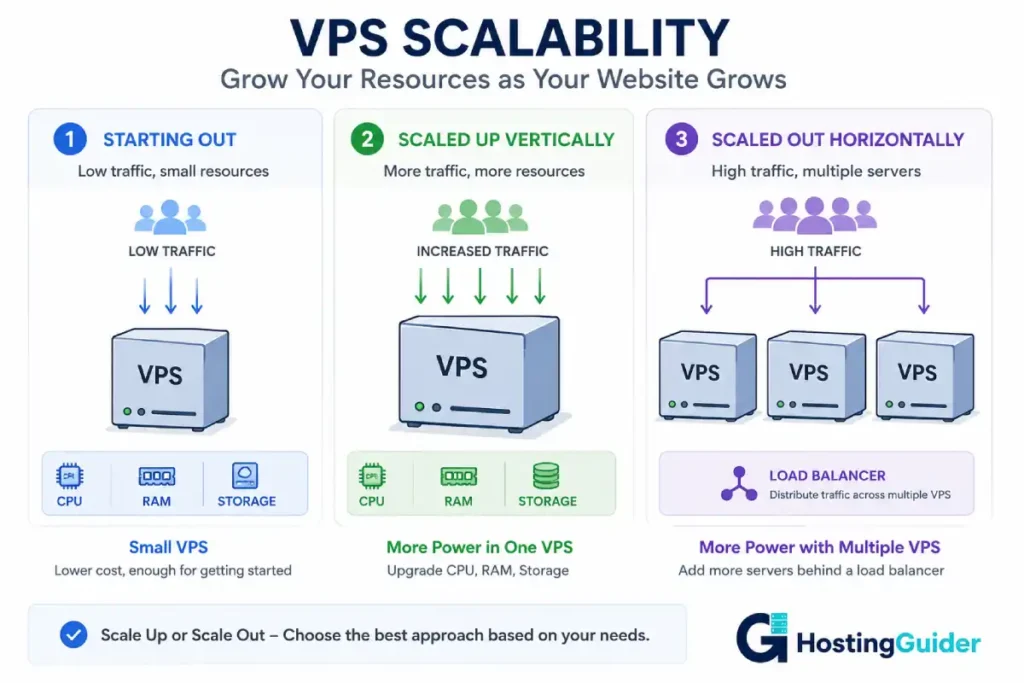
There are two main ways to scale a VPS. Understanding the difference helps you choose the right approach.
Vertical Scaling
Vertical scaling means adding more resources to your existing server.
You increase the RAM. You add more CPU cores. You expand your storage. You do all of this on the same server you already have.
Think of it like upgrading your car engine. Same car. More power.
| Resource | Why You Scale It | Example |
|---|---|---|
| RAM | Pages load slowly, server runs out of memory | Go from 2GB to 4GB RAM |
| CPU | High processing load, slow script execution | Go from 2 to 4 vCPU cores |
| Storage | Running out of disk space | Go from 50GB to 100GB SSD |
| Bandwidth | Hitting monthly transfer limits | Move to higher bandwidth plan |
Vertical scaling is the most common approach for VPS. Most providers allow it with a few clicks in your control panel.
Some providers apply the upgrade without restarting your server. Others require a brief reboot. Either way, the downtime is minimal.
Hands-on example: You run a WooCommerce store. During your Christmas sale, your server’s CPU usage hits 90%. Pages take five seconds to load. Customers are abandoning their carts. You log into your hosting dashboard. You upgrade from 2 vCPU to 4 vCPU. CPU usage drops to 45%. Pages load in under two seconds. Sales resume normally.
Cloudways allows vertical scaling by resizing your server directly from their dashboard. The process takes a few minutes.
Horizontal Scaling
Horizontal scaling means adding more servers to share the load.
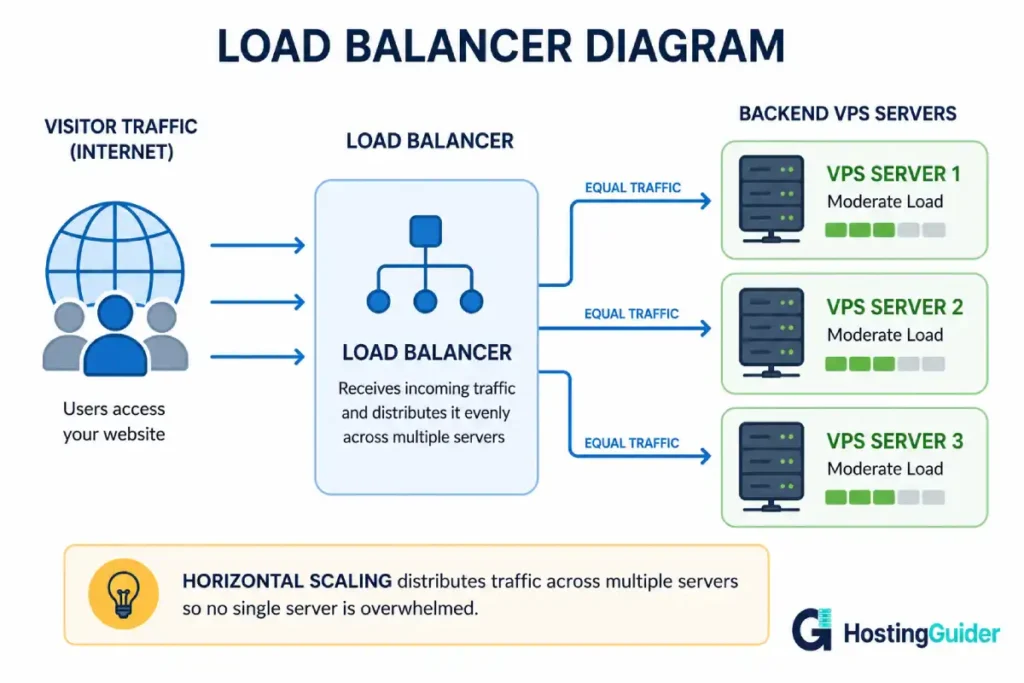
Instead of one server handling all your traffic, multiple servers handle it together. A load balancer sits in front of them. It directs each visitor request to whichever server is least busy.
Think of it like opening a second café location. More customers get served because there are more places to serve them.
Horizontal scaling is more complex than vertical. It requires your application to run on multiple servers simultaneously. Not all applications support this easily.
It is the more powerful approach for very high traffic. Cloud hosting makes horizontal scaling automatic. VPS requires more planning and configuration.
Hands-on example: You run a news website. A major story breaks. Your site receives 50,000 visitors in one hour instead of the usual 5,000. One server cannot handle this. You have set up two identical VPS servers with a load balancer in front. The load balancer splits traffic between them. Each server handles 25,000 visitors. Neither is overwhelmed. The site stays fast.
What Resources Can You Scale on a VPS?
Most VPS providers allow you to scale these resources independently or together.
RAM
RAM is the working memory of your server. It holds data your server is actively using.
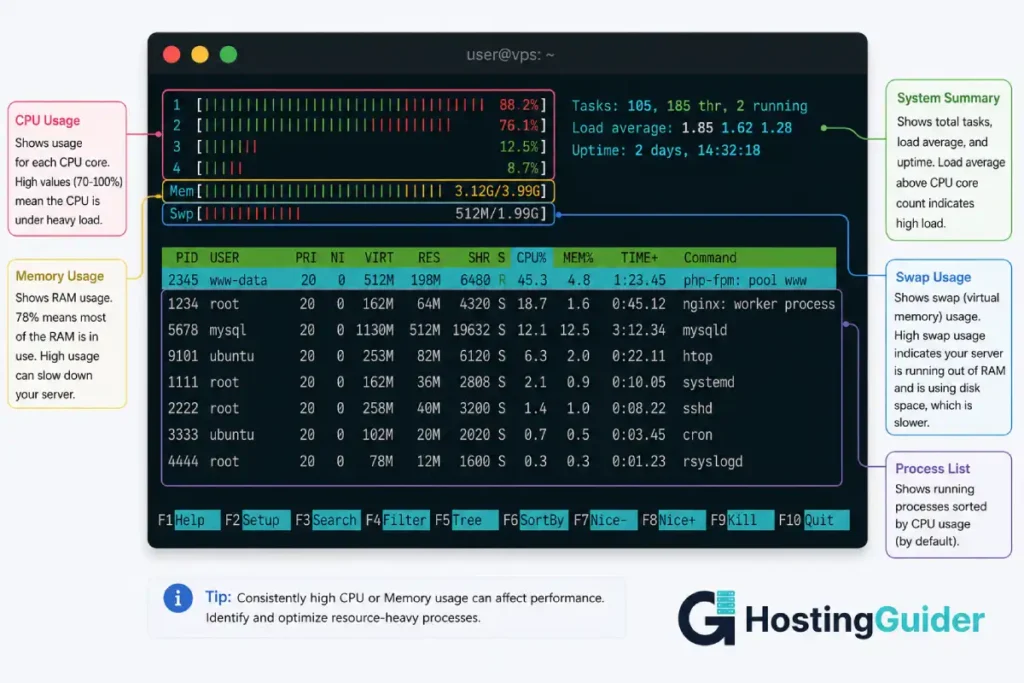
When your server runs low on RAM, it uses disk space as a substitute. This is called swap. Swap is dramatically slower than RAM.
Signs of RAM shortage: slow page loads even with low traffic, high swap usage, out of memory errors in server logs.
Scale RAM when: your server regularly uses more than 80% of available RAM.
CPU
CPU is the processing power of your server. It executes your PHP scripts, database queries, and everything else your server does.
Signs of CPU shortage: high CPU usage percentage in htop, slow script execution, long page generation times, 504 Gateway Timeout errors.
Scale CPU when: your CPU usage regularly stays above 80% during normal traffic.
Storage
Storage holds your website files, database, images, and all server logs.
Running out of storage does not slow your site. It stops it. When storage is full, your database cannot write new data. Uploads fail. Emails stop sending.
Scale storage when: you have less than 10% of your storage remaining.
Bandwidth
Bandwidth is the amount of data your server sends to visitors each month.
Hitting bandwidth limits results in extra charges or service suspension depending on your provider.
Scale bandwidth when: you regularly use more than 70% of your monthly allocation.
Signs You Need to Scale Your VPS
Your server tells you when it is struggling. You just need to know where to look.
| Warning Sign | What It Means | Action |
|---|---|---|
| Pages loading slowly at peak hours | Server running low on CPU or RAM | Monitor usage, prepare to scale |
| CPU usage above 80% regularly | Processing power insufficient | Upgrade CPU |
| RAM usage above 80% and high swap | Memory insufficient | Upgrade RAM |
| Disk space below 15% free | Storage running out | Expand storage or clean up files |
| Frequent 504 errors | Server timing out on requests | Upgrade CPU or optimise code |
| Visitors reporting site is down | Server overwhelmed | Scale immediately |
| Slow database queries | Insufficient RAM or CPU | Upgrade resources or optimise queries |
How to Check Your Resource Usage
Connect to your VPS via SSH. Type these commands.
Check CPU and memory in real time:
htop
Check disk space:
df -h
Check memory usage:
free -m
Check network usage:
vnstat
Run these checks regularly. Once a week is a good habit for growing sites.
Install vnstat if it is not already on your server:
sudo apt install vnstat -y
When to Scale: Proactive vs Reactive
There are two approaches to scaling. One is much better than the other.
Reactive scaling means you wait until something breaks. Your site slows down. Visitors complain. You realise the server is overwhelmed. You try to scale during the crisis.
Reactive scaling is stressful. Your site is already suffering. Your visitors are already having a bad experience. Scaling takes time. The damage is already happening.
Proactive scaling means you monitor your server and scale before problems occur.
You check your resource usage weekly. You see CPU trending toward 80%. You upgrade before it reaches that level. Your visitors never notice anything.
Proactive scaling requires monitoring. Set up server monitoring alerts. Most hosting dashboards let you set alerts for CPU, RAM, and storage thresholds.
You can also use server monitoring tools. New Relic and Datadog provide detailed server performance dashboards. Both have free tiers.
How to Scale Your VPS in Practice
Method 1: Upgrade Your Plan
The simplest way to scale is to move to a higher plan with your current provider.
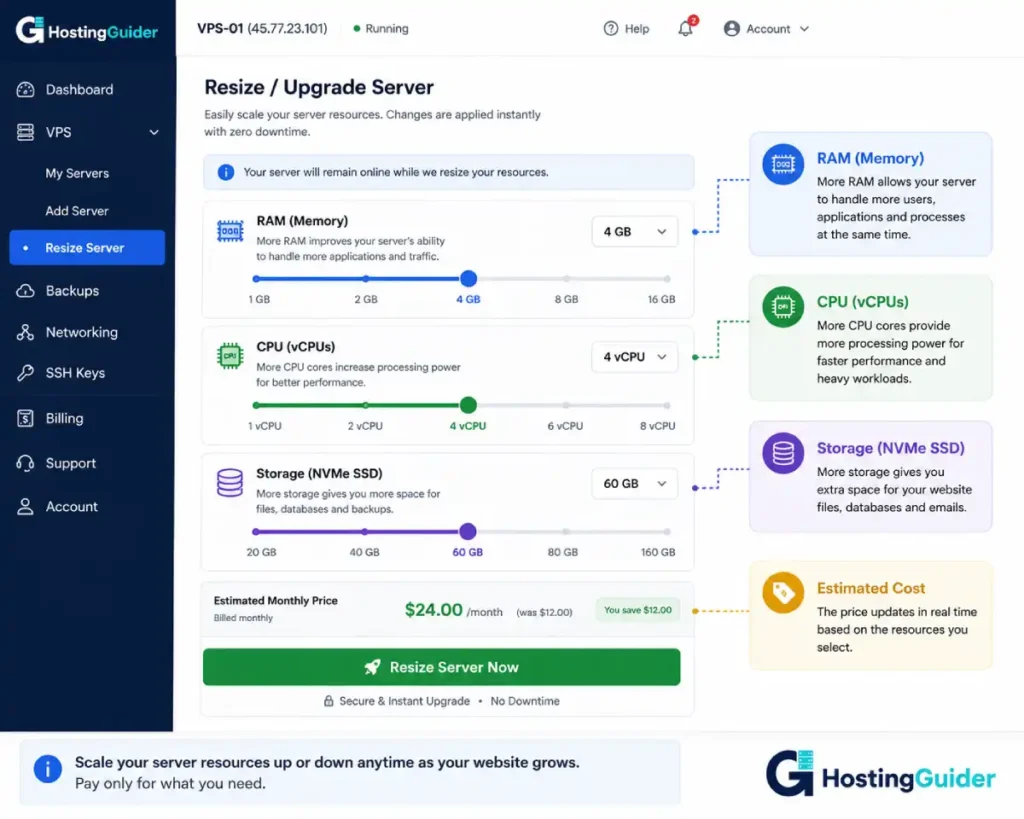
Log into your hosting control panel. Go to your VPS settings. Find the upgrade or resize option. Choose a plan with more RAM, CPU, or storage. Confirm the upgrade.
Most providers complete this within minutes. Some require a brief server restart.
Contabo allows plan upgrades directly from the customer control panel. The new resources are available almost immediately.
ScalaHosting advertises instant scalability as a feature. You can add RAM and CPU without migrating to a different server.
Method 2: Add Resources Without Changing Plan
Some providers let you add specific resources without moving to a completely new plan.
You add 2GB of extra RAM. You add one more vCPU. You keep everything else the same.
This is more flexible than moving to a full new plan. It lets you scale exactly what you need.
Method 3: Move to a Higher-Tier Server
Sometimes your current server cannot be upgraded further. The hardware has a limit.
In this case, you migrate to a new, more powerful server. Your hosting provider usually helps with this migration.
This is more disruptive than a simple upgrade. Plan it carefully. Do it during low-traffic hours. Back up your data before starting.
Method 4: Move to Cloud Hosting
If your traffic is very unpredictable, VPS scaling might not be fast enough.
Cloud hosting scales automatically. When traffic spikes, the cloud adds resources instantly. When traffic drops, resources scale back down.
Cloudways offers managed cloud hosting on infrastructure from AWS and Google Cloud. Their dashboard makes it easy to resize your server or move to more powerful cloud infrastructure when the time comes.
Read our cloud hosting scalability guide for a full explanation of how cloud scaling works.
VPS Scalability vs Cloud Scalability
This is one of the most important comparisons to understand.
| Factor | VPS Scaling | Cloud Scaling |
|---|---|---|
| Speed of scaling | Minutes to hours | Seconds to minutes |
| Automatic scaling | No, manual action required | Yes, can be fully automatic |
| Scaling during a spike | May be too slow | Handles spikes instantly |
| Cost during low traffic | Fixed monthly price | Pay for what you use |
| Cost during high traffic | Fixed price, no surprise bills | Higher bill during spikes |
| Technical complexity | Low to moderate | Low (managed) to high (raw cloud) |
| Best for | Predictable growth | Unpredictable spikes |
Hands-on example: You run a seasonal gift shop. Traffic is very low in January. It is extremely high in November and December. On VPS, you pay the same fixed price all year. You manually upgrade in October and downgrade in January. On cloud hosting, you pay more in November and December automatically. In January, costs drop automatically. Which is cheaper depends on your specific traffic pattern.
Our guide on cloud vs traditional hosting goes deeper into these differences.
VPS Scalability vs Dedicated Server Scalability
A dedicated server gives you an entire physical machine. It is very powerful. But it has a hard ceiling.
You cannot add more CPU cores beyond what the physical motherboard supports. You cannot add RAM beyond what the server chassis can hold.
When you hit the ceiling of a dedicated server, your only option is to buy a second server.
VPS scaling is more flexible. You move between plans or switch to a more powerful virtual machine. You are not limited by physical hardware in the same way.
Read about dedicated server vs VPS hosting for a full comparison. If you are approaching the limits of your VPS, our guide on upgrading from VPS to dedicated explains when that move makes sense.
Setting Up Your VPS for Better Scalability
You can prepare your VPS to handle traffic spikes better even without upgrading hardware.
Enable Caching
Caching stores pre-built versions of your pages. Instead of generating each page from scratch for every visitor, the server serves the cached version.
This dramatically reduces CPU and RAM usage. The same hardware handles significantly more visitors.
Install a caching plugin on WordPress. WP Super Cache and W3 Total Cache are both free. Enable page caching. Enable browser caching.
At the server level, enable Nginx FastCGI cache for even better performance.
Read our caching and website speed guide for a full explanation of how caching works.
Optimise Your Database
Database queries are one of the most common causes of slow pages and high CPU usage.
Run this command to check slow queries:
sudo mysql -e "SHOW FULL PROCESSLIST;"
If you see queries taking more than a second, investigate them. Badly written queries consume far more resources than they should.
Install a query caching layer. Redis object caching reduces repetitive database queries significantly.
Use a CDN
A CDN delivers your static files from servers close to your visitors. Images, CSS, and JavaScript files load from a nearby location instead of your VPS.
This reduces the bandwidth and processing load on your VPS. Your server only handles PHP requests and database queries. The CDN handles everything else.
Cloudflare has a free CDN tier. It works with any VPS. It also provides DDoS protection and basic security features.
Optimise Images
Large unoptimised images consume bandwidth and slow page loads.
Compress every image before uploading it. Use modern formats like WebP. Set images to lazy load so they only download when a visitor scrolls to them.
Follow our image optimisation guide for step-by-step instructions.
Scalability Planning: A Simple Framework
Use this framework to plan your VPS scaling strategy before you need it.
| Stage | Traffic Level | Action |
|---|---|---|
| Starting out | Under 10,000 monthly visitors | Basic VPS, monitor weekly |
| Growing | 10,000 to 50,000 monthly visitors | Enable caching, optimise database |
| Scaling needed | CPU or RAM above 70% regularly | Upgrade VPS plan |
| High growth | 50,000 to 200,000 monthly visitors | Consider cloud VPS or additional servers |
| Enterprise | Above 200,000 monthly visitors | Cloud hosting with load balancing |
You do not need to jump to the next stage the moment you hit a threshold. Use monitoring data. Scale when your usage is consistently high. One-off spikes do not necessarily mean you need to scale permanently.
Managed vs Unmanaged VPS for Scaling
Scaling an unmanaged VPS requires you to handle the upgrade process yourself. You log in. You resize the server. You verify everything works after the upgrade.
Managed VPS makes scaling easier. The provider handles the technical side. You click a button. They do the rest.
ScalaHosting managed VPS includes scalability as a named feature. Resources are added without server migration.
Cloudways lets you resize your cloud server from their dashboard in minutes. The process is visual and straightforward.
Our managed vs unmanaged VPS guide explains the full trade-off between the two approaches.
Frequently Asked Questions
What does scalability mean for VPS hosting?
Scalability for VPS hosting means the ability to increase your server resources when your website needs more power. You can add more RAM, CPU cores, or storage to your existing VPS. You can also add more servers to share traffic between them. A scalable VPS handles traffic growth without going offline or slowing down. Most VPS providers allow resource upgrades within minutes through their control panel.
What is the difference between vertical and horizontal scaling?
Vertical scaling means adding more resources to your existing server. You give it more RAM, faster CPU, or more storage. It is the same server with more power. Horizontal scaling means adding more servers. Instead of one powerful server, you have multiple servers sharing the load. Vertical scaling is simpler and suitable for most growing websites. Horizontal scaling is more complex but handles much higher traffic levels. VPS hosting supports both approaches.
How do I know when to scale my VPS?
The main signals are high CPU usage above 80% regularly, RAM usage above 80% with swap in use, disk space below 15% free, slow page load times during normal hours, and frequent server timeout errors. Check these metrics weekly using htop, df -h, and free -m on your server. Do not wait for your site to go down before scaling. Scale when usage trends show you approaching the limit, not after you have already hit it.
Is VPS hosting scalable enough for a growing business?
Yes, for most growing businesses. A VPS can typically be upgraded through several resource tiers before you need to consider moving to dedicated servers or cloud hosting. The critical difference is that VPS scaling requires manual action. You or your provider must upgrade the plan. Cloud hosting scales automatically. If your traffic is very unpredictable with sudden large spikes, cloud hosting from providers like Cloudways handles those spikes better than a standard VPS.
Can I scale my VPS without downtime?
It depends on your provider and the type of scaling. Many VPS providers apply RAM and CPU upgrades without restarting your server. Storage expansions are often seamless. Some providers require a brief reboot that takes one to three minutes. Before scaling during peak traffic, check your provider’s documentation or ask their support team how the upgrade process works. Scaling during a low-traffic period is always safer even if your provider says no downtime is expected.
How does VPS scalability compare to cloud hosting scalability?
VPS scaling is manual and takes minutes to hours. Cloud hosting scaling is often automatic and takes seconds. For predictable traffic growth, VPS scaling works well. You see the trend, you upgrade, the problem is solved. For unpredictable spikes, cloud hosting is more appropriate. It detects the surge and scales automatically before performance degrades. Cloud hosting costs more during high-traffic periods but scales back down automatically when traffic drops. Read our cloud hosting scalability guide for a deeper comparison.
What should I do before scaling to make my VPS more efficient?
Before upgrading your plan, try these steps first. Enable caching on your website. A good caching setup can double the number of visitors your current server handles. Optimise your database queries. Badly written queries waste significant CPU resources. Set up a CDN to offload static file delivery. Compress and optimise your images. These steps often delay the need for a hardware upgrade by months. Only scale hardware if optimisation alone is not enough to meet demand.


