
Every single day, a business owner buys a dedicated server they do not actually need. They want the prestige of owning physical hardware. They pay hundreds of dollars a month for a massive machine that sits ninety percent empty.
On the exact same day, a different business owner refuses to upgrade. They stay on a cheap virtual server to save money. Their database crashes during a massive holiday sale. They lose thousands of dollars in revenue because their checkout page locked up entirely.
Both of these business owners made terrible financial decisions. Dedicated hosting sits at the premium end of a fast-growing industry. Our web hosting statistics track how each hosting segment has grown and where dedicated servers fit in the global market today.
A dedicated server is not a magical upgrade that automatically makes a messy website faster. It is a specific infrastructure tool designed to solve very specific operational bottlenecks. If you do not have those bottlenecks yet, upgrading is a massive waste of capital.
This guide provides the exact thresholds you must cross before buying raw hardware. We will break down the traffic numbers, the latency limits, and the financial crossover points. A few minutes reading this guide will save you from making a very expensive infrastructure mistake.
Table of Contents
Key Takeaways
- A dedicated server gives you one hundred percent of the physical hardware with zero virtualization software slowing you down.
- High traffic volume does not always require dedicated hardware. High database concurrency is the real tipping point.
- Cloud utility pricing becomes a financial trap for businesses with high, steady baseline traffic.
- Checking your current CPU steal time is the fastest way to prove you have outgrown a virtual environment.
- Upgrading to unmanaged bare metal requires serious system administration skills.
- Premium managed options often provide the best balance of power and operational peace of mind.
What a Dedicated Server Actually Means
Understanding the physical architecture helps establish the right mental model before evaluating whether an upgrade is strictly necessary.
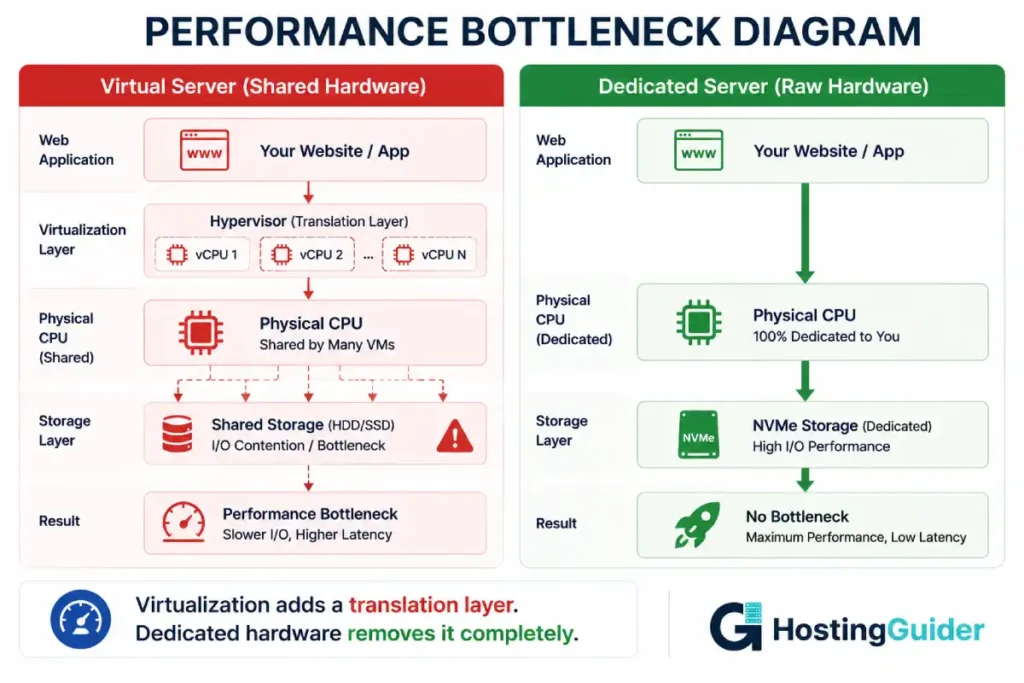
From the hardware side: A dedicated server is a physical computer bolted into a rack at a data center. All the memory sticks, all the processor cores, and all the storage drives belong exclusively to you. There is no hypervisor management software dividing the resources. You do not share the physical motherboard with any other tenant.
From the performance side: You get absolute physical isolation. In a virtual environment, if your neighbor gets hit by a massive traffic spike, their virtual machine can steal physical processor cycles from your virtual machine. Your website slows down unpredictably. A dedicated server eliminates this noisy neighbor effect completely. It provides guaranteed, predictable performance every single second of the day.
Think of it like housing. A virtual server is an apartment building. You share the plumbing and the elevators. A dedicated server is a standalone house sitting on its own private plot of land. You control everything.
If you are currently confused about where your site lives, understanding exactly what is VPS hosting is mandatory before reading further.
The Upgrade Thresholds: Broken Into Tiers
Not all bottlenecks require a dedicated server. Some problems can be fixed with better software optimization. You must analyze your specific breaking point.
| Tier | Description | The Solution Path |
| Static Traffic Surges | Massive spikes of visitors reading articles | Edge caching and Content Delivery Networks |
| Storage Capacity | Running out of disk space for media uploads | Cloud object storage (like Amazon S3) |
| High Concurrency | Hundreds of active shopping carts simultaneously | Dedicated Server |
| Latency Sensitivity | Real-time applications requiring instant responses | Dedicated Server |
| Compliance Rules | Strict legal limits on shared data environments | Dedicated Server |
Threshold 1: Database Concurrency and IOPS
Traffic volume is the most deceptive metric in the hosting industry.
If you get one million visitors a month reading static blog posts, you absolutely do not need a dedicated server. You can cache those static HTML pages heavily. A standard web hosting firewall will serve those pages directly from global edge networks. Your origin server will barely do any work.
The real threshold is database concurrency.
If you run a heavy WooCommerce store, a dynamic membership community, or a custom software application, every single user action triggers a database query. You cannot cache a live checkout page. You cannot cache a live inventory count.
When your store consistently processes hundreds of simultaneous active shopping carts, virtual servers begin to struggle heavily. The virtualized storage layers cannot read and write the database changes fast enough. This metric is called IOPS (Input/Output Operations Per Second).
When a database tries to write thousands of orders simultaneously on a virtual disk, the disk queue fills up. The server locks up. Your customers see a 504 Gateway Timeout error. If your business relies on dynamic, uncached transactions and regularly exceeds tens of thousands of active daily logins, you have crossed the first dedicated server threshold.
Threshold 2: CPU Steal Time
You do not have to guess if your virtual server is struggling. Your server will tell you exactly what is happening if you know how to ask.
In a shared virtual environment, the hypervisor allocates physical processor time to your virtual machine. If the physical host node is overcrowded, you have to wait in line to do math. This waiting period is called CPU Steal Time. It represents the exact percentage of time your virtual CPU was ready to work, but the physical CPU was busy helping another tenant.
If your site feels sluggish, log into your terminal and check your CPU steal time instantly.
Bash
top -bn1 | grep "Cpu(s)"
Look at the number right before the st label in the output.
If that number is consistently hovering around zero or one percent, your virtual server has plenty of power. Your slow website is caused by bad code, not bad hardware.
If that number consistently spikes above five or ten percent during your busy hours, your hosting provider is overselling the physical hardware. You are actively losing processing cycles to your noisy neighbors. Upgrading to a dedicated server drops your steal time to absolute zero permanently.
Threshold 3: The Financial Crossover Point
Cloud hosting platforms sell you a beautiful concept called utility billing. You only pay for the exact compute hours you consume. This model is absolutely brilliant for startups with highly unpredictable, bursty traffic.
However, cloud utility pricing is a massive financial trap for established businesses with high, steady baseline traffic.
Imagine your software application requires 32 CPU cores and 128 gigabytes of RAM running twenty-four hours a day to handle your baseline user load. If you rent those massive resources on a major public cloud provider, your monthly bill will easily exceed a thousand dollars.
Cloud providers charge massive premium markups for sustained heavy compute usage. They also charge punishing fees for outbound network bandwidth.
You can rent a physical dedicated server with those exact same massive hardware specifications for roughly three hundred dollars a month. Dedicated servers almost always include massive, unmetered bandwidth allocations.
If your baseline server resource graph looks like a flat, high plateau rather than a series of wild spikes, cloud hosting is financially punishing. You must move to a dedicated server to reclaim your corporate profit margins.
Threshold 4: Strict Compliance and Data Sovereignty
Sometimes the decision to upgrade has absolutely nothing to do with performance limits. Sometimes the corporate legal department makes the call.
Virtual servers are inherently multi-tenant environments. Your highly sensitive customer data sits on the exact same physical hard drive as data belonging to random strangers. The hypervisor software is designed to keep the data strictly separated.
However, critical security vulnerabilities in hypervisor software are discovered every single year.
If your company processes sensitive healthcare records, massive financial portfolios, or proprietary enterprise intellectual property, virtual separation is often not legally sufficient. Strict compliance frameworks like HIPAA or SOC 2 often strongly prefer, or explicitly mandate, total physical hardware isolation.
A dedicated server guarantees that nobody else has access to your physical memory modules or your physical storage drives.
Furthermore, strict data sovereignty laws in regions like the European Union dictate exactly where user data must physically reside. Renting a physical dedicated server in a specific geographical data center is the absolute easiest way to prove strict legal compliance to government auditors.
The Self-Assessment Test
Give honest answers only. Read each scenario and decide if your business fits the description right now.
| Scenario | What It Really Means | Does It Require Dedicated? |
| Your monthly cloud hosting bill is suddenly higher than your office rent. | You have hit the cloud utility billing penalty threshold. | Yes. Move to fixed-price bare metal. |
| Your site gets 500k monthly readers but is 99% static text and images. | You have a bandwidth problem, not a compute problem. | No. Upgrade your CDN caching layer. |
| Your CPU steal time spikes to 15% every day at noon. | You are a victim of severe noisy neighbor interference. | Yes. You need physical isolation immediately. |
| You want to run a complex machine learning model 24/7. | You need sustained, maximum CPU and GPU power constantly. | Yes. Virtualization will ruin this performance. |
| You are launching a new app and hope it goes viral next week. | Your traffic is totally unpredictable and currently non-existent. | No. Start on scalable cloud infrastructure. |
If you answered yes to the scenarios above, you have preparation to do before signing a server contract. This is not an insult. It is vital business information.
The Hidden Costs Nobody Talks About
Buying the server is only the first expense. You must understand the total cost of ownership.
The System Administration Tax. A raw unmanaged dedicated server gives you zero safety nets. If you delete a critical system file, the server dies. If you misconfigure the firewall rules, you lock yourself out instantly. If you do not have an experienced internal IT team, and you do not want to learn advanced essential hosting security tips, an unmanaged server is a massive corporate risk.
The Backup Infrastructure. When you rent a cheap virtual server, the provider usually takes automated snapshots of your entire machine. When you rent a dedicated server, you are entirely responsible for your own backups. You must buy secondary backup servers. You must configure automated synchronization scripts.
You can automate basic file backups using simple cron jobs. This command packages your entire web directory into an archive automatically:
Bash
tar -czf /backups/site-backup.tar.gz /var/www/html/
However, building a robust, off-site disaster recovery plan for a massive database requires serious engineering time and additional financial investment.
Hardware Failure Responsibility. If a RAM stick dies in a virtual server, the cloud provider moves your virtual machine to a healthy node instantly. You never notice. If a RAM stick dies in your dedicated server, your website goes completely offline. You must wait for a technician to physically walk to your server rack, open the case, and replace the broken component.
When You Should NOT Upgrade
Do not upgrade blindly out of frustration. If your business fits these profiles, a dedicated server will only cause you expensive operational headaches.
Highly Unpredictable Traffic: If you run an event ticketing website that gets zero traffic for three weeks, and then gets massive traffic for exactly two hours when concert tickets go on sale, do not buy a dedicated server. You would have to buy a massive, expensive server just to handle the two-hour spike. It will sit completely idle and waste money for the other three weeks. Stick to elastic cloud scaling.
You Lack System Administration Skills: Managing a massive server requires a deep understanding of Linux architecture. You must compile software manually. You must read system logs daily. If you refuse to learn the terminal commands found in a standard setup VPS hosting tutorial, you have no business renting unmanaged bare metal.
The Middle Path: High-End Managed Cloud and VPS
You do not have to jump from a ten-dollar shared hosting plan straight to a three-hundred-dollar unmanaged dedicated server. The hosting industry offers brilliant middle paths.
A premium managed cloud environment provides the raw performance isolation of dedicated resources without the terrifying system administration burden.
If you want massive hardware power but refuse to learn Linux command line administration, Cloudways provides incredible managed solutions.
They act as an advanced management layer on top of massive global infrastructure providers. You get dedicated resources configured perfectly for heavy web applications. Their expert team handles the deep server security, the operating system updates, and the strict firewall rules.
If you run a massive publishing network or a heavy WooCommerce store, general servers require too much manual database tuning.
Kinsta provides dedicated, isolated software containers running on enterprise Google infrastructure. You get absolute resource dedication configured precisely for the WordPress software engine. This guarantees massive speed under heavy checkout loads without ever touching a command terminal.
If you are moving away from basic shared hosting and need a highly affordable entry into dedicated power, Hostinger offers brilliant hybrid cloud solutions.
They provide plans with fully dedicated CPU cores and RAM limits. You get the strict isolation of a dedicated environment while maintaining a user-friendly control panel and automated provider backups.
Securing Your New Investment
Buying a dedicated server changes your security profile instantly. You are now responsible for a massive amount of unmonitored computing power.
Hackers actively scan the internet looking for unprotected dedicated servers. They want to hijack your massive processor to mine cryptocurrency. They want to hijack your massive network port to launch attacks against other companies.
You must protect the network layer aggressively. Ensure your chosen provider includes native DDoS protection hosting directly at the data center edge. A massive server can handle a lot of regular traffic, but a dedicated botnet will clog your physical network pipe regardless of how fast your processor is.
You must also lock down the server internally before you ever connect your database to the public internet. Disable root password access completely. Utilize cryptographic SSH keys instead. A massive server engine is completely useless if a hacker steals your keys.
Frequently Asked Questions
Can I run multiple websites on a single dedicated server?
Yes. A dedicated server is essentially a powerful standalone computer. You can install web server software and host multiple websites on a single machine, provided it has sufficient RAM, CPU resources, and storage to handle the combined traffic and workloads of all the sites.
What is the difference between bare metal and dedicated hosting?
In most modern hosting environments, bare metal and dedicated hosting mean the same thing. Both refer to a physical server rented exclusively to a single customer. The term “bare metal” simply highlights that the server runs directly on physical hardware without a virtualization layer managed by the hosting provider.
Do I need a control panel for a dedicated server?
No, a control panel is not strictly required. Experienced administrators can manage a dedicated server entirely through the command line. However, control panels such as cPanel or Plesk provide a user-friendly graphical interface that simplifies tasks like managing websites, email accounts, databases, DNS records, and security settings.
How long does it take to set up a dedicated server?
Dedicated servers typically take longer to deploy than virtual servers. Depending on the provider and hardware availability, setup can take anywhere from a few hours to one business day. The provisioning process may involve allocating physical hardware, configuring networking, and installing the operating system.
Will a dedicated server automatically improve my SEO rankings?
A dedicated server can improve website performance by providing more consistent resources and faster response times. Since page speed is one of the factors search engines consider, this may contribute to better rankings. However, a dedicated server alone cannot improve poor content, weak backlink profiles, or other SEO issues. Strong SEO still depends on high-quality content, user experience, and overall website optimization.


