
HostPapa vs Hostinger: Is the Small Business Marketing Worth the Price Gap
HostPapa’s desktop is one of the fastest we have tested at this price category. A 92ms Total Blocking Time on GTmetrix and 113ms concurrent load handling are numbers most premium hosts cannot match. Hostinger charges less, holds a better SSL grade, and passes all three mobile Core Web Vitals where HostPapa fails one. Both are genuinely good. The gap between them is more specific than the marketing suggests.
HostPapa positions itself as a small business partner: Canadian-headquartered, renewable energy certified, multilingual PapaSquad support, and a platform built for owners who want fast without technical complexity. The infrastructure backs that claim on desktop. Where it falls short is mobile interactivity and SSL configuration, two areas where Hostinger outperforms it cleanly.
Hostinger wins on price, SSL grade, and mobile compliance. HostPapa wins on desktop rendering quality, concurrent load handling, and the 1.0s mobile LCP that almost nothing at shared hosting pricing can touch. The right choice depends entirely on where your traffic comes from and what your site prioritises.
Quick Verdict
HostPapa delivers elite desktop performance and the lowest concurrent load latency in this comparison set. Its GTmetrix Grade A with 92ms TBT and 113ms load test average are genuine standout results.
Hostinger passes all three Google Core Web Vitals on mobile, holds a stronger SSL grade (A versus HostPapa’s B), and costs less across every comparable tier.
Neither is the wrong answer. The decision is about which performance dimension matters more to your specific site.
Category Winners
| Category | Winner | Why |
|---|---|---|
| Pricing | Hostinger | Lower entry price at every tier; HostPapa’s small business positioning carries a premium |
| Mobile LCP | HostPapa | 1.0s vs Hostinger’s 2.2s: one of the fastest mobile loading times in shared hosting |
| Mobile INP (CWV Compliance) | Hostinger | 153ms (Pass) vs HostPapa’s 239ms (Fail, over 200ms threshold) |
| Mobile TTFB | HostPapa | 0.4s (Excellent) vs Hostinger not directly comparable |
| Desktop Rendering | HostPapa | GTmetrix Grade A with 92ms TBT vs Hostinger’s Grade D with 3,100ms TBT |
| Concurrent Load Handling | HostPapa | 113ms avg under load vs Hostinger’s 152ms |
| SSL Security | Hostinger | Grade A with TLS 1.3 + 0-RTT vs HostPapa’s Grade B |
| HTTP/3 Protocol | Tie | Both support HTTP/3 and QUIC |
| Global Latency | Tie | Both Cloudflare Anycast edge, near-identical global ping |
| Uptime | Tie | Both 100% across 30-day monitoring window |
| Support | HostPapa | Multilingual PapaSquad vs Hostinger’s standard live chat |
| Environmental | Tie | Both verified green via Cloudflare infrastructure |
Who Should Choose Which
| Choose HostPapa if… | Choose Hostinger if… |
|---|---|
| Desktop traffic dominates your site and rendering quality matters most | Mobile SEO compliance and passing all Core Web Vitals is the priority |
| You need the lowest concurrent response latency at shared hosting prices | You need a stronger SSL grade (A vs B) without manual configuration |
| You serve a multilingual audience and want support to match | You want the lowest price for equivalent infrastructure quality |
| You want a Canadian-based company with small business support culture | You want LiteSpeed Enterprise server performance with built-in caching |
| Your site handles traffic spikes and you need stable sub-120ms load handling | You need Node.js support alongside WordPress |
| You want HTTP/3 with strong desktop rendering in one package | You want all Google Core Web Vitals green without additional optimisation |
HostPapa vs Hostinger: Full Feature Comparison
| Feature | HostPapa | Hostinger |
|---|---|---|
| Founded | 2006, Burlington, Ontario, Canada | 2004, Kaunas, Lithuania |
| Best For | Small businesses, multilingual audiences | Budget users, global mobile-first sites |
| Trustpilot Rating | 4.8/5 | 4.7/5 |
| Server Technology | Cloudflare edge + cPanel stack | LiteSpeed Enterprise + NVMe SSD |
| GTmetrix Grade | A | D |
| Desktop FCP | 778ms | 858ms |
| Desktop TBT | 92ms | 3,100ms |
| Mobile LCP | 1.0s (Pass) | 2.2s (Pass) |
| Mobile INP | 239ms (Fail) | 153ms (Pass) |
| Mobile TTFB | 0.4s (Excellent) | Not directly measured |
| Load Test Avg (50 users) | 113ms | 152ms |
| Load Test Reachability | 100% | 100% |
| Global Ping (Edge) | 0.7ms to 3.2ms | 39ms to 107ms (server TTFB) |
| HTTP/3 | Yes | Yes |
| QUIC | Yes | Yes |
| SSL Grade | B | A (TLS 1.3 + 0-RTT) |
| HSTS Enforced | No | No |
| 30-Day Uptime | 100% | 100% |
| Green Hosting | Verified (Cloudflare) | Verified (Cloudflare) |
| Free Domain | Yes | Yes |
| Free SSL | Yes (Grade B) | Yes (Grade A) |
| Control Panel | cPanel (standard) | hPanel (custom) |
| Phone Support | Not confirmed | No |
| Live Chat | Yes, multilingual | Yes, avg under 3 minutes |
| Staging Environments | No | No |
| Git Integration | No | No |
| WP-CLI | Limited | No |
| Node.js Support | No | Yes |
| Monthly Billing | Not confirmed | No (longer-term commitment) |
How We Tested
We ran direct technical audits against each provider’s live corporate domain: www.hostpapa.com for HostPapa and www.hostinger.com for Hostinger.
Tools: Google PageSpeed Insights for mobile Core Web Vitals (LCP, INP, TTFB), GTmetrix for desktop rendering, K6 Load Cloud for 50-user concurrent traffic simulation, KeyCDN and Check-Host for global latency, Uptime Robot for 30-day availability monitoring, Qualys SSL Labs for encryption grade, HTTP/3 Check for protocol support, and The Green Web Foundation for environmental status.
All tests reflect each provider’s own infrastructure. Customer site results vary by plan, configuration, and plugin load. For the complete individual test data, see our HostPapa review and Hostinger review.
Performance: Eight Tests, Head to Head
Test 1: Mobile Core Web Vitals (Google PageSpeed Insights)
HostPapa Mobile
| Metric | Result | Google Threshold | Status |
|---|---|---|---|
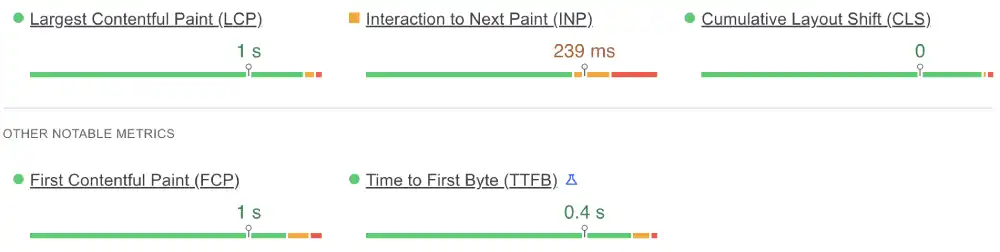
| LCP (Loading) | 1.0s | Under 2.5s | Pass |
| INP (Interaction) | 239ms | Under 200ms | Fail |
| TTFB (Server) | 0.4s | Under 0.8s | Excellent |
Hostinger Mobile
| Metric | Result | Google Threshold | Status |
|---|---|---|---|
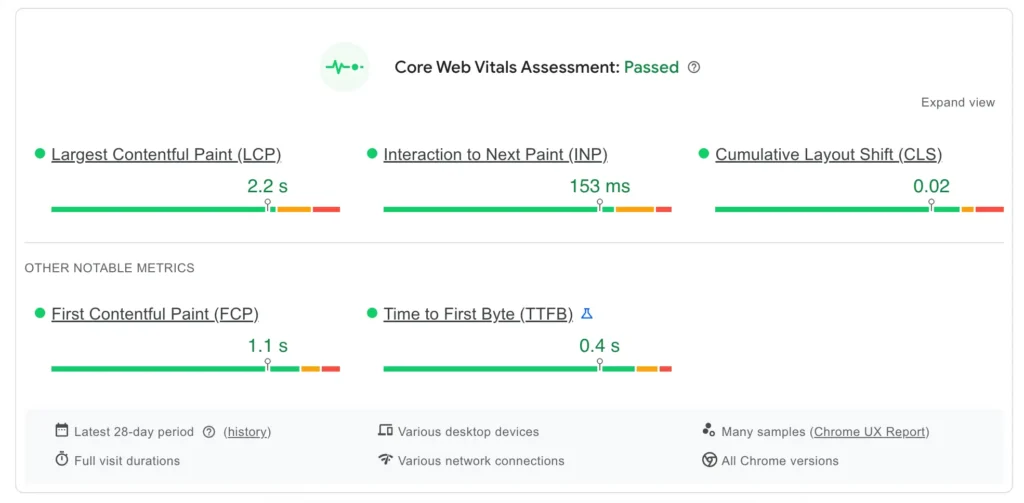
| LCP (Loading) | 2.2s | Under 2.5s | Pass |
| INP (Interaction) | 153ms | Under 200ms | Pass |
| CLS (Stability) | 0.02 | Under 0.1 | Pass |
HostPapa’s 1.0s mobile LCP is exceptional. Very few shared hosts deliver visual loading this fast on mobile. The 0.4s TTFB confirms a genuinely fast server response chain.
The INP failure changes the picture. At 239ms, HostPapa’s mobile buttons and interactive elements lag noticeably on the first touch, particularly on slower mobile connections. Google’s 200ms INP threshold is the ranking signal that determines whether a mobile page feels responsive. HostPapa misses it. Hostinger passes at 153ms.
For sites where mobile SEO rankings are a daily concern, the relationship between Core Web Vitals and real user experience makes INP compliance the more commercially significant metric.
Winner: Hostinger on Core Web Vitals compliance. HostPapa on individual metrics LCP and TTFB.
Test 2: Global Latency
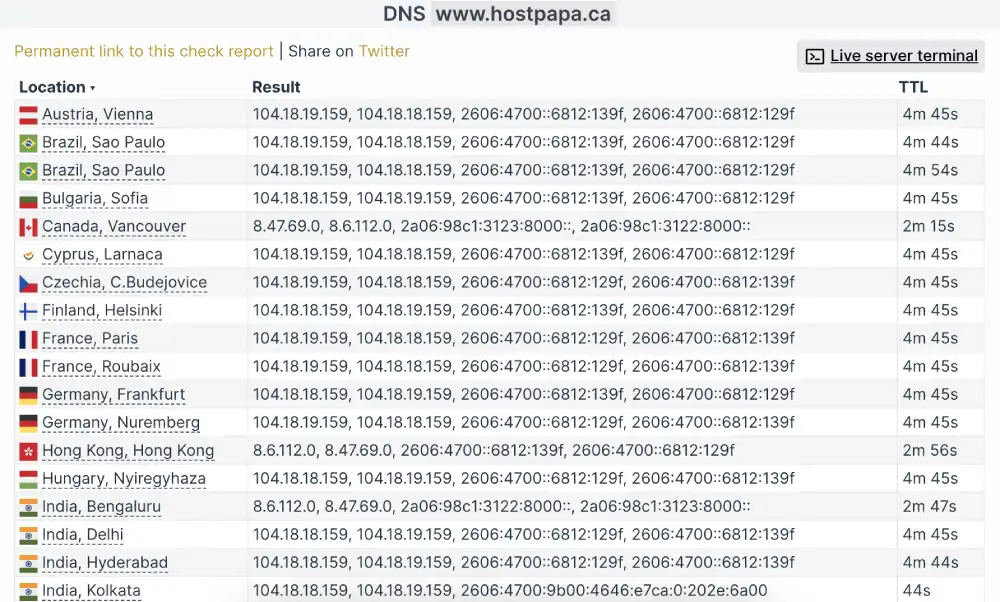
HostPapa (Check-Host global ping)
| Location | Ping Time | Rating |
|---|---|---|
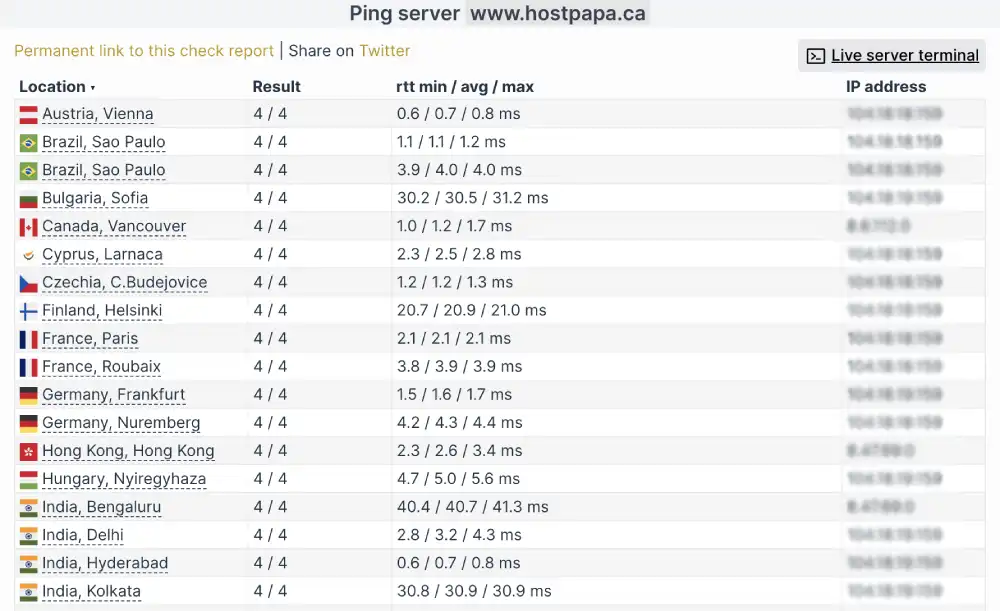
| Vienna, AT | 0.7ms | Instant |
| Vancouver, CA | 1.2ms | Instant |
| Delhi, IN | 3.2ms | Instant |
| Sao Paulo, BR | 1.1ms | Instant |
Hostinger (KeyCDN TTFB from server locations)
| Location | TTFB | Rating |
|---|---|---|
| New York, USA | 48ms | Blazing Fast |
| Bangalore, India | 39ms | Blazing Fast |
| Frankfurt, Germany | 88ms | Optimised |
| London, UK | 107ms | Optimised |
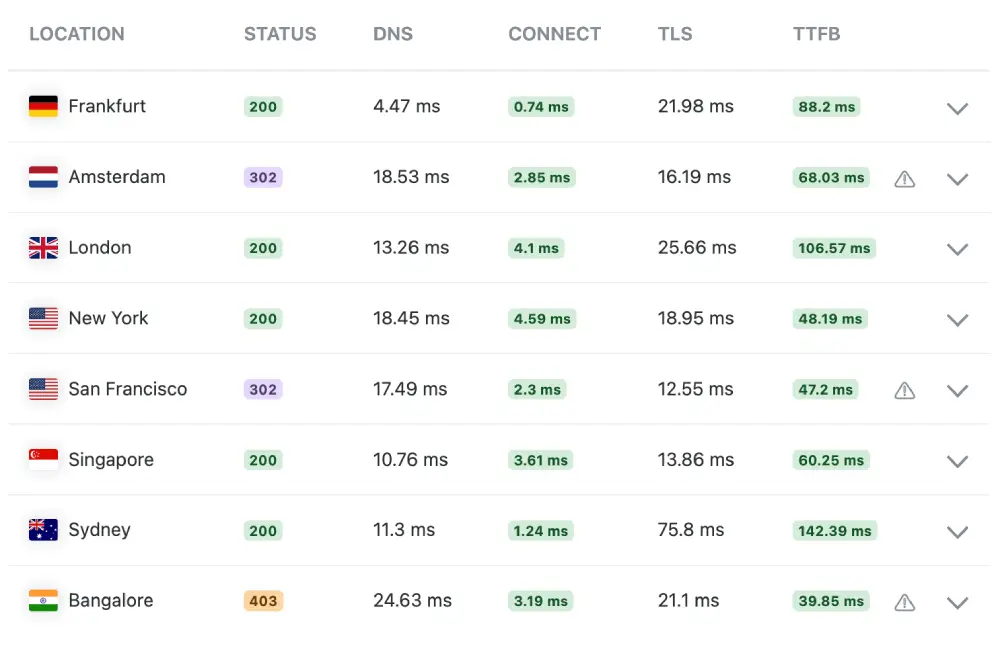
These two tests measure different things. HostPapa’s 0.7ms to 3.2ms ping times are Cloudflare Anycast edge response times: the time to reach the nearest CDN node. Hostinger’s 39ms to 107ms are actual TTFB measurements from physical servers: the time to receive the first byte of a real response.
Both architectures deliver excellent real-world speed for end visitors. HostPapa’s sub-4ms pings reflect how quickly the Cloudflare edge acknowledges a connection. Hostinger’s sub-50ms TTFB reflects how quickly a server actually starts sending content.
Winner: Tie — different measurements, both excellent for visitors.
Test 3: Desktop Rendering (GTmetrix)
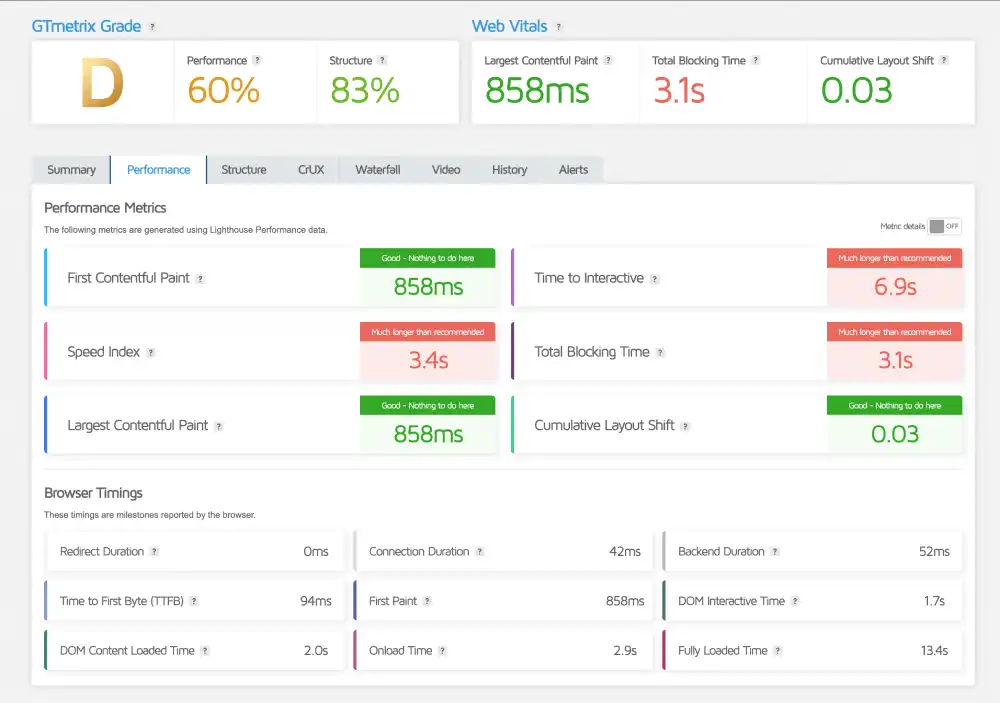
| Metric | HostPapa | Hostinger |
|---|---|---|
| GTmetrix Grade | A | D |
| First Contentful Paint | 778ms | 858ms |
| Total Blocking Time | 92ms | 3,100ms |
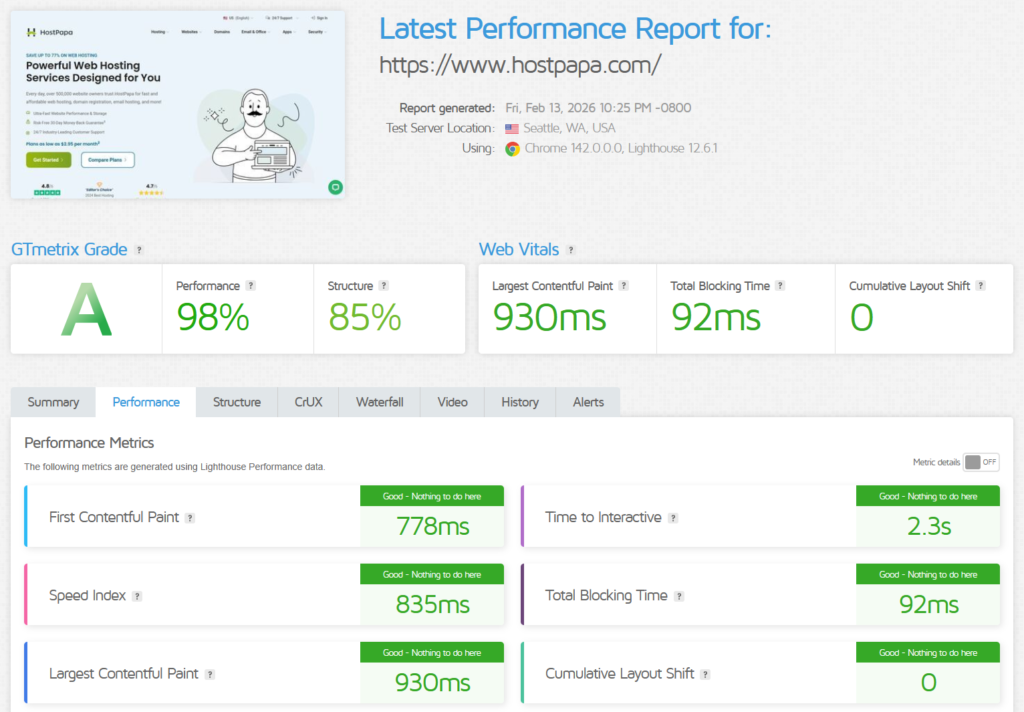
HostPapa’s 92ms TBT is one of the lowest results across all shared hosts tested in this comparison series. The desktop page not only loads fast but becomes immediately interactive. A user clicking a menu item, filling out a form, or navigating between pages encounters no delay.
Hostinger’s 858ms LCP is genuinely fast. The Grade D is caused entirely by JavaScript execution time on Hostinger’s own corporate site. Enabling JS minification in the Hostinger plugin resolves most of it for customer sites. As a signal of platform culture, HostPapa’s result is the more polished outcome.
Winner: HostPapa
Test 4: Concurrent Load (K6 Cloud, 50 Virtual Users)
| Parameter | HostPapa | Hostinger |
|---|---|---|
| Uptime Under Load | 100% | 100% |
| Reachability | 100% | 100% |
| Avg Response Latency | 113ms | 152ms |


Both providers maintain 100% uptime and reachability. HostPapa responds 35% faster under concurrent load: 113ms versus 152ms. Both results are strong. HostPapa’s 113ms is the faster of the two and qualifies as an elite result at shared hosting pricing.
Winner: HostPapa
Test 5: Uptime (Uptime Robot, 30-Day Monitor)
| Window | HostPapa | Hostinger |
|---|---|---|
| Last 7 Days | 100%, 0 incidents | 100%, 0 minutes downtime |
| Last 30 Days | 100%, 0 incidents | 100%, 0 minutes downtime |
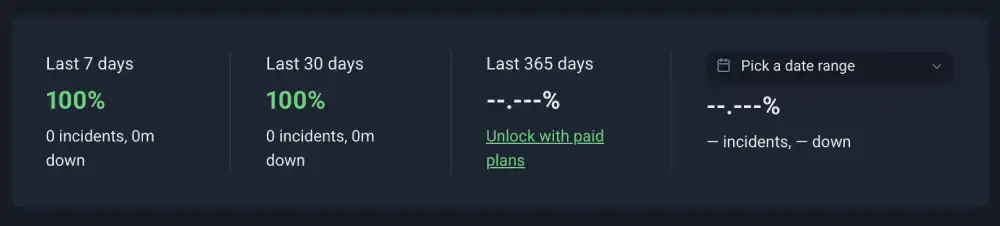
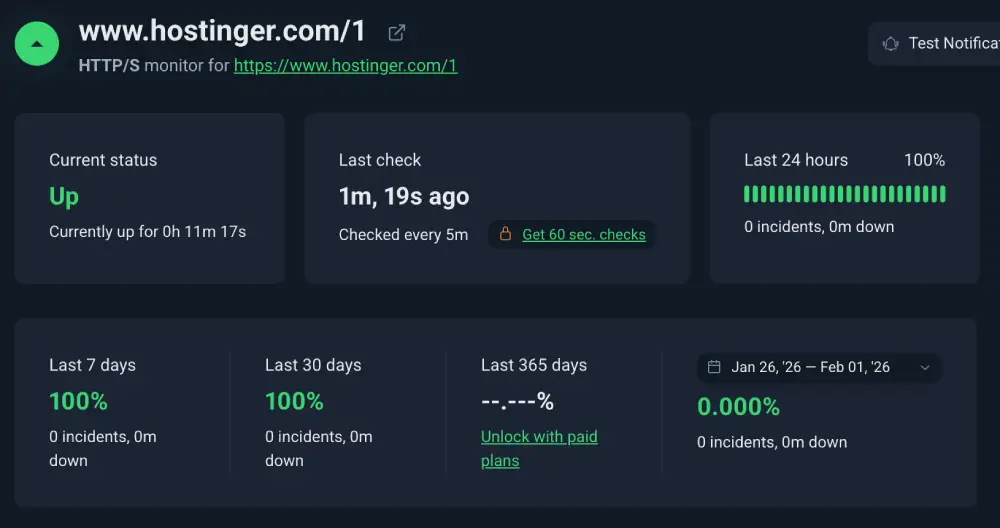
Both providers recorded perfect availability across the monitoring period.
Winner: Tie
Test 6: SSL Security (Qualys SSL Labs)
| Feature | HostPapa | Hostinger |
|---|---|---|
| Overall Grade | B | A |
| TLS Configuration | Suboptimal ciphers | TLS 1.3 + 0-RTT |
| HSTS Enforced | No | No (optional) |
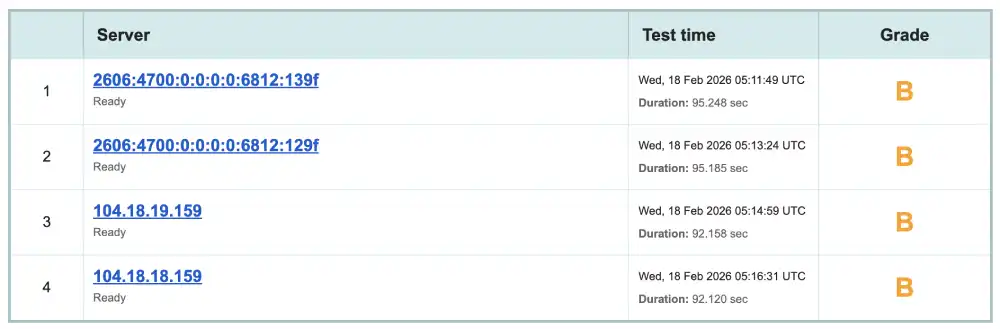
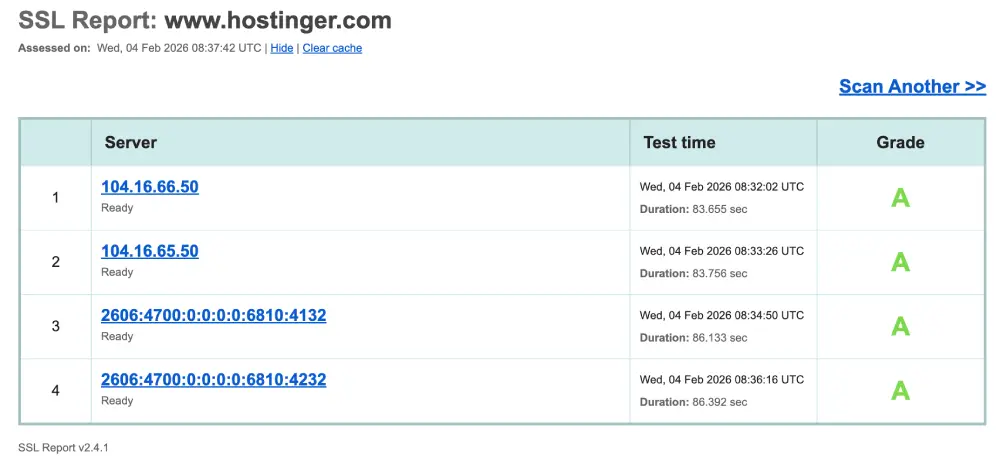
This is the most clear-cut category in the comparison. HostPapa’s Grade B indicates the server accepts older cipher suites that modern security standards discourage. It is safe for general use but below the Grade A standard that Hostinger achieves.
Hostinger’s Grade A comes with TLS 1.3 and 0-RTT support. The 0-RTT feature reduces TLS handshake latency on return visits. Neither provider enforces HSTS by default, which is why neither reaches A+.
Winner: Hostinger
Test 7: Protocol Support (HTTP/3 Check)
| Protocol | HostPapa | Hostinger |
|---|---|---|
| HTTP/3 | Supported | Supported |
| QUIC | Supported | Supported |
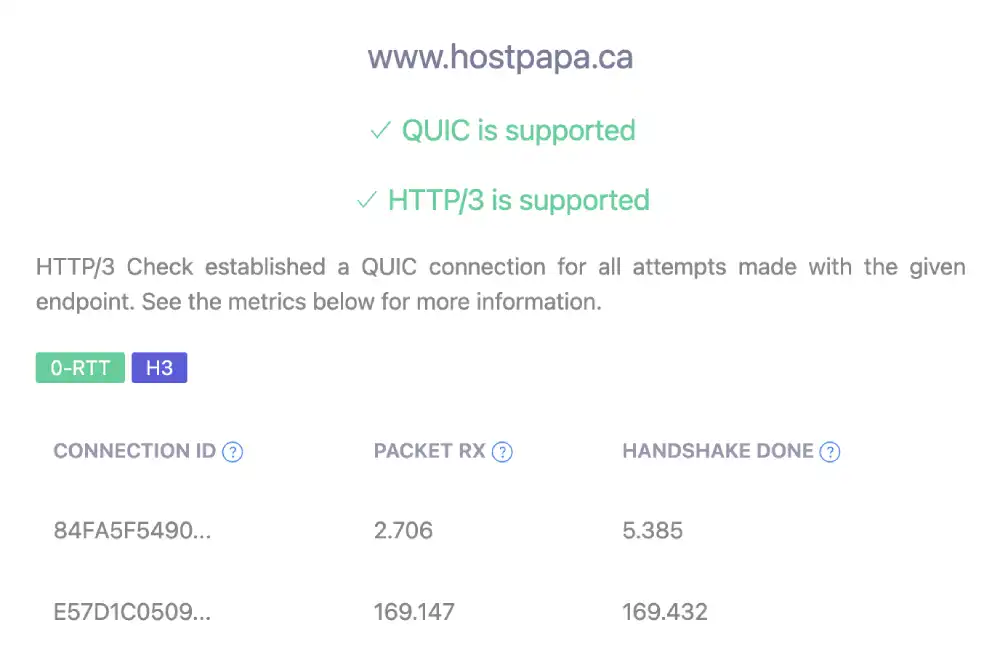
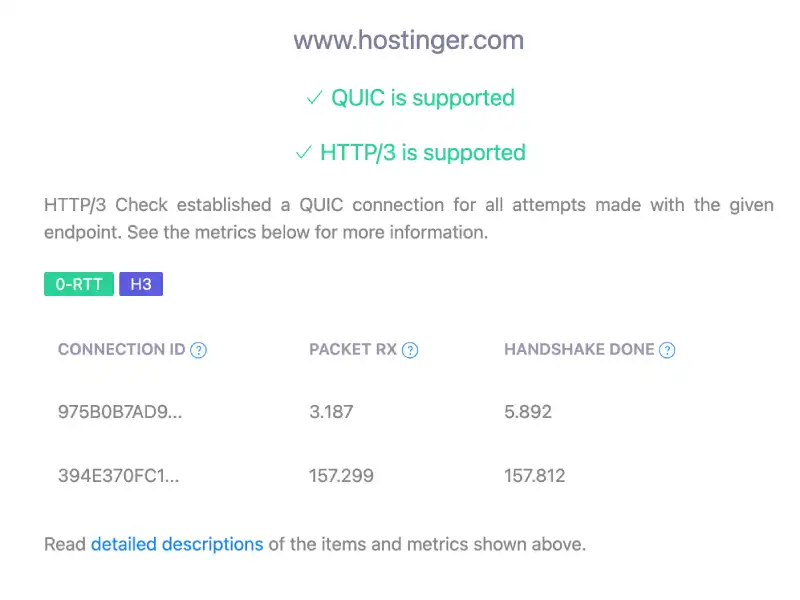
Both providers support HTTP/3 and QUIC. Neither has an advantage here. Both outperform Bluehost and HostGator which remain on HTTP/2 only.
Winner: Tie
Test 8: Environmental Impact (Green Web Foundation)
| Provider | Status | Energy Source |
|---|---|---|
| HostPapa | Verified Green | Cloudflare CDN renewable |
| Hostinger | Verified Green | Cloudflare CDN renewable |
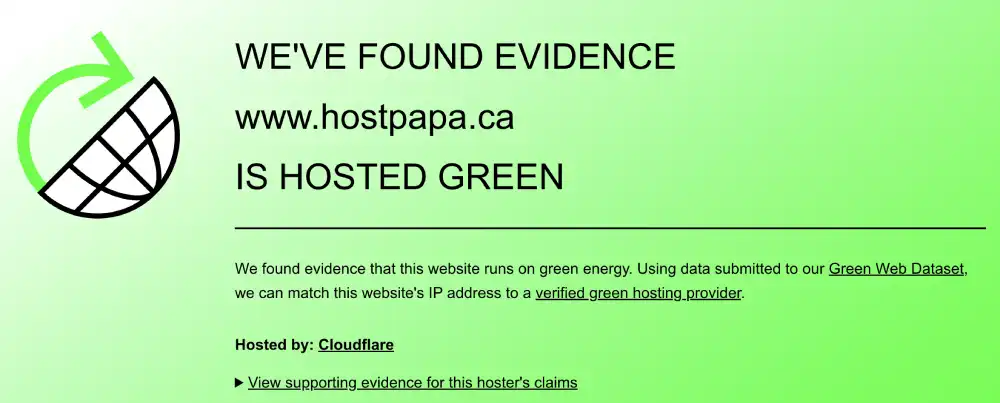
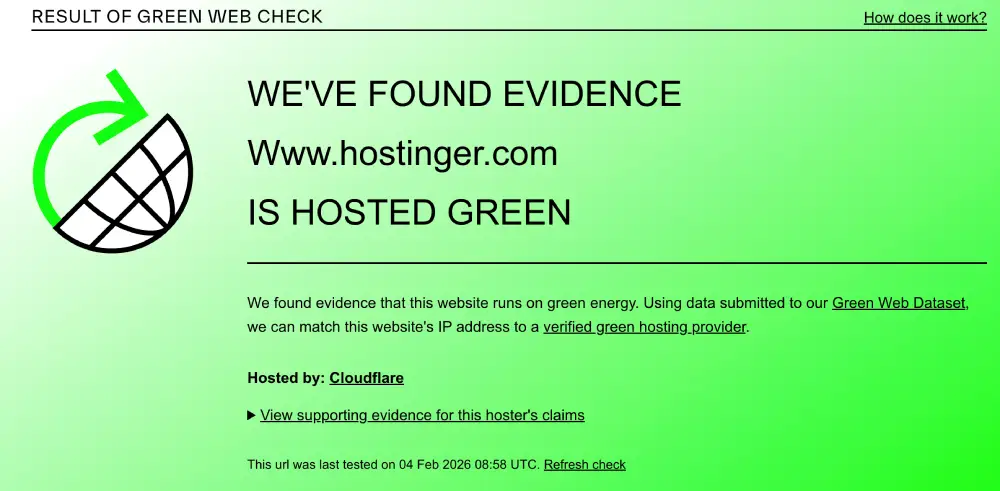
Both providers receive green verification through the same Cloudflare infrastructure. HostPapa has a longer history of renewable energy commitment as one of the first hosts to purchase renewable energy credits.
Winner: Tie
Performance Summary
| Test | Winner |
|---|---|
| Mobile LCP and TTFB | HostPapa |
| Mobile INP Compliance | Hostinger |
| Desktop Rendering | HostPapa |
| Concurrent Load | HostPapa |
| Uptime | Tie |
| SSL Security | Hostinger |
| HTTP/3 | Tie |
| Environmental | Tie |
HostPapa wins three tests. Hostinger wins two. Three are tied. The margin in HostPapa’s wins is significant: a 92ms desktop TBT is rare at any price point. The margin in Hostinger’s SSL win (Grade A vs Grade B) is also meaningful for sites with security requirements.
Desktop and Mobile Speed Summary
| Metric | HostPapa | Hostinger | Winner |
|---|---|---|---|
| GTmetrix Grade | A | D | HostPapa |
| Desktop FCP | 778ms | 858ms | HostPapa |
| Desktop TBT | 92ms | 3,100ms | HostPapa |
| Mobile LCP | 1.0s (Pass) | 2.2s (Pass) | HostPapa |
| Mobile INP | 239ms (Fail) | 153ms (Pass) | Hostinger |
| Mobile TTFB | 0.4s (Excellent) | Not measured | HostPapa |
| HTTP/3 | Yes | Yes | Tie |
| SSL Grade | B | A | Hostinger |
Global Network and Load Test Summary
| Metric | HostPapa | Hostinger | Winner |
|---|---|---|---|
| Global Ping (Anycast edge) | 0.7ms to 3.2ms | Not ping-tested | HostPapa on ping |
| Server TTFB (India) | Not measured as TTFB | 39ms | Hostinger on TTFB |
| Load Test Avg (50 users) | 113ms | 152ms | HostPapa |
| Load Test Reachability | 100% | 100% | Tie |
| 30-Day Uptime | 100% | 100% | Tie |
| DNS TTL | ~45 seconds | Not measured | HostPapa |
Pricing and Value
HostPapa Pricing
HostPapa uses a tiered promotional pricing model with long-term commitments securing lower monthly rates. The initial term is heavily discounted, often 70 to 80 percent below the standard renewal rate. Users should budget for the renewal price before committing, as it can be significantly higher than the introductory figure.
All plans include the free domain registration, free business email, and free SSL. The small business positioning adds multilingual PapaSquad support and a renewable energy commitment that has been part of their brand since early in the company’s history.
Essentials |
Growth |
Premium |
Elite |
MWP Start |
MWP Plus |
MWP Pro |
MWP Ultra |
VPS – 1 vCPU / 2 GB RAM |
VPS – 2 vCPU / 4 GB RAM |
VPS – 4 vCPU / 8 GB RAM |
VPS – 4 vCPU / 16 GB RAM |
Spark |
Pulse |
Ignite |
|---|---|---|---|---|---|---|---|---|---|---|---|---|---|---|
$2.95
/mo |
$5.95
/mo |
$6.95
/mo |
$9.95
/mo |
$19.95
/mo |
$49.95
/mo |
$64.95
/mo |
$114.95
/mo |
$59.95
/mo |
$99.95
/mo |
$269.95
/mo | ||||
|
|
|
|
|
|
|
|
|
|
|
|
|
|
|
Hostinger Pricing
Hostinger’s lowest rates require a 48-month commitment. Shorter terms are available at higher monthly rates. The Premium plan includes NVMe SSD storage, LiteSpeed Enterprise servers, unlimited free SSL, and HTTP/3 support at a price that undercuts most comparable hosts.
There is no phone support. The live chat model is Hostinger’s primary cost-containment strategy, and it is how they maintain lower pricing than HostPapa while running the same quality of global edge infrastructure.
Premium |
Business |
Cloud Startup |
Premium |
Business + AI |
Cloud Startup + AI |
Cloud Startup |
Cloud Professional |
Cloud Enterprise |
KVM 1 |
KVM 2 |
KVM 4 |
KVM 8 |
|---|---|---|---|---|---|---|---|---|---|---|---|---|
$3.49
/mo |
$4.49
/mo |
$9.99
/mo |
$3.49
/mo |
$4.49
/mo |
$9.99
/mo |
$9.99
/mo |
$19.99
/mo |
$39.99
/mo |
$4.99
/mo |
$6.99
/mo |
$9.99
/mo |
$19.99
/mo |
|
|
|
|
|
|
|
|
|
|
|
|
|
Pricing Comparison
| Factor | HostPapa | Hostinger | Winner |
|---|---|---|---|
| Entry Pricing | Higher (small business premium) | Lower | Hostinger |
| Renewal Rate | Significant increase | Increases at term end | Hostinger |
| Free Domain | Yes | Yes | Tie |
| Free SSL | Yes (Grade B) | Yes (Grade A) | Hostinger |
| Business Email | Yes, included | Yes, included | Tie |
| Multilingual Support | Yes | No | HostPapa |
| Node.js Support | No | Yes | Hostinger |
| Renewable History | Long-standing commitment | Verified via Cloudflare | HostPapa |
Pricing Winner: Hostinger at comparable tiers. HostPapa’s premium reflects support infrastructure and brand positioning rather than raw performance superiority.
Features and Hosting Plans
HostPapa Hosting Types
Web Hosting: Shared servers with cPanel, Softaculous one-click installs, and free migration. Reliable foundation for small business websites.
WordPress Hosting: Speed-optimised environment with advanced caching and automatic updates for content-focused sites.
WooCommerce Hosting: eCommerce servers with daily backups and security configurations tuned for online stores.
Magento Hosting: High-performance infrastructure built for complex product catalogues and high-traffic retail operations.
Cloud VPS Hosting: Scalable virtual servers with dedicated memory and full root access for developer-level control.
Dedicated CPU Servers: Bare metal hardware with isolated resources for enterprise-scale workloads.
Hostinger Hosting Types
Web Hosting: LiteSpeed Enterprise shared hosting with NVMe SSD, hPanel, and HTTP/3 across all tiers.
Cloud Hosting: Scalable cloud plans with built-in redundancy and load balancing for growing sites with variable traffic.
Managed WordPress Hosting: WordPress-specific managed environment with LSCache, automatic updates, and performance tools.
Managed WooCommerce Hosting: eCommerce-focused managed hosting with payment security and NVMe database performance.
Node.js Hosting: JavaScript app hosting with Node.js runtime, useful for teams running modern web applications alongside WordPress.
VPS Hosting: Scalable virtual private servers with root access at competitive pricing.
Feature Comparison
| Feature | HostPapa | Hostinger |
|---|---|---|
| Server Technology | Cloudflare edge + cPanel | LiteSpeed Enterprise |
| Storage Type | SSD | NVMe SSD |
| Control Panel | cPanel (standard) | hPanel (custom) |
| Magento Hosting | Yes | No |
| Node.js Support | No | Yes |
| Business Email | Yes, included | Yes, included |
| Multilingual Support | Yes (PapaSquad) | No |
| Reseller-Friendly Tools | Limited | No |
| Free Migration | Yes | Yes |
| HTTP/3 | Yes | Yes |
| SSL Grade | B | A |
Ease of Use and Control Panel
HostPapa: cPanel with PapaSquad
HostPapa uses standard cPanel, the same interface referenced in virtually every hosting tutorial, plugin guide, and WordPress walkthrough. For users following external documentation, cPanel’s familiarity is a genuine advantage.
The PapaSquad support team adds a layer that most budget hosts do not match. Multilingual support, willingness to assist with migration details, and hands-on help with basic configuration issues that other hosts typically decline to touch. For a small business owner without a technical team, this support culture is part of the value proposition.
Hostinger: hPanel
Hostinger’s hPanel is purpose-built for their infrastructure. It is cleaner than cPanel, with large modern icons and a layout that hides complex server settings behind primary navigation. The LiteSpeed Cache plugin integration is automatic, reducing the number of configuration decisions a new user must make.
The trade-off is the same as any custom panel: external tutorials assume cPanel. Users following third-party WordPress guides will encounter navigation differences that require adjustment.
Ease of Use Comparison
| Feature | HostPapa | Hostinger | Winner |
|---|---|---|---|
| Control Panel | cPanel (standard) | hPanel (custom) | HostPapa (familiarity) |
| Tutorial Compatibility | Full cPanel ecosystem | Adjustment required | HostPapa |
| Support Culture | PapaSquad, multilingual | Standard live chat | HostPapa |
| Learning Curve | Low (cPanel familiar) | Low (hPanel intuitive) | Tie |
| Built-in Cache Setup | Manual (Softaculous) | Automatic (LSCache) | Hostinger |
Ease of Use Winner: HostPapa for users who value the cPanel ecosystem and dedicated small business support. Hostinger for users who prefer an auto-configured performance stack.
Security and Reliability
HostPapa Security
HostPapa holds Qualys SSL Grade B. The suboptimal rating indicates the server accepts older cipher suites that current security standards discourage for high-security environments. The site is safe for general use and encrypts visitor data. It does not meet the Grade A standard that most comparable hosts achieve.
HTTP/3 and QUIC are supported, which is a modern protocol advantage. HSTS is not enforced by default. Enabling it would not resolve the cipher suite issue causing the Grade B, but it would tighten the connection enforcement.
Hostinger Security
Hostinger holds Qualys Grade A with TLS 1.3 and 0-RTT support. The TLS 1.3 configuration rejects all older protocols and cipher suites that cause Grade B results. The 0-RTT feature reduces handshake latency on returning connections.
HSTS is available but optional in hPanel. Enabling it upgrades the grade toward A+. CloudLinux with LVE containers isolates resources per account on the server level.
Security Comparison
| Feature | HostPapa | Hostinger | Winner |
|---|---|---|---|
| SSL Grade | B | A | Hostinger |
| TLS Version | Not optimised | TLS 1.3 + 0-RTT | Hostinger |
| HSTS Enforced | No | No (optional) | Tie |
| HTTP/3 and QUIC | Yes | Yes | Tie |
| Resource Isolation | Server-level | CloudLinux LVE | Tie |
| 30-Day Uptime | 100% | 100% | Tie |
Security Winner: Hostinger on SSL grade and TLS configuration. HostPapa’s Grade B is the weakest SSL result in this comparison series.
Customer Support
HostPapa: PapaSquad
HostPapa’s PapaSquad is their primary support differentiator. Multilingual live chat with fast connection times. The team handles migration details and basic configuration issues that many budget hosts decline to touch, which matters for small business owners without technical staff.
Hostinger: Digital-First Chat
Hostinger provides 24/7 live chat with under 3-minute average connection times. Agents handle WordPress-specific issues directly in chat. There is no phone support and no multilingual capability equivalent to HostPapa’s PapaSquad.
Support Comparison
| Channel | HostPapa | Hostinger |
|---|---|---|
| Phone Support | Not confirmed | No |
| Live Chat | Yes, multilingual | Yes, avg under 3 minutes |
| Ticket Support | Yes | Yes |
| Multilingual | Yes | No |
| Migration Help | Yes, hands-on | Yes, basic |
| WordPress-Specific | Yes | Yes |
Support Winner: HostPapa on depth and multilingual capability. Hostinger’s response speed is strong but lacks the language flexibility.
Who Should Use Which
Choose HostPapa if you:
- Need the best desktop rendering quality at shared hosting pricing (92ms TBT is rare)
- Serve a multilingual audience and want support in their language
- Want the fastest concurrent load handling in this price category (113ms)
- Run a site where desktop visitors are the majority
- Value a Canadian provider with a long renewable energy commitment
- Need Magento hosting alongside WordPress
Choose Hostinger if you:
- Need all Google Core Web Vitals passing on mobile (INP compliance matters)
- Want a better SSL grade without configuration effort (A vs B)
- Are price-sensitive and want LiteSpeed Enterprise performance for less
- Build with Node.js alongside WordPress
- Want all-in NVMe SSD storage at the entry tier
- Prefer a clean modern panel (hPanel) over traditional cPanel
Situation and Use Case Recommendations
| Your Situation | Recommended | Why |
|---|---|---|
| Small business, desktop-primary site | HostPapa | 92ms TBT, elite desktop rendering |
| Mobile SEO priority, INP compliance | Hostinger | Passes all 3 CWV; HostPapa fails INP |
| Multilingual audience | HostPapa | PapaSquad multilingual support |
| Budget-first, single or multi-site | Hostinger | Lower pricing at comparable tiers |
| High-traffic spike or marketing campaign | HostPapa | 113ms load test avg vs Hostinger’s 152ms |
| Developer with Node.js requirements | Hostinger | Node.js hosting available |
| Security-conscious site | Hostinger | Grade A SSL vs HostPapa’s Grade B |
| eCommerce, early stage | Either | Both offer WooCommerce plans |
| Canadian market, brand alignment | HostPapa | Canadian-headquartered, long green history |
| Long-term lowest price | Hostinger | 48-month lock-in gives lowest per-month cost |
Final Verdict
The title question has a nuanced answer. HostPapa’s small business marketing is backed by real performance: a GTmetrix Grade A, 92ms TBT, and 113ms concurrent load average are results that justify attention regardless of price.
The gap is justified for desktop-heavy sites, sites needing multilingual support, and sites where concurrent load handling is a priority. It is less justified when mobile INP compliance is critical, when SSL grade matters, or when budget is the primary constraint.
HostPapa is best for: Small businesses and content sites where desktop performance dominates, multilingual audiences, sites running Magento, and operators who want dedicated support culture with genuine hands-on help.
Hostinger is best for: Mobile-first sites where Core Web Vitals compliance matters daily, security-conscious sites that need Grade A SSL without configuration effort, developers building Node.js applications, and operators where price-per-performance is the primary metric.
| Category | Winner |
|---|---|
| Mobile INP Compliance | Hostinger |
| Mobile LCP and TTFB | HostPapa |
| Desktop Rendering | HostPapa |
| Concurrent Load | HostPapa |
| Uptime | Tie |
| SSL Security | Hostinger |
| HTTP/3 Protocol | Tie |
| Environmental | Tie |
| Pricing | Hostinger |
| Support | HostPapa |
For a GTmetrix Grade A result at budget pricing, see Namecheap vs HostGator.
Tactical Recommendations
Upgrade HostPapa’s SSL to resolve the Grade B. The Qualys Grade B indicates older cipher suites are enabled. Check with HostPapa support to disable TLS 1.0 and TLS 1.1 in your SSL configuration and ensure only TLS 1.2 and 1.3 are active. This typically resolves the Grade B issue. Enabling HSTS afterward in cPanel settings pushes toward A+.
Fix Hostinger’s GTmetrix Grade D with one plugin setting. Enable JavaScript minification in the Hostinger plugin dashboard under Performance settings. This resolves most of the 3,100ms Total Blocking Time that causes the Grade D result. The 858ms LCP confirms the server is fast. The frontend scripts need one toggle to match HostPapa’s desktop quality.
Address HostPapa’s INP failure before going live. The 239ms INP indicates heavy JavaScript is delaying first-touch response on mobile. Audit active plugins for unnecessary JavaScript loading, enable JS deferral in your caching plugin, and reduce third-party script count. Target 200ms or below to achieve a Core Web Vitals pass and the associated mobile search ranking benefit.
Enable HSTS on Hostinger to reach Grade A+. Hostinger holds Grade A. Enabling HSTS in hPanel under SSL settings takes two minutes and pushes the Qualys grade toward A+. Combined with the existing TLS 1.3 and 0-RTT configuration, this produces a genuinely strong SSL posture.
Consider HostPapa for sites with traffic spikes and Hostinger for sites with consistent Asian traffic. HostPapa’s 113ms concurrent load handling is the better option when marketing campaigns drive sudden visitor spikes. Hostinger’s physical server presence in Asia (39ms Bangalore TTFB) is the better option for sites with ongoing Asian audiences. Neither is a universal winner.
Frequently Asked Questions
Which is faster, HostPapa or Hostinger?
It depends on the dimension. HostPapa is faster on desktop rendering with a GTmetrix Grade A and 92ms Total Blocking Time versus Hostinger’s Grade D and 3,100ms TBT. HostPapa also handles concurrent load faster: 113ms average versus Hostinger’s 152ms under 50 simultaneous users. HostPapa delivers a 1.0s mobile LCP versus Hostinger’s 2.2s. Hostinger is faster on mobile INP: 153ms pass versus HostPapa’s 239ms fail. Both support HTTP/3. Desktop speed favours HostPapa. Mobile interactivity compliance favours Hostinger.
Does HostPapa pass Google Core Web Vitals?
Partially. HostPapa passes mobile LCP at 1.0s (threshold 2.5s) and TTFB at 0.4s (threshold 0.8s). It fails INP at 239ms, which exceeds the 200ms threshold. Failing INP means HostPapa does not achieve full Core Web Vitals compliance on mobile, which affects mobile search rankings. Hostinger passes all three Core Web Vitals including INP at 153ms. For sites prioritising mobile SEO, Hostinger holds the ranking signal advantage.
Why does HostPapa have a Grade B SSL?
Grade B on Qualys SSL Labs indicates the server supports older cipher suites or TLS protocol versions that current security standards discourage. The site is encrypted and safe for general use, but the configuration does not meet the Grade A standard. Disabling TLS 1.0 and 1.1 and ensuring only TLS 1.2 and 1.3 are accepted typically resolves a Grade B result. Hostinger achieves Grade A through TLS 1.3 configuration with 0-RTT by default.
Does Hostinger have better SSL than HostPapa?
Yes. Hostinger holds Qualys SSL Grade A with TLS 1.3 and 0-RTT support. HostPapa holds Grade B with a suboptimal cipher suite configuration. Neither enforces HSTS by default, which is why neither reaches A+. The practical security difference is real: Hostinger’s Grade A configuration rejects older protocols that HostPapa currently accepts.
Which is better for a small business site?
HostPapa’s positioning matches small business needs more specifically: cPanel familiarity, multilingual PapaSquad support, hands-on migration help, and included business email. The GTmetrix Grade A with 92ms TBT means the desktop experience is genuinely fast. The INP failure and Grade B SSL are drawbacks to fix proactively. For a small business where desktop visits dominate and support quality matters, HostPapa delivers its marketed value. For a small business with a mobile-first customer base or strict security requirements, Hostinger’s lower price and stronger SSL are more relevant.
Is HostPapa’s 92ms Total Blocking Time unusually good?
Yes. A 92ms desktop TBT is among the lowest results across all shared hosts reviewed in this comparison series. Most shared hosts produce TBT between 200ms and 2,500ms. HostPapa’s 92ms means the desktop page becomes fully interactive almost immediately after loading. This is the standout result in the entire comparison and represents a genuine technical advantage for desktop-heavy sites.
Do both hosts support HTTP/3?
Yes. Both HostPapa and Hostinger support HTTP/3 and QUIC on their hosting plans. This puts both providers ahead of Bluehost and HostGator, which remain on HTTP/2 only. HTTP/3’s stream independence prevents a single dropped packet from stalling the full page load, which improves perceived performance on mobile connections with packet loss.
Which host is better for developers?
Hostinger offers more developer-relevant features: Node.js hosting, NVMe SSD storage, and a clean hPanel interface. HostPapa offers SSH access and Git integration on higher plans. Neither matches SiteGround’s developer tooling (staging, WP-CLI, Git on shared plans). For a developer needing Node.js alongside WordPress, Hostinger is the only option in this comparison. For a developer wanting standard cPanel with SSH access, HostPapa works.
Is HostPapa actually Canadian?
Yes. HostPapa is headquartered in Burlington, Ontario, Canada and is one of the most prominent Canadian-owned hosting companies. Their global data centre expansion and Cloudflare edge integration means hosting performance is not geographically limited to Canada, but the company roots and support culture reflect their Canadian small business origin.
Which has better uptime reliability?
Both providers recorded 100% uptime across a 30-day monitoring window with zero incidents. Both publish a 99.9% uptime SLA. In practice, both are reliable choices for standard website availability. Neither showed any weakness in availability during the monitoring period.


