
Cloudways vs Kinsta: Managed Cloud Flexibility vs Premium WordPress Infrastructure
Both run managed cloud infrastructure. Kinsta runs exclusively on Google Cloud Platform for WordPress only. Cloudways runs on five different cloud providers including Google Cloud, DigitalOcean, AWS, Vultr, and Linode for any application. If you choose Cloudways with a Google Cloud backend, you are deploying on the same infrastructure as Kinsta at roughly half the price. The difference is everything else: Kinsta manages the entire WordPress stack, earns Grade A+ SSL, and staffs WordPress-only engineers. Cloudways manages the infrastructure layer and lets you switch cloud providers without migrating applications.
If you choose Cloudways with a Google Cloud backend, you are deploying on the same underlying infrastructure as Kinsta at roughly half the price. The difference is everything else: Kinsta manages the entire WordPress stack, holds Grade A+ SSL, deploys WordPress-only engineers, and provides a purpose-built panel called MyKinsta. Cloudways manages the infrastructure layer, gives you the Varnish and Redis stack, lets you clone and stage sites, and lets you switch cloud providers without migrating a single application.
Kinsta costs more. Kinsta manages more. Whether that management premium is worth paying is the only question this comparison needs to answer.
Cloudways was founded in 2011. It does not own servers. It provides a managed platform layer on top of third-party cloud infrastructure. The Application Manager separates server management from application management, allowing multiple WordPress sites to share a single cloud server efficiently. Varnish and Redis are pre-configured. The 24/7 live chat averages under two minutes to connect.
Kinsta was founded in 2013. It runs every customer site in an isolated Google Cloud container on the premium network tier. No shared server resources. No noisy neighbours. MyKinsta provides one-click staging, WP CLI, SSH access, and granular team roles. Support engineers handle WordPress only, which means the first agent you reach can identify a plugin-level conflict rather than restarting a server.
Quick Verdict
Cloudways wins on concurrent load performance, desktop TBT, and multi-cloud flexibility. For non-WordPress applications, Cloudways is the only viable choice: Kinsta will not host them.
Kinsta wins on SSL grade, mobile LCP, desktop FCP, and WordPress engineering depth. Its Grade A+ SSL and containerised Google Cloud isolation are genuine infrastructure advantages.
Both fail all mobile Core Web Vitals on their corporate sites. Neither supports HTTP/3. At these price points, both gaps are notable.
Category Winners
| Category | Winner | Why |
|---|---|---|
| Mobile INP | Cloudways | 225ms (closer to threshold) vs Kinsta 365ms (nearly 2x) |
| Mobile LCP | Kinsta | 2.7s (fail) vs Cloudways 5.0s (fail): Kinsta is closer |
| Mobile CLS | Kinsta | Cloudways 0.99 (severe fail); Kinsta not recorded |
| CWV Overall | Tie | Both fail all measured mobile CWV metrics |
| Concurrent Load | Cloudways | 451ms avg, 100% vs Kinsta 637ms, 100% |
| Desktop GTmetrix Grade | Kinsta | Grade C vs Cloudways Grade D |
| Desktop FCP | Kinsta | 329ms (elite) vs Cloudways 2.0s LCP |
| Desktop TBT | Cloudways | 2,200ms vs Kinsta 4,100ms |
| Desktop TTFB | Cloudways | 244ms vs Kinsta not recorded |
| Uptime | Tie | Both 100% across all monitoring windows |
| SSL Grade | Kinsta | Grade A+ vs Cloudways Grade A |
| HTTP/3 | Tie | Neither supports natively; Cloudways has a paid path |
| Environmental | Tie | Both verified green via Cloudflare |
| Multi-cloud Flexibility | Cloudways | 5 IaaS providers vs Kinsta Google Cloud only |
| Non-WordPress Apps | Cloudways | Cloudways supports any app; Kinsta is WordPress only |
| WordPress Engineering | Kinsta | WordPress-only expert support vs Cloudways all-app support |
| Agency Tools | Cloudways | Site cloning, team roles, multi-cloud deployment |
| Pricing Entry | Cloudways | Lower entry point; Kinsta is premium-only |
Who Should Choose Which
| Choose Cloudways if… | Choose Kinsta if… |
|---|---|
| You run applications beyond WordPress (Node.js, Magento, custom apps) | Your entire stack is WordPress and you want the deepest managed integration |
| You want to deploy on DigitalOcean, AWS, Google Cloud, Vultr, or Linode from one panel | You want Grade A+ SSL as a default baseline on every installation |
| You need to switch cloud providers without migrating applications | You need WordPress-only support engineers who can diagnose plugin-level conflicts |
| You want lower entry pricing for managed cloud without sacrificing Varnish and Redis | You want Google Cloud containerised isolation as documented infrastructure for clients |
| You manage multiple client sites and need site cloning and team permissions | You need a 4.8 Trustpilot rating to present in enterprise client proposals |
| You need 24/7 live chat that responds under two minutes for any platform issue | You want a clean uptime record with zero incidents over 30-day monitoring |
Cloudways vs Kinsta: Full Feature Comparison
| Feature | Cloudways | Kinsta |
|---|---|---|
| Founded | 2011, Malta | 2013, USA |
| Infrastructure | Multi-cloud (DO, AWS, GCP, Vultr, Linode) | Google Cloud Platform (containers) |
| WordPress Only | No (any application) | Yes (WordPress and WooCommerce only) |
| Best For | Agencies, multi-app developers, cloud flexibility | Enterprise WordPress, agencies, high-traffic stores |
| Trustpilot | 4.6/5 | 4.8/5 |
| Mobile INP | 225ms (Fail) | 365ms (Fail) |
| Mobile LCP | 5.0s (Fail) | 2.7s (Fail) |
| Mobile CLS | 0.99 (Fail) | Not recorded |
| Desktop GTmetrix | D (LCP 2.0s, TBT 2,200ms, TTFB 244ms) | C (FCP 329ms, TBT 4,100ms) |
| Load Test Avg | 451ms | 637ms |
| Load Test Reachability | 100% | 100% |
| 30-Day Uptime | 100% | 100%, 0 incidents |
| SSL Grade | A | A+ |
| HTTP/3 | No (Cloudflare Enterprise add-on) | No |
| Green Hosting | Verified (Cloudflare) | Verified (Cloudflare) |
| Free Domain | No | No |
| Free SSL | Yes | Yes (A+) |
| Email Hosting | No | No |
| Control Panel | Application Manager (custom) | MyKinsta (custom WordPress) |
| cPanel | No | No |
| Staging | Yes, built-in | Yes, one-click |
| Site Cloning | Yes | Not confirmed |
| Team Permissions | Yes, role-based | Yes, granular roles |
| WP CLI | Not confirmed | Yes |
| SSH Access | Available | Yes |
| Git Integration | Not confirmed | Not confirmed |
| Plugin Restrictions | No | No |
| Varnish + Redis | Yes, pre-configured | Not confirmed |
| Billing Model | Pay-as-you-go monthly | Sites + visits model |
| Free Trial | 3-day free trial | 30-day money-back |
| Support | 24/7 Live Chat | 24/7 Developer Chat |
| Support Scope | All applications | WordPress only |
| Google Cloud Available | Yes (one of 5 options) | Yes (only option) |
How We Tested
We ran direct technical audits against each provider’s official corporate domain: www.cloudways.com for Cloudways and kinsta.com for Kinsta.
Note on the comparison context: Both providers’ corporate sites are heavy marketing pages loaded with tracking scripts and interactive components. Neither result reflects a clean customer WordPress installation. Customer site performance particularly with Cloudways’ Varnish and Redis stack active would differ significantly from these corporate benchmarks. Kinsta’s Google Cloud container performance for customer sites similarly outperforms what its marketing site shows.
Tools: Google PageSpeed Insights for mobile Core Web Vitals, GTmetrix for desktop rendering, K6 Load Cloud for concurrent traffic simulation, Check-Host.net (Cloudways) and KeyCDN (Kinsta) for global latency, Uptime Robot for availability, Qualys SSL Labs for SSL grade, HTTP/3 Check for protocol support, The Green Web Foundation for sustainability.
For complete individual test data, see our Cloudways review and Kinsta review.
Performance: Eight Tests, Head to Head
Test 1: Mobile Core Web Vitals (Google PageSpeed Insights)
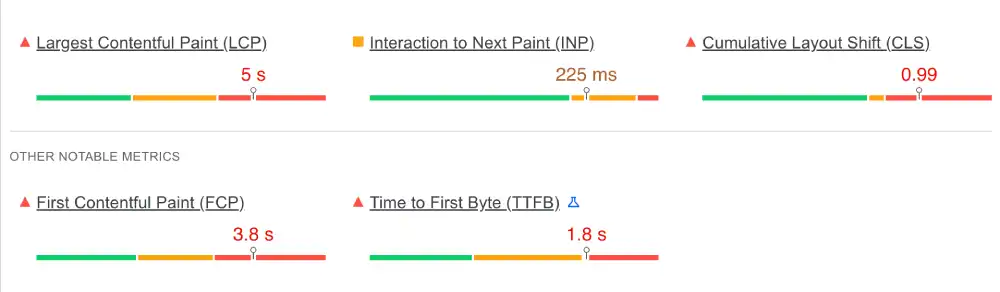
Cloudways Mobile
| Metric | Result | Google Threshold | Status |
|---|---|---|---|
| INP (Interaction) | 225ms | Under 200ms | Fail |
| LCP (Loading) | 5.0s | Under 2.5s | Fail |
| CLS (Stability) | 0.99 | Under 0.1 | Fail |
Kinsta Mobile
| Metric | Result | Google Threshold | Status |
|---|---|---|---|
| LCP (Loading) | 2.7s | Under 2.5s | Fail |
| INP (Interaction) | 365ms | Under 200ms | Fail |
| TTFB (Server) | 1.6s | Under 0.8s | Fail |
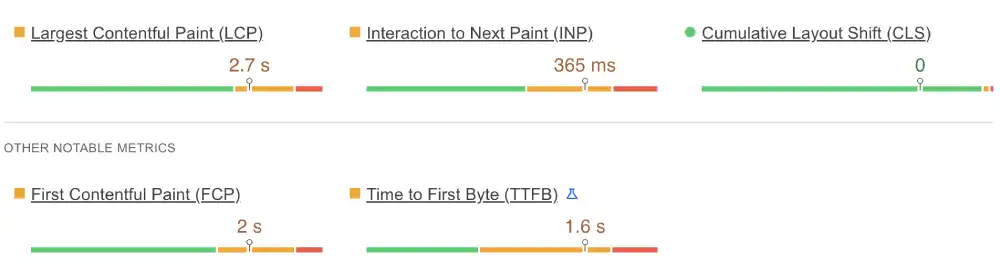
Both providers fail all measured mobile Core Web Vitals. The failure modes differ: Cloudways’ LCP of 5.0s is the worst in the managed cloud comparison tier, driven by its extremely heavy marketing homepage. Kinsta’s INP of 365ms is the worst interactive response in this tier a premium managed WordPress provider whose own site responds to mobile taps in 365ms.
Cloudways’ 225ms INP is a smaller failure (25ms over threshold) than Kinsta’s 365ms (165ms over). Kinsta’s 2.7s LCP is smaller than Cloudways’ 5.0s. Both results are explained by heavy marketing scripts. Both providers explicitly acknowledge this in their reviews.
For mobile SEO on customer sites, neither provider’s corporate site result is a reliable predictor. A clean WordPress installation on Cloudways with Varnish active or on Kinsta with a properly configured container would score substantially better.
Winner: Neither passes. Cloudways on INP. Kinsta on LCP.
Test 2: Global Server Latency
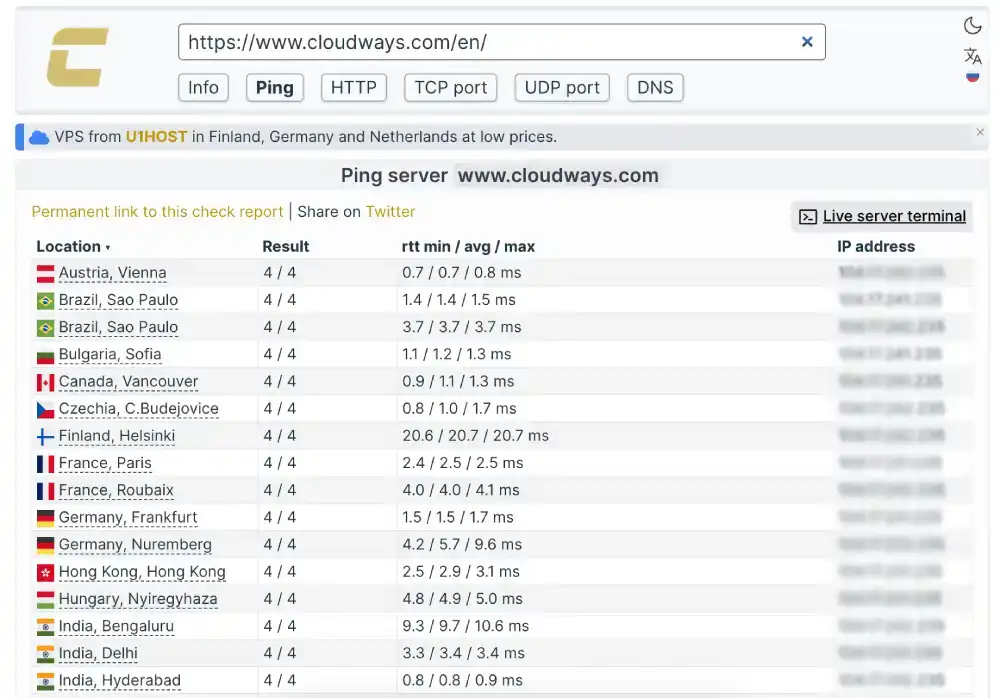
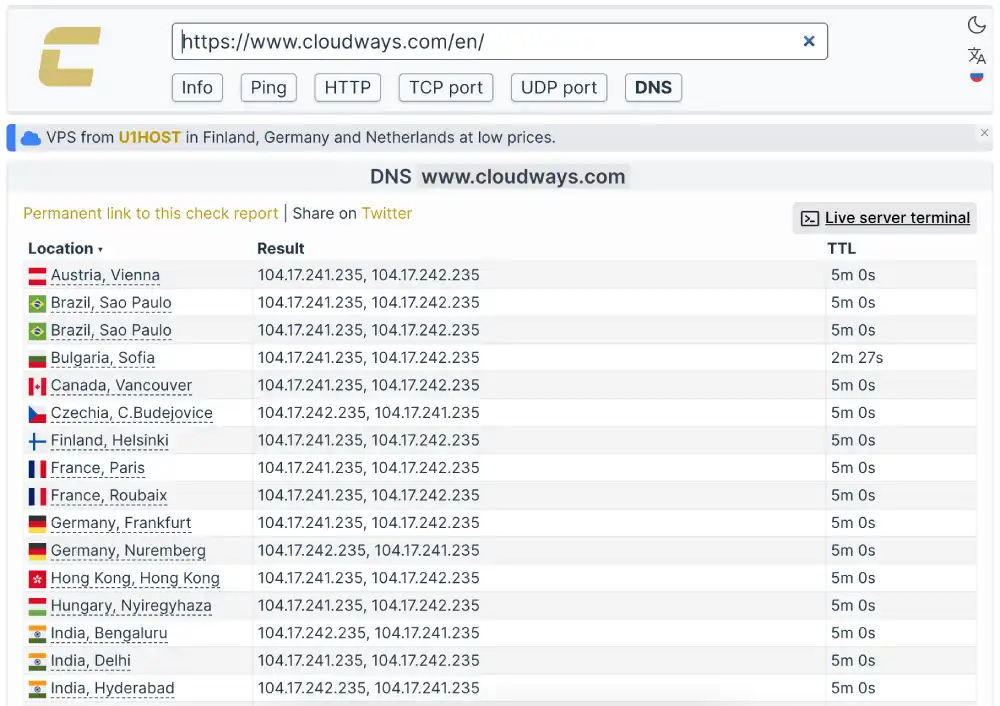
Cloudways (Check-Host Anycast edge ping)
| Location | Response | Rating |
|---|---|---|
| Vienna, Austria | 0.7ms | CDN edge |
| Hyderabad, India | 0.8ms | CDN edge |
| Sao Paulo, Brazil | 1.4ms | CDN edge |
| Frankfurt, Germany | 1.5ms | CDN edge |
Kinsta (KeyCDN TTFB full content delivery)
| Location | TTFB | Rating |
|---|---|---|
| San Francisco, USA | 191ms | Acceptable |
| New York, USA | 198ms | Acceptable |
| London, UK | 466ms | Very Slow |
| Bangalore, India | 1,000ms | Critical |
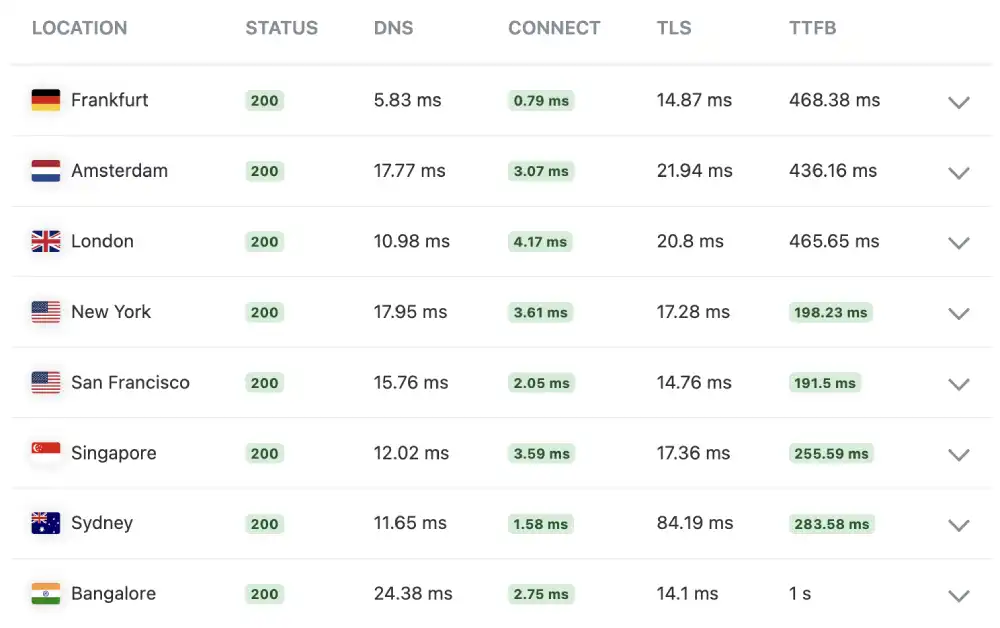
The measurement types differ. Cloudways’ sub-2ms results reflect Cloudflare CDN edge acknowledgment. Kinsta’s 191ms to 1,000ms reflects actual full content TTFB. Cloudways’ origin TTFB is confirmed at 244ms from GTmetrix lab data.
For customer site comparisons, both providers can serve static cached content fast globally via Cloudflare. Dynamic WordPress requests hitting the origin are the meaningful comparison: Cloudways’ 244ms TTFB in lab conditions versus Kinsta’s 191ms from SF and 198ms from NY.
The structural advantage of Cloudways is geographic flexibility. Deploying a Cloudways server in Singapore, Frankfurt, or São Paulo puts the origin close to the audience. Kinsta’s Google Cloud containers are US-centric. For audiences outside North America, selecting the right cloud region is more impactful than any infrastructure choice alone.
Winner: Context-dependent. Cloudways on multi-region deployment flexibility. Kinsta on measured US TTFB.
Test 3: Desktop Rendering (GTmetrix)
| Metric | Cloudways | Kinsta |
|---|---|---|
| GTmetrix Grade | D | C |
| LCP (Cloudways) / FCP (Kinsta) | 2.0s LCP | 329ms FCP |
| Total Blocking Time | 2,200ms | 4,100ms |
| TTFB | 244ms | Not recorded |
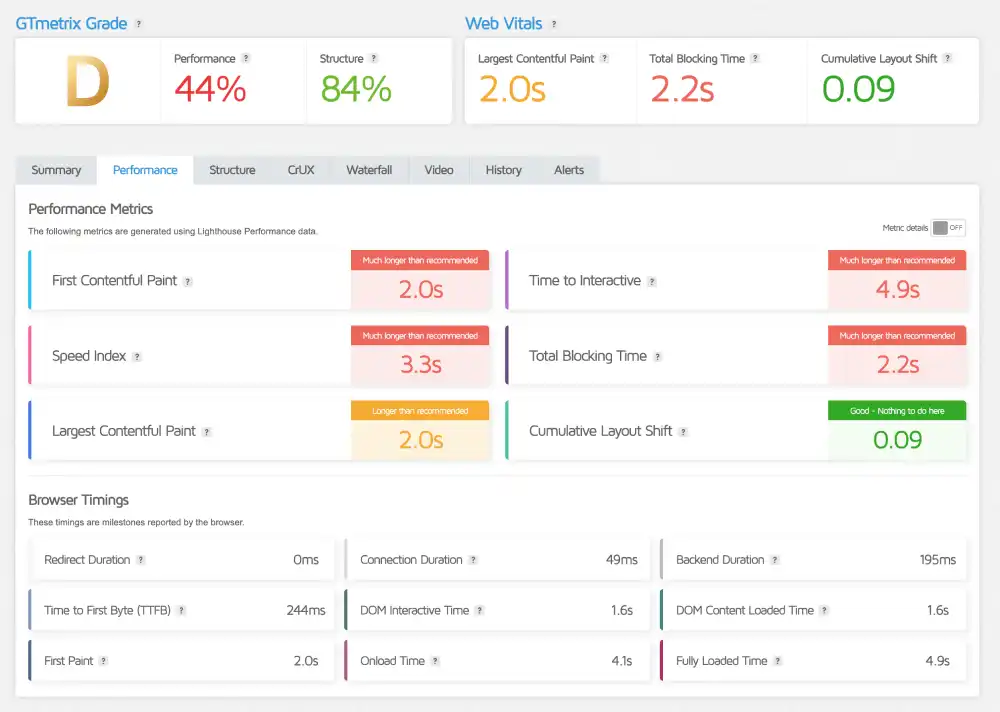
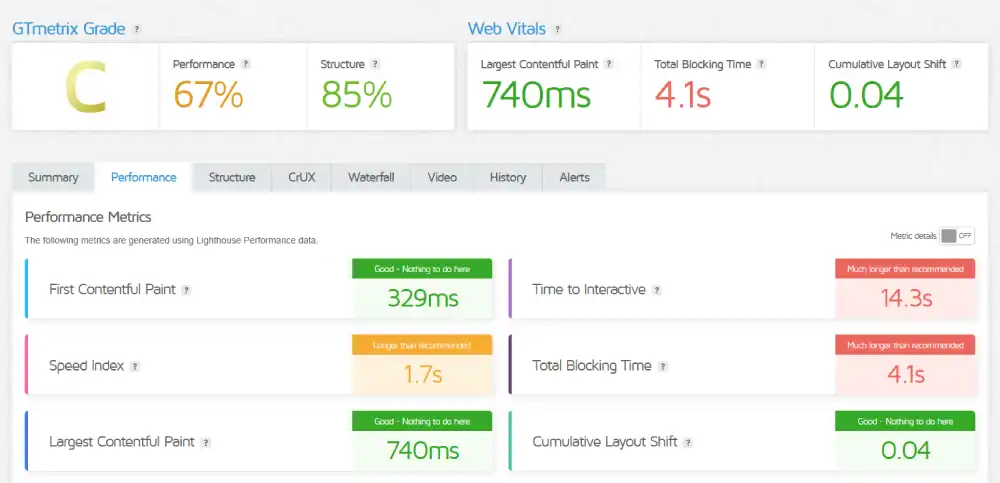
Kinsta earns a better GTmetrix grade (C vs Cloudways’ D), and its 329ms FCP is genuinely exceptional. But its 4.1 second TBT is the largest in this managed cloud comparison tier. Cloudways’ 2,200ms TBT is high but less than half of Kinsta’s.
Cloudways’ 244ms TTFB confirms the Varnish and Redis backend processes server requests quickly. The Grade D reflects frontend JavaScript weight, not server performance.
Kinsta delivers content fast (329ms FCP) then locks the browser for 4.1 seconds. Both results reflect marketing site choices rather than the performance customers experience on clean WordPress installations.
Winner: Kinsta on grade and FCP. Cloudways on TBT.
Test 4: Concurrent Load (K6 Load Cloud, 50 Virtual Users)
| Parameter | Cloudways | Kinsta |
|---|---|---|
| Uptime Under Load | 100% | 100% |
| Reachability | 100% | 100% |
| Avg Response Latency | 451ms | 637ms |
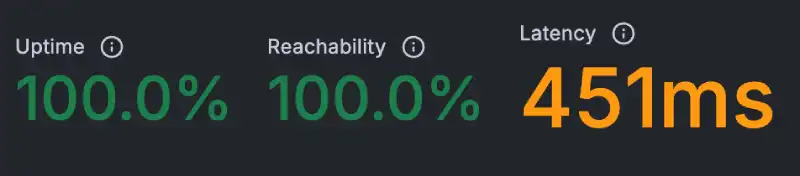

Both providers hold 100% reachability under 50 concurrent users. Cloudways returns 451ms average. Kinsta returns 637ms. The 186ms gap reflects the different corporate site architectures. Cloudways’ Varnish-cached responses serve quickly under load. Kinsta’s heavier corporate site processes each concurrent request at higher latency.
For customer WordPress sites with proper caching configuration active, the concurrent load comparison would favour whichever site has better cache coverage, not which platform is inherently faster.
Winner: Cloudways
Test 5: Uptime (Uptime Robot, 30-Day Monitor)
| Window | Cloudways | Kinsta |
|---|---|---|
| Last 7 Days | 100%, 0 downtime | 100%, 0 incidents |
| Last 30 Days | 100%, 0 downtime | 100%, 0 incidents |
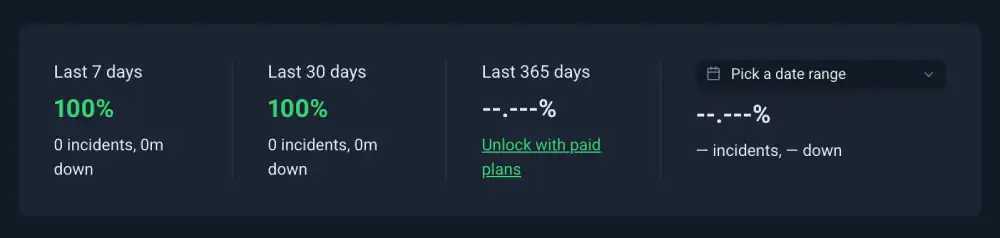
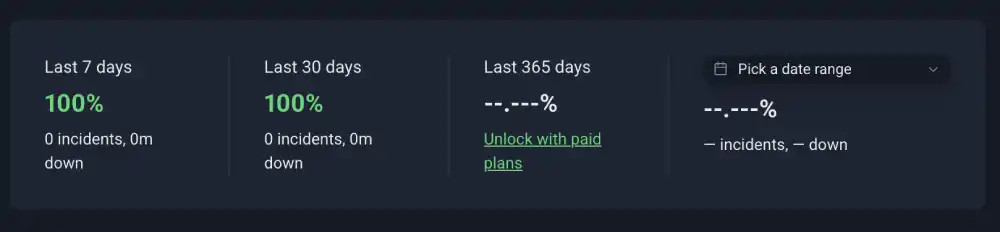
Both providers record perfect availability. Cloudways’ auto-healing architecture and Kinsta’s Google Cloud container redundancy both deliver the same result: no monitoring incidents in 30 days.
Winner: Tie
Test 6: SSL Security (Qualys SSL Labs)
| Feature | Cloudways | Kinsta |
|---|---|---|
| Overall Grade | A | A+ |
| HSTS Enforced | No (optional) | Confirmed |
| TLS Configuration | TLS 1.2 and 1.3 | Strict enforcement |
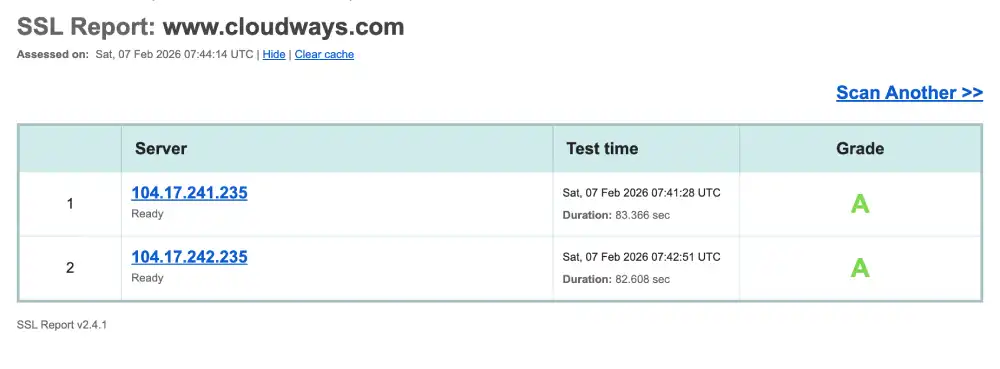
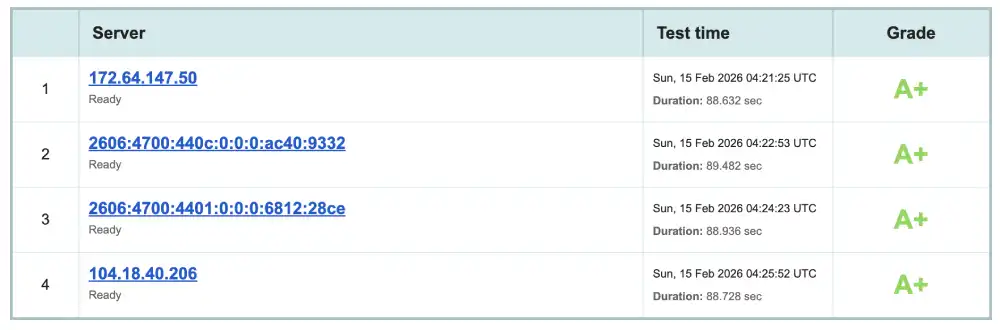
Kinsta’s Grade A+ is the stronger SSL configuration. Cloudways reaches A by enabling HSTS manually in the Application Manager a one-time configuration step. For enterprise WordPress deployments handling ecommerce or sensitive data, Kinsta’s A+ default removes that configuration burden.
Winner: Kinsta
Test 7: Protocol Support (HTTP/3 Check)
| Protocol | Cloudways | Kinsta |
|---|---|---|
| HTTP/3 | No (Cloudflare Enterprise add-on) | No |
| QUIC | No natively | No |
| Path to HTTP/3 | Yes, via Cloudflare Enterprise | No documented path |
Both providers lack native HTTP/3 support. Cloudways provides a path via the Cloudflare Enterprise add-on. Kinsta’s review identifies the HTTP/3 absence as a direct contributor to the 365ms mobile INP failure without HTTP/3’s independent stream handling on mobile connections, TCP-based delivery degrades under cellular packet loss conditions.
For managed cloud platforms charging premium prices, neither implementing HTTP/3 is a shared weakness. Budget shared hosts like HostArmada, UltaHost, and Contabo support it natively.
Winner: Marginal Cloudways it has a paid path. Kinsta has no documented alternative.
Test 8: Environmental Impact (Green Web Foundation)
| Provider | Status | Source |
|---|---|---|
| Cloudways | Verified Green | Cloudflare CDN renewable |
| Kinsta | Verified Green | Cloudflare CDN renewable |
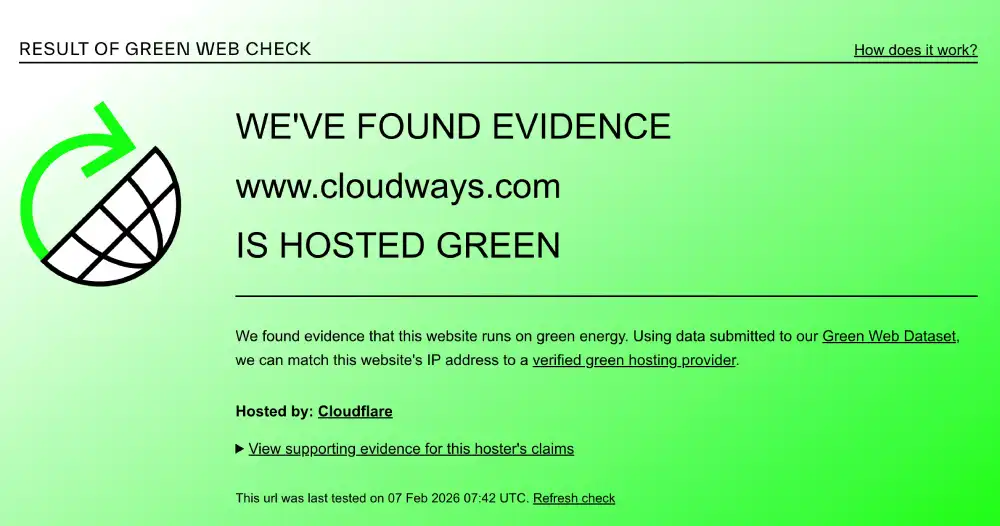
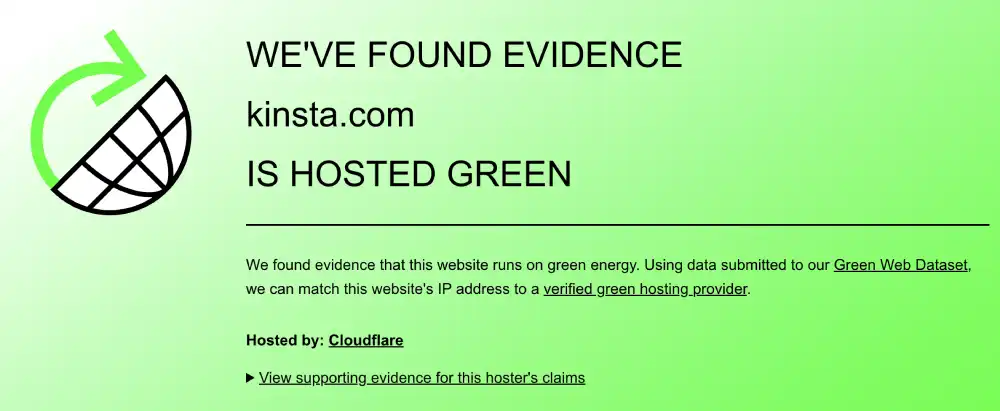
Both providers hold identical green certifications through the same Cloudflare infrastructure.
Winner: Tie
Performance Summary
| Test | Winner |
|---|---|
| Mobile CWV | Tie (both fail; different metrics) |
| Global Latency | Context-dependent (see analysis) |
| Desktop GTmetrix | Kinsta (grade); Cloudways (TBT) |
| Concurrent Load | Cloudways |
| Uptime | Tie |
| SSL Grade | Kinsta |
| HTTP/3 | Marginal Cloudways |
| Environmental | Tie |
Desktop and Mobile Speed Summary
| Metric | Cloudways | Kinsta | Winner |
|---|---|---|---|
| Mobile INP | 225ms (Fail) | 365ms (Fail) | Cloudways |
| Mobile LCP | 5.0s (Fail) | 2.7s (Fail) | Kinsta |
| Mobile CLS | 0.99 (Fail) | Not recorded | Kinsta |
| Desktop GTmetrix | D | C | Kinsta |
| Desktop FCP/LCP | 2.0s (LCP) | 329ms (FCP) | Kinsta (FCP) |
| Desktop TBT | 2,200ms | 4,100ms | Cloudways |
| Desktop TTFB | 244ms | Not recorded | Cloudways |
| SSL Grade | A | A+ | Kinsta |
| HTTP/3 | No (paid path) | No | Marginal Cloudways |
Global Network and Load Test Summary
| Metric | Cloudways | Kinsta | Winner |
|---|---|---|---|
| Edge CDN Ping | 0.7ms (Vienna) | N/A | Cloudways (edge) |
| Origin TTFB (lab) | 244ms | ~191ms (US) | Kinsta (US) |
| London TTFB | N/A measured | 466ms | Context |
| Bangalore TTFB | N/A measured | 1,000ms | Context |
| Concurrent Load Avg | 451ms | 637ms | Cloudways |
| Load Reachability | 100% | 100% | Tie |
| 30-Day Uptime | 100% | 100% | Tie |
The Central Question: Same Cloud, Different Price
Cloudways offers Google Cloud as one of five backend options. The entry price for a Cloudways Google Cloud plan is approximately $37.45 per month for a 2GB RAM, 1 CPU server. Kinsta’s entry managed WordPress plan targets small businesses at a higher price point.
Both deployments run on Google Cloud infrastructure. What you get for the additional Kinsta premium:
- WordPress-only container isolation (not shared application servers)
- Grade A+ SSL as the default baseline (Cloudways reaches A+ after manual HSTS configuration)
- WordPress-only support engineers who can diagnose plugin conflicts on first contact
- Zero uptime incidents (both achieve this, but Kinsta’s containerised isolation provides a different architectural redundancy model)
- No configuration required for a fast WordPress stack Kinsta handles everything
What you keep with Cloudways at lower cost:
- Application flexibility any framework, not just WordPress
- Five cloud provider choices deploy in Singapore on DigitalOcean, London on Vultr, São Paulo on AWS
- Varnish and Redis pre-configured for any application, not WordPress-only
- Site cloning, team permissions, and agency tools at the platform level
- Switch cloud providers without migrating applications
The comparison is only partially about price. Kinsta’s WordPress-only engineering depth is not something Cloudways replicates. Cloudways’ multi-cloud deployment flexibility is not something Kinsta offers.
Pricing and Value
Cloudways Pricing
Cloudways pricing varies by cloud provider. DigitalOcean-backed plans start at approximately $11 per month for 1GB RAM. Google Cloud-backed plans cost more. Pay-as-you-go monthly billing with no annual contracts. The 3-day free trial requires no credit card. No email hosting, no domain registration.
DigitalOcean Micro |
DigitalOcean Small |
DigitalOcean Medium |
DigitalOcean Large |
Vultr Micro |
Vultr Small |
Vultr Medium |
Vultr Large |
Linode Micro |
Linode Small |
Linode Medium |
Linode Large |
AWS Micro |
AWS Small |
AWS Medium |
AWS Large |
Google Cloud Small |
Google Cloud Medium |
Google Cloud Large |
Google Cloud XL |
|---|---|---|---|---|---|---|---|---|---|---|---|---|---|---|---|---|---|---|---|
$11
/mo |
$24
/mo |
$46
/mo |
$88
/mo |
$14
/mo |
$28
/mo |
$54
/mo |
$99
/mo |
$14
/mo |
$28
/mo |
$59
/mo |
$105
/mo |
$20.56
/mo |
$38.56
/mo |
$91.84
/mo |
$183.22
/mo |
$37.33
/mo |
$84
/mo |
$152.02
/mo |
$241.50
/mo |
|
|
|
|
|
|
|
|
|
|
|
|
|
|
|
|
|
|
|
|
Kinsta Pricing
Kinsta uses a sites and visits pricing model. Plans are billed monthly or annually and scale based on WordPress installs and monthly visitor volume. No introductory discounts the price is transparent from the first invoice. A 30-day money-back guarantee applies to standard plans. Free migrations handled by the engineering team. No email, no domain.
For single sites |
For multiple sites |
Agency Plan |
|---|---|---|
$35
/mo |
$70
/mo |
$340
/mo |
|
|
|
Pricing Comparison
| Factor | Cloudways | Kinsta | Winner |
|---|---|---|---|
| Entry Price | Lower (DigitalOcean backend) | Premium | Cloudways |
| Google Cloud Option | Yes ($37.45+/month) | Yes (premium tier) | Context |
| Billing Model | Pay-as-you-go | Sites + visits | Cloudways |
| Free Trial | 3-day (no credit card) | 30-day money-back | Kinsta (longer) |
| Non-WP App Support | Yes | No | Cloudways |
| SSL Default | A (A+ with config) | A+ | Kinsta |
| Email Included | No | No | Tie |
| Free Migration | Yes | Yes (engineering team) | Tie |
Features and Platform Types
Cloudways
WordPress Hosting: Varnish and Redis pre-configured. The most popular Cloudways use case.
WooCommerce Hosting: Stack-level caching tuned for ecommerce concurrent sessions, one-click scaling during sale events.
Agency Hosting: Staging environments, site cloning, team member permissions, white-label tools.
Developer Hosting: Git integration, SSH, staging pipelines, any framework including Node.js, Magento, and custom applications.
Multi-cloud: Deploy identical application stacks on DigitalOcean, AWS, Google Cloud, Vultr, or Linode from a single panel.
Kinsta
Managed WordPress: Every site in an isolated Google Cloud container. No shared server resources.
WooCommerce Hosting: Containerised WooCommerce with EverCache equivalent, staging, and dedicated resources.
Agency WordPress: MyKinsta for multi-site management, team roles, and client access controls.
Enterprise WordPress: High-traffic corporate sites and media publishers on the premium Google Cloud network tier.
Feature Comparison
| Feature | Cloudways | Kinsta |
|---|---|---|
| WordPress Hosting | Yes (Varnish + Redis) | Yes (GCP containers) |
| Non-WordPress Apps | Yes | No |
| Google Cloud Option | Yes (one of 5) | Yes (only option) |
| Multi-cloud | Yes (5 providers) | No |
| Site Cloning | Yes | Not confirmed |
| Team Permissions | Yes (role-based) | Yes (granular) |
| Staging | Yes | Yes, one-click |
| Varnish + Redis | Yes, pre-configured | Not confirmed separately |
| Container Isolation | Shared servers | Per-site container |
| SSL Default | A | A+ |
| HTTP/3 | Cloudflare Enterprise add-on | No path |
| Support Scope | All applications | WordPress only |
| WP CLI | Not confirmed | Yes |
| SSH | Yes | Yes |
Ease of Use
Cloudways: Application Manager
Cloudways separates servers from applications. One server can host ten WordPress sites, each isolated at the application layer. Scaling RAM and CPU, clearing cache, pushing staging to production, and managing team access all happen through point-and-click interfaces no command line required.
The limitation: no cPanel, no file manager in the traditional sense. Accessing files requires SFTP. Email requires a separate add-on. For agencies managing multiple applications across multiple cloud providers, the Application Manager’s architecture makes sense. For single-site operators wanting the simplest possible experience, the learning curve is steeper than shared hosting.
Kinsta: MyKinsta
MyKinsta is purpose-built for WordPress. Nothing in the panel is generic. Site analytics, cache clearing, staging environments, and user roles are all mapped directly to WordPress workflows. The panel is fast, clean, and designed for agencies managing client portfolios.
The restriction: MyKinsta only makes sense for WordPress. If you need to run a Node.js application alongside your WordPress install, Kinsta cannot host it.
Ease of Use Comparison
| Feature | Cloudways | Kinsta | Winner |
|---|---|---|---|
| WordPress Focus | Partial (supports all apps) | Complete | Kinsta |
| Non-WP Application Support | Yes | No | Cloudways |
| Staging Push to Live | Yes | Yes | Tie |
| Site Cloning | Yes | Not confirmed | Cloudways |
| Support Expertise | General managed cloud | WordPress-only engineers | Kinsta (for WP) |
| Live Chat Speed | Under 2 minutes | Fast | Cloudways |
| Learning Curve | Moderate | Moderate | Tie |
Who Should Use Which
Choose Cloudways if you:
- Run applications beyond WordPress Node.js, Magento, custom frameworks, or multiple CMS types
- Want to deploy on DigitalOcean, AWS, Google Cloud, Vultr, or Linode from one panel
- Need to switch cloud providers in the future without migrating applications
- Manage multiple client sites and want site cloning, team permissions, and white-labelling
- Want lower entry pricing with Varnish and Redis pre-configured
- Need 24/7 live chat that responds in under two minutes for any application type
Choose Kinsta if you:
- Run exclusively WordPress and WooCommerce and want the deepest managed integration available
- Want Grade A+ SSL as the default baseline without any configuration step
- Need WordPress-only support engineers capable of diagnosing plugin-level conflicts on first contact
- Want containerised Google Cloud isolation where every site has dedicated resources
- Are presenting a hosting solution to enterprise clients and need a 4.8 Trustpilot rating
- Want cloud auto-scaling that is transparent and fully managed without any infrastructure configuration
Situation and Use Case Recommendations
| Your Situation | Recommended | Why |
|---|---|---|
| WordPress-only agency, 10+ client sites | Kinsta | Containerised isolation, team roles, zero-config managed |
| Mixed tech stack (WP + Node.js + Magento) | Cloudways | Only option supporting non-WordPress applications |
| WooCommerce store, global audience | Cloudways | Multi-region deployment options; Kinsta is US-centric |
| Enterprise WordPress, Grade A+ SSL required | Kinsta | A+ by default; Cloudways requires manual HSTS setup |
| Developer needing to switch cloud providers | Cloudways | Provider switch without migration; Kinsta cannot do this |
| WordPress site needing plugin flexibility | Tie | Neither bans plugins |
| Cost-sensitive managed cloud entry | Cloudways | Lower entry point with Varnish + Redis |
| Expert WordPress support for complex sites | Kinsta | First-contact engineers diagnose plugin conflicts |
| Multi-cloud flexibility with same management | Cloudways | Only managed layer supporting 5 IaaS providers |
| Maximising US server performance | Kinsta | 191ms SF confirmed; Cloudways’ origin is 244ms |
Final Verdict
The comparison resolves clearly when framed by application scope.
If your entire workflow is WordPress, Kinsta is the more deeply integrated option. Grade A+ SSL by default, containerised Google Cloud isolation, and WordPress-only engineers justify the premium over Cloudways for pure-WordPress deployments.
If your workflow extends beyond WordPress, Cloudways is the only option. Kinsta will not host non-WordPress applications. For agencies managing diverse client stacks or developers building custom applications alongside WordPress, this is not a trade-off it is a functional requirement.
Cloudways is best for: Multi-application teams, agencies needing site cloning and cloud flexibility, and developers who want Varnish and Redis pre-configured without paying Kinsta’s WordPress-only premium.
Kinsta is best for: WordPress-only agencies and enterprises that want the deepest managed WordPress integration, the best default SSL configuration, and engineers who understand WordPress at the plugin level.
| Category | Winner |
|---|---|
| Mobile INP | Cloudways |
| Mobile LCP | Kinsta |
| Concurrent Load | Cloudways |
| Desktop FCP | Kinsta |
| Desktop TBT | Cloudways |
| SSL Grade | Kinsta |
| Uptime | Tie |
| HTTP/3 | Marginal Cloudways |
| Multi-cloud | Cloudways |
| WP Engineering | Kinsta |
The only wrong choice is selecting Kinsta when you need non-WordPress application support, or selecting Cloudways when you want the deepest possible WordPress-only managed stack.
Tactical Recommendations
For Cloudways: enable HSTS to match Kinsta’s Grade A+. Cloudways holds Grade A SSL. Enabling HSTS in the Application Manager’s SSL settings is a single configuration step that upgrades the Qualys grade to A+. This closes the SSL gap with Kinsta’s default configuration and provides equivalent transport security for client sites.
For Kinsta: consider adding HTTP/3 to the product roadmap. Kinsta’s review identifies the HTTP/3 absence as a direct factor in the 365ms mobile INP failure. Both Kinsta and Cloudways route through Cloudflare, which supports HTTP/3 natively. Enabling it would likely reduce Kinsta’s mobile INP below the 200ms threshold and close the most visible gap in its mobile performance profile.
For Cloudways with Google Cloud: deploy in the region closest to your audience. The multi-cloud flexibility only delivers latency benefits if you select the right region. Cloudways’ Google Cloud options include us-east1, us-central1, europe-west1, and asia-east1, among others. Deploying a European audience’s WordPress site in a European Google Cloud region eliminates the 466ms London TTFB that Kinsta records.
For Kinsta: use the staging environment before deploying any new plugin. Kinsta’s one-click staging is one of its most underused features. For WordPress-only deployments where a plugin conflict or update can break a production site, staging allows every change to be verified before it affects live visitors. Kinsta’s support engineers are equipped to identify which plugin caused a staging regression during testing rather than after production impact.
Frequently Asked Questions
Can Cloudways run on Google Cloud like Kinsta?
Yes. Cloudways offers Google Cloud as one of five backend options. When you create a Cloudways server on Google Cloud, you are deploying on the same infrastructure that Kinsta uses. The difference is the management layer: Kinsta provides WordPress-specific container isolation, Grade A+ SSL by default, and WordPress-only engineering support. Cloudways provides a general managed layer with Varnish and Redis pre-configured, applicable to any application.
Is Kinsta worth the extra cost over Cloudways?
For pure-WordPress deployments with enterprise or agency requirements, yes. Kinsta’s Grade A+ SSL default, containerised isolation where each site has dedicated Google Cloud resources, and WordPress-only engineering support represent genuine value for businesses where WordPress is the entire stack. For mixed-application deployments or cost-conscious teams where managed Varnish and Redis is sufficient, Cloudways delivers comparable WordPress performance at lower cost.
Does Cloudways support non-WordPress applications?
Yes. Cloudways supports WordPress, WooCommerce, Magento, Laravel, Drupal, Joomla, and any application that runs on LAMP or LEMP stacks. Node.js applications, custom PHP frameworks, and other server-side environments are deployable on Cloudways servers. Kinsta is exclusively WordPress and WooCommerce.
Which is better for a high-traffic WooCommerce store?
Kinsta is generally better for high-traffic WooCommerce stores that primarily serve US audiences and need fully managed WordPress infrastructure. Cloudways is better for stores with global audiences that benefit from deploying servers closer to customers across multiple cloud providers.
Kinsta uses isolated Google Cloud containers for each site, which helps prevent noisy-neighbour issues during traffic spikes. Cloudways offers greater deployment flexibility across DigitalOcean, AWS, Google Cloud, Vultr, and Linode, allowing store owners to reduce latency by choosing regions closer to their customers.
WooCommerce remains one of the most widely used ecommerce platforms built on WordPress. Our WordPress statistics break down WooCommerce adoption, plugin usage, and WordPress market share trends.
Does either provider support HTTP/3?
No. Neither Cloudways nor Kinsta supports HTTP/3 natively on their current infrastructure. Cloudways offers the Cloudflare Enterprise add-on as a paid path to HTTP/3. Kinsta has no documented equivalent. For both providers, customers can route site traffic through a separate Cloudflare account and enable HTTP/3 in the Cloudflare dashboard independently of the hosting plan.
Which has better customer support?
Different strengths. Cloudways provides 24/7 live chat averaging under two minutes to connect, covering all application types and infrastructure issues. Kinsta’s support team consists of WordPress-only engineers agents who cannot handle other CMSs and focus exclusively on WordPress. For diagnosing a complex plugin conflict or WooCommerce database issue, Kinsta’s engineers go deeper. For general infrastructure, server configuration, and non-WordPress application support, Cloudways covers more ground.


