
For a first website on shared hosting, a host’s own panel such as Hostinger’s hPanel is usually the easiest, because it only shows the tools that the plan uses.
cPanel runs on many different hosts, so your skills carry over when you switch.
Plesk is the one to pick if you need Windows Server.
On shared hosting, the panel matters less than the plan.
On a VPS, it matters more, because cPanel and Plesk are paid licences that can cost more than a small server.
Control panels are one of the core parts of a web hosting plan. Each section below covers how a panel works first, then what it changes for your site.
What a hosting control panel does
A control panel is the website you log in to for managing your hosting, so you don’t need to type server commands.
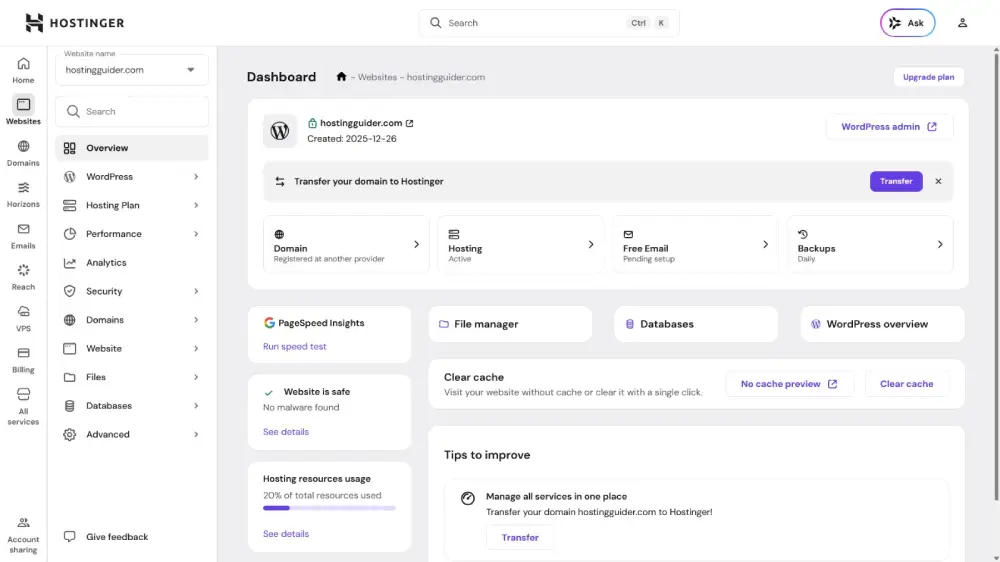
Behind the scenes, the server runs a web server, a database, a mail server, and a file system. The panel is a friendly layer on top.
When you click “Create email account”, the panel writes the right settings for you.
Typical jobs you do in a panel:
- Install WordPress and other apps
- Create email accounts and databases
- Upload files and manage domains
- Turn on SSL and change the PHP version
- Make and restore backups
Short definitions of panel terms (WHM, addon domain, file manager) live in the control panels section of the hosting glossary.
Most panels also show your account’s CPU, memory, and process usage. What those resource limits mean is covered in a separate explainer, Hosting Resource Limits Explained.
For your site, this means: every panel does the same core jobs. The differences are cost, layout, operating system support, and who controls updates.
cPanel vs Plesk vs hPanel side by side
cPanel and Plesk are licensed software that many hosts install, while hPanel is Hostinger’s in-house panel that only Hostinger customers get.
| cPanel | Plesk | hPanel | |
|---|---|---|---|
| Who makes it | cPanel | Plesk | Hostinger |
| Where you’ll find it | Many shared hosts; VPS and dedicated servers you license yourself | Some hosts, Windows hosting, and VPS you license yourself | Hostinger plans only |
| Operating systems | Linux only: AlmaLinux, CloudLinux, Rocky Linux, Ubuntu | Linux and Windows Server | Not sold separately |
| Licence cost model | Per server, priced by number of accounts | Per server, priced by edition and number of domains | Included in the Hostinger plan |
| Ease for beginners | Many icons; learnable, but busy at first | Cleaner layout, still built for admins | Simplest of the three, in our view |
| WordPress tools | WP Toolkit: staging, cloning, updates | WP Toolkit: cloning, staging, backup and restore | WordPress install, WP-CLI, SSH, PHP version control |
| Create and manage email accounts for your domains | Email extensions listed, such as Premium Email | Mailboxes come with Hostinger plans (2 per site on Premium) | |
| Backups | Backups set up from the panel | Backup and restore in WP Toolkit; cloud backup extension | Weekly on Premium, daily on Unlimited |
Feature lists for cPanel and Plesk come from their own sites; how much of each feature you see depends on what your host turns on.
For your site, this means: the table rows that change your bill are licence cost and operating system.
The rest are differences in layout that most people get used to quickly.
cPanel: the panel you’ll meet at many hosts
cPanel is Linux hosting software with two parts: WHM for whoever runs the server, and cPanel for each site owner on it.
cPanel says its WHM interface is tailored for hosting providers. A host uses WHM to create accounts, and each customer gets a cPanel login with limits set by that host.
According to its installation guide, cPanel & WHM install on AlmaLinux, CloudLinux, Rocky Linux, and Ubuntu. Windows isn’t on the list.
Its email accounts tool lets you “create, manage, and delete email accounts” for your domains.
What cPanel costs on a VPS
cPanel charges per server, and the price rises with the number of accounts you host. These are the cloud and VPS prices on cPanel’s pricing page, checked October 4, 2026:
| Licence | Accounts | Billed monthly | Billed annually |
|---|---|---|---|
| Solo | 1 | $29.99/mo | $27.46/mo |
| Admin | Up to 5 | $35.99/mo | $32.96/mo |
| Pro | Up to 30 | $53.99/mo | $49.46/mo |
| Premier | Up to 100 | $69.99/mo | Not shown |
Premier adds $0.49 a month for each account over 100.
On shared hosting, you don’t buy this licence. The host pays it and builds it into your plan price.
For your site, this means: cPanel is a safe skill to learn, because many hosts use it.
On a small VPS, though, a $29.99 licence can cost more than the server itself.
Plesk: the choice for Windows and mixed servers
Plesk is a server panel that runs on both Linux and Windows Server, which cPanel does not.
The Plesk Obsidian system requirements list Ubuntu, AlmaLinux, Debian, CloudLinux, Red Hat Enterprise Linux, Rocky Linux, and CentOS, plus Windows Server 2016 to 2025.
Plesk’s homepage describes its WordPress Toolkit with cloning, staging, backup and restore. It also sells extensions, such as cloud backup and premium email.
How Plesk pricing works
Plesk sells three editions per server, priced by how many domains you host: Web Admin (10 domains), Web Pro (30) and Web Host (unlimited). You pay monthly or yearly.
Plesk’s pricing page lists licences in euros, excluding VAT, with 8% off yearly billing. Direct purchases carry a 14-day refund policy.
Its euro figures contradicted that 8% saving when we checked on October 4, 2026, so we don’t quote them. The IONOS add-on below is a firm price.
Some hosts resell Plesk as a plan add-on. IONOS, for example, lists Plesk on its VPS plans at $6 a month.
For your site, this means: if you need Windows (for ASP.NET or MS SQL), Plesk is the realistic panel.
The Linux vs Windows VPS choice comes first, and the panel follows from it.
hPanel and other custom panels
A custom panel is one a host builds for its own customers, so it’s included in the plan price, but you can’t take it with you.
hPanel at Hostinger
Hostinger’s web hosting page says “each managed web hosting package comes with hPanel, our custom-built control panel”.
It also says SSH, WP-CLI, and PHP version control “can be found in hPanel”.
Our own Hostinger account runs on hPanel. The Hostinger shared plan we tested runs eight live sites plus our test site from one hPanel login.
SPanel at ScalaHosting
ScalaHosting includes SPanel on its managed cloud VPS. Its SPanel page says it comes “at no additional cost for Scala clients”, unlike cPanel’s per-account model.
That page lists a WordPress Manager, a backup tool, spam filtering and automatic SPF and DKIM records for email.
If you still want cPanel there, ScalaHosting’s managed VPS page sells it as an add-on from about $32.95 a month.
Other panels you may see
- DirectAdmin: InterServer’s Standard shared plan and its reseller plans use it.
- InterWorx: Liquid Web offers it, alongside cPanel and Plesk, on its managed VPS.
For your site, this means: a custom panel is often the easiest place to start. The trade-off is lock-in.
If you move hosts later, you learn a new layout and can’t use a cPanel-to-cPanel transfer.
Free control panels for a VPS
Free, open-source panels let you manage an unmanaged VPS without paying a licence, but you look after updates and security yourself.
- CyberPanel: its site says “CyberPanel with OpenLiteSpeed is free and open source”.
- aaPanel: its site describes it as open source, with a free version that manages websites, mail servers, FTP, and MySQL. A paid Pro version also exists.
HostArmada’s unmanaged VPS plans offer CyberPanel or aaPanel free, with cPanel and Plesk as paid options. On its managed cloud VPS, HostArmada includes 5 free cPanel accounts.
FastComet includes cPanel and WHM on its managed Cloud VPS.
If you’re weighing up who patches the server, the managed vs unmanaged VPS trade-offs matter more than the panel.
For your site, this means: a free panel saves the licence fee, but nobody else fixes it when an update breaks something.
Which hosts use which panel
Each panel below is named on the host’s own plan pages, checked September 25 to October 4, 2026.
| Host | Plan type | Panel |
|---|---|---|
| Hostinger | Web hosting | hPanel |
| Namecheap | Shared | cPanel (on our own Stellar Plus account) |
| HostPapa, UltaHost, AccuWeb | Shared | cPanel |
| InterServer | Standard shared / Windows | DirectAdmin / Plesk |
| ScalaHosting | Managed cloud VPS | SPanel included; cPanel add-on |
| FastComet | Managed Cloud VPS | cPanel and WHM included |
| HostArmada | Managed / unmanaged VPS | cPanel (5 accounts) / CyberPanel or aaPanel |
| IONOS | VPS | Plesk add-on, $6 a month |
| Liquid Web | Managed VPS | InterWorx, cPanel or Plesk |
| HostArmada, FastComet | Shared | cPanel |
Does the control panel matter when choosing a host?
On shared hosting, the panel is a minor factor, but on a VPS it can change your monthly cost and how much work you do.
First site on shared hosting. Pick the plan first: limits, backups, support and price. Any panel will do. A host’s own panel, like hPanel, is often the gentlest start.
If you want cPanel for portability, Namecheap’s cPanel plan we bought is a low-cost way in.
VPS owner. Add the licence to the server price before you compare. A $10 VPS plus a $29.99 cPanel Solo licence is really a $39.99 server.
A plan with a panel included, such as SPanel at ScalaHosting, can work out cheaper.
Agency with client sites. cPanel with WHM is built for running many accounts on one server, so each client gets a separate login.
Selling those accounts under your own brand is reseller hosting, explained in What Is Reseller Hosting?
Price it by account count: Pro covers 30 accounts for $53.99 a month. Plesk Web Pro (30 domains) and Web Host (unlimited) fill the same role.
To compare hosts by these factors, start with the shared plans compared by limits or the VPS picks with panel costs included.
Frequently asked questions
Is hPanel better than cPanel?
hPanel is simpler for beginners, while cPanel is more portable. hPanel only works at Hostinger. cPanel runs at many hosts, so what you learn carries over if you switch.
Is Plesk easier than cPanel?
In our view Plesk’s layout is a little cleaner, but that’s a matter of taste. The bigger difference is that Plesk runs on Windows Server and cPanel does not.
How much does a cPanel licence cost?
On a VPS, cPanel’s own pricing page lists Solo (1 account) at $29.99 a month, Admin (5 accounts) at $35.99 and Pro (30 accounts) at $53.99, checked October 4, 2026.
Annual billing is a little cheaper.
On shared hosting there’s no separate cPanel bill, since the licence cost is already inside what you pay each month.
Can I move my website from hPanel to cPanel?
Yes, but you move files, databases and email by hand or with a migration plugin. A direct cPanel-to-cPanel account transfer isn’t available because hPanel isn’t cPanel.
Many hosts offer free migration help, so ask before you buy.
Do I need a control panel on a VPS?
No. You can manage a VPS entirely over SSH. A panel saves time on email, domains and SSL, which matters more if you’re not comfortable on the command line.
What is the best free alternative to cPanel?
For a VPS, CyberPanel and aaPanel are free, open-source options that some hosts offer at no charge. They work well for simple sites, but you handle updates and security yourself.
How we researched this
Panel facts come straight from the vendors.
On October 3, 2026, we read the official pricing, feature, and system requirement pages for cPanel, Plesk, CyberPanel, and aaPanel, plus Hostinger’s own description of hPanel.
We rechecked the prices and quotes on October 4.
The host-to-panel table is built from each host’s plan pages, checked between September 25 and October 4, 2026.
Hands-on notes come from two accounts we pay for: Hostinger Business Web Hosting on hPanel (bought December 2024) and Namecheap Stellar Plus on cPanel (bought August 2026).
Licence prices were read on the vendors’ own pages, following the HostingGuider source-checking rules.


