
At some point, most growing businesses face the same question. The hosting plan that worked fine a year ago is starting to show its limits. Pages are slower. Support tickets pile up. Every traffic spike feels like a gamble.
The natural next step seems like a dedicated server. But is it actually the right one?
This guide is for business owners on some form of business hosting, whether VPS, cloud, or a business-tier shared plan, who want an honest answer about when a dedicated server makes sense and when it does not.
First: What Do These Two Terms Actually Mean?
The terms get used loosely, so here is a clear definition of each before comparing them.
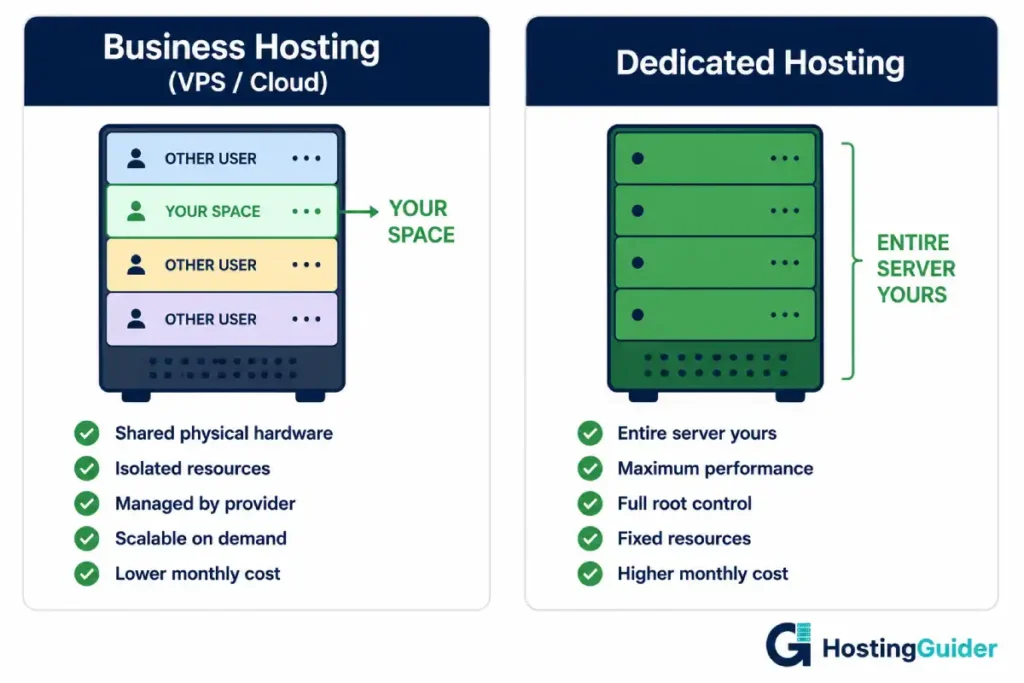
Business Hosting is not a single product. It covers several hosting types marketed toward businesses, most commonly:
- VPS hosting — isolated resources on a shared physical server
- Cloud hosting — distributed across multiple servers, scales automatically
- Business-tier shared plans — shared infrastructure with slightly better resource limits
What these have in common is a step up from basic shared hosting in performance, support, and features. Resources are partially isolated, performance is more predictable, and plans usually include daily backups, SSL, and improved security tools.
Dedicated Hosting means renting an entire physical server exclusively for your website or application. No other businesses share it. Every byte of RAM, every CPU core, and all bandwidth belongs to you. That exclusivity is both the main advantage and the reason it costs significantly more.
Read our guide to web hosting types if you want a fuller picture of where each tier fits.
What Business Hosting Already Does Well
A lot of businesses jump to a dedicated server before they actually need one and end up paying more for resources they are not using. Business hosting handles more than most people give it credit for:
- VPS hosting gives you isolated resources, a stable performance baseline, and root access on most plans
- Cloud hosting adds automatic scaling when traffic spikes, something a standalone dedicated server cannot do without additional infrastructure
- Both sit at price points that make sense for businesses growing steadily but not yet hitting the ceiling of shared infrastructure
For most businesses, a well-configured VPS or cloud plan is the right home for years of growth. The upgrade to dedicated should be driven by specific, concrete reasons, not a general feeling that more must be better.
How They Compare: The Real Differences
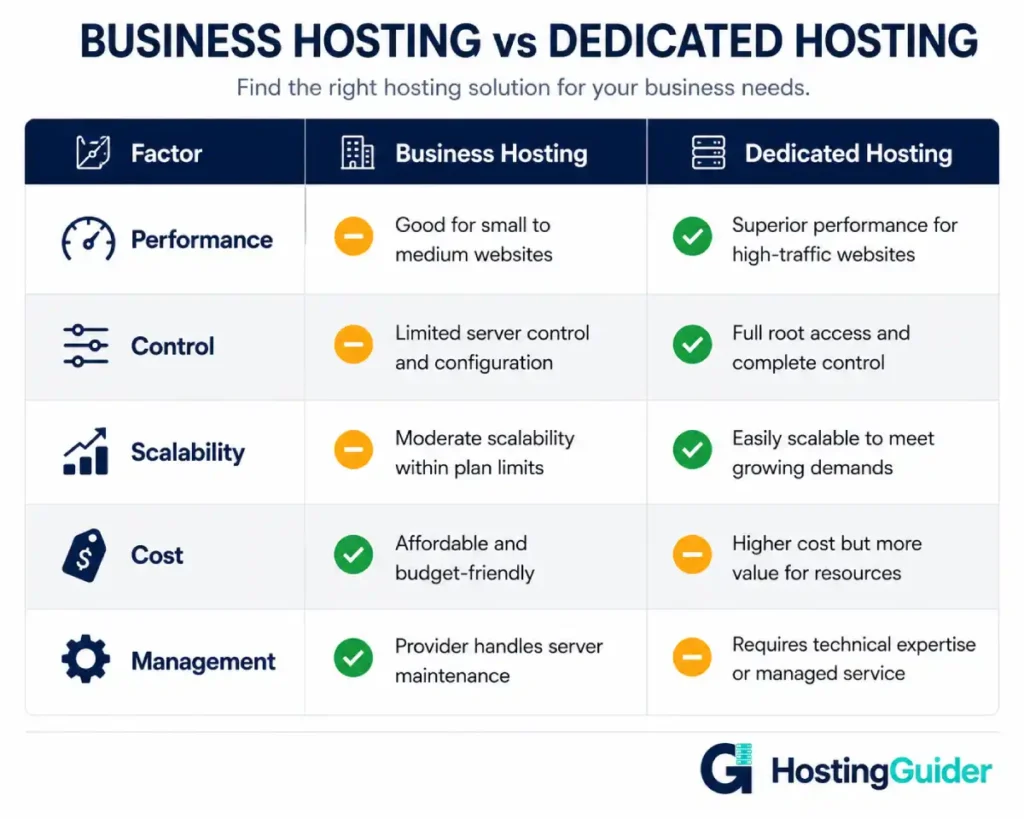
| Factor | Business Hosting | Dedicated Hosting |
|---|---|---|
| Performance | Consistent and predictable for most workloads | Maximum, no resource competition at hardware level |
| Control | Limited to provider plan settings | Full control over OS, stack, and hardware config |
| Scalability | Scales up or down on demand, especially cloud | Fixed resources, scaling requires hardware change |
| Cost | Lower monthly, pay for what you use | Higher fixed monthly cost |
| Management | Provider handles infrastructure and patching | You or your team manages the server |
A Note on Each Factor
Performance. The gap between a well-specced VPS and a dedicated server is not noticeable for most websites. It becomes meaningful when running computationally intensive applications, processing large databases continuously, or managing very high concurrent loads.
Control. Business plans, even high-end VPS, constrain what you can configure. A dedicated server gives you full access to the operating system, software stack, and security settings. This matters most when compliance requirements or custom application environments demand it.
Scalability. Cloud hosting scales automatically when traffic spikes and scales back when it drops. A dedicated server has fixed hardware. Scaling up requires planning, additional cost, and usually some downtime. For unpredictable traffic, cloud is often the smarter choice even at high resource levels. Our cloud vs. traditional hosting comparison covers this directly.
Cost. That cost difference is only justified when the performance, control, or compliance requirements of a dedicated server are genuinely necessary. Our dedicated server cost-effectiveness breakdown looks at the full picture including management overhead.
Management. With a dedicated server, infrastructure responsibility shifts significantly to you. Our guide to managed vs. unmanaged hosting covers this distinction, and the same principle applies to dedicated options.
The Signs You Actually Need a Dedicated Server
These are the concrete situations where upgrading makes genuine sense.
1. Your current plan has become the bottleneck
You have upgraded your VPS or cloud plan multiple times and still hit limits. Symptoms include:
- Slow database queries that persist after adding RAM
- Response time issues under moderate load with no clear cause
- Application errors tied to resource contention
- Your provider confirms you have maxed out the plan tier
Read when upgrading from VPS to dedicated actually makes sense for the practical trigger points.
2. You have compliance or data isolation requirements
Certain industries require a level of data isolation that shared infrastructure cannot satisfy:
- Healthcare businesses handling patient data face HIPAA obligations
- Businesses processing card payments at certain volumes face PCI DSS requirements that may require dedicated infrastructure
- Financial services, legal firms, and government contractors often face similar mandates
If your industry requires documented proof that your data does not share physical hardware with other organisations, a dedicated server is often the only option that satisfies auditors.
3. Your application needs consistent, uninterrupted resources
Some workloads cannot tolerate variability from shared hardware, even on a quality VPS:
- Real-time applications
- Large-scale data processing jobs
- High-frequency transaction systems
- Applications with strict low-latency requirements
If performance degrades unpredictably and your provider cannot identify a cause, resource contention at the hardware level is often the culprit.
4. Security isolation is a hard requirement
Even on a VPS, your environment shares physical hardware with other customers. For businesses handling highly sensitive data, that proximity is a risk worth eliminating. A dedicated server means no other customer’s security compromise can reach your environment at the hardware level. Our hosting security tips guide and secure hosting features guide explain where dedicated isolation fits in the broader security picture.
When You Probably Do Not Need to Upgrade Yet
Not every business that feels ready for a dedicated server actually needs one.
| Situation | Why to Stay on Business Hosting |
|---|---|
| Traffic is seasonal or unpredictable | Dedicated has fixed resources. Cloud scales automatically. You will overpay or under-serve at peak |
| No technical team to manage the server | Unmanaged dedicated is high risk without server admin expertise. Managed options narrow the cost gap |
| Performance issues have other causes | Unoptimised images, bad database queries, and bloated plugins follow you to a new server. Fix them first |
| Budget is tight | Dedicated hosting is a significant monthly cost. A reliable VPS is a completely viable long-term home |
If any of these apply, the right move is to optimise your current setup rather than upgrade the hardware. A well-managed VPS from a solid provider handles serious business workloads comfortably.
If You Are Ready: What to Decide Next
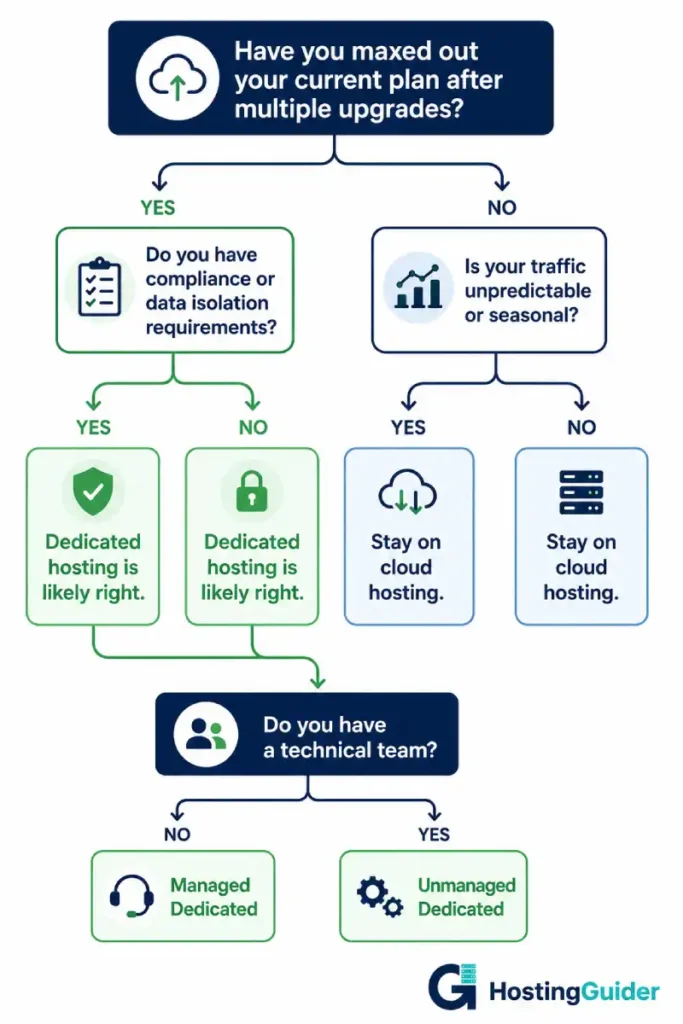
Once you have confirmed a dedicated server is the right move, three decisions follow.
Managed or unmanaged?
| Managed Dedicated | Unmanaged Dedicated | |
|---|---|---|
| Who handles patching and updates | Provider | You |
| Who monitors the server | Provider | You |
| Technical knowledge required | Low | High |
| Monthly cost | Higher | Lower |
| Best for | Businesses without server admins | Teams with in-house technical expertise |
Read our dedicated server configuration guide to understand what server management actually involves before choosing.
Rent or own?
For most businesses, renting is the right answer. You pay monthly, the provider owns the hardware, and you avoid capital expenditure and physical maintenance. Our renting vs. buying a dedicated server breakdown covers the full cost picture if ownership is on the table.
Worth checking before you commit: dedicated vs. high-spec VPS
Before committing to a full dedicated server, read our dedicated server vs. VPS hosting comparison. For some workloads, a high-specification VPS closes the gap enough that the lower cost and greater flexibility are hard to argue against.
For businesses that have decided dedicated is the right direction, Liquid Web is one of the most consistently well-regarded providers for mission-critical workloads. Their full review covers what makes them worth the premium at this level.
Final Thoughts
The upgrade from business hosting to a dedicated server is not a milestone to chase. It is a practical decision driven by specific technical requirements, compliance obligations, or resource demands your current plan genuinely cannot meet.
For most businesses, a well-chosen VPS or cloud plan handles years of growth without ever needing a dedicated server. When you do reach the point where hardware is the actual bottleneck, the case for upgrading becomes obvious rather than speculative.
Not sure where your current plan fits? Our guide to choosing a web hosting plan walks through the whole decision from the start.


