
Webflow makes the most visually sophisticated websites on the internet. Brands that care about design choose it because no other platform gives designers the same level of visual control without writing code.
Shopify runs more than four million online stores. It powers more ecommerce revenue than any other hosted platform. Its checkout is tested across hundreds of millions of transactions. Its app ecosystem covers every commerce need.
The problem: most brand-led businesses eventually need both. A beautifully designed storefront that converts visitors. A commerce infrastructure that handles subscriptions, multi-currency, abandoned carts, and complex fulfillment logic. A platform that does not make them choose between looking strong and selling at scale.
This is the tension at the center of every Webflow vs Shopify decision. This guide covers what each platform actually does well, where each one fails, and the architectural decision that resolves the tension for serious commerce brands.
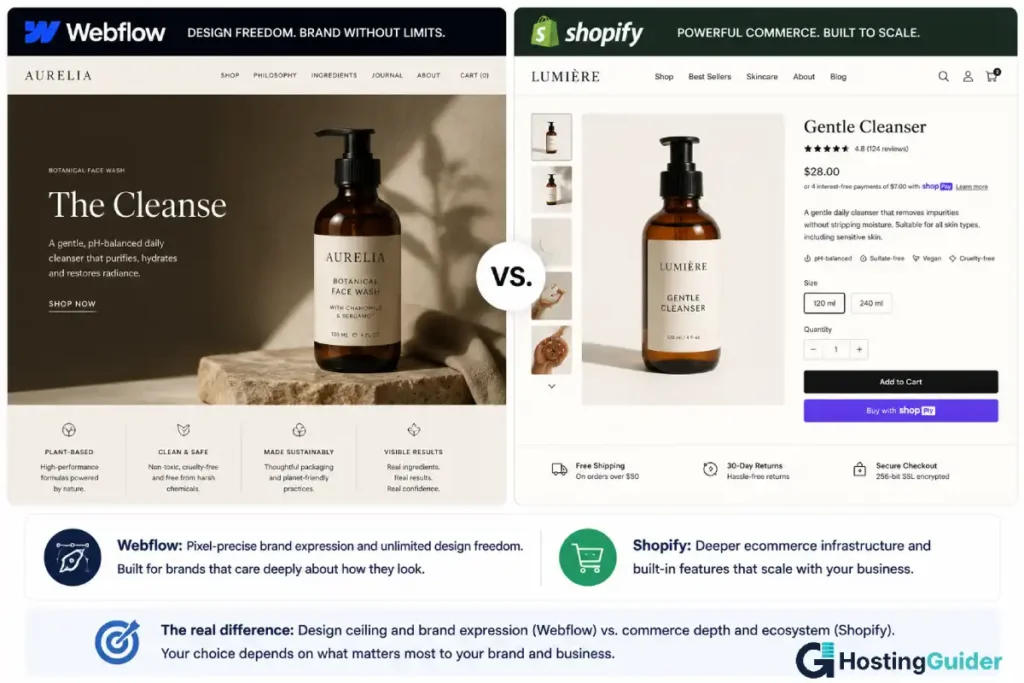
The Core Tension in the Webflow vs Shopify Comparison
Every comparison between Webflow and Shopify for ecommerce comes down to a structural tension that no amount of feature comparison resolves cleanly.
Webflow was built for design. Its ecommerce feature was added later, built on top of a platform whose primary purpose is visual expression. The commerce features work. For many small stores, they work well. They were not the reason Webflow was built and they show it when you push past basic product listings.
Shopify was built for commerce. Its visual customisation tools were added as the platform matured, built on top of infrastructure whose primary purpose is processing orders. The design tools work. For many stores, the available themes are more than adequate. The design ceiling shows when you want something that does not look like a theme.
This is not a criticism of either company. It is a description of where each platform’s design decisions came from and what those decisions optimise for. A platform’s priorities show in its edge cases. Webflow’s edge cases are unusual visual experiences it handles beautifully. Shopify’s edge cases are complex commerce operations it handles reliably.
The question is which edge cases matter more for your specific business.
Quick Comparison: Webflow vs Shopify
| Feature | Webflow (Commerce) | Shopify |
|---|---|---|
| Design flexibility | outstanding | Good (theme-constrained) |
| Visual editor | Pixel-precise, no-code | Section-based, limited |
| Product page design | Fully custom | Template-based |
| Checkout customisation | Basic | Shopify Plus only ($2,000/mo) |
| Transaction fees | 2% on Standard (0% on Plus+) | 0-2% (waived on Shopify Payments) |
| Subscription products | Not supported | App required ($79-99/mo) |
| Abandoned cart | Plus plan+ | Shopify plan+ |
| Multi-currency | Not on Standard | Built-in |
| Multi-language | Limited | Built-in (with Markets) |
| App/integration ecosystem | Limited | 8,000+ apps |
| Payment gateways | Stripe and PayPal primarily | 100+ gateways |
| POS (physical retail) | No | Yes (native hardware) |
| B2B / wholesale | No | Shopify Plus only |
| Inventory management | Basic | Advanced |
| Shipping rules | Basic | Advanced |
| SEO tools | Good | Good |
| Analytics | Basic | Built-in + Shopify Analytics |
| CMS / blog | Yes (native, excellent) | Limited (Shopify blog) |
| Performance | Fast (global CDN) | Fast (global CDN) |
| Hosting included | Yes | Yes |
| Platform lock-in | High (Webflow templates) | High (Shopify + Liquid themes) |
| Starting price (commerce) | $29/month | $39/month |
| Development language | Webflow Designer + CMS | Liquid templating |
What Webflow Commerce Can Actually Do in the Webflow vs Shopify Comparison
Webflow Commerce is a genuine product. For a specific type of store, it is excellent.
What works well:
Product page design. This is Webflow’s strongest ecommerce contribution. A Webflow product page can be built with the same pixel-precise control as any other Webflow page. Custom layout, editorial photography integration, animated elements, scroll-triggered interactions, and sophisticated typography are all possible without a developer. The product pages on a well-designed Webflow store look like they were built by a design agency. Many of them were.
CMS-integrated product content. Webflow’s CMS powers the product catalogue. This means product descriptions, specifications, and supporting content are structured data, not just text fields. You can build dynamic product pages that pull from CMS collections, creating editorial-quality product experiences where the supporting content is as designed as the product itself. For brands that sell through storytelling: craft food companies, independent fashion brands, artisan goods: this capability produces product pages that no Shopify theme can match.
Visual marketing pages alongside the store. Webflow builds the entire brand experience in one platform. The homepage, brand story pages, lookbooks, and blog content use the full Webflow design system. These pages share visual language with the product pages because they are built in the same tool. The design coherence across a Webflow-built brand site is genuinely hard to achieve on Shopify without significant development investment.
Hosted infrastructure with global CDN. Webflow hosts every site on its global content delivery network. SSL, compression, and image optimisation are handled automatically. A Webflow Commerce store loads fast from every continent without any performance configuration.
Digital product sales. Webflow Commerce handles digital downloads cleanly. For a brand selling PDFs, templates, courses delivered as files, or any other digital product, Webflow’s handling is smooth and requires no third-party app.
What Webflow Commerce handles adequately:
Physical product sales with simple inventory. Single-product or limited-catalogue stores with standard fulfillment. Basic discount codes and coupon functionality. Standard single-currency checkout through Stripe or PayPal. Basic email notifications for orders.
Where Webflow Commerce Falls Short: The Webflow vs Shopify Commerce Gap
This section is where the comparison shifts. The following are not minor gaps. They are fundamental limitations that make Webflow Commerce unsuitable for any store beyond basic physical product sales.
No subscription products. Webflow Commerce has no recurring billing capability. You cannot sell a monthly coffee subscription, a software-as-a-service product, a membership box, or any recurring revenue product natively. Shopify handles subscriptions through apps. WooCommerce handles them through a dedicated extension. Webflow has no path to subscription products on any current plan.
No abandoned cart recovery on the Standard plan. Abandoned cart emails, which recover a statistically significant percentage of lost sales, are only available on the Plus plan at $74/month. On the $29/month Standard plan, visitors who add to cart and leave generate no recovery sequence.
Limited payment gateway support. Webflow Commerce primarily supports Stripe and PayPal. If your customers are in a market where Stripe is not well-adopted, or if you need a specific regional payment processor, Webflow has no path to it. Shopify supports 100+ payment gateways globally.
2% transaction fee on the Standard plan. Webflow Commerce charges 2% of revenue as a platform transaction fee on the $29/month Standard plan. This is removed on Plus ($74/month) and Advanced ($212/month) plans. At $100,000 in annual revenue on the Standard plan, Webflow takes $2,000 in transaction fees plus the $348 annual platform fee. The Plus plan eliminates the fee but costs $888/year, a more honest comparison to Shopify’s fee structure.
No multi-currency on the Standard plan. International stores need to display prices in local currency. Multi-currency in Webflow requires the Plus plan. Shopify includes multi-currency on all plans.
No B2B or wholesale capability. Webflow Commerce has no customer group pricing, no net payment terms, no purchase order support. Brands with any wholesale or B2B component need a different platform or a heavily customised workaround.
Basic inventory management. Webflow Commerce handles inventory counts. It does not handle variants in the depth that larger catalogues require: no variant-level inventory tracking across warehouses, no bundle inventory management, no low-stock automation beyond basic email alerts.
Limited shipping logic. Complex shipping rules: weight-based tiers, carrier-calculated shipping, dimensional weight, zone-based pricing: all require workarounds on Webflow. Shopify handles all of these natively.
The honest summary: Webflow Commerce is suitable for stores with fewer than 50 products, no subscription component, simple shipping needs, and a primary audience in Stripe-supported markets. Outside that profile, the limitations become operational problems.
What Shopify Design Can Actually Do in the Webflow vs Shopify Comparison
Shopify’s design capability is commonly underrated by designers and commonly overrated by store owners who have not tried to go beyond templates.
What works well:
Theme editor and section builder. Shopify’s visual editor handles layout, colour, typography, and section ordering cleanly. For a non-developer, the theme editor produces professional results. Recent versions of Shopify themes are built with sections and blocks that can be rearranged, and the output is consistently well-structured and mobile-responsive.
Premium theme marketplace. Third-party theme developers have built strong Shopify themes at $150 to $400 one-time cost. Themes like Prestige, Impulse, and Turbo are used by established DTC brands and produce polished store experiences. A well-chosen premium theme closes much of the visual gap with a custom Webflow design for a fraction of the development cost.
Visual merchandising tools. Shopify’s product pages handle product photography well. Multiple images, zoom functionality, variant-linked images, video embeds, and 3D model displays are all available through the theme without custom development. For a standard product page experience, Shopify is complete.
Customisation with Shopify Scripts and Metafields. Metafields allow store owners to add custom data to products, collections, customers, and orders. Metafields can be displayed in the theme editor and allow product pages to show structured specifications, care instructions, or sizing data without developer intervention. This gives non-developer store owners more design and content flexibility than the standard theme editor alone provides.
Shopify Markets for international stores. Multi-currency, multi-language, and region-specific pricing are handled through Shopify Markets on all paid plans. For a store selling in multiple countries, this is a significant operational capability that Webflow does not match at standard plan pricing.
Where Shopify Design Falls Short: The Webflow vs Shopify Design Gap
The aesthetic ceiling. Shopify themes produce Shopify-looking stores. Designers who work with both platforms can identify a Shopify-built store within seconds of arrival. The grid structure, the navigation patterns, the product page layout, and the checkout all follow conventions that Shopify’s theme architecture enforces. For most stores, this is fine. For brand-led businesses where differentiated visual identity is central to the value proposition, this ceiling is a real problem.
Checkout is locked. Shopify’s checkout cannot be modified on any plan below Shopify Plus at $2,000/month. The checkout is Shopify’s code. The layout, the fields, the order of steps, the branding, and the confirmation page all belong to Shopify. For a luxury fashion brand, a high-end wellness product, or any brand where the checkout experience is part of the purchase experience, this limitation costs real money or requires the Plus plan investment.
The Liquid learning curve. Moving beyond the theme editor requires Shopify’s Liquid templating language. Liquid is not HTML. It is a Shopify-specific templating system with its own syntax and logic. Finding developers who specialise in Liquid and building custom Shopify themes from scratch is possible and produces excellent results. It is more expensive than building a Webflow design because the talent pool is smaller and the tool is more constrained.
The blog is functional, not editorial. Shopify’s blog handles basic content publishing. It is not a publishing platform. The formatting options, the content relationship features, and the editorial workflow are basic compared to WordPress or Webflow’s CMS. For a brand with a serious content strategy, Shopify’s blog is a limitation that many stores solve by running a separate WordPress blog.
SEO: A Closer Contest Than Expected in the Webflow vs Shopify Comparison
Both Webflow and Shopify produce comparable SEO results for straightforward product and category page optimisation. Neither matches WordPress with Yoast SEO for technical SEO depth.
Webflow SEO:
Webflow generates clean, semantically correct HTML. Meta titles, descriptions, and Open Graph tags are fully editable. Canonical tags work correctly. The XML sitemap is automatic. Page load speed is excellent through the global CDN. Alt texts are editable on all media.
The SEO limitations: no real-time content optimisation guidance, limited schema markup control for rich results (available through Webflow’s Embed element with custom code), and URL structures that are less flexible than WordPress. For a brand with a serious content marketing strategy, Webflow’s blog CMS is actually a significant strength: the structured CMS and editorial design quality make content-led SEO possible in a way that Shopify’s blog cannot match.
Shopify SEO:
Shopify generates clean URLs for products and collections. Meta titles and descriptions are editable. The sitemap is automatic. Canonical tags prevent most duplicate content issues. Performance through Shopify’s CDN is fast globally.
The SEO limitations: forced URL prefixes (/products/ and /collections/) cannot be changed, creating URL structures that differ from what some SEO strategies prefer. Blog content is limited in formatting compared to what a proper CMS produces. Schema markup for products is good but requires apps for advanced structured data types.
The verdict on SEO: For product page and category SEO, Shopify and Webflow are comparable. For content-led SEO where blog and editorial content drives traffic, Webflow’s CMS is meaningfully better than Shopify’s blog. For technical SEO at the deepest level, neither matches a well-configured WordPress installation with a dedicated SEO plugin.
Pricing: The Webflow vs Shopify Cost Comparison at Every Revenue Level
This comparison is more nuanced than headline monthly prices suggest.
Webflow Commerce Pricing
| Plan | Monthly (annual billing) | Transaction Fee | Key Commerce Features |
|---|---|---|---|
| Standard | $29/month | 2% | Unlimited products, basic checkout, Stripe and PayPal |
| Plus | $74/month | 0% | Abandoned cart recovery, multi-currency, advanced inventory |
| Advanced | $212/month | 0% | Priority support, higher API limits |
The effective cost calculation:
At $100,000 in annual revenue on Webflow Standard, the 2% transaction fee adds $2,000 to the $348 annual platform cost. Total: $2,348/year for the Standard plan at that revenue level.
Webflow Plus at $888/year eliminates the transaction fee and adds abandoned cart recovery, which is a critical conversion tool. For any store above $44,400 in annual revenue, the Plus plan becomes cheaper than Standard after the transaction fee calculation.
Shopify Pricing
| Plan | Monthly (annual billing) | Transaction Fee (non-Shopify Payments) | Key Features |
|---|---|---|---|
| Basic | $39/month | 2% | Full commerce stack, 2 staff accounts |
| Shopify | $105/month | 1% | Professional reports, 5 staff accounts |
| Advanced | $399/month | 0.5% | Advanced reports, calculated shipping |
| Plus | $2,000+/month | 0.15% | Checkout customisation, B2B, dedicated support |
Direct Comparison at the Same Revenue Level
| Annual Revenue | Webflow Standard (with 2% fee) | Webflow Plus | Shopify Basic (Shopify Payments) | Shopify Basic (2% fee) |
|---|---|---|---|---|
| $25,000/year | $348 + $500 = $848 | $888 | $468 | $468 + $500 = $968 |
| $50,000/year | $348 + $1,000 = $1,348 | $888 | $468 | $468 + $1,000 = $1,468 |
| $100,000/year | $348 + $2,000 = $2,348 | $888 | $468 | $468 + $2,000 = $2,468 |
| $250,000/year | Webflow Plus is required for this scale: $888 | $888 | $468 | $468 + $5,000 = $5,468 |
The pricing conclusion:
Webflow Plus at $74/month is competitive with Shopify Basic at $39/month on Shopify Payments when you factor in that Webflow Plus removes the transaction fee and Shopify Payments requires a supported region and category. For stores in Shopify Payments regions, Shopify Basic is cheaper. For stores using third-party processors, the comparison is more nuanced.
The decisive pricing factor is not the monthly fee. It is the app cost. A Shopify store with abandoned cart recovery, subscription billing, and loyalty programme pays $150 to $300/month in app fees on top of the platform fee. Webflow has no app ecosystem, so these features either are not available (subscriptions) or are included in the plan (abandoned cart on Plus).
The Hybrid Architecture Option: Using Both Together
This is the section most Webflow vs Shopify comparisons do not write because it requires understanding both platforms at an architectural level.
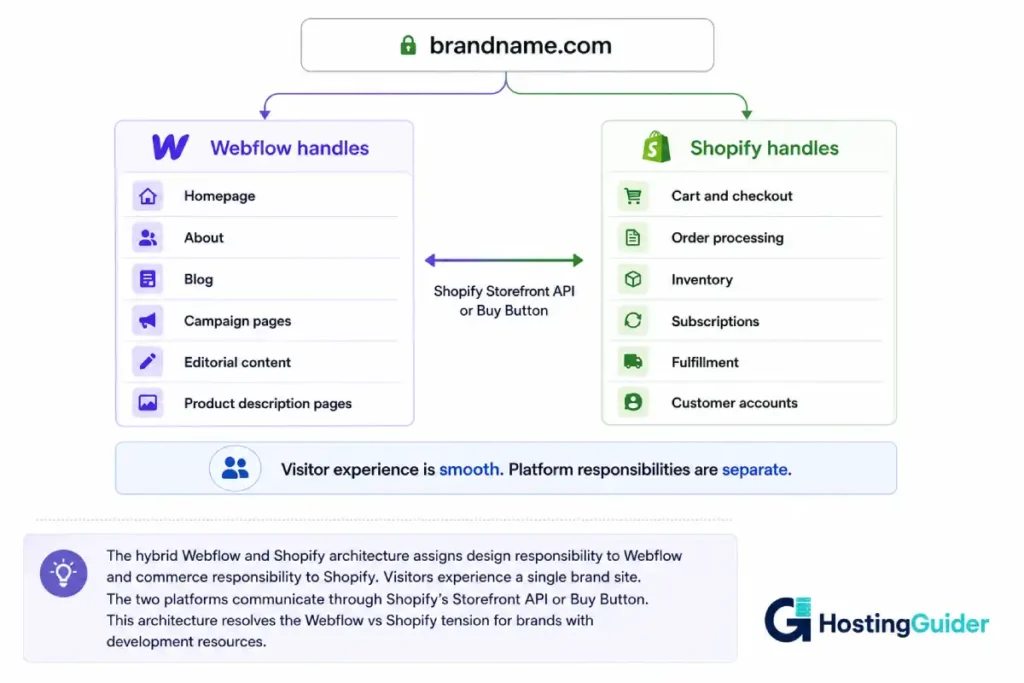
Many serious brand-led ecommerce businesses use both platforms simultaneously. Webflow handles the brand and marketing experience. Shopify handles the commerce infrastructure. The two platforms share a domain and present as a single coherent website to visitors.
How the hybrid works:
The simplest implementation uses Shopify’s Buy Button. A store owner builds the brand site, blog, editorial pages, and landing pages fully in Webflow. Individual products are embedded in Webflow pages using Shopify’s Buy Button embed code. The visitor sees a beautifully designed Webflow product page. When they click Add to Cart, they complete the purchase through Shopify’s hosted checkout. The Webflow page handles the design. Shopify handles the transaction.
This approach works well for stores with a limited SKU count where the product discovery and brand experience happens on Webflow pages, and the transaction itself happens through Shopify.
The advanced headless implementation:
For stores with full catalogues and complex commerce requirements, the headless architecture uses Shopify’s Storefront API as the commerce back-end and Webflow as the visual front-end. Webflow pages query the Shopify API to display dynamic product data: prices, inventory, variant options, and product metadata all come from Shopify in real time. Add-to-cart actions and checkout flow through Shopify’s infrastructure. The visitor experiences a single site with Webflow’s design quality and Shopify’s full commerce capability.
This architecture requires developer setup and ongoing maintenance. It is not a beginner solution. It is used by established DTC brands with development resources and revenue that justifies the investment. The result is the most capable combination available: Webflow’s design ceiling with Shopify’s commerce floor.
When the hybrid makes sense:
The hybrid architecture is the right choice when design differentiation is a genuine competitive advantage for the brand, when the ecommerce requirements go beyond what Webflow Commerce can handle natively, and when the brand has development resources or budget to maintain two connected platforms.
It is not the right choice for a store that is making its first $50,000 in revenue. The operational complexity of two platforms is overhead that is not justified until the design-commerce tension becomes a real constraint on growth.
The cost of the hybrid:
Running both platforms means paying for both: Webflow Business plan at $39/month minimum for a production site plus Shopify Basic at $39/month minimum. Total platform cost starts at $78/month before apps, plugins, or development costs. For a brand that generates the revenue to justify this architecture, it is affordable. For a store just getting started, it is a significant overhead.
Performance and Speed: Webflow vs Shopify Infrastructure
Both platforms serve sites through global CDNs with automatic SSL and compression. Neither requires performance configuration from the store owner.
Webflow performance:
Webflow publishes sites through Fastly CDN. Pages are generated as static HTML during publish. Because Webflow sites are pre-rendered static files rather than dynamically generated server responses, the time to first byte is extremely low. Webflow pages consistently score well on Core Web Vitals for desktop and mobile.
The performance risk in Webflow is designer-introduced. Heavy animations, large video backgrounds, complex scroll interactions, and high-resolution images embedded directly in pages can significantly reduce performance. Webflow provides a performance audit tool, but the platform does not automatically restrict or optimise the design choices that cause performance problems. A very animated Webflow store built without performance consideration can fail Core Web Vitals despite excellent infrastructure.
Shopify performance:
Shopify serves stores through its own global CDN infrastructure. Theme code and assets are cached and delivered from the nearest edge location. Shopify’s checkout pages are particularly well-optimised because Shopify controls the checkout code globally and keeps it lean.
Shopify’s performance risk is similar: heavy third-party apps that add JavaScript to every page, large unoptimised product images, and tracking scripts from multiple analytics tools can degrade page speed significantly. App-heavy Shopify stores with 10 to 15 apps commonly have performance issues caused by the combined JavaScript weight.
Performance comparison:
Out of the box with clean setups, both platforms perform similarly on standard benchmarks. Both can be degraded by user choices. Neither requires technical management for standard performance. The edge case where Webflow is faster is editorial and brand pages with minimal JavaScript and clean builds. The edge case where Shopify is more resilient is stores with heavy app usage, because Shopify optimises its own infrastructure code where Webflow cannot control what third-party embeds do to page weight.
Platform Ownership: Webflow vs Shopify Lock-In and Portability
Both Webflow and Shopify create significant lock-in. Understanding the exit path from each platform before you build matters.
Leaving Webflow:
Webflow allows export of the site’s HTML, CSS, and JavaScript as static files. This export is useful for developers who want to move the front-end code to another hosting environment, but the exported code is not editable in any other visual tool. The CMS data (products, blog posts, custom collections) exports as CSV. The visual design built in Webflow Designer does not map to any other platform’s design system.
Leaving Webflow means: content migrates, design is rebuilt. The timeline for a full Webflow site rebuild on another platform is days to weeks depending on complexity.
Leaving Shopify:
Shopify exports product data, customer data, and order history as CSV. The theme code is Liquid, which does not transfer to other platforms. Moving from Shopify to another ecommerce platform requires rebuilding the storefront. If you used Shopify Payments, your payment processing history stays within Shopify’s records.
Shopify’s data portability is comparable to Webflow’s: the content moves, the design does not. Both platforms hold you through the design rebuild required to leave.
The WooCommerce comparison:
For brands that want genuine data portability and no platform lock-in on either the design or the commerce side, WooCommerce built on WordPress provides full database-level portability. Moving WooCommerce from one host to another takes minutes. The design is built in standard PHP and CSS. The platform holds no proprietary claim on the template or the data. For brands where full ownership matters, this is worth considering as a third option.
Our comparison of Shopify vs WooCommerce covers the commerce platform trade-off in detail. Our Webflow vs WordPress post covers the design platform comparison for brands weighing those two options.
Who Each Platform Is Built For in the Webflow vs Shopify Decision
Webflow Commerce is built for:
- Independent brands with up to 50 to 100 products where design is a primary competitive differentiator
- Creative agencies that build sites for clients and want a single platform for design, CMS, and basic commerce
- Brands selling digital products, downloads, or limited-edition physical goods where simplicity and design quality are both priorities
- Designers and design-led founders who are the primary site builders and value design control over operational depth
- Brands where the marketing site and store are deeply integrated and need design coherence across both
Shopify is built for:
- Any store from its first sale to multi-million dollar revenue that needs a reliable, scalable commerce infrastructure
- Physical product retailers that need point-of-sale integration with online inventory
- Brands with subscription products, complex fulfillment, or multi-currency requirements
- Stores targeting international markets where Shopify’s market management tools reduce operational complexity
- Sellers who use Amazon, eBay, and social channels alongside their own store and need unified inventory management
- Any operator who values commerce reliability over design differentiation
When to Choose Webflow in the Webflow vs Shopify Decision
Choose Webflow Commerce when:
- Your store has fewer than 100 products with standard fulfillment and no subscription component
- You are in a Stripe-supported market where Webflow’s payment gateway coverage is not a limitation
- Visual brand differentiation is central to how you compete, and the design quality of Webflow justifies the commerce trade-offs
- You or your team are the site builders and the ability to edit design without a developer saves more cost than Shopify’s app ecosystem adds capability
- Your primary marketing channel is organic content, social media, or influencers rather than performance advertising, and the Webflow CMS supports that content strategy well
- The Webflow Plus plan at $74/month provides the abandoned cart and multi-currency features your store needs, and the total cost is justified by the design capability
Consider Webflow Commerce for a launch where speed to design quality matters, with a plan to migrate to the hybrid architecture or a full platform change when commerce complexity increases.
When to Choose Shopify in the Webflow vs Shopify Comparison
Choose Shopify when:
- Your store needs subscriptions, complex shipping logic, multiple currencies, or B2B pricing
- You are using Shopify Payments in a supported region and the flat monthly fee without transaction fees is the most cost-efficient option
- You need point-of-sale integration for physical retail alongside online commerce
- Your product catalogue grows beyond 100 SKUs or requires complex variant management
- Your store needs the full depth of the Shopify app ecosystem: subscription billing, loyalty programmes, advanced analytics, and third-party logistics integrations
- You are building a store to scale revenue quickly and the commerce infrastructure reliability matters more than design differentiation
- You do not have developer resources to maintain a hybrid architecture and need a single managed platform
The Alternative Most People Miss
Neither Webflow nor Shopify is the strongest answer for every brand that wants both design quality and commerce depth. The option that resolves the tension without the hybrid architecture cost is WooCommerce built on WordPress with a visual page builder.
A WooCommerce store built with a dedicated visual page builder like Elementor gives a designer comparable layout control to Webflow at the page level, with WooCommerce’s deep commerce capability underneath. The product pages, the marketing pages, and the checkout are all customisable without Shopify Plus-level investment. The SEO capability is the strongest of any platform in this comparison. The data ownership is complete.
The trade-off: WooCommerce requires hosting management that neither Webflow nor Shopify requires. Managed WooCommerce hosting reduces this significantly. For brands comfortable with a managed hosting environment, the design-commerce capability combination on WooCommerce is stronger than either Webflow Commerce or standard Shopify at comparable monthly cost.
For store owners weighing all three options, our Shopify vs WooCommerce post covers that specific comparison in detail.
Final Verdict
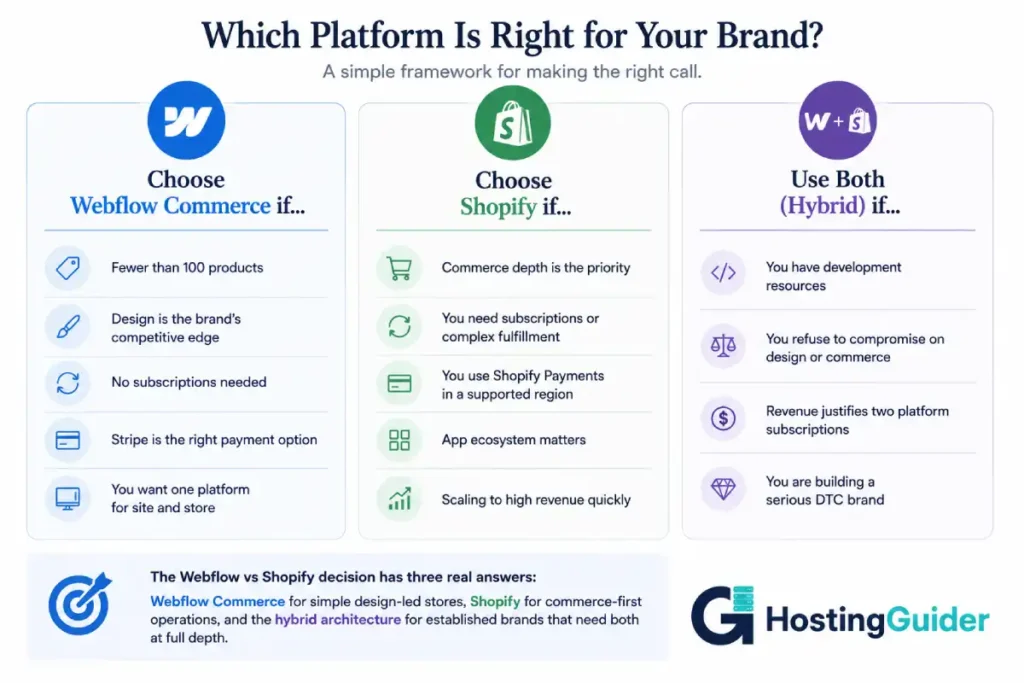
The Webflow vs Shopify decision for ecommerce is not a competition between equals on a single dimension. It is a choice between two different priorities.
Webflow Commerce is the right ecommerce choice for a narrow, specific profile: a design-led brand with a simple product catalogue, Stripe payment coverage, no subscription requirement, and a team that builds and maintains the site. Within that profile, it is excellent. Outside it, the limitations become operational problems.
Shopify is the right choice for most ecommerce operations that need reliable commerce infrastructure at any scale. Its design ceiling is real and frustrating for design-conscious brands. Its commerce depth is not matched by any other hosted platform. The combination of the Shopify app ecosystem, Shopify’s checkout reliability, and Shopify’s scalability makes it the correct default for any store beyond basic physical product sales.
The hybrid is the right answer for established brands with development resources that refuse to compromise on either dimension. Webflow for the front-end brand experience. Shopify for the commerce back-end. Connected through the Storefront API. More expensive. More capable.
Most stores should choose Shopify. Brands where visual identity is the product should consider the hybrid seriously. Brands at the beginning of their commerce journey should start on Shopify and invest in a premium theme rather than navigating Webflow Commerce’s limitations during the scaling phase.
Final Summary Table
| Category | Webflow Commerce | Shopify | Hybrid (Both) |
|---|---|---|---|
| Design quality | outstanding | Good (theme-limited) | outstanding |
| Commerce depth | Limited | Excellent | Excellent |
| Subscription products | No | App required | Yes (Shopify) |
| Checkout customisation | Basic | Plus only ($2k/mo) | Shopify checkout |
| SEO capability | Good | Good | Best (add WordPress) |
| Transaction fees | 2% (Standard) / 0% (Plus+) | 0-2% | Shopify structure |
| App ecosystem | Very limited | 8,000+ apps | Full Shopify apps |
| Platform cost | $29 to $212/month | $39 to $399/month | Both subscriptions |
| Development required | Low | Low | High |
| Platform lock-in | High | High | High |
| Portability | Moderate | Moderate | Moderate |
| Best for | Small, design-led brands | Most ecommerce stores | Established DTC brands |
Frequently Asked Questions
Webflow vs Shopify: Can Webflow Replace Shopify for an Online Store?
For simple stores with fewer than 100 products, no subscription requirement, and standard fulfillment in Stripe-supported markets, Webflow Commerce is a functional Shopify alternative. For stores that need subscriptions, complex shipping logic, multiple currencies, the full Shopify app ecosystem, or Shopify’s checkout conversion optimisation, Webflow Commerce is not a replacement. The commerce feature gap between the platforms is significant for any store with growth ambitions.
Webflow vs Shopify Transaction Fees: Does Webflow Charge Them?
Yes. Webflow Commerce charges a 2% transaction fee on the Standard plan ($29/month). This fee is eliminated on the Plus plan ($74/month) and Advanced plan ($212/month). The Webflow transaction fee applies on top of payment processor fees (Stripe or PayPal). Shopify also charges transaction fees of 0% to 2% depending on plan, waived when using Shopify Payments.
Can I use Webflow and Shopify together?
Yes. The hybrid architecture uses Webflow for brand and marketing pages while Shopify handles the commerce back-end. The simplest implementation uses Shopify’s Buy Button embedded in Webflow pages. A more advanced implementation uses Shopify’s Storefront API with Webflow as the visual front-end, delivering dynamic product data from Shopify’s back-end through custom-built API connections. The hybrid requires developer setup but produces the strongest combination of design quality and commerce capability.
Webflow vs Shopify for Luxury and Fashion Brands: Which Wins?
For a luxury or fashion brand where visual identity is central to the purchase experience, Webflow’s design capability produces better brand sites than most Shopify themes. However, if the store needs subscription boxes, complex sizing variants, multi-currency pricing for international customers, or a checkout that matches the luxury aesthetic without a $2,000/month Shopify Plus investment, Webflow Commerce’s limitations become real operational constraints. The hybrid architecture is the most common solution for established luxury DTC brands: Webflow for the brand experience, Shopify for the commerce execution.
Webflow vs Shopify SEO: Is Webflow Good for Ecommerce Search Rankings?
Webflow produces clean, fast-loading HTML that performs well in search. For product and category page SEO, Webflow is adequate. Its CMS-driven blog is genuinely strong for content-led SEO strategies. The limitations: no Yoast SEO equivalent for real-time content guidance, less granular schema markup control for rich product results compared to WordPress with Yoast, and URL structures that are less flexible than WordPress. For a store where blog and editorial content drives significant organic traffic, Webflow’s CMS is stronger than Shopify’s blog. For deep technical ecommerce SEO, WordPress with a WooCommerce store remains the strongest option.
Does Shopify work with Webflow?
Yes, through two primary methods. The Shopify Buy Button embeds Shopify’s cart and checkout functionality into any Webflow page with a simple JavaScript snippet. Shopify’s Storefront API allows more advanced headless integration where Webflow pages display dynamic Shopify product data and the full Shopify checkout handles transactions. Both approaches allow a Webflow-designed site to use Shopify’s commerce infrastructure without abandoning Webflow’s design system.
What is the cheapest way to get Webflow-quality design with full ecommerce capability?
The most cost-efficient approach for a brand that wants Webflow-level design quality with serious ecommerce capability is WooCommerce on WordPress with a visual page builder like Elementor. This combination gives full CSS and layout control at the page builder level, WooCommerce’s deep ecommerce feature set, full SEO capability with Yoast, and data ownership that neither Webflow nor Shopify provides. Managed WooCommerce hosting costs $20 to $50/month. The total platform cost is lower than either Webflow Plus or Shopify Basic while offering more design flexibility and commerce depth than either native solution.


