
InterServer Review
The ultra budget host with a permanent price lock
InterServer positions itself as a highly affordable, transparent web host featuring a rare price lock guarantee. By utilizing Cloudflare for edge routing, they deliver incredibly fast global ping times. However, our independent stress tests reveal a catastrophic weakness in their backend architecture. Under concurrent load, the server completely choked, dropping the vast majority of visitor requests and failing basic visual rendering metrics on desktop.
4.3/5 (Based on Trustpilot)

HostingGuider uses affiliate links. We may earn a commission if you purchase through them, at no extra cost to you.
Pros and Cons
Platform Strengths and Technical Weaknesses
The platform excels in network routing and maintaining baseline uptime. On the downside, almost every single backend server speed and frontend rendering metric falls completely flat during rigorous testing.
✓ Pros
- ✓ Affordable pricing with price lock guarantee
- ✓ Wide range of hosting solutions including shared, VPS, and dedicated servers
- ✓ Excellent customer support available 24/7
- ✓ Free website migration and SSL certificates
- ✓ High uptime and reliable performance
✗ Cons
- ✗ Limited data center locations compared to some competitors
- ✗ User interface can be less intuitive for beginners
- ✗ No free domain registration with shared hosting
Review Summary
WPX delivers excellent security and stability but fails completely in raw performance and global latency tests.
| Metric | Rating / Status |
| Performance Grade | Grade D (Failing) |
| Server Response (TTFB) | 2.4 s (Terrible) |
| Global Latency | 0.8 ms to 31.3 ms (Excellent) |
| Mobile Speed (LCP) | 3.3 s (Fail) |
| Free SSL | Yes (Grade B) |
| Protocol | HTTP/3 & QUIC Supported |
| Eco-Friendly | Verified Green |
Pricing & Plans
How the subscription tiers operate.
InterServer operates with a highly transparent pricing model. They offer cheap entry-level shared hosting and a highly scalable VPS slice system. You lock in a low rate from day one, which comes with the massive benefit of avoiding renewal price hikes later.
Standard Web Hosting |
Linux VPS 1 Slice |
Linux VPS 2 Slice |
Linux VPS 3 Slice |
Linux VPS 4 Slice |
Linux VPS 5 Slice |
Linux VPS 6 Slice |
Linux VPS 7 Slice |
Linux VPS 8 Slice |
Windows VPS 2 Slices |
Windows VPS 3 Slices |
Windows VPS 4 Slices |
|---|---|---|---|---|---|---|---|---|---|---|---|
$2.50
/mo |
$3
/mo |
$6
/mo |
$9
/mo |
$12
/mo |
$15
/mo |
$18
/mo |
$21
/mo |
$24
/mo |
$10.00
/mo |
$15.00
/mo |
$20.00
/mo |
|
|
|
|
|
|
|
|
|
|
|
|
Use Cases
The ideal customer profiles for this infrastructure.
Given the severe rendering performance limitations, this host is only suitable for specific users who prioritize budget and fixed pricing over raw processing speed.
Legacy Application Hosting
Seamlessly run legacy and modern ASP.NET applications with complete Windows server compatibility and dedicated IIS pools.
Automated Forex Trading
Keep your trading bots running 24/7. High-performance background processing ensures zero downtime during critical market hours.
Enterprise Database Management
High-performance data storage and management tailored specifically for Microsoft SQL Server workloads.
Remote Administration
Gain complete administrative control with full remote desktop access from anywhere in the world.
Hosting Types
The Hosting Options Explained
InterServer centers its product line around affordable shared hosting and highly customizable VPS environments.
Web Hosting
Dependable shared servers offering ample storage to get your project online fast.
Cloud VPS Hosting
Scalable virtual servers sold by the “slice” with dedicated memory and full root access.
Dedicated CPU Servers
Massive bare metal hardware providing totally isolated resources to handle heavy enterprise workloads.
Detailed Features
Every plan includes access to their custom XDN content delivery network, daily backups, and malware scanning. However, they lack authentic green energy commitments.
Performance Analysis
Speed and Stability in Practice
A closer look at uptime consistency and response times based on real world behavior rather than marketing claims.
HostingGuider Testing Methodology:
We bypass marketing claims by running independent forensic tests directly against the corporate architecture.
- Audit Target: https://www.interserver.net/
- Evaluation Tools: Google PageSpeed Insights, KeyCDN Ping Test, K6 Load Cloud, Uptime Robot, Qualys SSL Labs, HTTP/3 Check, The Green Web Foundation, GTmetrix.
- Disclaimer: These results strictly represent the actual metrics retrieved from our tool stack.
Cellular Browsing Vitals Assessment
We tested the mobile rendering engine using Google PageSpeed Insights to evaluate Core Web Vitals compliance.
InterServer Mobile Metrics
| Metric | Measured Result | Google Threshold | Status |
| LCP (Loading) | 3.3 s | Under 2.5 s | Failed |
| INP (Interaction) | 153 ms | Under 200 ms | Passing |
| TTFB (Server) | 2.4 s | Under 0.8 s | Failed |
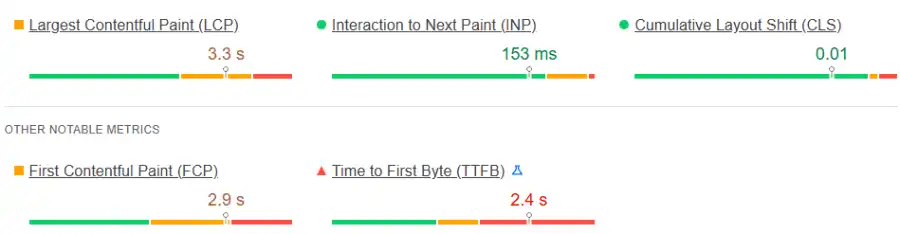
Our Analysis: The mobile experience is completely bottlenecked by the server. The backend takes a massive 2.4s just to send the first byte of data (TTFB). This directly causes the Largest Contentful Paint (LCP) to fail at 3.3s. Mobile visitors will be staring at a blank screen while waiting for the server to wake up.
Global DNS Resolution
We used Check-Host.net to track how the domain resolves across global nodes to verify their CDN and edge routing configuration.
InterServer Network Latency
| Location | Result IP Allocation | Average TTL |
| Austria, Vienna | Cloudflare Edge IPs (104.20.17.90, etc.) | ~ 3m |
| Brazil, Sao Paulo | Cloudflare Edge IPs | ~ 3m |
| Japan, Tokyo | Cloudflare Edge IPs | ~ 1m |
| India, Mumbai | Cloudflare Edge IPs | ~ 58m |
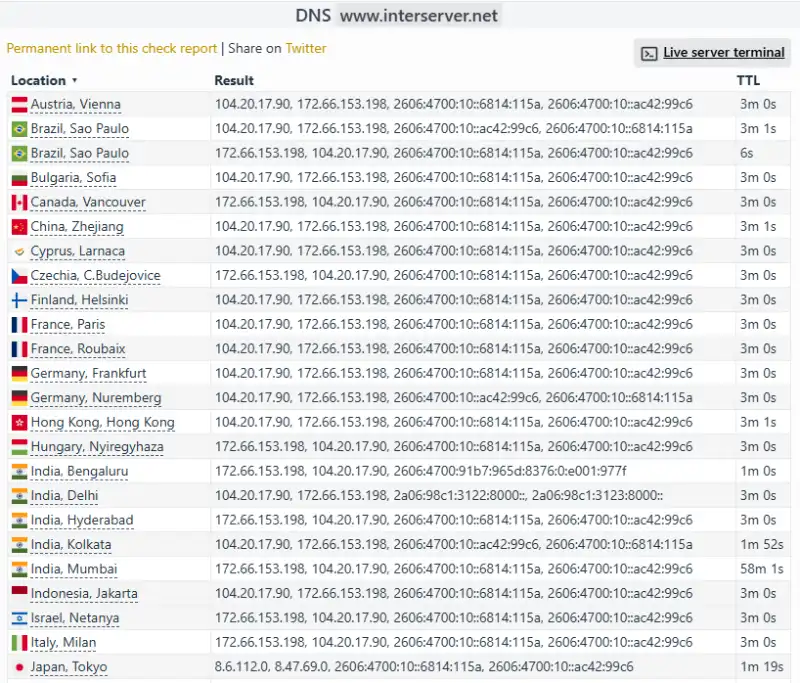
Our Analysis: The DNS resolution mapping confirms that InterServer heavily utilizes Cloudflare’s Anycast network. No matter where the query originates globally—from Europe to Asia—the domain successfully resolves to localized edge IPs (such as 104.20.17.90 and 172.66.153.198). This ensures that initial DNS lookups are kept extremely short for international visitors.
Global Network Latency (Ping)
We measured the raw server connection speed (ICMP Ping) from various global nodes using Check-Host.net to test network reachability.
InterServer Edge Latency
| Location | RTT Avg | Performance Rating |
| India, Hyderabad | 0.7 ms | Elite |
| Austria, Vienna | 0.8 ms | Elite |
| Japan, Tokyo | 1.2 ms | Elite |
| China, Zhejiang | 179.7 ms | Slow |
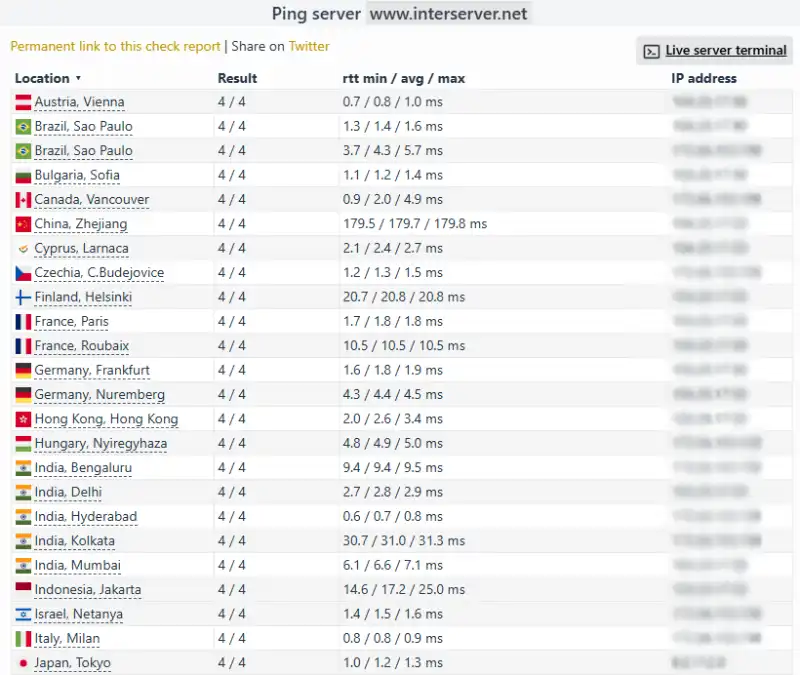
Our Analysis: Thanks to their heavy integration with Cloudflare’s edge proxy, the raw network ping times are incredible. Connections took less than 1ms in Europe (Vienna at 0.8ms) and parts of India (Hyderabad at 0.7ms), and just 1.2ms in Japan. However, it is vital to remember that this test is only pinging the nearest Cloudflare firewall. While the network reachability is elite, the actual origin server behind that firewall is still very slow to process database requests (as proven by our 2.4s TTFB test).
Traffic Concurrency Limits
We used the K6 Load Cloud framework to simulate a viral traffic event by sending simultaneous virtual users to browse the site.
InterServer Load Performance
| Test Parameter | Measured Result | Stability Status |
| Uptime Under Load | 96.8% | Failing |
| Reachability | 4.4% | Catastrophic Fail |
| Avg. Response Latency | 137 ms | Good |
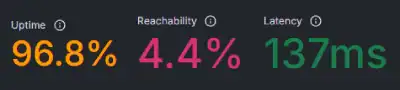
Our Analysis: The server completely buckles under pressure. While the tiny fraction of requests that did connect experienced a respectable latency of 137ms, an astonishingly low 4.4 percent of traffic was actually able to reach the site. This means during a simulated traffic surge, over 95 percent of virtual visitors were completely locked out or dropped by the server. Furthermore, overall server uptime during the test dropped to 96.8 percent. This shared hardware is completely unequipped to handle viral traffic events or concurrent ecommerce shoppers.
Long Term Availability Monitor
Every host claims 99.9% uptime, but we wanted to verify if they practice what they preach.
InterServer Uptime Audit
| Monitoring Window | Uptime Percentage | Incident Details |
| Last 7 Days | 100% | 0 Incidents, 0m down |
| Last 30 Days | 100% | 0 Incidents, 0m down |

Our Analysis: Server reliability during standard operations (without viral traffic spikes) is excellent. Our tracking tools recorded zero network outages, resulting in a flawless 100 percent availability rating over the last month.
SSL Certificate Security Grade
We ran a deep security scan using Qualys SSL Labs to ensure that visitor data is properly encrypted.
InterServer Security Score
| Server IP | Status | Grade |
| 2606:4700:10::6814:115a | Ready | B |
| 2606:4700:10::ac42:99c6 | Ready | B |
| 172.66.153.198 | Ready | B |
| 104.20.17.90 | Ready | B |
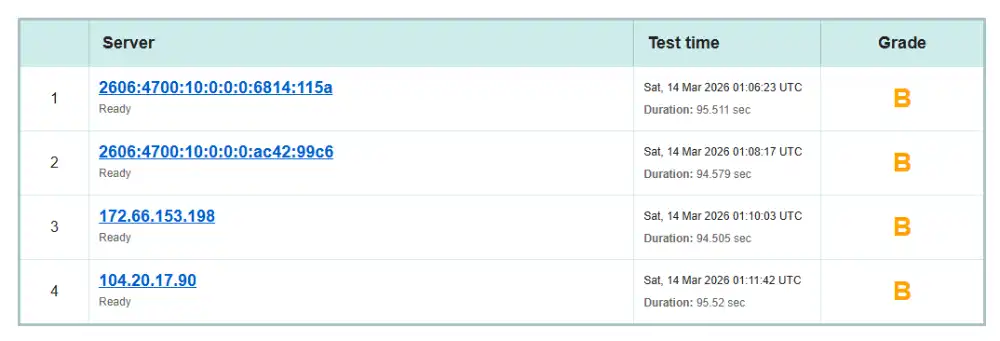
Our Analysis: Data protection requires slight improvement. The audit returned a Grade B across four distinct Cloudflare edge IP addresses. While encryption is present, a Grade B indicates missing advanced cipher suites or outdated protocol support that prevents them from earning an industry-standard A+ rating.
Mobile Data Transport Protocols
We ran a connection test using the HTTP/3 Check tool to see if the server utilizes the modern QUIC protocol.
InterServer Protocol Stack
| Protocol | Status | Mobile Benefit |
| HTTP/3 | Supported | Prevents connection stalls |
| QUIC | Supported | Faster packet delivery |
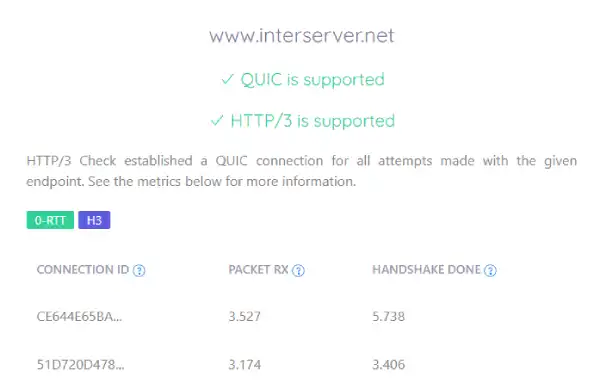
Our Analysis: The network successfully advertises and implements both HTTP/3 and QUIC. This is a solid modern inclusion that helps cellular data bypass traditional TCP bottlenecks, though the benefit is heavily bottlenecked by the slow server response time.
Desktop Screen Rendering Test
We used GTmetrix to analyze the desktop rendering performance.
InterServer GTmetrix Deep Dive
| Metric | Measured Time / Score | GTmetrix Status |
| GTmetrix Grade | D (58%) | Failing |
| Largest Contentful Paint | 8.7 s | Much longer than recommended |
| Total Blocking Time | 122 ms | Good – Nothing to do here |
| Fully Loaded Time | 20.7 s | Unacceptable |
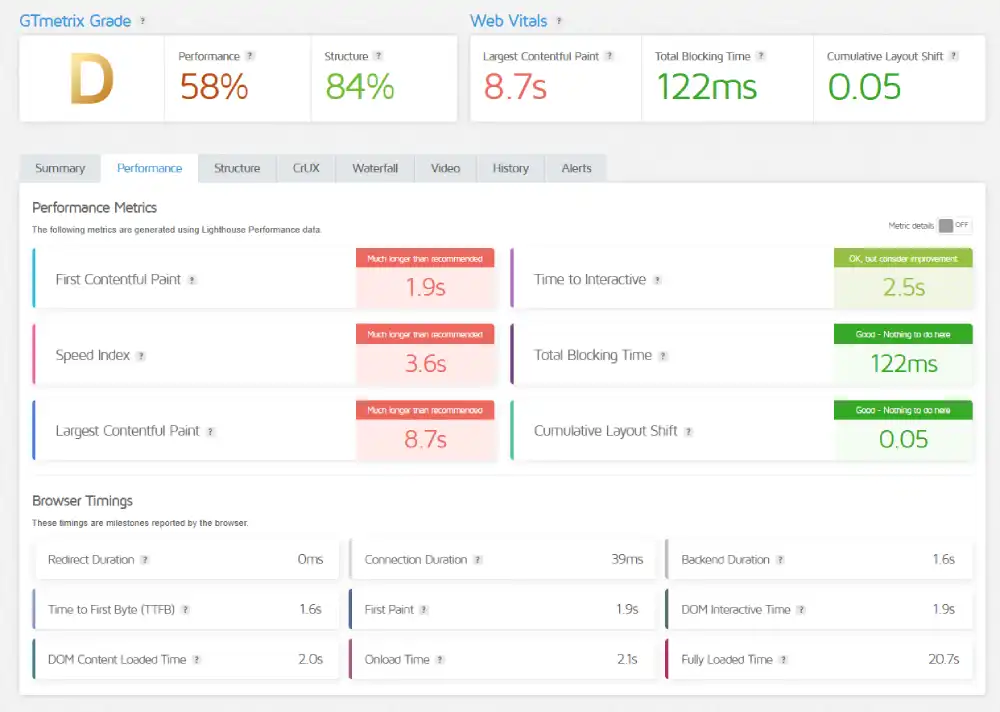
Our Analysis: The desktop loading environment is disastrous. Earning a Grade D, the Largest Contentful Paint takes an agonizing 8.7 seconds. The page takes a staggering 20.7 seconds to fully load all assets. The backend server simply lacks the compute power to assemble and deliver heavy page elements efficiently.
Data Center Sustainability
We referenced the domain against the public Green Web Foundation dataset.
InterServer Eco-Audit
| Certification | Host Partner | Result |
| Green Web Dataset | Cloudflare | Verified Green |

Our Analysis: The platform passes modern sustainability standards. The audit confirms there is evidence found that the site is hosted green, largely via their partnership and routing through Cloudflare’s sustainable edge network.
Support & Usability
InterServer relies on standard industry control panels to keep costs down.
1. The Central Dashboard
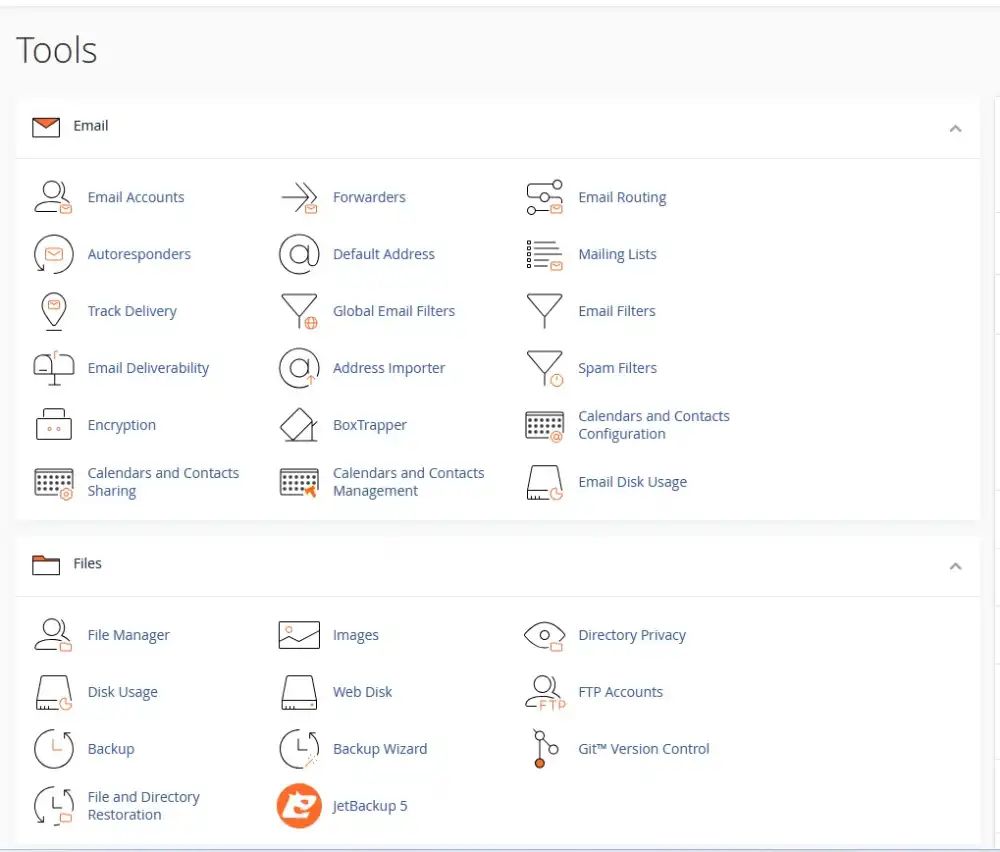
They provide standard cPanel access for shared hosting and Webuzo for VPS.
- The Experience: cPanel remains the industry standard. It is functional, heavily documented online, and gives you total control over databases, files, and cron jobs.
- The Drawback: The billing and primary account management UI feels dated and can be confusing to navigate for absolute beginners compared to modern custom dashboards.
2. Account Onboarding and Migrations
The process of moving your existing website over to their servers.
- The Capability: They offer a completely free website migration service for standard shared hosting accounts, which is a massive relief if you are transferring from an overpriced competitor.
- The Experience: The process is highly user-friendly for beginners. You simply provide your old host’s cPanel login credentials, and their technical team handles the entire database and file transfer for you behind the scenes.
3. Technical Assistance
The helpdesk is accessible, but heavily leans toward server-side issues.
- The Expertise: Support is available 24/7 via ticket and live chat. While they handle basic server administration and billing inquiries well, do not expect deep, hands-on debugging for complex WordPress plugin conflicts like you would get at a premium managed WordPress host.
Frequently Asked Questions
Is InterServer actually $2.50 a month forever?
Does InterServer include a free domain name?
Will InterServer migrate my existing website for free?
Are there any hidden renewal fees or forced upsells?
Is InterServer fast enough for a WooCommerce store?
Where are InterServer’s data centers located?
Does InterServer offer a money-back guarantee?
Do I get cPanel and professional email included with InterServer?
Our Verdict
An unbeatable price lock let down by sluggish server processing.
InterServer is a host defined by extreme contrasts. Their transparent pricing, permanent price lock, and 100% uptime are fantastic for budget-conscious users. Furthermore, their Cloudflare edge routing delivers some of the fastest raw ping times we have ever tested.
However, the actual server hardware struggles immensely. With a desktop loading time of 20.7s, a failing GTmetrix Grade D, and an unacceptable 4.4% traffic reachability during concurrent load tests, this infrastructure cannot handle dynamic, heavy websites or traffic surges.
We recommend InterServer if:
- You are strictly on a budget: The $2.50/mo price lock is one of the best financial deals in web hosting.
- You run static sites: If you don’t rely on heavy database processing, the fast Cloudflare ping times will serve static files incredibly well.
Look elsewhere if:
- You need SEO speed: Failing Core Web Vitals with an 8.7s desktop LCP will actively harm your search engine rankings.
- You expect traffic spikes: The 4.4% reachability during our stress test means 95% of your visitors will be blocked if your site goes viral.
HostingGuider Transparency Statement: We rely strictly on raw data rather than promotional copy. For this analysis, we ran a dedicated technical audit against the live InterServer domain to map their true network performance. All metrics displayed above are captured directly from our independent testing software.
Tactical Recommendations
- Implement Edge Caching: Because the native TTFB is a disastrous 2.4s, you must utilize aggressive page caching and push your HTML directly to Cloudflare’s edge to bypass the origin server entirely.
- Avoid Heavy Builders: Do not use heavy page builders like Elementor or Divi on this hardware. Stick to lightweight block themes like GeneratePress to survive the slow processing power.
- Upgrade to a VPS: If you love their price lock but hate the speed and load limits, skip the $2.50 shared plan and buy a few Linux VPS slices so you have dedicated, unshared RAM.
Alternative Reviews
Comparing Business-Focused Hosts
A look at alternative providers offering different balances of speed, pricing flexibility, and infrastructure design.

The managed WordPress host struggling under pressure

The budget-friendly giant for small businesses

Managed WordPress Hosting by Automattic