
Running a WordPress website involves more than just writing content and publishing pages. Behind every WordPress site is a layer of technical maintenance that most website owners did not sign up for. Core updates. Plugin updates. Security patches. Daily backups. Performance caching. Database optimisation. Server configuration.
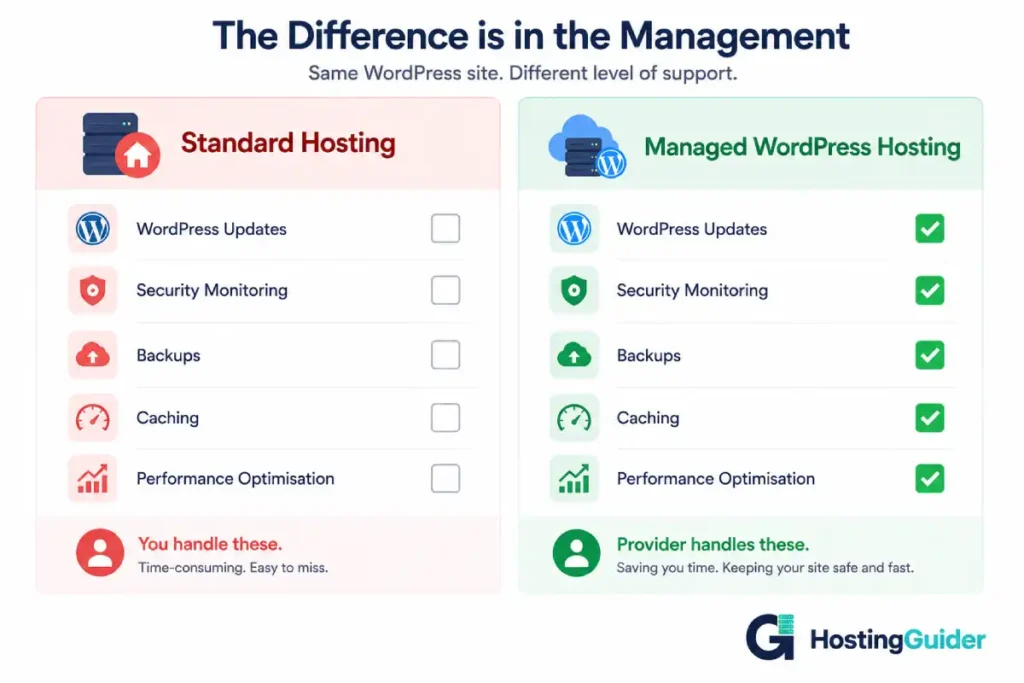
On standard hosting, all of that is your responsibility. Miss a security update and your site becomes vulnerable. Skip optimisation and your pages load slowly. Fail to maintain backups and a single problem wipes out months of work.
Managed WordPress hosting removes that burden entirely. The hosting provider handles the technical layer so you can focus on running your website and your business.
This guide explains exactly what managed WordPress hosting is, what it includes, how it compares to other hosting types, which providers stand out, and whether it is the right choice for your situation.
If you want to understand the cloud infrastructure that most managed WordPress hosts are built on, our What is Cloud Hosting? An Easy Explanation guide covers that foundation in detail. And for a broader look at how hosting types compare, our Cloud Hosting vs Traditional Hosting: Key Differences guide is a useful reference before reading this one.
Key Takeaways
- Managed WordPress hosting is a premium service where the provider handles all technical WordPress maintenance for you
- It includes automatic updates, daily backups, security monitoring, caching, and expert WordPress support
- It runs on cloud infrastructure in most cases, giving you the reliability and scalability benefits of cloud hosting
- It costs more than standard shared hosting but saves significant time and technical effort
- It is best suited for businesses, professional bloggers, and anyone who cannot afford downtime or technical problems
- It is not always necessary for brand new or very low-traffic websites
- WordPress.com is not the same thing as managed WordPress hosting, despite the similar name
Quick Answer
Managed WordPress hosting is a type of web hosting where the provider takes care of all WordPress-specific technical tasks automatically. This includes keeping WordPress core and plugins updated, running daily backups, monitoring for security threats, optimising site performance with caching, and providing support from people who specialise in WordPress. You get the power and flexibility of self-hosted WordPress without the burden of managing the technical infrastructure yourself.
What Managed WordPress Hosting Actually Is
Managed WordPress hosting is a hosting service built specifically for WordPress websites. WordPress powers a larger share of the web than any other content management system.
Our WordPress statistics cover market share, plugin adoption, WooCommerce usage, and how the platform has grown through 2026. It combines the technical infrastructure of cloud hosting with a full layer of WordPress-specific management services delivered by the hosting provider.
The word managed is the key part. When you buy standard shared hosting or a basic VPS and install WordPress yourself, you are responsible for everything that happens inside WordPress. Updates, security, performance, backups. The host keeps the server running. You manage everything on it.
With managed WordPress hosting, the provider takes over the WordPress management layer. Their team and their automated systems handle the technical tasks that standard hosting leaves to you. Your job is to create content, manage your business, and use your website. Their job is to keep the technical side running smoothly and securely.
Most managed WordPress hosts run their infrastructure on cloud architecture. This means your site benefits from the reliability, scalability, and global performance of cloud hosting as well as the WordPress-specific management layer on top. Our Benefits of Cloud Hosting for Your Business guide covers why cloud infrastructure matters for business websites.
What Managed WordPress Hosting Includes
The exact features vary by provider, but most managed WordPress hosting plans include these core services:
Automatic WordPress Updates
WordPress releases regular updates to its core software to fix bugs, add features, and patch security vulnerabilities. Plugin and theme developers release updates too.
On standard hosting, these updates sit waiting for you to apply them. Many website owners fall behind on updates, leaving known security vulnerabilities unpatched. Managed WordPress hosts apply core WordPress updates automatically. Some also manage plugin updates automatically. Your site stays current without any action from you.
Daily Automatic Backups
Managed WordPress hosts take daily backups of your entire website automatically. These backups are stored separately from your main site, usually in redundant cloud storage.
If something goes wrong, whether a hack, a bad update, an accidental deletion, or a server problem, you restore your site to a previous state with a few clicks from your hosting dashboard. No contacting support. No waiting hours for a recovery. The process takes minutes.
Some providers offer real-time backups that capture every change as it happens rather than once per day. Others store backups for 14, 30, or even 60 days, giving you a longer window to identify and recover from a problem.
Managed Security
Security is one of the most valuable components of a managed hosting service. Managed WordPress hosts provide multiple layers of protection:
| Security Feature | What It Does |
|---|---|
| Malware scanning | Automatically checks your site files for malicious code |
| Firewall | Blocks suspicious traffic and known attack patterns before they reach your site |
| DDoS protection | Absorbs and deflects attacks that try to overwhelm your server with traffic |
| Intrusion detection | Monitors for unusual activity that may indicate an attack in progress |
| Vulnerability patching | Applies server-level security patches automatically |
| SSL certificate | Keeps your site running on HTTPS with automatic certificate renewal |
| Login protection | Limits failed login attempts to prevent brute force attacks |
If a security incident does occur, managed WordPress hosts typically have response teams who investigate and clean infected sites as part of the service. This level of protection is far beyond what most website owners can implement and maintain on standard hosting.
WordPress-Specific Caching
Caching is a performance technique that stores temporary copies of your web pages so they can be served faster to visitors.
Every time someone visits a page on WordPress without caching, the server runs PHP code, queries the database, assembles the page, and sends it to the browser. With caching, the server sends a pre-built copy of the page instead. This is dramatically faster.
Managed WordPress hosts build caching into their infrastructure at the server level. You do not need to install a caching plugin or configure anything. The provider’s system handles it. Pages load faster automatically.
Some providers use multiple layers of caching: object caching, page caching, and CDN caching working together. The result is pages that load significantly faster than they would on standard hosting without caching setup.
CDN Integration
Most managed WordPress hosts include access to a Content Delivery Network. A CDN stores copies of your static files at data centres around the world. When a visitor loads your site, static content like images, scripts, and stylesheets comes from the nearest CDN location.
This reduces load times for visitors in different countries and takes delivery load off your main server. For a website with a global or even a national audience, CDN integration makes a measurable difference to page speed.
Staging Environments
A staging environment is a private copy of your website where you can test changes safely before applying them to your live site.
On standard hosting, many website owners test changes directly on their live site. A plugin conflict, a theme update that breaks the layout, a code change that causes an error. These problems hit your real visitors before you can fix them.
Managed WordPress hosts provide staging environments as a standard feature. You make changes on staging. You test them. When everything looks correct, you push the changes to live with one click. Your visitors only ever see the finished, working version.
WordPress-Expert Support
Standard hosting support teams help with server problems. They do not necessarily know WordPress well. When you have a WordPress question, they may point you to documentation rather than solving the problem.
Managed WordPress hosting support teams specialise in WordPress. They understand themes, plugins, the block editor, WooCommerce, common error messages, and performance issues specific to WordPress. When something goes wrong with your WordPress site, you get help from someone who actually knows the platform.
Most managed WordPress hosts provide 24/7 support through live chat. Response times on premium plans are often under two minutes.
How Managed WordPress Hosting Differs from Standard Hosting
| Feature | Standard Shared Hosting | Managed WordPress Hosting |
|---|---|---|
| WordPress updates | You apply manually | Applied automatically |
| Plugin updates | You apply manually | Often managed automatically |
| Backups | Often basic or extra cost | Daily automatic, self-serve restore |
| Security monitoring | Basic, generic | WordPress-specific, active monitoring |
| Caching | Requires plugin setup | Built into server infrastructure |
| CDN | Rarely included | Usually included |
| Staging environment | Rarely available | Standard feature |
| Support expertise | General hosting | WordPress specialists |
| Infrastructure | Shared traditional server | Cloud-based in most cases |
| Performance optimisation | Your responsibility | Handled by provider |
| Cost | $2 to $10/month | $15 to $100+/month |
How Managed WordPress Hosting Differs from WordPress.com
This is a point of confusion for many people because the names sound similar.
WordPress.com is a hosted website platform run by Automattic. You sign up, choose a plan, and build your site within the WordPress.com ecosystem. It is convenient but it limits what you can install and customise, particularly on lower-tier plans.
Managed WordPress hosting is a hosting service for self-hosted WordPress.org installations. You have full control over your WordPress site including every plugin, theme, and setting. The hosting provider manages the infrastructure and technical maintenance, but they do not restrict what you can do with your WordPress installation.
| WordPress.com | Managed WordPress Hosting | |
|---|---|---|
| WordPress type | WordPress.com platform | Self-hosted WordPress.org |
| Plugin installation | Restricted on lower plans | Unrestricted |
| Theme installation | Restricted on lower plans | Unrestricted |
| Site ownership | Hosted on WordPress.com servers | Hosted on provider’s cloud servers |
| Technical management | Platform-level only | Full WordPress management |
| Customisation level | Limited by platform | Full access |
| Who it suits | Beginners who want simplicity | Businesses, professionals, growing sites |
If you are unsure about the difference between WordPress.com and WordPress.org in general, our Wix vs Squarespace vs WordPress.com guide covers this distinction in the context of platform comparisons.
Top Managed WordPress Hosting Providers
Several providers stand out in the managed WordPress hosting space. Each has a slightly different focus and price point.
| Provider | Starting Price | Best For | Standout Feature |
|---|---|---|---|
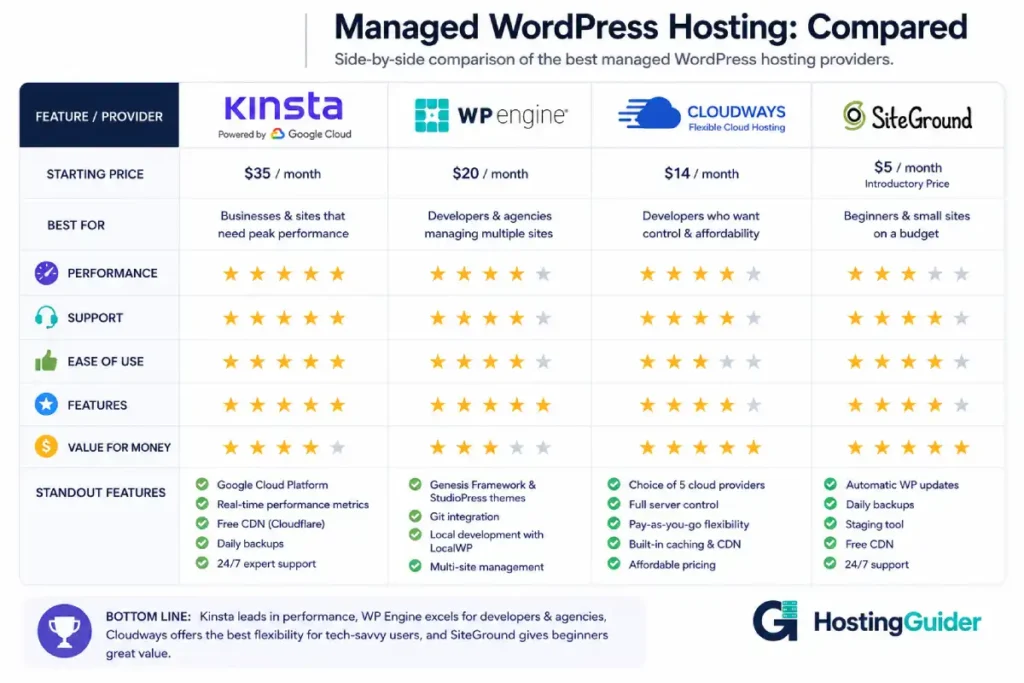
| Kinsta | From $35/month | Performance-focused businesses | Google Cloud infrastructure, excellent dashboard |
| WP Engine | From $23/month | Agencies and growing businesses | Genesis framework, strong developer tools |
| Cloudways | From $14/month | Flexibility on multiple cloud providers | Choose AWS, Google Cloud, or DigitalOcean |
| SiteGround | From $5/month | Budget-conscious beginners | Affordable entry point with managed features |
| Pressable | From $25/month | WordPress professionals | Automattic-owned, Jetpack included |
Kinsta
Kinsta runs on Google Cloud infrastructure and is widely regarded as one of the top performers in the managed WordPress space. Every plan includes automatic backups, free CDN through Cloudflare integration, a staging environment, malware scanning, and 24/7 expert support.
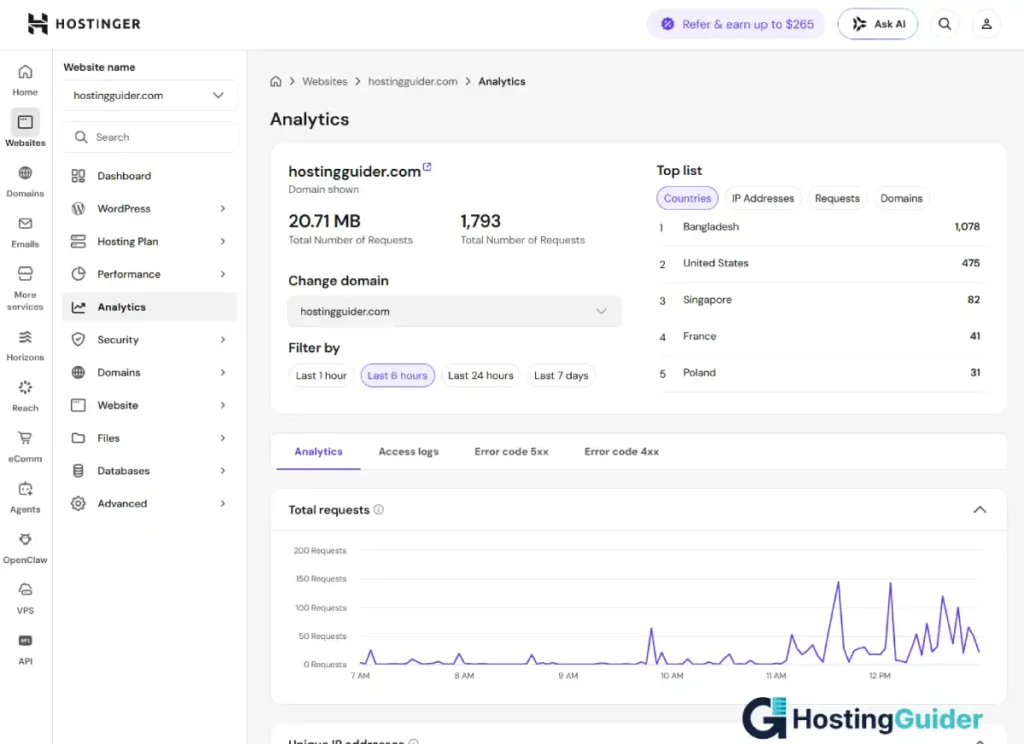
Kinsta’s dashboard, called MyKinsta, is one of the cleanest and most informative control panels in the industry. It shows real-time performance metrics, cache status, bandwidth usage, and easy access to all management tools from one screen.
WP Engine
WP Engine is one of the longest-established managed WordPress hosts. It offers a strong developer toolkit including Git integration, local development support through its LocalWP software, and a multi-site management dashboard for agencies managing multiple client sites.
WP Engine includes access to the Genesis framework and the StudioPress theme library, which adds significant design value to the base hosting plans.
Cloudways
Cloudways takes a different approach. Rather than running its own infrastructure, Cloudways lets you choose which underlying cloud provider your site runs on. Options include Amazon Web Services, Google Cloud, DigitalOcean, Linode, and Vultr.
This gives you more control over the infrastructure while Cloudways handles the WordPress management layer. It also makes Cloudways one of the most affordable paths to managed hosting on enterprise-grade cloud infrastructure, with plans starting around $14 per month.
SiteGround
SiteGround offers managed WordPress hosting at a price point accessible to smaller budgets, with plans starting around $5 per month on promotional pricing. It includes automatic WordPress updates, daily backups, a staging tool, and good support quality.
SiteGround is a strong entry point for website owners who want managed features without the premium pricing of Kinsta or WP Engine.
Who Should Use Managed WordPress Hosting
Managed WordPress hosting is not the right fit for every situation. Here is an honest breakdown of who benefits most.
| Who You Are | Why Managed WordPress Hosting Fits |
|---|---|
| A business with an established website | Downtime and security issues cost money, managed hosting prevents both |
| A professional blogger with significant traffic | Performance and reliability matter when readers depend on your site |
| An e-commerce store owner using WooCommerce | Sales depend on uptime, speed, and security |
| A freelancer or agency managing client WordPress sites | Multi-site management tools and staging environments save time |
| Someone who does not want to manage technical details | Managed hosting removes the technical burden entirely |
| A site that has been hacked before | Active security monitoring and malware scanning prevent recurrence |
| A WordPress site receiving more than 10,000 monthly visitors | Performance optimisation and scalability become meaningful at this level |
For WooCommerce stores specifically, managed WordPress hosting addresses all the critical requirements for reliable e-commerce. Our Website Builders for E-commerce: Top Choices guide covers WooCommerce and how it compares to other e-commerce platforms in detail.
Who Probably Does Not Need Managed WordPress Hosting Yet
| Who You Are | What Makes More Sense |
|---|---|
| A complete beginner building their first site | Standard shared hosting or WordPress.com to start |
| A personal blog with under 5,000 monthly visitors | Good shared hosting handles this volume comfortably |
| Someone on a very tight budget | SiteGround or basic shared hosting as a starting point |
| A static brochure site that rarely changes | Basic hosting with good uptime is sufficient |
The right time to move to managed hosting is when your site is generating enough traffic or revenue that downtime and technical problems have real consequences. If a site goes down and nobody notices because traffic is very low, the investment in managed hosting is premature.
How to Choose the Right Managed WordPress Host
With several strong providers available, the choice often comes down to a few key factors:
| Factor | What to Look For |
|---|---|
| Infrastructure quality | Google Cloud and AWS-based hosts generally deliver the best performance |
| Backup frequency and retention | Daily minimum, self-serve restore, at least 14 days retention |
| Staging environment | Should be included on all plans, not just premium ones |
| Support quality and speed | Look for WordPress-specialist teams with under 5-minute response times |
| CDN inclusion | Should be included without extra charge |
| Scalability | Handles traffic spikes without manual intervention |
| Migration service | Free migration for new customers saves time and reduces risk |
| Dashboard usability | You will use it regularly, it should be clean and informative |
| Plan limits | Check visitor limits, storage, and site count limits carefully |
| Price vs value | The cheapest plan is not always the best value at your traffic level |
Managed WordPress Hosting Pricing: What to Expect
Prices vary significantly across providers and plan tiers. Here is a realistic view of what different budgets get you:
| Budget Range | What You Get | Example Provider |
|---|---|---|
| $5 to $15/month | Entry managed features, basic performance, limited sites | SiteGround |
| $15 to $35/month | Full managed features, good performance, CDN included | Cloudways, Pressable |
| $35 to $70/month | Premium performance, excellent support, multiple sites | Kinsta, WP Engine |
| $70 to $200/month | High-traffic capacity, advanced features, agency tools | Kinsta, WP Engine upper tiers |
| $200+/month | Enterprise-level performance and support | Kinsta Enterprise, WP Engine dedicated |
When evaluating price, factor in what you would otherwise pay for separately on standard hosting: a caching plugin subscription, a security plugin subscription, a backup plugin subscription, and a CDN service. On many managed plans, all of these are included. The effective cost difference between managed and standard hosting narrows considerably when you count these add-ons.
Managed WordPress Hosting and SEO
Managed WordPress hosting contributes positively to SEO in several ways that are worth understanding if search rankings matter to your business.
Page speed is directly managed. Server-level caching, CDN delivery, and optimised infrastructure all reduce page load times. Faster pages rank better and keep visitors on the page longer.
Uptime is higher than standard hosting. Google crawls your site regularly. If your site is unavailable during a crawl, Google records the failure. Consistent availability keeps your content indexed properly.
Security is actively maintained. A hacked site can be delisted from Google entirely. Managed hosting’s active security monitoring and malware response significantly reduce the risk of your site being compromised in a way that affects your search presence.
For a comprehensive look at how your hosting platform and website setup affect SEO, our SEO Features of Popular Website Builders guide covers this in detail across multiple platforms.
Migrating to Managed WordPress Hosting
If you are currently on standard hosting and want to move to managed WordPress hosting, the process is straightforward for most sites.
Most managed WordPress hosts include free migration as part of onboarding. You provide access to your current hosting account and they handle the transfer. For sites with a large number of posts, images, or WooCommerce products, a professional migration through the host’s team is faster and safer than doing it manually.
After migration, the key steps are:
- Verifying all content transferred correctly
- Testing your staging environment
- Checking your site performance with the new infrastructure
- Pointing your domain to the new host when ready
- Keeping your old hosting active for one to two weeks as a safety net
For a full guide to managing website migrations without losing SEO rankings, our Migrating from a Website Builder to Self-Hosted WordPress guide walks through the process step by step.
Frequently Asked Questions
What is the difference between managed WordPress hosting and regular hosting?
Regular hosting provides server space and keeps the server running. What happens inside WordPress is your responsibility. You apply updates, configure security, set up backups, install caching, and troubleshoot problems. Managed WordPress hosting adds a full layer of WordPress-specific services on top of the hosting infrastructure. The provider automatically applies WordPress updates, runs daily backups, monitors for security threats, maintains caching, and provides support from WordPress specialists. You get the full power of self-hosted WordPress without the ongoing technical maintenance burden.
Is managed WordPress hosting worth the extra cost?
For most established WordPress websites, yes. The extra cost compared to standard shared hosting typically ranges from $10 to $30 per month. In return, you get automatic updates, daily backups with self-serve restore, active security monitoring, built-in caching, CDN access, a staging environment, and expert support. If you value your time, the technical tasks managed hosting removes are worth considerably more than the cost difference. If your site generates revenue, the downtime prevention and security benefits protect income that would otherwise be at risk on standard hosting.
Can I install any plugin on managed WordPress hosting?
Yes. Unlike WordPress.com which restricts plugin installation on lower-tier plans, managed WordPress hosting is built on self-hosted WordPress.org. You can install any plugin from the WordPress plugin directory or from third-party developers. Some managed hosts block a small number of specific plugins that conflict with their infrastructure, such as alternative caching plugins that would interfere with their built-in caching system. These exceptions are listed clearly in each provider’s documentation and represent a very small minority of available plugins.
Do I need technical skills to use managed WordPress hosting?
No. The core appeal of managed WordPress hosting is that it removes the technical requirements from your daily routine. You manage your website content through the same WordPress dashboard you would use on any hosting. The provider handles the technical layer through automated systems and their own team. You interact primarily with the hosting provider’s control panel for tasks like creating staging environments, restoring backups, or monitoring performance, and these dashboards are designed to be straightforward for non-technical users.
What happens if my managed WordPress host has a problem?
Reputable managed WordPress hosts are built on cloud infrastructure with high redundancy. Significant outages are rare. Most providers guarantee 99.9% or higher uptime and compensate customers if they fall below that level. If a problem does occur, managed hosts have dedicated response teams who work to resolve it faster than standard hosting providers. Your daily backups also provide a safety net. If a problem corrupts your site data, you restore from the most recent clean backup, often getting back online within minutes. The combination of cloud reliability, active monitoring, and automatic backups means managed WordPress hosting is significantly more resilient than standard hosting in any problem scenario.
Is managed WordPress hosting good for WooCommerce stores?
Yes, it is one of the best hosting choices for WooCommerce stores. WooCommerce is resource-intensive. It runs dynamic pages for products, cart, and checkout that cannot be fully cached the way static content can. Managed WordPress hosts optimise their infrastructure specifically for this kind of dynamic WordPress workload. The combination of server-level caching, CDN for static assets, automatic scaling during traffic spikes, daily backups, and active security monitoring addresses every major reliability concern for an online store. Downtime and slow load times directly cost WooCommerce stores revenue, making the investment in managed hosting particularly easy to justify.


