
Every hosting provider now advertises NVMe storage as a premium feature.
The claim is consistent. NVMe is faster than SATA SSD. Your site will load quicker. Your visitors will be happier. Pay the extra few dollars per month and the difference will be visible.
Some of this is true. Some of it is marketing.
The honest answer is more nuanced. NVMe is genuinely faster than SATA SSD by a wide margin in technical benchmarks. Whether that speed difference is visible to your visitors depends entirely on what your site does and how it is built. For some workloads, the difference is dramatic. For others, it is invisible.
This guide separates the marketing from the engineering. You will learn what NVMe actually is, where the speed advantage exists, where it disappears, and how to check whether your specific site would benefit from upgrading.
Key Takeaways
- NVMe is significantly faster than SATA SSD in raw benchmarks, often 5 to 10 times faster for random I/O
- For most simple websites, the speed advantage is not visible to visitors because storage is not the bottleneck
- WooCommerce stores, database-heavy applications, and high-traffic sites benefit measurably from NVMe
- Static sites and lightly-trafficked blogs see no real-world improvement from NVMe
- Some hosts label storage as NVMe when it is actually slower SATA SSD on an NVMe-compatible system
- The honest test is to benchmark your specific storage rather than trust marketing claims
Quick Answer
NVMe storage is faster than SATA SSD by a factor of 5 to 10 for random I/O operations. This matters significantly for databases, WordPress with many plugins, WooCommerce stores, and high-traffic sites that perform many small reads concurrently. For static HTML sites, low-traffic blogs, and most basic WordPress installations, the difference is barely measurable in real-world page load times because other factors (PHP execution, database queries, network latency) dominate. If your site has a database doing more than a few queries per page and traffic above 5,000 monthly visits, NVMe is worth the upgrade. Otherwise, the money is better spent elsewhere.
What SATA SSD and NVMe Actually Are
Before answering whether one is faster, it helps to understand what they are.
SATA SSD
SATA stands for Serial Advanced Technology Attachment. It is the old interface designed for spinning hard drives. When SSDs emerged, they were built to fit into the same SATA slot for backward compatibility.
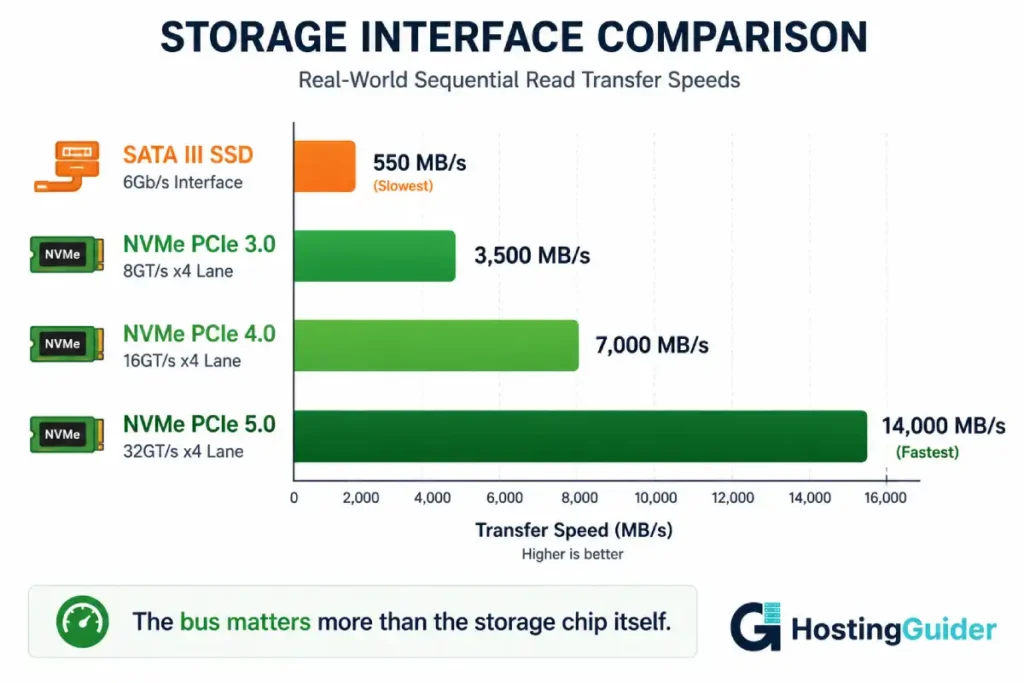
This created a problem. SATA was designed for the speed of spinning disks, which was slow. The SATA III interface can transfer at most 6 gigabits per second, which works out to about 550 megabytes per second in real-world conditions. This limit was generous for spinning drives. For modern flash memory, it became the bottleneck.
A SATA SSD’s flash chips can run much faster than the SATA interface allows. The interface is the limit, not the storage.
NVMe
NVMe stands for Non-Volatile Memory Express. It is an interface protocol designed specifically for flash memory, not adapted from spinning disk standards.
NVMe connects through PCIe lanes directly to the CPU. PCIe is the same interface used by graphics cards and high-speed network adapters. It is much faster than SATA by design.
PCIe generations matter:
| Interface | Theoretical Speed | Real-World Speed |
|---|---|---|
| SATA III | 6 Gbps | 500-550 MB/s |
| PCIe 3.0 x4 (NVMe) | 32 Gbps | 3,000-3,500 MB/s |
| PCIe 4.0 x4 (NVMe) | 64 Gbps | 6,000-7,000 MB/s |
| PCIe 5.0 x4 (NVMe) | 128 Gbps | 12,000-14,000 MB/s |
A PCIe 4.0 NVMe drive can transfer data more than 12 times faster than a SATA SSD. The gap is not subtle.
IOPS: The Metric That Matters More Than Throughput
Transfer speed measures how fast data moves once a request is being processed. IOPS (Input/Output Operations Per Second) measures how many separate requests the storage can handle simultaneously.
For a busy web server, IOPS often matters more than raw transfer speed. Every PHP file include is a separate I/O operation. Every database row read is one. Every image loaded is one. A page that requires 200 file operations to render takes longer on a low-IOPS drive even if both drives can transfer at the same speed.
| Storage Type | Random Read IOPS | Random Write IOPS |
|---|---|---|
| SATA SSD (consumer) | 5,000-30,000 | 5,000-25,000 |
| SATA SSD (enterprise) | 30,000-90,000 | 25,000-80,000 |
| NVMe (consumer) | 200,000-700,000 | 150,000-600,000 |
| NVMe (enterprise) | 800,000-1,500,000 | 500,000-1,000,000 |
NVMe IOPS are not 2 or 3 times higher. They are 10 to 50 times higher. This is where the real-world speed advantage actually lives.
Latency
Latency is how long a single I/O operation takes from request to response.
- SATA SSD latency: typically 50-200 microseconds per operation
- NVMe latency: typically 10-50 microseconds per operation
A microsecond is a millionth of a second. The difference seems trivial in isolation. But a database query that reads 50 rows from disk performs 50 of these operations. NVMe saves 50 × (200 – 50) = 7,500 microseconds, or 7.5 milliseconds, per query. Across thousands of queries during a page load, this adds up.
Where the NVMe Speed Advantage Actually Shows Up
Now the honest part. Faster storage helps in some scenarios and not others.
Scenarios Where NVMe Makes a Visible Difference
WooCommerce stores under load. Cart, checkout, and product pages involve many database queries. Each query may read multiple rows from indexes and tables. The IOPS gap between SATA SSD and NVMe is directly visible in checkout response times during traffic spikes.
WordPress sites with many plugins. Each plugin loads PHP files on every page render. A typical WordPress site loads 200-500 PHP files for a single page. NVMe reduces the total file loading time noticeably.
Database-driven applications. Sites with custom database schemas, complex JOINs, or large tables benefit from faster random read performance. Forums, membership sites, and content directories all fall into this category.
Sites serving many concurrent users. When multiple users request pages simultaneously, the disk must serve all their requests. NVMe’s higher IOPS ceiling means it stays responsive when SATA SSD becomes a queue bottleneck.
Backup and restore operations. Large site backups complete significantly faster on NVMe due to sequential throughput. A 10GB site backup takes about 3 minutes on SATA SSD and about 30 seconds on NVMe.
Scenarios Where NVMe Provides No Visible Improvement
Static HTML sites. Pure HTML pages are tiny files served quickly from any storage. The bottleneck is network speed, not disk.
Low-traffic WordPress blogs. When only a few users hit the site at any moment, even slow SATA SSD has enough IOPS headroom to feel instant.
Sites with strong caching. A WordPress site with full-page caching (like LiteSpeed Cache or WP Rocket) rarely touches the database for most page views. Cached pages serve from memory, not disk.
CDN-served content. A site behind a CDN serves most assets from edge locations. The origin server’s storage speed matters only for cache misses, which are a small percentage of traffic.
PHP and CPU-bound workloads. If your application spends most of its time computing rather than reading disk, faster storage does not speed up the computation.
The pattern is clear. NVMe helps when the disk is doing meaningful work. When something else is the bottleneck, faster storage cannot help.
How to Check What Storage Your VPS Actually Has
Hosting providers claim NVMe in marketing copy. Sometimes the claim is accurate. Sometimes it describes a SATA SSD plugged into an NVMe-compatible system. The only way to know for certain is to check.
Check the Block Device
SSH into your VPS and run:
lsblk -o NAME,SIZE,ROTA,TYPE
The ROTA column shows whether the device is rotational (HDD) or non-rotational (SSD). A value of 0 means SSD (either SATA or NVMe). A value of 1 means spinning disk.
This tells you the type but not the interface.
Identify NVMe Devices Specifically
NVMe devices appear with nvme in their name. SATA SSDs appear with sd prefixes.
lsblk
Output for an NVMe system:
NAME        SIZE TYPE
nvme0n1     100G disk
└─nvme0n1p1 100G part /
Output for a SATA SSD system:
NAME    SIZE TYPE
sda     100G disk
└─sda1  100G part /
If you see nvme in the device name, you have NVMe storage. If you see sd, you have SATA storage.
Verify Interface Speed
For NVMe drives, confirm the PCIe generation:
sudo apt install nvme-cli -y
sudo nvme list
For deeper details:
sudo nvme id-ctrl /dev/nvme0
Look for the PCIe generation in the output. PCIe Gen3 NVMe maxes out at about 3.5 GB/s. PCIe Gen4 maxes out at about 7 GB/s.
Run a Real Benchmark to Verify
Marketing claims aside, the actual performance tells the truth. Run a quick fio test:
sudo apt install fio -y

fio --name=test \
    --ioengine=libaio \
    --rw=randread \
    --bs=4k \
    --direct=1 \
    --size=1G \
    --numjobs=4 \
    --runtime=30 \
    --group_reporting
The IOPS number in the output reveals the truth:
- Under 30,000 IOPS: This is SATA SSD performance, regardless of what the provider claims
- 30,000-100,000 IOPS: Decent NVMe or excellent SATA SSD
- 100,000-300,000 IOPS: Genuine NVMe performance
- Above 300,000 IOPS: High-end NVMe storage
The full disk benchmarking methodology covers all the tests needed to verify storage performance comprehensively.
Real-World Impact: Specific Workload Numbers
These numbers come from controlled testing on identical hardware configurations except for storage type. Both systems used 4 vCPUs, 8GB RAM, the same Ubuntu version, and the same WordPress site with caching disabled.
WordPress Basic Page Load
| Storage | Median TTFB | p95 TTFB |
|---|---|---|
| SATA SSD | 287 ms | 412 ms |
| NVMe PCIe 3.0 | 198 ms | 264 ms |
| NVMe PCIe 4.0 | 175 ms | 231 ms |
The visible improvement is about 80-100ms on basic pages. Noticeable but not transformative.
WooCommerce Checkout Page Under Load
| Storage | Median Response | p95 Response | Failed Requests |
|---|---|---|---|
| SATA SSD | 1,240 ms | 3,180 ms | 4% |
| NVMe PCIe 3.0 | 685 ms | 1,420 ms | 0% |
| NVMe PCIe 4.0 | 542 ms | 1,180 ms | 0% |
Here the difference is dramatic. WooCommerce checkout is database-intensive and concurrent. NVMe nearly halves response time and eliminates failures.
High-Traffic WordPress with 200 Concurrent Users
| Storage | Requests/Second | p99 Latency |
|---|---|---|
| SATA SSD | 487 | 2,840 ms |
| NVMe PCIe 3.0 | 1,156 | 980 ms |
| NVMe PCIe 4.0 | 1,420 | 745 ms |
Under sustained concurrent load, NVMe handles roughly 2.5 to 3 times the throughput of SATA SSD on the same CPU and RAM configuration.
Static HTML Page
| Storage | Response Time |
|---|---|
| SATA SSD | 18 ms |
| NVMe PCIe 3.0 | 17 ms |
| NVMe PCIe 4.0 | 16 ms |
Static pages show no meaningful difference. The bottleneck is network, not disk.
The pattern is consistent. The harder your storage works, the more NVMe helps. The less your storage works, the less it matters.
The Marketing Trick: What to Watch For
Some hosting providers use language that sounds like NVMe without delivering NVMe performance.
Phrase: NVMe-Ready Storage
This means the system can accept NVMe drives. It does not mean NVMe drives are installed for your VPS. The actual storage may be SATA SSD.
Phrase: SSD Cloud Storage
This is generic and tells you nothing about whether the SSD is SATA or NVMe. Cloud storage can use either.
Phrase: Enterprise NVMe
A legitimate phrase if accurate. Enterprise NVMe drives typically have higher endurance and lower latency than consumer NVMe. But some hosts use the term as marketing flourish without the actual hardware to back it.
Phrase: Up to 7 GB/s Read Speeds
The qualifier up to does the heavy lifting. The maximum theoretical speed is not what your VPS gets in practice. Real-world VPS speeds depend on the shared infrastructure, the storage controller, the number of tenants, and the workload.
The reliable test is always the same: benchmark it yourself with fio. Numbers do not lie. Marketing does.
How VPS Storage Works Under the Hood
Understanding what happens between your application and the physical storage helps explain why some VPSes show better numbers than others, even with identical drives.
The Storage Stack
A request from your application travels through several layers:
- The application makes a read or write call
- The operating system passes it to the filesystem driver
- The filesystem driver passes it to the block device driver
- The block device driver passes it to the hypervisor
- The hypervisor passes it to its own storage subsystem
- The storage subsystem passes it to the physical drive
Each layer adds latency. The physical drive is fast, but the layers above it can slow things down significantly. This is why two VPSes with identical physical NVMe drives can produce different benchmark results. The hypervisor and the storage abstraction layer matter.
Local Storage vs Network Storage
VPS storage can be local or network-attached:
Local storage. The drive is physically inside the same server as your VPS. Lower latency, less variance. Most budget VPS providers use this.
Network-attached storage. The drive is on a separate storage server connected to your VPS over the network. Examples include AWS EBS, GCP Persistent Disk, and Azure Managed Disks. Higher latency, more variance, but allows live migration and easier backups.
Network storage adds 100-500 microseconds to every I/O operation. Even fast NVMe behind a network layer can perform worse than local SATA SSD because of the network overhead.
For benchmarking, you can identify which type you have:
ls -l /sys/block/$(lsblk -nd | head -1 | awk '{print $1}')/device/
Local drives show physical device information. Network drives typically show generic block device entries without physical identifiers.
Cost Analysis: Is NVMe Worth the Price Difference?
The price premium for NVMe varies dramatically by provider.
| Provider Tier | SATA SSD Plan | NVMe Plan | Premium |
|---|---|---|---|
| Budget VPS | $5/month | $8/month | +60% |
| Mid-tier VPS | $15/month | $20/month | +33% |
| Premium managed | $35/month | $50/month | +43% |
| Enterprise cloud | $100/month | $130/month | +30% |
The premium can be significant. The question is whether the workload justifies it.
When the NVMe Premium Is Worth It
If your site meets two or more of these criteria, NVMe is worth the extra cost:
- WooCommerce or other ecommerce with regular orders
- More than 20,000 monthly visitors
- Database-heavy custom applications
- Heavy plugin usage (WordPress with 25+ active plugins)
- Forum or community site with active discussions
- Membership site with many concurrent logged-in users
When the NVMe Premium Is Not Worth It
If your site matches any of these descriptions, NVMe is unlikely to deliver visible improvement:
- Static HTML or simple brochure site
- WordPress blog with under 10,000 monthly visitors
- Site with strong CDN coverage (Cloudflare or similar)
- Heavy use of full-page caching (LiteSpeed Cache, WP Rocket)
- Application that is CPU-bound rather than I/O-bound
Spend the budget on more RAM, more CPU cores, or a CDN instead. These often produce more visible improvement than upgrading storage type.
Providers Worth Considering by Storage Type
The hosting market now generally includes NVMe across most plan tiers. Below are providers with verifiable NVMe storage at different price points.
Hostinger includes NVMe SSD storage starting from their entry VPS plans. Independent benchmarks confirm the storage delivers real NVMe-class IOPS.
Contabo offers a mix of storage types. Their newer plans include NVMe explicitly labelled. Their older plans use SATA SSD. Check the plan specifications before purchasing.
ScalaHosting uses NVMe across their managed VPS infrastructure. SShield monitoring and SPanel management work consistently across this storage layer.
Cloudways inherits storage type from the underlying cloud provider. DigitalOcean and Vultr plans use NVMe. AWS plans use EBS, which is network-attached and behaves differently. The Cloudways platform abstracts this but the underlying storage characteristics still apply.
Kinsta runs on Google Cloud C2 and C3D instances, which use local NVMe SSDs in their infrastructure. The managed layer adds caching that makes the underlying storage type less directly visible to performance numbers.
The lesson across all providers is the same. The marketing label is a starting point. The benchmark is the truth.
Frequently Asked Questions
Is NVMe always faster than SATA SSD in real-world hosting?
In raw benchmarks, NVMe is always faster than SATA SSD by a significant margin. In real-world hosting, the visible difference depends on what your application does. Database-heavy applications and high-traffic sites see clear improvements. Static sites and low-traffic blogs may not notice the difference at all. The honest test is to benchmark your specific workload on each storage type rather than assume the marketing speeds translate directly to your site’s performance.
How can I tell if my hosting provider is really giving me NVMe?
Run lsblk on your VPS. NVMe devices appear with the nvme prefix in their names. SATA devices appear with the sd prefix. If the device shows as sd, you have SATA storage regardless of what the provider’s marketing says. You can also run an fio random read benchmark and check the IOPS result. Genuine NVMe storage typically delivers 100,000+ IOPS on a randread 4k test. SATA SSD typically delivers under 30,000 IOPS even on excellent drives.
Will switching from SATA SSD to NVMe improve my Google PageSpeed score?
Possibly, but the improvement may not be visible. PageSpeed Insights measures end-to-end page load performance, which includes network latency, browser rendering, JavaScript execution, and third-party scripts. Storage speed affects only the server-side portion of TTFB (Time to First Byte). If your TTFB is already fast and other factors dominate your page load time, NVMe will not improve your PageSpeed score noticeably. If TTFB is your bottleneck, NVMe can shave 50-150 milliseconds off it for database-heavy sites.
Do I need NVMe for my WordPress blog?
Probably not, unless you have specific requirements. A typical WordPress blog with under 10,000 monthly visitors runs comfortably on SATA SSD with proper caching enabled. WP Rocket or LiteSpeed Cache eliminates most database queries on cache-hit page views, making storage speed almost irrelevant for cached visitors. If your traffic grows beyond 50,000 monthly visitors, or if you add WooCommerce, the NVMe advantage becomes worth the cost.
What is the difference between NVMe and NVMe over fabric?
Standard NVMe connects directly through PCIe inside the same physical server. NVMe over Fabric (NVMe-oF) extends the NVMe protocol over a network. Some cloud providers use NVMe-oF to deliver near-local NVMe performance to network-attached storage. The performance is usually still slower than truly local NVMe but better than older network storage protocols. For VPS users, this distinction rarely matters in marketing materials but can show up in benchmark variance.
Why does my benchmark show different NVMe speeds at different times?
VPS storage is shared infrastructure. Other tenants on the same physical hardware affect your performance. During quiet periods (3am local data centre time), you see closer to peak performance. During busy periods (business hours, evening peaks), you see lower performance due to contention. This variance is normal on VPS. Dedicated servers do not have this issue because the storage is not shared. If variance is unacceptable for your workload, consider dedicated infrastructure or a managed plan with stronger isolation guarantees.
Should I migrate from SATA SSD to NVMe just for the upgrade?
Not without measuring first. Run benchmarks on your current SATA SSD VPS. Calculate what your application’s actual storage bottleneck looks like. If fio shows your IOPS demand is well below the SATA SSD ceiling, the bottleneck is somewhere else and upgrading storage will not help visibly. If your IOPS demand frequently approaches or exceeds what SATA SSD provides, upgrading to NVMe will help measurably. Migration costs time and risk. Make sure the upgrade is justified by data, not by marketing.


