
Cloud hosting dashboards are full of storage options. Block volumes. Object buckets. File shares. Each comes with its own pricing model, performance characteristics, and use case.
Most people default to using whatever the VPS came with and never think about it again. That works for small sites. It becomes expensive and limiting once traffic grows.
This guide explains what each storage type actually is, how they differ in ways that matter to your site, and exactly which combination your setup should use. No assumed prior knowledge. Real examples. Specific recommendations.
Key Takeaways
- Block storage is the disk your VPS runs on. Your operating system, code, and database live here
- Object storage is a remote HTTP-accessible bucket for files like images, videos, and backups
- File storage is a network-attached drive that multiple servers can access simultaneously
- Most single-server WordPress sites need only block storage
- Sites offloading media to a CDN need block storage plus object storage
- Multi-server setups need all three
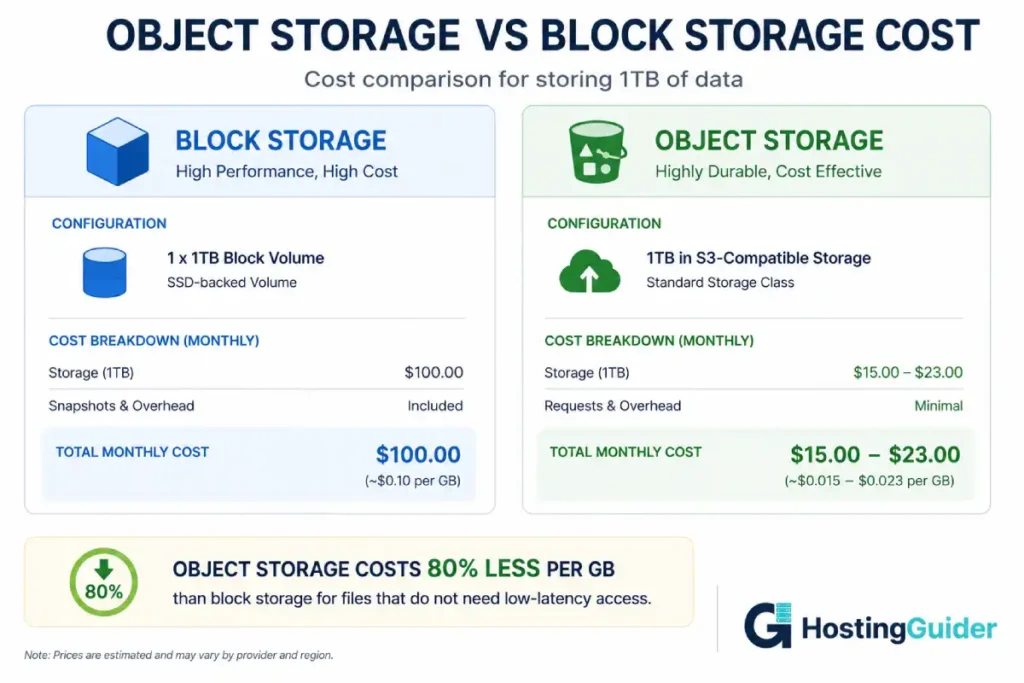
- Object storage is dramatically cheaper per GB than block storage for large media libraries
Quick Reference
Before the detail, here is the summary table.
| Feature | Block Storage | Object Storage | File Storage |
|---|---|---|---|
| What it is | Raw disk attached to a server | HTTP bucket for file storage | Network filesystem |
| Mounted as | Local drive (/dev/sda1) | No direct mount (API) | Mountable (/mnt/shared) |
| Access method | Low-level block I/O | HTTP REST API (GET, PUT) | NFS, SMB, POSIX |
| Latency | Microseconds | Milliseconds | Milliseconds |
| Best for | OS, databases, code | Media, backups, static files | Shared files across servers |
| Multiple servers | No (one server at a time) | Yes (any server via API) | Yes (concurrent access) |
| Cost per GB | $0.05-0.15/month | $0.004-0.025/month | $0.10-0.30/month |
| Scales to | Terabytes | Exabytes | Terabytes |
| Real examples | AWS EBS, DigitalOcean Volume | AWS S3, Cloudflare R2, Backblaze B2 | AWS EFS, Google Filestore, NFS |
Block Storage: Your Server’s Disk
What It Is
Block storage divides data into fixed-size chunks called blocks. The operating system addresses these blocks directly, exactly like a physical hard drive.
Your VPS has block storage. When you run df -h and see /dev/sda1 or /dev/nvme0n1, that is block storage. Your operating system, WordPress files, PHP, Nginx, and your MySQL database all live on block storage.
Think of block storage as the inside of your computer. The hard drive in a laptop is block storage. Everything you install or save goes there.
How It Works
The hypervisor on your cloud provider creates a virtual disk. It maps to real physical storage somewhere in the data centre. Your VPS sees this as a local drive. It has no idea it is virtual.
Because the connection is local (virtual but treated as local), latency is measured in microseconds. For a database doing thousands of small reads per second, this speed is essential.
NVMe block storage can deliver over 100,000 IOPS (Input/Output Operations Per Second). The difference between NVMe and SATA SSD block storage explains why this matters for WordPress database performance specifically.
When Block Storage Is Right
Block storage is the only choice for:
- Operating system files (the OS cannot run on object or file storage)
- Database data (MySQL/MariaDB requires direct block access for performance)
- WordPress core files, themes, and plugins
- PHP execution
- Application logs that are written continuously
You cannot avoid block storage. Your VPS needs it by definition. The question is what else you add alongside it.
Block Storage Costs
Most VPS providers include block storage in the base plan price. Additional block volumes cost extra.
| Provider | Standard SSD | NVMe SSD |
|---|---|---|
| DigitalOcean | $0.10/GB/month | $0.10/GB/month (Volumes) |
| Linode / Akamai | $0.10/GB/month | Included on some plans |
| Vultr | $0.08/GB/month | $0.08/GB/month |
| AWS EBS | $0.08/GB/month (gp3) | $0.08/GB/month (io2) |
| Contabo | Included in VPS plan | Included on NVMe plans |
Block storage is the most expensive per GB but also the most necessary. You pay for it whether your files are there or not. Most plans allocate 20-100GB of block storage. Beyond that, you add volumes at the per-GB rate.
Object Storage: Files in a Bucket
What It Is
Object storage stores data as objects rather than blocks. Each object consists of the data itself, metadata describing the data, and a globally unique identifier.
You do not access object storage through the filesystem. You access it through an HTTP API. You make a PUT request to upload a file. You make a GET request to download it. The object storage service handles where the data actually lives.
Think of object storage as a warehouse with a delivery window. You send packages in and request packages back. You never enter the warehouse. You never know how the warehouse is organised internally. You just know your package arrives when you need it.
How It Works
When you upload a file to an object storage bucket, the provider:
- Accepts the file over HTTPS
- Stores multiple copies across different physical locations
- Assigns a URL to the file
- Returns a 200 OK response
That file is now accessible from any server, any browser, and any application that has the right credentials, via that URL.
Object storage is designed for massive scale. AWS S3 stores trillions of objects. Cloudflare R2 stores objects across their global edge network. The underlying infrastructure is invisible. You get virtually unlimited capacity.
The S3 API Standard
Almost all object storage providers implement the Amazon S3 API. This is the de facto standard.
This matters because WordPress plugins, backup tools, and CDN integrations are all built against the S3 API. A file on Cloudflare R2, Backblaze B2, Wasabi, or DigitalOcean Spaces uses the same integration code as actual AWS S3.
When Object Storage Is Right
Object storage works best for:
- WordPress media uploads. Images, PDFs, videos uploaded by authors. Offloading these to object storage keeps your block storage small and fast
- Static assets. CSS, JavaScript, fonts that change rarely and are served to every visitor
- Backups. Database dumps, site archives that you need to keep for months but rarely access
- User-generated content. Avatars, attachments, any file uploaded by site users
- Video files. Large files that are expensive to serve from a VPS on bandwidth-metered plans
- CDN origin storage. Object storage buckets connect directly to CDN networks for fast global delivery
When Object Storage Does Not Work
Object storage has higher latency than block storage. A GET request takes 20-200 milliseconds. A block storage read takes under 1 millisecond.
This makes object storage wrong for:
- Database files. MySQL cannot use object storage. The latency would make every query 20x slower
- PHP files. Your web server cannot execute PHP stored in an object bucket
- Session files. Session reads happen on every page load and need sub-millisecond response
Object Storage Providers and Costs
| Provider | Cost per GB stored | Egress cost | Free tier |
|---|---|---|---|
| Cloudflare R2 | $0.015/GB/month | Free (zero egress) | 10GB storage, 1M operations |
| Backblaze B2 | $0.006/GB/month | $0.01/GB | 10GB storage |
| Wasabi | $0.0068/GB/month | Free | None |
| AWS S3 | $0.023/GB/month | $0.09/GB | 5GB first year |
| DigitalOcean Spaces | $25/month flat | Included (1TB) | None (flat fee includes 250GB) |
The egress cost difference is significant. Cloudflare R2 charges zero egress fees. AWS S3 charges $0.09 per GB out. For a site serving 500GB per month of media, R2 saves $45 per month in egress fees compared to S3.
Cloudflare R2 has become the preferred object storage choice for most content sites specifically because of zero egress costs.
File Storage: The Shared Network Drive
What It Is
File storage provides a filesystem over a network. Multiple servers can mount the same file storage simultaneously. They all see the same files. Changes made on one server appear instantly on all others.
Think of file storage as a shared network drive in an office. Every computer in the office can access the drive at the same time. Someone edits a file on one computer, and everyone else sees the update immediately.
How It Works
File storage uses protocols like NFS (Network File System) or SMB (Server Message Block) to expose a remote filesystem. Your server mounts this filesystem at a local path:
/var/www/shared → nfs://fileserver.internal/wordpress-uploads
From that point, code reading /var/www/shared/image.jpg actually reads from the remote file server over the network. The application does not know or care.
The file server manages locks and concurrent access. Two servers can write to the same directory without corrupting each other’s files.
When File Storage Is Right
File storage solves one specific problem: sharing files across multiple web servers.
A typical single-server WordPress site never needs file storage. But consider this scenario:
Your site grows to 300,000 monthly visitors. One server cannot handle the load. You add a second web server behind a load balancer. Now visitors alternate between Server 1 and Server 2.
User A uploads a profile photo. The upload goes to Server 1. The photo is stored in wp-content/uploads/ on Server 1. User A’s browser then requests the photo. The load balancer routes to Server 2. Server 2 has no idea about that photo. The image does not load.
File storage solves this. Both Server 1 and Server 2 mount the same wp-content/uploads/ directory from the file storage. Uploads to either server are visible on both.
This is the primary production use case for file storage in WordPress deployments.
Other cases where file storage is appropriate:
- Shared configuration files across a cluster of application servers
- Development environments where multiple developers need live access to the same files
- Content management systems where editors write files that all web servers must serve
File Storage Limitations
File storage is more expensive than object storage and slower than local block storage.
Latency is in the milliseconds range, similar to object storage. For reading many small files (like WordPress PHP autoloading), this is noticeable. Some hosting teams store WordPress core and plugins on block storage and only use file storage for the uploads directory.
File storage also has scalability limits. Unlike object storage (which scales to exabytes), file storage is typically limited to tens of terabytes before it becomes expensive to manage.
File Storage Providers and Costs
| Provider | Service | Cost |
|---|---|---|
| AWS | Elastic File System (EFS) | $0.30/GB/month used |
| Google Cloud | Filestore | $0.20/GB/month |
| Azure | Azure Files | $0.06-0.10/GB/month |
| Generic | Self-hosted NFS | Server cost only |
File storage is the most expensive per GB of the three types. For most use cases, object storage with the right WordPress plugin achieves the same result (sharing media across servers) at much lower cost.
The Three-Way Comparison
| Dimension | Block | Object | File |
|---|---|---|---|
| Latency | Microseconds | 20-200ms | 1-20ms |
| Throughput | Very high | Medium-high | Medium |
| Random IOPS | 100,000+ | Low | Medium |
| Multiple server access | No | Yes (via API) | Yes (concurrent) |
| Filesystem compatibility | Full | No | Full |
| Database-ready | Yes | No | Limited |
| Maximum scale | Hundreds of TB | Virtually unlimited | Tens of TB |
| Cost per GB | Highest | Lowest | Middle-high |
| Backup/archival | Expensive | Ideal | Not recommended |
| CDN integration | No | Direct | No |
Which Storage Does Your Site Actually Need
Single Server WordPress Blog
You need: Block storage only.
Your VPS already has it. You are done.
Optional enhancement: Object storage for backups. Store your weekly mysqldump exports in a Backblaze B2 or Cloudflare R2 bucket. This costs pennies per month and gives you off-server backup.
Single Server WordPress Blog (Media-Heavy)
You need: Block storage + Object storage.
If your site has thousands of images, storing them all on block storage is expensive. A 20,000-image blog with average image size 500KB uses 10GB just for uploads.
Offload your uploads to object storage. The WP Offload Media plugin moves your wp-content/uploads/ directory to an S3-compatible bucket. Images are served directly from the bucket via a CDN URL. Your block storage stays small and fast.
Your block storage remains responsible for: OS, WordPress core, plugins, themes, PHP, database. Object storage holds: all media uploads, offloaded assets.
WooCommerce Store (Single Server)
You need: Block storage (NVMe, larger volume) + Object storage.
WooCommerce is database-intensive. Every product page loads multiple database queries. Your block storage must be NVMe for the best database performance. Do not put WooCommerce on spinning disk or slow SSD.
Object storage handles: product images, downloadable products, backup archives.
Block storage handles: WooCommerce database, PHP session files, order data, application code.
High-Traffic WordPress (Multiple Web Servers)
You need: Block storage per server + File storage for uploads OR Block storage per server + Object storage with plugin.
Two architectures work here. Choose based on your cost tolerance and plugin support.
Architecture A: File Storage
Each web server has its own block storage for the OS and application code. The uploads directory is mounted from a shared file storage volume. All servers write to and read from the same uploads directory.
Best for: setups where plugins cannot support object storage.
Architecture B: Object Storage
Each web server has its own block storage. There is no shared filesystem. WordPress is configured via WP Offload Media to upload directly to an S3-compatible bucket. When visitors request images, they load from the CDN-connected bucket URL, not from the web server at all.
Best for: most modern multi-server WordPress setups. Cheaper than file storage. CDN-ready by design.
Static Site (No PHP or Database)
You need: Object storage only.
A static site is pure HTML, CSS, and JavaScript. You do not need a running server. Upload your files to an S3-compatible bucket. Enable static website hosting on the bucket. Point your domain to the bucket endpoint.
Cloudflare R2, AWS S3, and DigitalOcean Spaces all support static website hosting. Cost is literally the storage you use. For a typical blog, this is pennies per month.
Combine with Cloudflare as a CDN in front. Your static site now has global edge delivery, automatic HTTPS, and essentially unlimited capacity at almost no cost.
Media/Video Streaming Site
You need: Block storage (minimal, just for the application) + Object storage (large, for all media).
For sites serving large video or audio files, block storage is too expensive. Video files can reach gigabytes each. Hundreds of videos at 2GB average is 200GB. On block storage, that is $20-30 per month just for storage. On object storage (Backblaze B2 or Cloudflare R2), the same 200GB costs $1.20-3 per month.
Object storage + CDN is the standard architecture for media-heavy sites. The object storage holds the files. The CDN caches and delivers them globally.
Multi-Region Deployment
You need: Block storage per server + Object storage (global) + possibly File storage (regional).
For sites serving users across multiple geographic regions with servers in multiple data centres, object storage provides the global layer. All regional servers connect to the same object storage bucket. They serve the application from their local block storage but pull and cache media from the centralised object storage.
WordPress-Specific Storage Guide
WordPress uses storage in specific patterns that determine what combination you need.
| WordPress Component | Storage Type | Why |
|---|---|---|
| WordPress core (wp-includes, wp-admin) | Block storage | PHP files, needs fast filesystem access |
| Plugins and themes (wp-content/plugins, wp-content/themes) | Block storage | PHP files, needs fast filesystem access |
| Uploads (wp-content/uploads) | Block storage (default) or Object storage | Media files, can be offloaded |
| Database (all post content, settings, users) | Block storage | MySQL requires local block access |
| Object cache (Redis) | Block storage or RAM | Fast key-value store for object caching |
| PHP sessions | Block storage | Needs sub-millisecond access |
| Page cache | Block storage | Frequently read, needs fast access |
| Transients | Block storage or Redis | Temporary data cache |
Offloading WordPress Uploads to Object Storage
The most common storage optimisation for WordPress is offloading wp-content/uploads/ to object storage.
Step 1: Choose an object storage provider.
For zero egress cost: Cloudflare R2. For the cheapest raw storage: Backblaze B2. For AWS ecosystem integration: AWS S3.
Step 2: Install WP Offload Media Lite (free) or WP Offload Media (paid).
The free version handles most basic use cases. The paid version adds more control over existing media and CDN integration.
Step 3: Configure the plugin with your bucket credentials.
The plugin asks for your Access Key ID, Secret Access Key, bucket name, and region. These come from your object storage provider’s console.
Step 4: Enable automatic offloading for new uploads.
All new media uploads now go directly to the object storage bucket. Your block storage stops growing with each upload.
Step 5: Optionally migrate existing media.
The paid plugin can migrate existing uploads. The free plugin requires manual migration via CLI tools like AWS CLI or Rclone.
Setting Up S3 Sync with Rclone
For migrating existing uploads or managing object storage from the command line, Rclone is the standard tool:
curl https://rclone.org/install.sh | bash
Configure Rclone for your object storage provider:
rclone config
Follow the interactive prompts. Choose S3 as the provider type for Cloudflare R2, Backblaze B2, or any S3-compatible service.
Sync your uploads directory to the bucket:
rclone sync /var/www/yourdomain.com/wp-content/uploads/ \
  remote:your-bucket-name/uploads/ \
  --progress
This copies everything in uploads to the bucket without deleting anything on either side.
Cost Comparison: Real Numbers
For a typical content site with these specifications:
- 15GB of media uploads
- 2GB block storage for WordPress code
- 20GB database
- 500GB monthly bandwidth for media serving
| Architecture | Storage Cost | Bandwidth Cost | Total Monthly |
|---|---|---|---|
| All on block storage | $3.70 | Included in VPS | $3.70 (storage only) |
| Uploads on Backblaze B2 + CDN | $0.09 | $5.00 | $5.09 |
| Uploads on Cloudflare R2 | $0.23 | Free (R2 egress) | $0.23 |
| Uploads on AWS S3 + CloudFront | $0.35 | $45.00 | $45.35 |
The stark difference in bandwidth costs makes Cloudflare R2 the obvious winner for most content sites. Their zero-egress model eliminates the cost that makes AWS S3 expensive at scale.
Block storage is fine when your site is small. Once media grows beyond 5-10GB, the economics shift in favour of object storage.
Common Mistakes
Using block storage for everything.
Most sites start this way. It works until you scale. 100GB of images on a block volume costs $10 per month. The same 100GB on Cloudflare R2 costs $1.50. At 1TB, the difference is $90 per month.
Using object storage for databases.
The latency of object storage (20-200ms per operation) makes it completely unsuitable for databases. MySQL doing 1,000 queries per page load on object storage would take minutes to render a page. Never let database files leave block storage.
Ignoring egress costs.
Choosing AWS S3 for its familiarity and then being shocked by egress bills is extremely common. Always calculate the full cost including egress before choosing an object storage provider for media files.
Using file storage when object storage is sufficient.
File storage solves the multi-server problem but is expensive. For most WordPress multi-server setups, WP Offload Media with any S3-compatible bucket achieves the same result at 80-90% lower cost.
Not versioning or replicating object storage.
Object storage is durable (typically 99.999999999% durability). But a misconfigured aws s3 rm command can still delete everything. Enable versioning on production buckets. Keep cross-region replication for critical assets.
Frequently Asked Questions
What type of storage does my VPS use?
Your VPS uses block storage. The root disk your operating system and WordPress files sit on is a block storage volume. You can verify this by running lsblk and looking at the device names. If you see nvme0n1, you have NVMe block storage. If you see sda, you have SATA SSD or spinning disk block storage. Your hosting provider’s plan page usually specifies which type is included.
Can I mount object storage as a filesystem in WordPress?
Technically yes, using tools like s3fs or rclone mount. Practically, this is not recommended for production WordPress. The latency of object storage (tens to hundreds of milliseconds per operation) causes severe performance problems when mounted as a filesystem for PHP file access. WordPress loads hundreds of PHP files per request. Each file read over a mounted object storage bucket adds network latency. Use WP Offload Media plugin to integrate object storage properly instead of mounting.
What storage type should I use for WordPress database backups?
Object storage is ideal for database backups. Use mysqldump to export the database, gzip the output, and upload to an object storage bucket. Backblaze B2 at $0.006 per GB is the cheapest option for rarely-accessed backup archives. Cloudflare R2 at $0.015 per GB with zero egress is better if you need to restore frequently. Keep 30 days of backups in object storage for under a dollar per month for most sites.
What is the difference between object storage and a CDN?
Object storage and CDN serve different purposes but work well together. Object storage holds the authoritative copy of your files. A CDN caches copies of those files at edge locations around the world. When a visitor requests your image, the CDN serves it from the nearest edge cache rather than fetching from the object storage origin every time. Object storage provides durability and low storage cost. The CDN provides speed and global distribution. Cloudflare R2 includes automatic CDN integration because R2 buckets are accessible through Cloudflare’s edge network directly.
When does a WordPress site actually need file storage?
Primarily when running multiple web servers without using an object storage plugin for uploads. If you scale to three Nginx servers behind a load balancer and cannot or will not use WP Offload Media, those servers need a way to share the uploads directory. File storage solves this. In practice, most teams choose the object storage route because it is cheaper and CDN-friendly. File storage becomes the right choice when you have specific compliance requirements around keeping data in a mounted filesystem, or when your application has hardcoded filesystem paths that cannot be redirected to API calls.
Is Cloudflare R2 actually reliable enough for production?
Yes. Cloudflare R2 is built on the same infrastructure that powers one of the world’s largest networks. R2 is designed for 99.999999999% durability (eleven nines), the same standard as AWS S3. The zero-egress pricing is possible because R2 objects are served through Cloudflare’s edge network, which Cloudflare already operates for other services. For most production use cases, R2 is the best combination of reliability, performance, and cost.


