
Most hosting providers list HTTP/3 support in their feature tables. Far fewer actually deliver it where it matters.
Some providers support HTTP/3 at the CDN edge but not at the origin server. Some advertise it for one server tier but not another. Some enable it by default. Others require manual configuration. A few have it listed on the marketing page but not deployed in the infrastructure you actually land on.
This guide explains what HTTP/3 and QUIC actually are, where the real performance gains come from, how to test whether your specific hosting configuration supports it, and how to enable it yourself if your provider does not.
Key Takeaways
- HTTP/3 uses QUIC, a transport protocol built on UDP instead of TCP
- The single biggest improvement is eliminating head-of-line blocking, which slows HTTP/2 on unreliable networks
- Mobile users and visitors on high-latency connections benefit most
- A CDN like Cloudflare provides HTTP/3 at the edge regardless of what the origin server supports
- Nginx has supported HTTP/3 natively since version 1.25. Older versions need patches or replacements
- Checking whether HTTP/3 is active takes one curl command or 30 seconds in browser dev tools
- On fast wired connections, the difference between HTTP/2 and HTTP/3 is small. On mobile networks with packet loss, it can be 20 to 40 percent
What HTTP/3 and QUIC Are
HTTP/3 is the third major version of the Hypertext Transfer Protocol. HTTP/1.1 sends one request at a time per connection. HTTP/2 sends multiple requests in parallel over one TCP connection. HTTP/3 does the same but replaces TCP with QUIC as the underlying transport.
QUIC was originally developed at Google and standardised by the IETF. It runs over UDP instead of TCP. It builds encryption directly into the protocol rather than layering TLS on top.
To understand why this matters, you need to understand what TCP gets wrong.
The Problem That HTTP/2 Did Not Solve
HTTP/2 was a significant improvement over HTTP/1.1. Multiple resources load in parallel over a single connection. Connections reuse more efficiently. Header compression reduces overhead.
But HTTP/2 inherited TCP’s fundamental problem: head-of-line blocking at the transport layer.
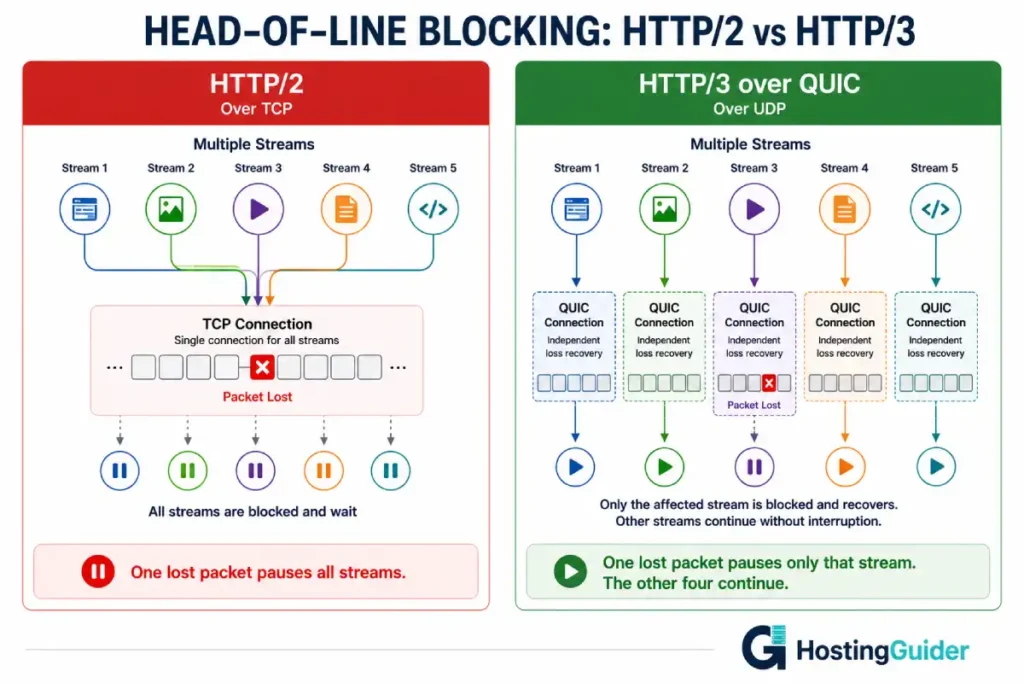
Here is how it breaks things. HTTP/2 sends multiple parallel streams over one TCP connection. When a single packet is lost in transit, TCP stops all streams and waits for the lost packet to be retransmitted before continuing. Every resource being loaded, the CSS, the JavaScript, the fonts, all of them pause while TCP recovers one lost packet.
On a clean, fast wired connection, packet loss is rare. Head-of-line blocking barely matters. On mobile networks with 1 to 5 percent packet loss, it matters a great deal. Pages load slower because a few lost packets repeatedly freeze all in-progress resource loads.
QUIC solves this by treating each stream independently. Every HTTP/3 stream has its own loss recovery. A lost packet in one stream stalls only that stream while the others continue loading. The page-freezing behaviour of HTTP/2 under packet loss simply does not happen.
The practical impact is most visible on mobile networks. A page that loads in 1.8 seconds over HTTP/2 on a mobile connection with typical packet loss can load in 1.3 seconds over HTTP/3 on the same connection.
The Three Real Improvements QUIC Delivers
Faster connection setup. TCP requires a three-way handshake before any data transfers. TLS on top of TCP adds another one to two round trips. QUIC combines the transport and cryptographic handshake into a single round trip. For a first-time visitor, this saves 50 to 150 milliseconds depending on distance from the server.
Zero round trip time for returning visitors. QUIC supports 0-RTT resumption. When a returning visitor reconnects, QUIC uses cached session information and sends the first request before the handshake completes. The connection effectively resumes from where it left off. This makes repeat visits measurably faster.
Connection migration. TCP connections are tied to a specific source IP address. When a mobile user switches from WiFi to mobile data, the TCP connection breaks and must be re-established. QUIC connections use a connection ID instead of an IP address. Switching networks does not break the connection. For mobile users in areas with variable network coverage, pages continue loading seamlessly through network transitions.
The mechanics of how QUIC handles these improvements at the protocol level, including the new header format and stream multiplexing, are covered in detail, which walks through the QUIC server internals without the marketing abstraction.
When HTTP/3 Makes a Real Difference
HTTP/3 is not uniformly better than HTTP/2 in all situations. Being specific about where the gains actually appear matters.
HTTP/3 helps most when:
- Your visitors are on mobile networks with variable signal
- Your server is geographically far from your audience (high latency)
- Your pages load many separate resources (CSS, JS, fonts, images)
- Your audience is in regions with less reliable internet infrastructure
HTTP/3 helps least when:
- Your visitors are primarily on fast wired connections
- Your server is close to your audience
- You already use a CDN with edge caching that reduces round trips
- Your pages are mostly cached and deliver few server round trips
For a typical content site behind Cloudflare with most assets cached at the edge, the difference between HTTP/2 and HTTP/3 for desktop visitors is often under 50 milliseconds. For mobile visitors on the same site without a CDN, it can be 300 to 500 milliseconds.
How to Check Whether Your Site Is Using HTTP/3
Method 1: curl (fastest)
Install a curl version with HTTP/3 support, or use Docker:
curl -I --http3 https://yourdomain.com
If the response starts with HTTP/3 200, your server supports and delivered HTTP/3. If you’re unfamiliar with what a 200 OK response means, see our complete guide to HTTP Status Codes for a breakdown of every response class and common error code.
If it falls back to HTTP/2 200, the server does not support HTTP/3 or it is not enabled.
Method 2: Check for the Alt-Svc header
Even if your curl does not support HTTP/3, you can check whether your server advertises it:
curl -I https://yourdomain.com | grep -i "alt-svc"
If the server returns a header like:
alt-svc: h3=":443"; ma=86400
It is advertising HTTP/3 support. Browsers that support HTTP/3 will use it on the next request. The ma=86400 value means this advertisement is valid for 86400 seconds (24 hours).
Method 3: Browser developer tools
Open Chrome or Firefox. Open developer tools with F12. Go to the Network tab. Reload the page. Click on any request. Look at the Protocol column or the Headers panel.
h3means the request used HTTP/3h2means HTTP/2http/1.1means HTTP/1.1
In Chrome, right-click the column header in the Network tab and enable the Protocol column if it is not visible.
Method 4: Online checker
Visit http3check.net and enter your domain. It tests HTTP/3 support from multiple locations and reports the result with technical details.
How to Check Your Hosting Provider’s Nginx Version
HTTP/3 support in Nginx arrived in version 1.25.0 in the mainline branch. Most Ubuntu repositories install older stable versions by default.
Check what Nginx version your server runs:
nginx -v
If the output shows 1.25 or higher, Nginx has built-in HTTP/3 support. If it shows 1.18, 1.20, or 1.22, you need either the Nginx mainline repository or an alternative approach.
Check what modules Nginx compiled with:
nginx -V 2>&1 | tr -- - '\n' | grep http3
If you see with-http_v3_module in the output, HTTP/3 support is compiled in. If nothing appears, your Nginx build does not include HTTP/3.
Enabling HTTP/3 on Your Own VPS: Nginx
If you manage your own VPS, enabling HTTP/3 involves three parts: installing a compatible Nginx version, updating your server block, and opening the right firewall ports.
Part A: Install Nginx Mainline
The mainline branch includes HTTP/3. Add the official Nginx repository:
curl https://nginx.org/keys/nginx_signing.key | gpg --dearmor \
  | sudo tee /usr/share/keyrings/nginx-archive-keyring.gpg > /dev/null
Add the mainline repository:
echo "deb [signed-by=/usr/share/keyrings/nginx-archive-keyring.gpg] \
  http://nginx.org/packages/mainline/ubuntu $(lsb_release -cs) nginx" \
  | sudo tee /etc/apt/sources.list.d/nginx.list
Install:
sudo apt update
sudo apt install nginx -y
Verify the version:
nginx -v
It should now show 1.25 or higher.
Part B: Configure the Server Block
Edit your site configuration:
sudo nano /etc/nginx/sites-available/yourdomain.com
Add the QUIC listener and HTTP/3 headers. Your server block needs both TCP and UDP listeners:
server {
    # HTTP/2 over TCP (existing)
    listen 443 ssl;
    listen [::]:443 ssl;

    # HTTP/3 over QUIC (new)
    listen 443 quic reuseport;
    listen [::]:443 quic reuseport;

    server_name yourdomain.com www.yourdomain.com;

    ssl_certificate /etc/letsencrypt/live/yourdomain.com/fullchain.pem;
    ssl_certificate_key /etc/letsencrypt/live/yourdomain.com/privkey.pem;

    ssl_protocols TLSv1.2 TLSv1.3;

    # Advertise HTTP/3 support to browsers
    add_header Alt-Svc 'h3=":443"; ma=86400' always;

    # Enable QUIC with retry for DDoS mitigation
    quic_retry on;

    # Enable 0-RTT for returning visitors
    ssl_early_data on;

    # rest of your site configuration...
}
The Alt-Svc header is the announcement. It tells browsers that HTTP/3 is available on port 443 and they should use it for the next 86400 seconds. Browsers cache this and switch to HTTP/3 on the next request.
Test and reload:
sudo nginx -t
sudo systemctl reload nginx
Part C: Open UDP Port 443 in the Firewall
HTTP/3 uses UDP on port 443. TCP port 443 is already open for HTTPS. You also need to open UDP:
sudo ufw allow 443/udp
sudo ufw reload
Without this step, QUIC connections are blocked at the firewall. Browsers fall back to HTTP/2 silently. Your configuration looks correct but HTTP/3 never works.
Verify the port is open:
sudo ufw status | grep 443
You should see both TCP and UDP listed.
Verify HTTP/3 Is Working
After configuration, verify it is actually serving HTTP/3:
curl -I --http3 https://yourdomain.com
You should see HTTP/3 200 in the response. If you see HTTP/2 200, HTTP/3 is not being served. Check:
- That nginx -v shows 1.25 or higher
- That nginx -V includes
--with-http_v3_module - That UDP port 443 is open in UFW
- That there is no firewall upstream (hosting provider firewall, not just UFW)
Enabling HTTP/3 with OpenLiteSpeed
OpenLiteSpeed is a free web server that has supported QUIC natively for longer than Nginx. If your server runs OpenLiteSpeed or LiteSpeed, enabling HTTP/3 is simpler.
In the OpenLiteSpeed admin panel:
- Go to Listeners
- Click your HTTPS listener
- Find the QUIC setting
- Set Enable QUIC to Yes
- Restart the server
OpenLiteSpeed handles the rest automatically. It serves HTTP/3 to supporting browsers and falls back gracefully to HTTP/2.
The CDN Shortcut: HTTP/3 Without Changing Your Origin
If you run Cloudflare as a CDN, every visitor gets HTTP/3 between their browser and the Cloudflare edge server, regardless of what your origin server supports.
Cloudflare supports HTTP/3 and advertises it to browsers automatically. Visitors connect to the nearest Cloudflare PoP over HTTP/3. Cloudflare connects to your origin over HTTP/2 or HTTP/1.1. The origin server never needs to support HTTP/3 for your visitors to benefit from it.
Enable it in Cloudflare:
- Log into your Cloudflare dashboard
- Go to Speed, then Optimization
- Find HTTP/3 (with QUIC)
- Toggle it on
That is the entire configuration. Cloudflare does the rest.
The correct way to configure Cloudflare with cloud hosting covers the full CDN setup including SSL modes, cache rules, and origin lockdown that should be in place before enabling HTTP/3 through Cloudflare.
This is also why the question of whether your hosting provider supports HTTP/3 is somewhat overstated for sites running behind a CDN. If your CDN edge supports HTTP/3, your visitors get the benefit. The origin support is secondary.
Provider Support at a Glance
| Provider | HTTP/3 at Edge | HTTP/3 at Origin | Notes |
|---|---|---|---|
| Cloudflare CDN | Yes (toggle in dashboard) | N/A (edge-only) | Enables for any origin |
| Kinsta | Yes | Yes (Google Cloud) | Enabled by default |
| Cloudways | Yes (Cloudflare add-on) | Depends on config | Requires Cloudflare enabled |
| Hostinger VPS | Depends on Nginx version | Possible with setup | Manual configuration |
| Contabo VPS | Depends on Nginx version | Possible with setup | Manual configuration |
| AWS CloudFront | Yes | No | Edge only |
| Shared hosting (generic) | Rarely | Rarely | Limited access to configure |
| LiteSpeed servers | Yes | Yes | Excellent native support |
For unmanaged VPS, Hostinger and Contabo both let you install Nginx mainline and configure HTTP/3 following the steps above. The provider’s infrastructure does not block UDP port 443 on these plans.
Kinsta runs on Google Cloud infrastructure and delivers HTTP/3 without any configuration required. It is one of the few managed WordPress hosts where HTTP/3 is on by default.
Measuring the Actual Impact on Your Site
Do not assume HTTP/3 made a difference. Measure it.
The most honest measurement simulates a real user experience, including connection setup, not just transfer speed:
# Test HTTP/2 baseline
curl -w "Connect: %{time_connect}s | TTFB: %{time_starttransfer}s | Total: %{time_total}s\n" \
  --http2 -o /dev/null -s https://yourdomain.com

# Test HTTP/3 if available
curl -w "Connect: %{time_connect}s | TTFB: %{time_starttransfer}s | Total: %{time_total}s\n" \
  --http3 -o /dev/null -s https://yourdomain.com
Run each test five times and compare the averages. On a fast wired connection from a nearby location, the difference is often within 20 milliseconds. On a connection with simulated packet loss, the gap widens considerably.
For a more complete picture of what HTTP/3 actually changes for your server load, the VPS benchmarking methodology covers how to run consistent latency tests that account for connection variance.
Understanding the Protocol Internals
QUIC runs over UDP and integrates encryption, connection establishment, and stream multiplexing into a single protocol. Unlike TCP, it allows independent streams to progress without one blocked stream delaying others, making it a key foundation of HTTP/3.
Common Problems
Problem: HTTP/3 is configured but browsers still use HTTP/2
Browsers do not use HTTP/3 on the very first connection. They use HTTP/2, receive the Alt-Svc header announcing HTTP/3 support, and switch to HTTP/3 on the next connection. This is by design. Clear your browser cache and reload. Check the Protocol column in dev tools. If Alt-Svc is being sent correctly, you should see h3 on the second and subsequent loads.
Problem: The Alt-Svc header appears but curl with –http3 still falls back to HTTP/2
The most common cause is a firewall blocking UDP port 443. QUIC requires UDP. If any firewall between the client and server blocks UDP on 443, the QUIC handshake fails silently and the client falls back to HTTP/2. Check both your server firewall (UFW) and any upstream firewall your hosting provider controls.
Problem: nginx -t fails after adding QUIC listeners
Your Nginx version does not support HTTP/3. Check nginx -v. If it shows lower than 1.25, upgrade to Nginx mainline as described above. Alternatively, remove the quic listener lines from the configuration and use Cloudflare for HTTP/3 at the edge instead.
Problem: QUIC connections succeed but performance is worse than HTTP/2
This occasionally happens on servers with high CPU load or when SSL session tickets are not configured. QUIC’s encryption is more CPU-intensive than HTTP/2 because each packet is individually encrypted. On a heavily loaded server, the CPU overhead can outweigh the latency benefits. Check CPU utilisation during the test. If the server is above 60 percent CPU under normal load, HTTP/3’s encryption overhead may cost more than the head-of-line blocking savings gain.
Problem: 0-RTT works but some requests fail
0-RTT (early data) is susceptible to replay attacks. Some server configurations or application-level logic rejects replayed requests. This is not a bug — it is a security trade-off. If 0-RTT causes issues, disable it by removing ssl_early_data on from the Nginx configuration. Connections still benefit from HTTP/3 without the 0-RTT optimisation.
Frequently Asked Questions
Does HTTP/3 require a new SSL certificate?
No. HTTP/3 uses the same TLS 1.3 certificate as HTTPS over HTTP/2. Your existing Let’s Encrypt or any other certificate works without changes. QUIC builds TLS 1.3 into the protocol rather than running it as a separate layer, but from a certificate perspective nothing changes. The same certificate file paths and renewal process apply.
Is HTTP/3 supported by all browsers?
All major browsers support HTTP/3: Chrome, Firefox, Safari, and Edge all include QUIC support. The global browser HTTP/3 support rate is above 95 percent of active browser installs. Browsers that do not support HTTP/3 fall back to HTTP/2 or HTTP/1.1 automatically. Enabling HTTP/3 never breaks anything for older clients.
Can I enable HTTP/3 on shared hosting?
Almost never. Shared hosting restricts access to web server configuration at the process level. Changing the Nginx or Apache configuration requires either root access or a web server that passes configuration through user-editable files. Most shared hosts do not expose QUIC settings. The exception is hosts running LiteSpeed Enterprise, where QUIC can sometimes be enabled per-account. Check with your specific provider.
Does HTTP/3 affect my SEO ranking?
Indirectly. Google uses page speed signals including Core Web Vitals in ranking. HTTP/3 improves TTFB and load time for mobile visitors on lossy networks, which can improve LCP (Largest Contentful Paint) scores for that segment. The improvement is more visible in the real-user measurement (RUM) data that Google collects from Chrome users than in lab measurements. If your audience is primarily mobile users in regions with variable network quality, HTTP/3 contributes to better Core Web Vitals scores.
What happens if a visitor’s network blocks UDP?
Some corporate networks, firewalls, and older routers block UDP traffic other than DNS. QUIC runs on UDP and fails silently on these networks. Browsers detect the failure quickly and fall back to TCP-based HTTP/2. The fallback adds a small delay on the first connection attempt (usually under 100 milliseconds) while the QUIC handshake times out. After falling back, HTTP/2 works normally. This is called the happy eyeballs fallback and is built into QUIC clients in all major browsers.
Does enabling HTTP/3 use more server resources?
Slightly. QUIC encrypts each packet individually, which is more CPU-intensive than TCP’s connection-level encryption. For most servers handling typical web traffic, the CPU overhead is negligible. For very high-traffic servers already running at high CPU utilisation, the added encryption work can become noticeable. Monitor CPU usage after enabling HTTP/3 on production. If CPU increases more than 5 to 10 percent under the same load, evaluate whether the latency benefit justifies the overhead.


