
Cloudways vs DigitalOcean: Managed Convenience vs Raw Cloud Control
Cloudways runs on top of DigitalOcean. If you choose Cloudways with a DigitalOcean backend, you are paying for the same server infrastructure at a roughly doubled price. What you are buying is the management layer, the stack optimisation, and the 24/7 live chat support. Whether that premium is worth it depends entirely on whether you want to be your own systems administrator.
Both platforms compete in the managed cloud segment of a rapidly expanding market. Our web hosting statistics cover the full picture of where managed cloud sits in the global hosting landscape.
This comparison is structurally different from every other in this series. Shared hosting comparisons ask which provider delivers better performance. This one asks a different question: how much of your server do you want to manage yourself?
DigitalOcean gives you raw cloud infrastructure. Droplets starting at $4 per month, 15 global regions, managed Kubernetes, managed databases, and full root access. Everything you configure is yours to control and yours to maintain.
Cloudways gives you a managed layer on top of cloud infrastructure, including DigitalOcean. Varnish and Redis caching pre-configured, staging environments included, agency tools built in, and 24/7 live chat available when something breaks. You never touch a command line unless you choose to.
Quick Verdict
DigitalOcean wins on raw corporate site metrics: faster load test (56ms vs 451ms), better desktop GTmetrix grade (B vs D), Grade A+ SSL with HSTS versus Cloudways’ Grade A, and better mobile Core Web Vitals compliance on their own sites.
Cloudways wins on managed value: the stack is pre-optimised for WordPress, live chat support is available 24/7, agency tools like staging and site cloning are built in, and you never need to configure Varnish, Redis, or server firewall rules yourself.
Neither result tells you what your customer site will perform like. For that, the underlying infrastructure choice and how well you configure it matters far more than whose corporate site loads faster.
Category Winners
| Category | Winner | Why |
|---|---|---|
| Corporate Mobile CWV | DigitalOcean | 1 fail (INP 220ms) vs Cloudways’ 3 fails (INP 225ms, LCP 5.0s, CLS 0.99) |
| Corporate Desktop (GTmetrix) | DigitalOcean | Grade B (72%) vs Cloudways’ Grade D |
| Corporate Load Test | DigitalOcean | 56ms avg vs Cloudways’ 451ms |
| SSL Security | DigitalOcean | Grade A+ with HSTS vs Cloudways’ Grade A |
| HTTP/3 Protocol | Tie | Neither supports it natively on their corporate sites |
| Uptime | Tie | Both 100% across all monitoring windows |
| Environmental | Tie | Both verified green via Cloudflare |
| Managed WordPress | Cloudways | Pre-configured Varnish and Redis; DigitalOcean requires manual setup |
| Live Chat Support | Cloudways | 24/7 live chat vs DigitalOcean’s ticket-only standard model |
| Pricing (raw compute) | DigitalOcean | $4/month Droplet vs Cloudways’ management premium on same hardware |
| Kubernetes | DigitalOcean | Native managed K8s; Cloudways has no Kubernetes offering |
| Managed Databases | DigitalOcean | Native PostgreSQL, MySQL, Redis, MongoDB clusters |
| Raw Server Control | DigitalOcean | Full root access and Linux control; Cloudways manages the stack for you |
| Multi-cloud Flexibility | Cloudways | Deploy on DigitalOcean, AWS, Google Cloud, Vultr, or Linode from one panel |
| Agency Tools | Cloudways | Staging, site cloning, and team management built into the platform |
| Beginner Accessibility | Cloudways | No command line required; DigitalOcean requires Linux and server knowledge |
| Instant Scaling | Cloudways | 1-click RAM and CPU scaling from the Application Manager |
Who Should Choose Which
| Choose Cloudways if… | Choose DigitalOcean if… |
|---|---|
| You want WordPress running fast without managing Varnish and Redis yourself | You are a developer comfortable with Linux, SSH, and server configuration |
| You run a WordPress agency managing multiple client sites | You need native managed Kubernetes, managed databases, or App Platform |
| You want 24/7 live chat when your site breaks at 2am | You want the lowest possible cost for raw cloud compute |
| You want staging environments and site cloning built into your hosting panel | You need full root access and custom server configuration |
| You need to scale server RAM and CPU instantly without server admin knowledge | You need a 99.99% uptime SLA with public status page accountability |
| You want to switch from DigitalOcean to AWS or Google Cloud without migrating apps | You need managed PostgreSQL, Redis, or MongoDB without third-party tooling |
Cloudways vs DigitalOcean: Full Feature Comparison
| Feature | Cloudways | DigitalOcean |
|---|---|---|
| Founded | 2011, Malta | 2011, New York, USA |
| Product Type | Managed cloud hosting layer | Raw cloud infrastructure (IaaS) |
| Best For | WordPress agencies, growing stores, developers wanting managed stack | Developers, startups, DevOps teams |
| Trustpilot | 4.6/5 | 4.6/5 |
| Underlying Infrastructure | DigitalOcean, AWS, Google Cloud, Vultr, Linode | DigitalOcean owns its own infrastructure |
| Corporate Desktop GTmetrix | D (LCP 2.0s, TBT 2,200ms, TTFB 244ms) | B (72%, LCP 792ms, TBT 736ms, TTFB 217ms) |
| Corporate Mobile LCP | 5.0s (Fail) | 2.3s (Pass) |
| Corporate Mobile INP | 225ms (Fail) | 220ms (Fail) |
| Corporate Mobile CLS | 0.99 (Fail) | 0 (Pass) |
| Corporate Load Test | 451ms avg, 100% reachability | 56ms avg, 100% reachability |
| Global Edge Latency | 0.7ms to 1.5ms (Cloudflare ping) | 43ms to 90ms (TTFB from global regions) |
| SSL Grade | A | A+ (HSTS enforced) |
| HTTP/3 | Not natively (Cloudflare Enterprise add-on) | Not supported on corporate site |
| Uptime SLA | 99.9% | 99.99% (production services) |
| 30-Day Uptime | 100% | 100% |
| Green Hosting | Verified (Cloudflare) | Verified (Cloudflare) |
| Free Domain | No | No |
| Free SSL | Yes (Let’s Encrypt, auto-renew) | Yes (Let’s Encrypt via Managed Certs) |
| Free Email | No | No |
| Control Panel | Proprietary Application Manager | Cloud Console (proprietary) |
| cPanel | No | No |
| Managed WordPress | Yes (Varnish + Redis pre-configured) | No (DIY setup required) |
| Staging Environments | Yes, built-in | No (DIY) |
| Git Integration | Yes | Yes (via App Platform or manual) |
| Managed Kubernetes | No | Yes, production-grade |
| Managed Databases | No (app-level Redis included) | Yes (PostgreSQL, MySQL, Redis, MongoDB, Kafka) |
| Object Storage | No | Yes (Spaces, S3-compatible) |
| Serverless Functions | No | Yes |
| Root Access | Limited (managed stack) | Yes (full root on Droplets) |
| Live Chat | Yes, 24/7 | No (standard plan) |
| Ticket Support | Yes | Yes |
| Phone Support | No | No |
| Premium Support | Not tiered | Yes, paid tier |
| Pricing Model | Pay-as-you-go monthly | Hourly billing, no contracts |
| Entry Price | ~$11/month (DigitalOcean 1GB Droplet + management) | $4/month (basic Droplet) |
| Free Trial | 3-day free trial (no credit card) | $200 credit for 60 days (new accounts) |
How We Tested
Important context for this comparison: Both Cloudways and DigitalOcean are infrastructure and platform providers, not shared hosting. The performance tests below measure their corporate marketing websites, which are heavily loaded with tracking scripts, interactive components, and marketing JavaScript.
These corporate site results do not reflect what a clean WordPress installation on either platform would score. A Cloudways-managed WordPress site with Varnish and Redis active would produce dramatically different results than Cloudways’ own marketing homepage. A DigitalOcean Droplet with a properly configured stack would differ from DigitalOcean’s own site.
The value of testing corporate sites for these providers is specifically in what it reveals about their infrastructure choices and their own technical culture, not as a predictor of customer site performance.
Tools used: Google PageSpeed Insights for mobile Core Web Vitals, GTmetrix for desktop rendering, K6 Load Cloud for concurrent traffic simulation, Check-Host and KeyCDN for global latency, Uptime Robot for 30-day availability, Qualys SSL Labs for encryption grade, HTTP/3 Check for protocol support, The Green Web Foundation for sustainability.
For complete individual test data, see our Cloudways review and DigitalOcean review.
Performance: Eight Tests, Head to Head
Test 1: Mobile Core Web Vitals (Google PageSpeed Insights)
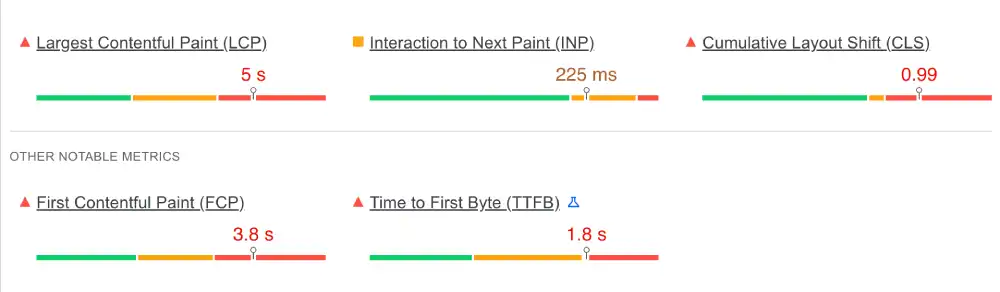
Cloudways Corporate Mobile
| Metric | Result | Google Threshold | Status |
|---|---|---|---|
| INP (Interaction) | 225ms | Under 200ms | Fail |
| LCP (Loading) | 5.0s | Under 2.5s | Fail |
| CLS (Stability) | 0.99 | Under 0.1 | Fail |
DigitalOcean Corporate Mobile
| Metric | Result | Google Threshold | Status |
|---|---|---|---|
| INP (Interaction) | 220ms | Under 200ms | Needs Improvement |
| LCP (Loading) | 2.3s | Under 2.5s | Pass |
| CLS (Stability) | 0 | Under 0.1 | Pass |
| FCP (First Paint) | 2.0s | Under 1.8s | Needs Work |
| TTFB (Server) | 1.1s | Under 0.8s | Needs Improvement |
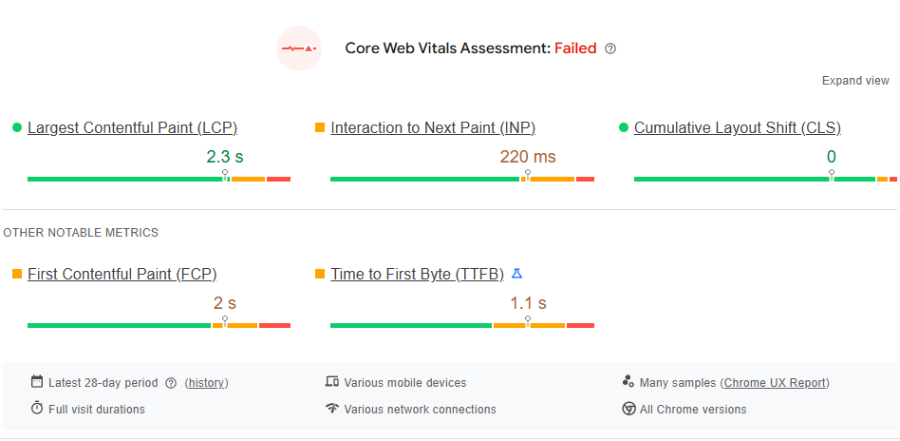
The CLS result is the most telling difference between the two corporate sites. Cloudways has a CLS of 0.99, meaning elements visibly shift and jump around the page as it loads. DigitalOcean has a CLS of exactly 0 — the page is completely layout-stable.
Both sites run heavy marketing JavaScript that causes the INP failures. Neither result predicts customer site performance with any reliability. Cloudways’ own recommendation is explicit: the engine they provide (Redis/Varnish) is fast; the results above reflect their frontend code choices, not their infrastructure.
Winner: DigitalOcean on corporate site CWV compliance.
Test 2: Global Latency
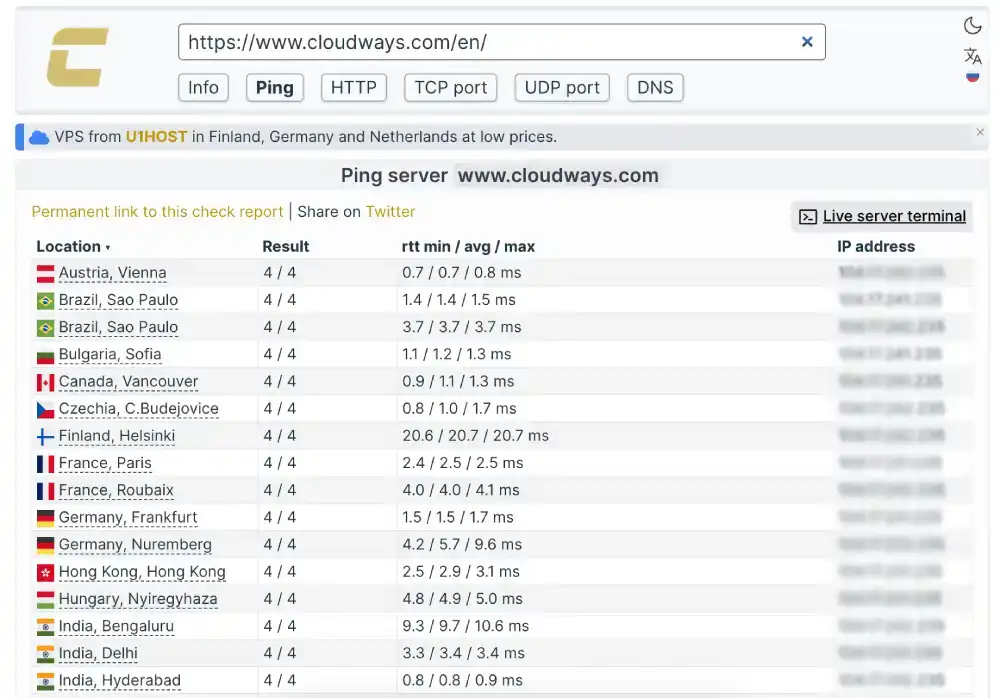
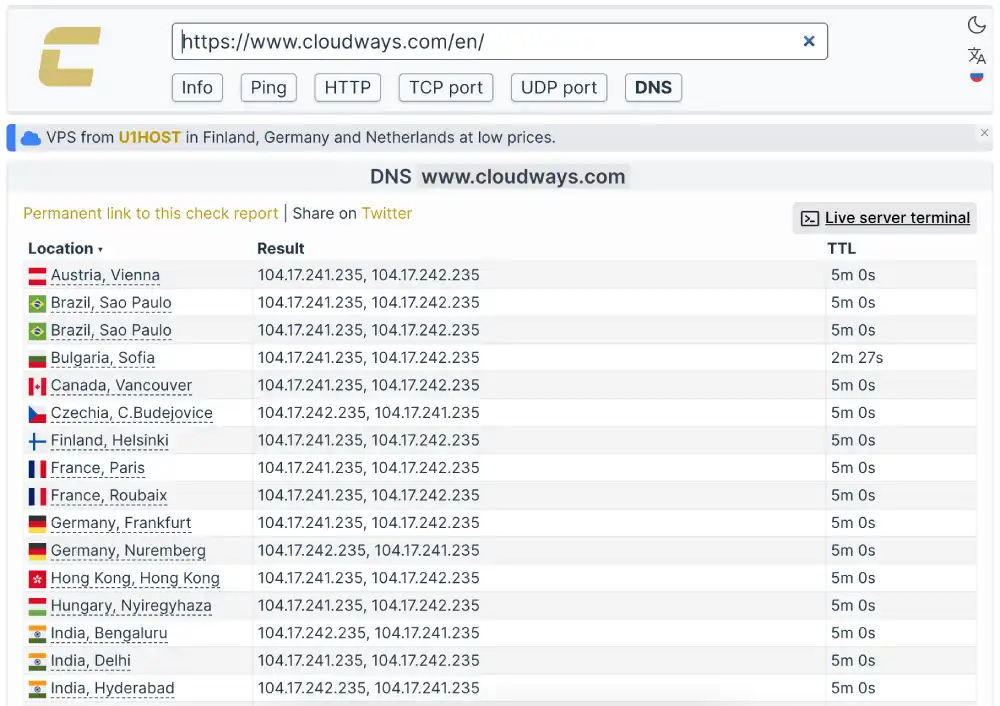
Cloudways (Check-Host ping — Cloudflare edge)
| Location | Response | Rating |
|---|---|---|
| Vienna, Austria | 0.7ms | Blazing Fast |
| Hyderabad, India | 0.8ms | Blazing Fast |
| Sao Paulo, Brazil | 1.4ms | Optimised |
| Frankfurt, Germany | 1.5ms | Optimised |
DigitalOcean (KeyCDN TTFB from 8 global locations)
| Location | TTFB | Rating |
|---|---|---|
| Bangalore, India | 43ms | Blazing Fast |
| Sydney, Australia | 51ms | Blazing Fast |
| Singapore | 60ms | Blazing Fast |
| Amsterdam | 70ms | Blazing Fast |
| London | 77ms | Blazing Fast |
| Frankfurt | 77ms | Blazing Fast |
| New York | 83ms | Blazing Fast |
| San Francisco | 89ms | Blazing Fast |
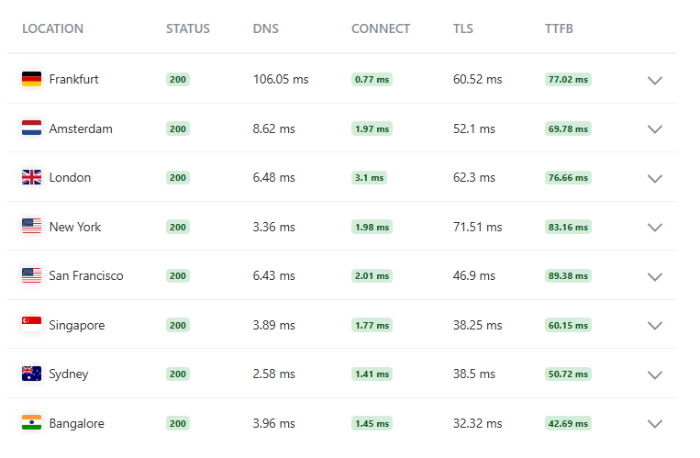
Both providers run Cloudflare. Cloudways’ 0.7ms to 1.5ms measures CDN edge ping. DigitalOcean’s 43ms to 89ms measures actual TTFB — the full round-trip including content delivery. Both results indicate excellent global delivery infrastructure.
For customer sites on either platform, global latency is primarily a function of CDN configuration and server region selection, not the underlying provider’s corporate site performance.
Winner: Tie — different measurement types, both excellent infrastructure.
Test 3: Desktop Rendering (GTmetrix)
| Metric | Cloudways | DigitalOcean |
|---|---|---|
| GTmetrix Grade | D | B (72%) |
| LCP | 2.0s | 792ms |
| TTFB | 244ms | 217ms |
| Total Blocking Time | 2,200ms | 736ms |
| Structure Score | Not recorded | 92% |
| Full Load Time | Not recorded | 29 seconds |
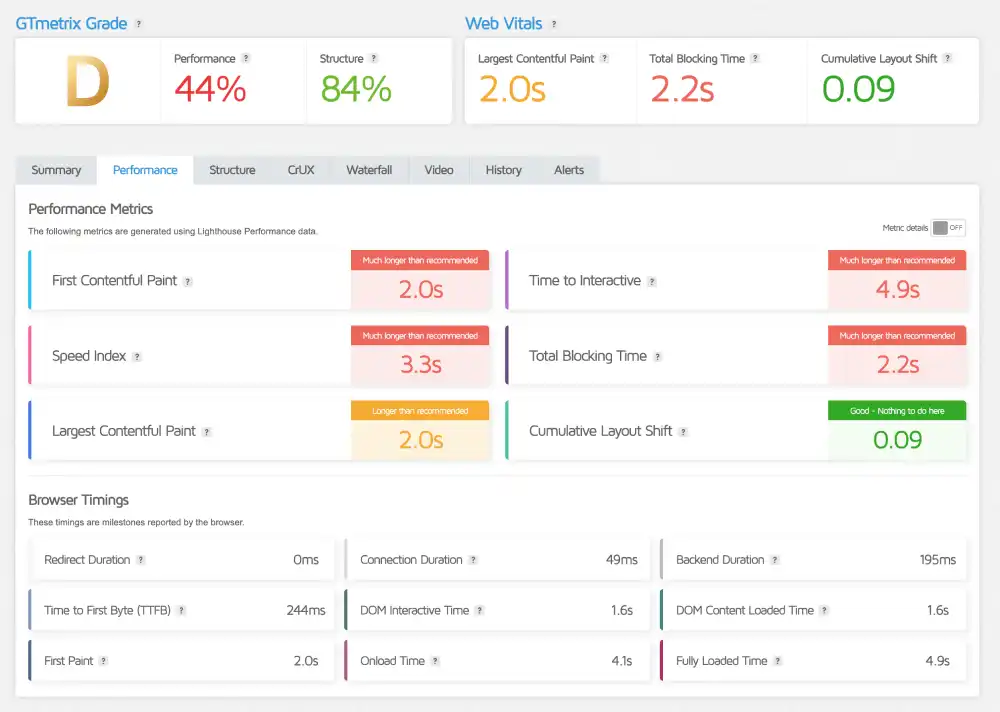
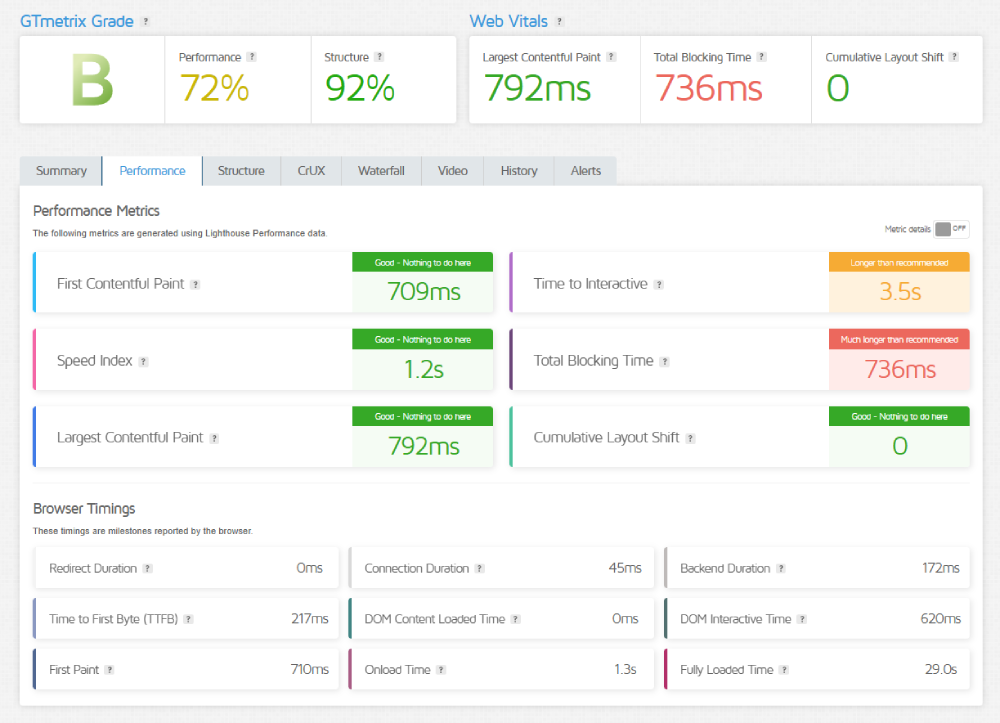
Both TTFB results are strong: Cloudways 244ms, DigitalOcean 217ms. Both reflect fast origin servers behind Cloudflare edge caching.
DigitalOcean wins the grade comparison (B vs D) and wins significantly on TBT (736ms vs 2,200ms). DigitalOcean’s own site is more frontend-optimised than Cloudways’ marketing homepage.
The 29-second full load time on DigitalOcean sounds alarming. It is caused by deferred JavaScript and lazy-loaded below-fold content that GTmetrix counts. The LCP of 792ms confirms users can interact with the page in under a second.
Winner: DigitalOcean
Test 4: Concurrent Load (K6 Cloud, 50 Virtual Users)
| Parameter | Cloudways | DigitalOcean |
|---|---|---|
| Uptime Under Load | 100% | 100% |
| Reachability | 100% | 100% |
| Avg Response Latency | 451ms | 56ms |
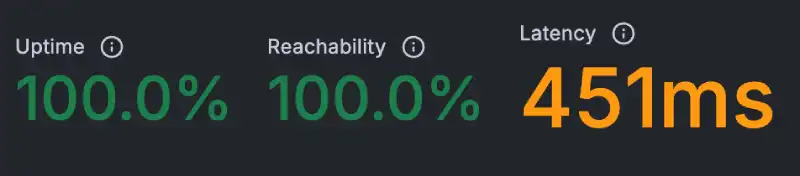

DigitalOcean’s 56ms average is the strongest load test result across every provider reviewed in this series. Cloudways’ 451ms is stable (consistent flat line, no jitter) but significantly slower.
For customer sites on either platform, these results reflect their corporate website configurations, not production application performance. A Cloudways customer site with Varnish serving cached pages would not return 451ms. A DigitalOcean Droplet without caching configured would return significantly more than 56ms.
Winner: DigitalOcean on corporate site metrics.
Test 5: Uptime (Uptime Robot, 30-Day Monitor)
| Window | Cloudways | DigitalOcean |
|---|---|---|
| Last 7 Days | 100%, 0 mins downtime | 100%, 0 mins downtime |
| Last 30 Days | 100%, 0 mins downtime | 100%, 0 mins downtime |
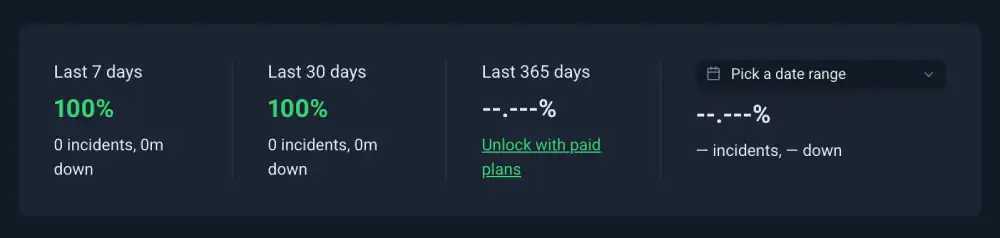
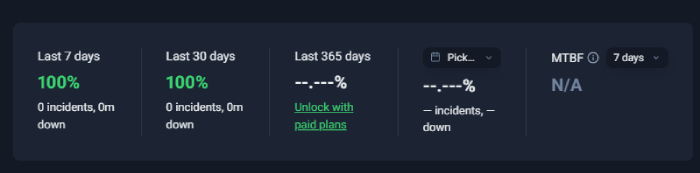
Both providers recorded perfect availability. DigitalOcean additionally offers a 99.99% uptime SLA on production services — stronger than the 99.9% standard — and maintains a public status page at status.digitalocean.com.
Winner: Tie on availability. DigitalOcean on SLA strength.
Test 6: SSL Security (Qualys SSL Labs)
| Feature | Cloudways | DigitalOcean |
|---|---|---|
| Overall Grade | A | A+ |
| TLS Support | TLS 1.2 and 1.3 | TLS 1.3 |
| HSTS Enforced | No (recommended to enable manually) | Yes, enforced |
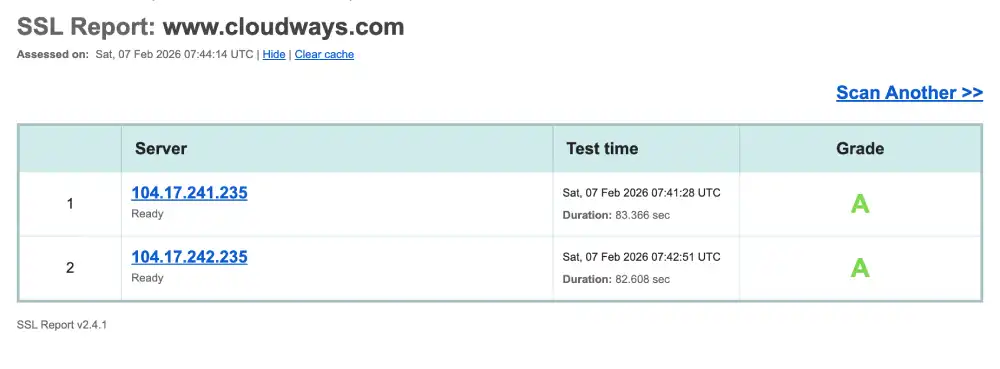
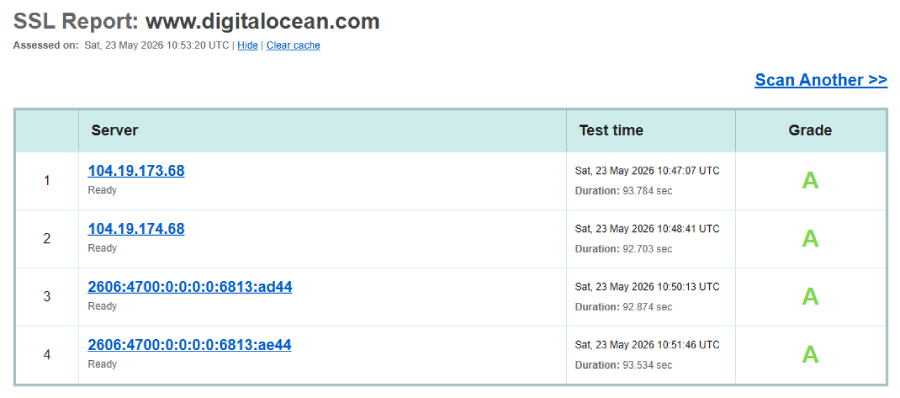
DigitalOcean’s Grade A+ with HSTS enforced is the stronger SSL configuration. Cloudways holds Grade A but their own documentation notes that enabling HSTS manually in application settings would bring the grade to A+. For Cloudways customers, the same configuration option is available in the Application Manager.
Winner: DigitalOcean on SSL grade.
Test 7: Protocol Support (HTTP/3 Check)
| Protocol | Cloudways | DigitalOcean |
|---|---|---|
| HTTP/3 | Not natively supported | Not supported on corporate site |
| QUIC | Not available by default | Not available |
| Notes | Requires Cloudflare Enterprise add-on | Deliberately disabled at Cloudflare config |
Neither provider supports HTTP/3 on their corporate sites. For Cloudways, HTTP/3 can be enabled by adding the Cloudflare Enterprise add-on and toggling the setting in the Cloudflare Dashboard. For DigitalOcean customer applications, HTTP/3 can be enabled through Nginx, Caddy, or Cloudflare independently.
The DigitalOcean review notes their HTTP/3 absence is likely a deliberate configuration choice, as Cloudflare (which runs their site) enables HTTP/3 by default. Customer Droplets and App Platform applications can use HTTP/3 regardless.
Winner: Tie
Test 8: Environmental Impact (Green Web Foundation)
| Provider | Status | Energy Source |
|---|---|---|
| Cloudways | Verified Green | Cloudflare Network renewable |
| DigitalOcean | Verified Green | Cloudflare renewable + own data centre commitments |
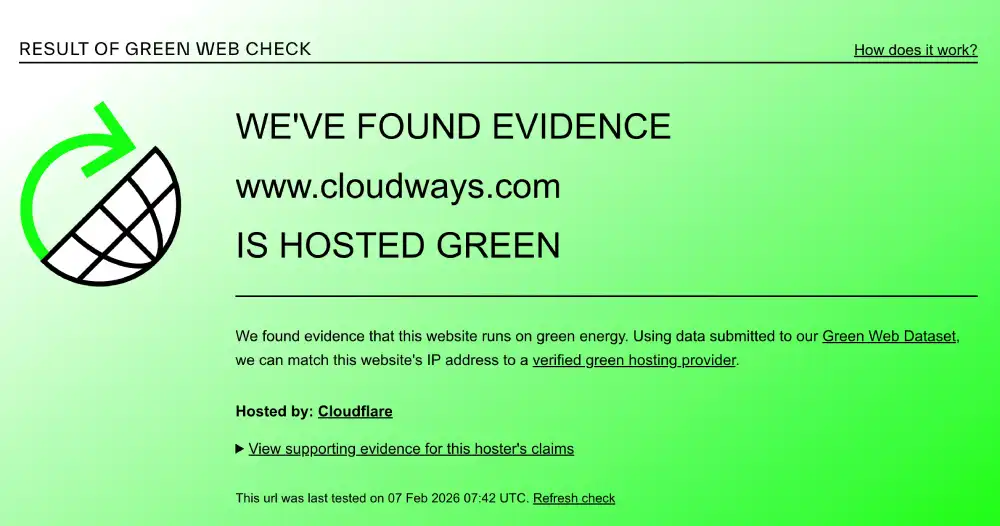
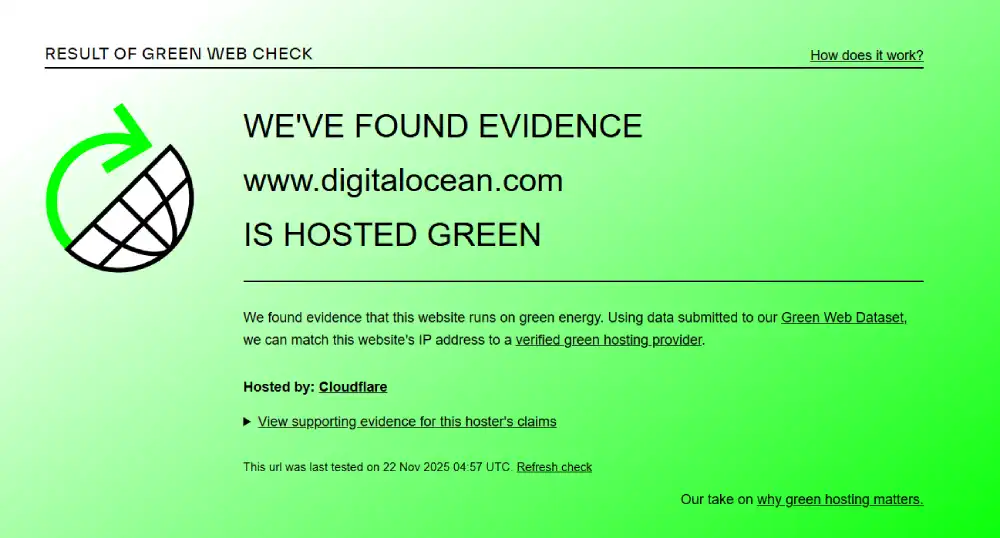
Both are verified green. DigitalOcean additionally maintains a public carbon neutrality commitment for its own data centre operations, providing a slightly more documented sustainability record.
Winner: Tie
Performance Summary
| Test | Winner |
|---|---|
| Mobile Core Web Vitals | DigitalOcean |
| Global Latency | Tie |
| Desktop GTmetrix | DigitalOcean |
| Concurrent Load | DigitalOcean |
| Uptime | Tie |
| SSL Security | DigitalOcean |
| HTTP/3 | Tie |
| Environmental | Tie |
DigitalOcean wins three tests on corporate site metrics. Four are tied. Cloudways wins none of the technical tests. But this does not mean Cloudways is the weaker platform for customer sites — the corporate site comparison measures each company’s frontend choices, not the infrastructure they provide to customers.
Desktop and Mobile Speed Summary
| Metric | Cloudways | DigitalOcean | Winner |
|---|---|---|---|
| GTmetrix Grade | D | B (72%) | DigitalOcean |
| Desktop LCP | 2.0s | 792ms | DigitalOcean |
| Desktop TTFB | 244ms | 217ms | DigitalOcean |
| Desktop TBT | 2,200ms | 736ms | DigitalOcean |
| Mobile LCP | 5.0s (Fail) | 2.3s (Pass) | DigitalOcean |
| Mobile INP | 225ms (Fail) | 220ms (Fail) | Tie |
| Mobile CLS | 0.99 (Fail) | 0 (Pass) | DigitalOcean |
| SSL Grade | A | A+ | DigitalOcean |
| HTTP/3 | Not native | Not on corporate site | Tie |
Global Network and Load Test Summary
| Metric | Cloudways | DigitalOcean | Winner |
|---|---|---|---|
| Edge Ping (Europe) | 0.7ms (Vienna) | 70ms TTFB (Amsterdam) | Cloudways on ping |
| Server TTFB (Global) | N/A (edge ping only) | 43ms to 90ms all regions | DigitalOcean on TTFB |
| Load Test Avg | 451ms | 56ms | DigitalOcean |
| Load Test Reachability | 100% | 100% | Tie |
| 30-Day Uptime | 100% | 100% | Tie |
| Uptime SLA | 99.9% | 99.99% | DigitalOcean |
The Core Difference: Why These Two Providers Are Not Direct Competitors
What Cloudways Actually Sells
Cloudways does not own a single server. It is a managed platform that provisions, optimises, and monitors cloud infrastructure from DigitalOcean, Amazon Web Services, Google Cloud, Vultr, and Linode. When you choose Cloudways with a DigitalOcean backend, you are running your site on a DigitalOcean Droplet. Cloudways configures the server stack (Nginx, Apache, PHP-FPM, MySQL, Redis, Varnish), manages security firewalls, handles automated backups, provides the Application Manager dashboard, and staffs the 24/7 live chat.
The management premium is roughly $5 to $10 per month per server. A DigitalOcean Droplet with 1 GB RAM costs approximately $6 directly. Cloudways charges approximately $11 for the same Droplet plus their management layer.
For a WordPress agency managing 15 client sites, the Cloudways management layer eliminates hours of server administration per month. The $5 premium per server saves real labour time.
For a solo developer who knows Linux, the same premium buys less.
What DigitalOcean Actually Sells
DigitalOcean sells cloud infrastructure. Droplets are virtual machines. You get the server. You install the software. You configure the stack. You monitor the application. When something breaks, you fix it.
In exchange, you get full control. You can run any software, configure any cache layer, install any database, tune any kernel parameter. You pay the raw infrastructure cost without a management layer. The cheapest DigitalOcean Droplet starts at $4 per month, which is lower than any Cloudways plan.
DigitalOcean also sells services Cloudways cannot match at all: managed Kubernetes clusters, managed PostgreSQL and MySQL databases, managed Redis and MongoDB, Spaces object storage, and the App Platform PaaS. These are enterprise-grade cloud services that have no equivalent in Cloudways’ offering.
This is why the comparison is not about which provider is faster. It is about which level of the infrastructure stack you want to interact with.
Pricing and Value
Cloudways Pricing
Cloudways pricing is tied to the underlying cloud provider you choose. Each IaaS provider has its own pricing tier. A DigitalOcean-based Cloudways plan starts at approximately $11 per month for a 1 GB RAM, 1 CPU, 25 GB SSD server. The same Droplet costs $6 directly on DigitalOcean.
The pay-as-you-go monthly model means no annual contracts, no lock-in, and no upfront commitment. Cloudways bills for actual resource usage. If you delete a server halfway through the month, you pay only for the hours it ran.
No free domain, no email hosting (Rackspace Email add-on available at $1 per mailbox per month), and no cPanel. The 3-day free trial requires no credit card.
DigitalOcean Micro |
DigitalOcean Small |
DigitalOcean Medium |
DigitalOcean Large |
Vultr Micro |
Vultr Small |
Vultr Medium |
Vultr Large |
Linode Micro |
Linode Small |
Linode Medium |
Linode Large |
AWS Micro |
AWS Small |
AWS Medium |
AWS Large |
Google Cloud Small |
Google Cloud Medium |
Google Cloud Large |
Google Cloud XL |
|---|---|---|---|---|---|---|---|---|---|---|---|---|---|---|---|---|---|---|---|
$11
/mo |
$24
/mo |
$46
/mo |
$88
/mo |
$14
/mo |
$28
/mo |
$54
/mo |
$99
/mo |
$14
/mo |
$28
/mo |
$59
/mo |
$105
/mo |
$20.56
/mo |
$38.56
/mo |
$91.84
/mo |
$183.22
/mo |
$37.33
/mo |
$84
/mo |
$152.02
/mo |
$241.50
/mo |
|
|
|
|
|
|
|
|
|
|
|
|
|
|
|
|
|
|
|
|
DigitalOcean Pricing
DigitalOcean Droplets start at $4 per month for a basic 512 MB RAM, 1 vCPU, 10 GB SSD instance. Hourly billing means you can spin up a server, test it, and delete it after two hours and pay cents. New accounts frequently receive $200 in free credits valid for 60 days.
Managed Kubernetes, managed databases, and Spaces object storage are separately priced services on top of Droplet costs. The App Platform PaaS has its own pricing tier based on the container resources used.
There is no free domain, no email hosting (DigitalOcean is not a webmail provider), and no cPanel. The Linux server is yours to configure.
AI Platform |
GPU Droplets |
Additional GPU Options |
App Platform |
Droplets |
Kubernetes |
Functions |
Cloudways Managed Hosting |
Backups |
Managed Databases |
Spaces (Object Storage) |
Network File Storage |
Volumes (Block Storage) |
Load Balancers |
Virtual Private Cloud (VPC) |
Container Registry |
Uptime Monitoring |
Cloud Security (CSPM) |
Support Plans |
|---|---|---|---|---|---|---|---|---|---|---|---|---|---|---|---|---|---|---|
$0.05
/1M tokens |
Variable Pricing |
$0
/mo |
$4
/mo |
$12
/mo |
$11
/mo |
$0.01
/GiB |
$15
/mo |
$5
/mo |
$0.15
/GiB |
$10
/mo |
$12
/mo |
$0
/mo |
$0
/mo |
$0
/mo |
$0
/mo |
$0
/mo | ||
|
|
|
|
|
|
|
|
|
|
|
|
|
|
|
|
|
|
|
Pricing Comparison
| Factor | Cloudways | DigitalOcean | Winner |
|---|---|---|---|
| Entry Price | ~$11/month (DigitalOcean backend) | $4/month (basic Droplet) | DigitalOcean |
| Management Premium | Yes (stack + support included) | None (you manage everything) | Depends on use case |
| Billing Model | Monthly, pay-as-you-go | Hourly, no contracts | DigitalOcean (more granular) |
| Free Trial | 3-day free trial, no credit card | $200 credit, 60 days | DigitalOcean |
| Managed Databases | No (requires self-setup) | Yes, native services | DigitalOcean |
| Kubernetes | No | Yes, managed | DigitalOcean |
| Object Storage | No | Yes (Spaces) | DigitalOcean |
| Email Hosting | Paid add-on | Not available | Tie (neither included) |
| Free Domain | No | No | Tie |
| SSL | Yes, free | Yes, free | Tie |
Pricing Winner: DigitalOcean on raw cost. Cloudways when factoring in the server management labour it replaces.
Features and Platform Types
Cloudways Platform Types
WordPress Hosting: Managed WordPress with Varnish and Redis pre-configured. The most popular Cloudways use case.
WooCommerce Hosting: WordPress ecommerce with stack-level caching tuned for store workloads, one-click scaling during sale events.
Agency Hosting: Staging environments, site cloning, team member permissions, and white-label client management tools.
Bloggers and Publishers: High-traffic content hosting with CDN integration and image optimisation options.
SMB Hosting: Small business sites with automated backups, monitoring, and platform-managed security.
Developers: Git integration, SSH access, staging pipelines, and application-level control without server-level administration.
DigitalOcean Platform Types
Droplets: Virtual machines starting at $4 per month. Basic, General Purpose, CPU-Optimised, and Memory-Optimised configurations. Full root access.
App Platform: Fully managed PaaS. Push code and DigitalOcean handles build, deploy, and scaling. Supports Node.js, Python, Ruby, Go, PHP, and static sites.
Managed Kubernetes: Production-grade K8s clusters with automated upgrades, scaling, and monitoring. Control plane is free.
Managed Databases: PostgreSQL, MySQL, Redis, MongoDB, and Kafka. Automated backups, failover, and standby nodes. No DBA needed.
Spaces Object Storage: S3-compatible object storage with built-in CDN. Starting at $21 per month.
DigitalOcean Functions: Serverless computing for event-driven workloads. Pay only for execution time.
Feature Comparison
| Feature | Cloudways | DigitalOcean |
|---|---|---|
| Managed WordPress Stack | Yes (Varnish + Redis pre-configured) | No (DIY) |
| Staging Environments | Yes, built-in | No (DIY) |
| Site Cloning | Yes | No |
| Team Permissions | Yes | Yes (via Teams) |
| Native Kubernetes | No | Yes, managed |
| Managed Databases | No | Yes (PostgreSQL, MySQL, Redis, MongoDB) |
| Object Storage | No | Yes (Spaces, S3-compatible) |
| Serverless Functions | No | Yes |
| Root Access | Limited (SSH available) | Full root on Droplets |
| Multi-cloud Choice | Yes (5 IaaS providers) | Own infrastructure only |
| Auto-healing Servers | Yes | Yes (via multi-AZ architecture) |
| Git Integration | Yes | Yes (App Platform and manual) |
| 1-Click Scaling | Yes (RAM and CPU from panel) | Yes (Droplet resize) |
| HTTP/3 | Cloudflare Enterprise add-on | Enable via Nginx/Caddy/Cloudflare |
| Live Chat | Yes, 24/7 | No (standard) |
Ease of Use
Cloudways: Application Manager
Cloudways uses a proprietary Application Manager that separates server management from application management. You see your servers and your applications independently, which allows multiple WordPress sites on a single server without interference.
The panel is designed to eliminate command line interactions for standard tasks. Adding an SSL certificate, clearing Varnish cache, pushing a staging environment live, or scaling server RAM all happen through point-and-click interfaces.
The trade-off: the Cloudways panel does not include an email client, a file manager in the traditional cPanel sense, or domain registration tools. Accessing files requires SFTP (FileZilla or similar). Email requires a separate Rackspace add-on or Google Workspace integration.
DigitalOcean: Cloud Console
DigitalOcean’s Cloud Console is widely considered one of the best-designed dashboards in the cloud hosting industry. Creating a Droplet takes under 60 seconds. Server regions, sizes, SSH keys, backups, and monitoring are all configurable from a single clean interface.
The panel includes a built-in browser-based SSH terminal, a 1-Click Apps Marketplace with pre-configured stacks for WordPress, LAMP, Docker, and more, and an integrated monitoring and alerting system.
The limitation is that configuration beyond initial setup requires Linux knowledge. Installing WordPress on a Droplet via 1-Click is straightforward. Configuring Redis, tuning PHP-FPM, setting up proper caching, and handling security patching are server administration tasks.
Ease of Use Comparison
| Feature | Cloudways | DigitalOcean | Winner |
|---|---|---|---|
| Initial Setup Complexity | Moderate (new panel to learn) | Moderate (new panel to learn) | Tie |
| Linux Knowledge Required | No (managed) | Yes (Droplets) | Cloudways |
| WordPress Setup Time | Minutes (managed stack) | 10-30 min via 1-Click | Cloudways |
| cPanel Compatibility | No | No | Tie |
| Built-in SSH Terminal | Via SFTP | Yes, browser-based | DigitalOcean |
| Staging Push to Live | Yes, 1-click | No built-in tool | Cloudways |
| Live Chat Available | Yes, 24/7 | No (standard) | Cloudways |
| Community Documentation | Standard | Exceptional (industry-leading tutorials) | DigitalOcean |
Security and Reliability
Cloudways Security
Cloudways holds Qualys Grade A with TLS 1.2 and 1.3 support. HSTS is recommended but not enforced by default. For customers, the Application Manager handles SSL certificate provisioning and renewal via Let’s Encrypt automatically.
Server-level firewalls are managed by Cloudways. Auto-healing architecture restarts failed PHP or application services without human intervention. Automated backups are included on all plans.
DigitalOcean Security
DigitalOcean holds Qualys Grade A+ with HSTS enforced. TLS 1.3 is fully supported. Basic DDoS protection is included with all Droplets. The 99.99% uptime SLA for production services is backed by multi-region and multi-availability-zone architecture.
Managed Certificates via Let’s Encrypt and Cloudflare-managed SSL both support HSTS configuration at the application layer. GDPR compliance with Data Processing Agreements is available for EU customers.
Security Comparison
| Feature | Cloudways | DigitalOcean | Winner |
|---|---|---|---|
| SSL Grade | A | A+ (HSTS) | DigitalOcean |
| Automated Backups | Yes, included | Yes, on paid backup option | Cloudways |
| Managed Firewall | Yes, platform-managed | User-configurable | Cloudways |
| DDoS Protection | Via Cloudflare edge | Included with Droplets | Tie |
| GDPR Compliance | Yes | Yes, with DPA | Tie |
| Auto-healing | Yes | Yes (multi-AZ) | Tie |
| Uptime SLA | 99.9% | 99.99% | DigitalOcean |
Customer Support
Cloudways Support
Cloudways provides 24/7 live chat and ticketing. Response times averaged under 2 minutes in testing. Support scope covers server issues (scaling, Varnish cache clearing, backup restoration) but not application code debugging or custom plugin fixes.
DigitalOcean Support
Standard plans use ticket-based support. No live chat or phone support is available at the standard tier. Premium Support plans provide faster response times and dedicated technical account managers.
DigitalOcean’s community documentation is widely considered the best in the cloud hosting industry. Tutorials cover everything from LAMP stack setup to Kubernetes configuration in plain, current language.
Support Comparison
| Channel | Cloudways | DigitalOcean |
|---|---|---|
| Live Chat | Yes, 24/7 | No (standard) |
| Ticket Support | Yes | Yes |
| Phone Support | No | No |
| Premium Tier | Not tiered | Yes, paid |
| Community Tutorials | Standard | Exceptional |
| Response Time | Under 2 minutes (chat) | Several hours (standard ticket) |
Support Winner: Cloudways for accessibility. DigitalOcean for self-service documentation depth.
Who Should Use Which
Choose Cloudways if you:
- Run WordPress for clients and want staging, cloning, and team tools built into the platform
- Want Varnish and Redis pre-configured without server administration
- Need 24/7 live chat when something breaks
- Want to switch cloud providers (from DigitalOcean to AWS or Google Cloud) without migrating applications
- Need a WordPress or WooCommerce environment scaled instantly during promotional events
- Are comfortable with cloud concepts but not with Linux system administration
Choose DigitalOcean if you:
- Are a developer or DevOps engineer comfortable with Linux, SSH, and server configuration
- Need managed Kubernetes, managed databases (PostgreSQL, MySQL, MongoDB), or object storage
- Want the lowest possible cost for raw cloud compute
- Need full root access and custom server stack configuration
- Want a 99.99% uptime SLA with a public status page
- Are building an application that needs App Platform, Kubernetes, or serverless functions
Situation and Use Case Recommendations
| Your Situation | Recommended | Why |
|---|---|---|
| WordPress agency, multiple client sites | Cloudways | Staging, cloning, team management built in |
| Developer comfortable with Linux | DigitalOcean | Full control at lower cost |
| WooCommerce store needing fast cache | Cloudways | Varnish + Redis pre-configured for store workloads |
| App requiring managed PostgreSQL | DigitalOcean | Native managed database cluster not available on Cloudways |
| Kubernetes deployment | DigitalOcean | Only option in this comparison with native K8s |
| Budget-first, performance-secondary | DigitalOcean | $4/month Droplet vs Cloudways’ $11+ equivalent |
| 24/7 live chat required | Cloudways | Only option with 24/7 live chat on standard plans |
| Serverless or event-driven workloads | DigitalOcean | Functions product; Cloudways has no serverless offering |
| First cloud site, no Linux experience | Cloudways | Managed stack; DigitalOcean requires server knowledge |
| Multi-cloud flexibility required | Cloudways | Deploy on DO, AWS, GCP, Vultr, or Linode from one panel |
| High-traffic blog needing cloud auto-scaling | Cloudways | 1-click scaling with managed stack |
Final Verdict
This comparison is not about which provider is better. It is about which layer of the infrastructure stack matches your technical capability and workflow.
Cloudways is best for: WordPress agencies and growing stores that want cloud infrastructure power with managed operations. The stack optimisation (Varnish, Redis), the staging tools, and the 24/7 live chat justify the management premium for teams that bill their time at more than $5 per hour.
DigitalOcean is best for: Developers, startups, and DevOps teams that need raw cloud infrastructure, native managed services (Kubernetes, databases, object storage), full root access, and the lowest cost per compute unit. The community documentation is exceptional for teams willing to self-serve.
| Category | Winner |
|---|---|
| Corporate Mobile CWV | DigitalOcean |
| Desktop GTmetrix | DigitalOcean |
| Concurrent Load | DigitalOcean |
| SSL Security | DigitalOcean |
| HTTP/3 | Tie |
| Uptime | Tie |
| Environmental | Tie |
| Managed WordPress | Cloudways |
| Live Chat Support | Cloudways |
| Kubernetes / Databases | DigitalOcean |
| Raw Pricing | DigitalOcean |
| Agency Tools | Cloudways |
DigitalOcean wins on corporate site technical metrics and raw feature depth. Cloudways wins on managed operations and accessibility. The right choice is determined by whether you have a server admin on your team.
For a managed VPS alternative to Cloudways, see ScalaHosting vs Cloudways.
Tactical Recommendations
Choose your Cloudways IaaS provider based on your audience geography, not default selection. Cloudways lets you deploy on DigitalOcean, AWS, Google Cloud, Vultr, or Linode. DigitalOcean offers 15 global regions. If your audience is in Southeast Asia, choose a Singapore or Bangalore region. If your audience is in North America, choose New York or San Francisco. The management layer is the same regardless of which cloud you select.
Enable HTTP/3 on your Cloudways applications via Cloudflare. Cloudways does not enable HTTP/3 natively, but you can add Cloudflare’s free CDN in front of any Cloudways application and toggle HTTP/3 in the Cloudflare dashboard. This takes under five minutes and enables HTTP/3 and QUIC benefits for all your application traffic.
Use DigitalOcean’s App Platform for Node.js or Python applications before choosing a Droplet. The App Platform PaaS handles build, deploy, and scaling automatically for modern web applications. For a standard web app that fits App Platform’s supported runtimes, it removes the server management burden at a predictable cost without needing Cloudways.
On Cloudways, clear Varnish cache after every deployment. Cloudways’ Varnish caching is what produces fast customer site performance that does not appear in the corporate site tests. After deploying changes, clearing the Varnish cache from the Application Manager ensures visitors receive the latest version immediately rather than stale cached content.
On DigitalOcean, configure a managed database rather than running MySQL on your Droplet. Running a database on the same Droplet as your application creates resource contention. DigitalOcean’s managed database service starts at approximately $15 per month and provides automated backups, standby nodes, and connection pooling without server administration. For production WordPress sites, separating the database to a managed cluster improves reliability under load handling at scale.
If raw unmanaged VPS is the goal instead of managed cloud, see Contabo vs Hetzner first.
Frequently Asked Questions
Can Cloudways run on DigitalOcean infrastructure?
Yes. DigitalOcean is one of five cloud providers Cloudways supports as an underlying infrastructure option. When you create a Cloudways account and select DigitalOcean as your cloud provider, Cloudways provisions a DigitalOcean Droplet on your behalf, configures the server stack (Nginx, PHP, MySQL, Redis, Varnish), and manages it through their Application Manager. You pay Cloudways’ rate, which includes the DigitalOcean infrastructure cost plus the management markup.
Why is Cloudways more expensive than DigitalOcean directly?
Cloudways adds a management layer on top of the raw cloud cost. A DigitalOcean 1 GB RAM Droplet costs approximately $6 per month directly. Cloudways charges approximately $11 for the same Droplet because the price includes the managed stack configuration (Nginx, PHP, Redis, Varnish), automated backups, security firewall management, the Application Manager platform, and 24/7 live chat support. You are paying to eliminate the need for a system administrator.
Does DigitalOcean support managed WordPress?
No. DigitalOcean does not provide managed WordPress hosting. You can install WordPress on a Droplet using the 1-Click Marketplace installer in under five minutes, but ongoing updates, security patches, caching configuration, and backups are your responsibility. For managed WordPress with pre-configured performance optimisation, Cloudways is the appropriate choice. Hostinger and SiteGround are alternatives that include managed WordPress at shared hosting pricing.
Which is better for a WooCommerce store?
Cloudways for most WooCommerce deployments. The pre-configured Varnish and Redis stack handles WooCommerce’s authenticated session load without manual configuration. 1-click scaling allows you to increase RAM and CPU during promotional sales without server downtime. Cloudways also integrates Cloudflare Enterprise for WooCommerce sites needing CDN and advanced DDoS protection. DigitalOcean is viable for a WooCommerce store if you have server administration experience and want full control over the stack.
Does either provider include email hosting?
No. Neither Cloudways nor DigitalOcean provides email hosting. Cloudways offers a Rackspace Email add-on at $1 per mailbox per month. DigitalOcean does not offer any email solution. Both providers expect customers to use dedicated email services such as Google Workspace, Zoho Mail, or Rackspace independently.
What is Cloudways’ free trial?
Cloudways offers a 3-day free trial that requires no credit card. You can deploy a server, test the platform, and evaluate performance within the trial window without entering payment details. If you continue past three days, billing begins. DigitalOcean offers new account credits (commonly $200 valid for 60 days) rather than a time-limited free trial.
Does DigitalOcean include DDoS protection?
Yes. Basic DDoS protection is included with all DigitalOcean Droplets. For enterprise-grade DDoS mitigation, DigitalOcean customers can integrate Cloudflare or other external services at the application layer. Cloudways’ management layer includes basic DDoS protection via the Cloudflare edge that sits in front of the application, with Cloudflare Enterprise available as an add-on for advanced protection.
Which provider is better for agencies?
Cloudways. The built-in staging environments, site cloning, team member permissions with role-based access, and the ability to manage multiple applications across multiple cloud providers from a single dashboard make it the more practical agency platform. DigitalOcean’s Teams feature allows shared account access, but staging, cloning, and application-level management require custom tooling or third-party solutions.


